
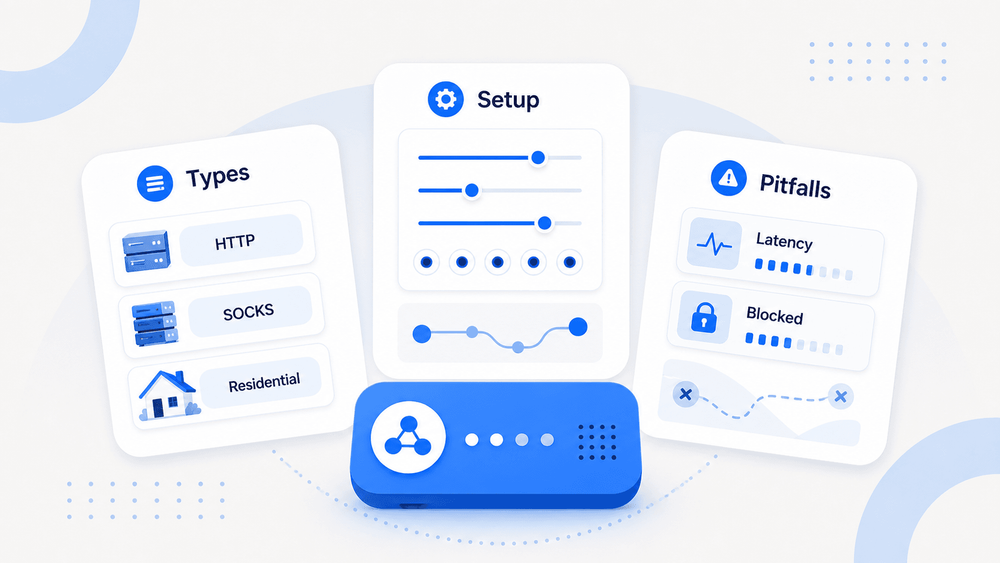
Most people think plugging in a proxy IP is enough to scrape anything, access any geo-restricted page, or run fifty social media accounts without a hitch. It's not. (Not even close.)
The proxy landscape in 2026 is more nuanced — and more commercially significant — than most guides let on. The broader proxy servers market is estimated at around USD 1.9 billion in 2026, growing at roughly 6.5% CAGR through 2031, driven by web scraping, price monitoring, ad verification, and large-scale data harvesting. Yet the gap between "I bought some proxies" and "I'm actually getting reliable data" is wider than ever, thanks to increasingly sophisticated anti-bot systems. This guide covers what proxies actually are, how to pick the right type (with real 2026 pricing), how to set them up, what gets you blocked, when you might not need to manage proxies at all, and the billing traps that catch even experienced buyers. Sales, ops, ecommerce, market research — whatever your lane, this is the practical reference I wish existed when I started navigating this space.
What Are Proxies and How Do They Actually Work?
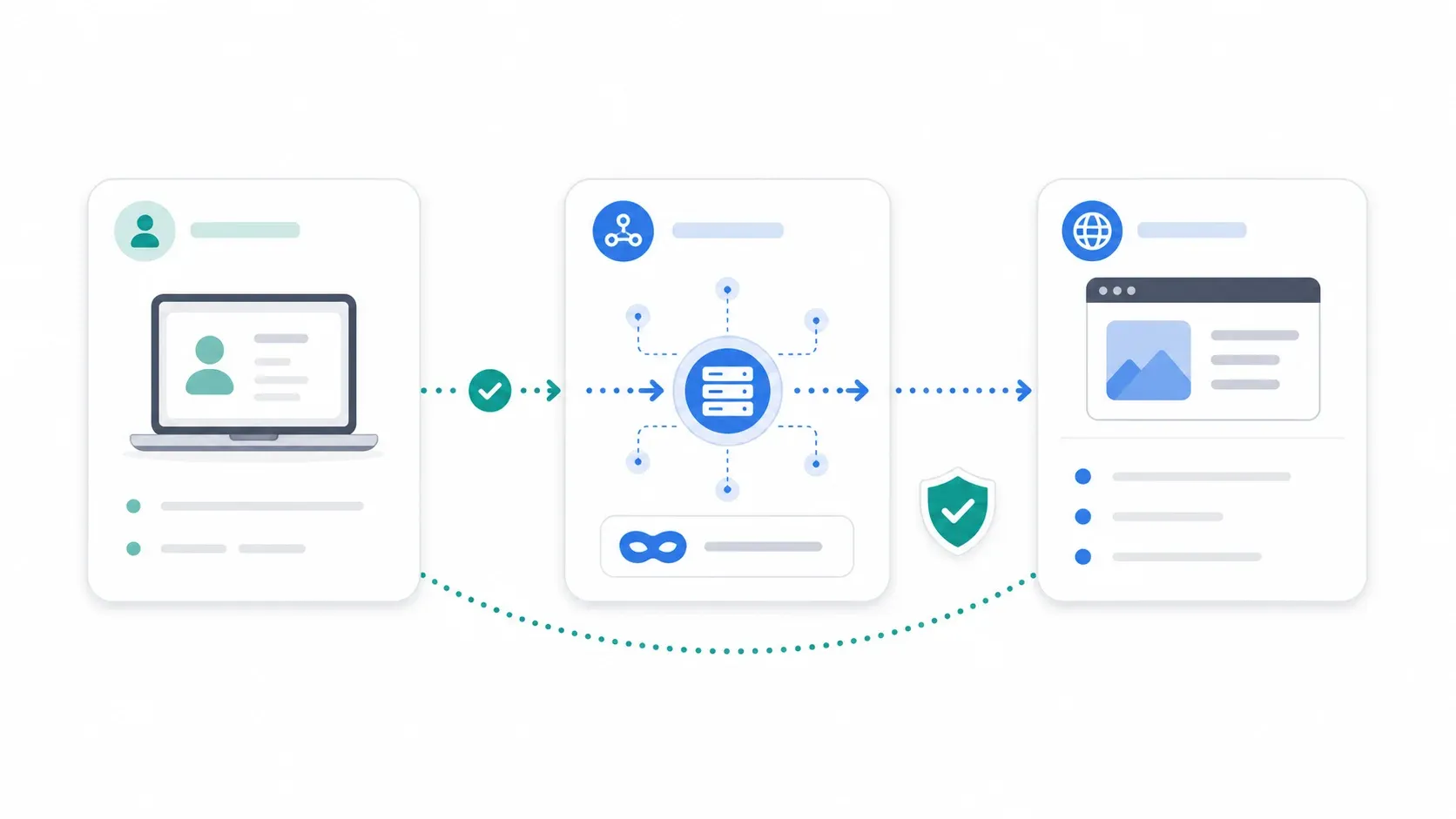
A proxy server sits between your device (or scraping tool) and the website you're visiting. When you use a proxy, your request goes to the proxy first, the proxy forwards it to the target website, the website responds to the proxy, and the proxy sends the response back to you. The target site sees the proxy's IP address, not yours.
Think of it like having someone else pick up your mail from a P.O. box. The sender never sees your home address — they only see the P.O. box.
Here's the basic flow:
Your device / scraper → Proxy server → Target website
                                ↓
Your device / scraper ← Proxy server ← Target website
One critical distinction: proxies operate at the application level. They route traffic for a specific browser, app, or scraping library — not all device traffic by default. This is different from a VPN, which usually wraps everything system-wide. I'll get to that comparison next.
Common misconceptions worth killing right now:
- "Proxies make me invisible." They mask your IP, but they don't automatically hide your browser fingerprint, TLS handshake, DNS leaks, cookies, or behavioral patterns. BrowserLeaks exposes not just IP and location, but also WebRTC, DNS, TLS, and HTTP/2 fingerprint data — all of which can betray you even with a proxy.
- "Residential proxies can't be blocked." Harder to flag, yes. Immune, no. Anti-bot vendors score behavior and device consistency, not just IP source.
- "Rotating more often is always better." Over-rotation can look unnatural, break sessions, and burn IP reputation faster.
- "Free proxies are fine for business use." Browserless found below 5% success rates across several public free proxy lists in a 2026 test. That's not a typo.
Proxy vs. VPN: Which One Do You Actually Need?
Every proxy article owes its readers this comparison. Most skip it. Both proxies and VPNs change your apparent IP address. That's where the similarity ends.
| Dimension | Proxy | VPN |
|---|---|---|
| Encryption | Varies. HTTPS proxy encrypts to the proxy; HTTP proxy sends traffic in the clear | Always — full encrypted tunnel |
| Traffic Scope | Per-app, per-browser, or per-tool | System-wide (all device traffic) |
| Speed Impact | Generally faster (less overhead) | Slightly slower (encryption cost) |
| Best For | Scraping, geo-unblocking, multi-accounting, ad verification, price monitoring | Privacy, public Wi-Fi safety, corporate remote access |
| Cost Shape | Per-GB, per-IP, or per-port (variable) | Usually $2–4/month flat on long-term plans |
| Operational Complexity | Higher — must manage IP type, rotation, sessions, bans | Lower for general browsing |
Norton's 2026 VPN pricing guide puts the cheapest long-term VPN plans at roughly $1–4/month. By contrast, proxy providers commonly bill by GB, IP, or port, which is why Reddit users often grumble that proxies feel more expensive even though they "do less" from a consumer perspective.
When to Choose a Proxy Over a VPN (and Vice Versa)
Use a proxy when:
- You're scraping websites at scale and need to rotate IPs across requests
- You need geo-specific data (e.g., checking prices in Germany while sitting in Texas)
- You're managing multiple accounts and need each to appear as a different user
- You're doing ad verification and need granular control over exit IP location
Use a VPN when:
- You want to protect all device traffic on public Wi-Fi
- You need corporate remote access with encryption
- Privacy-first browsing is the goal, not data extraction
Use both when:
- You're running scraping operations from a corporate network where all traffic must be encrypted, but you also need per-tool proxy routing for IP rotation
If your primary goal is structured data extraction — product listings, contact info, search results — keep reading. There's a section later on when you might not need proxy management at all.
Types of Proxies Explained: A Plain-English Breakdown
"Proxy" is an umbrella term covering 10+ distinct types, and choosing the wrong one is the most common — and most expensive — mistake in this space. Separate them by architecture/purpose and by IP source.
Forward, Reverse, and Transparent Proxies
- Forward proxy: Sits in front of clients, routes outbound requests. This is the type most people mean when they say "proxy." It's what you use for scraping, geo-access, and account management.
- Reverse proxy: Sits in front of servers, handles inbound traffic. Websites use these (think Cloudflare, Nginx). You, as a scraper or business user, don't buy reverse proxies — websites deploy them.
- Transparent proxy: Operates without the end user's knowledge. Often used by organizations for content filtering or caching. Not something you'd buy for data collection.
Anonymous vs. High-Anonymity (Elite) Proxies
- Anonymous proxies hide your real IP but may reveal that you're using a proxy (via headers like
X-Forwarded-For). - High-anonymity (elite) proxies hide both your IP and the fact that you're proxied. They strip identifying headers entirely.
When does this matter? Anonymous is fine for basic geo-access or low-sensitivity scraping. Elite is what you want when the target site has aggressive anti-bot measures and you need to look like a regular user.
SOCKS5 Proxies: When HTTP Proxies Aren't Enough
SOCKS5 proxies work at a lower network level than HTTP/HTTPS proxies. They can handle any type of traffic — not just web requests — making them useful for non-browser applications, UDP traffic, or tools that need more flexible routing. Major providers like Bright Data, Oxylabs, Decodo, NetNut, and IPRoyal support SOCKS5 in some plans, according to AIMultiple's 2026 SOCKS5 benchmark.
The tradeoff: SOCKS5 is slightly more complex to configure than a standard HTTP proxy, and not every tool supports it out of the box.
Residential vs. Datacenter vs. ISP vs. Mobile Proxies: A Decision Framework with 2026 Pricing
Every proxy buyer asks the same question: "Which type should I buy, and how much will it cost?"
Below are current 2026 prices pulled from official provider pages — real numbers, not vague ranges.
Residential Proxies: High Trust, Higher Cost
Residential proxies use IPs assigned by real ISPs to real households, so websites trust them — the traffic looks like a normal consumer browsing from home.
- Best for: Scraping sites with aggressive anti-bot (ecommerce, social media, travel platforms), geo-specific market research
- Downsides: Expensive per GB, slower than datacenter
- 2026 pricing examples:
- Bright Data: pay-as-you-go ~$8/GB list, promotional ~$4/GB, volume tiers down to ~$3/GB
- Oxylabs: $6/GB starter, $5/GB basic, $4/GB advanced, $2.50/GB corporate
- Decodo: $3.75/GB at 3GB, $3.00/GB at 50GB, headline claims plans from $2/GB
- IPRoyal: residential proxies starting at $1.75/GB
Practical range: USD $2–8/GB on mainstream plans. Budget providers and promotions can go lower; enterprise commitments sometimes reduce the effective rate further.
Residential proxies support both rotating sessions (new IP per request or per interval — best for stateless scraping) and sticky sessions (same IP for a set duration — best for logged-in flows or multi-step actions).
Datacenter Proxies: Fast and Cheap, But Easier to Detect
Datacenter proxies come from cloud hosting providers — fast and cheap, but not tied to real ISPs. Anti-bot systems flag them by ASN without breaking a sweat.
- Best for: High-volume scraping of less-protected sites, SEO rank monitoring, simple availability checks
- Downsides: More likely to be blocked on defended targets (social media, marketplaces)
- 2026 pricing examples:
- Bright Data: datacenter proxies from ~$0.90/IP
- Oxylabs: datacenter proxies at ~$1.20/IP (pay-per-IP, unlimited bandwidth under fair use)
ISP Proxies: The Middle Ground
ISP proxies live in datacenter-like environments but carry IPs registered under real ISPs — datacenter speed with ISP-level trust.
- Best for: Long-lived sessions, social media management, multi-accounting
- 2026 pricing examples:
- Oxylabs: ISP proxies at $1.60/IP starter, $1.30/IP advanced, $1.20/IP premium
- Bright Data: ISP proxies from ~$1.30/IP
This is the answer to the perennial forum question "What's the actual difference between ISP and residential?" The distinction is hosting location vs. IP registration. ISP proxies are faster and more stable for persistent sessions; residential proxies offer broader IP diversity for rotation-heavy scraping.
Mobile Proxies: The Hardest to Block
Mobile proxies route through carrier networks (4G/5G). Thousands of legitimate users share carrier NAT ranges, so blocking one exit IP means collateral damage to real people. Websites know this and are reluctant to pull the trigger.
- Best for: Social media automation, ad verification, accounts that are extremely ban-sensitive
- Downsides: Most expensive option, slower speeds, limited availability
- 2026 pricing: Decodo lists mobile proxies from $2.25/GB. In practice, expect USD $4–25/GB or per-IP/month pricing depending on provider and plan.
The Consolidated Decision Table
| Proxy Type | Best For | Anonymity/Trust | Speed | 2026 Cost Signal | Detection Risk | Session Pattern |
|---|---|---|---|---|---|---|
| Residential | Ecommerce, travel, social, geo research | High | Medium | $2–8/GB common | Medium-low | Rotating or sticky |
| Datacenter | SEO monitoring, simple scraping, volume | Low-medium | High | ~$0.90–1.20/IP | High on defended sites | Dedicated/shared |
| ISP | Account stability, multi-accounting, long sessions | Medium-high | High | ~$1.20–1.60/IP | Medium | Sticky/static |
| Mobile | Social media, ad verification, ban-sensitive | Very high | Low-medium | $4–25/GB or per IP/month | Low (but not immune) | Sticky/rotating |
| SOCKS5 | Non-browser apps, UDP, flexible routing | Depends on IP source | Depends | Usually a protocol option | Depends | Depends |
Note: Pricing changes frequently. Always check provider pages before committing.
3-Question Decision Tree: Which Proxy Type Is Right for You?
-
What am I using the proxy for?
- Scraping → residential or datacenter (depending on target defense level)
- Multi-accounting → mobile or ISP
- Basic privacy/geo-access → anonymous or elite
-
Do I need session persistence?
- Yes (logged-in flows, carts, account management) → sticky sessions
- No (stateless scraping, SERP checks) → rotating sessions
-
What's my budget per GB?
- Tight → datacenter
- Moderate → ISP or residential
- Flexible → mobile
How to Set Up and Use Proxies: Step-by-Step
- Difficulty: Beginner
- Time Required: ~15–20 minutes for first setup
- What You'll Need: A proxy provider account, Chrome browser (or your scraping tool of choice), and a target URL to test against
Step 1: Choose a Proxy Provider and Plan
Review aggregator rankings are often pay-to-play. Reddit sentiment and community forums give you a more honest picture. Criteria to evaluate:
- IP pool size and geographic coverage
- Session types supported (rotating, sticky, both)
- Bandwidth limits and billing model (per-GB, per-IP, flat rate)
- Trial availability — always start with a trial or pay-as-you-go plan before committing to a monthly contract
Step 2: Configure Proxies in Your Browser or Tool
For browser-based use, the most common approach is a proxy management extension. FoxyProxy is a popular open-source option for Chrome. The setup flow:
- Install FoxyProxy from the Chrome Web Store
- Open FoxyProxy options
- Choose manual proxy configuration
- Enter the Host/IP and port from your provider dashboard
- Add your username and password if required
- Switch FoxyProxy mode to route traffic through the proxy
For scraping tools (Puppeteer, Playwright, custom scripts), you'll typically pass proxy credentials in this format:
http://username:password@host:port
socks5://username:password@host:port
Most proxy providers include setup guides specific to their service and common tools.
Step 3: Test Your Proxy Connection
Before running any real workload, verify four things:
- Visit an IP-checking site like WhatIsMyIPAddress.com to confirm your IP has changed
- Verify the proxy location matches your intended geo-target
- Use BrowserLeaks to check for WebRTC leaks, DNS leaks, TLS fingerprint data, and other signals that might expose your real identity
- For more advanced fingerprint checks, try PixelScan to verify that your browser fingerprint is consistent with the proxy's location
If your IP changed but BrowserLeaks shows a WebRTC leak revealing your real IP, your proxy setup is incomplete. Fix leaks before proceeding.
Step 4: Rotate Proxies and Manage Sessions
- For stateless scraping: Set rotation intervals — new IP every N requests or every N minutes. Many providers offer backconnect endpoints that handle rotation automatically.
- For multi-accounting or logged-in sessions: Use sticky sessions so each account consistently uses the same IP. Configure session duration based on your provider's options (typically 1–30 minutes for residential sticky sessions).
The difference between provider-managed rotation (backconnect) and manual rotation matters. Backconnect endpoints are simpler — you hit one gateway URL and the provider rotates IPs behind the scenes. Manual rotation means you maintain a list of IPs and cycle through them yourself.
Step 5: Monitor and Troubleshoot
- Watch for sudden blocks, CAPTCHAs, or 403/429 status codes — these mean you need to adjust rotation speed, switch proxy type, or slow down request rate
- Track bandwidth usage in your provider dashboard to avoid billing surprises
- Keep an eye on session drops, especially with sticky sessions on residential proxies. Reddit threads consistently flag this as a real operational issue, not just a beginner mistake.
Why Proxies Get Blocked: How Anti-Bot Systems Actually Catch You
A proxy IP alone hasn't been enough for years. Not even close. Modern anti-bot systems from Cloudflare, DataDome, and F5 Distributed Cloud use layered detection that goes far beyond checking whether an IP belongs to a datacenter.
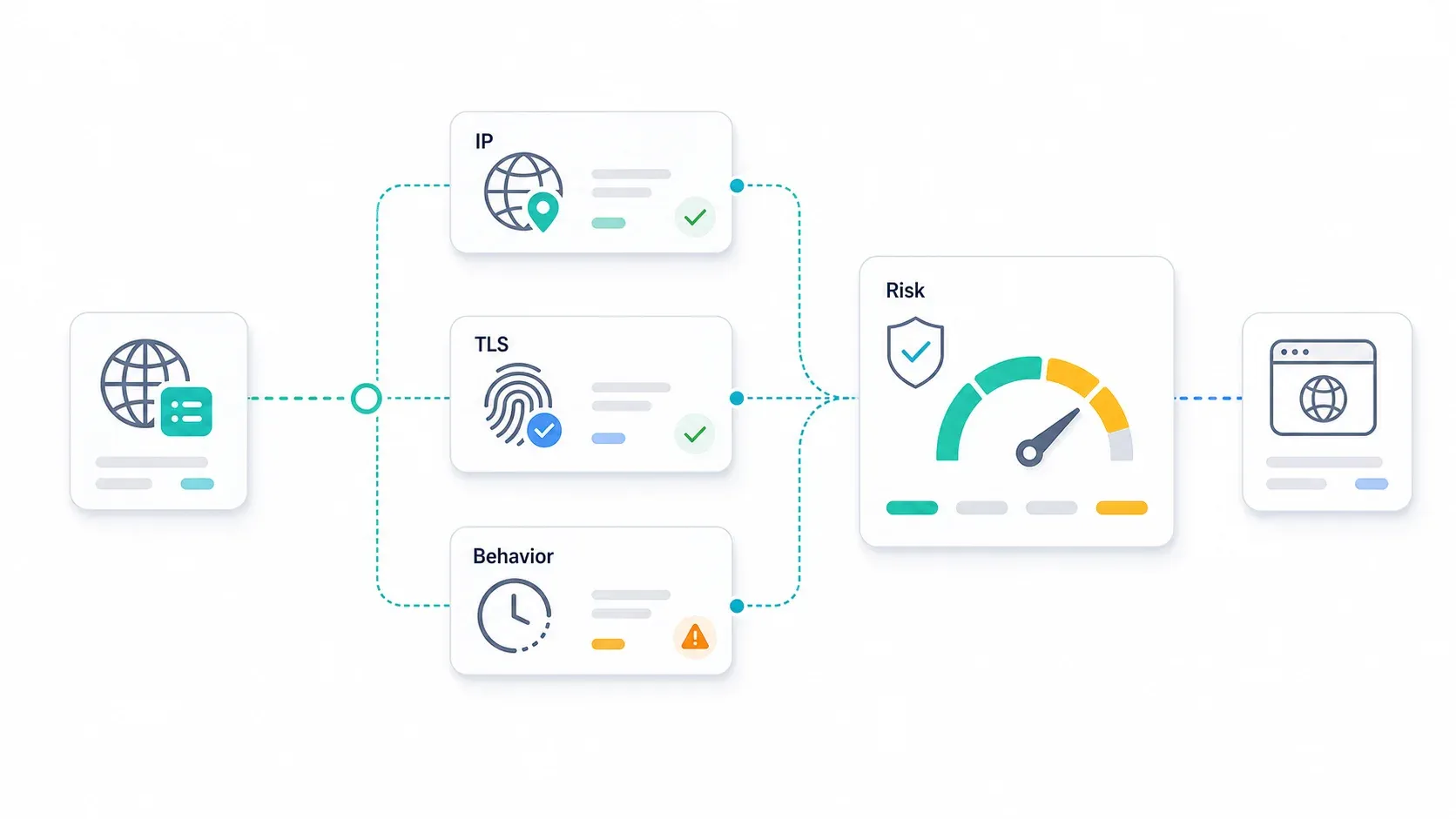
Layer 1: IP Reputation Scoring
Websites and anti-bot vendors assign trust scores to IP addresses based on:
- Whether the IP belongs to a datacenter ASN (easy flag)
- Whether the IP is in a known proxy provider's range
- The IP's age and history of abuse
- Residential "cleanliness" scores — even residential IPs can be flagged if they've been used aggressively
DataDome's bot mitigation guide explicitly describes IP filtering as only one part of a wider detection stack. Residential and mobile IPs have higher baseline trust, but they are not a free pass.
Layer 2: Browser and TLS Fingerprinting
Even with a pristine IP, your client can betray you. Anti-bot systems inspect:
- Canvas and WebGL fingerprints — rendering differences reveal the real browser/OS
- TLS JA3/JA4 hashes — the TLS handshake itself creates a fingerprint. Cloudflare describes JA4 as part of a broader suite covering TLS, HTTP, and SSH protocols.
- HTTP/2 and HTTP/3 settings — Scrapfly's 2026 guide explains how major anti-bot vendors combine protocol-level fingerprints into layered detection stacks
- Screen resolution, timezone, locale, fonts — if these don't match what a typical user from the proxy's location would produce, you're flagged
Recent academic work on TLS fingerprinting continues to confirm that handshake-level signals are actively used to distinguish bots from real users.
Layer 3: Behavioral Analysis
F5's Distributed Cloud Bot Defense emphasizes behavioral analysis and predictive threat detection. Anti-bot systems track:
- Request timing patterns — perfectly regular intervals (e.g., exactly 2.000 seconds apart) scream "bot"
- Mouse movement and scroll behavior — or the absence of it
- Navigation flow — real users don't visit 500 product pages in sequence without ever clicking a category link
- Request bursts — hammering a site with 100 requests in 10 seconds is a dead giveaway
A Practical Checklist to Avoid Getting Blocked
- Match proxy country with browser timezone, locale, and language settings
- Don't pair a mobile user agent with a desktop screen resolution
- Keep headers, TLS version, browser version, and user agent coherent
- Use sticky sessions for logged-in or multi-step actions
- Avoid exact request intervals — add realistic, clustered variation
- Slow down before upgrading proxy type. Request rate often matters more than proxy spend.
- Test for WebRTC and DNS leaks with BrowserLeaks before running a paid campaign
- When a sticky session drops mid-action, determine whether it's a provider quality issue or a detection response before changing your entire setup
When You Need Proxies for Scraping — And When an AI Scraping API Handles It for You
Web scraping and data collection is the #1 reason people search for proxy information. A significant chunk of proxy buyers are really buying infrastructure to solve a data extraction problem — and many don't realize there's a simpler path.
You Still Need Proxies When…
- You're running custom Puppeteer or Playwright automation with specific session requirements
- You're maintaining long-lived social media sessions (managing multiple accounts over days or weeks)
- You're doing geo-specific ad verification where you need granular control over exit IP location
- You're building internal tools that require persistent authenticated sessions
In these cases, proxy management is part of the job. No shortcut exists.
You May Not Need Proxy Management When…
- Your goal is structured data extraction: product listings, contact info, search results, real estate data
- You're spending more time debugging proxy rotation and CAPTCHA-solving than analyzing the data you collect
- You need clean JSON or Markdown output, not raw HTML
This is where AI-native scraping APIs come in. They handle anti-bot evasion, JS rendering, and CAPTCHA solving on the backend — so you never configure a proxy pool, rotation logic, or residential IP plan.
How Thunderbit's API, MCP Server, and CLI Replace Proxy Management for Data Extraction
Honesty about scope matters more than a sales pitch here. Thunderbit is not a proxy replacement for all use cases. It's strongest when the job is "get structured data reliably" — not "give me full manual control over network identity."
Here's what our tools offer for data extraction workflows:
- Open API:
POST /extractwith a JSON Schema returns structured data.POST /distillconverts pages to clean Markdown. Both handle JS rendering, anti-bot evasion, and CAPTCHAs without you configuring proxy pools.suggest_fieldsis free;distillcosts 1 credit;extractcosts 20 credits per call. - MCP Server:
thunderbit_extractandthunderbit_distilltools let AI agents (Claude, Cursor) scrape mid-task — ideal for research agents and data enrichment pipelines. - CLI:
npx @thunderbit/thunderbit-cli extract <url> --schema schema.jsonruns from terminal, CI, or cron. No browser, no proxy config needed. - Chrome Extension: For non-technical users, the Thunderbit Chrome Extension offers a 2-click option that handles all proxy and anti-bot complexity behind the scenes.
| Dimension | Managing Your Own Proxies | Thunderbit API / MCP / CLI |
|---|---|---|
| Setup time | Provider account, proxy type, credentials, browser/tool config, rotation rules | API key or MCP/CLI setup, then extract/distill calls |
| Maintenance | Monitor bans, IP quality, sessions, CAPTCHAs, bandwidth, provider changes | Monitor credits, schema quality, API/job status |
| Anti-bot handling | You coordinate proxies, browser stack, fingerprinting, rate limits | Abstracted by Thunderbit for supported use cases |
| Output | Usually HTML or raw responses; you build the parser | Structured JSON, Markdown, or schema-based fields |
| Best for | Custom automation, account sessions, ad verification, exact exit IP control | Structured public-data extraction and AI-agent research workflows |
| Cost model | Per GB/IP/port plus scraper infrastructure | Credit-based extraction/distillation |
For workflows like ecommerce price monitoring, lead generation from directories, or real estate listing aggregation, the API approach eliminates an entire category of infrastructure headaches. For deeper dives, see our guides on AI web scraping, web scraping without coding, and the best AI web scrapers on the Thunderbit blog.
Proxy Billing Traps: Why Your Unused Bandwidth Disappears (and How to Avoid Overpaying)
Proxy billing is where the industry gets genuinely confusing — and where buyers get burned. Forum threads are full of users blindsided by expired bandwidth, throttled "unlimited" plans, and providers that vanish overnight.
Common Proxy Billing Models and Their Tradeoffs
| Billing Model | How It Works | Watch Out For |
|---|---|---|
| Per-GB metered | Pay for bandwidth consumed | Rates vary wildly by proxy type; easy to overshoot budget |
| Per-IP/port flat rate | Pay per IP, often with "unlimited" bandwidth | Fair-use caps, throttling, or suspension for heavy use |
| Unlimited bandwidth | Flat monthly fee | Almost always has speed throttling or fair-use limits buried in ToS |
| Pay-as-you-go | Top up and draw down | Usually the most expensive per-GB; good for testing |
Why Residential Providers Expire Your Unused Traffic
Most residential proxy providers use 30-day traffic expiration cycles. Buy 10GB, use 3GB, and the remaining 7GB often vanishes at month-end. This isn't arbitrary greed — peering and bandwidth costs make "rollover" plans expensive to offer. But it stings when you're paying $5/GB.
Some providers now offer rollover or non-expiring traffic:
- IPRoyal highlights that residential proxy traffic "never expires" and supports on-demand adjustable purchasing
- ProxyEmpire claims rollover data where unused GBs carry forward
- DataImpulse markets $1/GB residential traffic with non-expiring bandwidth
Tip: Buy bandwidth in smaller increments to reduce waste. A 5GB top-up that you'll actually use in 30 days beats a 50GB plan where half expires.
A Provider Evaluation Checklist (Beyond Marketing Claims)
Before committing to any proxy provider, run through this:
- Trial availability and refund policy — if they don't offer a trial, that's a yellow flag
- Community reputation — Reddit sentiment in subreddits like r/proxies and r/webscraping is more reliable than review aggregator sites. Search for the provider name plus "scam," "exit scam," or "billing" to surface real complaints.
- Uptime SLAs and actual uptime track record — ask for historical data, not just a marketing number
- IP pool transparency — are residential IPs ethically sourced from opt-in programs, or are they from P2P SDK botnets? Bright Data publishes a sourcing/trust page describing transparent residential IP sourcing. Google's Threat Intelligence Group reported a 2026 disruption of a large residential proxy network allegedly leveraged by bad actors — a reminder that not all IP pools are created equal.
- Geographic coverage claims vs. reality — test with a trial before committing to a plan based on claimed country coverage
- Exit scam history — has the provider faced allegations of sudden shutdowns or fund disappearances?
Common Proxy Pitfalls and How to Avoid Them
The mistakes below trip up first-time and experienced proxy users alike.
Pitfall 1: Using Free Proxies for Business Tasks
Free proxies are slow, unreliable, and often log your traffic. Some inject ads or malware. Browserless' 2026 testing found below 5% success rates across several public free proxy lists. Never use free proxies for anything involving credentials, sensitive data, or production workflows.
Pitfall 2: Mismatching Proxy Type to Use Case
Using datacenter proxies for social media scraping (high block rate) or expensive mobile proxies for basic SEO monitoring (wasting budget) are the two most common mismatches. Refer to the decision tree above — it exists for a reason.
Pitfall 3: Ignoring Fingerprint Consistency
Rotating IPs but keeping the same browser fingerprint defeats the purpose. Your timezone, language, screen resolution, and user agent must align with your proxy's geo-location. A request from a "German residential IP" with an en-US locale, Pacific timezone, and a Chrome version that doesn't exist yet will get flagged instantly.
Pitfall 4: Over-Rotating or Under-Rotating IPs
Rotating too fast looks suspicious and can burn through IP reputation. Rotating too slow concentrates too many requests on individual IPs. The sweet spot depends on the target site's anti-bot sensitivity — start conservative (one rotation per 5–10 requests) and adjust based on block rates.
Pitfall 5: Ignoring Sticky Session Drops
Sticky sessions dropping mid-action is a recurring frustration in Reddit proxy threads. Before overhauling your entire setup, determine whether the drop is a provider quality issue (contact support, test with another provider) or a detection response (check fingerprint consistency, slow down).
Proxy Setup at a Glance: Summary Table
| Proxy Type | Best For | Anonymity Level | Speed | 2026 Cost Signal | Detection Risk | Session Type |
|---|---|---|---|---|---|---|
| Residential | Ecommerce, travel, social, geo research | High | Medium | $2–8/GB | Medium-low | Rotating or sticky |
| Datacenter | SEO monitoring, simple scraping | Low-medium | High | ~$0.90–1.20/IP | High on defended sites | Dedicated/shared |
| ISP | Account stability, multi-accounting | Medium-high | High | ~$1.20–1.60/IP | Medium | Sticky/static |
| Mobile | Social media, ad verification | Very high | Low-medium | $4–25/GB | Low | Sticky/rotating |
| SOCKS5 | Non-browser apps, UDP, flexible routing | Depends on source | Depends | Protocol option | Depends | Depends |
| Rotating | Stateless scraping, broad crawls | Depends on source | Depends | Provider-managed | Lower if paced | New IP per request/interval |
| Dedicated | Stable tasks, predictable routing | Depends | High | Per IP/port | Shared can inherit issues | Static |
Bookmark this table. It'll save you from the most expensive proxy mistakes.
Conclusion and Key Takeaways
Proxies in 2026 are more powerful and more complex than ever. The core decisions haven't changed, but the execution requirements have:
- Understand what type of proxy you need. Residential, datacenter, ISP, and mobile proxies serve different purposes — and the wrong choice wastes money or gets you blocked.
- Match proxy type to your use case and budget. Use the decision tree. Don't buy mobile proxies for SEO rank checks, and don't use datacenter proxies for social media scraping.
- Set up properly with fingerprint consistency. IP rotation without matching timezone, locale, user agent, and TLS fingerprint is security theater.
- Watch your billing. Unused bandwidth expiration, fair-use caps, and per-GB cost differences between proxy types can blow up a budget fast.
- Consider whether an AI scraping API can eliminate proxy management entirely. For structured data extraction — product listings, contact info, search results — tools like Thunderbit's API and CLI abstract away the entire proxy/anti-bot stack and return clean data directly.
Anti-bot systems will keep evolving. The trend is clear: AI-powered tools that abstract away infrastructure complexity are winning, and the teams that adopt them spend more time analyzing data and less time debugging proxy configurations. If you're curious, the Thunderbit Chrome Extension has a free tier to experiment with, and our YouTube channel has walkthroughs for common extraction workflows.
There's no single "best" proxy. There is a best proxy for what you're trying to do — and now you have the framework to find it.
FAQs
1. Are proxies legal to use?
Proxies are legal tools in most jurisdictions. The legality depends on what you do with them — scraping publicly available data is generally fine, but always respect website terms of service, access controls, and data privacy regulations like GDPR. This is not legal advice; consult a professional if your use case involves sensitive data or regulated industries.
2. How much do proxies cost in 2026?
It depends on the type. Datacenter proxies often run ~$0.90–1.20/IP. Residential proxies commonly cost $2–8/GB on mainstream plans. ISP proxies range from ~$1.20–1.60/IP. Mobile proxies are the most expensive at $4–25/GB or per-IP/month. Pricing varies significantly by provider, pool size, and commitment length — always check current provider pages before buying.
3. Can I use a free proxy for web scraping?
Not recommended for any serious business use. Free proxies are unreliable, slow, and often compromise your data through logging, ad injection, or malware. Browserless' 2026 testing found below 5% success rates across public free proxy lists. For production scraping, invest in a paid provider or use an API that abstracts proxy management entirely.
4. What's the difference between a proxy and a VPN?
A proxy typically routes traffic for a specific browser, app, or tool and doesn't always encrypt the connection. A VPN encrypts all device traffic system-wide. Proxies are better for scraping, geo-unblocking, and multi-accounting. VPNs are better for privacy, public Wi-Fi safety, and corporate remote access. See the detailed comparison table earlier in this article.
5. When should I use an AI scraping API instead of managing my own proxies?
When your goal is structured data extraction — product listings, contact info, search results, real estate data — and you're spending more time on proxy rotation, CAPTCHA-solving, and ban avoidance than on analyzing the data itself. AI scraping APIs like Thunderbit handle anti-bot evasion, JS rendering, and CAPTCHAs on the backend, returning clean structured data without requiring you to manage proxy infrastructure. You still need your own proxies for custom browser automation, long-lived authenticated sessions, or precise exit IP control.
Learn More




