
OpenClaw जैसे नए AI एजेंट को चालू करने में एक अलग ही रोमांच होता है—जब तक यह एहसास न हो जाए कि 2026 में “बस इंस्टॉल करो और चलाओ” सीधे-सीधे मुसीबत को न्योता देना है। मैंने टीमों को एक ही दोपहर में उत्साहित से घबराए हुए होते देखा है, सिर्फ इसलिए कि उनका OpenClaw इंस्टेंस ज़रूरत से ज़्यादा खुला था। सच्चाई यह है: OpenClaw वहाँ मौजूद सबसे शक्तिशाली ऑटोमेशन प्लेटफ़ॉर्म्स में से एक है, लेकिन अगर आप बुनियादी सुरक्षा कदम छोड़ दें, तो उसकी ताकत के साथ एक बड़ा, चमकता हुआ “सुरक्षा जोखिम” भी आता है।
यह सिर्फ़ सिद्धांत नहीं है। पिछले साल में हमने OpenClaw की अपनाने की रफ़्तार आसमान छूते देखी है—371,000 से ज़्यादा GitHub स्टार्स और 76,900 फोर्क्स (GitHub) — और इसी लोकप्रियता के साथ वास्तविक दुनिया के हमलों, खुले पड़े इंस्टेंस, और चर्चित कमजोरियों की लहर भी आई (Bitsight)। इसलिए, इससे पहले कि आप अपने AI एजेंट को अपनी डिजिटल दुनिया की चाबियाँ सौंपें, आइए एक सुरक्षा-प्रथम इंस्टॉलेशन प्रक्रिया से गुजरते हैं, जो आपके व्यवसाय को सुरक्षित, आपके डेटा को निजी, और आपके वीकेंड्स को बेफ़िक्र रखे।
मैं OpenClaw की नवीनतम सुरक्षा आर्किटेक्चर को तोड़कर समझाऊँगा, व्यावहारिक हार्डनिंग कदम साझा करूँगा, और दिखाऊँगा कि Thunderbit जैसे टूल आपके इंस्टॉलेशन की निगरानी और रखरखाव में कैसे मदद कर सकते हैं—वो भी AI को पूरी शेल पहुँच दिए बिना (अभी के लिए)। तैयार हैं? चलिए सब कुछ लॉक करते हैं।
AI के साथ OpenClaw इंस्टॉलेशन की निगरानी करें
2026 में OpenClaw के सुरक्षा परिदृश्य को समझना
OpenClaw एक टूल-उपयोग करने वाला AI एजेंट प्लेटफ़ॉर्म है—इसे ऐसे AI “रोबोट” की तरह सोचिए जो वेब ब्राउज़ कर सकता है, शेल कमांड चला सकता है, वर्कफ़्लोज़ ऑटोमेट कर सकता है, और प्लगइन्स भी इंस्टॉल कर सकता है। यही लचीलापन इसे सेल्स, ऑपरेशंस और IT टीमों के लिए इतना शक्तिशाली बनाता है। लेकिन यही वजह है कि OpenClaw डिप्लॉयमेंट्स सुरक्षा की छोटी-सी चूक के लिए भी खास तौर पर संवेदनशील होते हैं।
2026 की सुरक्षा आर्किटेक्चर: क्या नया है?
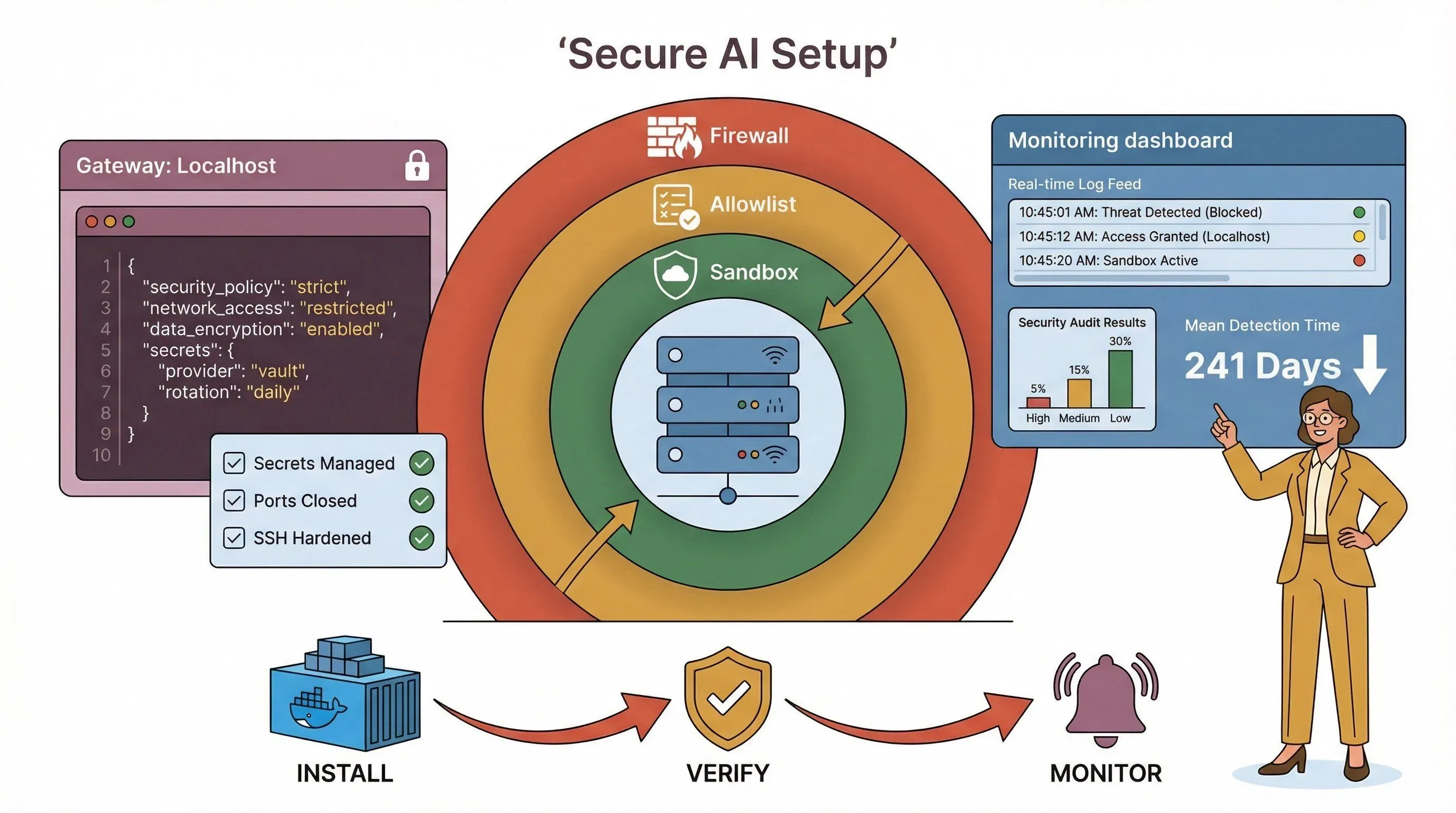
OpenClaw के नए रिलीज़ ने सुरक्षा में बड़ी प्रगति की है। अब प्लेटफ़ॉर्म में शामिल हैं:
- गेटवे कम्युनिकेशन के लिए बेहतर एन्क्रिप्शन, आधुनिक प्रोटोकॉल और मज़बूत सिफर सुइट्स के समर्थन के साथ (docs.openclaw.ai).
- API keys और credentials के लिए SecretRefs, ताकि secrets सादा टेक्स्ट कॉन्फ़िग फ़ाइलों में न पड़े रहें (docs.openclaw.ai).
- Exec approvals और allowlists, जिससे आप बहुत सख़्ती से नियंत्रित कर सकते हैं कि एजेंट कौन-सी कमांड चला सकता है—और सूची से बाहर की किसी भी चीज़ के लिए स्पष्ट अनुमति आवश्यक होती है (docs.openclaw.ai).
- Sandboxing सुधार, जो टूल निष्पादन को अलग-थलग रखते हैं, खासकर Docker और VM वातावरण में (docs.openclaw.ai).
लेकिन असली बात यह है: ये सुविधाएँ उतनी ही मज़बूत होती हैं जितनी आपकी कॉन्फ़िगरेशन। डिफ़ॉल्ट इंस्टॉल भी जोखिम भरा हो सकता है, अगर आप उसे ठीक से लॉक डाउन नहीं करते।
शेल एक्सेस वाले AI एजेंट क्यों हाई-रिस्क होते हैं
 सच कहें तो: किसी AI एजेंट को शेल एक्सेस देना ऐसा है जैसे एक बच्चे को माचिस का डिब्बा देकर सर्वर रूम में छोड़ देना। 2026 में सबसे बड़े जोखिमों में शामिल हैं:
- प्रॉम्प्ट इंजेक्शन हमले: वेब पेजों, ईमेल, या यहाँ तक कि Slack संदेशों से आया दुर्भावनापूर्ण इनपुट एजेंट को खतरनाक कमांड चलाने के लिए उकसा सकता है (OWASP).
- क्रेडेंशियल लीक: खुले पड़े कॉन्फ़िग या लॉग API keys, टोकन, या क्लाउड क्रेडेंशियल तक बाहर निकाल सकते हैं (GitGuardian).
- गलत कॉन्फ़िगरेशन: एक खुला पोर्ट या कमज़ोर पासवर्ड आपके OpenClaw इंस्टेंस को हमलावरों के लिए सार्वजनिक खेल का मैदान बना सकता है (Bitsight).
हालिया CVEज़ कहानी साफ़ बताते हैं: 2026 की शुरुआत में OpenClaw ने Docker sandbox में एक PATH-handling command injection को पैच किया (CVE-2026-24763), gatewayUrl से auth-token exfiltration के जरिए एक 1-क्लिक RCE (CVE-2026-25253), और एक plugin-install path traversal (GHSA-qrq5-wjgg-rvqw)। अगर इन्हें पैच न किया जाए, तो हर एक “अजीब आउटपुट” से “पूरे सिस्टम पर कब्ज़ा” तक पहुँच सकता था।
OpenClaw के लिए सुरक्षा-प्रथम इंस्टॉलेशन क्यों ज़रूरी है
सीधी बात: असुरक्षित OpenClaw इंस्टॉल सिर्फ़ एक तकनीकी जोखिम नहीं—यह एक व्यवसायिक जोखिम है। 2025 में डेटा ब्रीच की औसत लागत $4.44 मिलियन थी (IBM/Ponemon), और AI एजेंट घटनाएँ महीनों तक अनदेखी रह सकती हैं (पहचान + कंटेनमेंट का औसत समय: 241 दिन)।
ताकत बनाम जोखिम: वास्तविक उपयोग के मामले
यहाँ देखें कि OpenClaw एक साथ सुपरपावर भी कैसे हो सकता है और जिम्मेदारी भी:
| उपयोग मामला | व्यावसायिक मूल्य | गलत कॉन्फ़िगरेशन होने पर सुरक्षा जोखिम |
|---|---|---|
| सेल्स ऑटोमेशन | लीड्स स्क्रैप करना, ऑटो-ईमेल, CRM सिंक | खुले टोकन, बड़े पैमाने पर ईमेल दुरुपयोग |
| IT ऑपरेशंस | ऑटो-पैच, मॉनिटर, ऐप रीस्टार्ट करना | शेल एक्सेस = संभावित RCE |
| डेटा विश्लेषण | दस्तावेज़ सारांश, वेब डेटा इनजेस्ट | प्रॉम्प्ट इंजेक्शन, डेटा एक्सफ़िल्ट्रेशन |
| प्लगइन इकोसिस्टम | नए टूल्स के साथ विस्तार | सप्लाई चेन हमले, प्लगइन एक्सप्लॉइट्स |
“मददगार AI” और “सुरक्षा संकट” के बीच का फ़र्क पूरी तरह सेटअप में है।
क्लाउड AI बनाम सेल्फ-होस्टेड एजेंट: ज़िम्मेदार कौन है?
क्लाउड AI सेवाओं में, अधिकांश सुरक्षा की ज़िम्मेदारी प्रदाता संभालता है। सेल्फ-होस्टेड OpenClaw में, सुरक्षा टीम आप हैं। इसका मतलब है:
- नेटवर्क एक्सपोज़र पर आपका नियंत्रण है (पब्लिक, प्राइवेट, या सिर्फ़ tailnet)।
- आप secrets, अपडेट्स, और प्लगइन जाँच संभालते हैं।
- अगर कुछ गड़बड़ हुआ, तो जवाबदेही आपकी होगी।
अगर यह थोड़ा भारी लग रहा है, चिंता मत कीजिए—मैं आपको सही तरीका बताऊँगा।
प्री-इंस्टॉलेशन सुरक्षा चेकलिस्ट: नींव मज़बूत करें
openclaw install चलाने से पहले ही, अपने घर को व्यवस्थित कर लीजिए। अपने वातावरण को हार्डन करने के लिए मेरी पसंदीदा चेकलिस्ट यह है:
1. अपना OS और पैकेज अपडेट करें
- अपने सर्वर या VM को नवीनतम स्थिर रिलीज़ तक पैच करें।
- सभी सिस्टम पैकेज अपडेट करें, खासकर Docker, Python, और Node.js, अगर आप इन्हें इस्तेमाल करने वाले हैं।
2. अनावश्यक सेवाएँ और पोर्ट बंद करें
- जिन सेवाओं की ज़रूरत नहीं है, उन्हें बंद कर दें (FTP, telnet, आदि)।
- सभी अनयूज़्ड पोर्ट बंद करें—OpenClaw को सिर्फ़ वहीं सुनना चाहिए जहाँ आप चाहते हैं।
3. फ़ायरवॉल सक्षम करें और कॉन्फ़िगर करें
- इनबाउंड और आउटबाउंड ट्रैफ़िक को सीमित करने के लिए
ufwयाfirewalldका उपयोग करें। - केवल भरोसेमंद IPs या अपना tailnet अनुमति दें।
4. सबसे कम विशेषाधिकार का सिद्धांत
- OpenClaw के लिए एक अलग उपयोगकर्ता खाता बनाएँ—कभी भी root के रूप में न चलाएँ।
- फ़ाइल और डायरेक्टरी अनुमतियों को सिर्फ़ उतना ही रखें जितना ज़रूरी है।
5. SSH और रिमोट एक्सेस को मज़बूत करें
- पासवर्ड लॉगिन बंद करें; SSH keys इस्तेमाल करें।
- डिफ़ॉल्ट SSH पोर्ट बदलें और brute-force सुरक्षा के लिए fail2ban सेट करें।
6. secrets प्रबंधन के लिए तैयारी करें
- environment variables या secrets manager (HashiCorp Vault, AWS Secrets Manager, आदि) सेट करें।
- API keys या credentials कभी भी plaintext फ़ाइलों में न रखें।
7. शुरू करने से पहले ऑडिट करें
- एक बेसलाइन सुरक्षा स्कैन चलाएँ (
lynis,clamav, या आपका पसंदीदा टूल)। - अपनी शुरुआती स्थिति को डॉक्यूमेंट करें—मुझ पर भरोसा करें, बाद में आप खुद को धन्यवाद देंगे।
प्रो टिप: अगर आप Thunderbit इस्तेमाल कर रहे हैं, तो आप अपने सिस्टम लॉग्स या फ़ायरवॉल कॉन्फ़िग्स को स्क्रैप और सारांशित कर सकते हैं, ताकि कुछ भी इंस्टॉल करने से पहले खुले पोर्ट या जोखिम भरी सेटिंग्स की दोबारा जाँच हो जाए।
AI के साथ सिस्टम लॉग्स स्क्रैप और सारांशित करें Get Started Free
OpenClaw के सुरक्षित इंस्टॉलेशन चरण: एक व्यावहारिक walkthrough
अब काम की बात करते हैं। सुरक्षा को सर्वोच्च प्राथमिकता रखते हुए OpenClaw इंस्टॉल करने का मेरा सुझाया हुआ तरीका यह है।
1. अपना isolation चुनें: Docker, VM, या Bare Metal?
| विधि | फ़ायदे | नुकसान |
|---|---|---|
| Docker | आसान पैकेजिंग, तेज़ रीसेट, डिफ़ॉल्ट रूप से non-root | गलत कॉन्फ़िगरेशन होने पर नेटवर्किंग पोर्ट्स खोल सकती है; कंटेनर के अंदर root से जुड़ी समस्याओं से सावधान रहें (docs.openclaw.ai) |
| Dedicated VM | मज़बूत isolation, snapshot/rollback आसान | ज़्यादा ओवरहेड, फिर भी secrets hygiene चाहिए |
| Bare Metal | सबसे तेज़, कम झंझट | सबसे ज़्यादा जोखिम—agent और personal data का मिश्रण, बड़ा blast radius |
मेरी सलाह: ज़्यादातर टीमों के लिए Docker या dedicated VM सबसे बेहतर विकल्प है। अगर आपको bare metal इस्तेमाल करना ही पड़े, तो permissions और secrets को लेकर अतिरिक्त सावधानी रखें।
2. OpenClaw डाउनलोड करें और सत्यापित करें
- हमेशा आधिकारिक repo या registry से ही pull करें (GitHub).
- अगर checksums या signatures उपलब्ध हों, तो उन्हें सत्यापित करें।
3. गेटवे को localhost (या tailnet) से बाँधें
- अपनी कॉन्फ़िग में, जहाँ संभव हो, gateway को
127.0.0.1(loopback) पर bind करें। - अगर आपको रिमोट एक्सेस चाहिए, तो Tailscale Serve या VPN का उपयोग करें—OpenClaw को कभी भी सीधे public internet पर न खोलें (docs.openclaw.ai).
उदाहरण कॉन्फ़िग:
{
  "gateway": {
    "bind": "loopback",
    "tailscale": { "mode": "serve" },
    "auth": {
      "mode": "token",
      "allowTailscale": false,
      "token": { "source": "env", "provider": "default", "id": "OPENCLAW_GATEWAY_TOKEN" }
    }
  },
  "secrets": {
    "providers": { "default": { "source": "env" } }
  }
}
4. मज़बूत प्रमाणीकरण सेट करें
- gateway एक्सेस के लिए लंबे, यादृच्छिक टोकन इस्तेमाल करें।
- टोकन environment variables या secrets manager में रखें—कभी भी plaintext कॉन्फ़िग में नहीं।
5. Sandboxing और Exec Approvals सक्षम करें
- सभी टूल निष्पादन के लिए sandboxing चालू करें (docs.openclaw.ai).
- exec approvals और allowlists कॉन्फ़िगर करें (अगला भाग देखें)।
6. सिर्फ़ भरोसेमंद प्लगइन्स इंस्टॉल करें
- इंस्टॉल करने से पहले हर प्लगइन की जाँच करें।
- आधिकारिक registry के प्लगइन्स को प्राथमिकता दें; अनजान GitHub gists या npm packages से बचें।
7. सुरक्षा ऑडिट चलाएँ
- गलत कॉन्फ़िगरेशन या लीक हुए secrets की जाँच के लिए
openclaw security auditऔरopenclaw secrets auditचलाएँ (docs.openclaw.ai).
2026 में OpenClaw के लिए आवश्यक सुरक्षा कॉन्फ़िगरेशन गाइड
OpenClaw चालू होने के बाद, अब बारी है बारीकियों को कसने की।
1. कमांड allowlists और exec approvals
- सुरक्षित कमांड्स की एक स्पष्ट allowlist बनाएँ (जैसे
/usr/bin/git,/usr/bin/curl)। - approvals को “ask on miss” पर सेट करें और अगर approval UI उपलब्ध न हो तो “deny” पर fallback रखें।
उदाहरण कॉन्फ़िग:
{
  "version": 1,
  "defaults": {
    "security": "deny",
    "ask": "on-miss",
    "askFallback": "deny",
    "autoAllowSkills": false
  },
  "agents": {
    "main": {
      "security": "allowlist",
      "ask": "on-miss",
      "askFallback": "deny",
      "autoAllowSkills": false,
      "allowlist": [
        { "bin": "/usr/bin/git" },
        { "bin": "/usr/bin/curl" }
      ]
    }
  }
}
2. शेल एक्सेस सीमित करें
- केवल वही शेल कमांड्स अनुमति दें जो बिल्कुल आवश्यक हैं।
- जब तक आपके पास मज़बूत approval workflow न हो,
bashयाshकी खुली छूट कभी न दें।
3. API key प्रबंधन लागू करें
- सभी credentials के लिए SecretRefs और environment variables का उपयोग करें।
- keys नियमित रूप से rotate करें और अनउपयोगी या पुराने secrets का ऑडिट करें।
4. Prompt injection से बचाव
- सभी user input को सत्यापित करें और output को sanitize करें।
- जहाँ संभव हो, input/output restrictions और content filters का उपयोग करें।
- लॉग्स में असामान्य पैटर्न की निगरानी करें (जैसे ऐसी कमांड्स जिनकी उम्मीद नहीं थी)।
5. Audit logging और monitoring
- सभी agent actions, approvals, और denials के लिए विस्तृत logging सक्षम करें।
- लॉग्स को सुरक्षित, tamper-evident जगह पर रखें।
Thunderbit के साथ रियल-टाइम इंस्टॉलेशन लॉग मॉनिटरिंग
यहीं Thunderbit काम आता है। इंस्टॉलेशन के दौरान और बाद में Thunderbit आपकी मदद कर सकता है:
- OpenClaw लॉग्स को रियल टाइम में स्क्रैप और विश्लेषित करना: Thunderbit के AI से log entries निकालें, सारांशित करें, और वर्गीकृत करें—ताकि गलत कॉन्फ़िगरेशन या संदिग्ध गतिविधि जल्दी पकड़ी जा सके।
- असामान्यताओं का पता लगाना: Thunderbit की AI-आधारित विश्लेषण प्रक्रिया अप्रत्याशित त्रुटियों, बार-बार असफल authentication, या असामान्य कमांड निष्पादन को चिह्नित कर सकती है।
- महत्वपूर्ण घटनाओं पर अलर्ट: अगर कोई संभावित सुरक्षा समस्या दिखे, तो Thunderbit को Slack, email, या आपके पसंदीदा टूल के ज़रिए आपको सूचित करने के लिए सेट करें।
वर्कफ़्लो उदाहरण:
- Thunderbit को अपने OpenClaw log dashboard या API पर पॉइंट करें।
- मुख्य घटनाएँ निकालने के लिए “AI Suggest Fields” का उपयोग करें (जैसे असफल लॉगिन, अस्वीकृत approvals, plugin installs)।
- उच्च-जोखिम पैटर्न के लिए custom alerts सेट करें।
- ऑडिट ट्रेल के लिए निष्कर्ष Google Sheets या Notion में export करें।
Thunderbit पूरा SIEM नहीं है, लेकिन यह आपके OpenClaw deployment पर नज़र रखने का एक हल्का, AI-संचालित तरीका है—खासकर छोटी टीमों के लिए जिनके पास समर्पित security stack नहीं है।
चल रही मेंटेनेंस: अपडेट्स, पैचिंग, और सुरक्षा नीति का अनुकूलन
सुरक्षा एक बार का काम नहीं है। OpenClaw तेज़ी से बदल रहा है, और खतरे भी।
1. नियमित अपडेट और रोलिंग रिव्यू
- अपने OpenClaw कॉन्फ़िग फ़ाइलों की साप्ताहिक या मासिक समीक्षा शेड्यूल करें।
openclaw updateका उपयोग करके अपडेट लागू करें—security releases को तुरंत लागू किया जाना चाहिए (docs.openclaw.ai).- किसी भी अपडेट के बाद
openclaw doctorऔरopenclaw security auditफिर से चलाएँ।
2. सुरक्षित पैच लागू करना
- बड़े अपडेट से पहले VM snapshots या Docker image backups का उपयोग करें।
- संभव हो तो staging environment में अपडेट्स का परीक्षण करें।
3. Thunderbit से अपडेट चेक्स ऑटोमेट करें
- OpenClaw release feed या अपनी deployment status pages को स्क्रैप करने के लिए Thunderbit का उपयोग करें।
- नए security advisories या ज़रूरी patches के लिए alerts सेट करें।
4. नई कमजोरियों पर नज़र रखें
- सिर्फ़ core OpenClaw releases ही नहीं, OpenClaw security advisories और CVE feeds भी subscribe करें।
- प्लगइन या dependency अपडेट्स पर भी ध्यान रखें।
OpenClaw के लिए एक मज़बूत सुरक्षा प्रतिक्रिया योजना बनाना
सबसे अच्छे बचाव के बावजूद घटनाएँ हो सकती हैं। तैयार कैसे रहें:
1. Incident response playbook
- containment के लिए स्पष्ट कदम तय करें (जैसे gateway बंद करना, tokens revoke करना)।
- भूमिकाएँ तय करें: कौन जाँच करेगा, कौन संवाद करेगा, कौन सेवा बहाल करेगा।
- forensic data collection के लिए एक चेकलिस्ट रखें (लॉग्स, कॉन्फ़िग्स, snapshots)।
2. तेज़ प्रतिक्रिया के लिए Thunderbit का उपयोग करें
- किसी घटना के तुरंत बाद सभी संबंधित लॉग्स scrape और export करें।
- क्या हुआ, यह सारांशित करने और संदिग्ध घटनाओं को चिह्नित करने के लिए Thunderbit के AI का उपयोग करें।
- compliance और सीखने के लिए timeline और की गई कार्रवाइयों का दस्तावेज़ बनाएँ।
3. अभ्यास और अपडेट
- साल में कम-से-कम दो बार tabletop exercises या simulated incidents चलाएँ।
- जैसे-जैसे OpenClaw बदले या आपका वातावरण बदले, अपनी response plan अपडेट करें।
सुरक्षा-प्रथम ऑटोमेशन: OpenClaw के साथ सुरक्षित शुरुआती कदम
ताकतवर ऑटोमेशन में सीधे कूदने का मन होता है, लेकिन धीरे शुरू करें:
1. केवल-पढ़ने वाले workflows से शुरुआत करें
- reporting, monitoring, और data summarization कम-जोखिम वाले हैं।
- जब तक सेटअप पर पूरा भरोसा न हो, write/delete operations या shell commands से बचें।
2. धीरे-धीरे permissions बढ़ाएँ
- मानवीय approval चरणों के साथ, नई क्षमताएँ एक-एक करके जोड़ें।
- हर बदलाव के बाद लॉग्स और alerts पर नज़र रखें।
3. निरंतर निगरानी
- एजेंट के व्यवहार पर नज़र रखने के लिए Thunderbit या अपने पसंदीदा टूल का उपयोग करें।
- privileges बढ़ने या अप्रत्याशित कार्रवाइयों के लिए alerts सेट करें।
सुरक्षित ऑटोमेशन्स के उदाहरण:
- सार्वजनिक सेल्स लीड्स को scrape करके CRM में export करना (read-only)।
- सर्वर uptime या disk usage की निगरानी।
- समाचार लेखों या आंतरिक दस्तावेज़ों का सारांश बनाना।
मुख्य निष्कर्ष: 2026 में OpenClaw को सुरक्षित रखना
आइए ज़रूरी बातों को दोहरा लें:
- डिफ़ॉल्ट रूप से AI को पूरी शेल पहुँच न दें—allowlists, approvals, और sandboxing का उपयोग करें।
- अपना gateway localhost या tailnet से बाँधें—जब तक अत्यंत आवश्यक न हो, public exposure से बचें।
- मज़बूत authentication और secrets प्रबंधन का सही उपयोग करें—credentials कभी plaintext में न रखें।
- OpenClaw और सभी plugins को अपडेट रखें—जल्दी patch करें, नियमित रूप से configs की समीक्षा करें।
- लॉग्स मॉनिटर करें और alerts ऑटोमेट करें—Thunderbit जैसे टूल इसे आसान बनाते हैं, यहाँ तक कि छोटी टीमों के लिए भी।
- एक security incident response plan रखें—अभ्यास करें, डॉक्यूमेंट करें, और समय के साथ सुधारते रहें।
- सुरक्षित, read-only automations से शुरुआत करें—लगातार निगरानी के साथ सावधानी से विस्तार करें।
सुरक्षा एक यात्रा है, मंज़िल नहीं। OpenClaw ecosystem तेज़ी से बदल रहा है, और हमलावर भी। सुरक्षा-प्रथम दृष्टिकोण अपनाकर—और निगरानी व ऑटोमेशन के लिए Thunderbit जैसे टूल्स का उपयोग करके—आप अपने AI एजेंट को अपने लिए काम करने देंगे, अपने खिलाफ नहीं।
और सुझावों के लिए Thunderbit Blog देखें और OpenClaw की सुरक्षा सलाहों के लिए सदस्यता बनाए रखें।
अक्सर पूछे जाने वाले प्रश्न
1. इंस्टॉलेशन के दौरान मुझे OpenClaw को पूरी शेल एक्सेस क्यों नहीं देनी चाहिए?
OpenClaw जैसे AI एजेंट को पूरी शेल एक्सेस देने से prompt injection हमलों, credential leaks, और सिस्टम compromise का जोखिम बहुत बढ़ जाता है। डिफ़ॉल्ट रूप से shell access को allowlists और approvals से सीमित रखें, और व्यापक permissions केवल सावधानीपूर्वक समीक्षा और निगरानी के बाद ही सक्षम करें (OWASP).
2. रिमोट एक्सेस के लिए OpenClaw को expose करने का सबसे सुरक्षित तरीका क्या है?
सुझाया गया तरीका यह है कि gateway को 127.0.0.1 (loopback) पर bind करें और सुरक्षित रिमोट एक्सेस के लिए Tailscale Serve जैसे tailnet समाधान का उपयोग करें। जहाँ भी संभव हो public internet exposure से बचें, और हमेशा मज़बूत authentication लागू करें (docs.openclaw.ai).
3. OpenClaw सुरक्षा में Thunderbit कैसे मदद कर सकता है?
Thunderbit OpenClaw लॉग्स को scrape और analyze कर सकता है, गलत कॉन्फ़िगरेशन पकड़ सकता है, और वास्तविक समय में संदिग्ध गतिविधि के लिए आपको अलर्ट कर सकता है। यह इंस्टॉलेशन और कॉन्फ़िगरेशन बदलावों की निगरानी के लिए खास तौर पर उपयोगी है, भले ही आपके पास पूरा SIEM सेटअप न हो (Thunderbit).
4. मुझे OpenClaw और उसके plugins कितनी बार अपडेट करने चाहिए?
कम-से-कम साप्ताहिक रूप से अपडेट जाँचें, और security patches तुरंत लागू करें। किसी भी अपडेट के बाद openclaw doctor और openclaw security audit चलाएँ, ताकि आपकी कॉन्फ़िगरेशन सुरक्षित बनी रहे (docs.openclaw.ai).
5. अगर मुझे शक हो कि मेरा OpenClaw इंस्टेंस compromise हो गया है, तो मुझे क्या करना चाहिए?
तुरंत gateway बंद करके और credentials revoke करके घटना को contain करें। forensics के लिए लॉग्स और कॉन्फ़िग्स इकट्ठा करें, और क्या हुआ यह समझने के लिए Thunderbit या ऐसे ही टूल्स का उपयोग करें। अपनी incident response plan का पालन करें और सीखी गई बातों के आधार पर उसे अपडेट करें (csrc.nist.gov).
सुरक्षित रहें, समझदारी से ऑटोमेट करें, और याद रखें: 2026 में security-first सिर्फ़ एक best practice नहीं—यही वह एकमात्र तरीका है जो आपके AI एजेंट को आपके पक्ष में रखता है।
सुरक्षित AI मॉनिटरिंग के लिए Thunderbit आज़माएँ Get Started Free
और जानें
- AI एजेंट क्या हैं? यह कैसे काम करता है और इसका उपयोग कैसे करें
- शुरुआती गाइड: चरण-दर-चरण AI एजेंट कैसे बनाएँ
- 2026 में वेब क्रॉलिंग की स्थिति: प्रमुख आँकड़े और उद्योग बेंचमार्क
- वेब स्क्रैपिंग के लिए प्रक्रिया ऑटोमेशन: RPA बनाम AI एजेंट्स
- Crawl4AI की तुलना Thunderbit से: वास्तविक उपयोगकर्ताओं को क्या जानना चाहिए




