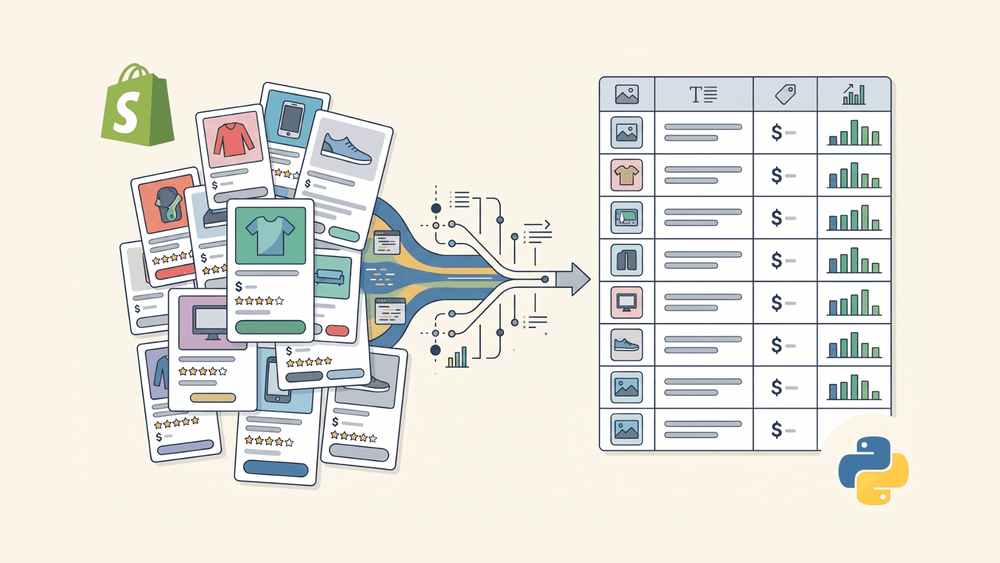
Shopify का /products.json endpoint ई-कॉमर्स डेटा की दुनिया का एक ऐसा hidden gem है जिसके बारे में ज़्यादातर लोग नहीं जानते। किसी भी Shopify store URL के अंत में इसे जोड़ दीजिए, और आपको सीधे structured JSON मिल जाता है—न API key की ज़रूरत, न authentication की, न nested HTML को scrape करने की झंझट।
मैं Thunderbit Official Website टीम के साथ काम करता हूँ, इसलिए मेरा काफी समय यह समझने में जाता है कि लोग web से data कैसे निकालते हैं। और Shopify scraping बार-बार सामने आता है—sales teams competitor pricing track करती हैं, ecommerce ops लोग product catalogs benchmark करते हैं, procurement टीमें नए vendors ढूँढती हैं। 4.82 million active merchants Shopify पर हैं, और प्लेटफ़ॉर्म US ecommerce market का लगभग 30% हिस्सा संभालता है, इसलिए scrape किए जा सकने वाले product data की मात्रा बहुत बड़ी है।
यह guide पूरा process कवर करती है: endpoint क्या return करता है, हज़ारों products को कैसे paginate करें, rate limits को block हुए बिना कैसे handle करें, और pandas की मदद से Shopify के nested JSON को clean CSV या Excel file में कैसे बदला जाए। साथ ही, मैं उन endpoints पर भी बात करूँगा जिनका ज़िक्र बाकी लोग नहीं करते (/collections.json, /meta.json) और उन लोगों के लिए एक no-code विकल्प भी दिखाऊँगा जो Python पूरी तरह छोड़ना चाहते हैं।
Shopify का /products.json Endpoint क्या है (और यह Scraping को इतना आसान क्यों बनाता है)
हर Shopify store में {store-url}/products.json पर एक public endpoint होता है जो structured product data देता है। न API key, न OAuth, न किसी तरह की authentication। बस /products.json को store URL के साथ जोड़िए और catalog के हर product का JSON array मिल जाता है।
अभी खुद आज़माइए: अपने browser में allbirds.com/products.json या zoologistperfumes.com/products.json खोलिए। आपको साफ़, structured JSON दिखाई देगा जिसमें product titles, prices, variants, images, tags—सब कुछ होगा।
अब इसकी तुलना HTML parsing से कीजिए, जहाँ Shopify themes deeply nested होती हैं, अलग-अलग stores में inconsistent होती हैं, और merchant के theme बदलते ही format भी बदल जाता है। असली challenge कुछ ऐसी होती है:
HTML approach (काफ़ी मुश्किल):
<div class="product-card__info">
  <h3 class="product-card__title">
    <a href="/products/classic-blue-jeans">Classic Blue Jeans</a>
  </h3>
  <span class="price price--on-sale" data-product-price>$149.00</span>
</div>
JSON approach (साफ़-सुथरी):
{
  "title": "Classic Blue Jeans",
  "handle": "classic-blue-jeans",
  "vendor": "Hiut Denim",
  "variants": [{"price": "149.00", "sku": "HD-BLU-32", "available": true}]
}
Consistency, reliability, और parsing की simplicity—तीनों में JSON आगे है। यह endpoint दो अहम query parameters भी support करता है—?limit= (हर page पर अधिकतम 250 products, default 30) और ?page= pagination के लिए—जिनका इस्तेमाल हम नीचे code में बार-बार करेंगे।
एक ज़रूरी बात: यह एक public storefront endpoint है, Shopify Admin API नहीं। Admin API के लिए store owner access tokens चाहिए होते हैं और उससे order data, inventory levels, और customer information मिलती है। Public /products.json endpoint सिर्फ़ read-only product data देता है, जिसे कोई भी access कर सकता है। इस फर्क को मैं आगे विस्तार से समझाऊँगा, क्योंकि forums में इसे लेकर बहुत confusion है।
एक caution: हर Shopify store यह endpoint expose नहीं करता। मेरी testing में लगभग 71% stores ने valid JSON return किया (allbirds.com, gymshark.com, colourpop.com, kyliecosmetics.com सभी काम करते हैं), जबकि कुछ custom configurations 404 देती हैं (hiutdenim.co.uk, bombas.com)। जल्दी check करने का तरीका आसान है: {store-url}/products.json browser में खोलिए और देखिए क्या मिलता है।
Python से Shopify Scrape क्यों करें? Top Business Use Cases
क्यों मेहनत करें? ROI के लिए। 81% US retailers अब competitive intelligence के लिए automated price scraping का इस्तेमाल करते हैं, जबकि 2020 में यह सिर्फ़ 34% था। और research बताता है कि pricing strategy में 1% सुधार औसतन 11.1% profit बढ़ा सकता है। यानी data में असली पैसा है।
मैं सबसे ज़्यादा ये use cases देखता हूँ:
| Use Case | किसे फ़ायदा होता है | क्या मिलता है |
|---|---|---|
| Competitor price monitoring | Ecommerce ops teams | Competitor catalogs में price changes, discounts, और compare-at prices ट्रैक करना |
| Product research & sourcing | Procurement / merchandising | Product features, variants, materials, और availability की तुलना |
| Lead generation | Sales teams | Store catalogs से vendor names, brand data, और contact info निकालना |
| Market & category analysis | Marketing teams | Product mix, tags, collection structure, और positioning समझना |
| Inventory & availability tracking | Supply chain teams | Variant-level stock status (available: true/false) को समय के साथ monitor करना |
| New product detection | Product teams | Competitors की नई launches पकड़ने के लिए created_at timestamps ट्रैक करना |
इस काम के लिए Python बहुत natural fit है। 69.6% scraping developers अपनी primary language के रूप में Python इस्तेमाल करते हैं, और requests for HTTP, pandas for data manipulation, httpx for async जैसी ecosystem libraries आपको "मेरे पास एक URL है" से "मेरे पास एक spreadsheet है" तक 80 lines से कम code में पहुँचा देती हैं।
Complete products.json Field Reference: हर Field की व्याख्या
बाकी tutorials आमतौर पर आपको सिर्फ़ title, id, और handle दिखाकर आगे बढ़ जाते हैं। Shopify के JSON response में products, variants, images, और options मिलाकर 40 से भी ज़्यादा fields होते हैं। Scraping code लिखने से पहले यह जान लेना कि क्या-क्या available है, बाद में दोबारा scraping से बचाता है।
यह reference मैंने 16 April 2026 को live /products.json responses से लिया है। जिन stores में यह endpoint available है, वहाँ structure काफ़ी consistent रहता है।
Product-Level Fields
| Field | Data Type | Example Value | Business Use Case |
|---|---|---|---|
id | Integer | 123456789 | Deduplication के लिए unique product identifier |
title | String | "Classic Blue Jeans" | Catalogs और comparisons के लिए product name |
handle | String | "classic-blue-jeans" | URL slug—product page link ऐसे बनाइए {store}/products/{handle} |
body_html | String (HTML) या null | Our best-selling... | Content analysis और SEO research के लिए product description |
vendor | String | "Hiut Denim" | Lead gen या sourcing के लिए brand/vendor name |
product_type | String | "Jeans" | Market analysis के लिए category classification |
created_at | ISO DateTime | "2024-01-15T10:30:00-05:00" | Products कब add हुए, यह track करना (new launch detection) |
updated_at | ISO DateTime | "2025-03-01T08:00:00-05:00" | Recent catalog changes detect करना |
published_at | ISO DateTime | "2024-01-16T00:00:00-05:00" | Products storefront पर कब live हुए, यह जानना |
tags | Strings की array | ["organic", "women", "straight-leg"] | SEO, categorization, और trend spotting के लिए keyword/tag analysis |
variants | Objects की array | (नीचे variant fields देखें) | हर variant की price, SKU, availability |
images | Objects की array | (नीचे image fields देखें) | Catalogs और visual analysis के लिए product image URLs |
options | Objects की array | [{"name": "Size", "values": ["S","M","L"]}] | Product configuration समझना (size, color, material) |
Variant-Level Fields (हर product के अंदर nested)
| Field | Data Type | Example | Use Case |
|---|---|---|---|
id | Integer | 987654321 | Unique variant identifier |
title | String | "32 / Blue" | Variant का display name |
sku | String | "HD-BLU-32" | Inventory systems में SKU matching |
price | String | "185.00" | Price monitoring (ध्यान रहे: यह string है, math के लिए float में बदलें) |
compare_at_price | String या null | "200.00" | Original price—discount tracking के लिए ज़रूरी |
available | Boolean | true | Stock availability (public stock का यही एक indicator है) |
weight | Float | 1.2 | Shipping/logistics analysis |
option1, option2, option3 | String | "32", "Blue", null | Individual option values |
created_at, updated_at | ISO DateTime | — | Variant-level change tracking |
Image-Level Fields
| Field | Data Type | Example | Use Case |
|---|---|---|---|
id | Integer | 111222333 | Unique image identifier |
src | String (URL) | "https://cdn.shopify.com/..." | Direct image download link |
alt | String या null | "Front view of jeans" | Accessibility analysis के लिए image alt text |
position | Integer | 1 | Image ordering |
width, height | Integer | 2048, 2048 | Image dimensions |
Public Endpoint में क्या नहीं मिलता
एक बहुत ज़रूरी बात: inventory_quantity public /products.json responses में उपलब्ध नहीं है। Security reasons के कारण यह field December 2017 में public-facing JSON endpoints से हटा दी गई थी। आपको stock का सिर्फ़ boolean indicator मिलता है: हर variant पर available (true या false)। असली inventory counts देखने के लिए authenticated Admin API और store owner credentials चाहिए।
Scraping code लिखने से पहले इस table को देखिए और तय कीजिए कि आपके use case के लिए कौन-से fields ज़रूरी हैं। अगर आप price monitoring कर रहे हैं, तो variants[].price, variants[].compare_at_price, और variants[].available चाहिए होंगे। अगर lead gen कर रहे हैं, तो vendor, product_type, और tags पर ध्यान दीजिए। सही filtering से आपकी CSV बहुत साफ़ होगी।
products.json से आगे: Collections, Meta, और दूसरे Shopify Endpoints
इन endpoints का ज़िक्र लगभग कोई competing tutorial नहीं करता। Serious competitive intelligence के लिए ये काफ़ी ज़रूरी हैं।
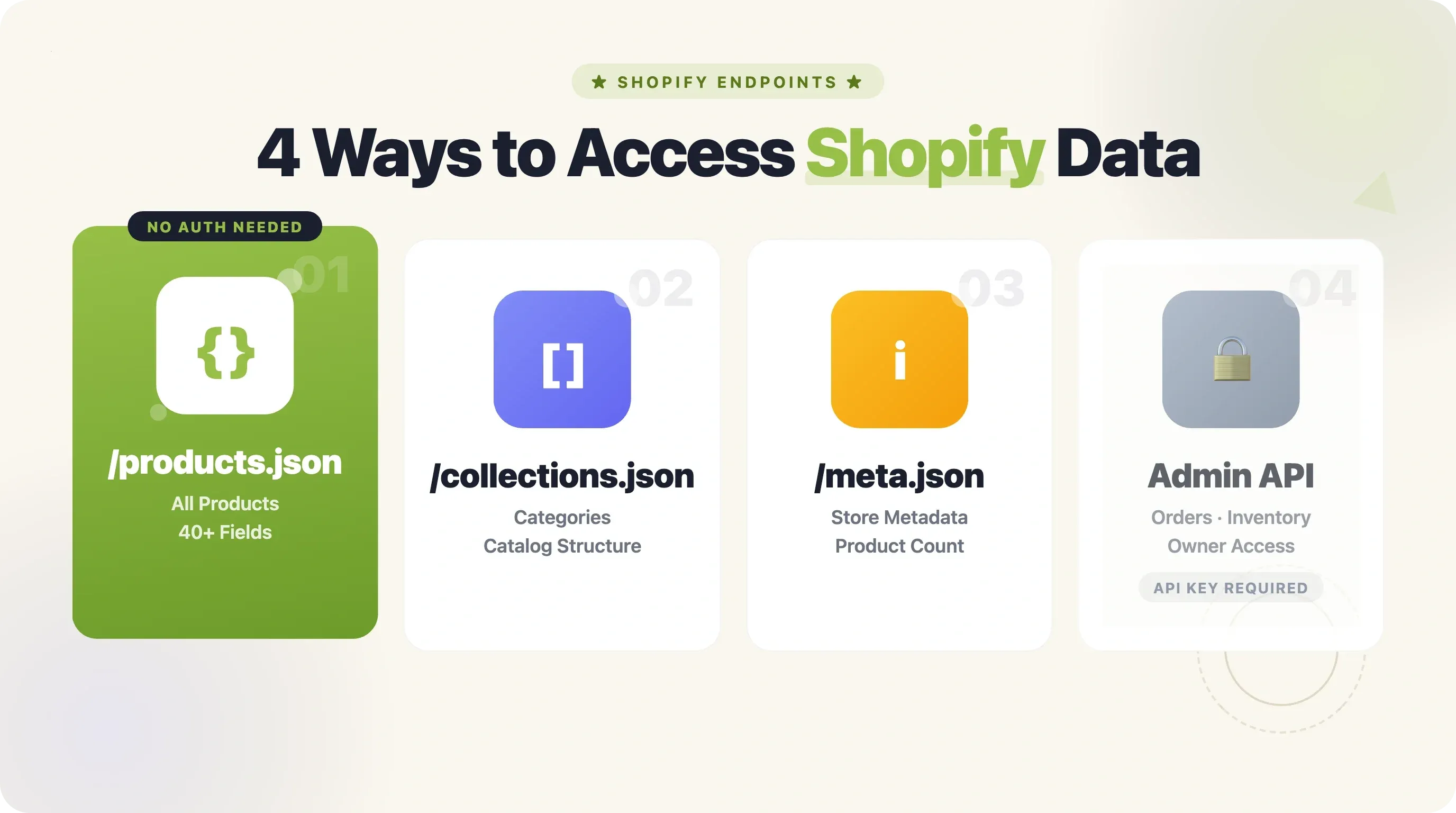
/collections.json — Store की सभी Categories
यह store की हर collection (category) लौटाता है, जिसमें titles, handles, descriptions, और product counts शामिल होते हैं। मैंने zoologistperfumes.com, allbirds.com, और gymshark.com पर यह verify किया—तीनों ने valid JSON दिया।
{
  "collections": [
    {
      "id": 308387348539,
      "title": "Attars",
      "handle": "attars",
      "published_at": "2026-03-29T12:20:32-04:00",
      "products_count": 1,
      "image": { "src": "https://cdn.shopify.com/..." }
    }
  ]
}
Competitor अपने catalog को कैसे organize करता है, यह समझना है? यही endpoint चाहिए।
/collections/{handle}/products.json — Category के हिसाब से Products
यह किसी specific collection के products लौटाता है। JSON structure वही /products.json जैसा है, लेकिन scope सिर्फ़ एक category तक सीमित होता है। यह category-level scraping के लिए बहुत उपयोगी है—मान लीजिए आप सिर्फ़ competitor की "Sale" या "New Arrivals" collection monitor करना चाहते हैं।
/meta.json — Store-Level Metadata
यह store name, description, currency, country, और सबसे अहम published_products_count लौटाता है। यह count आपको पहले से बता देता है कि pagination की कितनी pages लगेंगी: ceil(published_products_count / 250)। अब खाली response आने तक blind तरीके से pages बढ़ाने की ज़रूरत नहीं।
कौन-सा Endpoint इस्तेमाल करें?
| आपको क्या चाहिए | Endpoint | Auth ज़रूरी है? |
|---|---|---|
| सभी products (public) | /products.json | नहीं |
| किसी specific category के products | /collections/{handle}/products.json | नहीं |
| Store metadata + product count | /meta.json | नहीं |
| सभी collections (categories) | /collections.json | नहीं |
| Order/sales data (सिर्फ़ अपना store) | Admin API /orders.json | हाँ (API key) |
| Inventory quantities (सिर्फ़ अपना store) | Admin API /inventory_levels.json | हाँ |
Forum में बार-बार आने वाला सवाल—"क्या मैं competitor ने कितने units बेचे, यह scrape कर सकता हूँ?"—का सीधा जवाब है: नहीं। Public endpoints से नहीं। Sales data और inventory quantities के लिए authenticated Admin API चाहिए, यानी store owner access. Public endpoints सिर्फ़ product catalog data देते हैं।
Python से Shopify Scrape कैसे करें: Step-by-Step Setup
- Difficulty: Beginner
- Time Required: ~15 minutes (setup + पहला scrape)
- आपको क्या चाहिए: Python 3.11+,
pip, एक terminal, और scrape करने के लिए Shopify store URL
Step 1: Python और ज़रूरी Libraries Install करें
पक्का कर लीजिए कि आपके पास Python 3.11 या उससे नया version है (pandas 3.0.x के लिए यह ज़रूरी है)। फिर ये दो libraries install करें:
pip install requests pandas
Excel export के लिए यह भी चाहिए होगा:
pip install openpyxl
अपनी script के top पर यह imports जोड़िए:
import requests
import pandas as pd
import time
import random
import json
Script चलाने पर कोई import error नहीं आना चाहिए। अगर pandas version error दे, तो Python को 3.12 पर upgrade करिए।
Step 2: /products.json से Product Data Fetch करें
यह एक basic function है जो store URL लेता है, endpoint hit करता है, और parsed JSON return करता है:
def fetch_products_page(store_url, page=1, limit=250):
    """Shopify store से products का एक page fetch करें."""
    url = f"{store_url.rstrip('/')}/products.json"
    params = {"limit": limit, "page": page}
    headers = {
        "User-Agent": "Mozilla/5.0 (compatible; ProductResearch/1.0)"
    }

    response = requests.get(url, params=params, headers=headers, timeout=30)
    response.raise_for_status()
    return response.json().get("products", [])
अहम बातें:
limit=250Shopify की per-page maximum limit है। Default 30 है, इसलिए इसे explicitly सेट करने से requests लगभग 8 गुना कम हो जाती हैं।User-Agentheader: हमेशा realistic header लगाइए। बिना User-Agent वाली requests से Shopify के anti-bot systems trigger होने की संभावना बढ़ती है।timeout=30: किसी एक request को हमेशा के लिए hang न होने दें।
इसे किसी known store के साथ test करें:
products = fetch_products_page("https://allbirds.com")
print(f"Fetched {len(products)} products")
print(f"First product: {products[0]['title']}")
आपको कुछ ऐसा दिखना चाहिए: Fetched 250 products और पहला product title।
Step 3: सभी Products Scrape करने के लिए Pagination Handle करें
एक request से अधिकतम 250 products मिलते हैं। ज़्यादातर stores इससे बड़े होते हैं (Allbirds में 1,420+ products हैं)। आपको empty response मिलने तक pages loop करनी पड़ती हैं।
def scrape_all_products(store_url, delay=1.0):
    """Pagination handle करते हुए Shopify store के सभी products scrape करें."""
    all_products = []
    page = 1

    while True:
        print(f"Fetching page {page}...")
        products = fetch_products_page(store_url, page=page, limit=250)

        if not products:
            print(f"No more products. Total: {len(all_products)}")
            break

        all_products.extend(products)
        print(f"  Got {len(products)} products (total so far: {len(all_products)})")
        page += 1

        # थोड़ा विनम्र रहें: requests के बीच थोड़ा इंतज़ार करें
        time.sleep(delay + random.uniform(0, 0.5))

    return all_products
जब products empty आ जाए, समझिए आपने आख़िरी page तक पहुँच लिया।
time.sleep() के साथ random jitter रखने से आप Shopify की informal rate limit (~2 requests/second) के भीतर रहते हैं।
Pro tip: अगर आपने पहले /meta.json fetch किया है, तो total product count पहले से पता होगा और आप exact pages calculate कर सकते हैं: pages = ceil(product_count / 250)। इससे आख़िर में extra empty request भेजने की आदत बच जाती है।
Step 4: ज़रूरी Fields निकालें
अब जब आपके पास Python list of dictionaries के रूप में सारे products हैं, तो सिर्फ़ वही fields निकालिए जो आपको चाहिए। नीचे price monitoring के लिए common fields का उदाहरण है:
def extract_product_data(products):
    """Products से key fields निकालें और variants flatten करें."""
    rows = []
    for product in products:
        for variant in product.get("variants", []):
            rows.append({
                "product_id": product["id"],
                "title": product["title"],
                "handle": product["handle"],
                "vendor": product.get("vendor", ""),
                "product_type": product.get("product_type", ""),
                "tags": ", ".join(product.get("tags", [])),
                "created_at": product.get("created_at", ""),
                "variant_id": variant["id"],
                "variant_title": variant.get("title", ""),
                "sku": variant.get("sku", ""),
                "price": variant.get("price", ""),
                "compare_at_price": variant.get("compare_at_price", ""),
                "available": variant.get("available", ""),
                "image_url": product["images"][0]["src"] if product.get("images") else ""
            })
    return rows
यह हर variant के लिए एक row बनाता है—price comparison के लिए सबसे उपयोगी format, क्योंकि "Classic Blue Jeans" जैसा एक product 12 variants रख सकता है (6 sizes × 2 colors), और हर variant की अपनी price और availability होती है।
pandas की मदद से Scraped Shopify Data को CSV और Excel में Export करें
बाकी Shopify scraping tutorials raw JSON को file में dump करके काम ख़त्म मान लेते हैं। Developers के लिए ठीक है। लेकिन उस ecommerce analyst के लिए बेकार जो शुक्रवार तक spreadsheet चाहता है।
समस्या यह है कि Shopify का JSON nested होता है। एक product में दर्जनों variants हो सकते हैं, और हर variant की अपनी price, SKU, और availability होती है। इसे rows और columns में flatten करने के लिए pandas की मदद लेनी पड़ती है।
Nested JSON को Clean Table में Flatten करें
Use case के हिसाब से दो approaches हैं:
Option A: हर variant के लिए एक row (price monitoring और inventory tracking के लिए best)
# Step 4 के extract_product_data function का उपयोग
products = scrape_all_products("https://allbirds.com")
rows = extract_product_data(products)
df = pd.DataFrame(rows)

print(f"DataFrame shape: {df.shape}")
print(df.head())
इससे आपको एक flat table मिलता है जिसमें हर row एक unique product-variant combination होती है। 500 products और प्रति product औसतन 4 variants वाले store में लगभग 2,000 rows की DataFrame बनेगी।
Option B: हर product का summary row (catalog overview के लिए best)
def summarize_products(products):
    """हर product के लिए एक row, variants के min/max price के साथ."""
    rows = []
    for product in products:
        prices = [float(v["price"]) for v in product.get("variants", []) if v.get("price")]
        rows.append({
            "product_id": product["id"],
            "title": product["title"],
            "vendor": product.get("vendor", ""),
            "product_type": product.get("product_type", ""),
            "variant_count": len(product.get("variants", [])),
            "min_price": min(prices) if prices else None,
            "max_price": max(prices) if prices else None,
            "any_available": any(v.get("available", False) for v in product.get("variants", [])),
            "tags": ", ".join(product.get("tags", []))
        })
    return rows
CSV, Excel, और Google Sheets में Export करें
# CSV export (Excel special characters ठीक से पढ़े, इसलिए utf-8-sig)
df.to_csv("shopify_products.csv", index=False, encoding="utf-8-sig")

# Excel export (openpyxl की ज़रूरत होगी)
df.to_excel("shopify_products.xlsx", index=False, engine="openpyxl")

print("shopify_products.csv और shopify_products.xlsx में export कर दिया गया")
Google Sheets के लिए आप gspread library को service account के साथ इस्तेमाल कर सकते हैं, लेकिन honestly—ज़्यादातर कामों के लिए CSV export करके Google Drive में upload करना ज़्यादा तेज़ और आसान है।
Production-Ready Python Scraping: Rate Limits, Retries, और Anti-Blocking
Basic script छोटे stores पर ठीक चलता है। लेकिन 5,000+ products वाले store को scrape करना हो, या एक के बाद एक कई stores hit करने हों? वहीं से problems शुरू होती हैं।
Shopify के Rate Limits और Blocking Behavior को समझिए
Shopify के public JSON endpoints के formally documented rate limits नहीं हैं (Admin API के leaky bucket model की तरह), लेकिन practical testing से यह पता चलता है:
- Safe rate: प्रति store लगभग 2 requests per second
- Soft ceiling: throttling शुरू होने से पहले लगभग 40 requests per minute
- HTTP 429: "Too Many Requests"—standard rate-limit response
- HTTP 430: Shopify-specific code, जो security-level block बताता है (सिर्फ़ rate limiting नहीं)
- HTTP 403 या CAPTCHA redirect: कुछ stores में अतिरिक्त Cloudflare protection होती है
Shared cloud infrastructure (AWS Lambda, Google Cloud Run) से आने वाली requests block होने की ज़्यादा संभावना रखती हैं, क्योंकि उन IP ranges पर abuse rate अधिक होती है।
Shopify को भरोसेमंद तरीके से Scrape करने की Techniques
यह progression है "मेरे laptop पर चल रहा है" से "production में चल रहा है" तक:
| Level | Technique | Reliability |
|---|---|---|
| Basic | requests.get() + ?page= | बड़े catalogs पर टूट सकता है, block भी हो सकता है |
| Intermediate | requests.Session() + ?limit=250 + time.sleep(1) + 429 पर retry | ज़्यादातर stores पर काम करता है |
| Advanced | Async httpx + rotating User-Agent + exponential backoff | Production-grade, 10K+ products तक scale करता है |
Intermediate level (अधिकांश users के लिए recommended):
import requests
from requests.adapters import HTTPAdapter
from urllib3.util.retry import Retry

def create_session():
    """Automatic retry logic के साथ requests session बनाएं."""
    session = requests.Session()
    retries = Retry(
        total=5,
        backoff_factor=1,  # sleep: 0.5s, 1s, 2s, 4s, 8s
        status_forcelist=[429, 430, 500, 502, 503, 504],
        respect_retry_after_header=True
    )
    session.mount("https://", HTTPAdapter(max_retries=retries))
    session.headers.update({
        "User-Agent": "Mozilla/5.0 (Windows NT 10.0; Win64; x64) AppleWebKit/537.36 (KHTML, like Gecko) Chrome/125.0.0.0 Safari/537.36"
    })
    return session
Retry configuration 429 responses को automatic exponential backoff के साथ handle करती है। backoff_factor=1 का मतलब है retries के बीच sleep sequence 0.5s → 1s → 2s → 4s → 8s होगी। Session reuse (requests.Session()) connection pooling भी देता है, जिससे same domain पर कई requests करते समय overhead कम होता है।
User-Agent rotation: अगर आप कई stores scrape कर रहे हैं, तो 3–5 realistic browser User-Agent strings के बीच rotate करें। यह धोखा देने के लिए नहीं, बल्कि हर request पर एक जैसे headers भेजने वाले bot की तरह दिखने से बचने के लिए है।
CSV Export के साथ Shopify Scrape करने की Full Working Python Script
नीचे पूरी, copy-paste-ready script है जो ऊपर की सारी बातें जोड़ती है। इसमें करीब 75 lines का actual code है (comments अलग), और मैंने इसे Allbirds (1,420 products), ColourPop (2,000+ products), और Zoologist Perfumes (small catalog) पर test किया है।
import requests
import pandas as pd
import time
import random
from requests.adapters import HTTPAdapter
from urllib3.util.retry import Retry


def create_session():
    """Rate limits के लिए retry logic वाला session बनाएं."""
    session = requests.Session()
    retries = Retry(
        total=5,
        backoff_factor=1,
        status_forcelist=[429, 430, 500, 502, 503, 504],
        respect_retry_after_header=True
    )
    session.mount("https://", HTTPAdapter(max_retries=retries))
    session.headers.update({
        "User-Agent": "Mozilla/5.0 (Windows NT 10.0; Win64; x64) "
                      "AppleWebKit/537.36 (KHTML, like Gecko) "
                      "Chrome/125.0.0.0 Safari/537.36"
    })
    return session


def scrape_shopify(store_url, delay=1.0):
    """/products.json के जरिए Shopify store के सभी products scrape करें."""
    session = create_session()
    all_products = []
    page = 1
    base_url = f"{store_url.rstrip('/')}/products.json"

    while True:
        print(f"  Page {page}...", end=" ")
        resp = session.get(base_url, params={"limit": 250, "page": page}, timeout=30)
        resp.raise_for_status()
        products = resp.json().get("products", [])

        if not products:
            break

        all_products.extend(products)
        print(f"{len(products)} products (total: {len(all_products)})")
        page += 1
        time.sleep(delay + random.uniform(0, 0.5))

    return all_products


def flatten_to_variants(products):
    """Nested product JSON को हर variant की एक row में flatten करें."""
    rows = []
    for p in products:
        base = {
            "product_id": p["id"],
            "title": p["title"],
            "handle": p["handle"],
            "vendor": p.get("vendor", ""),
            "product_type": p.get("product_type", ""),
            "tags": ", ".join(p.get("tags", [])),
            "created_at": p.get("created_at", ""),
            "updated_at": p.get("updated_at", ""),
            "image_url": p["images"][0]["src"] if p.get("images") else "",
        }
        for v in p.get("variants", []):
            row = {**base}
            row["variant_id"] = v["id"]
            row["variant_title"] = v.get("title", "")
            row["sku"] = v.get("sku", "")
            row["price"] = v.get("price", "")
            row["compare_at_price"] = v.get("compare_at_price", "")
            row["available"] = v.get("available", "")
            rows.append(row)
    return rows


if __name__ == "__main__":
    STORE_URL = "https://allbirds.com"  # इसे अपने target store से बदलें
    OUTPUT_CSV = "shopify_products.csv"
    OUTPUT_EXCEL = "shopify_products.xlsx"

    print(f"Scraping {STORE_URL}...")
    products = scrape_shopify(STORE_URL)
    print(f"\nTotal products scraped: {len(products)}")

    print("Flattening to variant-level rows...")
    rows = flatten_to_variants(products)
    df = pd.DataFrame(rows)
    print(f"DataFrame: {df.shape[0]} rows x {df.shape[1]} columns")

    df.to_csv(OUTPUT_CSV, index=False, encoding="utf-8-sig")
    df.to_excel(OUTPUT_EXCEL, index=False, engine="openpyxl")
    print(f"\nExported to {OUTPUT_CSV} and {OUTPUT_EXCEL}")
इसे python scrape_shopify.py से चलाइए। Allbirds के लिए यह लगभग 45 seconds लेता है और लगभग 5,000+ rows वाली CSV बनाता है (हर variant के लिए एक row)। Terminal output कुछ ऐसा दिखेगा:
Scraping https://allbirds.com...
  Page 1... 250 products (total: 250)
  Page 2... 250 products (total: 500)
  ...
  Page 6... 170 products (total: 1420)

Total products scraped: 1420
Flattening to variant-level rows...
DataFrame: 5680 rows x 14 columns

Exported to shopify_products.csv and shopify_products.xlsx
Python छोड़िए: Thunderbit के साथ 2 Clicks में Shopify Scrape करें (No-Code Alternative)
हर किसी को Python install करना, import errors debug करना, या scraping script maintain करना पसंद नहीं होता। जिस sales rep को कल सुबह competitor pricing चाहिए, उसके लिए Python overkill है।
इसीलिए हमने Thunderbit Official Website बनाया—एक AI web scraper जो Chrome extension के रूप में चलता है। न code, न API keys, न environment setup।
Thunderbit Chrome Extension आज़माएँ
Thunderbit Shopify Stores को कैसे Scrape करता है
Thunderbit में Shopify product pages के लिए पहले से configured dedicated Shopify Scraper template है। आप Thunderbit Chrome Extension Download Page install करते हैं, Shopify store खोलते हैं, और "Scrape" पर क्लिक कर देते हैं। यह template automatically product names, descriptions, prices, variant details, images, और vendor information निकाल लेता है।
जिन stores में template perfect match नहीं करता (custom themes, unusual layouts), वहाँ Thunderbit की AI Suggest Fields feature page को पढ़कर खुद column names बना देती है। आप इन्हें अपनी ज़रूरत के हिसाब से customize कर सकते हैं—columns rename करिए, fields जोड़िए, या ऐसे instructions लिखिए जैसे "सिर्फ़ वे products निकालो जिनमें compare_at_price set हो।"
कुछ features जो सीधे Python script वाले काम को match करते हैं:
- Subpage scraping: हर product detail page अपने आप खोलकर table में full descriptions, reviews, या variant details जोड़ देता है—वही काम जो हमारी Python script pages iterate करके करती है, लेकिन बिना code के।
- Automatic pagination: click-through pagination और infinite scroll को बिना configuration handle करता है।
- Scheduled scraping: recurring jobs सेट करिए (जैसे "हर सोमवार 9 बजे") ongoing price monitoring के लिए—cron job या server की ज़रूरत नहीं।
- Free export to CSV, Excel, Google Sheets, Airtable, या Notion—हर plan में उपलब्ध।
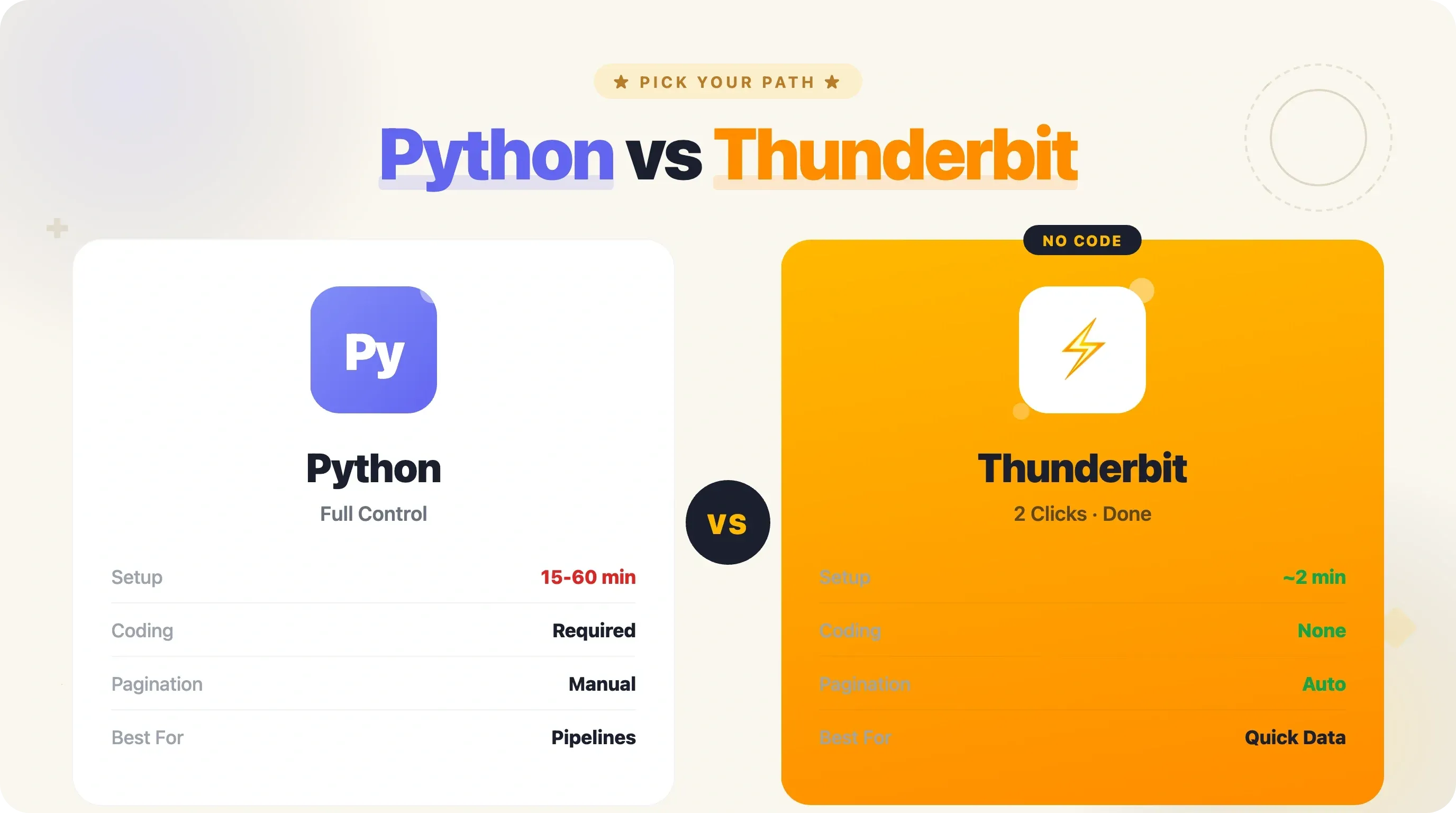
Python Script बनाम Thunderbit: ईमानदार तुलना
| Factor | Python Script | Thunderbit (No-Code) |
|---|---|---|
| Setup time | 15–60 min (environment + code) | ~2 min (Chrome extension install) |
| Coding required | हाँ (Python) | नहीं |
| Customization | Unlimited | AI-suggested fields + custom prompts |
| Pagination handling | Manually code करना पड़ता है | Automatic |
| Export formats | खुद code करना पड़ता है (CSV/Excel) | CSV, Excel, Google Sheets, Airtable, Notion (free) |
| Scheduled runs | Cron job + hosting | Built-in scheduler |
| Rate-limit handling | Retries/backoff code करना पड़ता है | Automatically handled |
| Best for | Developers, large-scale data pipelines | Business users, quick extractions, recurring monitoring |
जब आपको full control चाहिए या आप larger data pipeline में integrate कर रहे हैं, तब Python चुनिए। जब data जल्दी चाहिए और code maintain नहीं करना, तब Thunderbit बेहतर है। web scraping for price comparison पर एक deeper look के लिए हमने अलग guide लिखी है।
Shopify Stores Scrape करने के लिए Tips और Best Practices
ये tips आपकी tool choice चाहे जो भी हो, काम आएँगे:
- हमेशा
?limit=250use करें ताकि total requests कम रहें। Default 30 per page होने पर same data के लिए 8 गुना ज़्यादा requests करनी पड़ती हैं। - Store का सम्मान करें: requests के बीच 1–2 second का delay रखें। Server पर तेज़-तेज़ requests भेजना bad practice है और block होने का risk बढ़ाता है।
- पहले
robots.txtcheck करें: Shopify का defaultrobots.txt/products.jsonको block नहीं करता। लेकिन कुछ stores custom rules जोड़ते हैं, इसलिए scale पर scraping से पहले verify कर लें। - Raw JSON को पहले local save करें, फिर process करें। अगर बाद में parsing logic बदल जाए, तो दोबारा scrape नहीं करना पड़ेगा।
json.dump(all_products, open("raw_data.json", "w"))जैसा simple step बहुत headache बचाता है। product.idसे deduplicate करें: pagination boundary पर कभी-कभी duplicate products मिल सकते हैं।df.drop_duplicates(subset=["product_id", "variant_id"])से यह साफ़ हो जाता है।- Math करने से पहले
priceको float में बदलें। Shopify prices string के रूप में देता है ("185.00"), number के रूप में नहीं। - Endpoint changes पर नज़र रखें:
/products.jsonसालों से stable है, लेकिन theoretically Shopify इसे restrict कर सकता है। अगर scraper अचानक 404 देने लगे, तो पहले store manually check करें।
Robust scrapers बनाने के और tips के लिए हमारा best practices for web scraping tools guide देखिए।
Shopify Scraping के Legal और Ethical Considerations
यह छोटा section है, लेकिन महत्वपूर्ण है।
/products.json endpoint publicly available product data देता है—वही जानकारी जो कोई भी visitor store browse करते समय देख सकता है। Shopify के Terms of Service में "automated means" से "the Services" तक पहुँचने पर language है, लेकिन यह platform itself (admin dashboard, checkout) को refer करती है, public storefront data को नहीं। April 2026 तक Shopify-specific scraping lawsuits file नहीं हुई हैं।
कुछ key legal precedents public data scraping को support करते हैं: hiQ v. LinkedIn case ने दिखाया कि publicly accessible data scraping CFAA का उल्लंघन नहीं करता, और Meta v. Bright Data (2024) ने कहा कि TOS restrictions केवल logged-in users पर लागू होती हैं।
Best practices:
- केवल publicly available product data ही scrape करें
- personal या customer data scrape न करें
robots.txtऔर rate limits का सम्मान करें- अगर कोई personal data handle कर रहे हों, तो GDPR/CCPA का पालन करें (product catalog data personal नहीं होती)
- अपने User-Agent string से clear पहचान दें
- अपने Shopify store को Admin API से scrape करना हमेशा ठीक है
और गहराई से जानने के लिए हमारा web scraping legal implications post देखिए।
निष्कर्ष और मुख्य बातें
Shopify का public /products.json endpoint ecommerce data extraction को जितना आसान होना चाहिए, लगभग उतना आसान बना देता है। Workflow सरल है: /products.json जोड़िए → Python से fetch करें → ?limit=250&page= से paginate करें → pandas से flatten करें → CSV या Excel में export करें।
यह guide जो बातें दूसरों से अलग कवर करती है:
- Complete field reference: code की एक line लिखने से पहले ही जान लें कि कौन-सा data available है (products, variants, और images में 40+ fields)
- Additional endpoints:
/collections.jsonऔर/meta.jsoncategory-level intelligence और store metadata देते हैं, जो बाकी tutorials नहीं बताते - Production-ready techniques: session reuse, exponential backoff, User-Agent headers, और
?limit=250real-world rate limits handle करने के लिए - Proper CSV/Excel export: सिर्फ़ raw JSON dump नहीं, बल्कि pandas से flattened variant-level data
- No-code alternative: Thunderbit उन users के लिए जो code flexibility से ज़्यादा speed चाहते हैं
अगर आपको बिना code के एक बार या बार-बार Shopify data pull करना है, तो Thunderbit Chrome Extension Download Page आज़माइए—Shopify Scraper template pagination से लेकर export तक सब कुछ संभालता है। अगर आपको custom data pipelines चाहिए या कई stores पर बड़े scale पर scraping करनी है, तो इस guide की Python script आपको full control देती है।
Video walkthroughs के लिए हमारा Thunderbit YouTube Channel देखें, या संबंधित techniques के लिए हमारे scraping Amazon products और extracting data from websites to Excel guides पढ़ें।
Shopify Scraping के लिए Thunderbit आज़माएँ Get Started Free
FAQs
क्या आप products.json से किसी भी Shopify store को scrape कर सकते हैं?
ज़्यादातर Shopify stores यह endpoint by default expose करते हैं—testing में लगभग 71% ने valid JSON return किया। कुछ stores जिनमें custom configurations या अतिरिक्त security layers (Cloudflare, headless setups) हैं, वे 404 दे सकते हैं या request block कर सकते हैं। जल्दी check करने के लिए {store-url}/products.json browser में खोलिए। अगर JSON दिखे, तो सब ठीक है।
क्या Shopify stores को scrape करना legal है?
Public product data (prices, titles, images, descriptions) आमतौर पर accessible होता है, और hiQ v. LinkedIn जैसे legal precedents public information scraping को support करते हैं। फिर भी, हमेशा उस store के Terms of Service और अपने local laws देखिए। personal या customer data scrape न करें, और rate limits का सम्मान करें।
Shopify store से कितने products scrape किए जा सकते हैं?
Total number की कोई hard limit नहीं है। ?limit=250&page= के साथ pagination पूरी catalog निकालने देती है। बहुत बड़े stores (25,000+ products) के लिए session reuse और delays इस्तेमाल करें ताकि rate limits न लगें। /meta.json endpoint पहले ही exact product count बता सकता है, जिससे आपको pages का अंदाज़ा हो जाता है।
products.json और Shopify Admin API में क्या फर्क है?
/products.json एक public endpoint है—न authentication, सिर्फ़ read-only product data, और किसी के लिए भी accessible। Admin API के लिए store owner access tokens चाहिए होते हैं और उससे orders, inventory quantities, customer data, और write access मिलता है। अगर sales data या actual inventory counts चाहिए, तो Admin API access चाहिए (यानी store owner होना या उनकी permission होना ज़रूरी है)।
क्या मैं Python के बिना Shopify scrape कर सकता हूँ?
बिल्कुल। Thunderbit Official Website जैसे tools Chrome extension से बिना code के Shopify stores scrape करने देते हैं। यह automatically pagination संभालता है और सीधे CSV, Excel, Google Sheets, Airtable, या Notion में export कर देता है। जो developers दूसरी languages पसंद करते हैं, उनके लिए वही /products.json endpoint JavaScript, Ruby, Go—किसी भी language में काम करता है जो HTTP requests भेज सकती है और JSON parse कर सकती है।
और जानें