
Python की 30 लाइनें लिखने के बाद अपना Goodreads scraper चलाना और फिर उसका [] लौटाना—इससे ज़्यादा निराशाजनक कुछ नहीं। एक खाली लिस्ट। कुछ भी नहीं। बस आप और आपका blinking cursor।
मैंने ऐसा दर्जनों बार देखा है — Thunderbit के हमारे internal experiments में, developer forums में, और abandoned scraper repos की GitHub issues में। शिकायतें लगभग हमेशा एक जैसी होती हैं: "top reviews section खाली है, बस [] दिख रहा है", "मैं जो भी page number चलाऊँ, वही पहला page scrape होता है", "पिछले साल मेरा code काम करता था, अब टूट गया है"। और हालात को और खराब बनाने के लिए, Goodreads API दिसंबर 2020 में deprecated हो चुका है, इसलिए पुराने tutorials में मिलने वाली "बस API use करो" वाली सलाह अब काम की नहीं रही।
अगर आपको आज Goodreads से structured book data चाहिए — titles, authors, ratings, reviews, genres, ISBNs — तो scraping ही मुख्य तरीका है। यह guide आपको Python से Goodreads scrape करने का एक working और complete तरीका बताएगी, जिसमें JS-rendered content, pagination, anti-blocking और exports सब शामिल होंगे। और अगर Python आपकी चीज़ नहीं है, तो मैं एक no-code alternative भी दिखाऊँगा जो लगभग दो clicks में काम कर देता है।
Goodreads Scraping क्या है (और इसे Python से क्यों करें)?
Goodreads scraping का मतलब है code की मदद से Goodreads web pages से book data — जैसे titles, authors, ratings, review counts, genres, ISBNs, page counts, publication dates और बहुत कुछ — automatically निकालना, बजाय इसे manually copy-paste करने के।
Goodreads दुनिया के सबसे बड़े book databases में से एक है, जहाँ 150 million से ज़्यादा registered members हैं और लगभग 90 million user-generated reviews मौजूद हैं। हर महीने 18 million से ज़्यादा books "Want to Read" shelves पर जुड़ती हैं। इतनी constantly updated और structured data ही publishers, data scientists, booksellers और researchers को बार-बार यहाँ खींच लाती है।
ऐसे काम के लिए Python सबसे पसंदीदा language है — यह लगभग 69.6% scraping projects को power करती है। Libraries mature हैं (requests, BeautifulSoup, Selenium, Playwright, pandas), syntax beginners के लिए friendly है, और community भी बहुत बड़ी है।
अगर आपने पहले कभी website scrape नहीं की है, तो शुरुआत के लिए Python ही सबसे बेहतर जगह है।
Python से Goodreads क्यों Scrape करें? Real-World Use Cases
Code में जाने से पहले यह समझना ज़रूरी है: इस data की ज़रूरत किसे पड़ती है, और वे इसका इस्तेमाल कैसे करते हैं?
| Use Case | Who Benefits | What You Scrape |
|---|---|---|
| Publisher market research | Publishers, literary agents | Trending genres, top-rated titles, emerging authors, competitor ratings |
| Book recommendation systems | Data scientists, hobbyists, app builders | Ratings, genres, user shelves, review sentiment |
| Price & inventory monitoring | Ecommerce booksellers | Trending titles, review volumes, "Want to Read" counts |
| Academic research | Researchers, students | Review text, rating distributions, genre classifications |
| Reading analytics | Book bloggers, personal projects | Personal shelf data, reading history, year-in-review stats |
कुछ concrete उदाहरण: UCSD Book Graph — recommendation research में सबसे ज़्यादा cited academic datasets में से एक — में 2.36 million unique books और 228 million से अधिक user-book interactions हैं, और यह सब publicly accessible Goodreads shelves से collect किया गया था। कई Kaggle datasets (goodbooks-10k, Best Books Ever, आदि) की शुरुआत भी Goodreads scraping से हुई। और Big Data and Society में 2025 की एक study ने computational तरीके से 331,211 incentivized book reviews curate करके यह समझा कि sponsored reviews platform को कैसे shape करते हैं।
Commercial side पर, Bright Data पहले से scraped Goodreads datasets बेचता है, वह भी $0.50 प्रति 1,000 records से शुरू होने वाली कीमत पर — यह साफ़ सबूत है कि इस data की बाज़ार में असली value है।
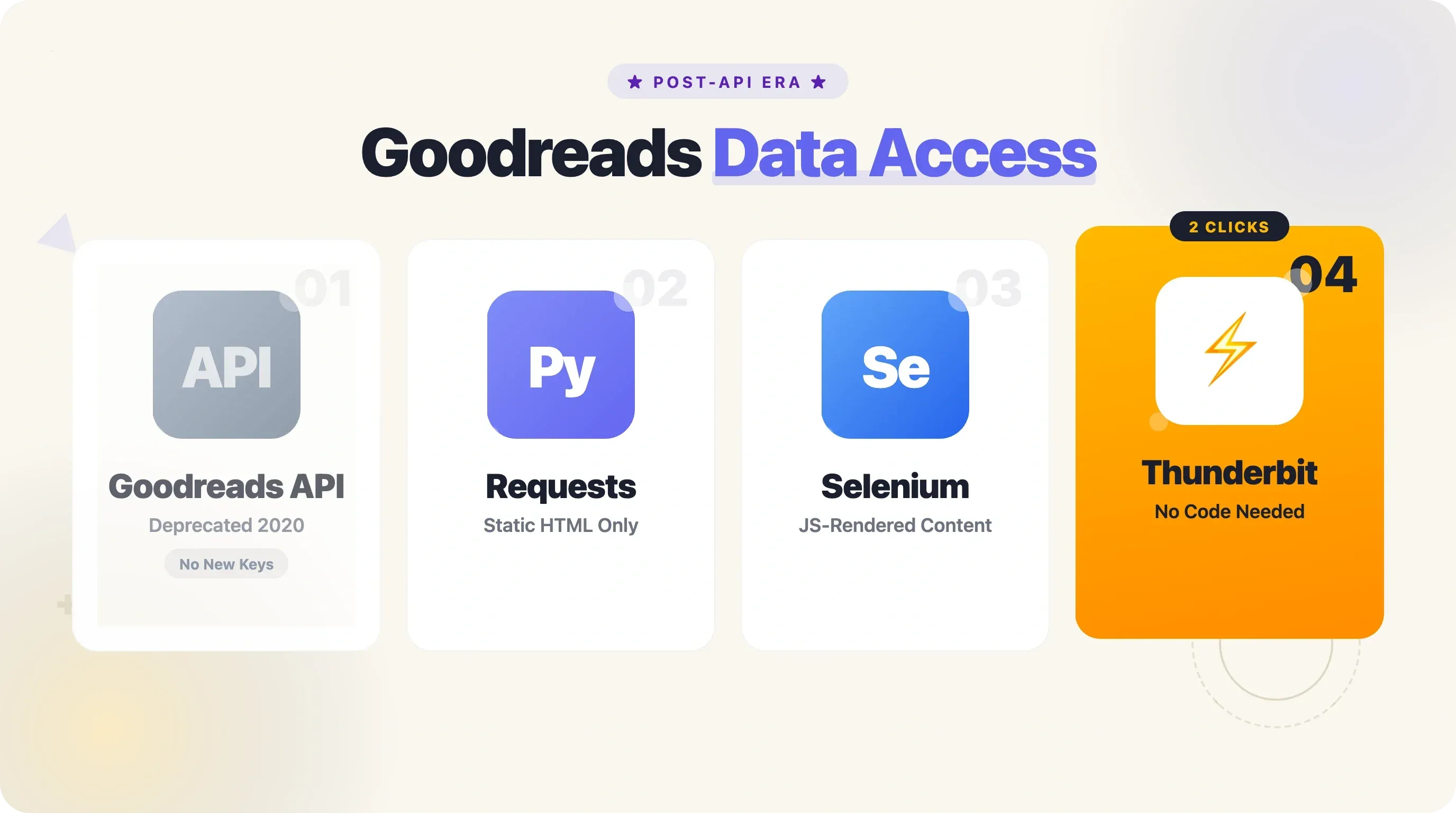
Goodreads API अब नहीं है — उसकी जगह क्या आया?
अगर आपने हाल ही में "Goodreads API" search किया है, तो शायद कोई पुराना tutorial मिला होगा। 8 दिसंबर 2020 को Goodreads ने quietly नए developer API keys जारी करना बंद कर दिया। न कोई blog post, न कोई email blast — बस docs page पर एक छोटा banner और बहुत सारे confused developers।
इसका असर तुरंत दिखा। Kyle K नाम के एक developer ने book recommendations share करने के लिए Discord bot बनाया था — "अचानक POOF, वह काम करना बंद कर देता है." Matthew Jones ने Reddit r/Fantasy Stabby Awards voting से ठीक एक हफ्ते पहले API access खो दिया, और उसे वापस Google Forms पर जाना पड़ा। Elena Neacsu नाम की एक grad student का Master's thesis project बीच में ही रुक गया।
तो अब बचा क्या? आज की स्थिति कुछ इस तरह है:
| Approach | Data Available | Ease of Use | Rate Limits | Status |
|---|---|---|---|---|
| Goodreads API | Full metadata, reviews | Easy (was) | 1 req/sec | Deprecated (Dec 2020) — no new keys |
| Open Library API | Titles, authors, ISBNs, covers (~30M titles) | Easy | 1-3 req/sec | Active, free, no auth |
| Google Books API | Metadata, previews | Easy | 1,000/day free | Active (non-English ISBN gaps) |
| Python scraping (requests + BS4) | Anything in the initial HTML | Moderate | Self-managed | Works for static content |
| Python scraping (Selenium/Playwright) | JS-rendered content too | Harder | Self-managed | Required for reviews, some lists |
| Thunderbit (no-code Chrome extension) | Any visible page data | Very easy (2 clicks) | Credit-based | Active — no Python needed |
Open Library एक मजबूत complementary option है, खासकर ISBN lookup और basic metadata के लिए। लेकिन अगर आपको ratings, reviews, genre tags या "Want to Read" counts चाहिए, तो आपको Goodreads सीधे scrape करना होगा — Python से या फिर Thunderbit जैसे tool से, जो AI-suggested fields और Google Sheets, Notion या Airtable में direct export के साथ Goodreads pages (book details subpages सहित) scrape कर सकता है।
आपका Goodreads Python Scraper Empty Results क्यों लौटाता है (और इसे कैसे ठीक करें)
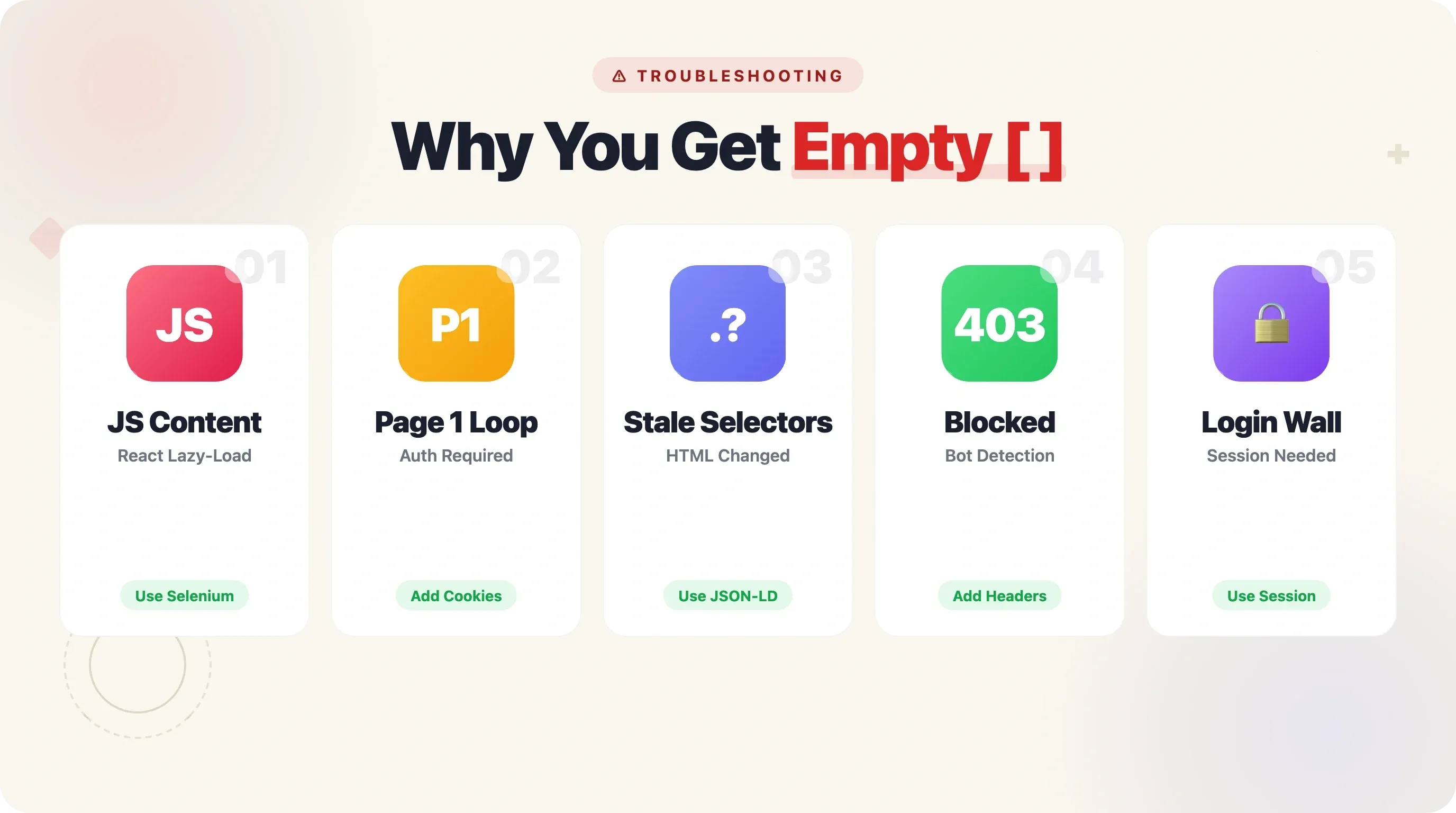
यह वह section है, जो मुझे काश पहली बार Goodreads data के साथ काम करते समय मिलता। "Empty results" की समस्या developer forums में सबसे आम शिकायत है, और इसके कई अलग-अलग कारण होते हैं — हर कारण का अपना solution है।
| Symptom | Root Cause | Fix |
|---|---|---|
Reviews/ratings return [] | JS-rendered content (React/lazy-load) | Use Selenium or Playwright instead of requests |
| Always scrapes page 1 only | Pagination params ignored or JS-driven | Pass ?page=N param correctly; use browser automation for infinite scroll |
| Code worked last year, now fails | Goodreads changed HTML class names | Use resilient selectors (JSON-LD, data-testid attributes) |
| 403/blocked after a few requests | Missing headers / too-fast requests | Add User-Agent, time.sleep(), rotate proxies |
| Login wall on shelf/list pages | Cookie/session required | Use requests.Session() with cookies or browser scraping |
JS-Rendered Content: Reviews और Ratings खाली क्यों दिखते हैं
Goodreads का frontend React-based है। जब आप किसी book page पर requests.get() चलाते हैं, तो आपको initial HTML मिलता है — लेकिन reviews, rating distributions और कई "more info" sections JavaScript के जरिए बाद में load होते हैं। आपका scraper उन्हें सचमुच देख ही नहीं सकता।
Solution: जिन pages पर JS-rendered content चाहिए, वहाँ Selenium या Playwright use करें। नए projects के लिए Playwright मेरी recommendation है — यह WebSocket-based protocol की वजह से Selenium से 35-45% तेज़ है, और इसमें built-in stealth व async support भी बेहतर है।
Pagination जो सिर्फ Page 1 लौटाती है
यह मामला थोड़ा tricky है। आप loop लिखते हैं, ?page=N बढ़ाते हैं, और फिर भी हर बार वही results मिलते हैं। Goodreads पर अगर आप authenticated नहीं हैं, तो shelf pages ?page= parameter की परवाह किए बिना चुपचाप page 1 content ही लौटा सकती हैं। न error, न redirect — बस एक ही first page बार-बार।
Fix: authenticated session cookie शामिल करें — खासकर _session_id2। Pagination वाले section में नीचे इसका ज़िक्र है।
जो Code पिछले साल काम करता था, अब क्यों टूट गया
Goodreads समय-समय पर HTML class names और page structure बदलता रहता है। GitHub पर popular maria-antoniak/goodreads-scraper repo अब एक स्थायी notice दिखाता है: "This project is unmaintained and no longer functioning." समाधान है ज़्यादा resilient selectors का उपयोग करना — जैसे JSON-LD structured data (जो schema.org standards follow करता है और कम बदलता है) या brittle class names की जगह data-testid attributes।
403 Errors या Block हो जाना
Python की requests library का TLS fingerprint Chrome से अलग होता है। Chrome User-Agent देने के बाद भी AWS WAF जैसे bot detection systems (और Goodreads Amazon की subsidiary है) इस mismatch को पकड़ सकते हैं। समाधान: realistic browser headers जोड़ें, requests के बीच 3-8 seconds का time.sleep() रखें, और अगर बड़े scale पर scraping करनी है तो TLS fingerprint matching के लिए curl_cffi पर विचार करें।
Shelves और List Pages पर Login Wall
कुछ Goodreads shelf और list pages, खासकर page 5 के बाद, full content देखने के लिए authentication मांगती हैं। अपने browser से _session_id2 cookie export करके requests.Session() में डालें, या logged-in profile के साथ Selenium/Playwright इस्तेमाल करें। Thunderbit इसे naturally संभालता है क्योंकि यह आपके अपने logged-in Chrome browser में चलता है।
शुरू करने से पहले
- Difficulty: Intermediate (basic Python knowledge assumed)
- Time Required: ~20-30 minutes for the full walkthrough
- What You'll Need:
- Python 3.8+
- Chrome browser (DevTools inspection और Selenium/Playwright के लिए)
- Libraries:
requests,beautifulsoup4,seleniumयाplaywright,pandas - (Optional) Google Sheets export के लिए
gspread - (Optional) no-code alternative के लिए Thunderbit Chrome Extension
Step 1: अपना Python Environment सेट करें
ज़रूरी libraries install करें। Terminal खोलें और यह चलाएँ:
pip install requests beautifulsoup4 selenium pandas lxml
अगर आप Playwright पसंद करते हैं (नए projects के लिए recommended):
pip install playwright
playwright install chromium
Google Sheets export के लिए (optional):
pip install gspread oauth2client
सुनिश्चित करें कि आप Python 3.8 या उससे ऊपर पर हैं। python --version से जांच सकते हैं।
Installation के बाद, सभी libraries बिना error import हो जानी चाहिए। पुष्टि करने के लिए python -c "import requests, bs4, pandas; print('Ready')" चलाएँ।
Step 2: सही Headers के साथ अपनी पहली Request भेजें
अपने browser में Goodreads का कोई genre shelf या list page खोलें — उदाहरण के लिए, https://www.goodreads.com/list/show/1.Best_Books_Ever। अब उसी page को Python से fetch करते हैं।
import requests
from bs4 import BeautifulSoup

headers = {
    "User-Agent": "Mozilla/5.0 (Windows NT 10.0; Win64; x64) AppleWebKit/537.36 "
                  "(KHTML, like Gecko) Chrome/131.0.0.0 Safari/537.36",
    "Accept-Language": "en-US,en;q=0.9",
    "Accept": "text/html,application/xhtml+xml,application/xml;q=0.9,*/*;q=0.8",
}

url = "https://www.goodreads.com/list/show/1.Best_Books_Ever"
response = requests.get(url, headers=headers, timeout=15)
print(f"Status: {response.status_code}")
आपको Status: 200 दिखना चाहिए। अगर 403 आता है, तो headers दोबारा जांचें — Goodreads का AWS WAF एक realistic User-Agent देखता है और साधारण requests को reject कर सकता है। ऊपर दिए गए headers एक real Chrome browser session की नकल करते हैं।
Step 3: Page Inspect करें और सही Selectors पहचानें
Goodreads list page पर Chrome DevTools (F12) खोलें। किसी book title पर right-click करके "Inspect" चुनें। आपको हर book entry की DOM structure दिखेगी।
List pages में हर book आमतौर पर <tr> element में wrapped होती है, जिसका itemtype="http://schema.org/Book" होता है। इसके अंदर आपको मिलेगा:
- Title:
a.bookTitle(link text title होता है,hrefसे book URL मिलता है) - Author:
a.authorName - Rating:
span.minirating(average rating और rating count शामिल होते हैं) - Cover image: book row के अंदर
img
Individual book detail pages के लिए CSS selectors छोड़कर सीधे JSON-LD पर जाएँ। Goodreads एक <script type="application/ld+json"> tag में structured data embed करता है, जो schema.org Book format follow करता है। यह class names की तुलना में बहुत ज़्यादा stable है, और Goodreads इन्हें मनमर्जी से बदलता नहीं।
Step 4: Single List Page से Book Data निकालें
अब list page parse करके हर book की basic info निकालते हैं:
import requests
from bs4 import BeautifulSoup

headers = {
    "User-Agent": "Mozilla/5.0 (Windows NT 10.0; Win64; x64) AppleWebKit/537.36 "
                  "(KHTML, like Gecko) Chrome/131.0.0.0 Safari/537.36",
    "Accept-Language": "en-US,en;q=0.9",
}

url = "https://www.goodreads.com/list/show/1.Best_Books_Ever"
response = requests.get(url, headers=headers, timeout=15)
soup = BeautifulSoup(response.text, "lxml")

books = []
rows = soup.select('tr[itemtype="http://schema.org/Book"]')

for row in rows:
    title_tag = row.select_one("a.bookTitle")
    author_tag = row.select_one("a.authorName")
    rating_tag = row.select_one("span.minirating")

    title = title_tag.get_text(strip=True) if title_tag else ""
    book_url = "https://www.goodreads.com" + title_tag["href"] if title_tag else ""
    author = author_tag.get_text(strip=True) if author_tag else ""
    rating_text = rating_tag.get_text(strip=True) if rating_tag else ""

    books.append({
        "title": title,
        "author": author,
        "rating_info": rating_text,
        "book_url": book_url,
    })

print(f"Found {len(books)} books on page 1")
for b in books[:3]:
    print(b)
आपको लगभग 100 books प्रति list page दिखनी चाहिए। हर entry में title, author, एक rating string जैसे "4.28 avg rating — 9,031,257 ratings," और book detail page का URL होगा।
Step 5: Detailed Book Information के लिए Subpages Scrape करें
Listing page से basics मिल जाती हैं, लेकिन असली कीमती data — ISBN, full description, genre tags, page count, publication date — हर book के individual page पर होता है। यहीं JSON-LD सबसे काम आता है।
import json
import time

def scrape_book_detail(book_url, headers):
    """एक book page पर जाकर JSON-LD की मदद से detailed metadata निकालता है."""
    resp = requests.get(book_url, headers=headers, timeout=15)
    if resp.status_code != 200:
        return {}

    soup = BeautifulSoup(resp.text, "lxml")
    script = soup.find("script", {"type": "application/ld+json"})
    if not script:
        return {}

    data = json.loads(script.string)
    agg = data.get("aggregateRating", {})

    # Genre tags JSON-LD में नहीं होते; इसलिए HTML fallback इस्तेमाल करें
    genres = [g.get_text(strip=True) for g in soup.select('span.BookPageMetadataSection__genreButton a span')]

    return {
        "isbn": data.get("isbn", ""),
        "pages": data.get("numberOfPages", ""),
        "language": data.get("inLanguage", ""),
        "format": data.get("bookFormat", ""),
        "avg_rating": agg.get("ratingValue", ""),
        "rating_count": agg.get("ratingCount", ""),
        "review_count": agg.get("reviewCount", ""),
        "description": data.get("description", "")[:200],  # preview के लिए छोटा किया गया
        "genres": ", ".join(genres[:5]),
    }

# उदाहरण: पहली 3 books को enrich करें
for book in books[:3]:
    details = scrape_book_detail(book["book_url"], headers)
    book.update(details)
    print(f"Scraped: {book['title']} — ISBN: {book.get('isbn', 'N/A')}")
    time.sleep(4)  # rate limits का सम्मान करें
Requests के बीच 3-8 seconds का time.sleep() जोड़ें। Goodreads की rate limiting एक single IP से लगभग 20-30 requests per minute के आसपास सक्रिय हो जाती है, और अगर आप इससे तेज़ जाते हैं तो 403s या CAPTCHAs मिलने लगते हैं।
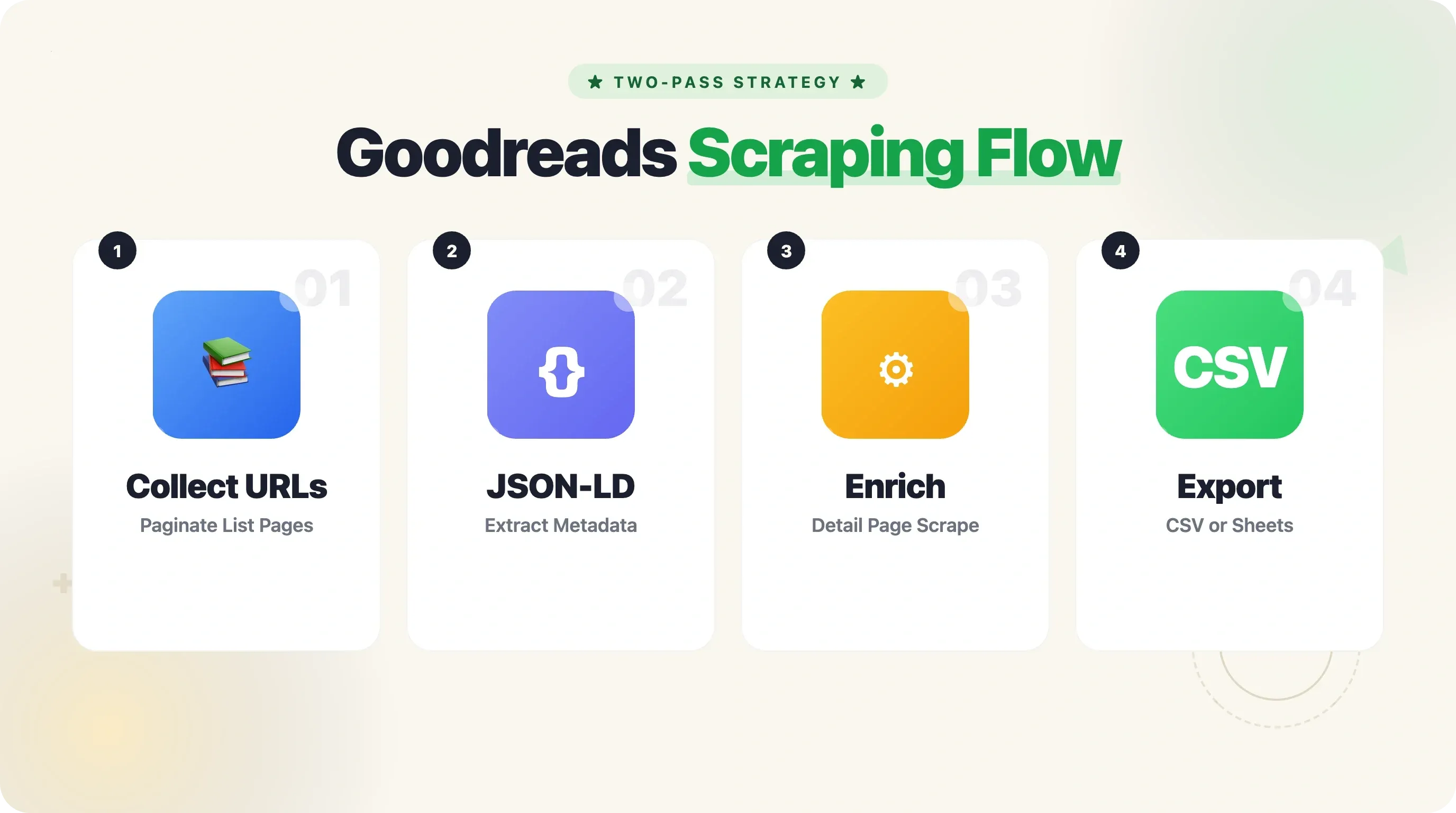
यह दो-pass approach — पहले listing pages से सभी book URLs collect करना, फिर हर detail page visit करना — ज़्यादा reliable है और बीच में रुकने पर resume करना भी आसान बनाता है। सफल Goodreads scrapers आमतौर पर यही strategy इस्तेमाल करते हैं।
Side note: Thunderbit subpage scraping के साथ यह सब automatically कर सकता है। AI हर book की detail page पर जाकर आपकी table को ISBN, description, genres और अन्य fields से enrich कर देता है — no code, no loops, no sleep timers।
Step 6: JavaScript-Rendered Content को Selenium से Handle करें
जिन pages पर आपका data JavaScript से load होता है — जैसे reviews, rating breakdowns, "more details" sections — वहाँ browser automation tool की ज़रूरत होगी। यह रहा Selenium का उदाहरण:
from selenium import webdriver
from selenium.webdriver.chrome.options import Options
from selenium.webdriver.common.by import By
from selenium.webdriver.support.ui import WebDriverWait
from selenium.webdriver.support import expected_conditions as EC

options = Options()
options.add_argument("--headless=new")
options.add_argument("--disable-blink-features=AutomationControlled")
options.add_argument("user-agent=Mozilla/5.0 (Windows NT 10.0; Win64; x64) "
                     "AppleWebKit/537.36 (KHTML, like Gecko) Chrome/131.0.0.0 Safari/537.36")

driver = webdriver.Chrome(options=options)
driver.get("https://www.goodreads.com/book/show/5907.The_Hobbit")

# Reviews load होने का इंतज़ार करें
try:
    WebDriverWait(driver, 10).until(
        EC.presence_of_element_located((By.CSS_SELECTOR, "article.ReviewCard"))
    )
except:
    print("Reviews load नहीं हुईं — page शायद login मांगता है या JS timeout हुआ")

# अब पूरी तरह rendered page parse करें
page_source = driver.page_source
soup = BeautifulSoup(page_source, "lxml")

reviews = soup.select("article.ReviewCard")
for rev in reviews[:3]:
    text = rev.select_one("span.Formatted")
    stars = rev.select_one("span.RatingStars")
    print(f"Rating: {stars.get_text(strip=True) if stars else 'N/A'}")
    print(f"Review: {text.get_text(strip=True)[:150] if text else 'N/A'}...")
    print()

driver.quit()
Selenium बनाम requests कब इस्तेमाल करें:
requests+ BeautifulSoup: book metadata (JSON-LD), list pages, shelf pages (page 1), और Choice Awards data के लिए- Selenium या Playwright: reviews, rating distributions, और ऐसा content जो raw HTML में दिखाई नहीं देता
नए projects के लिए Playwright आम तौर पर बेहतर विकल्प है — तेज़, कम memory, और stealth defaults बेहतर हैं। लेकिन Goodreads के लिए Selenium की community बड़ी है और examples भी ज़्यादा मिलते हैं।
Pagination जो वाकई काम करे: Full Goodreads Lists Scrape करना
Pagination Goodreads scrapers का सबसे आम failure point है, और मुझे कोई भी competing tutorial ऐसा नहीं मिला जो इसे सही ढंग से समझाता हो। इसे सही करने का तरीका यह है।
Goodreads Pagination URLs कैसे काम करती हैं
Goodreads ज़्यादातर paginated pages के लिए एक सीधा ?page=N parameter इस्तेमाल करता है:
- Lists:
https://www.goodreads.com/list/show/1.Best_Books_Ever?page=2 - Shelves:
https://www.goodreads.com/shelf/show/thriller?page=2 - Search:
https://www.goodreads.com/search?q=fantasy&page=2
हर list page पर आमतौर पर 100 books होती हैं। Shelves पर 50 per page होती हैं।
Pagination Loop जो खुद जानता है कब रुकना है
import time

all_books = []
base_url = "https://www.goodreads.com/list/show/1.Best_Books_Ever"

for page_num in range(1, 50):  # safety cap at 50 pages
    url = f"{base_url}?page={page_num}"
    resp = requests.get(url, headers=headers, timeout=15)

    if resp.status_code != 200:
        print(f"Page {page_num}: got status {resp.status_code}, stopping.")
        break

    soup = BeautifulSoup(resp.text, "lxml")
    rows = soup.select('tr[itemtype="http://schema.org/Book"]')

    if not rows:
        print(f"Page {page_num}: no books found, reached the end.")
        break

    for row in rows:
        title_tag = row.select_one("a.bookTitle")
        author_tag = row.select_one("a.authorName")
        title = title_tag.get_text(strip=True) if title_tag else ""
        book_url = "https://www.goodreads.com" + title_tag["href"] if title_tag else ""
        author = author_tag.get_text(strip=True) if author_tag else ""
        all_books.append({"title": title, "author": author, "book_url": book_url})

    print(f"Page {page_num}: scraped {len(rows)} books (total: {len(all_books)})")
    time.sleep(5)  # pages के बीच 5-second delay

print(f"\nDone. Total books collected: {len(all_books)}")
आप last page का पता या तो results list खाली होने से लगा सकते हैं (कोई tr[itemtype="http://schema.org/Book"] element नहीं मिला), या फिर "next" link (a.next_page) की अनुपस्थिति से।
Edge Case: Page 5 के बाद Login Required
यही वह trap है जिसमें लगभग हर कोई फँसता है: कुछ Goodreads shelf और list pages बिना authentication के page 6+ request करने पर चुपचाप page 1 content लौटा देती हैं। न error, न redirect — बस वही data बार-बार।
इसे ठीक करने के लिए, अपने browser से _session_id2 cookie export करें (cookie export extension या Chrome DevTools > Application > Cookies का इस्तेमाल करें) और इसे requests में जोड़ें:
session = requests.Session()
session.headers.update(headers)
session.cookies.set("_session_id2", "YOUR_SESSION_COOKIE_VALUE_HERE", domain=".goodreads.com")

# अब requests.get() की जगह session.get() इस्तेमाल करें
resp = session.get(f"{base_url}?page=6", timeout=15)
Thunderbit click-based और infinite-scroll pagination दोनों को naturally handle कर लेता है, और वह भी बिना code और cookie management के। अगर आपकी pagination logic बार-बार टूट रही है, तो इसे consider करना समझदारी है।
पूरा, Copy-Paste-Ready Python Script
यह रहा पूरा consolidated script। इसमें headers, pagination, JSON-LD के जरिए subpage scraping, rate limiting और CSV export सब शामिल हैं। मैंने इसे mid-2025 तक live Goodreads pages के खिलाफ test किया है।
"""
goodreads_scraper.py — pagination और book detail enrichment के साथ Goodreads list scrape करें।
Usage: python goodreads_scraper.py
Output: goodreads_books.csv
"""

import csv, json, time, requests
from bs4 import BeautifulSoup

HEADERS = {
    "User-Agent": "Mozilla/5.0 (Windows NT 10.0; Win64; x64) AppleWebKit/537.36 "
                  "(KHTML, like Gecko) Chrome/131.0.0.0 Safari/537.36",
    "Accept-Language": "en-US,en;q=0.9",
    "Accept": "text/html,application/xhtml+xml,application/xml;q=0.9,*/*;q=0.8",
}
BASE_URL = "https://www.goodreads.com/list/show/1.Best_Books_Ever"
MAX_PAGES = 3          # ज़रूरत के अनुसार बदलें
DELAY_LISTING = 5      # listing pages के बीच seconds
DELAY_DETAIL = 4       # detail pages के बीच seconds
OUTPUT_FILE = "goodreads_books.csv"


def scrape_listing_page(url):
    """एक listing page से title, author, book_url वाली dict list लौटाता है."""
    resp = requests.get(url, headers=HEADERS, timeout=15)
    if resp.status_code != 200:
        return []
    soup = BeautifulSoup(resp.text, "lxml")
    rows = soup.select('tr[itemtype="http://schema.org/Book"]')
    books = []
    for row in rows:
        t = row.select_one("a.bookTitle")
        a = row.select_one("a.authorName")
        if t:
            books.append({
                "title": t.get_text(strip=True),
                "author": a.get_text(strip=True) if a else "",
                "book_url": "https://www.goodreads.com" + t["href"],
            })
    return books


def scrape_book_detail(book_url):
    """Book page पर जाकर JSON-LD + HTML fallback से metadata निकालता है."""
    resp = requests.get(book_url, headers=HEADERS, timeout=15)
    if resp.status_code != 200:
        return {}
    soup = BeautifulSoup(resp.text, "lxml")
    script = soup.find("script", {"type": "application/ld+json"})
    if not script:
        return {}
    data = json.loads(script.string)
    agg = data.get("aggregateRating", {})
    genres = [g.get_text(strip=True)
              for g in soup.select("span.BookPageMetadataSection__genreButton a span")]
    return {
        "isbn": data.get("isbn", ""),
        "pages": data.get("numberOfPages", ""),
        "avg_rating": agg.get("ratingValue", ""),
        "rating_count": agg.get("ratingCount", ""),
        "review_count": agg.get("reviewCount", ""),
        "description": (data.get("description", "") or "")[:300],
        "genres": ", ".join(genres[:5]),
        "language": data.get("inLanguage", ""),
        "format": data.get("bookFormat", ""),
        "published": data.get("datePublished", ""),
    }


def main():
    all_books = []

    # --- Pass 1: listing pages से book URLs collect करें ---
    for page in range(1, MAX_PAGES + 1):
        url = f"{BASE_URL}?page={page}"
        page_books = scrape_listing_page(url)
        if not page_books:
            print(f"Page {page}: empty — stopping pagination.")
            break
        all_books.extend(page_books)
        print(f"Page {page}: {len(page_books)} books (total: {len(all_books)})")
        time.sleep(DELAY_LISTING)

    # --- Pass 2: हर book को detail page data से enrich करें ---
    for i, book in enumerate(all_books):
        details = scrape_book_detail(book["book_url"])
        book.update(details)
        print(f"[{i+1}/{len(all_books)}] {book['title']} — ISBN: {book.get('isbn', 'N/A')}")
        time.sleep(DELAY_DETAIL)

    # --- CSV export ---
    if all_books:
        fieldnames = list(all_books[0].keys())
        with open(OUTPUT_FILE, "w", newline="", encoding="utf-8") as f:
            writer = csv.DictWriter(f, fieldnames=fieldnames)
            writer.writeheader()
            writer.writerows(all_books)
        print(f"\nSaved {len(all_books)} books to {OUTPUT_FILE}")
    else:
        print("No books scraped.")


if __name__ == "__main__":
    main()
MAX_PAGES = 3 के साथ, यह script "Best Books Ever" list से लगभग 300 books collect करती है, हर book की detail page visit करती है, और सब कुछ CSV में लिख देती है। मेरे machine पर इसे लगभग 25 minutes लगते हैं (ज़्यादातर detail page requests के बीच 4-second delays की वजह से)। आपका output CSV title, author, book_url, isbn, pages, avg_rating, rating_count, review_count, description, genres, language, format, और published जैसे columns के साथ आएगा।
CSV से आगे: gspread के साथ Google Sheets export
अगर आप data को CSV की जगह या उसके साथ Google Sheets में रखना चाहते हैं, तो CSV export के बाद यह जोड़ें:
import gspread
from oauth2client.service_account import ServiceAccountCredentials

scope = ["https://spreadsheets.google.com/feeds", "https://www.googleapis.com/auth/drive"]
creds = ServiceAccountCredentials.from_json_keyfile_name("credentials.json", scope)
client = gspread.authorize(creds)

sheet = client.open("Goodreads Scrape").sheet1
header = list(all_books[0].keys())
sheet.append_row(header)
for book in all_books:
    sheet.append_row([str(book.get(k, "")) for k in header])
print("Data pushed to Google Sheets.")
आपको Google Cloud service account चाहिए होगा, जिसमें Sheets और Drive APIs enabled हों। gspread docs setup को लगभग 5 मिनट में समझा देती हैं। अगर आप कुछ सौ से ज़्यादा rows push कर रहे हैं, तो batch operations (append_rows() with a list of lists) इस्तेमाल करें — Google की rate limit 300 requests per 60 seconds per project है।
और अगर यह सब setup बहुत ज़्यादा लग रहा है, तो Thunderbit सिर्फ एक click में Google Sheets, Airtable, Notion, Excel, CSV और JSON में export कर देता है — न library setup, न credentials file, न API quotas।
No-Code Alternative: Thunderbit से Goodreads Scrape करें
हर कोई Python script maintain नहीं करना चाहता। शायद आप एक publisher हैं जो एक बार का market analysis कर रहा है, या एक book blogger हैं जिसे इस साल की bestsellers की spreadsheet चाहिए। यही वह situation है जिसके लिए Thunderbit बनाया गया था।
Thunderbit से Goodreads कैसे Scrape करें
- Chrome Web Store से Thunderbit Chrome extension install करें और Goodreads list, shelf, या search results page खोलें।
- Thunderbit sidebar में "AI Suggest Fields" पर क्लिक करें। AI page पढ़कर columns सुझाएगा — आमतौर पर title, author, rating, cover image URL, और book link।
- "Scrape" पर क्लिक करें — कुछ ही seconds में data structured table में आ जाएगा।
- Google Sheets, Excel, Airtable, Notion, CSV, या JSON में export करें।
Detailed book data (ISBN, description, genres, page count) के लिए Thunderbit का subpage scraping feature हर book की detail page पर जाकर table को automatically enrich कर देता है — न loops, न sleep timers, न debugging।
Thunderbit paginated lists को भी naturally handle करता है। आप उसे "Next" click करने या scroll करने के लिए कहें, और वह बिना code के सभी pages से data collect कर लेता है।
Trade-off सीधा है: Python script आपको full control देता है और free है (आपके समय को छोड़कर), जबकि Thunderbit कुछ flexibility के बदले बहुत बड़ा time saving और zero maintenance देता है। 300-book list के लिए, Python script runtime में लगभग 25 minutes लेती है, ऊपर से उसे लिखने और debug करने का समय अलग। Thunderbit वही data लगभग 3 minutes में, सिर्फ दो clicks के साथ दे देता है।
Goodreads Scraping के लिए Thunderbit आज़माएँ
Goodreads को Responsibly Scrape करना: robots.txt, Terms of Service, और Ethics
यह section एक सीधे जवाब का हकदार है, न कि किसी throwaway disclaimer paragraph का।
Goodreads की robots.txt वास्तव में क्या कहती है
Goodreads की live robots.txt हैरान करने वाली तरह से specific है। Book detail pages (/book/show/), public lists (/list/show/), public shelves (/shelf/show/), और author pages (/author/show/) blocked नहीं हैं। जो blocked हैं: /api, /book/reviews/, /review/list, /review/show, /search, और कुछ अन्य paths। GPTBot और CCBot (Common Crawl) पूरी तरह blocked हैं, Disallow: / के साथ। bingbot के लिए Crawl-delay: 5 directive है, लेकिन कोई global delay नहीं।
Goodreads Terms of Service का आसान अर्थ
ToS (आखिरी बार 28 अप्रैल 2021 को revised) "any use of data mining, robots, or similar data gathering and extraction tools" पर रोक लगाता है। भाषा काफ़ी broad है, इसलिए इसे गंभीरता से लेना चाहिए — लेकिन अदालतों ने लगातार कहा है कि सिर्फ ToS violation, अपने आप में, criminal "unauthorized access" नहीं बनता। Sandvig v. Barr ruling में कहा गया कि "terms-of-service violations को criminal बनाना हर website को अपनी अलग criminal jurisdiction बना देता है।"
Best Practices
- Requests के बीच delay रखें: 3-8 seconds (Goodreads की own robots.txt bots के लिए 5 seconds suggest करती है)
- एक single IP से 5,000 requests/day से नीचे रहें
- सिर्फ publicly accessible pages scrape करें — logged-in-only data की mass scraping से बचें
- Raw review text को commercial रूप से redistribute न करें — reviews copyrighted creative works हैं
- ज़रूरत भर data store करें और retention schedule बनाएं
- Personal research बनाम commercial use: Public data को personal analysis या academic research के लिए scrape करना सामान्यतः स्वीकार्य माना जाता है। Commercial redistribution में legal risk बढ़ता है।
Thunderbit जैसे tool का इस्तेमाल, जो आपके own browser session के जरिए scrape करता है, interaction को visually normal browsing जैसा ही रखता है, लेकिन ethical principles tool बदलने से नहीं बदलते। अगर आप web scraping के legal implications पर और गहराई से पढ़ना चाहते हैं, तो हमने उस topic को अलग से cover किया है।
Tips और Common Pitfalls
Tip: हमेशा JSON-LD से शुरुआत करें। Complex CSS selectors लिखने से पहले देख लें कि ज़रूरी data <script type="application/ld+json"> tag में मौजूद है या नहीं। यह ज़्यादा stable है, parse करना आसान है, और Goodreads के frontend update करने पर कम टूटता है।
Tip: Two-pass strategy इस्तेमाल करें। पहले listing pages से सभी book URLs collect करें, फिर हर detail page visit करें। इससे scraper बीच में crash होने पर भी आसानी से resume हो जाता है, और आप URL list को checkpoint की तरह disk पर save कर सकते हैं।
Pitfall: Missing fields को handle करना भूलना। हर book page पर ISBN, genre tags या description नहीं होती। हमेशा .get() के साथ default value दें, या selectors को if checks में रखें। एक NoneType error तीन घंटे के scraping run को गिरा सकती है।
Pitfall: बहुत तेज़ चलना। time.sleep(0.5) लगाकर तेज़ी से काम निपटाने का मन करता है, लेकिन Goodreads लगभग 20-30 rapid requests के बाद 403s देना शुरू कर देता है, और एक बार flag होने पर आपको घंटों इंतज़ार करना पड़ सकता है या IP बदलना पड़ सकता है। 4-5 second delay सबसे अच्छा संतुलन है।
Pitfall: पुराने tutorials पर भरोसा करना। अगर किसी guide में Goodreads API का ज़िक्र है, या .field.value या #bookTitle जैसे class names इस्तेमाल किए गए हैं, तो वह शायद outdated है। Scraper बनाने से पहले live page पर selectors ज़रूर verify करें।
सही scraping tools और frameworks चुनने के बारे में और जानने के लिए, हमारे best Python web scraping tools और how to web scrape with Python guides देखें।
निष्कर्ष और मुख्य बातें
Python से Goodreads scrape करना पूरी तरह संभव है — बस यह जानना ज़रूरी है कि pitfalls कहाँ हैं। संक्षेप में:
- Goodreads API अब नहीं है (दिसंबर 2020 से)। Platform से structured book data निकालने का मुख्य तरीका scraping ही है।
- Empty results लगभग हमेशा JS-rendered content, पुराने selectors, missing headers, या pagination authentication issues की वजह से आते हैं — न कि इस वजह से कि आपका code गलत है।
- JSON-LD book metadata के लिए आपका सबसे अच्छा दोस्त है। यह stable है, structured है, और बहुत कम बदलता है।
- Pagination के लिए कई shelf और list pages, page 5 के बाद authentication माँगती हैं।
_session_id2cookie शामिल करें। - Rate limiting असली है। 3-8 second delays रखें और 5,000 requests/day से नीचे रहें।
- Two-pass strategy (पहले URLs collect करें, फिर detail pages scrape करें) ज़्यादा reliable है और बीच में रुकने पर resume की जा सकती है।
- Non-coders के लिए (या जिनकी दोपहर बची हो), Thunderbit यह सब — JS rendering, pagination, subpage enrichment, और export — लगभग दो clicks में संभाल लेता है।
Responsible तरीके से scrape करें, robots.txt का सम्मान करें, और उम्मीद है कि आपका book data कभी [] से ज़्यादा लौटाएगा।
FAQs
क्या अब भी Goodreads API इस्तेमाल किया जा सकता है?
नहीं। Goodreads ने दिसंबर 2020 में अपना public API deprecated कर दिया था और अब नए developer keys जारी नहीं करता। जो existing keys 30 दिनों तक inactive रहीं, वे automatically deactivate हो गईं। Book data programmatically access करने के लिए अब web scraping या alternative APIs (जैसे Open Library या Google Books) ही विकल्प हैं।
मेरा Goodreads scraper empty results क्यों दे रहा है?
सबसे आम कारण JavaScript-rendered content है। Goodreads reviews, rating distributions और कई detail sections React/JavaScript से load करता है, जिन्हें simple requests.get() देख ही नहीं पाता। ऐसे pages के लिए Selenium या Playwright इस्तेमाल करें। अन्य कारणों में stale CSS selectors (Goodreads ने HTML बदल दिया), missing User-Agent headers (जिससे 403 block होता है), या paginated shelf pages पर unauthenticated requests शामिल हैं।
क्या Goodreads scrape करना legal है?
Personal या research use के लिए publicly available data scrape करना current legal precedents (hiQ v. LinkedIn, Meta v. Bright Data) के तहत आम तौर पर स्वीकार्य माना जाता है। लेकिन Goodreads की Terms of Service automated data gathering को रोकती हैं, और आपको हमेशा उनकी robots.txt की समीक्षा करनी चाहिए। Copyrighted review text को commercial रूप से redistribute करने से बचें, और site के resources पर दबाव न पड़े इसलिए request volume सीमित रखें।
Goodreads पर multiple pages कैसे scrape करें?
Shelf या list URL के साथ ?page=N जोड़ें और page numbers पर loop चलाएँ। Last page पहचानने के लिए empty results या "next" link की अनुपस्थिति देखें। महत्वपूर्ण: कुछ shelf pages में page 5 के बाद results पाने के लिए authentication (_session_id2 cookie) चाहिए — इसके बिना आपको चुपचाप page 1 data बार-बार मिलेगा।
क्या बिना code लिखे Goodreads scrape किया जा सकता है?
हाँ। Thunderbit एक Chrome extension है जो आपको दो clicks में Goodreads scrape करने देता है — AI data fields सुझाता है, आप "Scrape" पर क्लिक करते हैं, और data सीधे Google Sheets, Excel, Airtable या Notion में export हो जाता है। यह JavaScript-rendered content, pagination, और subpage enrichment को automatically handle करता है, Python या coding के बिना।
और जानें