Bing अब सिर्फ “दूसरा” सर्च इंजन नहीं रहा। 2026 में ये चुपचाप सर्च मार्केट के मल्टी-बिलियन-डॉलर हिस्से को ताकत दे रहा है—खासकर US, Canada और Europe में डेस्कटॉप यूज़र्स के बीच। अगर तुम sales, operations या market research में हो, तो Bing को नज़रअंदाज़ करने का मतलब है कम भीड़ वाले, अक्सर ज़्यादा actionable डेटा संकेतों की एक सोने की खान छोड़ देना। लेकिन सच बताऊँ: analysis के लिए Bing results को हाथ से कॉपी करना उतना ही “मज़ेदार” है जितना बिना निर्देशों के IKEA का फर्नीचर जोड़ना—थकाऊ, गलती-भरा, और अंत में कुछ extra screws (या कुछ rows गायब) होने की पूरी संभावना।
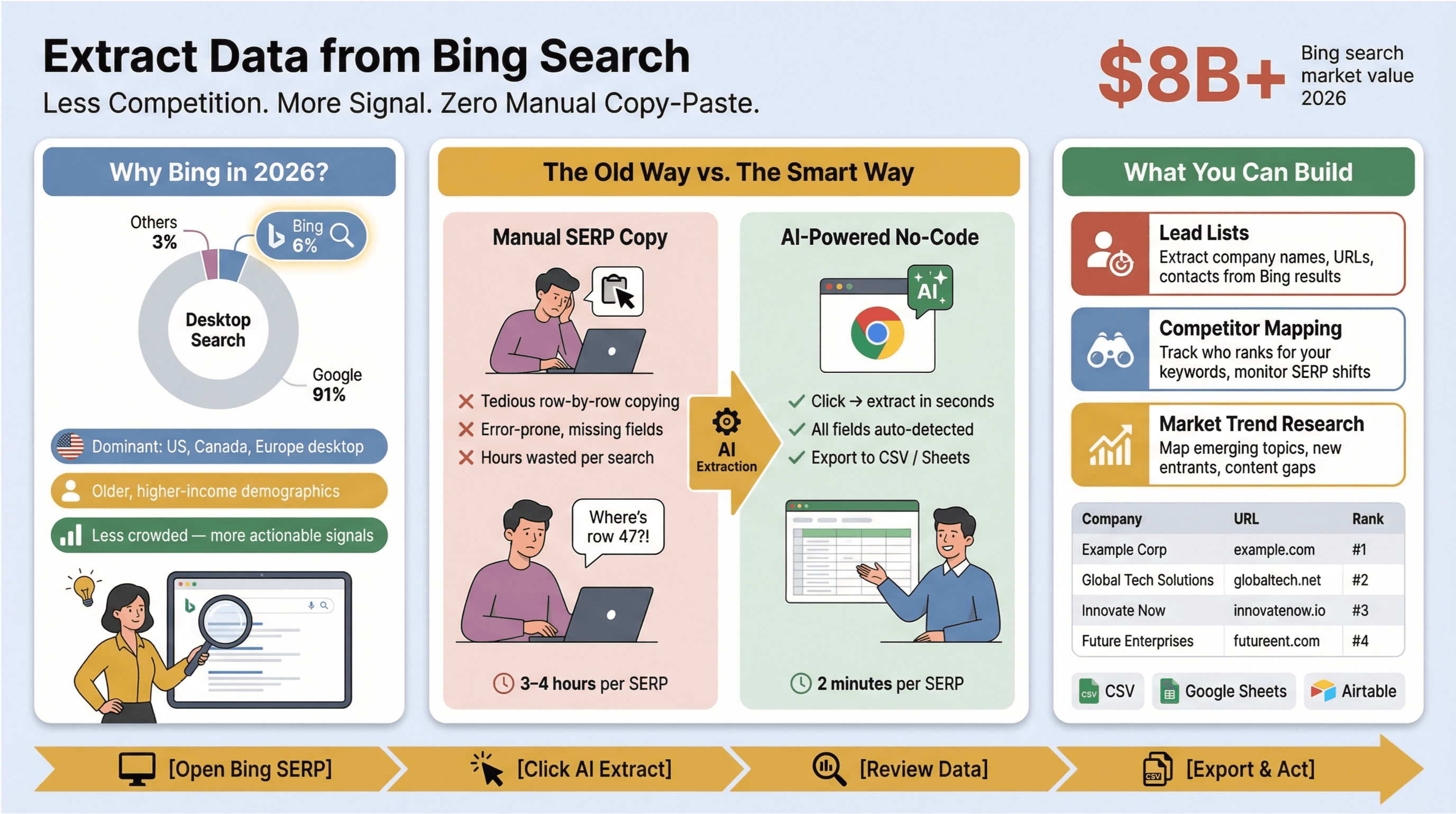 इसीलिए मैं तुम्हें की मदद से bing search scrape करें का तरीका step-by-step दिखाने के लिए genuinely excited हूँ। चाहे तुम lead lists बना रहे हो, competitors को ट्रैक कर रहे हो, या market trends मैप कर रहे हो—Thunderbit का AI-पावर्ड Chrome extension Bing SERP scraping को एकदम आसान बना देता है—ना code, ना templates, बस कुछ clicks। चलो समझते हैं कि Bing search data इतना valuable क्यों है, और तुम इसे मिनटों में business insights में कैसे बदल सकते हो।
Bing Search से डेटा क्यों निकालें? यूनिक इनसाइट्स अनलॉक करें
Bing कोई Google की कॉपी नहीं है बस अलग रंग के साथ। ये एक ऐसा सर्च इंजन है जिसकी मार्केट में solid पकड़ है—खासकर desktop-heavy, B2B और North America वाले संदर्भों में। ये वजहें हैं कि Bing search data पर ध्यान देना क्यों फायदेमंद है:
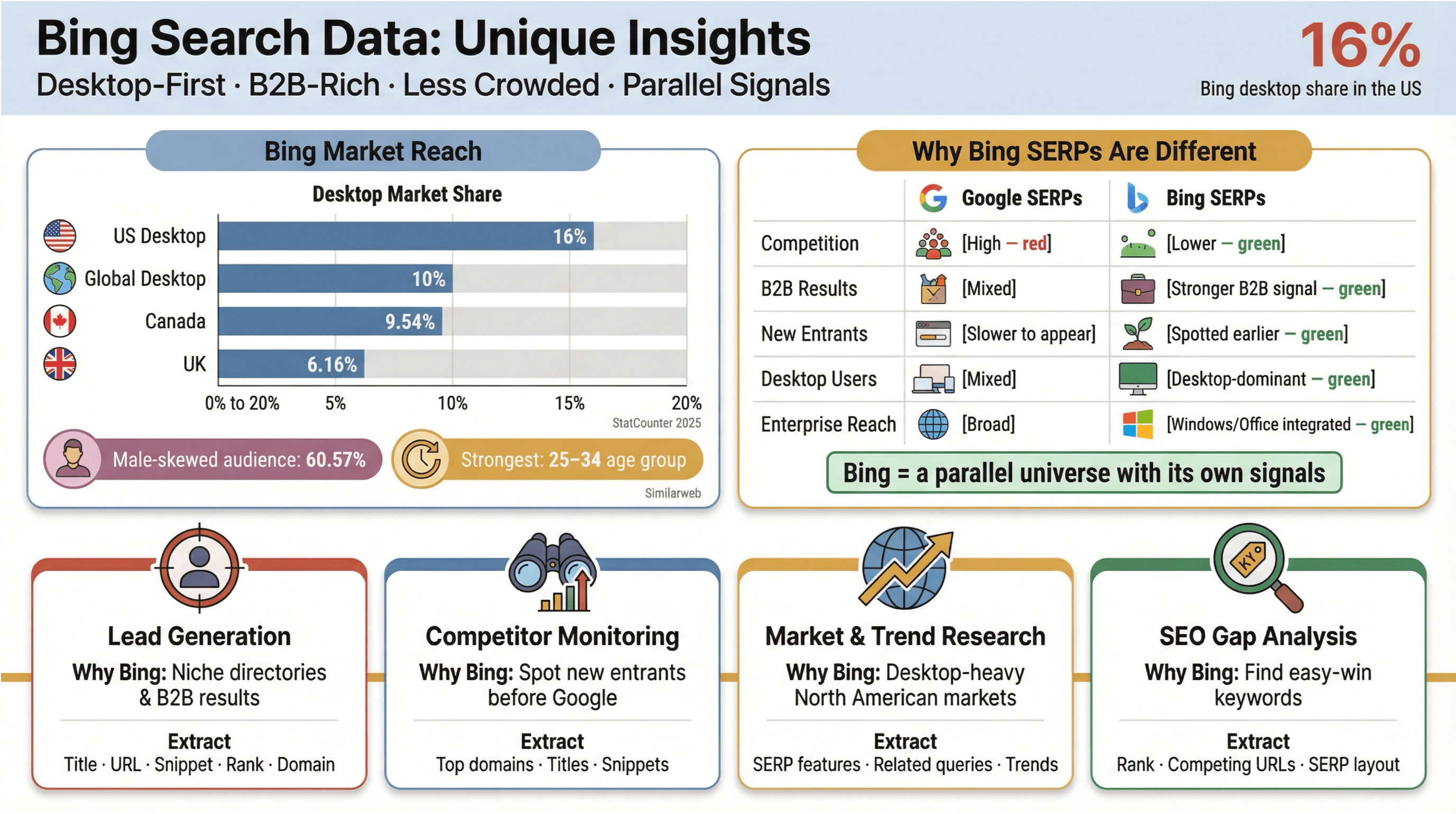
- Key Markets में Desktop पर मजबूत पकड़: Bing के पास हिस्सा है, और । Canada और UK में भी ये एक meaningful player है (, ).
- यूज़र डेमोग्राफिक्स में अलग झुकाव: Bing की audience थोड़ी ज्यादा male (60.57%) है और 25–34 age group में सबसे मजबूत है—Google से मिलती-जुलती, लेकिन कुछ subtle differences के साथ जो niche targeting में काम आ सकते हैं ().
- कम competition, ज्यादा actionable: क्योंकि ज्यादातर टीमें Google पर फोकस करती हैं, Bing के SERPs अक्सर कम crowded होते हैं। मतलब: नए competitors, content gaps या lead opportunities तुम्हें पहले दिख सकते हैं।
- Long-tail और niche markets: Windows के साथ Bing का integration और desktop-first user base इसे B2B, enterprise और research-driven workflows के लिए खास तौर पर उपयोगी बनाता है।
Bing SERP Data कहाँ सबसे ज्यादा काम आता है
| Use Case | Bing क्यों? | क्या निकालें |
|---|---|---|
| Lead Generation | कम competition, ज्यादा niche directories और B2B results | Title, URL, Snippet, Rank, Domain |
| Competitor Monitoring | Google तक पहुँचने से पहले नए entrants या messaging shifts पकड़ें | Top domains, titles, snippets |
| Market/Trend Research | desktop-heavy या North American markets में उभरते topics ट्रैक करें | SERP features, related queries, trends |
| SEO Gap Analysis | कमजोर competition वाले “easy win” keywords खोजें | Rank, competing URLs, SERP layout |
Bing के SERPs सिर्फ Google का mirror नहीं हैं—ये एक parallel universe जैसा है, अपने अलग signals के साथ। इस डेटा को extract करके analyze करना तुम्हें real edge दे सकता है, खासकर अगर तुम Google के overcrowded sandbox में scraps के लिए लड़ते-लड़ते थक चुके हो।
Bing Search Scraping ट्यूटोरियल: Thunderbit के साथ Step-by-Step
अब practical हिस्से पर आते हैं। मैं दिखाऊँगा कि से Bing search results कैसे निकालें, pagination कैसे संभालें, और analysis के लिए डेटा को structure कैसे करें। बिना coding, बिना सिरदर्द—बस काम करने का एक smarter तरीका।
Step 1: Thunderbit Chrome Extension इंस्टॉल करें
सबसे पहले इंस्टॉल करो। शुरुआत मुफ्त है, और setup में कॉफी बनने से भी कम समय लगता है।
Step 2: अपना Bing Search चलाएँ
पर जाओ और अपना target query डालो। इस ट्यूटोरियल के लिए मान लेते हैं: best CRM software for small business.
Step 3: Thunderbit खोलें और Scrape सेटअप करें
- Chrome toolbar में Thunderbit icon पर क्लिक करो।
- Bing results page खुला होने पर Thunderbit अपने आप page context पहचान लेगा।
- AI Suggest Fields पर क्लिक करो। Thunderbit का AI page scan करके ऐसे columns सुझाता है:
- Title
- URL
- Snippet/Description
- Rank/Position
- Displayed Domain
तुम जरूरत के हिसाब से columns add/remove/rename कर सकते हो। “Result Type” (organic/paid) जैसी extra info चाहिए? बस एक column जोड़ दो—Thunderbit का AI उसे भरने की पूरी कोशिश करेगा।
Step 4: Full SERP Coverage के लिए Pagination ऑन करें
Bing default रूप से प्रति page 10 results दिखाता है, लेकिन असली insights अक्सर page one के बाद मिलते हैं। Thunderbit का pagination feature तुम्हें जितने pages चाहिए उतने scrape करने देता है:
- Pagination option enable करो।
- कितने pages scrape करने हैं सेट करो (जैसे top 50 results के लिए 5 pages)।
- Scrape दबाओ—Thunderbit अपने आप हर page पर जाएगा और results को aggregate कर देगा।
Step 5: डेटा Review करें और Export करें
Scrape पूरा होने पर तुम्हें results की एक structured table दिखेगी। तुम Thunderbit के अंदर ही data review, filter या enrich कर सकते हो। फिर एक click में Excel, Google Sheets, Airtable या CSV में export—ना paywall, ना झंझट।
Sample Code और Data Output
Thunderbit no-code है, लेकिन तुम्हारा exported data कुछ ऐसा दिख सकता है:
| Query | Position | Title | URL | Displayed Domain | Snippet |
|---|---|---|---|---|---|
| best CRM software for SMB | 1 | The 10 Best CRM Software for Small Business 2026 | https://www.example.com/best-crm-2026 | example.com | Discover the top CRM tools for growing businesses... |
| best CRM software for SMB | 2 | Small Business CRM Solutions - Reviews & Pricing | https://www.example2.com/crm-reviews | example2.com | Compare features, pricing, and customer feedback... |
ये structure आगे analysis के लिए ideal है—चाहे तुम competitor domains map कर रहे हो, keyword trends track कर रहे हो, या lead lists बना रहे हो।
Thunderbit बनाम Traditional Bing Search Scraping Methods
सच कहें तो Bing SERPs scrape करना पहले एक technical headache हुआ करता था। यहाँ Thunderbit की तुलना पुराने तरीकों से है:
| Method | Setup Time | Maintenance | Coding Needed | Handles Pagination | Export Options | AI Field Detection | Subpage Scraping |
|---|---|---|---|---|---|---|---|
| Manual Copy-Paste | High | Ongoing | None | No | Manual | No | No |
| Python Scripts (BeautifulSoup/Selenium) | High | Frequent | Yes | Yes (with code) | CSV/JSON | No | Yes (with code) |
| No-Code Tools (Octoparse, ParseHub) | Medium | Moderate | No | Yes (setup required) | CSV/Excel/Cloud | Limited | Sometimes |
| Thunderbit | Low | None | None | Yes (auto) | Excel/Sheets/Airtable/CSV | Yes | Yes (auto) |
Thunderbit का AI-पावर्ड approach मतलब: कम समय tweaking में, ज्यादा समय analysis में। और तुम किसी एक export format में फँसे नहीं रहते—डेटा तुम्हारा, तरीका तुम्हारा।
Bing Search Data से Market Insights निकालना
अब तुम्हारे पास Bing SERP data है—अब आगे क्या? raw results को actionable insights में बदलने के तरीके:
- Keyword Opportunity Mapping: ऐसे keywords पहचानो जहाँ competitors कमजोर हैं या मौजूद ही नहीं। ऐसे domains देखो जो Bing पर Google की तुलना में नीचे rank करते हैं—ये “easy win” opportunities हो सकती हैं।
- Competitor Monitoring: कौन से domains तुम्हारे target queries पर dominate कर रहे हैं, ये track करो। titles और snippets को समय के साथ compare करके नए entrants या messaging shifts पकड़ो।
- Trend Spotting: snippets और related queries को aggregate करके emerging topics या customer pain points surface करो।
- Lead List Building: directories, company sites या resource pages के लिए results filter करो—फिर subpage scraping से contact info या product details निकालो।
Data Sample: Raw Bing Results से Insights तक
Raw Table:
| Query | Position | Title | URL | Snippet |
|---|---|---|---|---|
| crm software | 1 | Top 10 CRMs in 2026 | example.com/top-crms | Compare the best... |
Insights Dashboard (Example):
| Domain | # Top 10 Rankings | Avg. Position | Notes |
|---|---|---|---|
| example.com | 5 | 2.4 | Dominant in SMB CRM |
| rival.com | 2 | 6.5 | New entrant, rising |
Excel या Sheets में कुछ pivot tables या charts के साथ तुम share-of-voice visualize कर सकते हो, gaps पकड़ सकते हो, या week-by-week competitor movement track कर सकते हो।
Deep Dive: Bing के लिए Thunderbit का Subpage Scraping
यहीं Thunderbit असली ताकत दिखाता है। Bing SERPs scrape करने के बाद तुम Subpage Scraping से हर result URL पर जाकर deeper data निकाल सकते हो—जैसे product specs, contact emails, या user reviews।
Subpage Scraping कैसे इस्तेमाल करें:
- Thunderbit results table में Scrape Subpages पर क्लिक करो।
- कौन से columns enrich करने हैं चुनो (जैसे हर linked page से meta title, email, phone, या H1 निकालना)।
- Thunderbit का AI हर URL visit करता है, मांगी गई info extract करता है, और उसे तुम्हारी main table में जोड़ देता है।
Example:
| Title | URL | Email Found | Meta Description |
|---|---|---|---|
| Best CRM 2026 | https://example.com/crm | info@example.com | The leading CRM for SMBs... |
Sales ops, lead gen, या किसी भी ऐसे व्यक्ति के लिए जो search results की surface से आगे जाना चाहता है—ये सच में एक game-changer है।
Bing Search Data को Excel, Google Sheets और Airtable में Export करना
Thunderbit के साथ Bing data export करना बेहद आसान है (या अगर तुम मेरी तरह हो, तो DoorDash पर pie order करने जितना आसान):
- Excel: डेटा .xlsx या .csv में download करो—pivot tables, charts या dashboards के लिए ready।
- Google Sheets: सीधे अपने Sheets workspace में export करो ताकि real-time collaboration हो सके।
- Airtable: structured data Airtable में push करो ताकि advanced filtering, tagging या दूसरे tools के साथ integration हो सके।
सभी exports free हैं—कोई hidden fees नहीं, कोई “unlock करने के लिए upgrade” वाला drama नहीं। उन teams के लिए ये बहुत बड़ा फायदा है जिन्हें Bing data share/analyze/integrate करना होता है।
Data Sample: Export Formats और Tips
Excel/CSV Example:
| Query | Position | Title | URL | Snippet |
|---|---|---|---|---|
| crm software | 1 | Top 10 CRMs in 2026 | example.com/top-crms | Compare the best... |
Result Table Example:
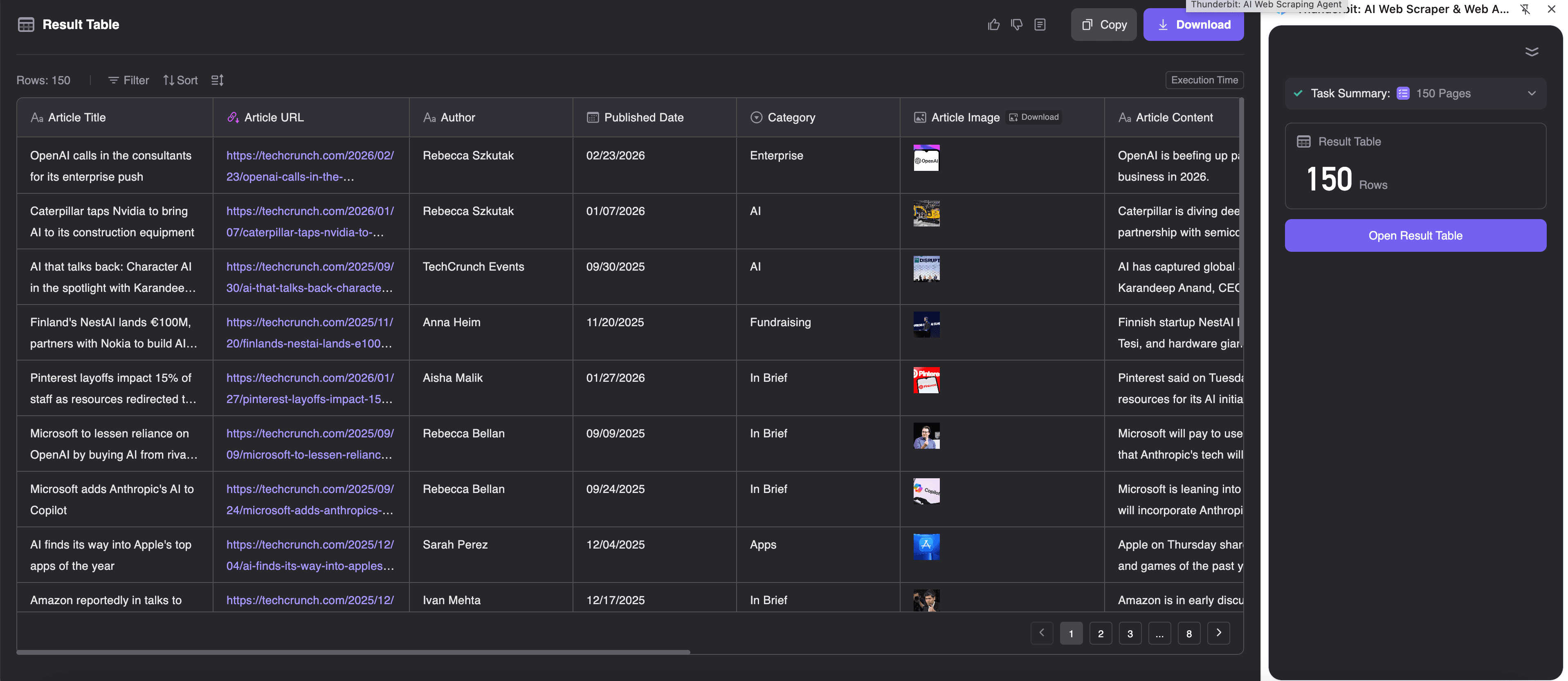
Tips:
- downstream analysis आसान बनाने के लिए clear column names रखो।
- डेटा कब collect हुआ ये track करने के लिए “Scrape Date” column जोड़ो।
- recurring projects के लिए Thunderbit का scheduled scraping सेट करो ताकि Sheets या Airtable हमेशा up to date रहे।
Practical Tips: Thunderbit के साथ Bing Search Scraping को Maximize करें
दर्जनों Bing scrapes चलाने (और “मेरा data missing क्यों है?” जैसे सवालों) के बाद, ये मेरी top tips हैं:
- Field Prompts का इस्तेमाल करो: अगर तुम्हें specific info चाहिए (जैसे “सिर्फ .edu domains निकालो”), तो column में custom prompt जोड़ो। Thunderbit का AI साफ निर्देशों पर कमाल का काम करता है।
- Scrape Speed को संतुलित रखो: Bing bots को पसंद नहीं करता। छोटे batches के लिए browser scraping पर टिके रहो और बहुत तेज़ी से scrapes मत चलाओ ताकि CAPTCHAs या soft blocks कम हों ().
- Scheduling का फायदा उठाओ: ongoing monitoring (जैसे weekly competitor checks) के लिए Thunderbit की natural language scheduling से scrapes automate करो ().
- Compliance का ध्यान रखो: Bing का general bots के लिए
/searchपर automated crawling disallow करता है, और Microsoft की use को personal/noncommercial purposes तक सीमित करती हैं। हमेशा terms review करो और जिम्मेदारी से scrape करो। - Data Enrich करो: subpage scraping से result URLs से emails, product specs या reviews निकालो—इससे basic SERP table एक powerful lead/research dataset बन जाती है।
Conclusion & Key Takeaways
Bing search data business users के लिए एक hidden gem है—खासकर sales, ops या research में, और उन लोगों के लिए जो Google पर scraps के लिए लड़ते-लड़ते थक चुके हैं। के साथ तुम Bing SERP data मिनटों में extract, enrich और export कर सकते हो—बिना एक भी line code लिखे।
Key takeaways:
- Bing मायने रखता है—खासकर desktop, B2B और North American workflows के लिए ().
- Thunderbit Bing search scraping को सबके लिए आसान बनाता है: AI-powered field detection, pagination, subpage enrichment और free exports के साथ।
- raw Bing data को actionable insights में बदलो: competitors map करो, trends पकड़ो, lead lists बनाओ, और बहुत कुछ।
- Excel, Google Sheets या Airtable में export करके sharing और analysis आसान करो।
- जिम्मेदारी से scrape करो: Bing terms का सम्मान करो, scrape speed moderate रखो, और छोटे batches के लिए Thunderbit का browser-based approach अपनाओ।
देखना चाहते हो कि Bing search data तुम्हारे business के लिए क्या कर सकता है? और आज ही अपना पहला Bing SERP scrape ट्राय करो। और ज्यादा tips व advanced tutorials के लिए देखो।
FAQs
1. क्या Bing search results scrape करना legal है?
Bing SERPs scraping, Bing के (जो bots के लिए /search disallow करता है) और Microsoft की के अधीन है, जो use को personal/noncommercial purposes तक सीमित करती हैं। business use के लिए हमेशा terms review करो और जिम्मेदारी से आगे बढ़ो।
2. Thunderbit traditional Bing scraping tools से बेहतर क्यों है?
Thunderbit में coding की जरूरत नहीं होती, AI की मदद से Bing के बदलते layouts के साथ adapt हो जाता है, pagination और subpage scraping अपने आप संभालता है, और data को सीधे Excel, Sheets या Airtable में export कर देता है—जिससे non-technical users के लिए ये काफी तेज़ और आसान बन जाता है।
3. क्या मैं Bing results के first page से आगे भी data निकाल सकता/सकती हूँ?
बिल्कुल। Thunderbit का pagination feature तुम्हें जितने pages चाहिए उतने scrape करने देता है—बस pages की संख्या सेट करो, बाकी Thunderbit संभाल लेगा।
4. Bing results के साथ subpage scraping कैसे करें?
Bing SERP scrape करने के बाद Thunderbit का “Scrape Subpages” feature इस्तेमाल करो। ये हर result URL पर जाकर emails, product specs या meta descriptions जैसी deeper info निकालता है। enriched lead lists या detailed market maps बनाने के लिए ये बेहतरीन है।
5. Bing data के लिए Thunderbit कौन-कौन से export options देता है?
Thunderbit तुम्हें Bing search data मुफ्त में Excel (.xlsx, .csv), Google Sheets या Airtable में export करने देता है। इससे data share करना, analyze करना या दूसरे tools/teams के साथ integrate करना आसान हो जाता है।
और deeper जाना है? पर और scraping guides व business use cases देखो, या step-by-step tutorials के लिए subscribe करो। Happy scraping—और तुम्हारी Bing insights हमेशा competition से एक कदम आगे रहें।
और जानें