
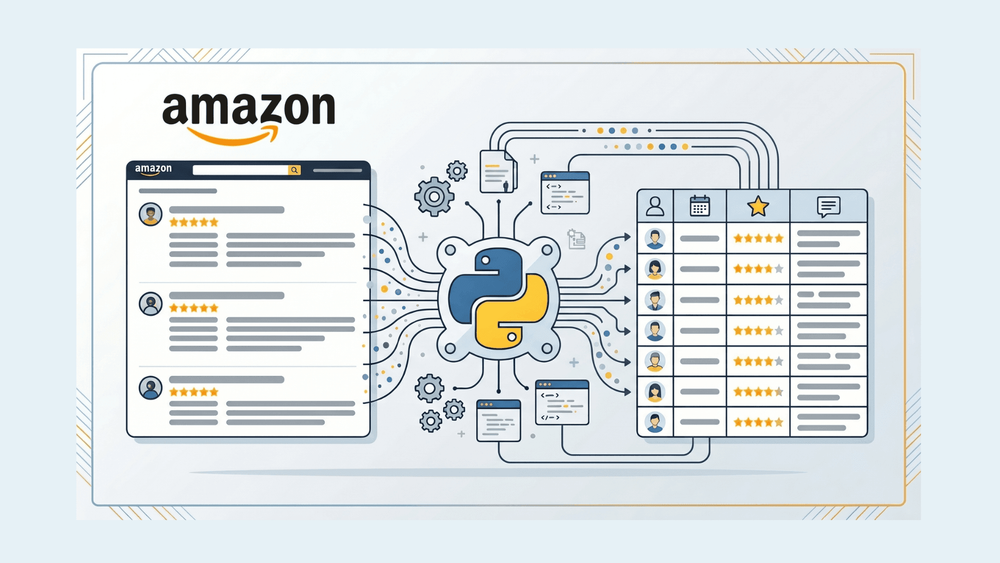
मेरा Amazon review scraper छह हफ्तों तक बिल्कुल ठीक चलता रहा — फिर एक सुबह उसने 200 OK तो लौटाया, लेकिन पेज पर कुछ भी नहीं था। न कोई error, न CAPTCHA, बस खाली HTML, जहाँ पहले सैकड़ों reviews दिखते थे।
अगर यह आपको जाना-पहचाना लग रहा है, तो आप अकेले नहीं हैं। 2025 के आखिर में Amazon ने full review pages को login wall के पीछे डालना शुरू कर दिया, और एक ही रात में Python scraping scripts की बड़ी संख्या काम करना बंद कर गई। पिछले कुछ महीनों से मैंने Thunderbit में इस समस्या को दोनों तरफ़ से समझते हुए काम किया है — एक तरफ हमारा AI scraper बनाते हुए, और दूसरी तरफ अपनी खुद की Python review pipeline संभालते हुए — इसलिए लगा कि अब वह guide लिखने का समय आ गया है जो मुझे उस वक्त चाहिए थी जब मेरा script पहली बार बंद हुआ था। इस पोस्ट में वही practical तरीका है जो सच में काम करता है: cookie-based authentication, Amazon की CSS obfuscation के बावजूद टिकने वाले stable selectors, 10-page pagination cap के workaround, anti-bot defenses, और एक bonus sentiment analysis section जो raw review text को असली business insights में बदल देता है। और अगर आप बीच में सोचें, "मैं यह सारा code maintain नहीं करना चाहता," तो मैं दिखाऊँगा कि Thunderbit यही काम लगभग दो मिनट में, बिना Python के, कैसे करता है।
Amazon Review Scraping क्या है, और यह क्यों ज़रूरी है?
Amazon review scraping का मतलब है programmatically customer review data निकालना — star ratings, review text, author names, dates, verified purchase badges — Amazon product pages से। क्योंकि Amazon ने 2010 में अपनी Product Advertising API से review content हटा दिया था (और फिर वापस नहीं लाया), इसलिए इस data तक programmatic पहुँच का एकमात्र रास्ता web scraping ही है।
आँकड़े भी यही साबित करते हैं। 95% shoppers खरीदने से पहले reviews पढ़ते हैं, और 94% लोग product reviews के लिए Amazon को अपना #1 source मानते हैं. किसी product page पर सिर्फ 5 reviews दिखाने से conversion 270% तक बढ़ सकता है. जो कंपनियाँ systematically review sentiment analyze करती हैं, वे customer retention में 15% तक सुधार देखती हैं। यह सिर्फ abstract data science नहीं है — यह competitive intelligence, product improvement signals, और marketing language है, जो Amazon servers पर plain text की तरह पड़ा हुआ है।
Python से Amazon Reviews Scrape क्यों करें
इस काम के लिए Python अब भी सबसे पसंदीदा भाषा है। यह 2024 Stack Overflow Developer Survey में सबसे ज़्यादा चाही जाने वाली language है, और इसका ecosystem — requests, BeautifulSoup, pandas, Scrapy — web scraping को उन लोगों के लिए भी accessible बनाता है जो full-time developers नहीं हैं।
अलग-अलग teams इस data का उपयोग अलग-अलग तरीकों से करती हैं:
| Team | Use Case | What They Extract |
|---|---|---|
| Product / R&D | बार-बार आने वाली complaints पहचानना, fixes को priority देना | 1–2 star review text, keyword frequency |
| Sales | competitor product sentiment पर नज़र रखना | Ratings, review volume trends |
| Marketing | ad copy के लिए customer language निकालना | Positive review phrases, feature mentions |
| Ecommerce Ops | अपने product sentiment को समय के साथ track करना | Star distribution, verified purchase ratio |
| Market Research | category leaders की features के आधार पर तुलना | Multi-ASIN review datasets |
एक kitchenware brand ने negative reviews खंगाले, पाया कि 22% लोग "non-stick coating wears off" की शिकायत कर रहे थे, product को reformulate किया, और 60 दिनों के भीतर अपनी #1 Best Seller rank वापस हासिल कर ली। एक fitness tracker company ने review text से "band irritation" निकाला, latex allergy की समस्या पहचानी, hypoallergenic variant लॉन्च किया, और returns 40% तक घटा दिए। यही वह ROI है जो engineering effort को वाजिब बनाता है।
Login Wall: आपका Amazon Review Scraper क्यों बंद हो गया
14 नवंबर 2024 को, Amazon ने full product-reviews page देखने के लिए sign-in अनिवार्य कर दिया. यह बदलाव community forums और scraping vendor blogs दोनों में confirm हुआ। अगर आप incognito window में /product-reviews/{ASIN}/ खोलते हैं, तो आपको review data की जगह sign-in page पर भेज दिया जाएगा।
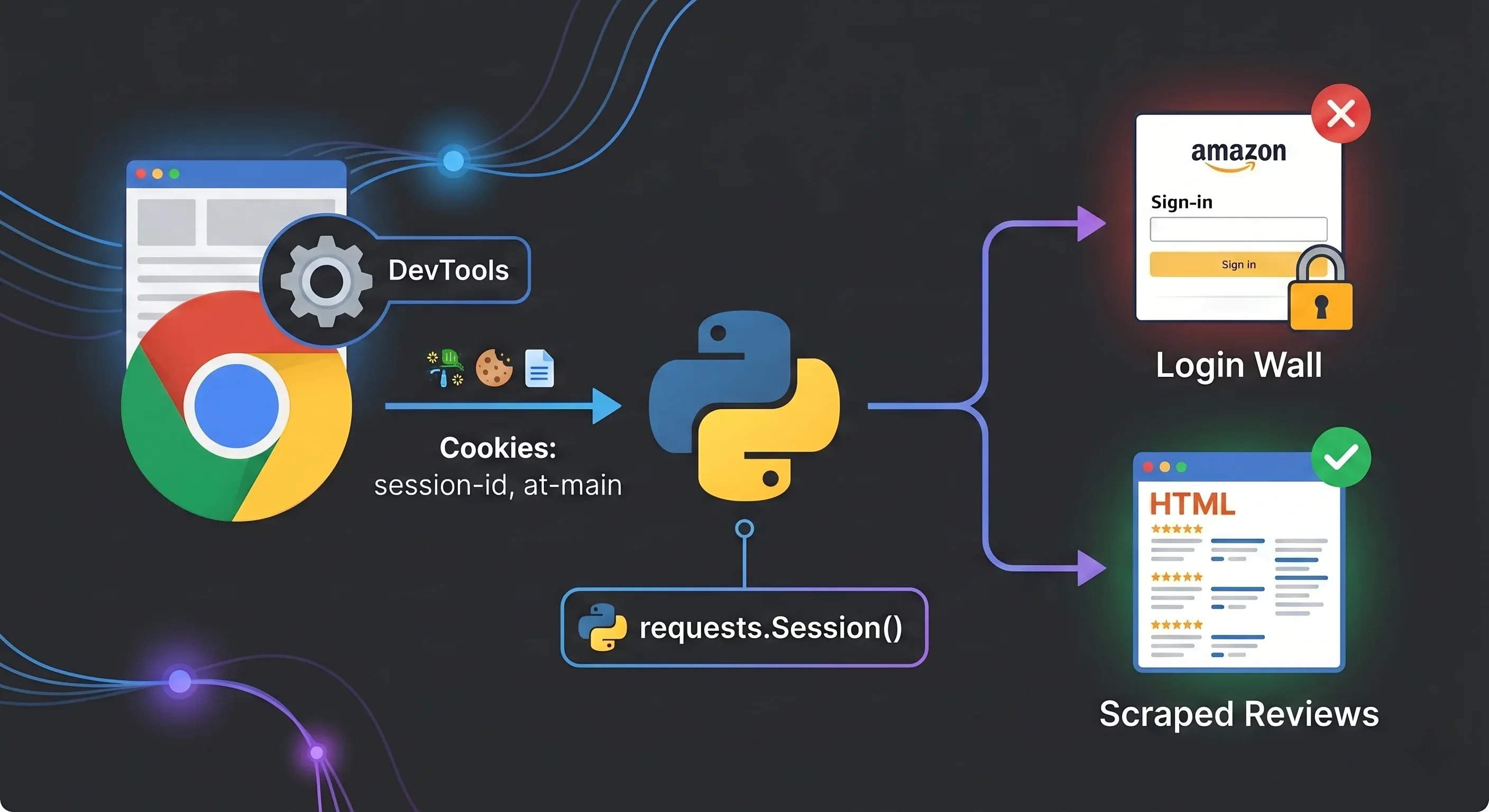
इसका लक्षण subtle है: script को 200 OK response मिलता है, लेकिन HTML body में reviews की जगह login form (name="email", id="ap_password") होता है। न error code, न CAPTCHA। बस... काम का कुछ नहीं।
Amazon ने यह anti-bot और regional compliance reasons से किया। Enforcement भी inconsistent है — कभी-कभी पहली page पर wall आने से पहले कुछ reviews दिख जाते हैं, खासकर fresh browser window में — लेकिन किसी भी scraper को scale पर चलाते समय आपको मानकर चलना चाहिए कि wall हमेशा on है।
अलग-अलग Amazon country domains (.de, .co.uk, .co.jp) इस wall को अलग-अलग तरीके से लागू करते हैं। एक forum user के शब्दों में: "हर country के लिए अलग login चाहिए." आपके .com cookies .co.uk पर काम नहीं करेंगे।
Featured Reviews vs. Full Reviews: बिना Login के अभी क्या मिल सकता है
Amazon product pages (/dp/{ASIN}/ URL) अभी भी बिना authentication के लगभग 8 "featured reviews" दिखाते हैं। इन्हें Amazon के algorithm ने हाथ से चुना होता है और ये quick sentiment check के लिए उपयोगी हैं, लेकिन इन्हें sort, filter या paginate नहीं किया जा सकता।
Full review pages (/product-reviews/{ASIN}/) — जहाँ newest के हिसाब से sorting, star rating filtering, और सैकड़ों reviews तक pagination मिलती है — login मांगती हैं।
अगर आपको बस कुछ reviews चाहिए और quick pulse check करना है, तो product page scrape करें। अगर सैकड़ों या हज़ारों चाहिए, तो authentication handle करनी पड़ेगी।
शुरू करने से पहले क्या चाहिए: Python setup और libraries
कोई code लिखने से पहले, यह setup देख लें:
- Difficulty: Intermediate (Python में comfortable, basic HTML knowledge)
- Time Required: पूरे pipeline के लिए ~45 मिनट; basic scrape के लिए ~10 मिनट
- What You'll Need: Python 3.8+, Chrome browser, valid Amazon account
Core libraries install करें:
pip install requests beautifulsoup4 lxml pandas textblob
Optional (advanced sentiment analysis के लिए):
pip install transformers torch
ASIN क्या है? यह Amazon का 10-character product identifier है। यह आपको हर product URL में मिलेगा — उदाहरण के लिए, amazon.com/dp/B0BCNKKZ91 में ASIN B0BCNKKZ91 है। यही key review URL में लगती है।
Step 1: Cookie-Based Authentication से Login Wall पार करें
सबसे reliable तरीका है कि आप browser में Amazon login करें, अपनी session cookies copy करें, और उन्हें Python requests.Session() में inject कर दें। इससे Selenium-based login automation में आने वाले CAPTCHA और SMS 2FA से बचा जा सकता है।
आपको ये सात cookies चाहिए:
| Cookie Name | Purpose |
|---|---|
session-id | Rotating session identifier |
session-id-time | Session timestamp |
session-token | Rotating session token |
ubid-main | User browsing identifier |
at-main | Primary auth token |
sess-at-main | Session-scoped auth |
x-main | User-email-keyed identifier |
Chrome DevTools से Cookies कैसे निकालें
- Chrome में amazon.com पर login करें
- DevTools खोलें (F12 या right-click → Inspect)
- Application → Storage → Cookies →
https://www.amazon.comपर जाएँ - तालिका में हर cookie नाम ढूँढें और उसकी value copy करें
- Python के लिए उन्हें semicolon-separated string के रूप में format करें
अपना session इस तरह set करें:
import requests

session = requests.Session()

# यहाँ अपनी cookie values paste करें
cookies = {
    "session-id": "YOUR_SESSION_ID",
    "session-id-time": "YOUR_SESSION_ID_TIME",
    "session-token": "YOUR_SESSION_TOKEN",
    "ubid-main": "YOUR_UBID_MAIN",
    "at-main": "YOUR_AT_MAIN",
    "sess-at-main": "YOUR_SESS_AT_MAIN",
    "x-main": "YOUR_X_MAIN",
}

headers = {
    "User-Agent": "Mozilla/5.0 (Windows NT 10.0; Win64; x64) AppleWebKit/537.36 (KHTML, like Gecko) Chrome/147.0.0.0 Safari/537.36",
    "Accept": "text/html,application/xhtml+xml,application/xml;q=0.9,image/webp,*/*;q=0.8",
    "Accept-Language": "en-US,en;q=0.5",
}

session.cookies.update(cookies)
session.headers.update(headers)
महत्वपूर्ण: अपनी हर request में वही session object reuse करें। इससे cookies consistent रहती हैं और session एक real browser जैसा दिखता है। आम तौर पर cookies कुछ दिनों से हफ्तों तक चलती हैं, लेकिन अगर फिर से login redirect मिलने लगे, तो browser से उन्हें refresh कर लें।
.com के अलावा marketplaces में cookie names थोड़े बदलते हैं — amazon.de में at-main की जगह at-acbde, amazon.co.uk में at-acbuk, और इसी तरह। हर marketplace के लिए अलग independent session चाहिए।
Step 2: Request बनाएँ और BeautifulSoup से Review HTML Parse करें
Amazon reviews URL का pattern यह है:
https://www.amazon.com/product-reviews/{ASIN}/ref=cm_cr_arp_d_viewopt_srt?sortBy=recent&pageNumber=1
Core function:
from bs4 import BeautifulSoup
import time, random

def get_soup(session, url):
    time.sleep(random.uniform(2, 5))  # Polite delay
    response = session.get(url, timeout=15)

    # Detect login wall
    if "ap_email" in response.text or "Amazon Sign-In" in response.text:
        raise Exception("Login wall detected — refresh your cookies")

    if response.status_code != 200:
        raise Exception(f"HTTP {response.status_code}")

    return BeautifulSoup(response.text, "lxml")
एक छोटा लेकिन उपयोगी trick: reviews page hit करने से पहले product page खोलें। इससे session में natural browsing pattern बनता है।
# पहले product page visit करें (real browsing जैसा)
product_url = f"https://www.amazon.com/dp/{asin}"
session.get(product_url, timeout=15)
time.sleep(random.uniform(1, 3))

# फिर reviews page hit करें
reviews_url = f"https://www.amazon.com/product-reviews/{asin}/ref=cm_cr_arp_d_viewopt_srt?sortBy=recent&pageNumber=1"
soup = get_soup(session, reviews_url)
Step 3: Review Data निकालने के लिए Stable Selectors इस्तेमाल करें (CSS Classes पर निर्भर रहना बंद करें)
यहीं 2022–2023 के ज़्यादातर tutorials टूट जाते हैं। Amazon CSS class names को obfuscate करता है — ये समय-समय पर बदलते रहते हैं, और एक forum thread में एक परेशान developer के शब्दों में: "span tags के class names में किसी एक जैसा pattern नहीं था."
समाधान यह है: Amazon review elements पर data-hook attributes इस्तेमाल करता है, और ये surprisingly stable रहते हैं। ये semantic identifiers हैं जिन पर Amazon का खुद का frontend code निर्भर करता है, इसलिए इन्हें random नहीं किया जाता।
| Review Field | Stable Selector (data-hook) | Fragile Selector (class) |
|---|---|---|
| Review text | [data-hook="review-body"] | .review-text-content (changes) |
| Star rating | [data-hook="review-star-rating"] | .a-icon-alt (ambiguous) |
| Review title | [data-hook="review-title"] | .review-title (sometimes) |
| Author name | span.a-profile-name | Relatively stable |
| Review date | [data-hook="review-date"] | .review-date (region-dependent) |
| Verified purchase | [data-hook="avp-badge"] | span.a-size-mini |
data-hook selectors के साथ extraction code:
import re

def extract_reviews(soup):
    reviews = []
    review_divs = soup.select('[data-hook="review"]')

    for div in review_divs:
        # Star rating
        rating_el = div.select_one('[data-hook="review-star-rating"]')
        rating = None
        if rating_el:
            rating_text = rating_el.get_text(strip=True)
            match = re.search(r'(\d\.?\d?)', rating_text)
            if match:
                rating = float(match.group(1))

        # Title
        title_el = div.select_one('[data-hook="review-title"]')
        title = title_el.get_text(strip=True) if title_el else ""

        # Body
        body_el = div.select_one('[data-hook="review-body"]')
        body = body_el.get_text(strip=True) if body_el else ""

        # Author
        author_el = div.select_one('span.a-profile-name')
        author = author_el.get_text(strip=True) if author_el else ""

        # Date and country
        date_el = div.select_one('[data-hook="review-date"]')
        date_text = date_el.get_text(strip=True) if date_el else ""
        # Format: "Reviewed in the United States on January 15, 2025"
        country_match = re.search(r'Reviewed in (.+?) on', date_text)
        date_match = re.search(r'on (.+)$', date_text)
        country = country_match.group(1) if country_match else ""
        date = date_match.group(1) if date_match else ""

        # Verified purchase
        verified_el = div.select_one('[data-hook="avp-badge"]')
        verified = bool(verified_el)

        reviews.append({
            "author": author,
            "rating": rating,
            "title": title,
            "content": body,
            "date": date,
            "country": country,
            "verified": verified,
        })

    return reviews
मैंने यह selector set कई ASINs पर महीनों तक चलाया है, और data-hook attributes एक बार भी नहीं बदले। दूसरी तरफ CSS classes इसी अवधि में कम-से-कम दो बार बदल चुकी हैं।
Step 4: Pagination और Amazon के 10-Page Cap को संभालें
Amazon pageNumber parameter को 10 pages तक सीमित रखता है, और हर page में 10 reviews होते हैं — यानी हर filter combination पर लगभग 100 reviews की hard limit। 10वें page के बाद "Next page" button गायब हो जाता है।
Basic pagination loop:
all_reviews = []

for page in range(1, 11):
    url = f"https://www.amazon.com/product-reviews/{asin}/ref=cm_cr_arp_d_viewopt_srt?sortBy=recent&pageNumber={page}"
    soup = get_soup(session, url)
    page_reviews = extract_reviews(soup)

    if not page_reviews:
        break  # इस page पर और reviews नहीं हैं

    all_reviews.extend(page_reviews)
    print(f"Page {page}: {len(page_reviews)} reviews")
10 Pages से ज़्यादा Amazon Reviews कैसे निकालें
वर्कअराउंड है filter bucketing। filterByStar और sortBy का हर combination अपना अलग 10-page window देता है।
Star filter values: one_star, two_star, three_star, four_star, five_star
Sort values: recent, helpful (default)
5 star filters × 2 sort orders को मिलाकर आप product के लिए 100 pages तक, यानी 1,000 reviews तक पहुँच सकते हैं — और जिन products में star distribution uneven हो, वहाँ अक्सर आपको लगभग पूरा review set मिल जाता है।
star_filters = ["one_star", "two_star", "three_star", "four_star", "five_star"]
sort_orders = ["recent", "helpful"]
all_reviews = []
seen_titles = set()  # Simple deduplication

for star in star_filters:
    for sort in sort_orders:
        for page in range(1, 11):
            url = (
                f"https://www.amazon.com/product-reviews/{asin}"
                f"?filterByStar={star}&sortBy={sort}&pageNumber={page}"
            )
            soup = get_soup(session, url)
            page_reviews = extract_reviews(soup)

            if not page_reviews:
                break

            for review in page_reviews:
                # Deduplicate by title + author combo
                key = (review["title"], review["author"])
                if key not in seen_titles:
                    seen_titles.add(key)
                    all_reviews.append(review)

            print(f"[{star}/{sort}] Page {page}: {len(page_reviews)} reviews")

print(f"Total unique reviews: {len(all_reviews)}")
Buckets के बीच overlap होगा, इसलिए deduplication बहुत ज़रूरी है। मैं review title + author name के combination को quick key की तरह इस्तेमाल करता हूँ — perfect नहीं है, लेकिन ज़्यादातर duplicates पकड़ लेता है।
Step 5: Anti-Bot Defenses से बचें (Rotate, Throttle, Retry)
Amazon AWS WAF Bot Control इस्तेमाल करता है, और यह काफी aggressive हो गया है। एक-स्तरीय countermeasures (सिर्फ User-Agent rotate करना, सिर्फ delays जोड़ना) अब पर्याप्त नहीं हैं।
| Technique | Implementation |
|---|---|
| Rotating User-Agents | 10+ real browser strings में से random choice |
| Exponential backoff | 503 पर 2s → 4s → 8s retry delays |
| Request throttling | pages के बीच random.uniform(2, 5) seconds |
| Proxy rotation | residential proxies के बीच cycle |
| Session fingerprint | हर session में consistent cookies + headers |
| TLS impersonation | production में stock requests की जगह curl_cffi इस्तेमाल करें |
Production-ready retry wrapper:
import time, random

USER_AGENTS = [
    "Mozilla/5.0 (Windows NT 10.0; Win64; x64) AppleWebKit/537.36 (KHTML, like Gecko) Chrome/147.0.0.0 Safari/537.36",
    "Mozilla/5.0 (Macintosh; Intel Mac OS X 10_15_7) AppleWebKit/537.36 (KHTML, like Gecko) Chrome/147.0.0.0 Safari/537.36",
    "Mozilla/5.0 (Windows NT 10.0; Win64; x64; rv:149.0) Gecko/20100101 Firefox/149.0",
    "Mozilla/5.0 (Macintosh; Intel Mac OS X 15_7_5) AppleWebKit/605.1.15 (KHTML, like Gecko) Version/26.0 Safari/605.1.15",
    "Mozilla/5.0 (Windows NT 10.0; Win64; x64) AppleWebKit/537.36 (KHTML, like Gecko) Chrome/146.0.0.0 Safari/537.36",
]

def scrape_with_retries(session, url, max_retries=3):
    for attempt in range(max_retries):
        try:
            session.headers["User-Agent"] = random.choice(USER_AGENTS)
            time.sleep(random.uniform(2, 5))

            response = session.get(url, timeout=15)

            # Blocks detect करें
            if "validateCaptcha" in response.url or "Robot Check" in response.text:
                wait = (2 ** attempt) * 5
                print(f"CAPTCHA detected. Waiting {wait}s...")
                time.sleep(wait)
                continue

            if response.status_code in (429, 503):
                wait = (2 ** attempt) * 2
                print(f"Rate limited ({response.status_code}). Waiting {wait}s...")
                time.sleep(wait)
                continue

            if "ap_email" in response.text:
                raise Exception("Login wall — cookies expired")

            return BeautifulSoup(response.text, "lxml")

        except Exception as e:
            if attempt == max_retries - 1:
                raise
            print(f"Attempt {attempt + 1} failed: {e}")

    return None
Proxies के बारे में एक बात: Amazon known datacenter IP ranges को blacklist करता है (AWS, GCP, Azure, DigitalOcean) network layer पर। अगर आप कुछ सौ pages से ज़्यादा scrape कर रहे हैं, तो residential proxies practically mandatory हैं — volume के हिसाब से $50–200+/month तक खर्च आ सकता है। छोटे projects (100 requests/day से कम) के लिए, home IP से careful throttling अक्सर ठीक काम कर जाती है।
Amazon TLS fingerprints भी inspect करता है। Python की stock requests library का एक well-known JA3 hash है जिसे WAFs पहले से block कर सकते हैं. Production scrapers के लिए curl_cffi पर विचार करें, जो real browser TLS stacks की नकल करता है। Tutorial-scale scraping (कुछ सौ pages) के लिए requests अच्छे headers के साथ आमतौर पर काम कर जाता है।
Step 6: Scraped Amazon Reviews को CSV या Excel में Export करें
एक बार reviews इकट्ठे हो जाएँ, तो pandas की मदद से उन्हें usable format में बदलना आसान है:
import pandas as pd

df = pd.DataFrame(all_reviews)
df.to_csv("amazon_reviews.csv", index=False)
print(f"Exported {len(df)} reviews to amazon_reviews.csv")
Sample output:
| author | rating | title | content | date | country | verified |
|---|---|---|---|---|---|---|
| Sarah M. | 5.0 | Best purchase this year | Battery lasts all day, screen is gorgeous... | January 15, 2025 | the United States | True |
| Mike T. | 2.0 | Disappointed after 2 weeks | The charging port stopped working... | February 3, 2025 | the United States | True |
| Priya K. | 4.0 | Great value for the price | Does everything I need, minor lag on heavy apps... | March 10, 2025 | the United States | False |
Excel export के लिए: df.to_excel("amazon_reviews.xlsx", index=False) (इसके लिए openpyxl चाहिए)।
Google Sheets के लिए gspread library काम करती है, लेकिन इसमें Google Cloud configuration के 8+ steps लगते हैं — project बनाना, दो APIs enable करना, service account credentials बनाना, sheet share करना। अगर यह actual scraping से ज़्यादा setup लगता है, तो आप गलत नहीं हैं। (यही वह जगह है जहाँ Thunderbit जैसा tool, जो एक click में Google Sheets में export कर देता है, अचानक बहुत आकर्षक लगने लगता है।)
Bonus: सिर्फ 5 Lines of Python में Scraped Reviews पर Sentiment Analysis जोड़ें
ज़्यादातर scraping tutorials CSV export पर रुक जाते हैं। लेकिन sentiment score करना raw data को business decisions में बदलता है।
सबसे तेज baseline TextBlob से मिलता है:
from textblob import TextBlob

df["sentiment"] = df["content"].apply(lambda x: TextBlob(str(x)).sentiment.polarity)
इससे हर review के लिए -1.0 (बहुत negative) से +1.0 (बहुत positive) तक polarity score मिल जाता है। Sample output:
| content (truncated) | rating | sentiment |
|---|---|---|
| "Battery lasts all day, screen is gorgeous..." | 5.0 | 0.65 |
| "The charging port stopped working after..." | 2.0 | -0.40 |
| "Does everything I need, minor lag on..." | 4.0 | 0.25 |
| "Absolute garbage. Returned immediately." | 1.0 | -0.75 |
| "It's okay. Nothing special but works." | 3.0 | 0.10 |
सबसे दिलचस्प rows वे हैं जहाँ mismatch होता है — जैसे 3-star review जिसमें text सकारात्मक हो, या 5-star review जिसमें भाषा negative हो। ऐसे अंतर star ratings से छूट जाने वाली nuanced customer opinions दिखाते हैं।
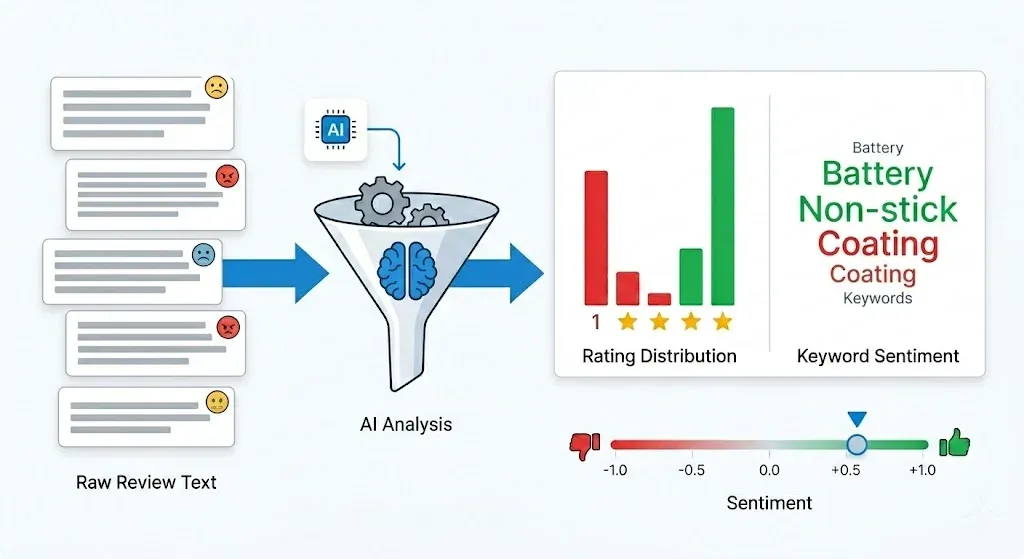
Production-grade accuracy के लिए Hugging Face Transformers बेहतर विकल्प है। VADER tweets पर train हुआ था, product reviews पर नहीं, और transformer models lexicon tools की तुलना में review classification में 98% से अधिक accuracy हासिल करते हैं। nlptown/bert-base-multilingual-uncased-sentiment model तो सीधे 1–5 star ratings भी predict कर सकता है:
from transformers import pipeline

clf = pipeline("sentiment-analysis",
               model="nlptown/bert-base-multilingual-uncased-sentiment")
df["predicted_stars"] = df["content"].apply(
    lambda x: int(clf(str(x)[:512])[0]["label"][0])
)
Amazon reviews एक J-shaped distribution follow करते हैं — 5 stars पर बड़ा spike, 1 star पर छोटा spike, और बीच में valley। इसका मतलब है कि average star rating अक्सर actual product quality का अच्छा proxy नहीं होती। 1-star cluster को अलग करके recurring themes खोजिए — अक्सर वहीं कोई एक fixable defect छिपा होता है।
ईमानदार तुलना: DIY Python vs. Paid Scraping APIs vs. Thunderbit
मैंने Amazon के लिए Python scrapers maintain किए हैं, और साफ़ कहूँ तो: वे टूटते हैं। Selectors बदल जाते हैं, cookies expire हो जाती हैं, Amazon नया bot detection layer roll out कर देता है, और अचानक आपका शनिवार सुबह data analyze करने की जगह scraper debug करने में निकल जाता है। Forum users भी यही शिकायत करते हैं — DIY scripts जो "पिछले महीने चले थे" अब लगातार patch माँगते हैं।
तीनों मुख्य approaches की तुलना यह है:
| Criteria | DIY Python (BS4/Selenium) | Paid Scraping API | Thunderbit (No-Code) |
|---|---|---|---|
| Setup time | 1–3 घंटे | 30 min (API key) | 2 minutes |
| Cost | Free (+ proxy costs) | $50–200+/mo | Free tier available |
| Login wall handling | Manual cookie management | Usually handled | Handled automatically |
| Maintenance | High (selectors break) | Low (provider maintains) | Zero (AI adapts) |
| Pagination | Custom code needed | Built-in | Built-in |
| Multi-country support | Separate sessions per domain | Usually supported | Browser-based = your locale |
| Sentiment analysis | Add your own code | Sometimes included | Export to Sheets, analyze anywhere |
| Best for | Learning, full control | Scale/production pipelines | Quick data pulls, non-dev teams |
Python आपको full control देता है और असल में web scraping के अंदर क्या हो रहा है, यह सीखने का सबसे अच्छा तरीका है। Paid APIs (ScrapingBee, Oxylabs, Bright Data) उन production pipelines के लिए ठीक हैं जहाँ uptime, cost से ज़्यादा अहम है। और जिन teams को dev overhead के बिना review data चाहिए — जैसे ecommerce ops जो competitor products weekly monitor करते हैं, या marketing teams जो ad copy के लिए customer language निकालती हैं — उनके लिए एक तीसरा रास्ता है।
Thunderbit से Amazon Reviews कैसे Scrape करें (No Code, No Maintenance)
हमने Thunderbit ठीक उन्हीं scenarios के लिए बनाया है जहाँ Python scraper maintain करना overkill लगता है। Workflow कुछ ऐसा है:
- Thunderbit Chrome Extension install करें
- Amazon product review page पर browser में जाएँ (आप पहले से logged in हैं, इसलिए login wall मुद्दा नहीं है)
- "AI Suggest Fields" पर click करें — Thunderbit page पढ़कर Author, Rating, Title, Review Text, Date, Verified Purchase जैसे columns सुझाता है
- "Scrape" पर click करें — data तुरंत निकल जाता है, built-in pagination के साथ
- Excel, Google Sheets, Airtable, या Notion में export करें
मुख्य फायदा यह है कि Thunderbit का AI हर बार page structure को fresh पढ़ता है। न CSS selectors maintain करने की ज़रूरत, न cookie management, न anti-bot code। जब Amazon HTML बदलता है, AI खुद adapt कर लेता है। जो पाठक programmatic access चाहते हैं लेकिन पूरी DIY नहीं, उनके लिए Thunderbit एक Extract API भी देता है — AI-powered field detection के साथ structured data extraction via API, बिना selector maintenance के।
Amazon data पर और गहराई से पढ़ने के लिए, हमारे guides देखें: how to scrape Amazon products and reviews और extracting and analyzing Amazon sales data।
Python से Scale पर Amazon Reviews Scrape करने के Tips
अगर आप कई ASINs पर reviews scrape कर रहे हैं, तो कुछ practices आपकी बहुत परेशानी बचाएँगी:
- ASINs को batch करें और products के बीच delay रखें, सिर्फ pages के बीच नहीं। मैं ASINs के बीच 10–15 सेकंड का pause रखता हूँ।
- Aggressively deduplicate करें। जब आप कई star filter और sort order combinations मिलाते हैं, तो overlapping reviews मिलेंगी।
(title, author, date)tuples का set dedup key की तरह इस्तेमाल करें। - Failures log करें। कौन-सा ASIN + page + filter combination fail हुआ, यह track करें ताकि सब कुछ दोबारा scrape किए बिना सिर्फ वही retry कर सकें।
- Large projects के लिए database में store करें। Simple SQLite database, बढ़ते हुए CSV files से कहीं बेहतर scale करता है:
import sqlite3

conn = sqlite3.connect("reviews.db")
df.to_sql("reviews", conn, if_exists="append", index=False)
- Recurring scrapes schedule करें। Ongoing monitoring के लिए cron job set करें या Thunderbit की Scheduled Scraper feature इस्तेमाल करें — URL और schedule बताइए, और यह बिना server के बाकी सब संभाल लेता है।
अतिरिक्त approaches के लिए, हमारे posts best automated web scraping tools और scraping data from websites to Excel में और options दिए गए हैं।
कानूनी और नैतिक पहलुओं पर एक छोटा लेकिन ज़रूरी नोट
Amazon की Conditions of Use साफ़ तौर पर "the use of any robot, spider, scraper, or other automated means to access Amazon Services" को prohibit करती हैं। फिर भी, हाल के US case law public data scrapers के पक्ष में रहे हैं। Meta Platforms v. Bright Data (January 2024) में एक federal court ने कहा कि publicly accessible data scraping, अगर scraper logged-in "user" नहीं है, तो terms of service का उल्लंघन नहीं करता।
महत्वपूर्ण nuance यह है: login के पीछे scraping (जो यह tutorial cover करता है) contract-law territory में आ जाती है, क्योंकि account बनाते समय आपने Amazon की ToS स्वीकार की थी। सार्वजनिक रूप से दिखने वाली featured reviews scrape करना, login wall के पीछे scraping की तुलना में कम legal risk रखता है।
व्यावहारिक दिशानिर्देश: scraped data को commercial रूप से redistribute न करें, publicly displayed data से आगे personal user data scrape न करें, robots.txt का सम्मान करें, और large-scale या commercial use के लिए legal counsel से सलाह लें। यह कानूनी सलाह नहीं है। कानूनी परिदृश्य के बारे में और जानने के लिए हमारा web scraping legal implications overview देखें।
निष्कर्ष: Python से Amazon Reviews Scrape करें, या code को पूरी तरह छोड़ दें
इस guide में हमने जो देखा, उसका quick recap:
- Login wall असली है, लेकिन cookie-based authentication से solve हो सकता है — browser से 7 cookies copy करें और उन्हें
requests.Session()में inject करें - ऐसे extraction के लिए
data-hookselectors इस्तेमाल करें जो हर कुछ हफ्तों में टूटते नहीं - 10-page pagination cap को तोड़ने और प्रति product 500+ reviews तक पहुँचने के लिए star filters और sort orders को combine करें
- Quick baseline के लिए TextBlob से sentiment analysis जोड़ें, या production accuracy के लिए Hugging Face Transformers का इस्तेमाल करें
- Anti-bot defenses maintain करें: throttling, User-Agent rotation, exponential backoff, और scale के लिए residential proxies
Python आपको पूरा control देता है और यह समझने का सबसे अच्छा तरीका है कि अंदर क्या चल रहा है। लेकिन अगर आपका use case "मुझे शुक्रवार तक spreadsheet में competitor review data चाहिए" है, न कि "मुझे production data pipeline बनानी है," तो custom scraper को maintain करने का बोझ शायद worth it न हो।
Thunderbit authentication, selectors, pagination, और export को clicks में संभाल लेता है — free tier आज़माएँ और देखें कि क्या यह आपके workflow में फिट बैठता है। जैसे-जैसे Amazon anti-bot measures और सख़्त करता जाएगा, real time में adapt होने वाले AI-powered tools nice-to-have से ज़्यादा ज़रूरी होते जाएँगे।
आप scraping workflows के video walkthroughs के लिए हमारा Thunderbit YouTube Channel भी देख सकते हैं।
FAQs
1. क्या बिना login किए Amazon reviews scrape किए जा सकते हैं?
हाँ, लेकिन सिर्फ product detail page (/dp/{ASIN}/) पर दिखने वाले लगभग 8 "featured reviews" ही मिलते हैं। Sorting, filtering, और pagination वाले full review pages के लिए late 2024 से authentication ज़रूरी है। ज़्यादातर business use cases में आपको login wall handle करनी पड़ेगी।
2. क्या Amazon reviews scrape करना legal है?
Amazon की Terms of Service automated scraping को prohibit करती हैं। लेकिन हाल के US case law (Meta v. Bright Data, 2024; hiQ v. LinkedIn) publicly accessible data scraping का समर्थन करते हैं। Login के पीछे scraping में legal risk ज़्यादा है, क्योंकि आपने Amazon की ToS मान ली है। Commercial use के लिए legal counsel से सलाह लें।
3. मैं प्रति product कितनी Amazon reviews scrape कर सकता हूँ?
Amazon review pages को हर sort order और star filter combination पर 10 pages तक सीमित करता है। सभी 5 star filters × 2 sort orders इस्तेमाल करके आप प्रति product 100 pages (लगभग 1,000 reviews) तक पहुँच सकते हैं। Keyword filters के साथ theoretical ceiling और ऊपर जा सकती है, लेकिन duplication भी काफ़ी होगी।
4. Amazon reviews scraping के लिए सबसे अच्छी Python library कौन-सी है?
Static HTML parsing के लिए requests + BeautifulSoup सबसे common और reliable combination है। JavaScript rendering ज़रूरी हो तो Selenium उपयोगी है। ऐसा no-code विकल्प चाहिए जो login walls और pagination को automatically संभाले, तो Thunderbit आज़माएँ।
5. Amazon scraping करते समय block होने से कैसे बचें?
10+ real browser strings वाले User-Agent pool से rotate करें, requests के बीच 2–5 seconds की random delay जोड़ें, 503/429 errors पर exponential backoff implement करें, scale के लिए residential proxies इस्तेमाल करें (datacenter IPs पहले से block हो सकते हैं), और requests के बीच consistent session cookies बनाए रखें। Zero-maintenance approach के लिए Thunderbit आपके browser session के ज़रिए anti-bot defenses automatically संभालता है।
Learn More