
अप्रैल 2026 तक GitHub पर "linkedin scraper" खोजने पर लगभग मिलते हैं। इनमें से ज़्यादातर आपका समय बर्बाद करेंगे। कठोर लगता है? शायद। लेकिन यही मैंने तब पाया जब मैंने सबसे ज़्यादा दिखाई देने वाले आठ repos का audit किया, GitHub के दर्जनों issue threads पढ़े, और Reddit तथा scraping forums से community reports को cross-reference किया। पैटर्न बार-बार वही दिखा: ज़्यादा stars वाले repos ध्यान खींचते हैं, LinkedIn की anti-bot टीम code का अध्ययन करती है, detection patch हो जाता है, और users के हाथ लगते हैं टूटे हुए selectors, CAPTCHA loops, या सीधे account bans। एक Reddit user ने मौजूदा स्थिति को साफ़ शब्दों में बताया — LinkedIn ने "stricter rate limits, बेहतर bot detection, session tracking, और frequent changes" जोड़ दिए हैं, और पुराने tools अब "जल्दी टूट जाते हैं या accounts/IPs को flag कर देते हैं।" अगर आप sales rep, recruiter, या ops manager हैं और spreadsheet में LinkedIn data चाहते हैं, तो जिस repo को आपने पिछले महीने clone किया था, हो सकता है वह अब तक dead हो चुका हो। यह guide आपको यह समझने में मदद करने के लिए बनाई गई है कि कौन-से GitHub projects सच में आपके समय के लायक हैं, अपने account को बर्बाद होने से कैसे बचाएँ, और कब code को पूरी तरह छोड़ देना बेहतर है।
GitHub पर LinkedIn Scraper क्या है?
GitHub पर LinkedIn scraper project आम तौर पर एक open-source script होता है — अक्सर Python में, कभी-कभी Node.js में — जो LinkedIn pages से structured data निकालने को automate करता है। सामान्य targets में शामिल हैं:
- People profiles: नाम, headline, company, location, skills, experience
- Job listings: title, company, location, posting date, job URL
- Company pages: overview, headcount, industry, follower count
- Posts और engagement: content text, likes, comments, shares
अंदर से देखें तो ज़्यादातर repos दो तरीकों में से एक का इस्तेमाल करते हैं। Browser-driven scrapers Selenium, Playwright, या Puppeteer पर निर्भर होते हैं ताकि pages render हों, flows पर click किया जाए, और CSS selectors या XPath से data निकाला जाए। एक छोटा subset LinkedIn के internal (undocumented) API endpoints को सीधे call करने की कोशिश करता है। और एक नया wave — जो GitHub पर अभी भी rare है लेकिन बढ़ रहा है — browser automation को GPT-4o mini जैसे LLM के साथ जोड़ता है, ताकि brittle selectors के बिना page text को structured fields में बदला जा सके।
यहाँ एक बुनियादी audience mismatch है। ये tools उन developers के लिए बने हैं जो virtual environments, browser dependencies, और proxy configuration में सहज हैं। लेकिन "linkedin scraper github" खोजने वालों में बड़ा हिस्सा recruiters, SDRs, RevOps managers, और founders का होता है, जिन्हें बस spreadsheet में rows चाहिए होती हैं।
यही gap issue threads में दिखने वाली ज़्यादातर frustration की वजह है।
लोग LinkedIn Scraping के लिए GitHub की ओर क्यों जाते हैं
आकर्षण साफ़ है। मुफ़्त। अनुकूलन योग्य। किसी vendor का बंधन नहीं। अपनी data pipeline पर पूरा नियंत्रण। अगर कोई SaaS tool pricing बदल दे या बंद हो जाए, तो आपका code फिर भी मौजूद रहता है।
| उपयोग मामला | किसे चाहिए | आम तौर पर निकाला जाने वाला डेटा |
|---|---|---|
| Lead generation | Sales teams | नाम, titles, companies, profile URLs, email clues |
| Candidate sourcing | Recruiters | Profiles, skills, experience, locations |
| Market research | Ops और strategy teams | Company data, headcounts, job postings |
| Competitive intelligence | Marketing teams | Posts, engagement, company updates, hiring signals |
लेकिन "free" एक licensing label है, operating cost नहीं। असली खर्च हैं:
- Setup time: अच्छे repos भी आम तौर पर environment setup, browser dependencies, cookie extraction, और proxy configuration में 30 मिनट से 2+ घंटे ले लेते हैं
- Maintenance: LinkedIn नियमित रूप से अपना DOM और anti-bot defenses बदलता रहता है — आज का working scraper अगले हफ़्ते टूट सकता है
- Proxies: residential proxy bandwidth लगभग पड़ता है, provider और plan के अनुसार
- Account risk: आपका LinkedIn account दांव पर सबसे महँगी चीज़ है, और यह proxy IP की तरह replace नहीं होता
Repo Health Scorecard: किसी भी LinkedIn Scraper GitHub Project का मूल्यांकन कैसे करें
ज़्यादातर "best LinkedIn scraper" lists repos को star count के आधार पर rank करती हैं। Stars historical interest दिखाते हैं, current functionality नहीं। 3,000 stars वाला और 2022 के बाद से बिना commits वाला repo museum exhibit है, production tool नहीं।
git clone करने से पहले यह framework अपनाएँ:
| मानदंड | क्यों महत्वपूर्ण है | चेतावनी संकेत |
|---|---|---|
| आख़िरी commit की तारीख | LinkedIn बार-बार DOM बदलता है | browser-driven repos के लिए 6 महीने से पुराना |
| Open/closed issues ratio | maintainer कितनी जल्दी जवाब देता है | open-to-closed 3:1 से ज़्यादा, खासकर हालिया "blocked" या "CAPTCHA" reports के साथ |
| Anti-detection features | LinkedIn काफ़ी आक्रामक तरीके से ban करता है | README में cookies, sessions, pacing, या proxies का ज़िक्र नहीं |
| Authentication method | 2FA और CAPTCHA login flows तोड़ देते हैं | सिर्फ़ password-based headless login का support |
| License type | commercial use में legal exposure | कोई license नहीं या अस्पष्ट terms |
| Supported data types | अलग-अलग use cases के लिए अलग repos चाहिए | आपको कई चीज़ें चाहिए हों और tool सिर्फ़ एक data type दे |
सबसे ज़्यादा समय बचाने वाली एक तरकीब: किसी भी repo को अपनाने से पहले उसके Issues tab में "blocked," "banned," "CAPTCHA," या "not working" खोजें। अगर हालिया issues में ये शब्द भरे पड़े हों और maintainer की तरफ़ से जवाब न हो, तो आगे बढ़ जाइए। वह repo लड़ाई हार चुका है।
2026 Audit में असल में क्या मिला
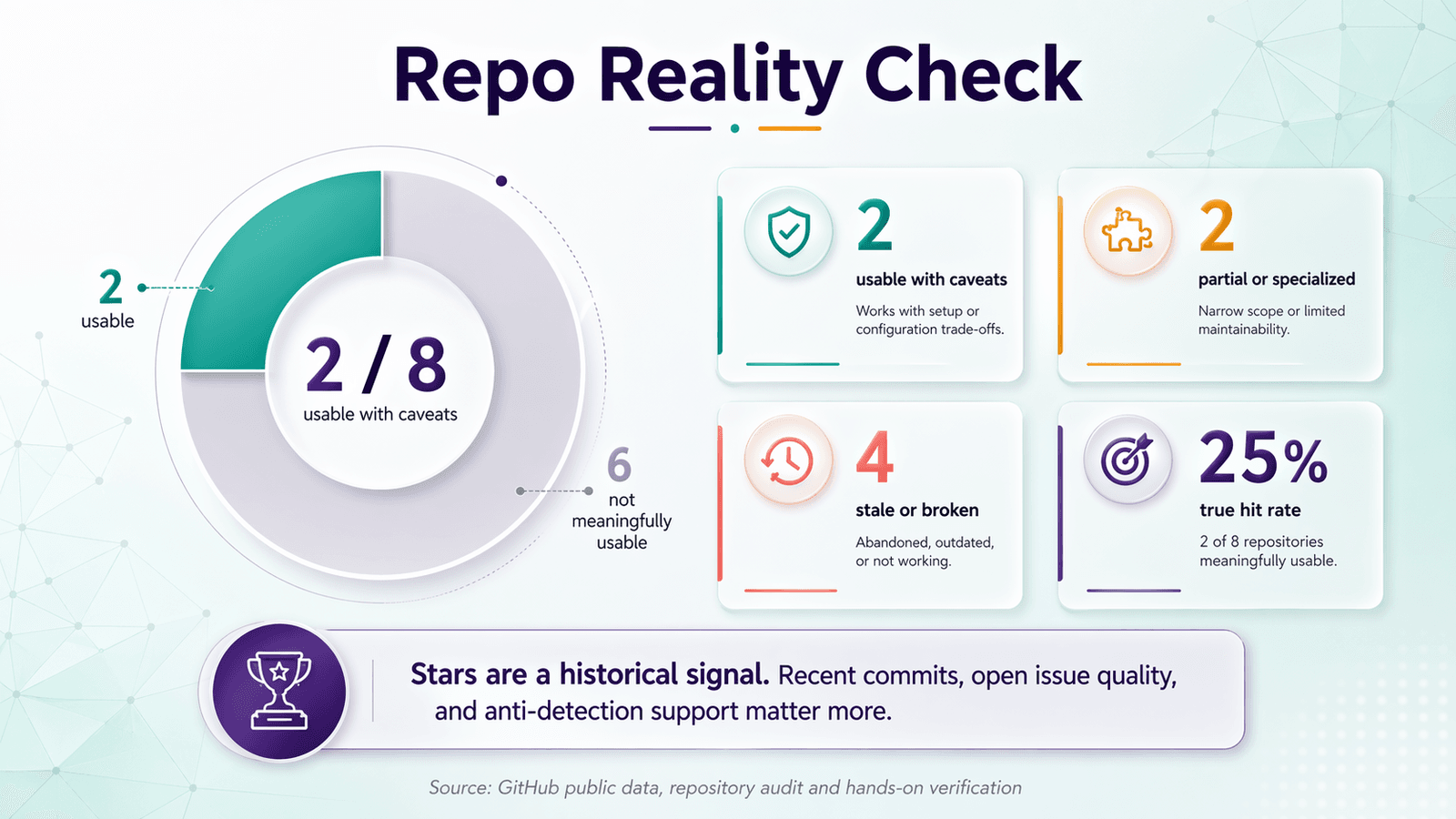
मैंने यह scorecard GitHub पर सबसे ज़्यादा दिखने वाले आठ LinkedIn scraper repos पर लागू किया। नतीजे उत्साहजनक नहीं थे।
| Repo | Stars | Last Commit | 2026 में काम करता है? | मुख्य दायरा | मुख्य नोट्स |
|---|---|---|---|---|---|
| joeyism/linkedin_scraper | ~3,983 | Apr 2026 | ✅ कुछ शर्तों के साथ | Profiles, companies, posts, jobs | Playwright-based rewrite, session reuse — लेकिन हालिया issues security blocks और broken job search दिखाते हैं |
| python-scrapy-playbook/linkedin-python-scrapy-scraper | ~111 | Jan 2026 | ✅ tutorials/public data के लिए | People, companies, jobs | ScrapeOps proxy integration; free plan में 1,000 requests/month और 1 thread |
| spinlud/py-linkedin-jobs-scraper | ~472 | Mar 2025 | ⚠️ सिर्फ़ jobs | Jobs | Cookie support, experimental proxy mode — अगर आपको सिर्फ़ public job listings चाहिए तो उपयोगी |
| madingess/EasyApplyBot | ~170 | Mar 2025 | ⚠️ गलत tool | Easy Apply automation | यह data scraper नहीं है — job applications automate करता है |
| linkedtales/scrapedin | ~611 | May 2021 | ❌ | Profiles | README अभी भी कहता है "working in 2020"; issues में pin verification और HTML changes दिखते हैं |
| austinoboyle/scrape-linkedin-selenium | ~526 | Oct 2022 | ❌ | Profiles, companies | कभी उपयोगी था, अब 2026 के लिए बहुत पुराना हो चुका है |
| eilonmore/linkedin-private-api | ~291 | Jul 2022 | ❌ | Profiles, jobs, companies, posts | Private API wrapper; undocumented endpoints अप्रत्याशित रूप से बदलते हैं |
| nsandman/linkedin-api | ~154 | Jul 2019 | ❌ | Profiles, messaging, search | ऐतिहासिक रूप से दिलचस्प; लगभग 900 requests/hour के बाद rate limiting documented है |
इन 8 repos में से सिर्फ़ 2 ही 2026 के reader के लिए बिना भारी caveats के सच में उपयोगी लगे। यह अनुपात असामान्य नहीं है — GitHub पर LinkedIn scraping के लिए यही सामान्य स्थिति है।
Ban से बचाव की योजना: Proxies, Rate Limits, और Account Safety
Account bans सबसे बड़ा operational risk हैं। यहाँ तक कि technically competent scrapers भी यहीं फेल हो जाते हैं। Code काम करता है; account नहीं। Users ने proxies और लंबे delays के बावजूद केवल के बाद flagged होने की रिपोर्ट की है।
Rate Limiting: Community क्या बताती है
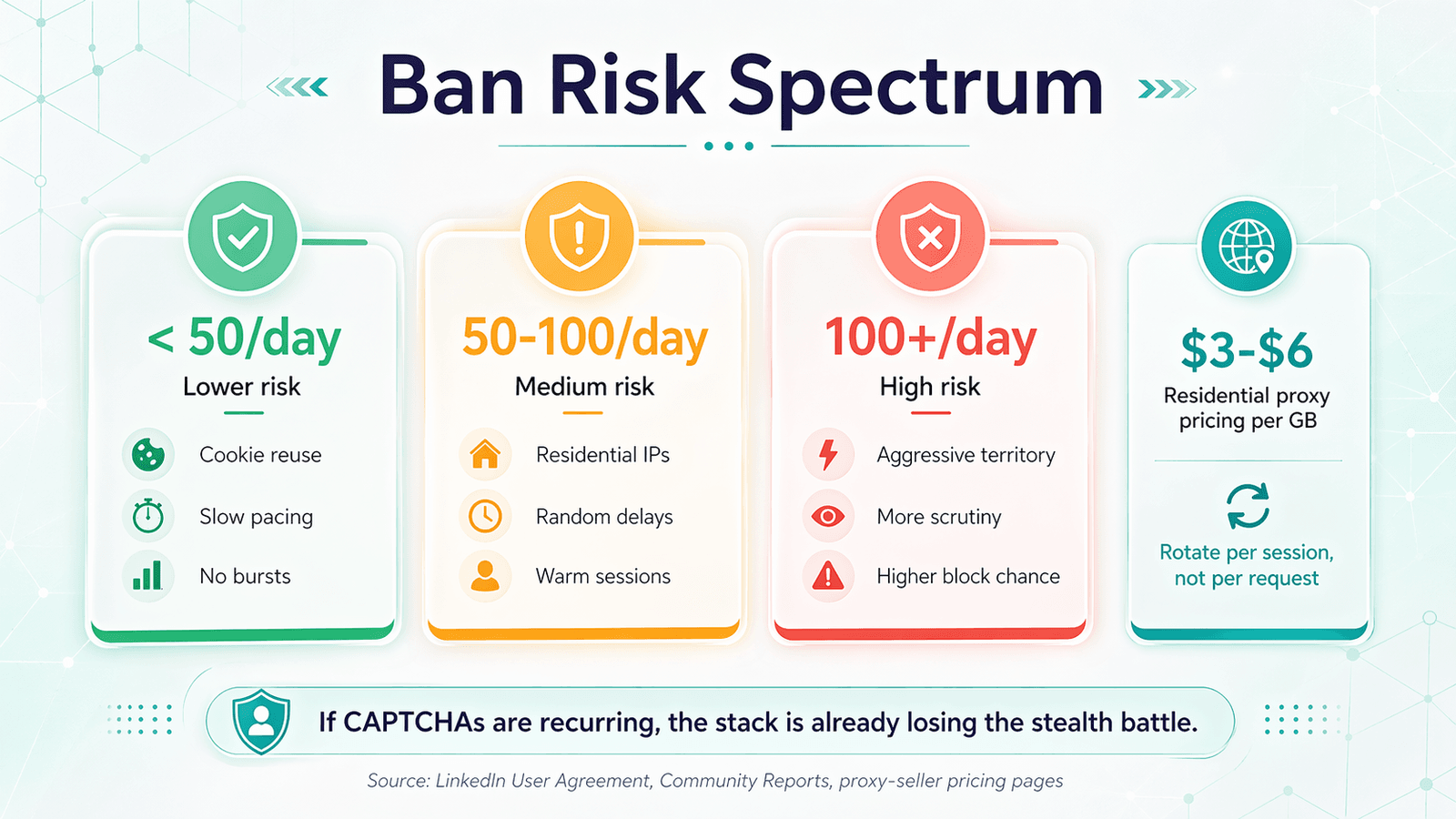
कोई निश्चित safe number नहीं है। LinkedIn session age, click timing, burst patterns, IP reputation, और account behavior को देखता है — सिर्फ़ raw volume को नहीं। Community data आम तौर पर इन bands में बंटता है:
- एक user ने proxies और 33-second pacing के साथ 40–80 profiles पर detection की रिपोर्ट की
- दूसरे ने 30 profiles/day/account के आसपास रहने की सलाह दी
- एक अधिक आक्रामक operator ने दिन भर में फैलाकर का दावा किया
- ने लगभग 900 requests in one hour के बाद internal rate-limit warning document की
व्यावहारिक निष्कर्ष: 50 profile views/day/account से नीचे का स्तर कम जोखिम वाला है। 50–100/day मध्यम जोखिम है, जहाँ session quality बहुत मायने रखती है। 100/day/account से ऊपर जाना increasingly aggressive territory है।
Proxy Strategy: Residential बनाम Datacenter
LinkedIn के लिए residential proxies अभी भी standard हैं क्योंकि वे सामान्य end-user traffic जैसे दिखते हैं। Datacenter IPs सस्ते होते हैं, लेकिन sophisticated sites पर जल्दी flag हो जाते हैं — और LinkedIn ठीक वही तरह की site है जहाँ सस्ता traffic पकड़ा जाता है।
मौजूदा pricing context:
- : plan के अनुसार $3.00–$4.00/GB
- : plan के अनुसार $4.00–$6.00/GB
Rotation हर session के हिसाब से करें, हर request के हिसाब से नहीं। Per-request rotation एक ऐसा fingerprint बनाती है जो किसी भी single IP से कहीं ज़्यादा ज़ोर से "proxy infrastructure" चिल्लाती है।
Burner Account Protocol
इस मुद्दे पर community advice बिल्कुल साफ़ है: अपने main LinkedIn account को disposable scraping infrastructure की तरह मत इस्तेमाल कीजिए।
अगर आप account-backed scraping ही करना चाहते हैं:
- अपनी primary professional identity से अलग एक account इस्तेमाल करें
- profile को पूरी तरह भरें और scraping शुरू करने से पहले उसे कुछ दिनों तक human-like व्यवहार करने दें
- कभी भी अपना real phone number scraping accounts से लिंक न करें
- scraping sessions को real outreach और messaging से पूरी तरह अलग रखें
ध्यान देने योग्य बात: LinkedIn का (3 नवंबर 2025 से प्रभावी) false identities और account sharing को स्पष्ट रूप से निषिद्ध करता है। Burner-account tactic operational रूप से आम है, लेकिन contract की दृष्टि से उलझन भरा है।
CAPTCHA को कैसे संभालें
CAPTCHA सिर्फ़ झंझट नहीं है। यह संकेत है कि आपका session पहले से scrutiny में है। विकल्पों में शामिल हैं:
- session जारी रखने के लिए manual completion
- login flows को फिर से चलाने के बजाय cookies reuse करना
- जैसी solver services (~$0.50–$1.00 per 1,000 image CAPTCHAs, ~$1.00–$2.99 per 1,000 reCAPTCHA v2 solves)
लेकिन अगर आपका workflow बार-बार CAPTCHAs trigger कर रहा है, तो solver services की economics आपकी सबसे छोटी समस्या है। आपका stack stealth battle हार रहा है।
Risk Spectrum
| Volume | Risk Level | Recommended Approach |
|---|---|---|
| < 50 profiles/day | कम | Browser session या cookie reuse, धीमा pacing, कोई आक्रामक automation नहीं |
| 50–500 profiles/day | मध्यम से उच्च | Residential proxies, warmed accounts, session reuse, randomized delays |
| 500+/day | बहुत उच्च | Commercial APIs या built-in anti-detection वाले maintained tools; सिर्फ़ public GitHub repos आम तौर पर पर्याप्त नहीं होते |
Open-Source विरोधाभास: लोकप्रिय LinkedIn Scraper GitHub Repos जल्दी क्यों टूटते हैं
Users एक उचित चिंता उठाते हैं: "Open-source version बनाने का मतलब LinkedIn बस देख सकता है कि आप क्या कर रहे हैं और उसे रोक सकता है।" यह चिंता paranoid नहीं है। यह संरचनात्मक रूप से सही है।
Visibility Problem
ज़्यादा stars एक साथ दो संकेत बनाते हैं: users के लिए trust और LinkedIn की security team के लिए target। कोई repo जितना लोकप्रिय होता जाता है, उतनी ही संभावना होती है कि LinkedIn उसके methods को खास तौर पर counter करे।
आप इस lifecycle को audit data में देख सकते हैं। linkedtales/scrapedin इतना notable था कि 2020 में LinkedIn की "new website" के साथ काम करने का दावा करता था। लेकिन बाद के verification और layout changes के साथ यह तालमेल नहीं रख सका। nsandman/linkedin-api ने कभी उपयोगी tricks document की थीं, लेकिन इसकी आख़िरी commit मौजूदा anti-bot environment से कई साल पुरानी थी।
Community Patch Advantage
Open source का एक असली फायदा अभी भी है: active maintainers और contributors LinkedIn की defense बदलते ही जल्दी patch कर सकते हैं। इस audit में joeyism/linkedin_scraper इसका मुख्य उदाहरण है — यह अभी भी blocked-auth और broken-search issues दिखाता है, लेकिन कम से कम आगे बढ़ रहा है। Forks अक्सर मूल repo से पहले नए evasion techniques लागू कर लेते हैं।
इसके बारे में क्या करें
- किसी एक public repo को स्थायी infrastructure मत मानिए
- सक्रिय forks पर नज़र रखें जो updated evasion techniques लागू करते हों
- production use के लिए private fork बनाए रखने पर विचार करें (ताकि आपकी विशिष्ट adaptations public न हों)
- LinkedIn के detection या UI behavior बदलने पर methods बदलने के लिए तैयार रहें
- सारे दांव एक tool पर लगाने के बजाय approaches विविध रखें
AI-Powered Extraction बनाम CSS Selectors: एक व्यावहारिक तुलना
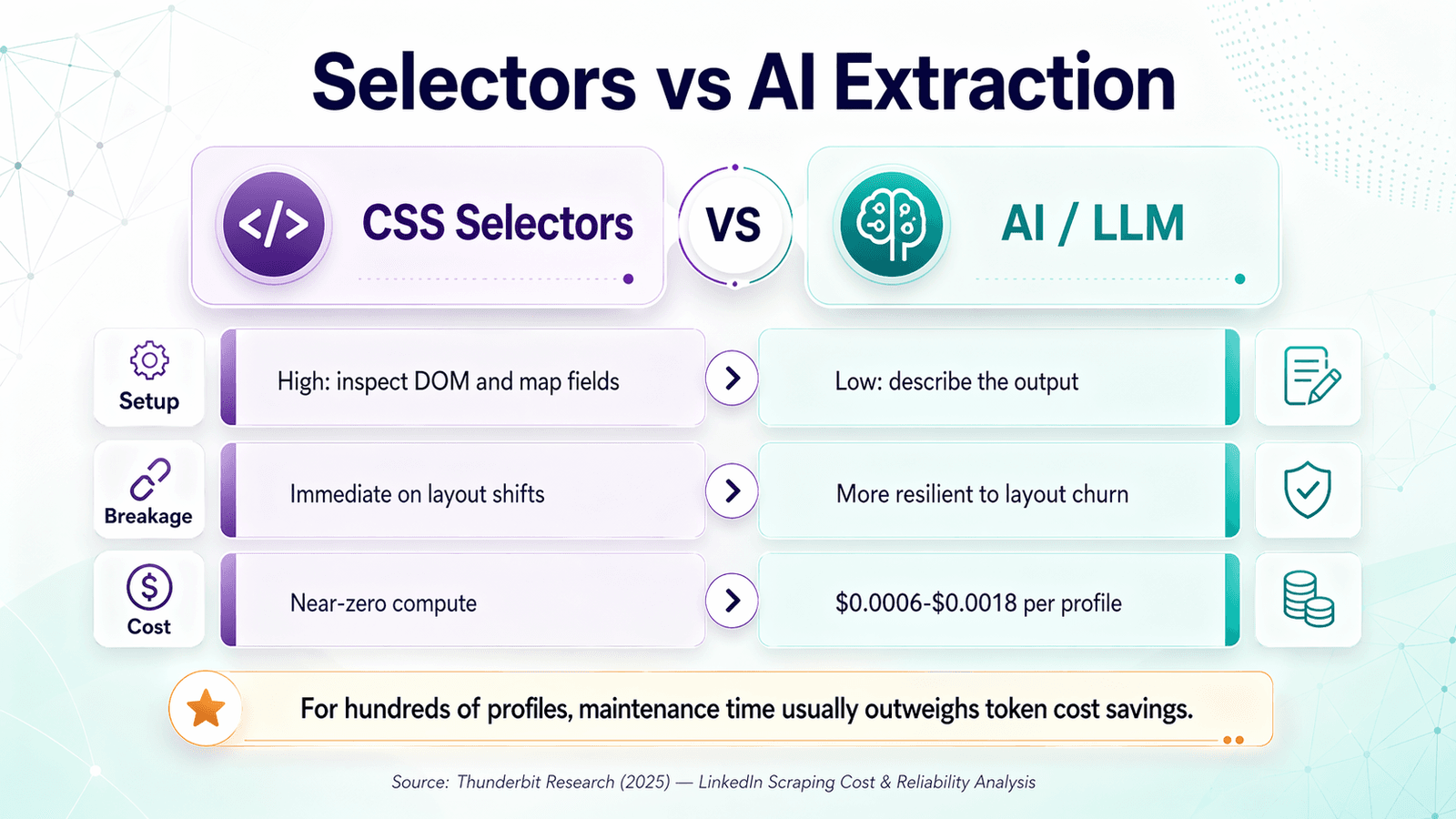
2026 में सबसे दिलचस्प technical split GitHub बनाम no-code नहीं है। यह selector-based extraction बनाम semantic extraction है — और यह फर्क ज़्यादातर roundups से कहीं ज़्यादा महत्वपूर्ण है।
CSS Selectors कैसे काम करते हैं (और कैसे टूटते हैं)
Traditional scrapers LinkedIn के DOM का निरीक्षण करते हैं और हर field को CSS selector या XPath expression से map करते हैं। जब page structure स्थिर होती है, तो यह तरीका शानदार होता है: उच्च precision, कम marginal cost, बहुत तेज़ parsing।
Failure mode भी उतना ही साफ़ है। LinkedIn class names, nesting, lazy-loading behavior बदल देता है, या अलग auth walls के पीछे content gate कर देता है — और scraper तुरंत टूट जाता है। Repo audit के issue titles पूरी कहानी बताते हैं: "changed HTML," "broken job search," "missing values," "authwall blocks."
AI/LLM Extraction कैसे काम करती है
नया पैटर्न अवधारणा में सरल है: page render करें, visible text इकट्ठा करें, model से structured fields निकलवाएँ। यही logic कई no-code AI scrapers और कुछ नए custom workflows के पीछे है।
मौजूदा ($0.15/1M input tokens, $0.60/1M output tokens) का उपयोग करते हुए, एक profile के लिए text-only extraction pass की लागत आम तौर पर $0.0006–$0.0018 per profile आती है। यह मध्यम-आकार के workflows के लिए नगण्य है।
सीधी तुलना
| आयाम | CSS Selector / XPath | AI/LLM Extraction |
|---|---|---|
| Setup effort | अधिक — DOM inspect करें, हर field के लिए selectors लिखें | कम — desired output को प्राकृतिक भाषा में बताइए |
| Layout बदलने पर टूटना | तुरंत टूटता है | स्वतः अनुकूल होता है (semantic रूप से पढ़ता है) |
| Structured fields पर accuracy | selectors सही हों तो ~99% | ~95–98% (कभी-कभी LLM interpretation errors) |
| Unstructured/variable data को संभालना | custom logic के बिना कमजोर | मज़बूत — AI context समझता है |
| Cost per profile | लगभग शून्य (केवल compute) | ~$0.001–$0.002 (API token cost) |
| Labeling/categorization | अलग post-processing चाहिए | एक ही pass में categorize, translate, label कर सकता है |
| Maintenance burden | लगातार selector fixes | लगभग शून्य |
आपको क्या चुनना चाहिए?
बहुत उच्च volume वाले, स्थिर, engineering-owned pipelines के लिए selector-based parsing लागत के मामले में अभी भी जीत सकता है। ज़्यादातर छोटे और mid-market users जो लाखों नहीं बल्कि सैकड़ों profiles scrape करते हैं, उनके लिए AI extraction बेहतर long-term investment है, क्योंकि LinkedIn के layout changes developer time में tokens से ज़्यादा महँगे पड़ते हैं।
जब GitHub Repos बहुत ज़्यादा हों: No-Code रास्ता
"linkedin scraper github" खोजने वाले ज़्यादातर लोग browser-automation maintainers बनना नहीं चाहते।
उन्हें तालिका में rows चाहिए।
Users GitHub scraper की usability को issue threads में साफ़ तौर पर complain करते हैं: "It does not handle 2FA and it is not easy to use since there is no UI." Audience में recruiters, SDRs, और ops managers शामिल हैं — सिर्फ़ Python developers नहीं।
Build बनाम Buy का निर्णय
| Factor | GitHub Repo | No-Code Tool (e.g., Thunderbit) |
|---|---|---|
| Setup time | 30 मिनट–2+ घंटे (Python, dependencies, proxies) | 2 मिनट से कम (extension install करें, क्लिक करें) |
| Maintenance | LinkedIn बदलने पर आपको fix करना पड़ता है | Tool provider updates संभालता है |
| Anti-detection | Proxies, delays, sessions आपको configure करने पड़ते हैं | Tool में built-in |
| Data structuring | Parsing logic आप लिखते हैं | AI automatically fields सुझाता है |
| Export options | Export pipeline आप बनाते हैं | Excel, Google Sheets, Airtable, Notion में one-click export |
| Cost | Free repo + proxy costs + आपका समय | Free tier available; volume के लिए credit-based |
Thunderbit बिना कोड LinkedIn Scraping कैसे संभालता है
GitHub repos से अलग तरीके से इस समस्या को हल करता है। selectors लिखने या browser automation configure करने के बजाय, आप:
- install करते हैं
- किसी भी LinkedIn page पर जाते हैं (search results, profile, company page)
- "AI Suggest Fields" पर क्लिक करते हैं — Thunderbit की AI page पढ़ती है और structured columns सुझाती है (name, title, company, location, आदि)
- ज़रूरत हो तो columns adjust करते हैं, फिर extract करते हैं
- सीधे Excel, Google Sheets, , या Notion में export करते हैं
क्योंकि Thunderbit हर बार page को semantically पढ़ने के लिए AI का उपयोग करता है, LinkedIn का DOM बदलने पर यह टूटता नहीं है। यही फायदा custom Python scripts में GPT-integrated approach का भी है, लेकिन codebase की जगह एक no-code extension में पैक किया गया है जिसे आपको maintain नहीं करना पड़ता।
के लिए — search results list से individual profiles पर click करके अपनी data table को enrich करना — Thunderbit इसे automatically संभालता है। Browser mode login-required pages के लिए अलग proxy configuration के बिना काम करता है।
अभी भी GitHub Repo किसे इस्तेमाल करना चाहिए?
GitHub repos अभी भी सही हैं:
- उन developers के लिए जिन्हें deep customization या unusual data types चाहिए
- उन teams के लिए जो बहुत high volume पर scraping करते हैं, जहाँ per-credit cost मायने रखती है
- उन users के लिए जिन्हें CI/CD pipelines या servers पर scraping चलाना है
- उन लोगों के लिए जो LinkedIn data को बड़े automated workflows में शामिल कर रहे हैं
बाकी सभी — खासकर sales, recruiting, और ops teams — के लिए पूरा setup-and-maintain cycle हटा देता है।
चरण-दर-चरण: GitHub से LinkedIn Scraper का मूल्यांकन और उपयोग कैसे करें
अगर आपने तय कर लिया है कि GitHub सही रास्ता है, तो यहाँ एक staged workflow है जो समय की बर्बादी और account risk को कम करता है।
चरण 1: Repos खोजें और Shortlist बनाएं
GitHub पर "linkedin scraper" खोजें और फ़िल्टर करें:
- हाल में अपडेट हुए (पिछले 6 महीने)
- आपकी stack से मेल खाने वाली भाषा (Python सबसे आम है)
- आपकी वास्तविक ज़रूरत से मेल खाने वाला scope (profiles बनाम jobs बनाम companies)
3–5 repos short list करें जो जीवंत लगें।
चरण 2: Repo Health Scorecard लागू करें
हर repo को पहले बताए गए scorecard से गुज़ारें। इनमें से कुछ भी हो तो हटा दें:
- पिछले साल में कोई commit नहीं
- unresolved "blocked" या "CAPTCHA" issues
- सिर्फ़ password-based authentication
- sessions, cookies, या proxies का कोई ज़िक्र नहीं
चरण 3: अपना Environment सेट करें
इस audit में repos से मिले common setup commands:
1pip install linkedin-scraper
2playwright install chromium
3pip install linkedin-jobs-scraper
4LI_AT_COOKIE=<cookie> python your_app.py
5scrapy crawl linkedin_people_profile
बार-बार आने वाले friction points:
session.jsonfiles गायब होना- browser driver version mismatches (Chromium/Playwright)
- browser DevTools से cookies निकालना
- proxy auth timeouts
चरण 4: छोटा Test Scrape चलाएँ
10–20 profiles से शुरुआत करें। जाँचें:
- क्या fields सही तरीके से parsed हैं?
- क्या data पूरा है?
- क्या कोई security checkpoint आया?
- क्या output format उपयोगी है या raw JSON शोर?
चरण 5: सावधानी से Scale करें
Randomized delays जोड़ें (requests के बीच 5–15 seconds), concurrency कम रखें, session reuse करें, और residential proxies इस्तेमाल करें। ताज़ा account पर सीधे hundreds of profiles/day पर न जाएँ।
चरण 6: अपना Data Export और Structure करें
ज़्यादातर GitHub repos raw JSON या CSV output देते हैं। फिर भी आपको यह करना होगा:
- records deduplicate करना
- titles और company names normalize करना
- fields को अपने CRM या ATS में map करना
- compliance के लिए data provenance document करना
(अगर आप यह चरण छोड़ना चाहें, तो Thunderbit structuring और export अपने आप संभाल लेता है।)
LinkedIn Scraper GitHub बनाम No-Code Tools: पूरी तुलना
| आयाम | GitHub Repo (CSS Selectors) | GitHub Repo (AI/LLM) | No-Code Tool (Thunderbit) |
|---|---|---|---|
| Setup time | 1–2+ घंटे | 1–3+ घंटे (+ API key) | 2 मिनट से कम |
| Technical skill | उच्च (Python, CLI) | उच्च (Python + LLM APIs) | कोई नहीं |
| Maintenance | उच्च (selectors टूटते हैं) | मध्यम (LLM adapts, code को फिर भी updates चाहिए) | कोई नहीं (provider maintain करता है) |
| Anti-detection | DIY (proxies, delays) | DIY | Built-in |
| Accuracy | काम करते समय उच्च | occasional LLM errors के साथ उच्च | उच्च (AI-powered) |
| Cost | Free + proxy costs + आपका समय | Free + LLM API costs + proxy costs | Free tier; volume के लिए credit-based |
| Export | DIY (JSON, CSV) | DIY | Excel, Sheets, Airtable, Notion |
| Best for | Developers, custom pipelines | कम maintenance चाहने वाले developers | Sales, recruiting, ops teams |
कानूनी और नैतिक विचार
इस section को छोटा रखूँगा, लेकिन इसे छोड़ा नहीं जा सकता।
LinkedIn का (3 नवंबर 2025 से प्रभावी) स्पष्ट रूप से service को scrape करने के लिए software, scripts, robots, crawlers, या browser plugins के उपयोग को प्रतिबंधित करता है। LinkedIn ने enforcement के साथ इसका समर्थन भी किया है:
- : LinkedIn ने Proxycurl के खिलाफ legal action की घोषणा की
- : LinkedIn ने कहा कि वह मामला सुलझ गया
- : Law360 ने रिपोर्ट किया कि LinkedIn ने industrial-scale scraping पर अतिरिक्त defendants के खिलाफ मुकदमा दायर किया
hiQ v. LinkedIn मामलों की श्रृंखला ने public data access को लेकर कुछ nuance पैदा किया, लेकिन ने breach-of-contract theories पर LinkedIn के पक्ष में रुख किया। "Publicly visible" का मतलब "commercial reuse के लिए बड़े पैमाने पर scrape करना स्पष्ट रूप से सुरक्षित है" नहीं होता।
EU-लिंक्ड workflows के लिए । फ्रांसीसी data authority की एक ठोस उदाहरण है कि regulators scraped LinkedIn data को personal data मानकर data protection rules के अधीन रखते हैं।
Thunderbit जैसे maintained tool का उपयोग करने से आपकी legal obligations नहीं बदलतीं। लेकिन यह security responses को accidentally trigger करने या rate limits तोड़ने के जोखिम को कम करता है, जिससे LinkedIn का ध्यान खिंच सकता है।
2026 में क्या काम करता है और क्या नहीं
क्या काम करता है
- किसी भी repo को अपनाने से पहले Repo Health Scorecard लागू करना
- बार-बार automated login करने के बजाय cookie/session reuse
- जब account-backed scraping करना ही हो तो residential proxies
- छोटे, धीमे, human-like scraping workflows
- जब आपको marginal token cost से ज़्यादा adaptability चाहिए तो AI-assisted extraction
- जब असली ज़रूरत spreadsheet output हो, scraper ownership नहीं
- एक public repo पर दाँव लगाने के बजाय approaches को विविध बनाना
क्या काम नहीं करता
- maintenance status या हालिया issues देखे बिना high-star repos clone करना
- LinkedIn के लिए datacenter proxies या free proxy lists का उपयोग
- rate limits या anti-detection के बिना hundreds of profiles/day तक scale करना
- maintenance plan के बिना लंबे समय तक CSS selectors पर निर्भर रहना
- अपने असली LinkedIn account को disposable infrastructure समझना
- "publicly accessible" को "contractually या legally unproblematic" समझ लेना
FAQs
क्या LinkedIn scraper GitHub repos 2026 में भी काम करते हैं?
कुछ करते हैं, लेकिन सिर्फ़ एक छोटा subset। इस audit में देखे गए आठ visible repos में से केवल दो ही 2026 के reader के लिए भारी disclaimers के बिना सच में उपयोगी लगे। असली बात यह है कि repos का मूल्यांकन star counts से नहीं, maintenance activity और issue health से करें। किसी project में setup time लगाने से पहले Repo Health Scorecard इस्तेमाल करें।
Ban हुए बिना मैं रोज़ कितने LinkedIn profiles scrape कर सकता हूँ?
कोई निश्चित safe number नहीं है, क्योंकि LinkedIn सिर्फ़ volume नहीं, session behavior भी देखता है। Community reports के अनुसार 50 profiles/day/account से नीचे का स्तर कम जोखिम वाला है, 50–100/day मध्यम जोखिम है जहाँ infrastructure quality मायने रखती है, और 100/day से ऊपर जाना increasingly aggressive हो जाता है। 5–15 seconds के randomized delays और residential proxies मदद करते हैं, लेकिन risk पूरी तरह खत्म नहीं करते।
LinkedIn scraper GitHub projects का no-code विकल्प है क्या?
हाँ। आपको AI-powered field detection, browser-based auth (कोई proxy configuration नहीं), और Excel, Google Sheets, Airtable, या Notion में one-click export के साथ कुछ ही clicks में LinkedIn pages scrape करने देता है। यह sales, recruiting, और ops teams के लिए बनाया गया है जिन्हें code maintain किए बिना data चाहिए। आप इसे से आज़मा सकते हैं।
क्या LinkedIn data scrape करना कानूनी है?
यह एक gray area है, और इसकी edges पहले से ज़्यादा सख़्त हो रही हैं। LinkedIn का User Agreement scraping को स्पष्ट रूप से प्रतिबंधित करता है, और LinkedIn ने में scrapers के खिलाफ कानूनी कार्रवाई की है। public data access पर hiQ v. LinkedIn precedent को हालिया rulings ने सीमित किया है। GDPR यह देखे बिना लागू होता है कि personal data कैसे इकट्ठा किया गया। किसी भी commercial use case के लिए अपने मामले के हिसाब से legal counsel लें।
AI extraction या CSS selectors — LinkedIn scraping के लिए क्या इस्तेमाल करूँ?
जब वे काम कर रहे हों तो CSS selectors प्रति record तेज़ और सस्ते होते हैं, लेकिन वे maintenance treadmill बनाते हैं क्योंकि LinkedIn अपना DOM नियमित रूप से बदलता है। AI/LLM extraction प्रति profile थोड़ा अधिक खर्च करता है (~$0.001–$0.002 वर्तमान पर), लेकिन layout changes के अनुसार स्वतः अनुकूल हो जाता है। ज़्यादातर non-enterprise users जो लाखों नहीं बल्कि सैकड़ों profiles scrape कर रहे हैं, उनके लिए AI extraction बेहतर long-term investment है। Thunderbit का built-in AI engine यह लाभ देता है, बिना आपके code लिखे या maintain किए।
और जानें