

Apollo list queries को optimize करना सिर्फ़ एक technical exercise नहीं है—यह उन सभी लोगों के लिए एक ज़रूरी skill है जो real-time news data, automated news extraction, या high-speed sales और operations workflows पर depend करते हैं। मैंने खुद देखा है कि एक धीमी list query कैसे एक बढ़िया dashboard को bottleneck में बदल देती है—sales teams spinner देखते रह जाते हैं और ops teams spreadsheets में workaround ढूँढने लगती हैं। ऐसे समय में, जब 60% sales reps का समय पहले ही non-selling tasks में जा रहा है, हर millisecond मायने रखता है।
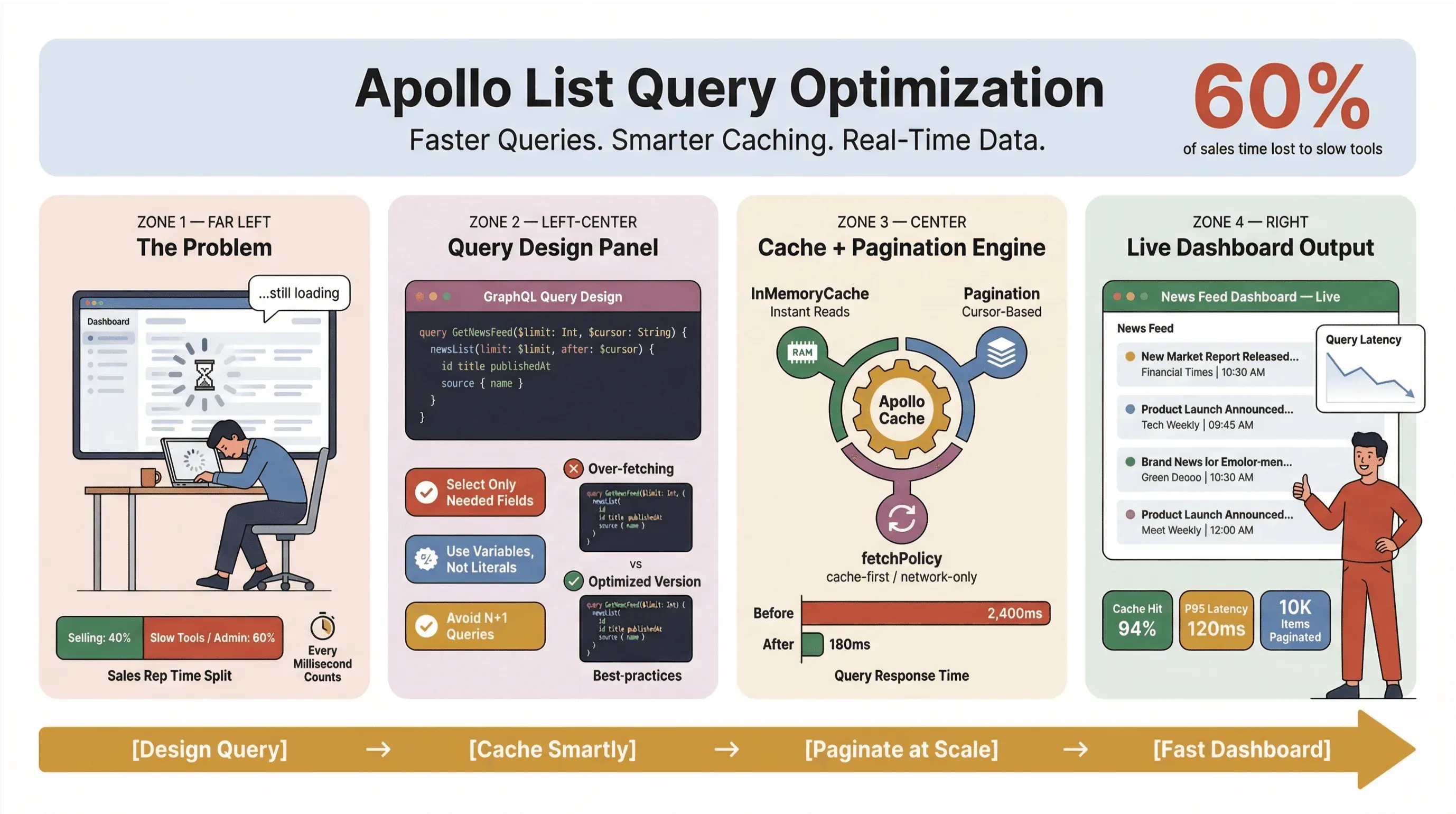
तो, Apollo Client list queries को तेज़, भरोसेमंद, और scale पर consistent कैसे रखा जाए — खासकर जब आप news scrape कर रहे हों, leads track कर रहे हों, या mission-critical dashboards चला रहे हों? इस guide में, मैं उन practical तरीकों से गुज़रूँगा जो production में टिके रहे हैं: query design, caching, pagination, और Thunderbit जैसे no-code tools को जोड़कर news extraction का भारी काम automate करना।
--- चाहे आप developer हों, product manager हों, या बस वही इंसान हों जिसे dashboard slow होने पर सब blame करते हैं, यह Apollo GraphQL list performance के लिए आपका playbook है।
Automated News Extraction के लिए Thunderbit आज़माएँ
Apollo List Queries को optimize क्यों करें? (apollo client list performance, optimize apollo list queries)
सच कहें तो: कोई भी headlines या sales leads के load होने का इंतज़ार नहीं करना चाहता। Business environments में — खासकर जहाँ automated news extraction या real-time data का इस्तेमाल होता है — धीमी Apollo list queries सिर्फ़ users को परेशान नहीं करतीं; ये पैसे भी बर्बाद करती हैं, decisions को late कराती हैं, और लोगों को फिर से manual काम की तरफ धकेल देती हैं। Slack Workforce Lab की लगातार reports दिखाती रही हैं कि desk workers अपने दिन का लगभग एक-तिहाई — और हाल की reports में करीब 40% — low-value, repetitive tasks में खर्च करते हैं, अक्सर इसलिए क्योंकि उनके tools काम को धीमे surfaces पर बाँट देते हैं।
जब list queries optimize नहीं होतीं, तो यह होता है:
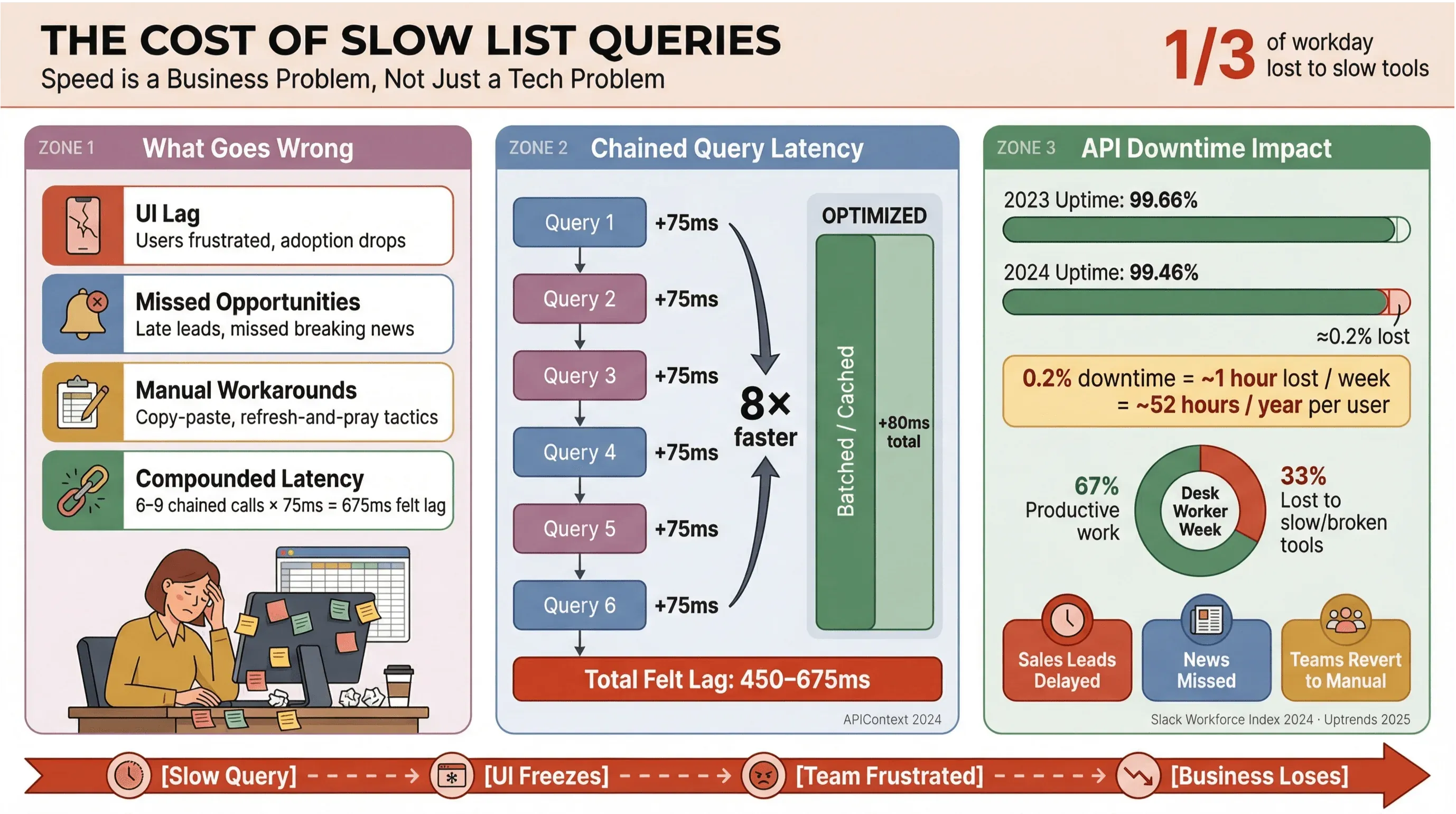
- UI में देरी: Users को delay महसूस होता है, जिससे frustration बढ़ती है और adoption घटती है।
- मौके चूकना: Sales या news monitoring में, कुछ seconds की देरी भी hot lead या breaking news miss करा सकती है।
- Manual workaround: Teams फिर से copy-paste, spreadsheets, या “refresh and pray” जैसी tactics अपनाने लगती हैं।
- Latency का असर जुड़ता जाता है: हर धीमी API call कुल समय बढ़ाती है—अगर आपके workflow में 6–9 dependent queries हैं, तो प्रति call सिर्फ़ 75ms की देरी भी 450–675ms के “felt” lag में बदल सकती है (APIContext).
और मामला सिर्फ़ speed का नहीं है। API downtime बढ़ रहा है, जहाँ average uptime एक ही साल में 99.66% से गिरकर 99.46% हो गया—यानी list-heavy apps के लिए लगभग हर हफ़्ते एक घंटे के बराबर productivity loss। जब आपका business real-time news data पर टिका हो, तो ऐसा risk आप afford नहीं कर सकते।
सही Data Structure और Fields चुनना (apollo graphql list best practices)
मैंने जो सबसे आम गलती देखी है (और हाँ, मैं खुद भी कर चुका हूँ) वह है हर list query को detail query समझ लेना। GraphQL में आपके पास वही data खींचने की ताकत है जो सच में चाहिए—तो उसी का इस्तेमाल करें। Overfetching performance का दुश्मन है, खासकर news scraping tools और real-time dashboards में।
Automated News Extraction के लिए Fields को tune करना
मान लीजिए आप एक news feed बना रहे हैं। क्या आपको list query में पूरा article body, सारे tags, comments, और author bios चाहिए? शायद नहीं। फर्क कुछ ऐसा है:
Efficient List Query:
query NewsFeed($after: String, $first: Int) {
  newsFeed(after: $after, first: $first) {
    edges {
      cursor
      node {
        id
        title
        url
        sourceName
        publishedAt
      }
    }
    pageInfo { endCursor hasNextPage }
  }
}
Inefficient List Query (ऐसा न करें):
query NewsFeedTooHeavy($after: String, $first: Int) {
  newsFeed(after: $after, first: $first) {
    edges {
      node {
        id title url publishedAt
        fullText
        summary
        entities { ... }
        relatedArticles { ... }
      }
    }
  }
}
पहली query हल्की-फुल्की और तेज़ है—ranking, filtering, और rows render करने के लिए बढ़िया। दूसरी? ये disguise में एक detail query है, जो भारी payload खींचती है और सब कुछ धीमा कर देती है (GraphQL spec, Apollo best practices).
Pro tip: दो-स्तरीय तरीका अपनाएँ—list में सिर्फ़ lightweight fields लें, और heavy details (जैसे full text या NLP enrichment) तभी load करें जब user किसी item को खोलता है या hover करता है।
तेज़ Queries के लिए Apollo Client Cache का इस्तेमाल (apollo client list performance)
Apollo Client cache list-query performance के लिए आपके हाथ में सबसे बड़ा lever है। सही तरह configure होने पर यह आपको:
- Repeat queries instantly serve करने देता है (network round-trips नहीं)
- Server load और API costs कम करता है
- Back/forward navigation और filter changes को smooth बनाता है
लेकिन caching magic नहीं है—इसके लिए थोड़ी setup और discipline चाहिए।
असरदार Cache Policies सेट करना
Apollo कई fetch policies support करता है:
| Policy | यह क्या करता है | News Lists के लिए सबसे अच्छा उपयोग |
|---|---|---|
| cache-first | पहले cache से पढ़ता है, ज़रूरत हो तो network से लाता है | Lists दोबारा खोलना, filters बदलना, back/forward navigation |
| network-only | हर बार network से fetch करता है | Manual refresh, “latest headlines” |
| cache-and-network | पहले cache दिखाता है, फिर network response से अपडेट करता है | तेज़ initial paint + background update (news feeds के लिए बढ़िया) |
| no-cache | हर बार fetch करता है, cache में कुछ नहीं रखता | एक-off sensitive queries (lists के लिए कम ही) |
Real-time news data के लिए मुझे cache-and-network पसंद है—यह users को तुरंत results देता है, फिर background में update करता है। बस refresh के बाद data re-order होने पर UI flicker से सावधान रहें (GitHub issue).
Cache configuration tips:
- Stable IDs (
idया_id) का इस्तेमाल करें ताकि normalization सही हो (Apollo cache docs). - Large lists के लिए cache size और garbage collection tune करें (memory management).
ROOT_QUERYके अंदर बड़े unnormalized blobs स्टोर करने से बचें—ये app को धीमा कर सकते हैं (community report).
Pagination लागू करना और Item Counts सीमित करना (apollo graphql list best practices)
अगर आप एक साथ सैकड़ों या हज़ारों news articles या sales leads load कर रहे हैं, तो आप मुश्किल को न्योता दे रहे हैं। Pagination सिर्फ़ UX feature नहीं है—यह performance की ज़रूरत है।
Apollo दोनों offset-based और cursor-based pagination support करता है। तुलना कुछ यूँ है:
| Pagination Type | फायदे | कमियाँ | किसके लिए बेहतर |
|---|---|---|---|
| Offset-based | आसान, जल्दी implement होता है | डेटा बदलने पर items miss/duplicate हो सकते हैं | Immutable या छोटी lists |
| Cursor-based | स्थिर, data changes को बेहतर संभालता है | थोड़ा ज़्यादा complex | News feeds, बड़ी lists |
ज़्यादातर real-time news या lead lists के लिए cursor-based pagination सही रास्ता है। यह नए items आने या पुराने हटने के बावजूद data consistency बनाए रखता है (GraphQL Foundation).
Apollo pagination tips:
- Paginated fields के cache keys नियंत्रित करने के लिए
keyArgsset करें (docs). - Cache में pages जोड़ने के लिए
mergefunction लागू करें। - पिछले results को overwrite किए बिना और pages लाने के लिए
fetchMoreका उपयोग करें।
News Scraping Tools के लिए Practical Pagination Patterns
एक typical news scraping UI आमतौर पर:
- सबसे ताज़ा 20–50 headlines दिखाएगा (सिर्फ़ lean fields)
- Scroll या “next page” क्लिक पर और data load करेगा
- Details सिर्फ़ ज़रूरत पड़ने पर fetch करेगा
इससे आपका UI तेज़ रहता है, API खुश रहती है, और users productive बने रहते हैं।
Automated News Extraction के लिए Thunderbit को Integrate करना
अब उस बड़े सवाल पर आते हैं: इतना structured news data आता कहाँ से है? यहीं Thunderbit काम आता है।
Thunderbit Chrome Extension पाएं Get Started Free
Thunderbit एक no-code AI web scraper Chrome Extension है जो लगभग किसी भी website से news headlines, URLs, sources, authors, publication dates, summaries, और images निकाल सकता है—बिना coding के। मैंने teams को Thunderbit के साथ पूरा news extraction process automate करते देखा है, जहाँ वे unstructured web pages को साफ़, structured data में बदल देते हैं जिसे सीधे database या GraphQL API में feed किया जा सकता है।
Real-Time News Data के लिए Thunderbit और Apollo का संयोजन
Sales और ops teams के लिए मुझे यह workflow बहुत पसंद है, जिन्हें up-to-date news चाहिए:
- Extraction Layer: Target sites से schedule के हिसाब से structured news data pull करने के लिए Thunderbit का News Scraper template इस्तेमाल करें।
- Storage Layer: Scraped data को fast retrieval के लिए optimized database में रखें।
- GraphQL Layer: API के जरिए
newsFeedlist field औरnewsArticle(id)detail field expose करें। - Client Layer: Apollo Client से list fetch करें (lean fields, paginated), और details सिर्फ़ ज़रूरत पर लाएँ।
यह “scrape → store → query” pipeline सुनिश्चित करती है कि आपके Apollo queries हमेशा fresh, structured data के साथ काम करें—बिना manual copy-paste या brittle scripts के।
Bonus: Thunderbit अपने AI-powered field suggestions से आपकी lists में sentiment या category जैसे extra fields भी जोड़ सकता है, जिससे आपका news feed और smart बन जाता है।
Step-by-Step Guide: Apollo List Queries को optimize करना
इसे action में लाने के लिए तैयार हैं? Apollo list query optimization के लिए मेरी go-to checklist यह है:
-
Queries को हल्का करें
- List render करने के लिए ज़रूरी fields ही माँगें (title, URL, timestamp, आदि)।
- Heavy fields (full text, images, enrichment) को detail queries में रखें।
-
Pagination लागू करें
- बड़ी या dynamic lists के लिए cursor-based pagination इस्तेमाल करें।
- Cache correctness के लिए
keyArgsऔरmergefunctions configure करें।
-
Apollo Cache का लाभ लें
- Stable IDs के साथ entities normalize करें।
- सही fetch policy चुनें (
cache-and-networknews के लिए बढ़िया है)। - अपने data volume के अनुसार cache size और garbage collection tune करें।
-
Automated Extraction को जोड़ें
- News scraping automate करने और data fresh रखने के लिए Thunderbit का इस्तेमाल करें।
- Structured data सीधे database या spreadsheet में export करें।
-
Monitor और Troubleshoot करें
- Queries, cache, और performance inspect करने के लिए Apollo Client Devtools का उपयोग करें।
- बड़े cache writes, excessive watched queries, और UI stutter पर नज़र रखें।
- p95/p99 latency और error rates track करें (New Relic, Uptrends).
Query Performance की Monitoring और Troubleshooting
Apollo के Devtools यहाँ बहुत काम आते हैं। आप:
- Active queries और cache state inspect कर सकते हैं
- Duplicate queries या excessive watchers पकड़ सकते हैं
- बड़े cache blobs या normalization issues पहचान सकते हैं
अगर UI lag या slow updates दिखें, तो इन बातों की जाँच करें:
- बहुत बड़ी list queries (उन्हें छोटा करें)
- खराब cache normalization (अपने IDs ठीक करें)
- Pagination merge issues (अपने
keyArgsऔरmergeaudit करें)
और tail latency मापना न भूलें—सिर्फ़ average नहीं। असली user pain वहीं छिपा होता है।
Traditional बनाम AI-Driven News Scraping Approaches की तुलना
सच कहें तो: news data scrape करना पहले custom scripts लिखने, headless browsers संभालने, और वेबसाइट का layout रातोंरात न बदल जाए, इसके लिए प्रार्थना करने जैसा था। अब Thunderbit जैसे AI-driven tools के साथ आप पूरा process automate कर सकते हैं—no code, no drama।
| Approach | Strengths | Business Users के लिए सीमाएँ |
|---|---|---|
| Scripted scraping | पूरी तरह customizable, scale पर सस्ता | High maintenance, engineering time चाहिए |
| Managed scraping platforms | जल्दी start होता है, anti-bot handling offload करता है | फिर भी config चाहिए, usage बढ़ने पर cost बढ़ती है |
| AI-driven extraction (Thunderbit) | Messy layouts संभालता है, code की ज़रूरत नहीं | Output QA चाहिए, schema से integration करनी पड़ती है |
| No-code visual scrapers | Non-engineers के लिए आसान | UI changes से टूट सकते हैं, scale सीमित |
| Proxy/unlocker infra | Blocks bypass करता है, high throughput support करता है | फिर भी extraction logic चाहिए, compliance risks |
Legal note: Public data scrape करना आम तौर पर legal होता है, लेकिन हमेशा terms of service और rate limits का सम्मान करें (Reuters).
Apollo GraphQL List Best Practices के Key Takeaways
आइए ज़रूरी बातों को दोहरा लें:
- Speed और clarity के लिए optimize करें: List queries को छोटा रखें, pagination लगाएँ, और caching का भरपूर उपयोग करें।
- Structure ज़रूरी है: सिर्फ़ वही data लें जो चाहिए—heavy fields को detail queries में भेजें।
- Cache आपका दोस्त है: डेटा तुरंत देने के लिए Apollo normalization और fetch policies का उपयोग करें।
- Extraction automate करें: Thunderbit जैसे tools news scraping और list enrichment को सभी के लिए आसान बनाते हैं।
- Monitor करें और iterate करें: Bottlenecks जल्दी पकड़ने के लिए Devtools और observability dashboards का उपयोग करें।
Sales, ops, और news teams के लिए ये best practices कम इंतज़ार, ज़्यादा action, और “यह इतना slow क्यों है?” वाले Slack messages की काफी कम संख्या का मतलब हैं।
निष्कर्ष: Apollo List Queries को optimize करने के अगले कदम
अगर आप अभी भी heavy, unpaginated, या cache-friendly न होने वाली list queries चला रहे हैं, तो अब audit और upgrade करने का समय है। छोटे कदम से शुरू करें: fields कम करें, pagination जोड़ें, और cache को tune करें। फिर Thunderbit जैसे automated extraction tools जोड़कर data को ताज़ा और actionable बनाए रखें।
और गहराई में जाना चाहते हैं? Apollo docs, Thunderbit Blog, या real-world tips और troubleshooting के लिए Apollo Community देखें। और अगर आप news extraction automate करने के लिए तैयार हैं, तो Thunderbit के News Scraper template को आज़माएँ—यह real-time data की ज़रूरत रखने वाले हर व्यक्ति के लिए game-changer है, बिना headache के।
Thunderbit News Scraper Template का उपयोग करें
अगर इस लेख के बाद आप कुछ और न भी करें, तो भी ये तीन काम ज़रूर करें: अपने list-query field selection को छोटा करें, cursor-based pagination जोड़ें, और एक sensible fetch policy चुनें। सिर्फ़ ये तीन बदलाव अक्सर list query को "noticeable" lag से "imperceptible" तक ले जाते हैं — और आपको data पर focus करने देते हैं, loading state पर नहीं।
FAQs
1. Real-time news या sales dashboards में Apollo list queries धीमी क्यों हो जाती हैं?
अगर list queries बहुत ज़्यादा data fetch करें, pagination न हो, या caching सही से set न हो, तो वे धीमी हो सकती हैं। News monitoring जैसे high-frequency workflows में छोटे delays भी जुड़कर UI lag और productivity loss बन जाते हैं।
2. Automated news extraction के लिए Apollo list queries को कैसे structure करना चाहिए?
सिर्फ़ वही fields माँगें जो list render करने के लिए ज़रूरी हैं (जैसे title, URL, timestamp)। Heavy fields (जैसे full article text या images) को detail queries में रखें, और payload छोटा और तेज़ रखने के लिए results को paginate करें।
3. Apollo Client cache list performance को कैसे बेहतर बनाता है?
Apollo cache पहले से fetched data को store करता है, जिससे repeat queries तुरंत respond कर सकती हैं। सही cache normalization और fetch policies (जैसे cache-and-network) list views को काफी तेज़ बना सकती हैं और server load कम कर सकती हैं।
4. News scraping और Apollo integration में Thunderbit कैसे मदद करता है?
Thunderbit एक no-code AI web scraper है जो किसी भी website से structured news data निकालता है। इसका उपयोग news extraction automate करने के लिए किया जा सकता है, फिर उस data को आपके database या GraphQL API में डालकर Apollo Client के साथ इस्तेमाल किया जा सकता है।
5. Apollo list query performance monitor और troubleshoot करने के लिए कौन से tools इस्तेमाल कर सकता हूँ?
Apollo Client Devtools आपको real time में queries, cache state, और performance inspect करने देते हैं। इसे observability dashboards (जैसे New Relic या Uptrends) के साथ मिलाकर latency और error rates track करें, और बेहतर results के लिए अपने query design को iterate करें।
Web scraping, automation, और real-time data workflows पर और tips चाहिए? Deep dives, tutorials, और AI-powered productivity की latest updates के लिए Thunderbit Blog देखें।
Thunderbit AI Web Scraper आज़माएँ Get Started Free
और जानें
- प्रभावी लीड प्रबंधन के लिए Apollo Lists को कैसे optimize करें
- Apollo Data Enrichment: Features, Benefits, and AI Boost
- Apollo Prospecting में महारत कैसे हासिल करें: एक चरण-दर-चरण मार्गदर्शिका
- कुशल extraction के लिए Web Scraper Pagination का उपयोग कैसे करें
- कुशल extraction के लिए Web Scraper Pagination का उपयोग कैसे करें




