टूटे हुए लिंक। Orphan pages। 2019 का कोई “test” पेज जिसे Google ने किसी तरह index कर लिया। अगर तुम वेबसाइट मैनेज करते हो, तो ये वाला दर्द तो एकदम पक्का जानते ही हो।
एक बढ़िया crawler ये सारी गड़बड़ियाँ पकड़ लेता है—और तुम्हारी पूरी साइट का नक्शा बना देता है ताकि तुम सच में चीज़ें ठीक कर सको। लेकिन दिक्कत ये है कि लोग अक्सर “web crawler” और “web scraper” को एक ही चीज़ मान लेते हैं। जबकि दोनों का रोल अलग है।
मैंने असली वेबसाइट्स पर 10 मुफ़्त crawlers टेस्ट किए। कुछ SEO audit के लिए कमाल हैं। कुछ data extraction में ज़्यादा तगड़े हैं। नीचे बताया है कि क्या काम आया—और क्या नहीं।
Website Crawler क्या होता है? बेसिक्स समझिए
सबसे पहले ये क्लियर कर लो: website crawler और web scraper एक चीज़ नहीं हैं। हाँ, दोनों शब्द अक्सर साथ में सुनाई देते हैं, लेकिन इनका काम अलग-अलग है। Crawler को तुम अपनी साइट का “नक्शा बनाने वाला” समझो—ये हर कोना-कोना घूमता है, हर लिंक फॉलो करता है, और सारे pages का एक मैप तैयार करता है। इसका मुख्य काम discovery है: URLs ढूँढना, site structure समझना, और content को index करने लायक बनाना। यही काम Google जैसे search engines अपने bots से करते हैं, और SEO tools इसी से तुम्हारी साइट की सेहत का audit करते हैं ().
इसके उलट, web scraper डेटा का “खनन” करता है। उसे पूरी साइट की मैपिंग से खास मतलब नहीं—उसे तो बस काम की चीज़ें निकालनी होती हैं: product prices, company names, reviews, emails वगैरह। Scraper, crawler द्वारा मिली pages से खास fields निकालता है ().
एक आसान उदाहरण:
- Crawler: किराना स्टोर की हर aisle में घूमकर सभी products की सूची बनाना।
- Scraper: सीधे coffee shelf पर जाकर हर organic blend की कीमत नोट करना।
ये फर्क क्यों ज़रूरी है? क्योंकि अगर तुम्हारा लक्ष्य सिर्फ़ अपनी साइट के सारे pages ढूँढना है (जैसे SEO audit के लिए), तो तुम्हें crawler चाहिए। और अगर तुम competitor की साइट से सारे product prices निकालना चाहते हो, तो scraper चाहिए—या फिर ऐसा टूल जो दोनों कर सके।
Online Web Crawler क्यों इस्तेमाल करें? बिज़नेस के लिए फायदे
तो web crawler की ज़रूरत क्यों पड़ती है? क्योंकि web छोटा तो होने से रहा। सच ये है कि का इस्तेमाल अपनी साइट optimize करने के लिए करते हैं, और कुछ SEO tools रोज़ाना तक crawl करते हैं।
Crawlers तुम्हारे लिए ये सब कर सकते हैं:
- SEO Audits: broken links, missing titles, duplicate content, orphan pages जैसी दिक्कतें पकड़ना ().
- Link Checking & QA: users से पहले 404s और redirect loops पकड़ लेना ().
- Sitemap Generation: search engines और planning के लिए XML sitemap अपने-आप बनाना ().
- Content Inventory: तुम्हारी सभी pages, hierarchy और metadata की पूरी सूची तैयार करना।
- Compliance & Accessibility: हर page पर WCAG, SEO और legal compliance चेक करना ().
- Performance & Security: slow pages, oversized images या security issues को flag करना ().
- AI & Analysis के लिए डेटा: crawled data को analytics या AI tools में feed करना ().
नीचे एक quick table है जो use cases को business roles से जोड़ता है:
| Use Case | Ideal For | Benefit / Outcome |
|---|---|---|
| SEO & Site Auditing | Marketing, SEO, Small Biz Owners | तकनीकी समस्याएँ पकड़ें, structure optimize करें, rankings बेहतर करें |
| Content Inventory & QA | Content Managers, Webmasters | content audit/migration, टूटे links/images पकड़ें |
| Lead Generation (Scraping) | Sales, Biz Dev | prospecting automate करें, CRM में नए leads भरें |
| Competitive Intelligence | E-commerce, Product Managers | competitor prices, नए products, stock changes मॉनिटर करें |
| Sitemap & Structure Cloning | Developers, DevOps, Consultants | redesign/backup के लिए site structure clone करें |
| Content Aggregation | Researchers, Media, Analysts | analysis या trend monitoring के लिए कई sites से डेटा जुटाएँ |
| Market Research | Analysts, AI Training Teams | analysis या AI model training के लिए बड़े datasets इकट्ठा करें |
()
हमने Best Free Website Crawler Tools कैसे चुने
मैंने कई रातें (और जितनी कॉफी बताना चाहूँ उससे ज़्यादा) crawler tools खंगालने, docs पढ़ने और test crawls चलाने में निकाल दीं। मैंने ये चीज़ें चेक कीं:
- Technical Capability: क्या ये modern sites (JavaScript, logins, dynamic content) संभाल सकता है?
- Ease of Use: non-tech users के लिए आसान है या command-line वाला जुगाड़ चाहिए?
- Free Plan Limits: सच में free है या बस teaser?
- Online Accessibility: cloud tool है, desktop app है, या code library?
- Unique Features: क्या इसमें कुछ हटके है—जैसे AI extraction, visual sitemaps, या event-driven crawling?
हर tool को मैंने खुद चलाकर देखा, user feedback पढ़ा, और features को side-by-side compare किया। जो tool मुझे laptop खिड़की से बाहर फेंकने का मन कराए—वो list में नहीं आया।
Quick Comparison Table: 10 Best Free Website Crawlers (एक नज़र में)
| Tool & Type | Core Features | Best Use Case | Technical Needs | Free Plan Details |
|---|---|---|---|---|
| BrightData (Cloud/API) | enterprise crawling, proxies, JS rendering, CAPTCHA solving | बड़े पैमाने पर data collection | थोड़ी technical समझ मदद करेगी | Free trial: 3 scrapers, 100 records each (कुल ~300 records) |
| Crawlbase (Cloud/API) | API crawling, anti-bot, proxies, JS rendering | devs को backend crawl infra चाहिए | API integration | Free: ~5,000 API calls (7 days), फिर 1,000/month |
| ScraperAPI (Cloud/API) | proxy rotation, JS rendering, async crawl, prebuilt endpoints | devs, price monitoring, SEO data | minimal setup | Free: 5,000 API calls (7 days), फिर 1,000/month |
| Diffbot Crawlbot (Cloud) | AI crawl + extraction, knowledge graph, JS rendering | scale पर structured data, AI/ML | API integration | Free: 10,000 credits/month (लगभग 10k pages) |
| Screaming Frog (Desktop) | SEO audit, link/meta analysis, sitemap, custom extraction | SEO audits, site managers | desktop app, GUI | Free: प्रति crawl 500 URLs, core features only |
| SiteOne Crawler (Desktop) | SEO, performance, accessibility, security, offline export, Markdown | devs, QA, migration, documentation | desktop/CLI, GUI | Free & open-source, GUI report में 1,000 URLs (configurable) |
| Crawljax (Java, OpenSrc) | JS-heavy sites के लिए event-driven crawl, static export | devs, dynamic web apps QA | Java, CLI/config | Free & open-source, no limits |
| Apache Nutch (Java, OpenSrc) | distributed crawl, plugins, Hadoop integration, custom search | custom search engines, बड़े crawl jobs | Java, command-line | Free & open-source, infra cost अलग |
| YaCy (Java, OpenSrc) | peer-to-peer crawl & search, privacy, web/intranet indexing | private search, decentralization | Java, browser UI | Free & open-source, no limits |
| PowerMapper (Desktop/SaaS) | visual sitemaps, accessibility, QA, browser compatibility | agencies, QA, visual mapping | GUI, आसान | Free trial: 30 days, 100 pages (desktop) या 10 pages (online) प्रति scan |
BrightData: Enterprise-Grade Cloud Website Crawler
BrightData web crawling की “heavy-duty” कैटेगरी में आता है। ये cloud platform विशाल proxy network, JavaScript rendering, CAPTCHA solving और custom crawls के लिए IDE देता है। अगर तुम बड़े पैमाने पर data collection कर रहे हो—जैसे सैकड़ों e-commerce sites पर pricing monitor करना—तो BrightData का infra वाकई दमदार है ().
Strengths:
- anti-bot वाली tough sites भी संभाल लेता है
- enterprise जरूरतों के हिसाब से scale हो जाता है
- common sites के लिए pre-built templates
Limitations:
- permanent free tier नहीं (सिर्फ trial: 3 scrapers, 100 records each)
- simple audits के लिए overkill हो सकता है
- non-technical users के लिए learning curve
Scale पर crawl करना हो तो BrightData Formula 1 कार जैसा है—बस test drive के बाद free रहने की उम्मीद मत रखना ().
Crawlbase: Developers के लिए API-Driven Free Web Crawler
Crawlbase (पहले ProxyCrawl) programmatic crawling पर फोकस करता है। तुम API को URL देते हो और ये HTML लौटा देता है—पीछे से proxies, geotargeting और CAPTCHAs संभालते हुए ().
Strengths:
- high success rates (99%+)
- JavaScript-heavy sites संभालता है
- अपने apps/workflows में integrate करने के लिए बढ़िया
Limitations:
- API/SDK integration की जरूरत
- Free plan: ~5,000 API calls (7 days), फिर 1,000/month
अगर तुम developer हो और proxies manage किए बिना scale पर crawl (और जरूरत पड़े तो scrape) करना चाहते हो, Crawlbase बढ़िया ऑप्शन है ().
ScraperAPI: Dynamic Web Crawling को आसान बनाता है
ScraperAPI एक “बस मेरे लिए fetch कर दो” वाला API है। तुम URL देते हो, ये proxies, headless browsers और anti-bot सब संभालकर HTML (या कुछ sites के लिए structured data) दे देता है। Dynamic pages के लिए खास तौर पर काम का है और free tier भी ठीक-ठाक है ().
Strengths:
- developers के लिए बेहद आसान (एक API call)
- CAPTCHAs, IP bans, JavaScript संभालता है
- Free: 5,000 API calls (7 days), फिर 1,000/month
Limitations:
- visual crawl reports नहीं
- links follow करके crawl करना हो तो logic तुम्हें script करना पड़ेगा
अगर तुम मिनटों में अपने codebase में web crawling जोड़ना चाहते हो, ScraperAPI एकदम सीधा विकल्प है।
Diffbot Crawlbot: Website Structure Discovery (AI के साथ)
Diffbot Crawlbot यहाँ गेम को थोड़ा स्मार्ट बना देता है। ये सिर्फ crawl नहीं करता—AI से pages को classify करता है और structured data (articles, products, events आदि) JSON में निकाल देता है। मानो एक robot intern जो पढ़कर समझ भी लेता है ().
Strengths:
- AI-powered extraction, सिर्फ crawling नहीं
- JavaScript और dynamic content संभालता है
- Free: 10,000 credits/month (लगभग 10k pages)
Limitations:
- developer-oriented (API integration)
- visual SEO tool नहीं—ज़्यादा data projects के लिए
Scale पर structured data चाहिए, खासकर AI/analytics के लिए, तो Diffbot काफी दमदार है।
Screaming Frog: Free Desktop SEO Crawler
Screaming Frog SEO audits के लिए सबसे क्लासिक desktop crawler है। Free version में प्रति scan 500 URLs तक crawl करता है और तुम्हें सब कुछ दिखाता है: broken links, meta tags, duplicate content, sitemaps वगैरह ().
Strengths:
- तेज़, thorough, और SEO इंडस्ट्री में भरोसेमंद
- coding की जरूरत नहीं—URL डालो और चलाओ
- प्रति crawl 500 URLs तक free
Limitations:
- सिर्फ desktop (cloud version नहीं)
- advanced features (JS rendering, scheduling) के लिए paid license चाहिए
SEO को लेकर serious हो तो Screaming Frog ज़रूर रखो—बस 10,000-page site को free में crawl कराने की उम्मीद मत करना।
SiteOne Crawler: Static Site Export और Documentation

SiteOne Crawler technical audits के लिए Swiss Army knife जैसा है। ये open-source, cross-platform है और crawl/audit के साथ-साथ documentation या offline use के लिए site को Markdown में export भी कर सकता है ().
Strengths:
- SEO, performance, accessibility, security—सब कवर
- archiving या migration के लिए export
- Free & open-source, usage limits नहीं
Limitations:
- कुछ GUI tools की तुलना में ज़्यादा technical
- GUI report default रूप से 1,000 URLs तक (configurable)
Developers, QA या consultants के लिए—खासकर open source पसंद हो—SiteOne एक hidden gem है।
Crawljax: Dynamic Pages के लिए Open Source Java Web Crawler
Crawljax एक specialist tool है: ये modern, JavaScript-heavy web apps को user interactions (clicks, form fills आदि) simulate करके crawl करता है। ये event-driven है और dynamic site का static output भी बना सकता है ().
Strengths:
- SPAs और AJAX-heavy sites के लिए बेहतरीन
- open-source और extensible
- usage limits नहीं
Limitations:
- Java और programming/config की जरूरत
- non-technical users के लिए नहीं
React या Angular app को “real user” की तरह crawl करना हो, तो Crawljax काम आता है।
Apache Nutch: Scalable Distributed Website Crawler
Apache Nutch open-source crawlers की दुनिया का पुराना और भरोसेमंद नाम है। इसे massive, distributed crawls के लिए बनाया गया है—जैसे अपना search engine बनाना या लाखों pages index करना ().
Strengths:
- Hadoop के साथ billions of pages तक scale
- highly configurable और extensible
- Free & open-source
Limitations:
- सीखना मुश्किल (Java, command-line, configs)
- छोटे sites या casual users के लिए नहीं
Scale पर web crawl करना है और command-line से डर नहीं लगता, तो Nutch तुम्हारे लिए है।
YaCy: Peer-to-Peer Web Crawler और Search Engine
YaCy एक अलग तरह का, decentralized crawler और search engine है। हर instance sites crawl करके index बनाता है, और तुम peer-to-peer network join करके दूसरों के साथ indexes share कर सकते हो ().
Strengths:
- privacy-focused, कोई central server नहीं
- private या intranet search बनाने के लिए बढ़िया
- Free & open-source
Limitations:
- results network coverage पर निर्भर
- setup की जरूरत (Java, browser UI)
Decentralization में इंटरेस्ट हो या अपना search engine चाहिए, तो YaCy काफी मज़ेदार और काम का है।
PowerMapper: UX और QA के लिए Visual Sitemap Generator
PowerMapper का फोकस तुम्हारी साइट की structure को visually दिखाना है। ये site crawl करके interactive sitemaps बनाता है, साथ ही accessibility, browser compatibility और SEO basics भी चेक करता है ().
Strengths:
- visual sitemaps agencies और designers के लिए शानदार
- accessibility और compliance checks
- आसान GUI, technical skills की जरूरत नहीं
Limitations:
- सिर्फ free trial (30 days, 100 pages desktop/10 pages online प्रति scan)
- full version paid है
Clients को site map present करना हो या compliance check करना हो, तो PowerMapper बढ़िया है।
अपनी जरूरत के हिसाब से सही Free Web Crawler कैसे चुनें
इतने विकल्पों में चुनोगे कैसे? मेरी quick guide:
- SEO audits के लिए: Screaming Frog (small sites), PowerMapper (visual), SiteOne (deep audits)
- Dynamic web apps के लिए: Crawljax
- Large-scale या custom search के लिए: Apache Nutch, YaCy
- API access चाहिए (developers): Crawlbase, ScraperAPI, Diffbot
- Documentation/archiving के लिए: SiteOne Crawler
- Enterprise-scale (trial के साथ): BrightData, Diffbot
ध्यान देने वाले factors:
- Scalability: तुम्हारी site या crawl job कितनी बड़ी है?
- Ease of use: code comfortable हो या point-and-click चाहिए?
- Data export: CSV, JSON या दूसरे tools के साथ integration चाहिए?
- Support: community या help docs मिल रहे हैं?
जब Web Crawling और Web Scraping मिलते हैं: Thunderbit क्यों ज़्यादा समझदारी है
हकीकत ये है: ज़्यादातर लोग websites crawl सिर्फ़ “सुंदर maps” बनाने के लिए नहीं करते। असली goal अक्सर structured data निकालना होता है—चाहे product listings हों, contact info हो, या content inventory। यहीं पर काम आता है।
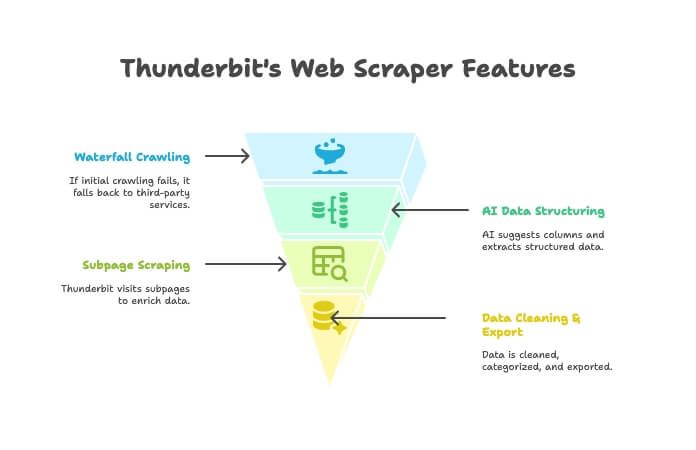
Thunderbit सिर्फ crawler या scraper नहीं है—ये AI-powered Chrome extension है जो दोनों को जोड़ता है। इसका तरीका:
- AI Crawler: Thunderbit साइट explore करता है, crawler की तरह।
- Waterfall Crawling: अगर Thunderbit का अपना engine page नहीं ला पाता (जैसे tough anti-bot), तो ये अपने-आप third-party crawling services पर fallback कर देता है—manual setup की जरूरत नहीं।
- AI Data Structuring: HTML मिलते ही Thunderbit का AI सही columns suggest करता है और structured data (names, prices, emails आदि) बिना selectors लिखे निकाल देता है।
- Subpage Scraping: हर product page से details चाहिए? Thunderbit अपने-आप subpages visit करके तुम्हारी table enrich कर देता है।
- Data Cleaning & Export: summarize, categorize, translate करके data को Excel, Google Sheets, Airtable या Notion में एक click में export कर सकते हो।
- No-Code Simplicity: browser चला लेते हो तो Thunderbit भी चला लोगे—ना coding, ना proxies, ना सिरदर्द।
Traditional crawler की जगह Thunderbit कब चुनें?
- जब तुम्हारा end goal URLs की list नहीं, बल्कि साफ़-सुथरा usable spreadsheet हो।
- जब तुम पूरा flow (crawl → extract → clean → export) एक ही जगह automate करना चाहते हो।
- जब तुम अपना समय और दिमाग—दोनों बचाना चाहते हो।
तुम और खुद देख सकते हो कि इतने business users क्यों switch कर रहे हैं।
Conclusion: Free Website Crawlers से सबसे ज़्यादा फायदा कैसे लें
Website crawlers ने काफी तरक्की कर ली है। तुम marketer हो, developer हो, या बस अपनी साइट को healthy रखना चाहते हो—तुम्हारे लिए कोई न कोई free (या कम से कम free-to-try) tool मौजूद है। BrightData और Diffbot जैसे enterprise platforms से लेकर SiteOne और Crawljax जैसे open-source gems तक, और PowerMapper जैसे visual mappers तक—आज options पहले से कहीं ज़्यादा हैं।
लेकिन अगर तुम “मुझे ये data चाहिए” से “ये रहा मेरा spreadsheet” तक का सफर ज़्यादा स्मार्ट और integrated तरीके से करना चाहते हो, तो Thunderbit ज़रूर ट्राय करो। ये उन business users के लिए बना है जिन्हें reports नहीं, results चाहिए।
Crawling शुरू करने के लिए ready हो? कोई tool डाउनलोड करो, scan चलाओ, और देखो तुम क्या-क्या miss कर रहे थे। और अगर तुम crawling से actionable data तक दो clicks में पहुँचना चाहते हो, तो ।
और ज़्यादा deep dives और practical guides के लिए पर जाओ।
FAQ
Website crawler और web scraper में क्या फर्क है?
Crawler किसी साइट के सभी pages खोजकर उनका map बनाता है (मानो table of contents तैयार करना)। Scraper उन्हीं pages से खास data fields (जैसे prices, emails या reviews) निकालता है। Crawlers ढूँढते हैं, scrapers निकालते हैं ().
Non-technical users के लिए कौन सा free web crawler सबसे अच्छा है?
Small sites और SEO audits के लिए Screaming Frog काफी user-friendly है। Visual mapping के लिए PowerMapper (trial के दौरान) अच्छा है। और अगर तुम्हारा लक्ष्य structured data है और तुम no-code, browser-based अनुभव चाहते हो, तो Thunderbit सबसे आसान है।
क्या कुछ websites web crawlers को block करती हैं?
हाँ—कुछ sites robots.txt या anti-bot measures (जैसे CAPTCHAs या IP bans) से crawlers को रोकती हैं। ScraperAPI, Crawlbase और Thunderbit (waterfall crawling के साथ) अक्सर इन बाधाओं को पार कर लेते हैं, लेकिन हमेशा जिम्मेदारी से crawl करो और site rules का सम्मान करो ().
क्या free website crawlers में pages या features की limits होती हैं?
अधिकतर में होती हैं। जैसे Screaming Frog का free version प्रति crawl 500 URLs तक सीमित है; PowerMapper का trial 100 pages तक। API-based tools में monthly credits की सीमा होती है। SiteOne या Crawljax जैसे open-source tools में आम तौर पर hard limits नहीं होतीं, लेकिन तुम्हारी hardware capacity सीमा बन जाती है।
क्या web crawler इस्तेमाल करना legal और privacy-compliant है?
आमतौर पर public web pages crawl करना legal होता है, लेकिन हमेशा site की terms of service और robots.txt देखो। बिना अनुमति private या password-protected data crawl मत करो, और अगर तुम personal data निकाल रहे हो तो privacy laws का ध्यान रखो ().