
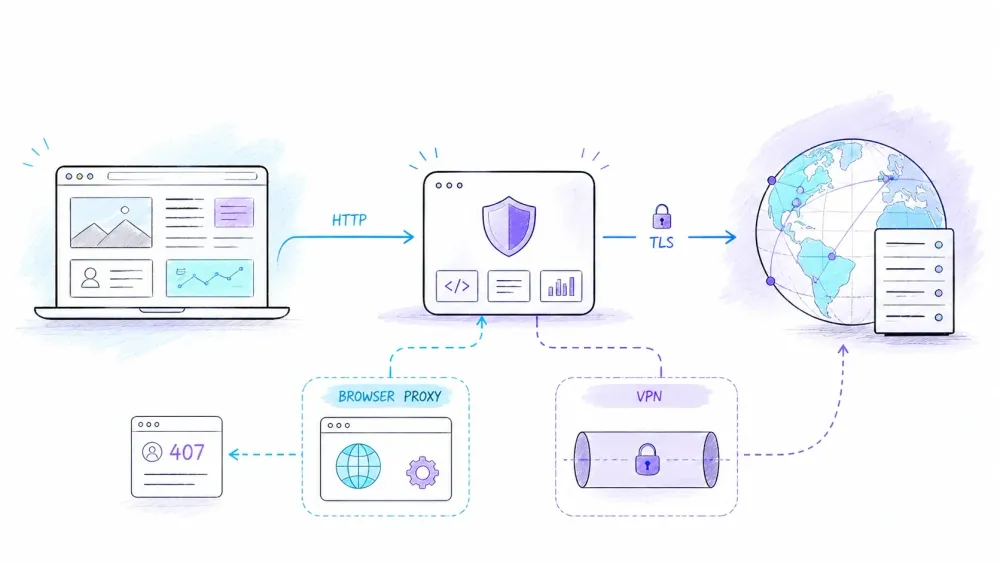
Open a phone or laptop's network settings and you may find an HTTP Proxy option with choices such as Off, Manual, and Auto. The safe default is simple: if a trusted administrator or a specific application did not give you proxy details, do not invent them. A proxy address is not a performance switch or a privacy mode. It changes where your HTTP requests go.
That small settings panel hides a surprisingly large subject. An HTTP proxy can enforce company policy, route a developer's API calls, cache shared responses, or create a tunnel for HTTPS. A reverse proxy can also sit on the other side of the exchange, in front of a website rather than in front of its users. None of those roles automatically makes a connection private, anonymous, fast, or authorized.
This guide explains the protocol rather than the marketing labels: what an HTTP proxy is, what actually crosses the wire, how CONNECT differs from ordinary forwarding, where SOCKS5 and VPNs fit, and how to debug a proxy without randomly changing five settings at once.
What Is an HTTP Proxy?
An HTTP proxy is an intermediary that receives an HTTP request and attempts to satisfy it by forwarding the request, serving a stored response when permitted, or returning its own response. RFC 9110 calls a client-selected proxy a message-forwarding agent. The client normally learns about it from application settings, operating-system settings, a Proxy Auto-Configuration (PAC) file, or environment variables.
For an explicit forward proxy, the path looks like this:
client  --->  forward proxy  --->  origin server
        <---                 <---
The client connects to the proxy first. The proxy then opens or reuses a connection toward the destination. The origin will normally observe the proxy's network connection as its immediate peer, but that fact alone does not prove anonymity. Headers, cookies, browser fingerprints, authenticated sessions, DNS behavior, and logs can still identify a user or organization. “The origin sees a different source IP” and “the user is anonymous” are very different claims.
An HTTP proxy is also not encryption. Plain HTTP remains plain unless another security layer protects it. HTTPS can pass through a proxy as a TLS tunnel, but the encryption comes from TLS—not from the word proxy.
How an Explicit HTTP Proxy Handles a Request
The important difference appears in the request target. When an HTTP/1.1 client talks directly to an origin server, it commonly sends origin-form:
GET /reports/weekly HTTP/1.1
Host: example.com
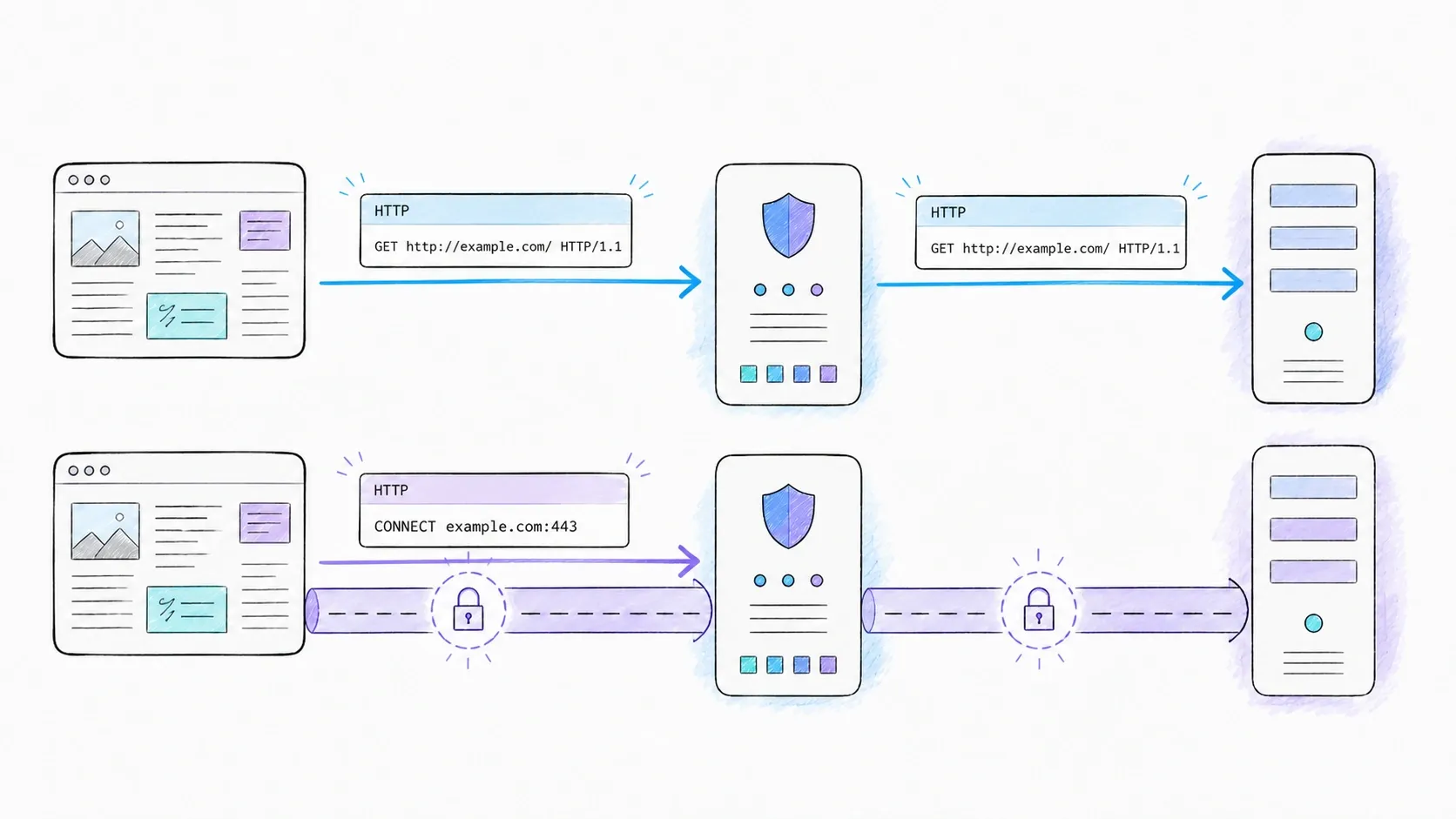
When the same client sends an ordinary HTTP request to an explicit proxy, RFC 9112 specifies absolute-form so the proxy can identify the destination:
GET http://example.com/reports/weekly HTTP/1.1
Host: example.com
The typical flow is:
- The client selects a proxy using its applicable configuration rules.
- It connects to the proxy and sends a request that identifies the target URI.
- The proxy may authenticate the client, apply policy, consult a cache, or reject the request.
- If forwarding is allowed, the proxy sends an appropriate request toward the origin.
- The response returns through the proxy. The proxy may add intermediary metadata, transform the message when allowed, store a cacheable response, or simply relay it.
“May” is doing real work in that list. HTTP defines possible behavior and interoperability rules; it does not guarantee that every proxy filters content, caches responses, rewrites headers, or hides identifiers.
If the proxy requires authentication, it can respond with 407 Proxy Authentication Required. That is different from 401 Unauthorized: 407 concerns credentials for the proxy, while 401 concerns the origin server. RFC 9110 defines the distinction. Credentials also need an appropriate protected channel; Basic authentication does not create confidentiality by itself.
HTTPS Through an HTTP Proxy: CONNECT Is a Tunnel, Not Encryption
For an HTTPS destination, a client commonly asks the proxy to open a TCP tunnel using CONNECT. The request target uses authority-form—host plus port—not a full URL:
CONNECT example.com:443 HTTP/1.1
Host: example.com:443
After a successful response, the connection becomes a tunnel. The client then performs a TLS handshake with example.com through that byte stream:
client == TLS ==[ proxy relays bytes ]== TLS endpoint at origin
In this ordinary tunneling model, the proxy can see connection metadata such as the proxy user, destination authority, timing, and byte counts, but the HTTPS request and response bodies are encrypted by TLS. The tunnel itself is not the encryption mechanism. That distinction matters when diagnosing a failure: CONNECT can succeed while the later TLS handshake fails.
Some managed networks perform authorized TLS interception. In that design, the intermediary terminates one TLS connection and creates another toward the origin. The client must trust a certificate authority used by that deployment. The intermediary can then inspect HTTP content because it is a TLS endpoint, not because all HTTP proxies can magically read HTTPS. This should be an explicit, administered policy on managed devices. Disabling certificate verification is not a legitimate production fix for an unexpected certificate error.
There is a security boundary on the proxy side too. Allowing CONNECT to arbitrary hosts and ports can turn a proxy into a path to services it was never meant to expose. A production proxy should restrict destinations and ports according to its purpose.
Forward, Reverse, Explicit, and Interception Proxies
Proxy labels become confusing when two different axes are flattened into one list.
The first axis is which side selects the intermediary:
- A forward proxy is selected on behalf of a client. It controls or assists outbound access from that client or network.
- A reverse proxy, called a gateway in HTTP semantics, sits in front of one or more origin servers. Visitors address the public service; the gateway chooses a backend, terminates TLS, caches eligible responses, or applies server-side policy.
The second axis is how traffic reaches the intermediary:
- An explicit proxy is known to the client configuration. The client deliberately formats requests for it or opens a
CONNECTtunnel. - An interception proxy receives traffic redirected by the network without ordinary explicit proxy configuration at the client.
These labels can overlap. A corporate forward proxy may be explicit. A network gateway may intercept selected outbound traffic. A reverse proxy is usually invisible as a separate hop to a visitor, although it is still the server the client connects to.
Interception is not simply “explicit proxying without the settings screen.” It can disturb assumptions about destination addresses, authentication, TLS, and path MTU. Squid's interception guidance documents several of those operational constraints. If the network cannot satisfy them, the result is often a mysterious partial failure rather than a clean error message (everyone's favorite kind).
Terms such as anonymous, elite, and high-anonymity belong mostly to vendor taxonomies. They are not formal HTTP capabilities. Evaluate the observable behavior you need—headers, egress addresses, authentication, logging, DNS resolution, and tunnel policy—instead of treating a label as a security guarantee.
HTTP Proxy vs. SOCKS5 vs. VPN
There is no defensible universal ranking in which one of these is always faster, cheaper, or more private. Performance depends on distance, congestion, encryption, implementation, protocol, and the destination. Cost depends on the provider and deployment. Compare their control boundaries instead.
| Question | HTTP proxy | SOCKS5 proxy | VPN |
|---|---|---|---|
| What interface does the client use? | HTTP forwarding and usually CONNECT tunneling | SOCKS protocol commands | A virtual/network tunnel managed by the OS or VPN client |
| What traffic is eligible? | Traffic from apps that support the configured HTTP proxy | TCP, plus UDP association when client and server support it | Traffic selected by routing and split-tunnel policy |
| Does the mechanism guarantee payload encryption? | No | No | The VPN tunnel normally protects traffic inside its configured boundary; protocol and policy still matter |
| Where is it commonly configured? | App, OS, PAC/WPAD, or environment | Per application or library | OS or VPN client, sometimes per app |
| Who resolves destination DNS? | Depends on the client, request mode, and implementation | Depends on how the client supplies the destination | Depends on VPN routing and DNS policy |
| Best decision question | Does this HTTP-capable app need an intermediary? | Does this app need a more general relay interface? | Which device or application routes should enter an encrypted network tunnel? |
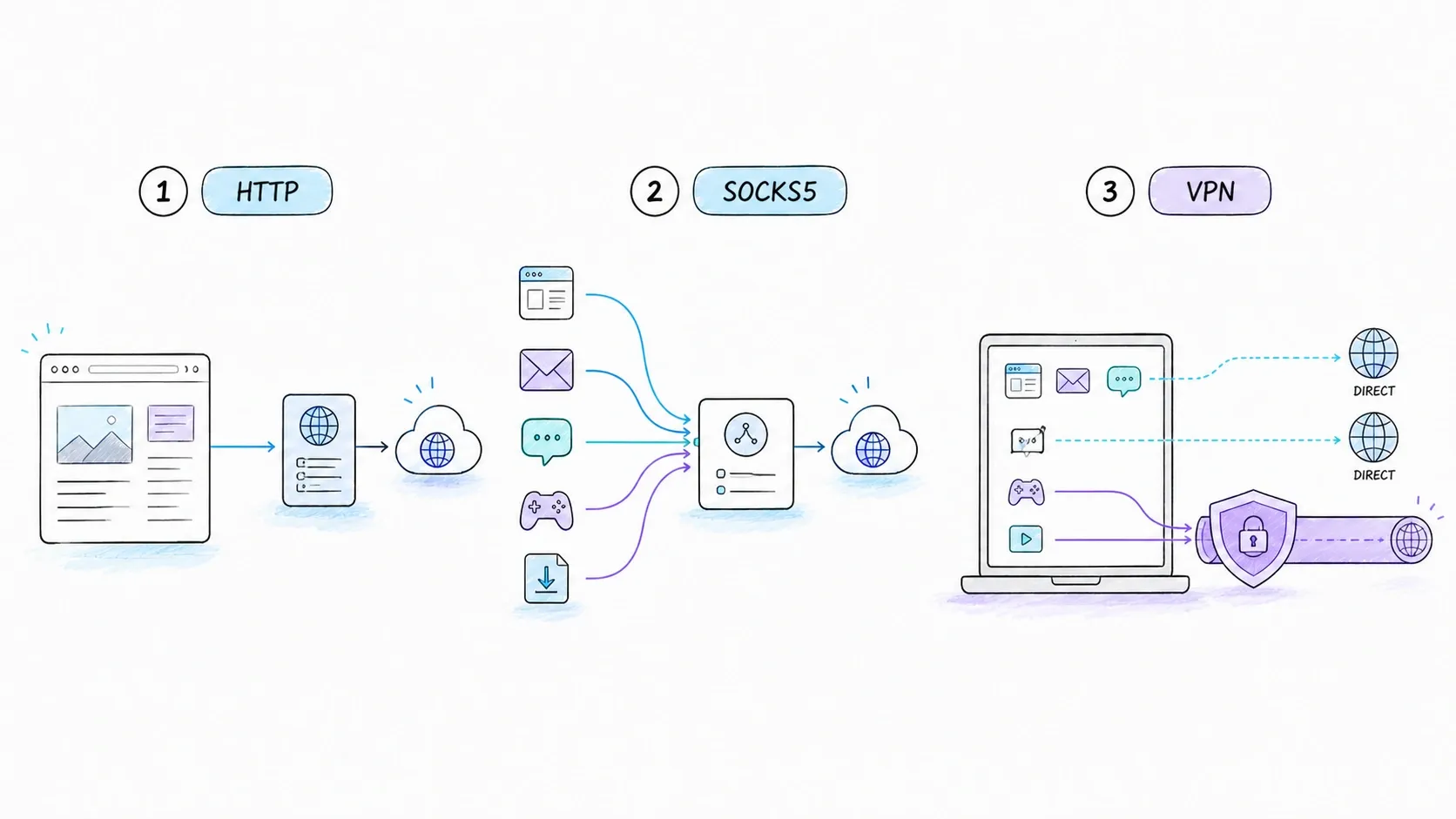
SOCKS5 defines CONNECT, BIND, and UDP ASSOCIATE. That makes it more general than HTTP-specific forwarding, but it still does not promise encryption or anonymity. Security depends on authentication, any outer protected channel, endpoint behavior, and the operator.
A VPN generally operates at a broader network boundary, but “a VPN always carries every byte from the device” is wrong. Split tunneling can include or exclude particular routes or apps. Apple's VPN deployment documentation is one example of a platform supporting scoped VPN behavior.
Choose by scope and trust, not by a one-word label. If only one HTTP client needs a company gateway, a device-wide VPN may be unnecessary. If several applications need access to a private network, configuring separate HTTP proxies may be the wrong abstraction.
Should the HTTP Proxy Setting Be On or Off?
For an unmanaged home network, leave it off unless a trusted service you intentionally use supplies the address, port, and authentication method. Turning on a random public proxy sends traffic toward an operator you have not evaluated.
For a managed work or school device, follow the administrator's current instructions. Do not remove an unfamiliar configuration before checking device management, a VPN/security client, or the administrator. A proxy can be part of access control; deleting it may break access or violate policy even if ordinary browsing appears to work afterward.
“Auto” usually refers to a PAC URL or an automatic discovery mechanism. A PAC file is JavaScript that can return different routes for different URLs—for example, send an internal hostname through a proxy while connecting directly to a public site. That means a browser can work for one destination and fail for another with the same visible setting.
The exact menus change across releases, so use current vendor documentation rather than a screenshot from an old article. The durable questions are:
- Is the setting managed by the organization or entered by the user?
- Is it Manual, PAC/Auto, or application-specific?
- Which protocols and destinations does it cover?
- Are there bypass rules such as
NO_PROXYor “exclude simple hostnames”? - Which configuration wins when the app, OS, environment, and PAC disagree?
That final question is client-specific. Chrome/Chromium generally integrates with platform proxy resolution but also has its own documented rules. Firefox can use its own connection settings. Command-line tools often read environment variables independently. A configured system proxy therefore does not prove that every application uses it.
Using an HTTP Proxy in curl and Python
For a one-off request, curl's --proxy option makes the choice visible:
curl --fail-with-body --show-error \
  --proxy 'http://proxy.example:8080' \
  'https://api.example.com/health'
If authentication is required, avoid placing real secrets in source files, shell history, screenshots, or article examples. Use the credential mechanism approved for your environment. This example uses placeholders deliberately:
curl --fail-with-body --show-error \
  --proxy 'http://proxy.example:8080' \
  --proxy-user "$PROXY_USER:$PROXY_PASSWORD" \
  'https://api.example.com/data'
For persistent automation, fail closed. If policy says the request must use a proxy, do not catch a proxy error and silently retry direct. A direct fallback can leak the client's egress address or bypass an access policy.
Python Requests accepts an explicit mapping:
import os
import requests

proxy_url = os.environ["APP_PROXY_URL"]
proxies = {
    "http": proxy_url,
    "https": proxy_url,
}

response = requests.get(
    "https://api.example.com/health",
    proxies=proxies,
    timeout=(5, 20),
)
response.raise_for_status()
print(response.json())
The https key above means “use this proxy for an HTTPS destination”; it does not necessarily mean the client establishes TLS to the proxy. An http:// proxy URL can still receive CONNECT and tunnel TLS to the origin. Requests also documents environment-variable support and CA-bundle handling in its advanced proxy guide.
Environment behavior is not perfectly uniform. curl intentionally accepts lowercase http_proxy, while other variables and tools may accept different casing. NO_PROXY matching, CIDR support, leading dots, ports, loopback behavior, and precedence vary. Treat the documentation for the exact runtime as the contract. Do not assume a working curl command proves that Requests, Go, a browser, and a container will choose the same route.
Also avoid this “fix”:
# Do not use this to hide a certificate problem in production.
requests.get("https://api.example.com", verify=False)
If an authorized inspection proxy uses a private CA, install or reference the correct trust bundle. If the proxy is not authorized, stop and investigate.
Troubleshooting an HTTP Proxy by Layer
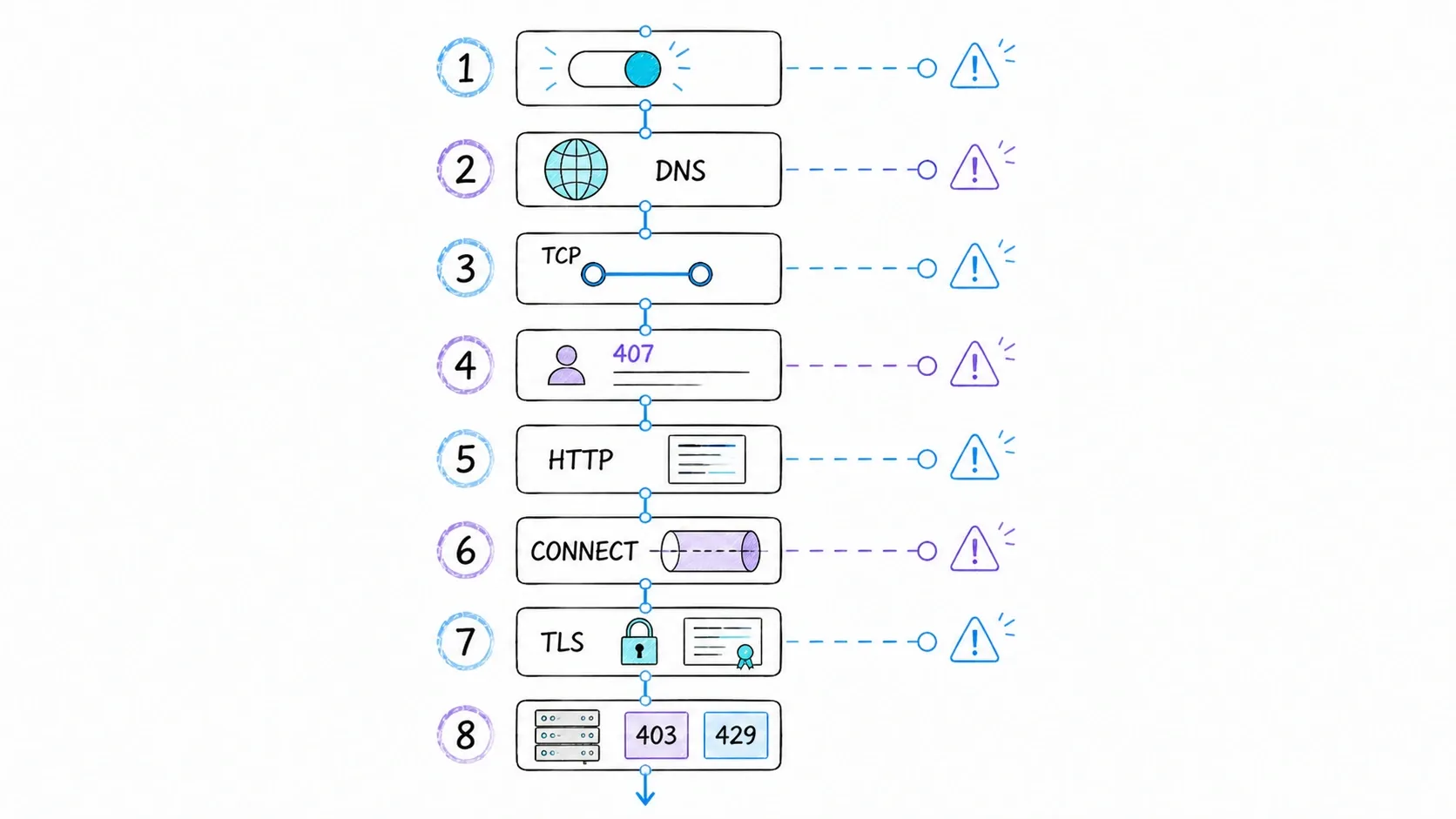
Proxy failures become manageable when you test one layer at a time:
- Configuration selection: Confirm which proxy source the failing application actually uses—manual settings, system settings, PAC, environment, or its own configuration. Check bypass rules.
- Name resolution: Determine whether the client resolves the destination locally or sends a hostname for the proxy to resolve. Test the proxy hostname separately.
- TCP reachability: Can the client connect to the proxy host and port? A timeout here is not an HTTP error.
- Proxy authentication: A
407means the proxy is asking for credentials. Do not confuse it with an origin401. - HTTP forwarding: For a plain HTTP target, inspect the response code and whether the request uses the correct absolute-form target.
- CONNECT policy: For HTTPS, verify that the proxy permits the destination host and port. A rejected tunnel never reaches the TLS stage.
- TLS: After CONNECT succeeds, check certificate identity, trust chain, protocol negotiation, and whether authorized interception is expected.
- Origin response: A
403,404, or429from the destination is not automatically a proxy failure—and does not authorize switching identities or bypassing controls.
Some intermediaries emit the optional Proxy-Status field with diagnostic details. Use it when present, but never design your only troubleshooting path around it. Logs from the client, proxy, and origin remain the most reliable way to identify which hop failed.
What About Proxy Caching?
Shared caching is useful, but it is conditional rather than automatic. RFC 9111 requires a shared cache to consider the method, cache key, freshness, response directives, authorization, and revalidation rules before reusing a response.
Four directives are often misread:
privatetells a shared cache not to store the response (or the specified fields).no-storetells caches not to store the message, but the RFC explicitly warns that it is not a complete privacy mechanism.no-transformasks intermediaries not to transform the representation.proxy-revalidateaffects reuse after a stored response becomes stale; it does not make an otherwise uncacheable response cacheable.
HTTPS tunneled end to end is opaque to the forwarding proxy, so that proxy cannot act as an HTTP content cache for the encrypted messages inside the tunnel. A reverse proxy or authorized TLS-terminating gateway is a different architecture.
HTTP Proxies, Web Scraping, and Thunderbit
Data-collection systems may use proxies for controlled egress, regional routing, workload separation, or a stable network identity. Those are routing capabilities, not permission slips. A proxy does not grant authorization to collect a page, override access controls, or guarantee that a target will accept a request. Status codes such as 403 and 429, or a CAPTCHA, require policy-aware handling—not an automatic “change proxy type” recipe.
There is also an abstraction choice. A raw forward proxy gives a developer an HTTP routing or tunneling interface. The application still owns fetching, rendering, parsing, schema validation, retries, observability, and compliance decisions.
Thunderbit's documented interfaces sit higher in the stack. The Thunderbit documentation describes URL-based extraction with rendering and routing capabilities, while the Web Scraper API documents two output modes: clean Markdown from a URL, or schema-shaped JSON. That can reduce the amount of crawler and parsing infrastructure a team operates. It does not create universal target success, bypass access controls, or decide whether collection is authorized.
Use the lower-level proxy interface when you need direct control over transport behavior and are prepared to own the rest of the crawler. Use a higher-level extraction interface when the real requirement is structured page data and the documented service boundary fits. Those are different engineering responsibilities, not two brands of the same proxy.
Key Takeaways
- An HTTP proxy is a message-forwarding intermediary, not an automatic privacy or encryption feature.
- Explicit HTTP forwarding uses an absolute URI; HTTPS commonly starts with a
CONNECT host:portrequest and then runs TLS through the tunnel. - A tunneling proxy normally cannot read TLS-protected HTTP bodies, but an authorized TLS-interception gateway is a different deployment.
- Forward/reverse and explicit/interception describe separate axes.
- HTTP proxy, SOCKS5, and VPN should be compared by traffic scope, configuration, trust, and routing policy—not universal speed or cost claims.
- If no trusted administrator or intentional application gave you proxy details, leave the proxy setting off.
- In automation, make proxy use explicit, protect credentials, understand bypass and precedence rules, and fail closed when the proxy is mandatory.
FAQs
Is an HTTP proxy the same as a VPN?
No. An HTTP proxy provides an HTTP-aware forwarding or tunneling interface for applications that select it. A VPN creates a network tunnel and changes routing for the traffic included by its policy. Neither label alone proves anonymity, and VPN split tunneling means device-wide coverage is not universal.
Can an HTTP proxy see HTTPS traffic?
In an ordinary CONNECT tunnel, the proxy relays TLS bytes and cannot read the protected HTTP content. It can still observe connection metadata. If an authorized gateway terminates TLS using a CA trusted by the managed client, it can inspect content because it is one endpoint of two TLS connections.
What does 407 Proxy Authentication Required mean?
The proxy is challenging the client for proxy credentials. It is distinct from a 401 challenge sent by the origin. Check the approved authentication method and the protected channel before sending credentials.
Does an HTTP proxy hide my IP address?
The origin normally sees the proxy connection as its immediate network peer, but that does not establish anonymity. Forwarded headers, authentication, cookies, fingerprints, DNS behavior, and logs may still identify the client.
Do I need a proxy for web scraping?
Not universally. The answer depends on the authorized target, request volume, regional requirements, architecture, and the site's published access rules. A proxy can provide routing and egress control; it does not replace authorization, throttling, parsing, monitoring, or error handling.
Why does one app ignore my system proxy?
Applications can use different configuration sources and precedence rules. One may follow the OS, another may use its own settings, and a command-line tool may read environment variables. Check the failing application's documentation and its bypass rules rather than assuming the system panel controls everything.
Learn More




