
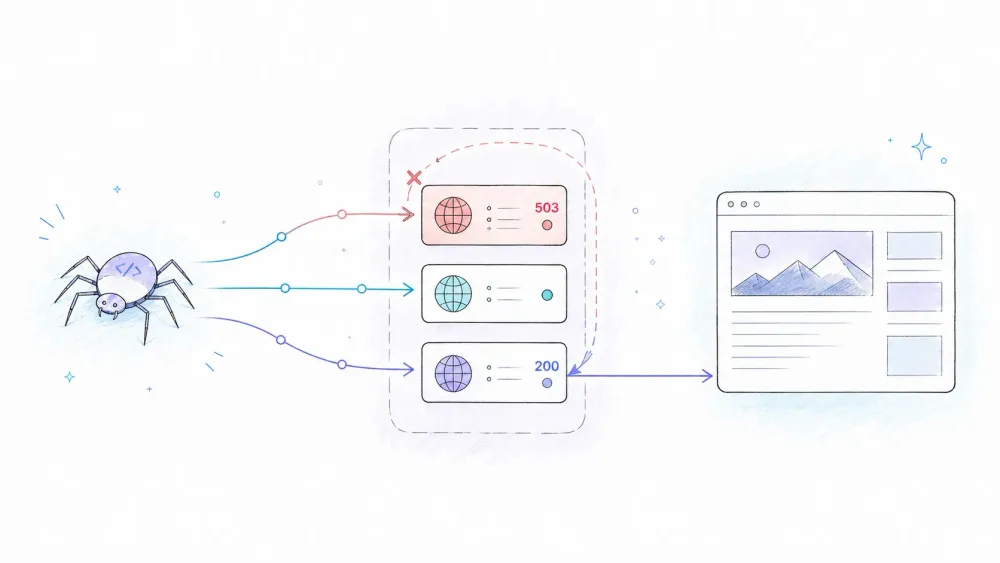
Your Scrapy spider crushes it on 100 test pages, then falls apart at 10,000. That's not really a scraping bug — it's a networking problem wearing a scraping bug's costume. The fix everyone reaches for is a proxy, and slapping one into request.meta takes about thirty seconds.
The problem is that the thirty-second fix is where many basic tutorials stop. They show you meta={"proxy": "http://IP:PORT"}, maybe a middleware class, and call it a day. They often omit what happens when that proxy dies mid-crawl, how credentials leak into Git history, or why a retry may reuse the same failed proxy. Those are the production concerns this guide covers: fail-closed configuration, secret management, deliberate proxy selection on retry, protocol limits, and measurable cost trade-offs.
What Is a Proxy Middleware in Scrapy?
A proxy middleware is a piece of code that sits in Scrapy's downloader pipeline and decides which IP address a request should appear to come from before it hits the wire. Scrapy ships with a built-in one, HttpProxyMiddleware, that reads a proxy key from request.meta, attaches proxy authentication if needed, and hands the request off to the download handler that actually opens the connection. Custom proxy middleware doesn't replace that transport step — it's a selector that decides which proxy to plug in before the built-in machinery takes over. That distinction matters more than it sounds like it should, and it's the source of most "my custom middleware isn't working" bug reports.
Why Proxies Matter for Production Scrapy Projects
A proxy changes the network route and apparent source IP. That can help with legitimate geo-specific testing, distribute authorized request traffic, and isolate network failures. It does not grant permission, bypass rate limits, or guarantee access. Whether a crawl needs a proxy at all depends on the target, its terms, request rate, and the reliability requirements of the job.
Not all proxies are created equal, and picking the wrong tier is its own kind of production incident:
| Proxy Type | Reliability | Speed | Detection Risk | Typical Cost |
|---|---|---|---|---|
| Free public proxies | Highly variable | Variable | Often high | No fee, but material security/operational risk |
| Datacenter proxies | Provider- and target-dependent | Often fast | Target-dependent | Commonly priced per GB or IP |
| Residential proxies | Provider- and target-dependent | Variable | Target-dependent | Commonly priced per GB |
| ISP proxies | Provider- and target-dependent | Variable | Target-dependent | Provider-specific |
Free proxies deserve a specific callout because the measured risks are substantial. The 30-month Free Proxies Unmasked study tracked more than 640,000 addresses from 11 providers: 34.5% were active at least once, and 16,923 manipulated content. That population supports a strong security warning for public lists; it is not a portable failure rate for every current list, paid pool, target, or workload.
Proxies also don't magically defeat modern bot detection. Services like Cloudflare score requests using dozens of signals — TLS fingerprints, header consistency, JavaScript execution, behavioral patterns — where your IP address is just one input among many. A clean residential proxy on a request with inconsistent headers and no cookie jar will still get flagged. Keep that expectation in check before you build an entire architecture around "just rotate the IP."
Before You Start
- Difficulty: Intermediate
- Time Required: ~30–45 minutes for the full production setup, ~5 minutes for the quick test
- What You'll Need: Python 3.9+, Scrapy installed (this guide is tested against Scrapy 2.17.0, released July 2026), a working spider from
scrapy startproject, and at least one proxy endpoint (a free trial from any datacenter proxy provider works fine for testing)
Step 1: Test a Proxy with the Request Meta Parameter
The fastest way to confirm a proxy works is to bypass all the middleware architecture entirely and just try it.
Scrapy's built-in HttpProxyMiddleware reads a proxy key straight out of request.meta and routes the request through it. No settings changes, no middleware class — just one keyword argument.
import scrapy

class ProxyTestSpider(scrapy.Spider):
    name = "proxy_test"
    start_urls = ["https://httpbin.org/ip"]

    def start_requests(self):
        for url in self.start_urls:
            yield scrapy.Request(
                url,
                meta={"proxy": "http://203.0.113.10:8080"},
                callback=self.parse,
            )

    def parse(self, response):
        self.logger.info(response.text)
Run it with scrapy runspider proxy_test.py. If the proxy works, httpbin.org/ip will echo back the proxy's IP address instead of your own — that's your confirmation. If the response hangs and eventually throws a TCP connection timed out error, the proxy is dead or unreachable, which, spoiler, happens more often than proxy vendors like to admit.
This method is fine for one-off spiders or quick tests. It falls apart the moment you have more than one spider, because now you're hardcoding the same proxy string in five different files.
Step 2: Build a Custom Proxy Middleware
For anything beyond a single spider, you want the proxy logic centralized in one place. Create a ProxyMiddleware class in your project's middlewares.py:
from scrapy.exceptions import NotConfigured

class ProxyMiddleware:
    def __init__(self, proxy_url):
        self.proxy_url = proxy_url

    @classmethod
    def from_crawler(cls, crawler):
        proxy_url = crawler.settings.get("PROXY_URL")
        if not proxy_url:
            raise NotConfigured("PROXY_URL is required; refusing silent direct fallback")
        return cls(proxy_url=proxy_url)

    def process_request(self, request, spider):
        if "proxy" not in request.meta:
            request.meta["proxy"] = self.proxy_url
And register it in settings.py:
import os

PROXY_URL = os.environ.get("PROXY_URL")

DOWNLOADER_MIDDLEWARES = {
    "myproject.middlewares.ProxyMiddleware": 350,
}
Note the from_crawler classmethod instead of a plain __init__. This is the pattern Scrapy actually recommends for reading settings, and it's the exact hook we'll lean on again in Step 4 when we talk about secrets. The upside here is simple: change one setting, every spider in the project picks up the new proxy. No more grepping through five files to swap a dead IP.
Step 3: Understand Middleware Execution Order (So Your Proxy Doesn't Silently Do Nothing)
Here's the part almost every other tutorial glosses over with "just set the priority to 350, trust me." Downloader middleware in Scrapy runs in a specific, predictable order, and if you don't understand it, your proxy setup will produce bugs that look completely unrelated to proxies.
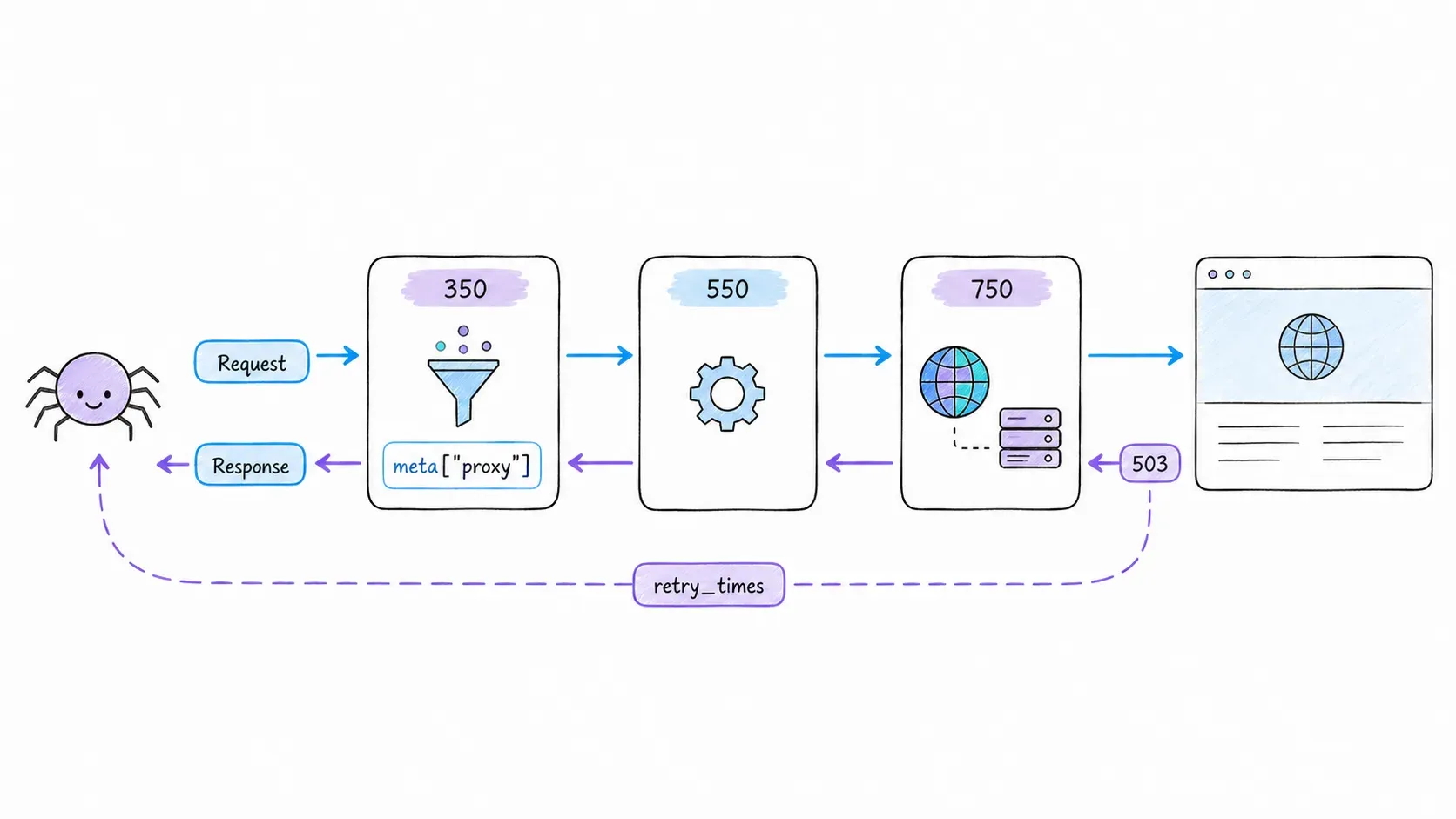
Request-side hooks (process_request) run in ascending priority order — lowest number first. Response-side hooks (process_response, process_exception) run in descending order — highest number first, unwinding back down the chain.
Request flow (ascending):
  Spider → [100] RobotsTxt → [300] HttpAuth → [350] YOUR PROXY MIDDLEWARE
         → [500] UserAgent → [550] Retry → [700] Cookies → [750] HttpProxy
         → Downloader

Response flow (descending):
  Downloader → [750] HttpProxy → [700] Cookies → [550] Retry
             → [500] UserAgent → [350] YOUR PROXY MIDDLEWARE → [300] HttpAuth
             → [100] RobotsTxt → Spider
Here's the real, current default priority table for Scrapy's built-in middlewares (verified against 2.17.0):
| Middleware | Default Priority |
|---|---|
| RobotsTxtMiddleware | 100 |
| HttpAuthMiddleware | 300 |
| DownloadTimeoutMiddleware | 350 |
| DefaultHeadersMiddleware | 400 |
| UserAgentMiddleware | 500 |
| RetryMiddleware | 550 |
| RedirectMiddleware | 600 |
| CookiesMiddleware | 700 |
| HttpProxyMiddleware | 750 |
| DownloaderStats | 850 |
| HttpCacheMiddleware | 900 |
When RetryMiddleware schedules a retry, it copies the failed request—including its metadata—and that new request re-enters the downloader middleware chain. The selector's numeric relationship to priority 550 does not guarantee rotation. Rotation happens only when selector code recognizes the retry and deliberately overwrites the copied meta["proxy"]. Priority 350 is a convenient place for a selector because it runs before the built-in transport step at 750, but it is not a rotation mechanism by itself.
Common Middleware Ordering Mistakes
- Setting your middleware to the same priority as
HttpProxyMiddleware(750): This creates a race condition where Scrapy's dict-ordering (not your logic) decides which middleware processes the request first. Symptom: intermittent, unexplainable proxy behavior. - Using
setdefault()orif "proxy" not in request.metain a rotating selector: the copied retry keeps the old proxy. Symptom: every retry repeats the same failed route. Fix: detect a retry (for example,retry_times > 0) and explicitly replace the selector-owned proxy value. - Disabling
HttpProxyMiddlewareentirely: Some tutorials tell you to set"scrapy.downloadermiddlewares.httpproxy.HttpProxyMiddleware": Nonebecause "the custom middleware handles it." It doesn't — your custom middleware is a selector, not a transport layer. Disabling the built-in one means proxy authentication headers never get attached, and your requests silently go out unauthenticated (or don't go out at all).
Step 4: Stop Hardcoding Proxy Credentials
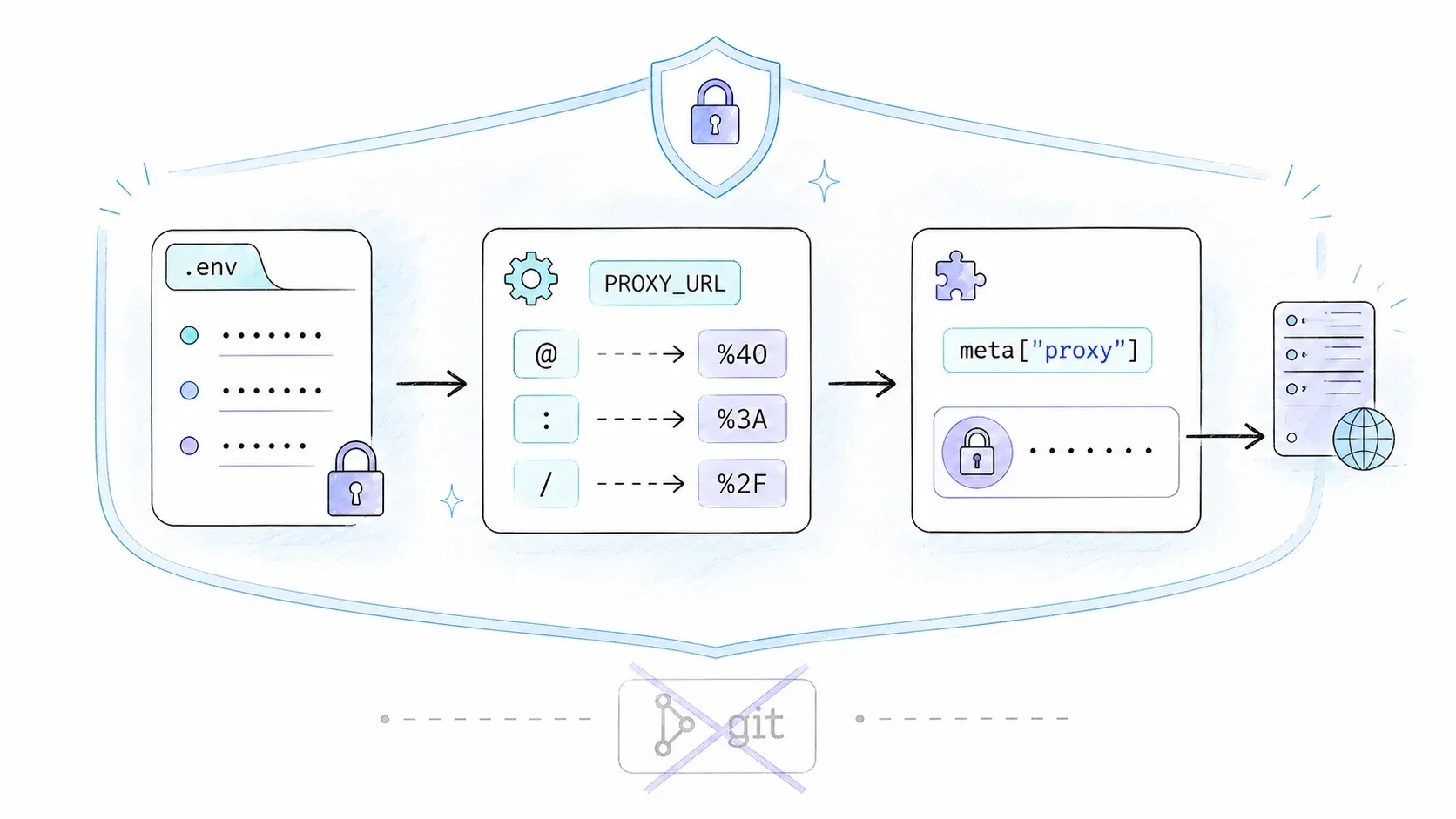
Every top-ranking Scrapy proxy tutorial I found writes http://username:password@proxy.example.com:8080 directly into a Python file. That's a credential sitting in your Git history forever, showing up in every clone, every fork, every log dump if someone gets sloppy with print() statements.
There are really three tiers of doing this:
| Method | Security | Flexibility | Best For |
|---|---|---|---|
| Hardcoded in spider/settings.py | Poor — secrets live in the repo | Low | Quick local testing only |
http_proxy environment variable (Scrapy-native) | Better — out of code | Low (one proxy) | CI/CD pipelines, Docker |
.env file + python-dotenv + from_crawler | Best — out of code, per-environment | High (multiple proxies, rotation) | Production scrapers |
The third option is worth building properly. Install python-dotenv, create a .env file (and immediately add it to .gitignore — I mean it, do this now):
PROXY_USER=myuser
PROXY_PASSWORD=my$ecret!Pass
PROXY_HOST=proxy.example.com
PROXY_PORT=8080
Load it at the top of settings.py:
from dotenv import load_dotenv
import os

load_dotenv()

PROXY_USER = os.getenv("PROXY_USER")
PROXY_PASSWORD = os.getenv("PROXY_PASSWORD")
PROXY_HOST = os.getenv("PROXY_HOST")
PROXY_PORT = os.getenv("PROXY_PORT")
Then read it securely inside your middleware using from_crawler — this is the pattern that solves the exact confusion I've seen on forums where people ask "how do I set this before running scrapy crawl if the credentials need to change per-run?":
import os
from urllib.parse import quote

class SecureProxyMiddleware:
    def __init__(self, user, password, host, port):
        self.user = quote(user, safe="")
        self.password = quote(password, safe="")
        self.host = host
        self.port = port

    @classmethod
    def from_crawler(cls, crawler):
        settings = crawler.settings
        return cls(
            user=settings.get("PROXY_USER"),
            password=settings.get("PROXY_PASSWORD"),
            host=settings.get("PROXY_HOST"),
            port=settings.get("PROXY_PORT"),
        )

    def process_request(self, request, spider):
        proxy_url = f"http://{self.user}:{self.password}@{self.host}:{self.port}"
        request.meta["proxy"] = proxy_url
Note the urllib.parse.quote() call around the credentials. If your password contains a @, :, or / (and password generators love throwing these in), it'll break the URL parsing unless it's percent-encoded first. This is a one-line fix that saves an embarrassing hour of debugging "invalid proxy URL" errors that have nothing to do with your proxy actually being invalid.
Keep credentials out of logs and test percent-encoding with representative—but fake—values. HTTPS tunneling, SOCKS5, and non-Latin credentials have handler-specific boundaries; do not assume an authentication pattern works across them without a pinned integration test.
Step 5: Add Proxy Rotation
A single proxy — even a good one — making 5,000 requests to the same site will eventually get flagged. You need a pool.
Option A — build it yourself. This is genuinely simple:
import random

class RotatingProxyMiddleware:
    def __init__(self, proxy_pool):
        self.proxy_pool = proxy_pool

    @classmethod
    def from_crawler(cls, crawler):
        return cls(proxy_pool=crawler.settings.getlist("PROXY_POOL"))

    def process_request(self, request, spider):
        request.meta["proxy"] = random.choice(self.proxy_pool)
This works for basic use but has zero awareness of which proxies are actually alive. You're rolling dice every request.
Option B — use scrapy-rotating-proxies. This third-party package adds ban detection and automatic backoff out of the box:
pip install scrapy-rotating-proxies
I'll flag something honestly here: the latest release on PyPI is version 0.6.2, dated 2019, and the project is tagged Alpha. It's not necessarily broken on modern Scrapy, but "not actively maintained since 2019" is not the same as "battle-tested for 2026 production traffic." Pin the version, test it against your actual target sites, and don't assume it handles authenticated proxy endpoints — it largely doesn't.
Step 6: Build a Fault-Tolerant Proxy Middleware (Dead Proxy Detection)
This is the section every competitor tutorial skips entirely, and it's the difference between a demo and something that survives a 6-hour crawl unattended.
| Scenario | What most tutorials show | What this middleware adds |
|---|---|---|
| Proxy returns 407 | Not addressed | Treats it as a proxy-authentication failure |
| Target returns 403/429 | Often grouped together | Keeps policy/rate feedback separate from proxy health |
| Proxy times out | Not addressed | Configurable timeout threshold, health score decay |
| All proxies dead | Not addressed | Graceful fallback or crawl pause with a logged warning |
| Proxy flapping (intermittent) | Not addressed | Cool-down period before re-adding to the pool |
import time
import random
from scrapy.exceptions import IgnoreRequest

class FaultTolerantProxyMiddleware:
    MAX_FAILURES = 3
    COOLDOWN_SECONDS = 300

    def __init__(self, proxy_pool):
        self.pool = {p: {"failures": 0, "banned_until": 0} for p in proxy_pool}

    @classmethod
    def from_crawler(cls, crawler):
        return cls(proxy_pool=crawler.settings.getlist("PROXY_POOL"))

    def _healthy_proxies(self):
        now = time.time()
        return [p for p, s in self.pool.items() if s["banned_until"] < now]

    def process_request(self, request, spider):
        healthy = self._healthy_proxies()
        if not healthy:
            spider.logger.warning("All proxies unhealthy — pausing crawl")
            raise IgnoreRequest("No healthy proxies available")
        request.meta["proxy"] = random.choice(healthy)

    def process_response(self, request, response, spider):
        proxy = request.meta.get("proxy")
        if proxy and response.status == 407:
            self._mark_failure(proxy)
        return response

    def process_exception(self, request, exception, spider):
        proxy = request.meta.get("proxy")
        if proxy:
            self._mark_failure(proxy)

    def _mark_failure(self, proxy):
        state = self.pool[proxy]
        state["failures"] += 1
        if state["failures"] >= self.MAX_FAILURES:
            state["banned_until"] = time.time() + self.COOLDOWN_SECONDS
            state["failures"] = 0
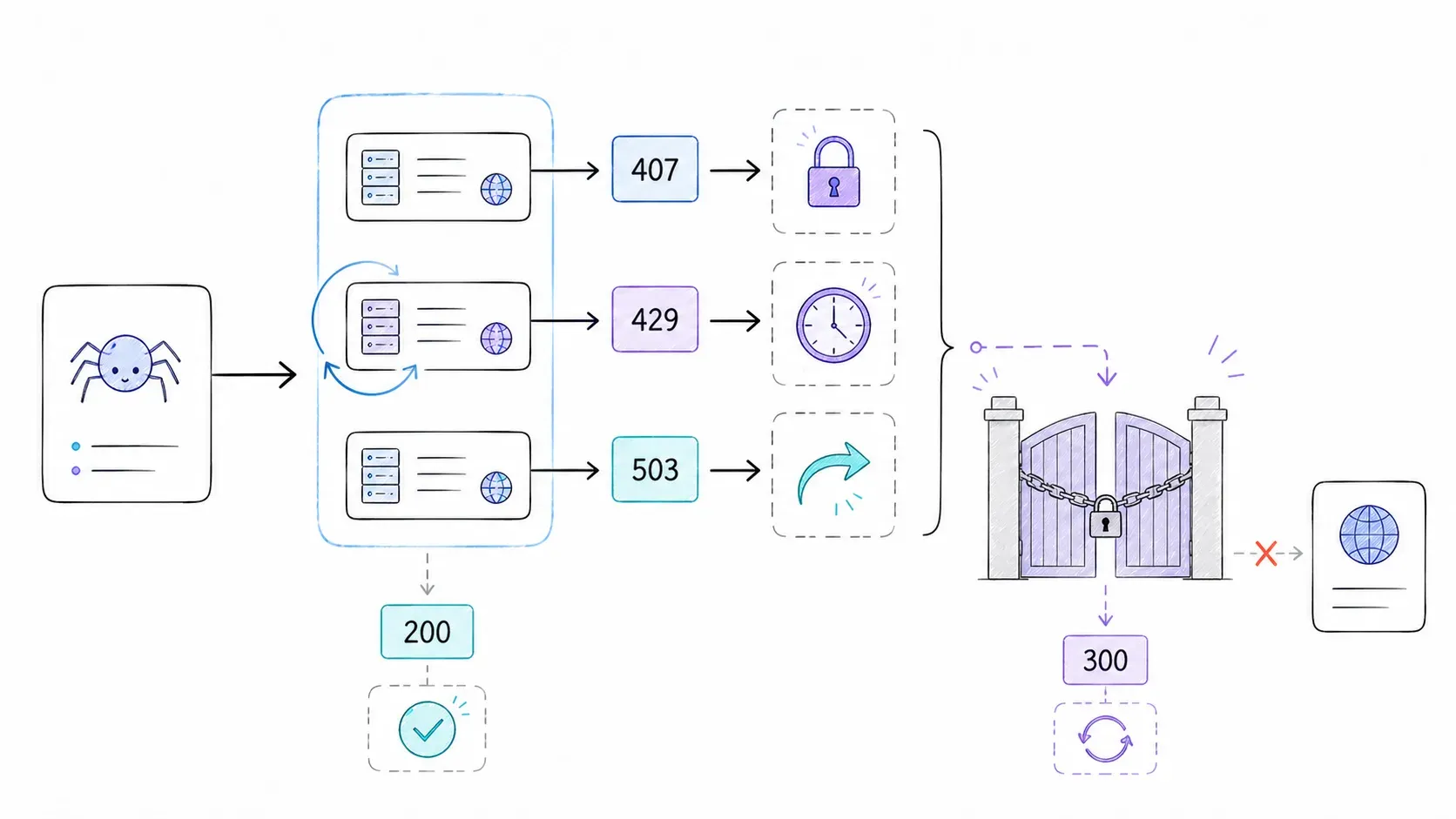
A few notes from actually building this: don't treat every 403 as proof the proxy itself is dead — RFC 9110 defines 403 as "the server understood but refuses," which could just as easily mean your headers or session look suspicious, proxy notwithstanding. A 407, on the other hand, means the proxy specifically is rejecting your authentication — that's a stronger and more specific signal. Mixing these signals into one bucket is how people end up burning healthy proxies for no reason.
Keep Scrapy's transient retry defaults explicit in production so reviewers can see the policy:
RETRY_HTTP_CODES = [500, 502, 503, 504, 522, 524, 408, 429]
RETRY_TIMES = 2
Those are Scrapy 2.17's defaults. Do not blanket-add 403 or 407: a 403 is target refusal with many possible causes, while 407 is a proxy-authentication problem that generic request retrying will not repair. If a specific target contract justifies retrying another status, document that reason and test it separately.
Step 7: A Measured Proxy-on-Retry Pattern
Some authorized targets may return valid content directly and need a proxy only after a documented transient response. That can reduce proxied bytes, but there is no defensible universal savings percentage or portable direct-request success rate. Measure your own workload before adopting the pattern.
Use Scrapy's public get_retry_request() helper and keep escalation limited to target-specific statuses you have explicitly classified. This example treats 429 and 503 as retryable pressure signals; it intentionally excludes 403 and 407.
from scrapy.downloadermiddlewares.retry import get_retry_request

class CostAwareEscalationMiddleware:
    def process_response(self, request, response, spider):
        if response.status not in {429, 503}:
            return response

        retry = get_retry_request(
            request,
            spider=spider,
            reason=f"proxy_escalation_{response.status}",
            max_retry_times=2,
        )
        if retry is None:
            return response

        current_tier = request.meta.get("proxy_tier", "direct")
        if current_tier == "direct":
            retry.meta["proxy"] = spider.settings["DATACENTER_PROXY"]
            retry.meta["proxy_tier"] = "datacenter"
        elif current_tier == "datacenter":
            retry.meta["proxy"] = spider.settings["RESIDENTIAL_PROXY"]
            retry.meta["proxy_tier"] = "residential"
        else:
            return response
        return retry
Log direct valid-content rate, proxied valid-content rate, bytes per successful record, retries per success, and added latency. A direct-first design is only acceptable when direct access is authorized and the system fails closed whenever a proxy is required. The saving is the measured reduction in proxied traffic—not an assumed percentage.
When DIY Proxy Management Isn't Worth It
I want to be straight about this instead of pretending the entire rest of this article was pointless: everything above is real, useful engineering, and for a lot of projects — high-volume crawls, custom pipelines, anything where you need full control over request scheduling — it's the right call.
But if your actual goal is "get structured data from this page" rather than "operate proxy infrastructure," an extraction API may be a better boundary. Thunderbit's current POST /extract documentation accepts a page URL and an optional JSON Schema; when the schema is omitted, the service can generate one from the page content. The endpoint also exposes none, basic, and full render modes, along with timeout and post-load wait controls. Prompt-only extraction is not part of the current supported request surface, so build production integrations around the documented schema contract. This moves the extraction interface behind one request; it does not justify a universal promise about every anti-bot or CAPTCHA target.
| Factor | DIY Scrapy + Proxies | API-based extraction (e.g., Thunderbit) |
|---|---|---|
| Setup effort | High — middleware, rotation, retry logic | Low — one API call with a schema |
| Network/rendering behavior | You configure handlers, proxies, headers, and delays | Controlled through documented API options |
| Maintenance | You own selectors, pool health, and target changes | You own schema quality, validation, and integration behavior |
| Cost model | Proxy fees + compute + engineering time | Current docs list 20 units per page (checked 2026-08-10) |
| Control | Full — custom pipelines, middleware chain | Limited to API capabilities |
| Best for | Complex crawls, high volume, custom logic | Targeted extraction, prototyping, enrichment |
If you're mostly extracting structured pages for lead lists, product data, or research, run a representative pilot with the Thunderbit Chrome Extension or the API and compare valid records, latency, units, and maintenance time. If your project needs custom crawl graphs and pipeline control, Scrapy remains the stronger fit.
Learn More
Tips & Common Pitfalls
- Tip: Test proxies against
httpbin.org/ipbefore pointing them at a real target. It's the fastest way to confirm routing works before you add complexity on top. - Pitfall: Setting a proxy in
request.headersinstead ofrequest.meta. This is a genuinely common typo-adjacent bug —HttpProxyMiddlewareonly readsmeta["proxy"], and a header-based attempt will fail silently with no obvious error. - Pitfall: Assuming HTTP and HTTPS proxies configure identically. An HTTP proxy URL routing to an HTTPS destination generally works via CONNECT tunneling under a compatible handler, but using an
https://scheme for the proxy endpoint itself is a different, less-supported configuration — don't conflate the two. - Tip: If you need SOCKS5 support, check your Scrapy version's download handler capabilities first. Scrapy 2.17's experimental Httpx handler added SOCKS5 support via
httpx[socks], but it's still labeled experimental — don't build a production dependency on it without your own testing.
Alternative Methods
Beyond scrapy-rotating-proxies, some teams route all proxy logic through a provider gateway — a single proxy URL where the vendor handles rotation, session stickiness, and geo-targeting behind the scenes. This trades a bit of control for a lot less middleware code, and it's worth pricing out against a self-managed pool before you build one from scratch.
Conclusion
Setting a proxy in Scrapy takes one line. Making that setup survive a real production crawl requires explicit failure policy, protected credentials, tested handler boundaries, and selector code that deliberately replaces copied proxy metadata on retry. If you walk away with two habits, make them these: fail closed when a proxy is required, and never commit a proxy password to a Python file.
FAQs
How do I set up a custom proxy in Scrapy with authentication?
Use the protocol://username:password@host:port URL format, but percent-encode the username and password with urllib.parse.quote() first if they contain special characters. For production, read those credentials via a from_crawler classmethod pulling from environment variables rather than hardcoding them.
What priority number should I use for my custom proxy middleware in Scrapy?
350 is a common selector priority because it runs before HttpProxyMiddleware at 750. It does not guarantee rotation. A retry gets a fresh proxy only if the selector recognizes the copied retry request and overwrites its prior meta["proxy"] value.
How do I handle dead proxies in Scrapy automatically?
Build a middleware that tracks failure counts per proxy in process_response and process_exception, removes proxies from the active pool after a failure threshold, and re-adds them after a cool-down period rather than banning them permanently.
Can I use Scrapy with SOCKS5 proxies?
Scrapy 2.17's experimental HttpxDownloadHandler documents SOCKS5 support when httpx[socks] is installed. The default HTTP/1.1 handler does not support SOCKS proxies. Pin the handler/version and run an integration test before treating this path as production-ready.
How much can the proxy-on-retry pattern actually save on proxy costs? There is no portable percentage. Measure the share of authorized requests that return valid content directly, the bytes sent through each proxy tier, retries per successful record, and added latency. The observed reduction in proxied bytes is your saving; if direct-first access is not authorized or valid, do not use this pattern.




