
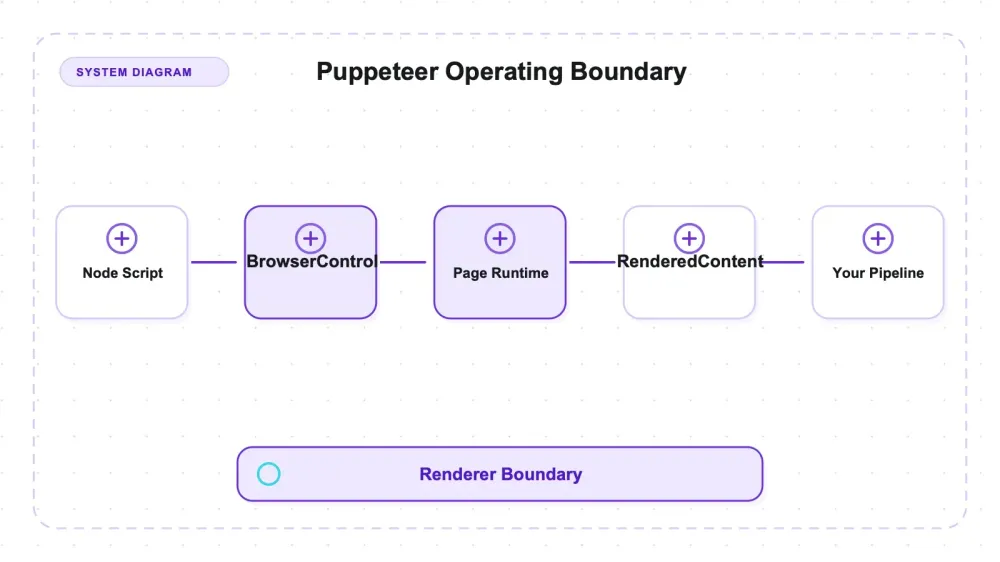
Puppeteer is Google's Node library for driving a real Chrome from JavaScript — you write the automation, the Chrome DevTools Protocol carries the commands, and a full browser renders the page before you read a byte of it. It lives at puppeteer/puppeteer on GitHub: Apache-2.0, written in TypeScript, and sitting at roughly 95.3k stars (95,307 the day I pulled the snapshot). Its official positioning is deliberately narrow — "a JavaScript API to control Chrome (and experimentally Firefox)" — which tells you what it is and, just as usefully, what it is not.
I ran Puppeteer 24.16.0 through the same fixture server and public demos we use for every browser-automation library: a static catalog with pagination, an article, a JavaScript-rendered catalog, a JSON API, a route that returns 500, a small crawl graph, plus Books to Scrape and Quotes to Scrape. The rendering job it did cleanly and without ceremony. It also left exactly one job on my desk — the same one every headless-browser library leaves — and being honest about that gap is most of what separates a useful review from a press release.
One number stood out more than the recall figures did. On a page whose data arrives from a JSON endpoint, Puppeteer pulled all 8 records without scraping the DOM at all — it ran the fetch inside the page and read the response object directly. That, plus native rendering with working screenshots, is the shape of the tool: a mature Chrome renderer, not a crawler framework, and the difference matters before you type a single line.
What Puppeteer actually is (and what it competes with)
The category label does real work here, so start with it. Puppeteer is a browser-automation library. It launches Chrome, opens pages, lets the page's JavaScript run, and hands you the rendered result to read or screenshot. That is the entire reason you reach for it instead of an HTTP client plus an HTML parser: you want the page after its scripts execute, not the empty shell the server sends first.
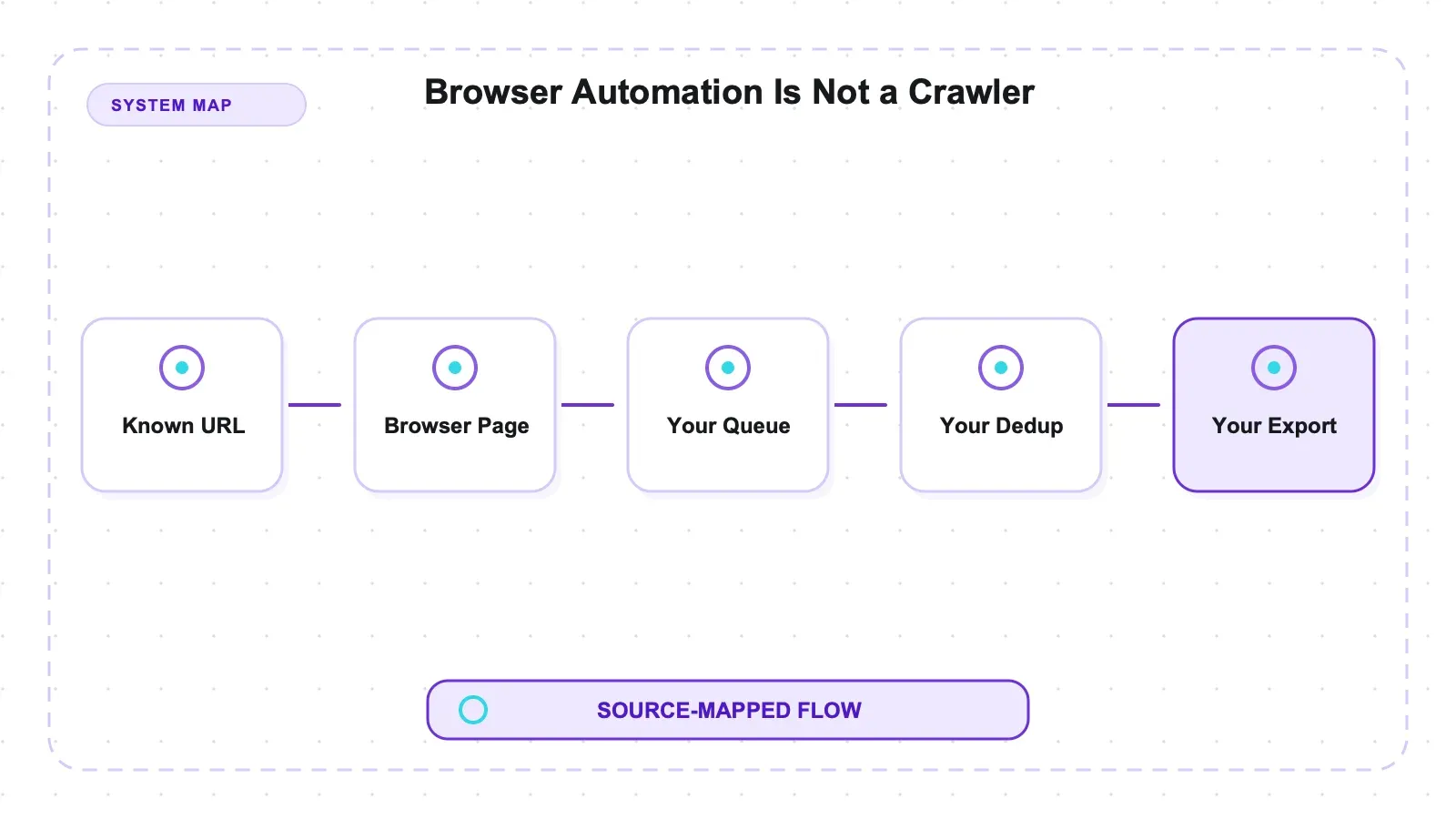
In shape, it competes with the other real-browser libraries — Playwright and Selenium — not with crawler frameworks like Scrapy or with LLM-Markdown tools. If you point Puppeteer at a thousand URLs and expect it to queue them, dedupe them, throttle politely, and write a dataset, you have brought a renderer to a crawling problem. It will render each page beautifully and manage none of the orchestration. (That is a scope boundary, not a bug — I will come back to it, because it is the single most important thing to internalize before adopting the tool.)
Puppeteer came out of Google's Chrome team, which is why it is Chrome-first by design and why its API reads like a thin, well-worn glove over the browser's own debugging protocol. It is old enough to be boring in the good way: the methods you need have been stable for years, the docs are thorough, and the ecosystem around it is deep.
Native rendering and an in-page fetch pattern
Two behaviors are worth pulling out of the results table because they define how you'd actually use the thing.
First, native rendering. The JavaScript-rendered catalog — a page that builds its product grid client-side after load — came back at 8/8, with a full-page screenshot saved to disk. The setup was minimal but did include waiting for the target content after goto. The public Quotes to Scrape JS page returned all ten quotes with the same pattern. These are fixture outcomes, not a general rendering-recall score.
Second, the JSON-API fixture loaded products from /api/dynamic-products. Running a same-origin fetch through page.evaluate returned all eight records without parsing rendered rows. This is a general browser-evaluation pattern, not a Puppeteer-specific discovery feature. It can simplify extraction when the endpoint and request contract are known; authentication headers, runtime tokens, credentials policy, CORS/CSP, service workers, and pagination can still make an application request differ.
The third thing to carry forward is the framing, not a number: Puppeteer is a mature Chrome renderer, and it is not a crawler. Both halves are true, and the second half is the one write-ups skip.
How Puppeteer talks to Chrome
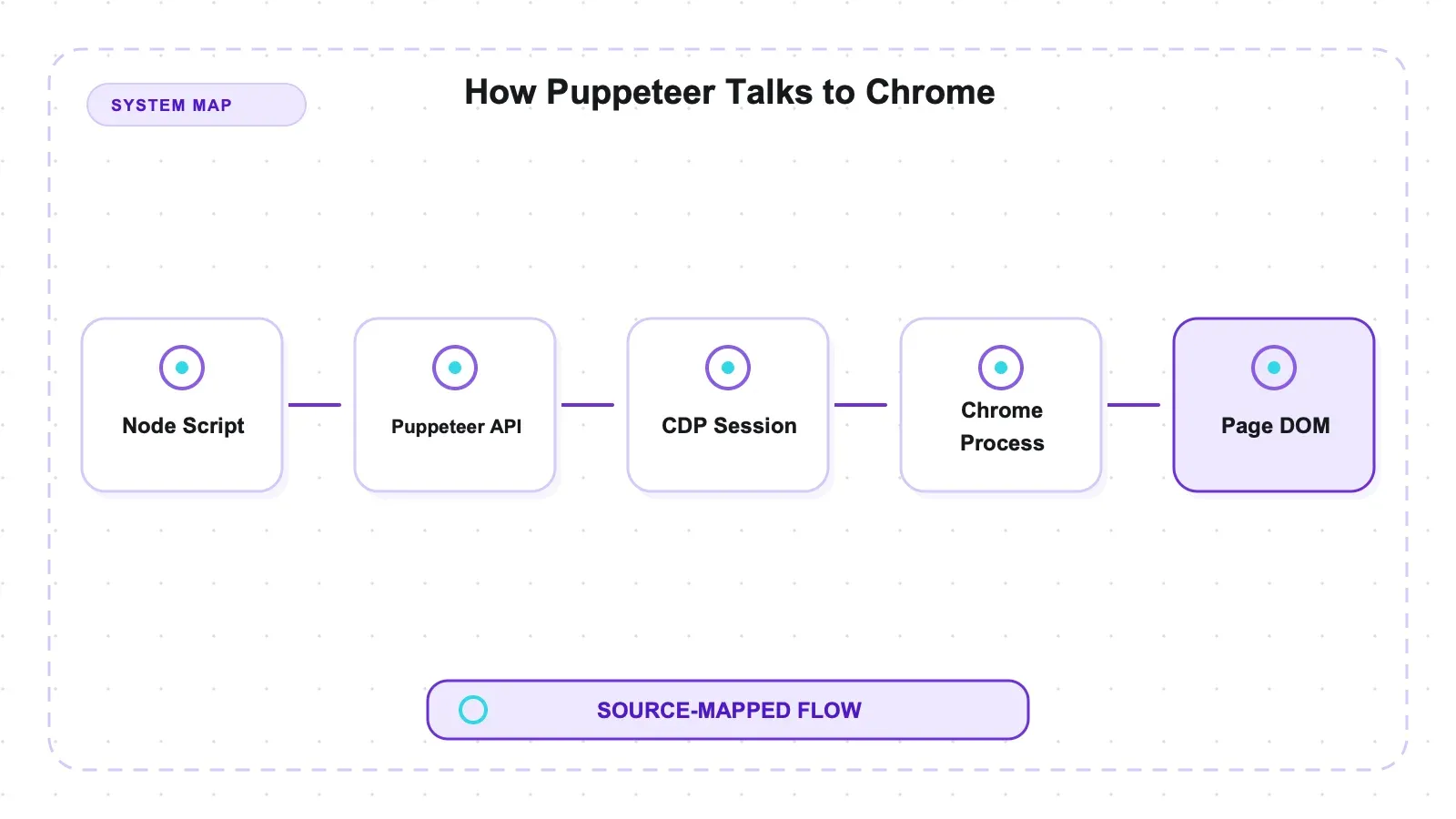
On Chrome, Puppeteer uses the Chrome DevTools Protocol (CDP), the JSON-over-WebSocket channel used by browser DevTools. puppeteer.launch() starts Chrome and opens that protocol connection; calls such as goto, $$eval, and screenshot expose browser operations through a higher-level API. Firefox support follows the WebDriver BiDi path described below, so not every Puppeteer operation is universally a CDP command.
page.evaluate runs a function in a page context, so a relative fetch('/api/...') uses that page's origin and may reuse eligible cookies and session state. It does not automatically reproduce application-created authorization headers, request options, tokens, or service-worker behavior. On this same-origin fixture it returned JSON directly; production requests need their actual contract inspected.
It is also why Puppeteer is heavy. Every page is a real browser tab with a real rendering engine behind it. That buys you correctness on JavaScript-heavy pages and costs you memory and startup time versus an HTTP-only fetch. There is no free rendering; CDP just makes the bill legible.
The engine question, told straight
There is a popular shorthand that Puppeteer is "Chrome-only." For the version I tested, that is wrong, and getting it right changes the comparison.
| Engine | How Puppeteer 24.16.0 drives it | Exercised in these tests |
|---|---|---|
| Chrome | Chrome-first over CDP — the default, so existing automations keep working | yes |
| Firefox | Documented support through WebDriver BiDi since v23 | no |
| WebKit | Not driven at all | — |
Both Chrome for Developers and Mozilla wrote the Firefox shift up when it landed. The build I ran, 24.16.0, is well past v23, so "Chrome-only" understates what ships in the box. That WebKit absence, plus the relative youth of its cross-engine story next to Playwright's, is the real breadth difference — not "one engine versus three."
The Firefox/BiDi path is documented and available in the version I tested, but I did not run my fixtures through it, so I'm reporting a capability, not a measurement. If Firefox rendering is load-bearing for your targets, verify it against your own pages before you commit. For readers who want the full head-to-head on engine and language scope, our Playwright-vs-Puppeteer comparison runs both libraries through these same tests and settles the "which one" question there; here the subject is Puppeteer alone.
Setup and install reality: the browser is the heavy part
The default npm install puppeteer path downloads a compatible Chrome for Testing build. That behavior can be skipped or redirected through configuration, and users can point Puppeteer at another executable, so version matching depends on the deployment choice. The browser download was the heaviest part of this install; a package-manager audit snapshot is not treated as a durable security property.
That auto-bundling is a genuine ergonomic win and a genuine footprint cost, and it is worth naming both sides. The win: you don't hunt for a compatible browser or pin versions by hand; npm install gives you a working pair. The cost: you are downloading a browser, so budget disk and bandwidth for it, especially in CI where a cold cache pays that price on every fresh runner.
It is also a real contrast with Playwright, which splits the two steps — you install the library, then run a separate npx playwright install to pull its browser builds. Neither approach is painful; they just fail differently. Puppeteer's single command can surprise you with its size on a metered connection, while Playwright's second step can surprise you by being forgotten. Know which one you're running.
Hands-on results
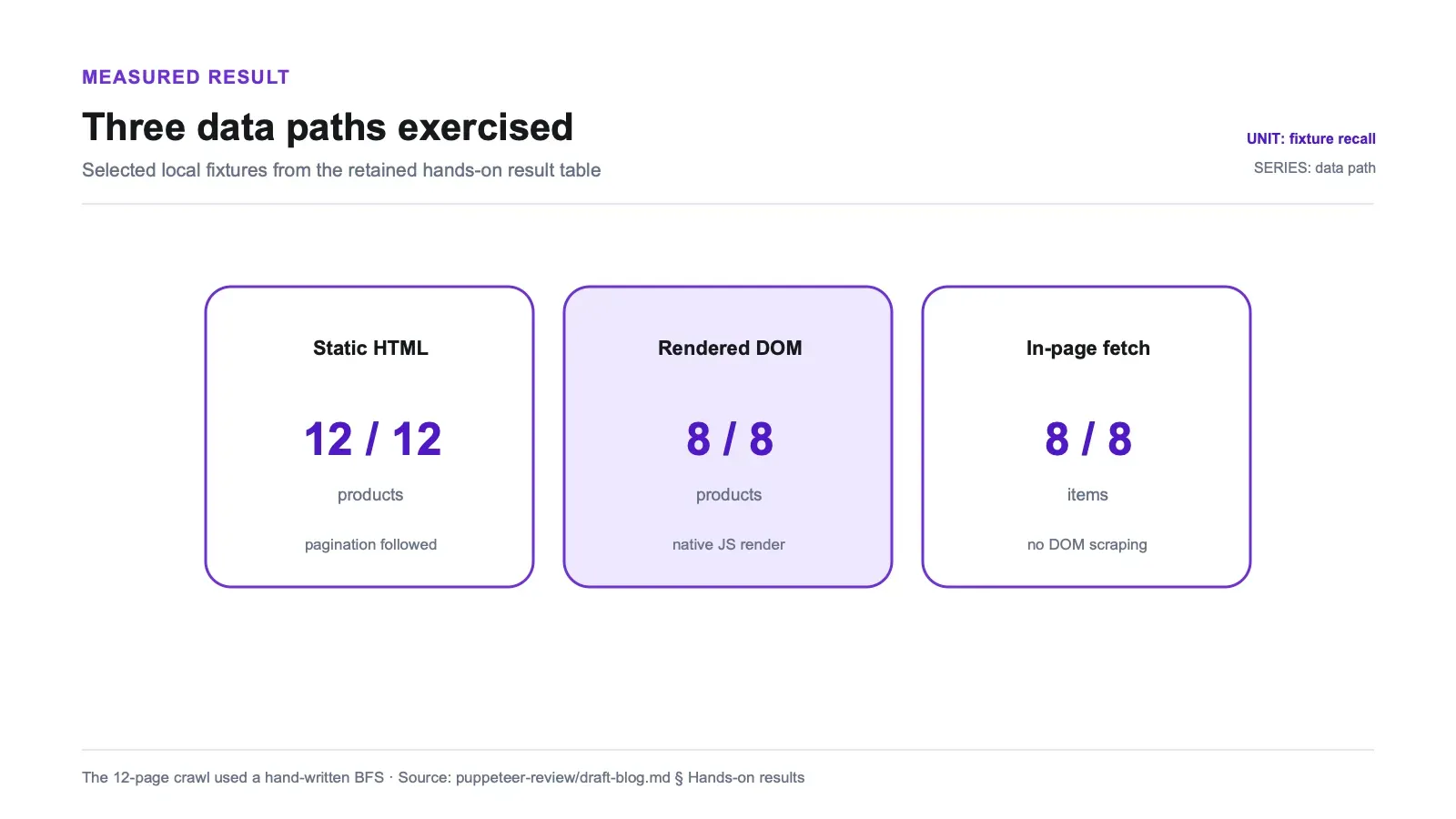
Every test ran against a local fixture server on 127.0.0.1 plus two public practice sites, on Node v22.22.3, macOS arm64, with Puppeteer 24.16.0 and its bundled Chrome. Ground truth for each fixture was written down before the run, so recall is measured against a fixed expected set rather than whatever Puppeteer happened to print.
The public research pack includes the fixture server, test runner, and ground truth. The dependency lock and raw run summary were deliberately withheld from the publication bundle because the strict security review rejected dependency-lock data and environment-specific endpoint material. To reproduce the safe local fixture, run npm install and then node run_puppeteer_material_tests.mjs inside tools/puppeteer/tests, then compare the result with the published ground truth. Public demo pages can change, so the local fixture is the stable basis for the expected-count checks.
For an exact historical dependency reconstruction, create and audit a fresh lockfile locally rather than treating an unpublished lock as public evidence.
| Test | Target | Result |
|---|---|---|
| Static catalog + pagination | local fixture | 12/12, recall 1.0 |
| Article extraction | local fixture | title + 3/3 paragraphs, boilerplate separated |
| Dynamic JS page (native render) | local fixture | 8/8, recall 1.0, full-page screenshot saved |
Dynamic JSON API (in-page fetch) | local fixture | 8/8, recall 1.0, no DOM scraping |
| HTTP 500 handling | local fixture | status 500 inspectable, no throw |
| Crawl graph (hand-written BFS) | local fixture | 12 pages, depths {0:1, 1:4, 2:7} |
| Books to Scrape | public demo | 20 products |
| Quotes JS | public demo | 10 quotes, rendered natively |
A few of these deserve a sentence beyond the table.
The authored pagination code recovered all 12 expected catalog items. The article selector recovered the title and three expected body paragraphs; surrounding boilerplate remained available in the DOM. Puppeteer supplied the rendered DOM, while the selector logic—not Puppeteer itself—defined what counted as article content.
On the tested HTTP 500 route, goto returned a response object with an inspectable 500 status and did not throw. That says nothing about timeouts, DNS failures, browser crashes, detached frames, or other navigation errors, which still need explicit handling.
The crawl graph is the one that tells the whole story. Walking the fixture's internal links to 12 pages, tracking depth so I didn't revisit URLs, took a hand-written breadth-first search — because Puppeteer has no built-in crawl queue. It found all 12 pages across depths {0:1, 1:4, 2:7}, which is to say my BFS worked. But the BFS was mine. Puppeteer rendered each page; the walking-the-site logic was code I wrote. For twelve pages that's a dozen lines and no big deal. For thousands of URLs with dedup, retries, and politeness delays, that dozen lines becomes a project.
One caveat I'll repeat because it's easy to abuse: the artifacts include per-test timings, but they are single-run, single-machine observations, not benchmarks. I'm not ranking Puppeteer's speed against anything on the strength of one laptop and one run. What the numbers support is recall and behavior across eight different page types — not a stopwatch claim.
What I didn't test
So the results aren't read as broader than they are, here is what stayed outside the test run, and therefore outside these numbers:
| Outside the test run | Status |
|---|---|
| Firefox via WebDriver BiDi | Documented, available in 24.16.0, not exercised here |
| Proxying and request interception | Untested; both are supported features I didn't run |
| Parallel-page scale | I ran small; browser-fleet behavior under real concurrency is unmeasured |
| Re-run on the latest release | I tested 24.16.0; npm latest is 25.3.0, a full major version ahead, as of 2026-07-09. The APIs I exercised (launch, goto, $$eval, screenshot, in-page fetch) are stable across 24→25, but the honest move is to re-run on 25.3.0 before betting exact numbers on it |
None of these is a knock. They're the edges of what one fixture run can honestly claim.
Pros and cons
Pros:
- Native JavaScript rendering with an explicit content wait: 8/8 on the dynamic fixture and all ten quotes on the public demo, with screenshots.
- The authored pagination and article selectors recovered the expected fixture items.
- In-page
fetchreturned all eight records from the known same-origin endpoint without DOM parsing. - The tested HTTP 500 came back as an inspectable response without an exception.
- The default install downloads a compatible Chrome for Testing build; alternate executable and skip-download configurations remain possible.
- Mature, Chrome-focused API over CDP, with a deep ecosystem and thorough docs. Apache-2.0.
- Broader than its reputation: documented Firefox support via WebDriver BiDi since v23.
Cons:
- No built-in crawl queue, dataset writer, or throttle — crawl-scale needs your own code or a wrapper.
- No WebKit engine, and its cross-engine story is younger than Playwright's.
- Real browser weight: a bundled Chrome to download and a per-page memory cost versus HTTP-only tools.
- Node-based; using it from another language means building and maintaining a bridge.
- The version I ran (24.16.0) trails npm latest (25.3.0) by a major version — re-verify on current before trusting exact figures.
Who it's for, and who should skip it
Reach for Puppeteer if you live in Node, your targets render fine in Chrome (most do), and you want a mature, focused library that turns "the page after its JavaScript runs" into something you can read and screenshot. For scraping a set of dynamic pages, or grabbing a JSON API with the page's own session, or capturing rendered screenshots as proof, it is a strong, low-drama default. The Firefox-via-BiDi option is there if you grow into it, and the ecosystem means most problems you hit have been hit before.
Think twice if your problem is crawl orchestration rather than rendering. If you need to walk hundreds or thousands of URLs with deduplication, retries, and rate limits, Puppeteer alone will have you rebuilding a crawler by hand — that's the wrong altitude for it. Skip a headless browser entirely if your pages don't actually need JavaScript to reveal their data; when an HTTP request and a parser return the content, a real browser is expensive overkill that just burns memory and setup time. And if you need WebKit fidelity or a non-JavaScript language client, this isn't the tool for that axis.
Alternatives, and where Thunderbit fits
The honest framing first: Puppeteer is free, Apache-2.0, self-hosted, and you own every part of running it — the browser fleet, the crawl code you bolt on, and the ongoing anti-bot arms race. For a lot of projects that ownership is exactly right, and no managed service will render an authorized page more cheaply than a browser you already have.
Within open source, the useful comparisons are by job, not by logo. For crawl-scale specifically, Crawlee is the natural companion: its PuppeteerCrawler wraps Puppeteer with the request queue, dataset, and throttling the library deliberately omits, so you keep the rendering and get the orchestration. If your output goal is clean Markdown for an LLM pipeline rather than a rendered DOM, Crawl4AI drives a real browser and produces exactly that. If your pages don't need a browser at all, an HTTP-first framework like Scrapy is a different and lighter category. When you're weighing several of these at once, our open-source scraper roundup lays the categories out side by side.
A managed service such as Thunderbit moves browser operation and extraction behind an API. It was not run through these Puppeteer fixtures, so this review makes no matched claim about rendering, blocking, extraction quality, or cost. The decision boundary is operational ownership: maintain browser and crawl code yourself, or pay a provider to operate part of that layer.
With Puppeteer there is no vendor usage fee, but compute, bandwidth, browser maintenance, orchestration, and operations remain yours. A managed route charges for usage and shifts some of that responsibility to the provider. This experiment did not compare the outcomes.
Try Thunderbit for Web Data Extraction
Verdict
Puppeteer 24.16.0 is worth evaluating if you're in Node and need Chrome-first browser automation. The authored fixture code recovered 12 static items, eight dynamic items, and ten public-demo quotes; the known same-origin API returned eight records through page.evaluate; screenshots worked; and the tested HTTP 500 remained inspectable. These results belong to the named fixtures and an older major version, not to extraction recall in general.
Size the claims properly, though. Puppeteer is a renderer, not a crawler: my 12-page walk needed a hand-written BFS because there is no built-in queue, and at scale that gap is real work — hand it to Crawlee or write the machinery yourself. It's Chrome-first with documented Firefox support via BiDi but no WebKit, so it isn't the tool for cross-engine breadth. It carries a real browser's weight. And I tested 24.16.0 against a 25.3.0 latest, so re-run on current before you trust exact figures. Know those four things going in and Puppeteer is an excellent Chrome-automation library. Expect it to crawl a site for you and you'll be writing the crawler you thought you were downloading.
Try Thunderbit for Web Data Extraction Get Started Free
FAQs
Does Puppeteer render JavaScript pages, or do I need a plugin?
It renders them natively, no plugin. On my dynamic fixture it returned 8 of 8 client-side-built products at recall 1.0 with a full-page screenshot, and the public Quotes to Scrape JS page returned all 10 quotes the same way — a plain goto, then read the rendered DOM. Because Puppeteer drives a real Chrome over the DevTools Protocol, the page's scripts actually execute before you read anything.
Can Puppeteer scrape a JSON API without parsing the HTML?
Yes, when the endpoint and request contract allow it. page.evaluate can issue a request from the page origin and may reuse eligible cookies, but it does not automatically reproduce application headers, tokens, options, or service-worker behavior. On the same-origin fixture it returned all eight records without DOM parsing.
Is Puppeteer a web crawler? No — it's a browser-automation library, not a crawler framework. There's no built-in request queue, dataset writer, or throttle, so my 12-page crawl (depths {0:1, 1:4, 2:7}) needed a hand-written breadth-first search. That's a scope boundary, not a defect. For crawl-scale, pair it with a wrapper like Crawlee's PuppeteerCrawler, which adds the queue and dataset machinery Puppeteer leaves out.
Is Puppeteer Chrome-only? Not anymore. It's Chrome-first over CDP, but since v23 it has documented Firefox support through WebDriver BiDi, and the version I tested (24.16.0) is well past that. What it doesn't drive is WebKit, and its cross-engine story is younger than Playwright's — that, not "Chrome-only," is the accurate limitation. I only exercised Chrome here, so I'm reporting Firefox-via-BiDi as documented, not as something I measured.
What does installing Puppeteer actually download?
By default, npm install puppeteer downloads a compatible Chrome for Testing build. The download can be skipped or redirected, and another executable can be configured, so version matching depends on deployment choices. Budget disk and bandwidth for the browser, especially on uncached CI runners. This review tested 24.16.0; rerun the core fixtures on the release current at publication.




