
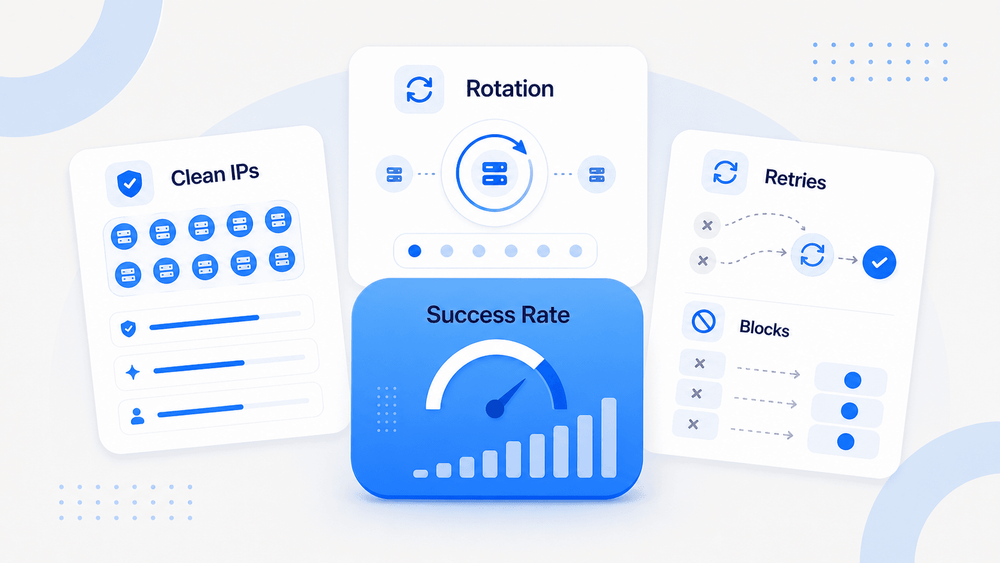
Most proxy users I talk to share the same frustration: they picked a provider, configured rotation, and still watch half their requests come back as CAPTCHAs or empty pages. The provider dashboard says "99.9% success rate." The spreadsheet says otherwise.
Here's what's actually happening. The proxy servers market is worth roughly USD 1.9 billion in 2026 and is projected to reach USD 2.6 billion by 2031 — so there's real money flowing into proxy infrastructure. But the gap between vendor marketing and production reality is wide enough to drive a truck through. I've spent a lot of time digging into independent benchmarks, community reports, and anti-bot documentation to figure out what actually moves the needle on success rates. This guide is the result: a practical, operator-level playbook — not theory, not vendor hype.
What Does "Proxy Success Rate" Actually Mean (and Why Most Numbers Lie)
A proxy success rate, in the simplest terms, is the percentage of your requests that return valid, usable data. Not just an HTTP 200 status code. Not just "the proxy connected." Actual content you can use.
There are at least four layers of "success," and the distinction matters more than most people realize:
- Transport success: The proxy connected and returned something.
- HTTP success: The target returned a non-error status code (200, 301, etc.).
- Content success: The response body contains the expected data — not a CAPTCHA page, not a soft block, not an empty shell.
- Business success: The data is complete enough for your downstream pipeline or analysis.
Provider claims of 99.9% success or 99.86% success typically live at the first two layers. They're measured against easy targets, under low concurrency, with controlled routes. Proxyway's methodology is more honest — they define success as requests that reach the target and return its response, while also tracking response time and stability. But even that doesn't tell you whether the response body is a real product page or a Cloudflare challenge.
Proxy type, target anti-bot sophistication, request volume, session management, and your digital fingerprint consistency all shape the real number. Treat success rate as a range. Anyone selling you a fixed number is selling you a fantasy.
Try AI Web Scraper for Structured Data
Realistic Proxy Success Rate Benchmarks by Target Site Category
Every competing article I've read discusses proxy types and success rates in abstract terms — none publish expected ranges by site category. So here's the table nobody else gives you.
A few caveats before you read it: these are directional planning ranges, not lab-certified guarantees. They assume basic fingerprint hygiene (matching TLS, headers, and User-Agent) and reasonable request pacing. Your actual numbers will shift based on your stack, volume, and the target's current anti-bot posture.
| Target Site Category | Datacenter Proxy | ISP Proxy | Residential Proxy | Mobile Proxy |
|---|---|---|---|---|
| Simple directories / classifieds | 85–98% | 90–99% | 90–99% | 90–99% |
| Normal e-commerce (product pages) | 50–85% | 75–95% | 80–97% | 85–98% |
| Search engines (Google, Bing) | 30–70% | 60–90% | 70–95% | 75–95% |
| Travel / ticketing / marketplaces | 20–60% | 50–85% | 60–90% | 70–95% |
| Social media / logged-in flows | 10–50% | 40–80% | 50–85% | 60–90% |
| Heavily protected (Akamai, Cloudflare, HUMAN) | 10–60% | 40–80% | 50–90% | 60–92% |
Notice how the ranges overlap and sometimes a "cheaper" proxy type outperforms expectations. That's because proxy type is only one variable. I've seen reports on Reddit where datacenter proxies with curl-impersonate hit about 91% success on mid-sized Cloudflare-protected e-commerce sites, while residential proxies using default Python requests headers limped along at 60%. Fingerprint quality can beat raw IP trust.
Why E-Commerce Sites Have Different Block Rates Than Social Media
Why the variation? Different site categories invest in fundamentally different anti-bot layers.
E-commerce and marketplace sites typically combine rate limiting, IP reputation scoring, behavioral analysis, and WAF protections. Many use Akamai Bot Manager, DataDome, or Cloudflare because scraping directly affects pricing, inventory visibility, and competitive intelligence. The protection is real, but it's mostly focused on volume and pattern detection — if you look like a normal shopper browsing at human speed, residential and ISP proxies can do well.
Social media and login-heavy platforms are harder for a different reason. They have account history, device identity graphs, session continuity expectations, and sophisticated behavioral models. A proxy that works fine for a public product page may still fail during login, scrolling, or account switching. HUMAN's Bot Defender processes numerous data signals and generates behavioral fingerprints — the IP is just one input.
Classifieds, local directories, and simple public pages are generally the easiest targets. Lower abuse economics, simpler protections, and less investment in bot detection. Datacenter proxies can work here if you respect rate limits.
DataDome's detection guidance confirms the layered reality: effective bot detection combines fingerprinting, behavioral analysis, IP reputation, machine learning, and device verification. No single method catches every bot, and no single proxy type defeats every method.
Learn how data scraping works Get Started Free
How to Choose the Right Proxy Type to Get High Success Rates
Most wasted proxy budget comes from choosing the wrong type for the target. I've watched teams burn through hundreds of dollars of datacenter bandwidth on Instagram before anyone thought to check whether the approach even made sense. A simple decision framework prevents that.
The Proxy Decision Flowchart
Walk through these questions in order:
1. What are you scraping?
- Public data (e-commerce listings, search results, directories) → Go to question 2.
- Authenticated sessions (social media, SaaS dashboards, logged-in flows) → You need sticky sessions and high-trust IPs. Skip to ISP or mobile proxies.
2. What anti-bot level does the target have?
- Low (basic rate limiting, no JS challenges) → Datacenter proxies can work. Test first.
- Medium (Cloudflare JS Challenge, moderate fingerprinting) → Residential or ISP proxies. Fingerprint stack matters.
- High (Akamai, PerimeterX/HUMAN, DataDome) → Residential or mobile proxies, plus a complete fingerprint and behavioral stack.
3. Do you need sticky sessions or stateless rotation?
- Stateless (each request is independent) → Per-request rotation.
- Stateful (login flows, multi-step navigation, cart operations) → Sticky sessions with ISP or dedicated residential IPs.
4. What's your request volume?
- Under 1K requests/day → Almost any proxy type works if the target isn't heavily protected. Start cheap.
- 1K–100K/day → Residential or ISP proxies for protected targets. Monitor cost per successful request.
- 100K+/day → You need provider-level pool diversity, ASN rotation, and likely a mix of proxy types.
Here's a quick comparison of the proxy types:
| Proxy Type | Speed | Cost | Trust Level | Best Use Case | Success Pattern |
|---|---|---|---|---|---|
| Datacenter | High | Low (~$0.50–2/IP/mo) | Low–Medium | Simple public pages, SEO checks, high-volume low-protection | Strong on easy targets, weak on defended ones |
| Residential | Medium | Medium–High (~$5.88–$7/GB) | High | E-commerce, public data, geo-specific scraping | Strong if fingerprint and pacing are coherent |
| ISP / Static Residential | High | Medium (~$2.70–3.33/IP) | Medium–High | Long sessions, account workflows, stable identity | Good for sticky flows; fewer IP changes |
| Mobile | Low–Medium | High (~$3.50–7.50/GB) | Very High | Social/mobile targets, ad verification, ban-sensitive | High trust, expensive, not immune |
Rotation vs. Sticky Sessions: The Core Tradeoff
Per-request rotation gives every request a fresh IP. It's ideal for stateless scraping — product pages, search results, directory listings. It spreads load and prevents any single IP from accumulating too much attention.
Sticky sessions keep the same IP for a set duration. Oxylabs says residential sticky sessions can last up to 24 hours. They're essential for login flows, multi-step navigation, and anything where the target expects session continuity.
The failure mode to watch for is sticky session drift. The underlying residential peer can go offline, the provider can silently rotate the exit IP, or the target can invalidate the session. Community reports on Reddit and BlackHatWorld repeatedly mention sticky-session instability that doesn't match provider claims.
Practical rule: use rotation for stateless work, sticky sessions for stateful work, and always monitor whether your session identity is actually stable.
Shared vs. Dedicated Proxies: When It Matters
Shared proxies are cheaper because multiple customers use the same pool. They're fine for low-stakes, low-protection tasks. The risk is inherited reputation — a shared IP may already be burned on the exact target you need.
Dedicated proxies cost more but give you cleaner reputation and better control. Use them for high-stakes targets, long-running campaigns, or account workflows where a burned IP means a banned account. BlackHatWorld threads repeatedly warn that very cheap "unlimited" residential pools can be small and overused — "spammed to death" across many sites.
Think in terms of effective cost: a dedicated IP that costs 3x more upfront can be cheaper overall if it doubles your valid response rate and eliminates retry waste.
Beyond IP Rotation: The Full Anti-Detection Checklist for 2026
IP rotation alone is an outdated strategy. Full stop. Modern anti-bot systems examine dozens of signals beyond your IP address, and most proxy guides pretend this section doesn't exist. If you fix only the IP layer, everything else in your stack becomes the weak link.
The full checklist for 2026:
1. TLS/JA3/JA4 Fingerprint Alignment
Cloudflare's documentation explains that JA3 and JA4 fingerprints identify TLS clients by how they initiate connections. Different browsers, bots, and HTTP libraries produce distinct handshake patterns. If your User-Agent says "Chrome 125" but your TLS handshake looks like Python requests or Go's default HTTP client, the mismatch is an immediate automation signal — before the target even renders the page.
2. HTTP/2 Settings and Header Order
HTTP/2 adds fingerprintable signals: SETTINGS frames, WINDOW_UPDATE behavior, pseudo-header order, and priority handling. Scrapfly's 2026 guide confirms that anti-bot systems like Cloudflare, Akamai, and DataDome combine protocol fingerprints with TLS fingerprints in a multi-layer detection stack. Header values aren't enough — header order matters too.
3. User-Agent ↔ OS ↔ TCP Stack Coherence
Your browser identity must be internally consistent. A mobile Android User-Agent combined with desktop viewport dimensions, macOS fonts, a US-English locale, an Ubuntu-like TCP stack, and a German residential IP is not a normal user. It's a red flag sandwich. Oxylabs explicitly supports IP version and OS/platform filtering to help create more realistic traffic patterns.
4. Canvas/WebGL Fingerprint Entropy
Browser fingerprinting extends to canvas rendering, WebGL parameters, fonts, audio context, and hardware concurrency. These signals create a device identity that should be consistent across requests from the same "user."
5. DNS Leak Prevention
Use remote DNS resolution through the proxy, not local DNS. A DNS leak reveals your real location and infrastructure, undermining the entire proxy setup.
6. Request Timing and Behavioral Signals
Uniform request intervals are a giveaway. Real users have irregular timing — bursts, pauses, scrolls, revisits. Fingerprint.com's 2026 bot detection overview confirms that detection monitors mouse movements, scrolling behavior, request rates, and navigation patterns. Add randomized delays with jitter. Avoid impossible geolocation jumps (New York to Los Angeles in two seconds is physically impossible).
7. JavaScript Rendering and Headless Browser Signals
If the target expects JavaScript behavior, you need a real browser or a well-configured headless environment. Puppeteer Extra Stealth patches obvious automation signals like navigator.webdriver, but Browserless warns that stealth plugins don't cover every network-layer or infrastructure-layer signal. DataDome's analysis of stealth plugins notes the ongoing cat-and-mouse nature of detection.
8. Cookie and Session State Management
Persist cookies and session state for multi-step flows. A "user" who arrives with no cookies, accepts them, then appears on the next request with no cookies again is clearly automated.
The core point: users who fix only the IP layer but ignore fingerprinting are the ones whose scrapers "suddenly break after weeks of working fine." The target didn't change its IP blocking — it tightened its fingerprint checks.
Step-by-Step Guide to Get High Success Rates With Proxies
- Difficulty: Intermediate
- Time Required: ~30–60 minutes for initial setup, ongoing for monitoring
- What You'll Need: A target URL list, a proxy provider account (trial is fine), an HTTP client or headless browser, and logging infrastructure
Step 1: Define Your Traffic Profile
Before you touch a proxy dashboard, document what you're actually doing. Zyte's traffic profile concept frames this well: your profile is the combination of target websites, request volume, and geo-locations.
Write down:
- Target domains and specific page types (product pages, search results, profiles)
- Request volume per hour and per day
- Geographic requirements (do you need US IPs? EU? Specific cities?)
- Session needs: stateless (independent requests) or stateful (login flows, pagination with cookies)
- Data validation requirements: what does a "good" response look like?
- Acceptable latency and retry budget
This step takes ten minutes and saves hours of wasted testing later.
Step 2: Select the Right Proxy Type and Provider
Use the decision flowchart from earlier to pick your proxy type. Then evaluate 2–3 providers with small paid batches against your actual target. Community advice on Reddit consistently says to ignore generic success-rate marketing and test against the real site.
Evaluate providers on:
- Pool size and geographic coverage
- ASN diversity (more diverse = harder to block by subnet)
- Rotation controls and sticky-session TTL
- Protocol support: HTTP, HTTPS, SOCKS5
- Pricing model: per-GB, per-IP, per-request, or unlimited
- Trial availability (if they won't let you test, that's a red flag)
- Dashboard transparency: can you see per-request logs?
Step 3: Configure Your Fingerprint Stack
Match your fingerprint to the target's expectations. For basic pages with minimal protection, a well-configured HTTP client (like curl-impersonate or a properly set up httpx session) may be enough. For JS-heavy protected pages, use a real browser or managed headless environment with stealth plugins.
Key configuration:
- Align TLS/JA4 fingerprint with the browser version in your User-Agent
- Set realistic HTTP/2 settings and header order
- Ensure User-Agent, OS, viewport, timezone, locale, and proxy geo are all coherent
- Enable remote DNS resolution through the proxy
- If using headless Chrome/Playwright, apply puppeteer-extra-plugin-stealth or equivalent
Step 4: Implement Smart Rotation and Session Management
- Stateless scraping: Configure per-request rotation. Each request gets a fresh IP.
- Stateful flows: Set sticky sessions with appropriate TTL (5–30 minutes is typical; some providers support up to 24 hours).
- Retries: Implement exponential backoff with jitter. Not fixed intervals —
1s → 2s → 4swith random variance. BlackHatWorld users emphasize slowing down when blocks increase, not speeding up. - Geo consistency: Don't jump between countries or cities faster than a real user could travel.
Step 5: Validate Responses (Not Just Status Codes)
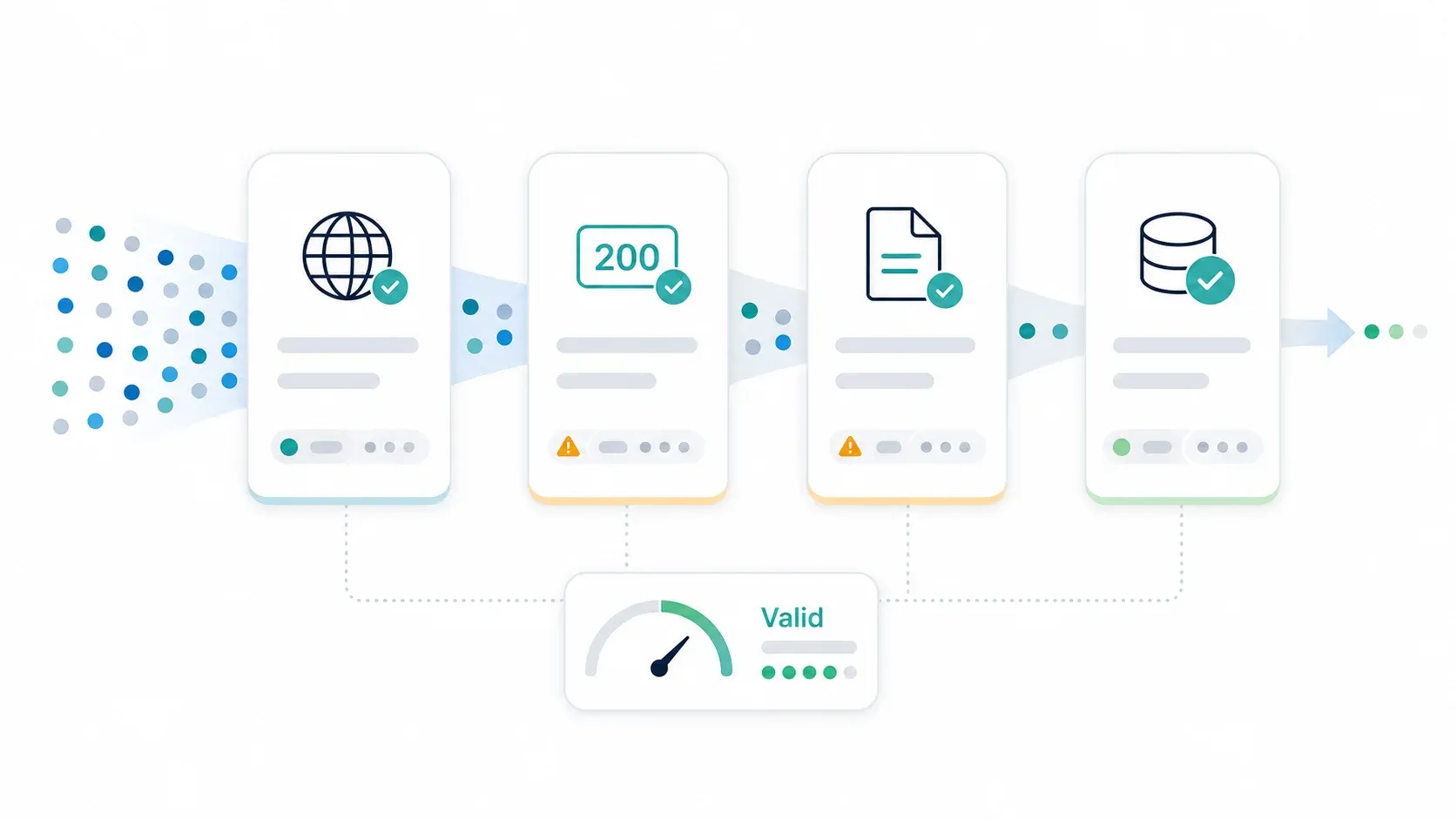
This is where most setups fail silently. An HTTP 200 does not mean success. Build validation logic that checks:
- Expected HTML selectors or JSON keys are present
- No CAPTCHA or challenge page markers
- Content is not empty or truncated
- No login wall or consent wall
- Correct locale/language (if geo-targeting)
- No soft-block messaging ("We detected unusual activity...")
- Data freshness (not a stale cached page)
If you skip this step, your "95% success rate" might actually be 60% usable data.
Step 6: Monitor, Log, and Iterate
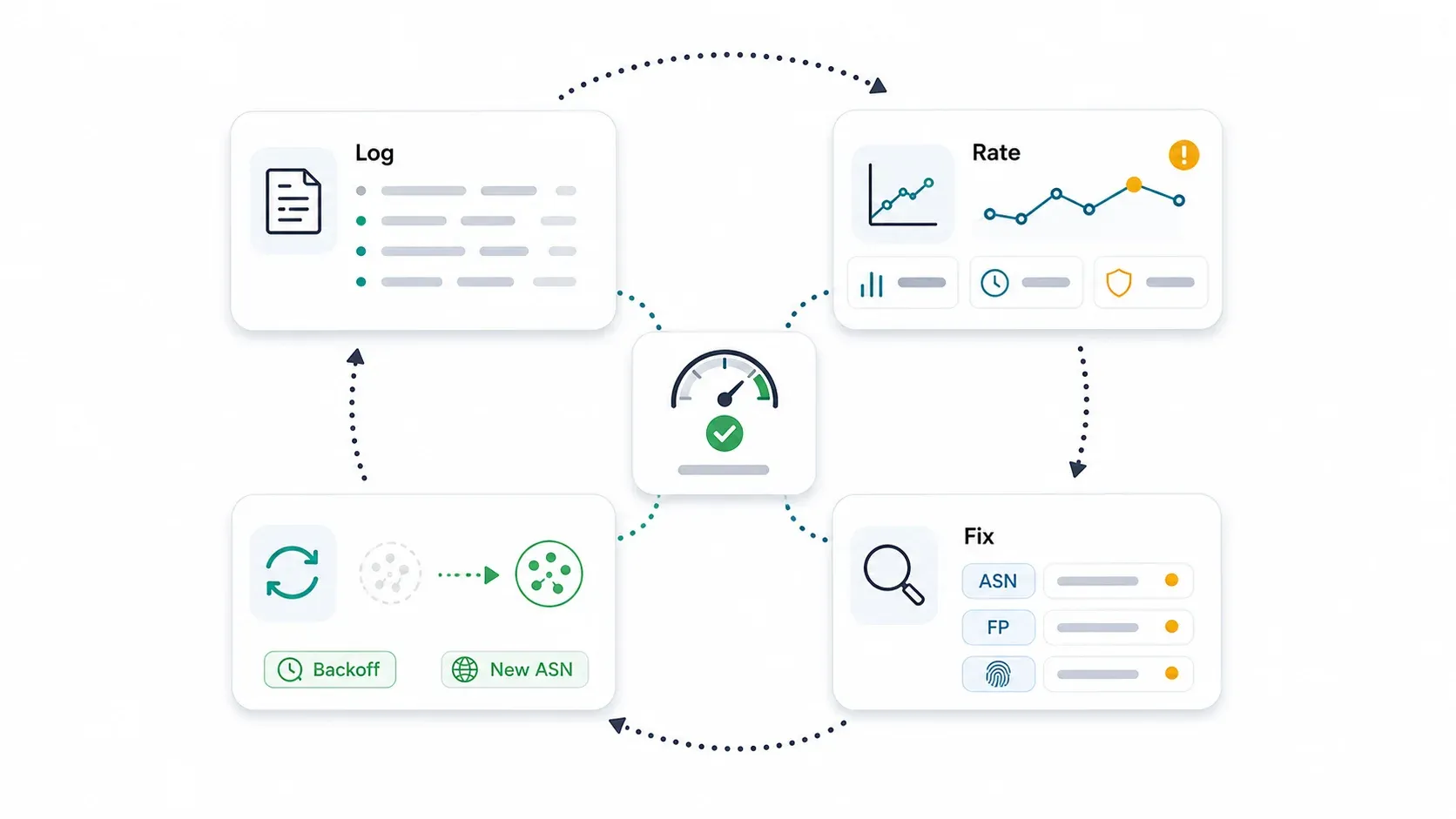
Proxy success rates are a living metric, not a setup checkbox. The next section covers this in depth.
Monitoring, Diagnosing, and Recovering Proxy Success Rates Over Time
No competing article covers this, and it's the part that separates hobby scrapers from production operators. Success rates degrade. IPs get burned. Providers' pools fluctuate. Targets update their defenses. You need a system.
What to Log for Every Request
Every request through your proxy pipeline should record:
- Timestamp
- Target URL and page type
- Proxy provider, IP, port, ASN, and geo (country/city)
- Proxy type and session ID
- User-Agent / browser profile used
- HTTP status code (200, 403, 429, 503, timeout)
- Latency (ms)
- Retry count
- Validation outcome: valid data, CAPTCHA, empty page, soft block, login wall, wrong locale
- Cost unit: GB consumed or request charge
Key Metrics to Track
| Metric | Formula | Why It Matters |
|---|---|---|
| Validated success rate | Valid responses ÷ total attempts | The only number that counts |
| Block rate by ASN/subnet | Blocks from ASN X ÷ total requests via ASN X | Identifies burned IP ranges |
| Average and p95 latency | Standard latency calculation | Slow responses often precede blocks |
| Retry rate | Retries ÷ initial attempts | High retry rate = wasted bandwidth |
| CAPTCHA/challenge rate | Challenge responses ÷ total attempts | Early warning of tightened defenses |
| Cost per successful request | Total proxy spend ÷ valid responses | The real ROI metric |
Diagnosis Framework: When Success Rates Drop
When your validated success rate drops, check in this order:
- Has the target updated its anti-bot? Look for new Cloudflare or Akamai deployment, new challenge pages, or changed response patterns.
- Are specific ASNs or subnets burned? Segment your block rate by ASN. If one subnet is getting hammered, the rest of the pool may be fine.
- Has your fingerprint drifted? A library update, header change, or TLS mismatch can break things overnight. This is the most common cause of "it worked for weeks and then suddenly stopped."
- Is the provider's pool quality degrading? Check their status page, community reports, and whether your pool segment has been rotated into lower-quality peers.
- Did your traffic volume spike? Targets often have dynamic rate limits that tighten under load.
- Did geo, timezone, or locale drift? Infrastructure changes can shift your exit geography without warning.
Recovery Playbook
- Reduce rate first. Don't immediately buy more expensive proxies. Slow down and see if success recovers.
- Add exponential backoff with jitter if you haven't already.
- Rotate to a different ASN block or subnet segment.
- Warm up new IPs gradually. Don't blast a fresh pool at full volume on day one.
- Upgrade proxy type only when evidence points to IP trust as the bottleneck (not fingerprint or pacing).
- Rebuild your fingerprint stack if mismatches appear in your logs.
- Fail over to a second provider if pool health degrades and the provider can't explain why.
- Evaluate whether an API abstraction is a better fit if structured extraction is the goal and proxy operations are consuming more engineering time than extraction logic.
One Reddit thread describes residential proxies that worked perfectly for 48 hours and then degraded into 90% failure rates — speed drops, timeouts, and blocks even when IPs weren't obviously flagged. Without logging and monitoring, that kind of degradation can burn through your budget before you notice.
When to Skip Proxy Management Entirely: AI-Native Scraping APIs
A lot of developers managing proxies are actually trying to solve a data extraction problem, not a networking problem. When the goal is structured data, the proxy layer is the wrong abstraction.
Self-managed proxies make sense when you need exact exit-IP control, custom browser automation, authenticated session management at scale, or when you have dedicated infrastructure engineers who enjoy this kind of work (they exist — I've met them).
But for everyone else — especially teams that need structured JSON or clean Markdown from web pages — an API that handles proxies, anti-bot, rendering, and parsing in one call is a fundamentally different (and often better) approach.
At Thunderbit, we built our developer stack to abstract away the entire proxy management layer:
- Open API:
POST /extractreturns schema-matched structured JSON from any URL. JS rendering, anti-bot bypass, and CAPTCHA handling are built in — zero proxy configuration.POST /distillconverts pages to clean Markdown for RAG/LLM pipelines.POST /suggest_fieldsdiscovers extractable fields for free. - MCP Server:
thunderbit_extractandthunderbit_distilltools let AI agents and coding assistants (Claude, Cursor) scrape mid-task without proxy infrastructure. - CLI:
npx @thunderbit/thunderbit-cli extract <url> --schema schema.json -f jsonenables batch extraction from terminal or CI without touching proxy settings.
The same AI engine powers 100,000+ extension users extracting tens of millions of pages per month, according to our launch announcement.
Comparison: Self-Managed Proxies vs. Thunderbit API/MCP/CLI
| Dimension | Self-Managed Proxies | Thunderbit API / MCP / CLI |
|---|---|---|
| Setup time | Hours–days (provider eval, config, testing) | Minutes (API key + schema) |
| Anti-bot handling | You manage (fingerprints, rotation, CAPTCHAs) | Built-in, automatic |
| Output format | Raw HTML → you parse | Structured JSON via JSON Schema |
| Maintenance | Ongoing (pool health, IP rotation, provider swaps) | Monitor credits and schema quality |
| Best for | High-volume custom pipelines, exact exit-IP control, niche anti-bot targets | Structured data extraction, RAG ingestion, enrichment workflows |
Proxies aren't obsolete. But if structured data is the output you need, the proxy layer might be the wrong place to spend your engineering hours.
Quick Example: Extracting Structured Data Without Proxies
With self-managed proxies, extracting product data from an e-commerce page looks something like this:
- Choose a proxy provider and configure rotation
- Set up TLS fingerprint alignment and header consistency
- Send the request through the proxy
- Parse the raw HTML with BeautifulSoup or a custom parser
- Validate the response isn't a CAPTCHA or soft block
- Handle retries, backoff, and IP rotation on failure
- Structure the extracted data into your schema
With Thunderbit CLI, the same task:
npx @thunderbit/thunderbit-cli extract "https://example.com/product" --schema schema.json -f json
One command. Structured JSON output. No proxy configuration, no fingerprint tuning, no HTML parsing. The tradeoff is control — you can't pick your exit IP or customize the browser environment. For structured extraction workflows, that tradeoff is usually worth it.
For more on AI web scraping and how it compares to traditional approaches, we've written extensively on the topic.
Common Mistakes That Tank Your Proxy Success Rates
These show up repeatedly in forums, support tickets, and (honestly) my own past experiments:
-
Using datacenter proxies on heavily protected sites. Amazon, LinkedIn, Instagram — these sites know datacenter ASNs. Fix: test residential or ISP proxies and validate effective cost, not just per-GB cost.
-
Ignoring fingerprint consistency. Your TLS handshake says Python, your User-Agent says Chrome, and your timezone says UTC. Fix: align every layer — TLS, HTTP/2, headers, browser, OS, timezone, locale, and proxy geo.
-
Blasting targets at full speed. 100 requests per second from the same subnet is not subtle. Fix: use jittered pacing. Slow down before you scale up.
-
Validating only HTTP status codes. A 200 response containing a CAPTCHA page is not a success. Fix: validate response bodies against expected content patterns.
-
Treating proxy setup as "set and forget." It worked last month. It may not work today. Fix: monitor validated success rate, block rate, latency, and cost per success continuously.
-
Choosing the cheapest provider without testing. "Unlimited residential proxies for $10/month" is almost always a trap. Fix: run paid trials against your actual target before committing.
-
Using shared pools for high-stakes, long-running campaigns. Inherited reputation from other customers can burn your IPs before you send a single request. Fix: use dedicated or ISP proxies where reputation continuity matters.
Any one of these can cut your success rate in half. Combined, they explain why some teams report 15% success while others hit 90%+ on the same target.
Wrapping Up: What Actually Moves the Needle
High success rates don't come from finding the "best" provider or the most expensive IP type. They come from matching proxy type to target, building a coherent fingerprint stack, pacing like a human, validating every response, and monitoring continuously.
Key takeaways:
- Success rates vary dramatically by target site category and proxy type — set realistic expectations using the benchmark table, not vendor marketing.
- IP rotation alone is not enough — TLS fingerprinting, header consistency, and behavioral signals matter just as much (sometimes more).
- Use the decision flowchart to match proxy type to use case before spending money.
- Monitor and log every request — success rates degrade over time and require active tuning.
- For structured data extraction, consider whether proxy self-management is even the right approach. AI-native APIs like Thunderbit's can eliminate the proxy management layer entirely when structured output is the goal.
If you want to experiment with the API approach, Thunderbit offers free credits to get started — no proxy configuration required.
Try AI Web Scraper Get Started Free
FAQs
What is a good proxy success rate?
Depends entirely on the target. For low-protection public pages (directories, classifieds) with residential proxies, 90%+ validated success is achievable. For heavily protected sites (Akamai, Cloudflare, HUMAN), 60–80% may be realistic with a good fingerprint stack. Below 50% consistently signals a fundamental mismatch — wrong proxy type, broken fingerprint, or excessive request rate.
Do residential proxies always have higher success rates than datacenter proxies?
On protected targets, usually yes — but not always. A datacenter proxy with a coherent TLS/browser fingerprint (using something like curl-impersonate) can outperform a residential proxy sending requests with default Python headers. The key is matching proxy type and fingerprint quality to target difficulty. Against low-protection targets, datacenter proxies work fine at a fraction of the cost.
How often should I rotate proxy IPs?
For stateless scraping (product pages, search results), per-request rotation is standard. For login flows or multi-step navigation, sticky sessions of 5–30 minutes are typical — some providers support up to 24 hours. The critical rule: never switch geolocations faster than a real user could physically travel. New York to Chicago in two seconds is not human behavior.
Can I get high success rates with free proxies?
Short answer: no. Free proxies have overused IPs, terrible success rates, unpredictable uptime, and significant security risks (some log your traffic). For production work, invest in a reputable paid provider with trial access, or use a managed API like Thunderbit that handles proxies internally.
When should I use an API instead of managing proxies myself?
When your actual goal is structured data extraction (not raw HTML), when you don't have infrastructure engineers to maintain proxy pipelines, or when the target changes frequently and you need an adaptive solution. If you're spending more engineering hours on proxy rotation, fingerprint tuning, and pool health than on actually using the data you extract, the proxy layer is probably the wrong abstraction for your problem. Thunderbit's API, MCP server, and CLI handle anti-bot, rendering, and parsing in one call — so you can focus on what you're actually building.
Learn More




