
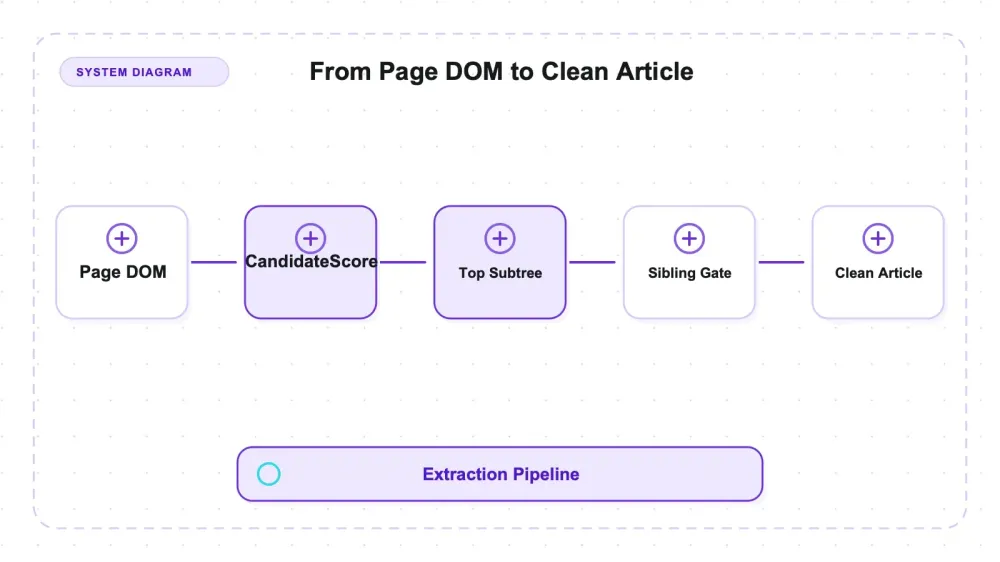
Mozilla's Readability is the standalone JavaScript port of the extractor behind Firefox's Reader View. Published as the Apache-2.0 package @mozilla/readability, it selects article content from a live DOM. Under Node it therefore needs a DOM implementation such as jsdom. It does not fetch pages, execute their JavaScript, or perform schema extraction.
The version under test is npm latest at 0.6.0, published March 3, 2025, with 11,361 stars on the repo when I checked on July 27, 2026 (last pushed July 9, 2026, so main is well ahead of the published package). I ran it under jsdom 29.1.1 on Node v22.22.3, macOS arm64, against 22 labeled HTML fixtures built for the purpose, and every measurement here comes from that setup. Hands-on it is the least demanding tool in this category: two minutes to install, no binaries, no browser sitting in a cache, identical output on every rerun. What makes it interesting isn't operating it — it's that the failures are predictable from a handful of constants in the source, and one of those constants decides more than the docs let on.
Across 22 controlled synthetic fixtures, Readability recovered all 74 labelled article blocks. That bounded result does not mean it never loses article text: the public real-page benchmark reports recall 0.982, and known issue shapes did not reproduce here. The most visible fixture failure was extra sibling content admitted by a source-level link-density gate at 0.25. Its apparent severity changes with the testbed.
What readability.js actually is, and three things it isn't
Readability is a rule-based scoring pass over a DOM. It walks candidate elements, assigns each a content score, propagates those scores up to ancestors, picks the highest-scoring subtree, then does cleanup passes to strip what looks like page furniture. That's the entire article extraction strategy — no model, no training data, no per-site rules. That design is why it works on a page it has never seen — and why its failures are predictable from the source, which is the fun part.
Three things it is not, and all three trip people up:
- Not a fetcher. It takes a
document, not a URL. Fetching, retries, anti-bot, and headers are your problem. - Not a renderer. No JavaScript execution. Whatever the DOM you hand it contains is what it sees.
- Not a structured extractor. You get
title,byline,excerpt,content(HTML),textContent,length,siteName. No schema, no typed rows, no{name, price}.
Four constants do most of the work
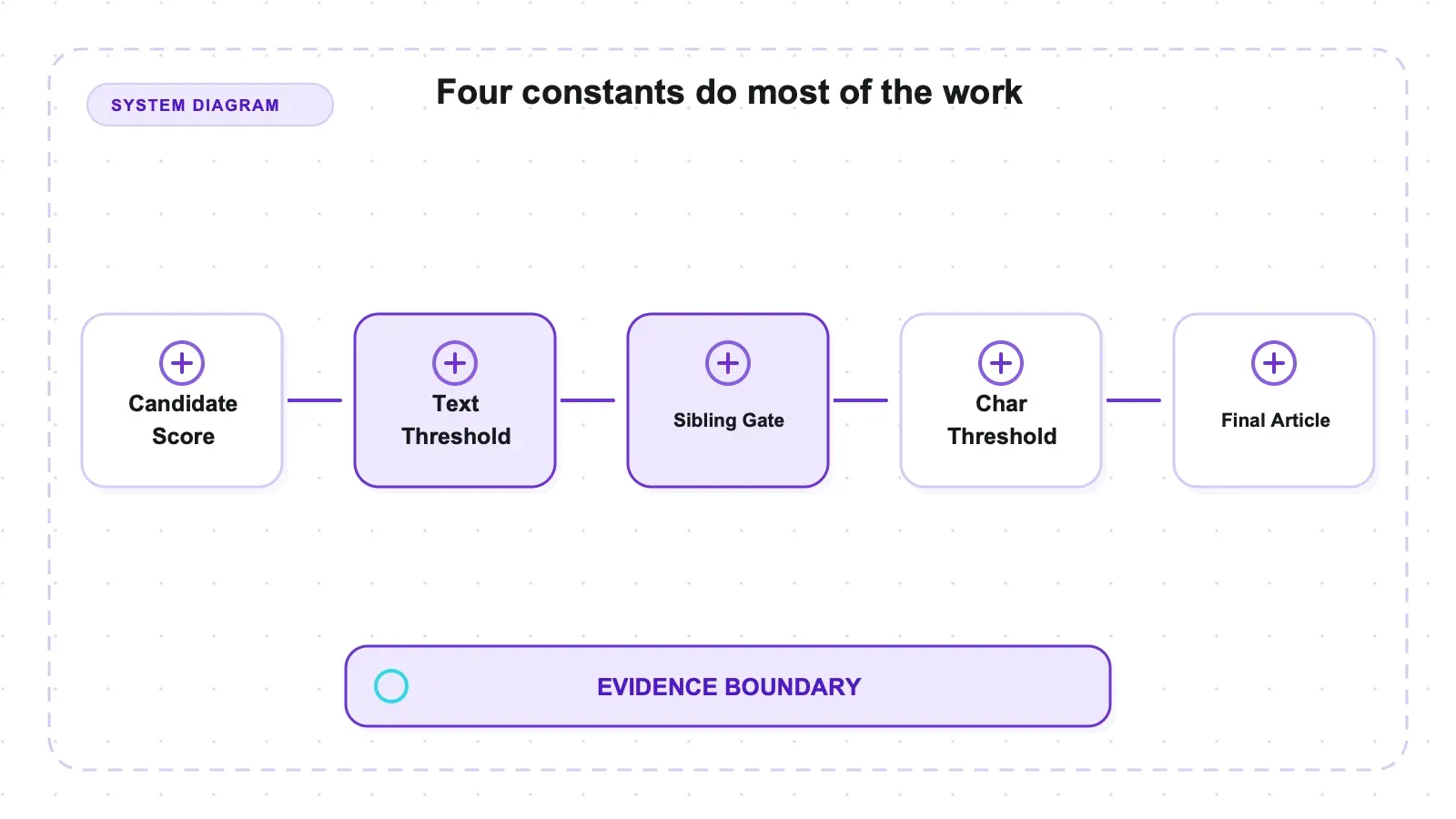
Reading Readability.js in node_modules tells you more about behavior than any docs page. Four pieces of machinery account for most of what the library does:
- Content score per scored paragraph:
1 + (commaCount + 1) + min(floor(len / 100), 3). Paragraphs under 25 characters are not counted at all. Scores propagate to ancestors with dividers — parent gets the full score, grandparent half, and deeper ancestorslevel · 3. DEFAULT_CHAR_THRESHOLD = 500— the minimum article length for a "successful" parse. Below it, a flag-removal sieve reruns the grab with fewer cleanup passes.- The
unlikelyCandidatesregex — matches class and id substrings likecomment,footer,menu,related,sidebar,social,sponsor. Matching nodes get dropped before scoring. - The sibling-append gate in
grabArticle— after the top candidate is chosen, its siblings are considered for inclusion. A sibling comes along if its own score clears the threshold, ornodeLength > 80 && linkDensity < 0.25, ornodeLength < 80 && nodeLength > 0 && linkDensity === 0 && it contains a period.
Link density is Σ(linkText.length · coef) / textLength, with coef = 0.3 for bare # hrefs and 1 otherwise. That gate explains the sibling leaks measured here; it is not the whole extraction algorithm.
Setup, and the dependency that isn't in the pitch
npm install @mozilla/readability jsdom and you're running. Two minutes, no binaries, no post-install download, no browser sitting in your cache. On the install axis this thing is close to ideal.
But "zero dependencies" is a claim about the algorithm, not the runtime. Readability operates on a live document, and under Node that means you supply a DOM implementation — jsdom here, at 29.1.1. jsdom is not small, and for most pipelines it's the dominant cost in the loop, not the extraction. Budget for it.
One more footgun that cost me a rerun: Readability.parse() mutates the DOM it's given. Parse the same jsdom document twice and the second call sees a document the first one already tore apart. Every parse in my harness builds a fresh jsdom. If you're looping over pages and reusing a document object to save time, that's the bug you're about to file.
How I tested it
I didn't point this at live news sites. Live pages give you a score with no way to see why — and with a heuristic, the "why" is the entire value. Instead I generated 22 HTML fixtures containing 91 labeled blocks (74 article, 17 boilerplate), where every word in a block is prefixed with that block's unique sentinel string. Vocabularies across blocks are disjoint, so an extracted token maps to exactly one block, and "recovered" or "leaked" is an exact membership test rather than a fuzzy match.
The extraction step and the scoring step are deliberately separated. The Node runner emits only raw extracted text, the isProbablyReaderable booleans, and measured link densities. All precision and recall is computed afterward from that raw text against the labels, by a separate script. No metric constant is written by hand anywhere in the harness, which is the only way I trust my own numbers.
Then I fed the identical bytes to trafilatura 2.1.0 for a same-testbed contrast. Every fixture was parsed three times; all 22 returned byte-identical text each run.
You can inspect each stage rather than trusting the summary table. tests/build_fixtures.mjs creates the annotated HTML and ground truth; tests/run_readability.mjs records extraction and predictor output; and tests/metrics.py scores those records after the fact. The raw Readability output, computed metrics, and same-input comparison are retained in artifacts/raw/. That separation matters when a result looks suspicious: you can tell whether the parser returned unexpected text, the label set was wrong, or the scoring code misclassified it. Reproduction on this pack checks the claims made here, but it remains a harness check—not evidence that a deployment's real page mix has the same failure distribution.
The scope limit is real and load-bearing: these are synthetic controlled pages, not a real-world corpus. The authoritative real-page figures come from the public article-extraction-benchmark, which scores readability_js 0.6.0 — the exact version tested here — at word-F1 0.947 ± 0.005 (precision 0.914 ± 0.008, recall 0.982 ± 0.003) across roughly 181 real pages. I cite that; I did not reproduce it.
Current-release benchmark rows are used here; superseded historical rows were excluded. The controlled fixtures add a per-block decomposition showing which content shape triggers which rule, rather than replacing the public real-page corpus.
Recall was perfect in the synthetic fixture pack
74 out of 74. Across all 22 fixtures, Readability did not drop a single labeled article block — and on the eleven clean synthetic fixtures that mixed article and boilerplate, micro-averaged token recall came out at 1.000. Not one article sentence went missing.
Two caveats attach to that:
These are clean, single-column synthetic pages. Real articles nest deeper, interleave ads mid-body, and sometimes lose their opening paragraph to a scoring artifact — that class of miss is reported in the tracker (#437, #901, and content-before-a-table drops in #922). My fixtures did not trigger any of them, so I'm not claiming they're fixed — I'm telling you my test didn't reach them. On real pages the benchmark recall for this version is 0.982, not 1.000.
Still, the direction of the result is the useful part. Readability's problem is not that it throws your article away. It's what it brings along with it.
The precision number, and why it needs three labels
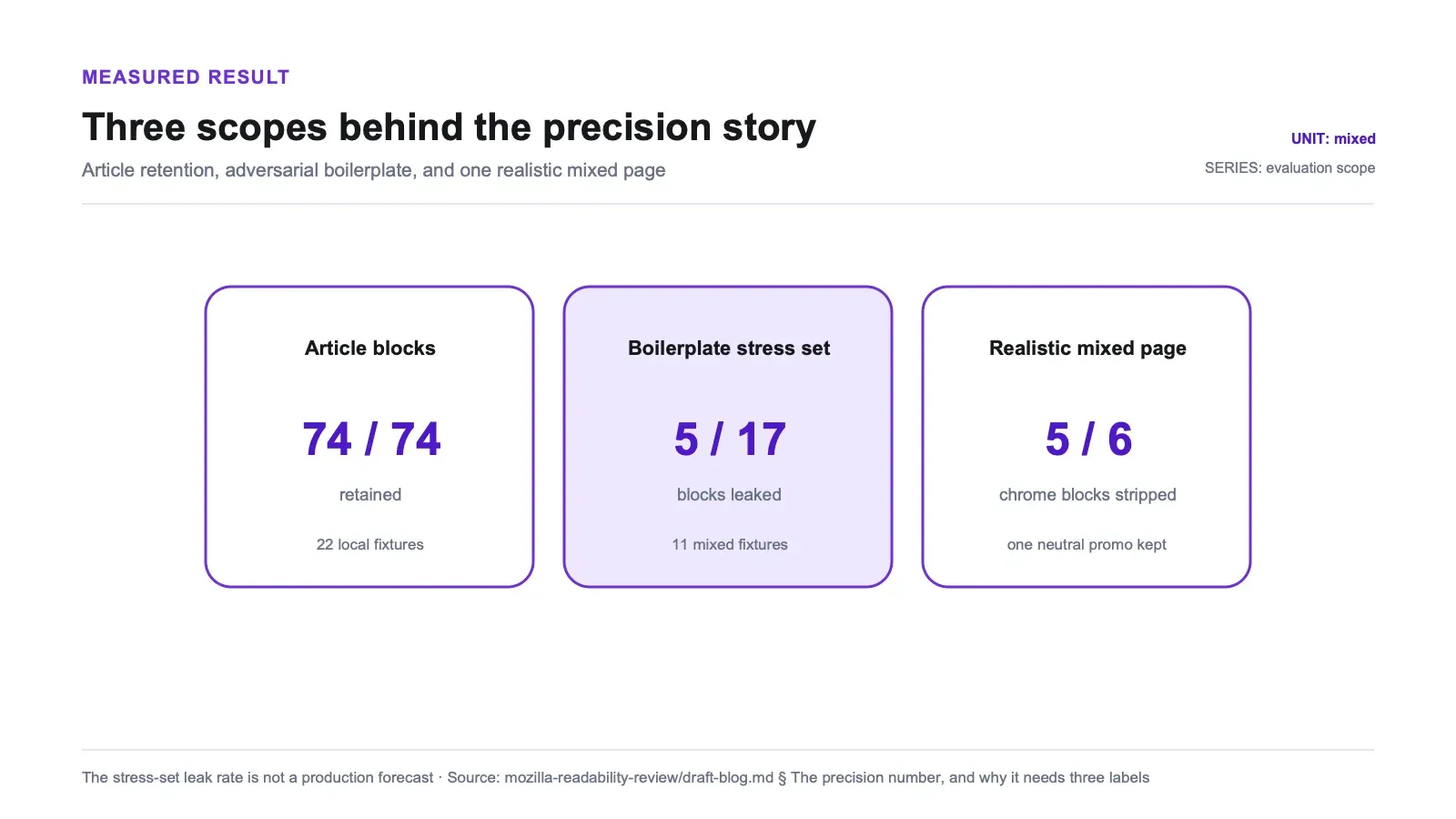
One number is easy to quote and hard to defend. On the eleven mixed fixtures, Readability kept 5 of 17 boilerplate blocks — a leak rate of 0.294.
That is not a real-world leak rate. Three different setups measure three different things, and only one of them describes ordinary pages:
| What the number is measuring | Result |
|---|---|
| Adversarially weighted fixture set — 6 of the 11 mixed pages were purpose-built to defeat the sibling gate | 5 of 17 boilerplate blocks kept (0.294) |
The one realistic page — <article> body surrounded by nav, ad banner, sidebar, comments, footer, plus one neutrally-classed promo | 5 of 6 chrome blocks stripped; 1 kept |
| ~181 real pages, public benchmark (not my run) | precision 0.914, recall 0.982, word-F1 0.947 — readability_js 0.6.0 |
Read the first row as a stress test, not a forecast. Readability does not leak 29% of boilerplate in the wild. On the realistic page, everything carrying a class the unlikelyCandidates regex matches — nav-menu, ad-banner, sidebar, comments, site-footer — was stripped cleanly, all five of them. The single survivor was the one block I engineered to dodge that regex.
The 0.25 gate: where boilerplate removal stops
The sibling-append rule is documented in the source. What nobody had measured, as far as I can find, is exactly where it flips. So I built a gradient: one neutrally-classed <p class="teaser-block"> sitting outside the <article>, a decisive four-paragraph article guaranteed to win as top candidate, and nothing varying but the promo's length and link density. The densities are computed with Readability's own formula, measured at runtime rather than assumed:
| Promo block | Inner-text length | Over 80 chars | Measured link density | Outcome |
|---|---|---|---|---|
| No links at all | 126 | yes | 0.000 | kept |
| One short link | 126 | yes | 0.143 | kept |
| One longer link | 126 | yes | 0.278 | dropped |
| Half the text linked | 126 | yes | 0.476 | dropped |
| Single sentence, ends in a period | 60 | no | 0.000 | kept |
| Same text, no period | 59 | no | 0.000 | dropped |
The source condition uses a 0.25 threshold; the measured samples bracketed it, with 0.143 kept and 0.278 dropped. A separate branch kept a 60-character sentence ending in a period and dropped a 59-character version without the period. Article recall stayed 4/4 in each arm, so these samples isolate a precision effect.
Outside a test harness, that gate says, in effect: long, low-link, neutral prose next to the article is article. Which describes a lot of things that are not the article — a "Related reading" blurb written as a paragraph, a newsletter pitch, an editor's note, a sponsored teaser that a marketing team wrote in full sentences with the link stripped out for tracking reasons.
In a RAG index, a low-link promo paragraph can become an extracted chunk and create a risk that retrieval or generation treats it as article content. The source rule makes that failure mode plausible; this review did not run an end-to-end retrieval or model-quotation evaluation.
For a site-specific hard filter, pre-filter known source-DOM containers, retain source-node ancestry for comparison before serialization, or apply carefully validated text-pattern filtering afterward. Returned HTML alone may no longer preserve whether a node originally sat outside the primary container. The sibling gate is not tunable through the public options.
Three assumptions the fixtures contradicted
The fixtures contradicted three assumptions: that charThreshold rejects short articles, that semantic tags are required, and that short non-prose content is dropped. The evidence below is the relevant part; no preregistration claim is needed.
charThreshold = 500 is not a cliff
The folklore reading is that an article under 500 characters returns null. It doesn't. I swept body length from 120 to 1500 characters against charThreshold values of 200, 500, and 1000:
| Body length | Parse succeeded at every threshold | Extracted length |
|---|---|---|
| 120 | yes | 161 |
| 300 | yes | 342 |
| 460 | yes | 509 |
| 520 | yes | 569 |
| 800 | yes | 841 |
| 1500 | yes | 1555 |
Flat. Identical extracted length across all three threshold settings, at every body size. The threshold doesn't gate the return value — it decides whether to rerun the grab with cleanup flags removed, and on a clean page there's nothing to remove, so the sieve returns the same content either way. The real null boundary is "no extractable text at all."
Which produces the actual failure here, and it's a nastier one than a false null. I fed it a near-empty page — a nav bar and a four-word blurb. It returned successfully, and the "article" it returned included the nav. Given no real article, Readability hands you boilerplate labeled as the article. If you're crawling at scale and treating a non-null result as "this page had content," that assumption is wrong.
Semantic tags aren't doing the work
I expected recall to drop when I took the scaffolding away. Same article text, two skins: one with <main><article><h1> and descriptive class names, one with <div class="x1"> and paragraphs as bare <div>s. Result: 4 of 4 article blocks recovered in both, zero boilerplate leaked in both. When the article is clearly the densest text block on the page, the length-and-comma scoring finds it without any semantic help. "Readability needs <article> tags" is folklore.
The honest limit on that claim: my page had one obvious content block. Where semantics would plausibly earn their keep is a page with two competing dense subtrees, and I didn't test that tie-break.
Non-prose content survives intact
The "paragraphs under 25 characters aren't counted" rule made me expect losses on tables and captions. Wrong again — that rule affects candidate scoring, not retention. Once the container wins, everything inside it comes along:
| Content type inside the article | Readability | trafilatura |
|---|---|---|
| Prose paragraphs (×2) | kept | kept |
| Data table cells (×2) | kept | kept |
<pre> code block | kept | kept |
Sub-25-character one-line <p> (×2) | kept | kept |
<figcaption> | kept | dropped |
| Total | 8/8 | 7/8 |
That's an axis where the heavier-handed cleaner loses. If your pages are documentation, tutorials, or anything with code blocks and captioned figures, Readability's keep-the-whole-winning-subtree behavior is a feature.
isProbablyReaderable says no when parse() says yes
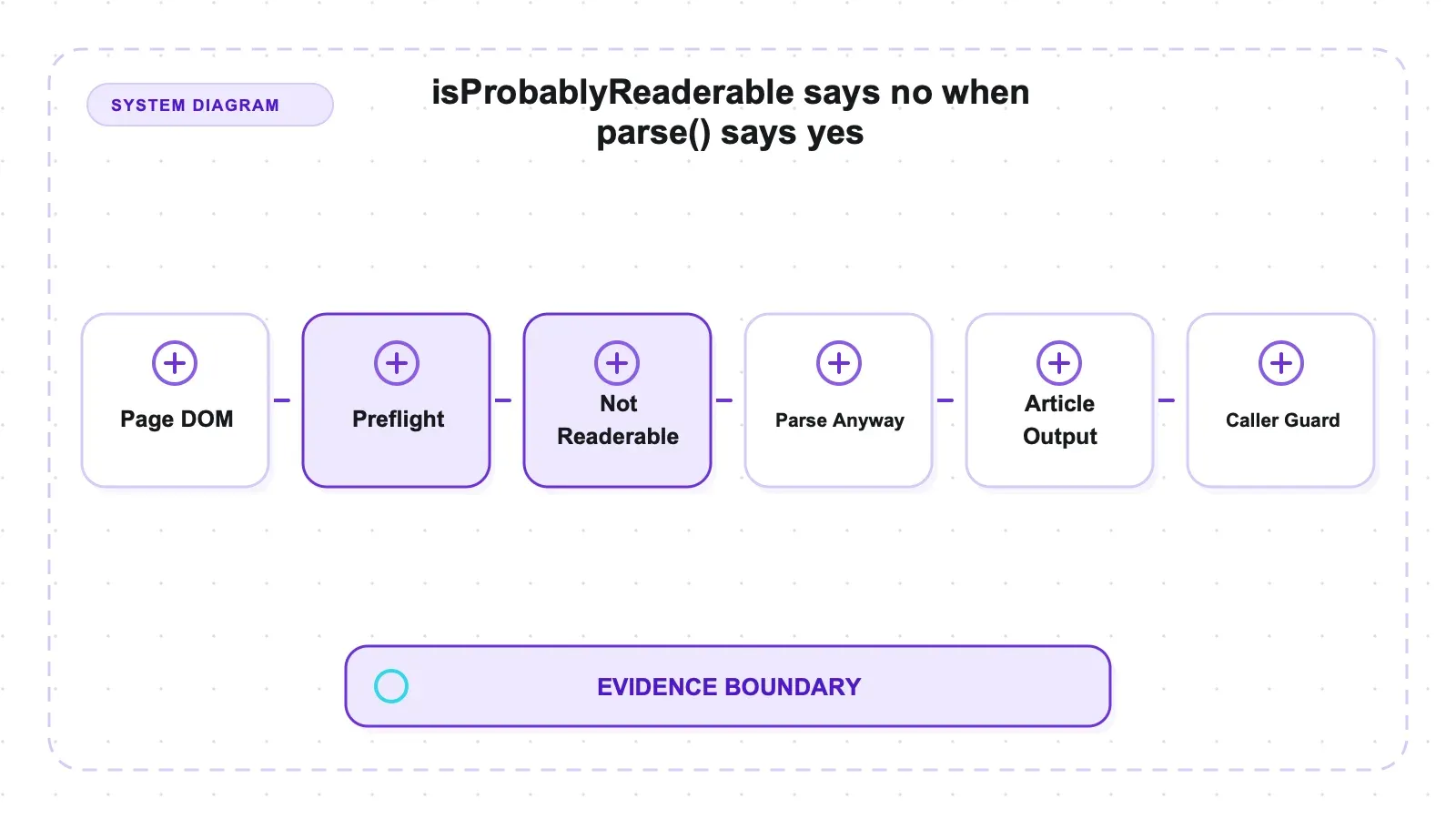
The README suggests calling isProbablyReaderable(doc) as a cheap pre-flight check before committing to a full parse. In my tests that gate rejected three separate page shapes that parse() then handled fine:
| Page shape | Predictor verdict | parse() | Which lever fixes it |
|---|---|---|---|
Content in <li> elements only | false | succeeds | none — false at every minScore 1–80 and every minContentLength 40–200 |
| Ten paragraphs, each under 140 chars | false | succeeds | minContentLength ≤ 100 (minScore does nothing) |
| One 408-character paragraph | false | succeeds | minScore ≤ 10 (score is ≈16.4) |
| Normal article (control) | true | succeeds | — |
The three failures have three different causes, and only two are tunable. The <li> case is structural: the predictor scores only p, pre, and article nodes (plus div > br parents), so a page whose content lives in list items matches nothing, scores zero, and no threshold tuning recovers it — a shape already reported in issue #662. The many-short case is a minContentLength gate that skips each paragraph before scoring, so ten substantial paragraphs sum to nothing; lowering that value fixes it, and adjusting minScore does not. The single-paragraph case is arithmetic: the score is sqrt(408 − 140) ≈ 16.4, under the default minScore of 20 — a lone paragraph needs 140 + 20² = 540 characters to clear the bar by itself.
The README does warn the predictor produces false negatives. What I'd add is the practical rule: don't use it as your only gatekeeper. If a page matters, parse it and check the result length. The parse is not that expensive relative to the jsdom build you already paid for.
Same bytes, two extractors
Running trafilatura 2.1.0 over the identical fixtures gives a cleaner read than lining up two numbers measured on two different testbeds, because the input is byte-for-byte the same:
| Measure (11 mixed fixtures) | @mozilla/readability | trafilatura |
|---|---|---|
| Article block recall | 1.000 | 1.000 |
| Boilerplate blocks kept | 5/17 (0.294) | 1/17 (0.059) |
| Token F1 (micro) | 0.948 | 0.969 |
| Non-prose recall | 8/8 | 7/8 |
| Very short article (120 chars), token F1 | 0.800 | 0.571 |
Neither one dominates these fixtures. Trafilatura kept fewer sibling blocks, while Readability retained more short and non-prose content. Both tools' absolute token precision is deflated by unlabeled heading text, so the block-level leak count is the cleaner direct signal. The public real-page benchmark happens to order their word-F1 similarly, but the corpora and metrics differ and this is not cross-testbed validation.
Robustness, briefly: I ran a deliberately malformed twin of the canonical page (unclosed <p>, misnested <b>/<i>, a stray </div>) and recall was 3/3 with zero leaks, matching the well-formed version. Credit there belongs to jsdom's HTML5 tree builder, which repairs the mess before Readability ever sees it. No fixture crashed the parser.
Pros and cons
Pros
- Article recall is the strong axis: 74/74 labeled blocks recovered across 22 synthetic fixtures, token recall 1.000 on the mixed set.
- Regex-classed page furniture strips reliably — nav, ad banner, sidebar, comments, and footer all gone on the realistic page (5 of 6).
- Non-prose content is fully retained: tables,
<pre>code, figure captions, and sub-25-character lines all survived (8/8), where trafilatura dropped a caption. - No dependence on semantic markup — a neutralized
<div>article scored identically to the<article>/<main>version. - Short articles are not falsely rejected: clean content recovered down to 120 characters, identical across
charThreshold200/500/1000. - Fully deterministic: all 22 fixtures returned identical text across three runs.
- Two-minute install, Apache-2.0, and the version on npm is the version I tested (0.6.0), so nothing here is stale.
Cons
- The sibling-append gate is exploitable: long, low-link, neutrally-classed promo prose is indistinguishable from article text and rides along at
linkDensity < 0.25. - On content-poor pages it returns boilerplate as the article rather than
null— the near-empty fixture came back with its nav bar as the body. isProbablyReaderableproduces false negatives on three separate page shapes, one of which no amount of tuning fixes.- Needs a full DOM at runtime — the "no dependencies" framing hides the jsdom cost, which dominates the loop.
parse()mutates the input document, so you must rebuild the DOM per page.- No fetching, no JavaScript rendering, no structured output. It's one stage of a pipeline, not the pipeline.
- Real-page misses reported in the tracker (opening-paragraph and before-table drops) did not reproduce on my fixtures, so I can't tell you whether they're rare or whether my pages just never reached them.
Who should use it, and who should skip it
Reach for Readability if you already have HTML in hand and want the article out of it in pure JavaScript, inside a Node service where adding a Python dependency would be awkward. (I didn't collect timing as a proper distribution, so I'm making no speed claim beyond "the jsdom build dominates the loop, not the extraction.") Reader-mode features, offline article archiving, email newsletters, "clean view" buttons, browser extensions, documentation pipelines with code blocks and captions — that's the lane, and the recall numbers say it's a good one. Its behavior is also readable straight out of the source, which is worth more than it sounds when you need to explain to a colleague why one specific block came through.
Skip it if boilerplate removal precision is the metric you're graded on, and especially if you're feeding an LLM index where a stray promo paragraph becomes a retrievable chunk. Skip it if your pages render content client-side, because it reads whatever DOM you hand it and doesn't run JavaScript. Skip it if what you need is {title, price, sku} rather than prose — no configuration turns a content extractor into a schema-driven one. And if you're processing pages where "did this page have an article at all" is a real question, don't trust a non-null return as your answer.
Alternatives, and where the Thunderbit stack fits
Nothing here is a knock on a free Apache-2.0 library maintained by Mozilla — Readability is infrastructure, it's been shipping inside Firefox for years, and for reader-mode extraction it's the reference implementation for a reason. If you want the wider field, I keep a running comparison in the open-source scrapers roundup and a broader survey in the best web scraping tools.
For the same fixtures across all six extractors, see the six-library extraction comparison.
Author note: Thunderbit is our managed option for URL-in rendering and extraction. It was not run on these fixtures, so no matched quality claim is implied. The relevant boundary is whether you already have a DOM and want local article extraction, or want fetching/rendering and structured output operated as a service. Self-hosting avoids a vendor usage fee but still carries infrastructure and maintenance costs.
The honest trade-off: Readability is free, transparent, and yours to run — you can read the exact gate that decided your output, which is not something a managed API gives you. A managed stack costs money and hides the mechanism, but it covers the fetch-render-structure stages you'd otherwise assemble yourself. If you want the AI-assisted end of that spectrum, I've written about scraping any website with AI and about AI crawlers elsewhere. Pick by which stages you actually want to own.
Try Thunderbit for Web Data Extraction
Verdict
Readability is a candidate when you already have a DOM, run JavaScript/Node, and prefer occasional extra sibling content to aggressive omission. In this fixture pack it recovered all 74 labelled article blocks and retained tables, code, and captions. That result is bounded by synthetic single-column pages; public real-page recall is 0.982, known opening/table-adjacent misses were not reproduced, and content-poor pages can return boilerplate as the article.
Just size the weakness correctly. Its main failure surface in these fixtures is precision, and it's located at a specific, documented line of source: a sibling that's over 80 characters with link density under 0.25 gets appended to your article, whether or not it's part of it. I watched that flip at 0.143 versus 0.278 on identical text. The real-page benchmark reports precision 0.914 and recall 0.982. If you're pumping extracted text into an index that a model will later quote, inspect both retained boilerplate and omitted body text instead of assuming either error class is absent.
Try Thunderbit for Web Data Extraction Get Started Free
FAQs
Does Mozilla Readability remove all boilerplate?
No, and the number depends heavily on what you're measuring. On the public real-page benchmark, readability_js 0.6.0 scores precision 0.914 — so roughly 8.6% of what it returns isn't body content. On a realistic test page of mine it stripped 5 of 6 chrome blocks (nav, ad, sidebar, comments, footer all gone), keeping only a neutrally-classed promo paragraph. On a fixture set I deliberately weighted with blocks engineered to defeat the heuristic, it kept 5 of 17 — that last figure is a stress test, not a real-world rate.
Do I need jsdom to use readability.js in Node?
Yes, or some other DOM implementation. Readability is pure JavaScript, but it operates on a live document object, so under Node you supply the DOM yourself — jsdom 29.1.1 in my setup. The "no dependencies" description refers to the algorithm, not the runtime. Also note that parse() mutates the document it's given, so build a fresh DOM for each page instead of reusing one.
What does the charThreshold option actually do?
Not what most people assume. It does not make short articles return null — I recovered clean articles down to 120 characters, with identical extracted length across charThreshold values of 200, 500, and 1000. The threshold controls whether the parser reruns its grab with cleanup flags removed; on a clean page there's nothing to remove, so the output is the same either way. The genuine null case is a page with no extractable text at all, and even a nav-only page came back non-null, returning the nav as the article.
Should I call isProbablyReaderable before parse()?
Use it as a hint, not a gate. It returned false on three page shapes where parse() then succeeded: content inside <li> elements, ten paragraphs each under 140 characters, and a single 408-character paragraph. The <li> case can't be fixed by tuning, because the predictor only scores p, pre, and article nodes; the many-short case needs a lower minContentLength; the one-long case needs a lower minScore, since a lone paragraph must reach 540 characters to clear the default. If a page matters, parse it and check the result.
Readability or trafilatura for article extraction?
On identical fixture bytes, trafilatura kept less boilerplate (1/17 blocks versus 5/17), while Readability recovered more short content and retained a <figcaption> that trafilatura dropped. Choose by error tolerance and runtime. The public benchmark is separate context, not validation of this fixture result.




