
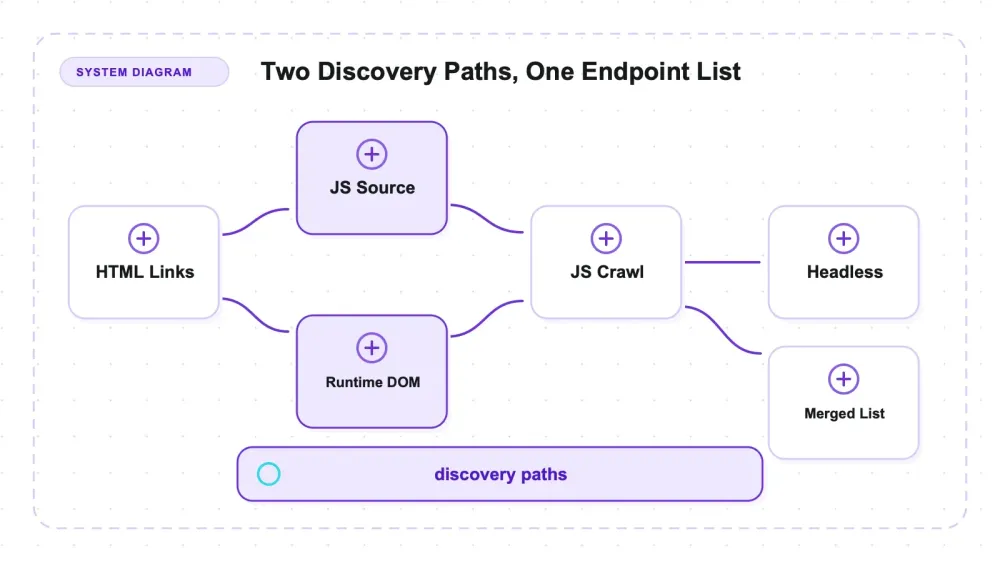
Katana is ProjectDiscovery's endpoint-discovery crawler — a Go binary, MIT-licensed, that takes a target and returns URLs and endpoints for the next tool in a pipeline. It crawls in a browserless HTTP mode or with -headless, which drives Chromium. Official guidance presents headless mode as the higher-coverage option; this fixture shows why the type of endpoint matters as much as the count.
I built a small site with three deliberately different endpoint classes and measured which mode found each one on v1.6.1 at -d 4. Ordinary HTML reached 4/4 links and the full three-hop chain in all four configurations. The split appeared in endpoints exposed through JavaScript source versus runtime DOM changes.
On this fixture, headless found the runtime-DOM class that the tested browserless modes missed, while standard mode with -jc found JavaScript-file literals that both headless runs missed. No row in the four-command matrix covered both classes. Scope, resume, and known-files behavior supplied the other practical boundaries.
What katana actually is
The katana crawler — projectdiscovery/katana on GitHub — is written in Go and MIT-licensed. I tested v1.6.1 on July 27, 2026; the version matters because the coverage and known-files findings below are build-specific observations.
The category label matters more than usual here. An endpoint-discovery crawler is not a field extractor. If you want a go web crawler that hands you product names and prices as structured JSON, katana is the wrong aisle entirely — it'll happily tell you /products/1138 exists and nothing whatsoever about what's on that page. That's by design, and judging it on extraction would be like reviewing a metal detector on its ability to appraise jewelry.
Its home turf is offensive-security recon and automation pipelines: STDIN in, URLs out, pipe it into the next tool. Which brings the obvious caveat forward — every measurement here ran against a fixture on 127.0.0.1 that I wrote myself. Point katana at hosts you own or have written authorization to test, and nothing else. None of this is about evading anyone's defenses; it's about how much of a site's endpoint surface a given command actually enumerates.
The three modes, and what each one can see
Standard mode is a Go HTTP client. It fetches, parses HTML, follows hrefs, and never boots a browser. Fast, cheap, blind to anything that only exists after JavaScript runs.
-jc (-js-crawl) bolts a JavaScript parser onto that browserless path. It downloads linked .js files and pulls URL-shaped string literals out of the source. No execution, just reading. There's also -jsl (jsluice), described in the README as a heavier, memory-intensive parser — I didn't test it, so I have nothing to say about whether it changes the coverage picture.
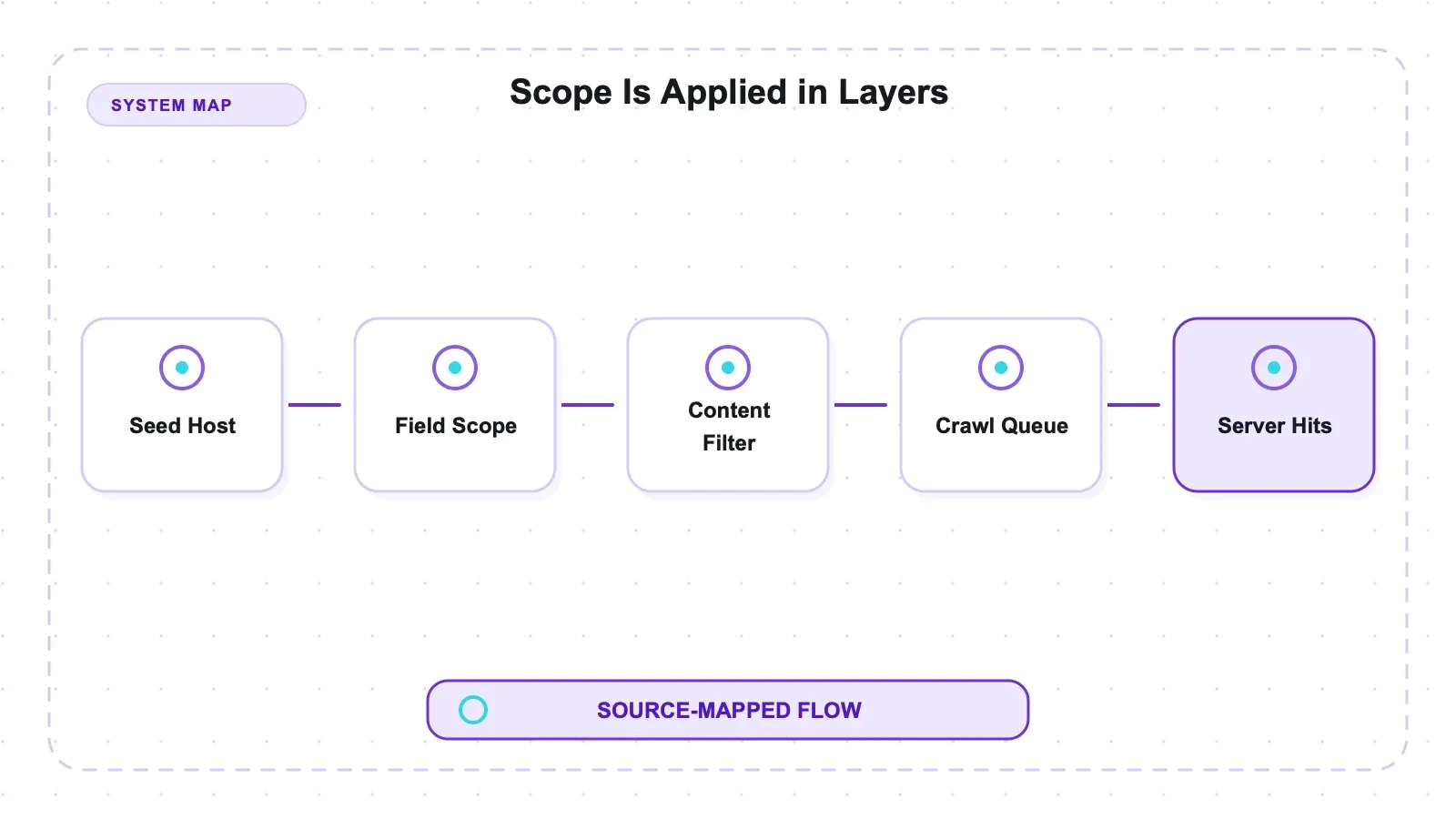
-headless drives Chromium and executes page scripts. In this fixture, it was the only tested Katana mode that recovered the path assembled from fragments and inserted into the runtime DOM. That result does not establish what every parser or future Katana mode could recover.
Then there's the scope model, which is the part I'd internalize before typing anything into production.
| Flag | What it controls | Values / default |
|---|---|---|
-fs (field scope) | which hosts are in play | dn, rdn, fqdn, or a custom regex — defaults to rdn |
-cs and -cos | URL regexes that filter within that field scope | — |
-kf | known files: robots.txt and sitemap.xml | the README says it needs a minimum depth of 3 |
-d | depth | default 3 |
-resume | picks up an interrupted crawl | — |
The ordering isn't cosmetic: it decides whether a host regex widens a crawl or silently empties it.
Setup: one binary, one asterisk
Three ways in, and only one of them wants a toolchain:
| Install route | Prerequisite |
|---|---|
From source: go install github.com/projectdiscovery/katana/cmd/katana@latest | Go 1.25 or newer is the stated requirement |
| Precompiled binaries on the release page | no toolchain |
| Docker image | no toolchain |
Mine landed at ~/go/bin/katana and reported Current version: v1.6.1 on every run. So far, the usual pleasant Go story: one file, no runtime.
The asterisk is headless, where the browser is a separate prerequisite from the binary:
Where -headless runs | What it needs |
|---|---|
| My machine | katana auto-detected an already-installed Chromium; I did not record the browser build or provide a browser path |
| A bare server, per the project's own Ubuntu instructions | apt install google-chrome-stable before headless does anything |
| The Docker route | runs headless with -system-chrome |
On a bare server that convenience evaporates. Budget for a browser, not just a binary, the moment -headless enters your command line.
One smaller thing worth knowing if you run this in CI: katana makes a version-check call to GitHub on startup. -duc disables it. On a laptop it's noise; on an air-gapped or rate-limited runner it's a per-run network round trip you didn't ask for. My timing runs pass -duc so the numbers measure crawling rather than a phone-home.
How I tested it
Three classes of endpoint, chosen specifically because they separate the modes. Everything lives in a local fixture server, and ground truth was written down before any crawl ran, so recall is measured against a fixed set rather than whatever katana happened to print.
- Class A — plain HTML.
/page/a,/page/b,/page/c, plus a three-hop chain/depth/1 → /depth/2 → /depth/3. Any crawler should get these. - Class B — JavaScript-file literals.
/api/js-endpoint-7and/api/js-endpoint-8exist only as string literals inside a linked/static/app.js. Readable without a browser, if something bothers to read the JS. - Class C — runtime-DOM only. One path assembled at runtime from fragments (
'endpoint' + (6 * 7)) and injected into the DOM by script. The string/runtime-only/endpoint42never appears contiguously in any byte the server sends — not in the HTML, not in the JS source. Only execution reveals it.
Plus a robots.txt, a sitemap.xml carrying two <loc> endpoints that appear nowhere else, a route that returns 500, a dead link, and an out-of-scope link pointing at a second server on a different hostname.
The instrument matters as much as the fixture: the server counts what was actually fetched, so scope and resume claims rest on hit truth rather than on katana's own stdout. Raw runs are committed in the benchmark repo if you want to check my arithmetic.
The coverage split nobody quantifies
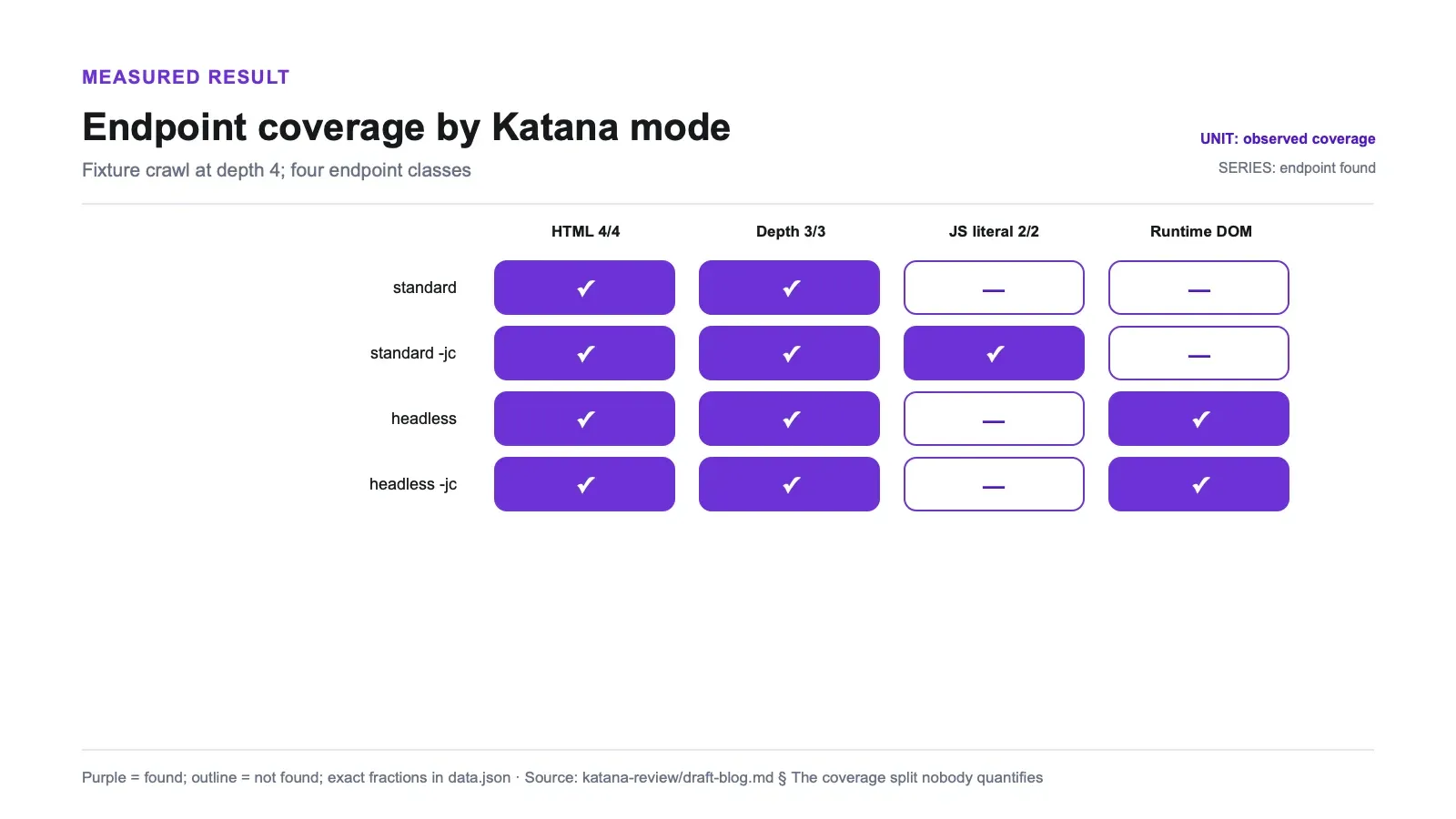
The matrix, mode by endpoint class, at -d 4:
| Mode | HTML links (A) | Depth chain (A) | JS-file literals (B) | Runtime-DOM (C) |
|---|---|---|---|---|
| standard | 4/4 | 3/3 | 0/2 | not found |
standard -jc | 4/4 | 3/3 | 2/2 | not found |
-headless | 4/4 | 3/3 | 0/2 | found |
-headless -jc | 4/4 | 3/3 | 0/2 | found |
Read the last two columns as a pair and the problem jumps out. Class B was found by exactly one configuration: standard mode with -jc. Class C was found by exactly two: both headless runs. There is no row with a hit in both columns. The full matrix is in discovery-summary.json, where the computed field headless_jc_covers_both reads false.
The practical consequence is that "just use headless for better coverage" was incomplete for this test. Headless did not add class B on top of the standard result; it recovered class C while missing class B. Covering all planted classes in this fixture needed two crawls and a merge:
katana -u https://target.example -jc -d 4 -silent -o pass-jc.txt
katana -u https://target.example -headless -d 4 -silent -o pass-headless.txt
sort -u pass-jc.txt pass-headless.txt > endpoints.txt
The -headless -jc row is the one I'd most like an upstream answer on. Adding the JavaScript parser to the headless run recovered nothing — still 0/2 on class B, in every run, including a fresh reproduction. I'm reporting the behavior, not claiming to have traced the mechanism; I didn't instrument katana's internals to find out why the browser path stops contributing JS-file literals. Treat it as a reproducible observation and a good GitHub issue, not a diagnosis. (Worth noting alongside it: the -hl -jc combination completed cleanly with return code 0 on v1.6.1 on macOS ARM, which hasn't always been true historically.)
The official docs describe headless as giving better coverage, and it did for the runtime-rendered class here. The checked guidance did not spell out this source-literal/runtime-DOM split, so treat the matrix as a reason to test both paths against your own endpoint classes, not as a universal taxonomy.
What headless costs in wall time
Three sequential runs per mode on an otherwise idle machine:
| Mode | p50 | min–max | mean |
|---|---|---|---|
| standard | 13.08s | 13.07–13.17s | 13.11s |
-headless | 66.82s | 66.78–67.68s | 67.09s |
That's a 5.1x ratio with ranges that don't come close to overlapping — my slowest standard run (13.17s) still beat my fastest headless run (66.78s) by more than 53 seconds (cost-summary.json). This is not measurement noise.
One caveat on that 13 seconds: my fixture deliberately includes a 500 route and a dead link, and standard mode sits through the default -timeout 10 retry tail on both. I didn't tune the timeout to flatter the fast mode, which means a tuned standard run would likely widen the gap rather than narrow it.
The ratio is a local capacity signal, not a production forecast. Real targets vary in latency, failures, script work, and scheduling, while this fixture includes a default timeout tail. Use the measured 5.1x difference to decide whether headless deserves a separate budget and target subset, then benchmark that plan on representative authorized hosts.
Scope held, but one flag quietly did nothing
The scope test used two servers: the primary on 127.0.0.1, and a second one reachable as localhost on a different port, serving a path that exists only there. So a hit on that path is proof the out-of-scope host was genuinely fetched, not merely printed.
| Configuration | Out-of-scope host fetched? | Hits on the second server |
|---|---|---|
default (-fs rdn) | no | 0 |
-fs fqdn | no | 0 |
-cs localhost | no | 0 |
| `-fs '(127.0.0.1 | localhost)'` | yes |
Scope discipline is good news: by default katana stayed home, and it took an explicit act to widen. That's the right default for a tool that gets pointed at other people's infrastructure.
The interesting row is -cs localhost. It did not widen the crawl to the second host — and it also emitted zero URLs at all. Because -cs filters within the field scope, and the field scope was still the primary host, the regex matched nothing and the crawl returned an empty set instead of an error. If you've ever written a crawl-scope regex naming a host you wanted to include and stared at an empty output file, that's the mechanism (scope-summary.json). To add a host, set -fs. To narrow within hosts you already have, use -cs/-cos.
Resume is coarser than the flag suggests
The README describes the flag as -resume string resume scan using resume.cfg, which reads like a file dropped in your working directory. It isn't. On my machine the checkpoint was written to ~/.config/katana/resume-<xid>.cfg — measured, not read off a docs page, because the docs don't state a path.
What's inside is the more important surprise. The file held an InFlightUrls map containing exactly one thing: the seed URL. Not the visited set, not the frontier. So here's what happened when I interrupted a crawl with SIGINT after three seconds and resumed it:
| Run | Distinct paths |
|---|---|
| Full baseline crawl | 11 |
| Fetched before the interrupt | 10 |
| Re-fetched by the resume run | all 11, including all 10 that had already completed |
Resume reached the same final endpoint set, so nothing is broken. But the checkpoint granularity is per input seed, not per URL — the in-memory dedupe filter is never persisted, so resuming a single-seed crawl re-crawls that seed from scratch (resume-summary.json). If you feed katana a list of 500 hosts, resume should save you the hosts that fully finished; that multi-seed behavior follows from how the state is stored but I only measured the single-seed case. If you're deep into one enormous site, resume buys you correctness, not time.
Known files: requested, then dropped
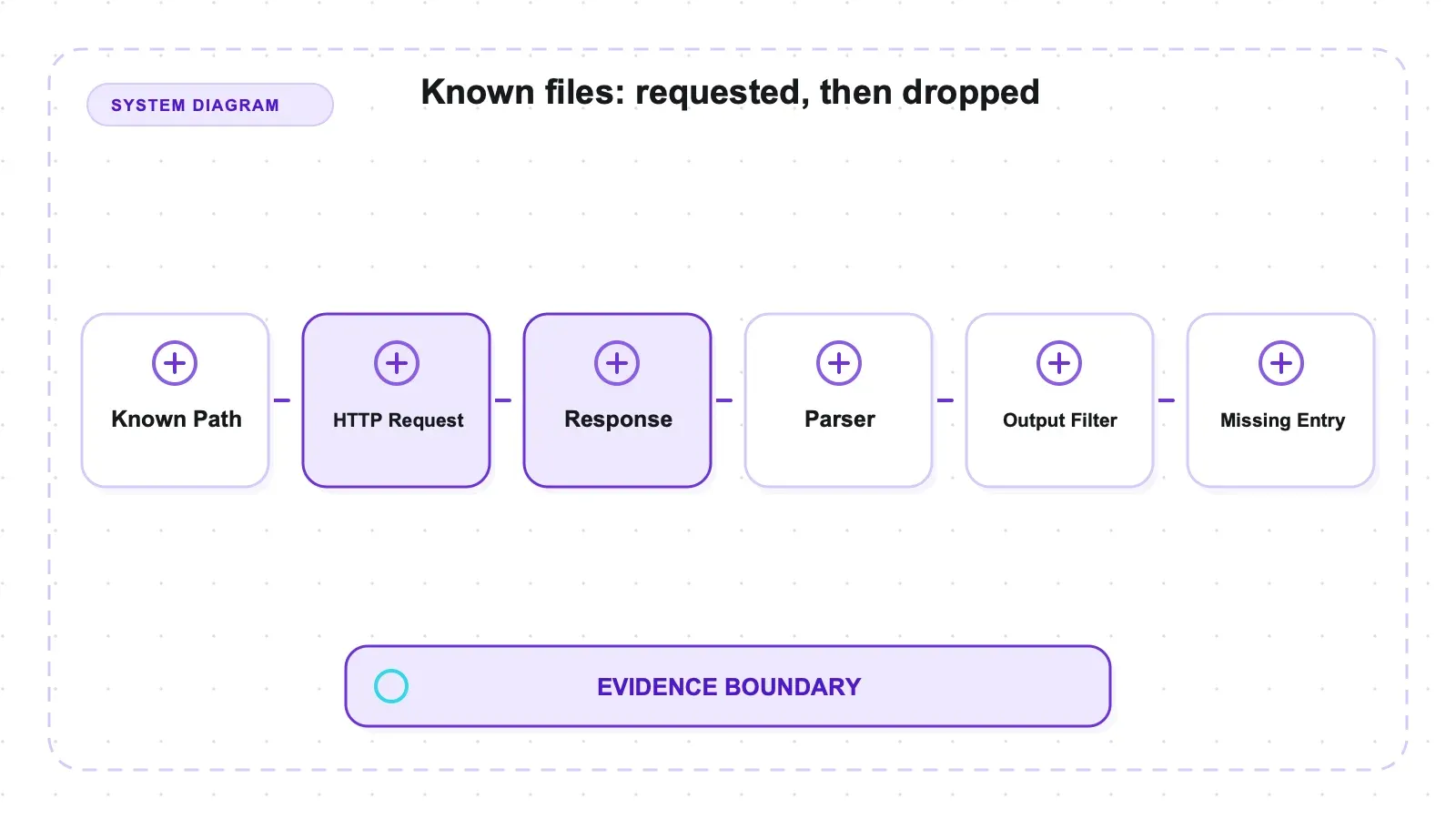
-kf all -d 3 did request both files — robots.txt and sitemap.xml showed up in the server's hit log — and then recovered 0 of 2 of the endpoints listed in that sitemap's <loc> elements. Recall 0.0.
Before calling that a limitation I tried to make it my fault. Every variation recovered the same thing:
| Variation tried | Sitemap <loc> endpoints recovered |
|---|---|
-kf all | 0/2, recall 0.0 |
-kf sitemapxml | 0/2, recall 0.0 |
-kf robotstxt | 0/2, recall 0.0 |
| depth 3 | 0/2, recall 0.0 |
| depth 4 | 0/2, recall 0.0 |
| depth 5 | 0/2, recall 0.0 |
with -jc added | 0/2, recall 0.0 |
seeded directly at /sitemap.xml | 0/2, recall 0.0 |
The documented requirement — use -kf, go at least three deep — was satisfied every time. This is not a missing-flag story.
The useful decision comes first: on this IP-literal fixture, do not assume that requesting known files means their <loc> URLs joined the crawl. Verify recall, or extract and seed those URLs yourself.
The v1.6.1 code path is consistent with the observation, but I did not instrument it during the run. In sitemapxml.go at v1.6.1, NewNavigationRequestURLFromResponse builds <loc> navigation requests from a response without a populated RootHostname. The request then reaches ValidateScope; in scope.go at v1.6.1, the IP-literal branch compares the URL host with that empty root and can reject it. The custom -fs '(127.0.0.1|localhost)' command took a different scope branch in a separate scope test, so it is a source-predicted rescue, not a measured -kf workaround. A confirmation attempt was blocked by intermittent dialing in the known-files client on this host; the reported result therefore remains 0/2.
What I'd actually do in production, until someone confirms the flag: fetch the sitemap yourself, extract the <loc> URLs, and hand them to katana as a seed list. Two lines of shell, no scope validation involved.
One thing behaved exactly as advertised and deserves a sentence: the 500 route and the dead link were fetched, logged, and stepped over. Every browserless run finished with return code 0. A crawler that dies on the first bad response is useless unattended, and katana doesn't.
A target-specific coverage check before deployment
The fixture matrix is most useful as a template for testing your own authorized targets. Define endpoint classes before running Katana: plain links, literals in linked scripts, routes created only after execution, and known-file entries are four reasonable starting buckets. Keep a small ground-truth sample for each class. Without that prior list, a larger stdout file can look like better coverage even when a class has disappeared.
Run the browserless and headless paths as separate measurements first. Save the exact commands, Katana version, browser build, return codes, and outputs. Normalize and diff the endpoint sets rather than comparing line counts. If standard -jc contributes nothing unique on your sample, a headless-only policy may be enough; if the sets diverge as they did here, keep the two passes distinct and merge after collection. Adding both flags to one command should not be assumed to equal the union until the target-specific diff proves it.
Validate scope with evidence outside Katana's output. Put a canary URL on a host that should remain excluded and inspect that server's request log. Also test an intended second host if the crawl is supposed to widen. The -cs localhost run here produced an empty output because content-scope filtering did not expand field scope; the custom -fs '(127.0.0.1|localhost)' invocation did contact the second server. Recording the exact regular expression matters because a one-character change can alter the regex rather than merely its presentation.
Test interruption and known files separately from discovery recall. For resume, interrupt a representative seed after several pages, save the generated checkpoint path, and count how many completed URLs are fetched again. For -kf, confirm both that robots/sitemap were requested and that planted <loc> URLs were actually scheduled. Those are different assertions. In this fixture the files were fetched while the two sitemap endpoints were absent, so request logs and endpoint output were both necessary to see the boundary.
Finally, establish a local cost baseline using sequential runs on an otherwise idle machine, then repeat on representative hosts. Preserve min, max, and median rather than only a multiplier. The 5.1x figure here includes this fixture's failure and timeout behavior; it tells you that headless deserves its own budget, not how long a production inventory will take.
Pros and cons
Pros:
- Perfect recall on ordinary HTML in every mode — 4/4 links and the full 3/3 depth chain, no configuration required.
-jcgenuinely works browserless: 2/2 endpoints recovered from string literals in a linked JS file, with no browser cost.-headlessis the only thing that found an endpoint assembled at runtime — a class that is invisible to source parsing by construction.- Scope defaults are conservative. The out-of-scope host was never fetched under default,
-fs fqdn, or-cs. - Single Go binary, MIT license, precompiled builds and a Docker image, pipeline-shaped I/O.
- Robust on failure: 500s and dead links don't stop the crawl.
Cons:
- No single invocation covered both JS-file and runtime-DOM endpoints. Full coverage needs two runs and a merge.
-jccontributed nothing under-headless— 0/2 on class B in every headless run.- Headless costs 5.1x the wall time (66.82s vs 13.08s p50, non-overlapping ranges).
-resumere-crawls completed pages within a seed. It restores the endpoint set, not your elapsed time.- Known files requested robots.txt and sitemap.xml but recovered 0/2 sitemap
<loc>endpoints against an IP target. - Headless quietly requires a Chromium on the box; the "one binary" story stops at the browser.
- Discovery only. No structured extraction, no content conversion, no field schema.
Untested, and therefore outside what any of these numbers cover: -jsluice, a dedicated depth-cutoff test at -d 1/-d 2, multi-seed resume, automatic form filling, and any real JavaScript-heavy or protected production site. All numbers are one machine (macOS arm64) against a local fixture.
Who it's for, and who should skip it
If your job is producing an endpoint inventory of infrastructure you're authorized to touch, katana has the right pipeline shape: STDIN/STDOUT plumbing, a distributable binary, and both browserless and browser-backed modes. The two-pass merge was necessary for this fixture's planted classes; whether your targets need both passes is something to establish from representative pages.
Skip it if you want data rather than addresses. Katana will never hand you a table of products; it hands you the URLs where products might live, and something else does the extraction. Skip it too if you need one command to be complete — the two-pass merge is fine in a pipeline and irritating at a prompt. And if your enumeration leans on sitemap <loc> endpoints while targeting IPs, verify what you're actually getting before you trust the output, because on my fixture that path returned nothing.
Alternatives, and the extraction boundary
Katana is free, MIT-licensed, and self-hosted. It keeps discovery, mode selection, browser deployment, and result merging on your side of the boundary.
Within open source, the useful comparisons are by job rather than by language. Colly is the other Go option, but it's a library you compile with your own callbacks and it doesn't render JavaScript at all. Crawl4AI runs a real browser and produces Markdown for LLM pipelines, which is a different output entirely. If you're weighing several of these at once, our open-source scraper roundup lays the categories out side by side.
Disclosure: Thunderbit is the publisher's product and was not tested in this Katana fixture. It sits downstream in the managed extraction category, turning pages into text or structured records rather than enumerating an authorized target's endpoint surface. A workflow may use both categories, but this review supplies evidence only for Katana's discovery behavior.
Try Thunderbit for Web Data Extraction
Verdict
Use katana when the deliverable is an endpoint list for targets you are authorized to crawl and you can validate mode coverage against those targets. In this fixture, standard -jc recovered the planted JavaScript-file literals, while headless recovered the runtime-DOM endpoint; Katana's tested browserless modes did not recover that runtime path. Default scope also kept the second host unfetched, and browserless runs continued past the 500 and dead link.
The caveats are operational: a two-pass merge may be needed for mixed endpoint classes, headless took about five times the local wall time, single-seed resume re-fetched completed paths, and known-files recall was 0/2 against the IP target. Those are v1.6.1 fixture results, not guarantees about every site. They are enough to define the checks a production evaluation should repeat.
Try Thunderbit for Web Data Extraction Get Started Free
FAQs
Where does katana save its resume file, and does resuming skip pages I already crawled?
The checkpoint landed in ~/.config/katana/resume-<xid>.cfg, not a resume.cfg in the working directory as the flag's help text implies. And no, it doesn't skip completed pages: the file stores only in-flight seed URLs, so a resumed single-seed crawl re-fetched all 11 baseline paths including the 10 already done. You get the same final endpoint set, just not the saved time.
Why did -kf all request my sitemap.xml but not crawl the URLs inside it?
Against an IP target, the result is consistent with a scope-validation boundary rather than a flag mistake. In v1.6.1's code, Katana's sitemap parser builds each <loc> request without carrying the root hostname forward, and the DNS-scope check for IP-literal hosts can then reject that URL; I did not instrument the run to confirm that mechanism. It held at 0 recall across every flag, depth, and seeding variation I tried. A custom -fs host regex takes a different validation branch and is the fix the source predicts — but I could not confirm it against -kf on my machine, so treat it as untested. Extracting the <loc> URLs yourself and seeding katana with them is the approach I'd trust today.
What should I preserve when reporting a Katana coverage test?
Record the exact Katana version and command, including the byte-for-byte -fs expression; define endpoint classes before the run; keep server-side hit logs in addition to stdout; and separate measured behavior from source-based hypotheses. For headless runs, record the browser build as well—this test did not, which limits reproduction.
Should I use -jc, -headless, or both?
Choose from the endpoint classes you need. In this fixture, standard -jc found literals stored in a JavaScript file, while headless found the endpoint inserted into the runtime DOM. Neither mode covered both classes alone, so a two-pass run followed by deduplication was the defensible choice for mixed targets.
Will one failed URL stop the crawl? It did not in this controlled run. Katana continued after both a 500 response and a dead link and still returned the other reachable paths. That is not a substitute for production error accounting: keep failed-request logs and define an acceptable failure rate so a partially successful crawl is not mistaken for complete coverage.




