

Last quarter, a sales rep on a team I know spent six weeks building a relationship with a "VP of Technology" at a mid-size healthcare company. Demos, follow-ups, a custom proposal—the works. Then came the call: "This looks great, but I'll need to run it by our procurement committee and the department head. I don't actually approve purchases like this." Six weeks, gone.
That story is painfully common, and the data backs it up. Gartner's research shows a typical complex B2B purchase involves six to 10 decision makers, each armed with independently gathered information. More recent data from 6sense pushes that number even higher: the average B2B buying group is now 11 people, and buyers are nearly 70% through the purchase process before they even talk to a seller.
So the question isn't just "who has the right title?"—it's "who actually holds the budget, signs the contract, and can say yes?" This blog covers how to find, validate, and map the real decision makers—even when job titles are misleading, org charts are messy, and LinkedIn profiles haven't been updated since 2022.
What Is a Decision Maker (And Why Job Titles Don't Tell the Full Story)
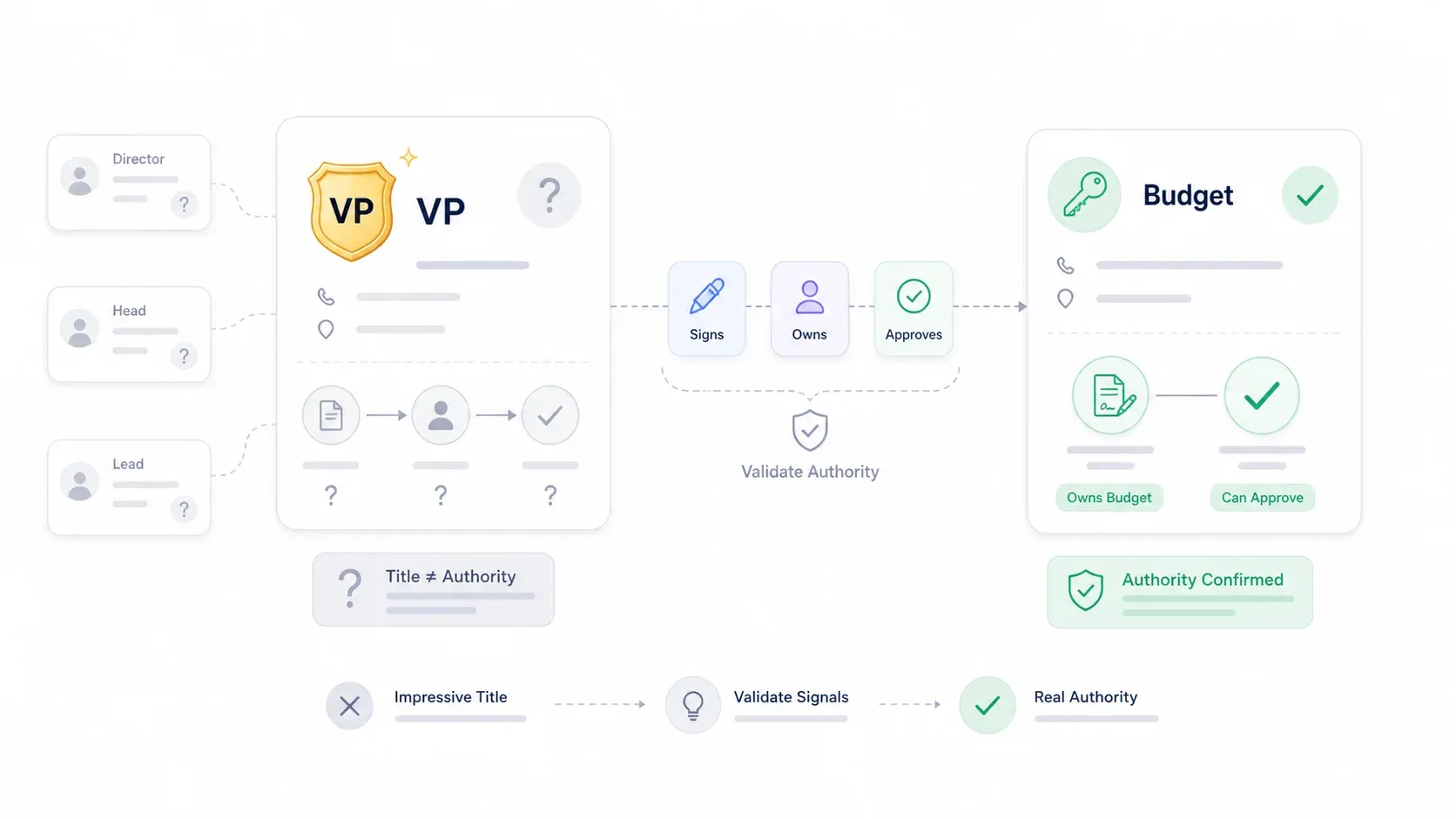
A "decision maker" is the person—or, more often, the group of people—with the authority and budget to approve a purchase. Simple enough in theory. But in practice, the old playbook of "find the C-suite contact and pitch them" is outdated and often counterproductive.
In large organizations, a dozen people may share the same title. "Director of Operations" at a 200-person startup means something very different from "Director of Operations" at a Fortune 500. Real authority often sits in unexpected places: a department head who controls the line-item budget, a procurement lead who can veto any vendor, or a technical architect whose thumbs-down kills a deal before it reaches the executive suite.
In sales methodology terms (think MEDDIC or MEDDICC), the distinction is between the Economic Buyer (the person who can fund the change), the Champion (your internal advocate), and other stakeholders like influencers, blockers, and technical evaluators. A Champion who loves your product but can't approve spend is not a decision maker—they're an ally. The Challenger Customer framework adds another useful lens: Mobilizers build consensus and drive change, Talkers are accessible but lack power, and Blockers resist change. The person who responds to your cold email fastest is often a Talker, not a Mobilizer.
Scrape decision makers from public pages with AI Get Started Free
What follows is a practical system for finding and validating the real buyers—not just the people with impressive-sounding titles.
Why Finding Decision Makers Is Harder Than Ever in 2026
Several forces have converged to make finding real decision makers harder than it was five years ago.
Title inflation is everywhere. As Dossifier's seniority guide puts it, titles on LinkedIn, company websites, and business cards are often inconsistent, ambiguous, or misleading. A Director at one company may outrank a VP at another. Ravio's analysis of VP vs. Director roles shows that span of control, decision authority, and strategic impact vary wildly by company stage and size. A LinkedIn post analyzing Pave's benchmarks across 135,000+ managers found that total reports under a VP at a 3,000+ employee company averaged 115—while at a smaller firm, the same title might manage a handful of people.
Flat org structures and remote teams make it harder to infer authority from reporting lines. And privacy-conscious executives increasingly limit their online presence—some of the most powerful buyers I've encountered haven't updated their LinkedIn in years.
The cost of getting it wrong is real. Salesloft describes reps who negotiate, offer discounts, and only then discover the prospect must "run it by a boss." Upsales documents a quarter-end deal that collapsed because the actual decision maker hadn't bought in. 6sense's research shows that buying-group size explains 49% of the variation in buying-process length—so failing to identify all stakeholders doesn't just risk losing the deal, it drags out the cycle.
These are the mistakes I see most often:
| Mistake | Why It Fails | Better Move |
|---|---|---|
| Searching only by title on LinkedIn | Titles are inconsistent and often inflated | Search by function, budget area, and recent initiatives |
| Assuming the most senior person is the buyer | C-suite may sponsor but not run evaluation | Find the functional owner plus procurement/legal/security |
| Believing one champion can close internally | Champions often lack final authority | Map Champion, Economic Buyer, Influencer, and Blocker |
| Ignoring procurement until the end | Paper process can stall a ready buyer | Ask about purchasing path early |
| Treating "VP" as proof of budget power | VP level varies by company size and industry | Validate approval limits and reporting structure |
Title ≠ Authority: A Framework to Validate Who Really Holds Budget Power
Finding a name and title is step one. Validating whether that person actually has purchasing authority is where most sales teams fall short—and where the real leverage is.
I've found that no single signal is definitive. But a pattern of three or more positive authority signals is a strong indicator. This is the framework I recommend:
| Signal | Indicates Real Authority | Indicates Influencer Only |
|---|---|---|
| Signs contracts or purchase orders | ✅ Yes | ❌ No |
| Owns or publicly discusses the relevant budget area | ✅ Yes | ❌ Rarely |
| Referenced in vendor partnership press releases | ✅ Yes | ❌ No |
| Named in SEC filings, annual reports, or board materials | ✅ Yes | ❌ Usually no |
| Attends vendor demos | ⚠️ Possible | ✅ Likely |
| Posts about strategy, budgets, or procurement on LinkedIn | ✅ Yes | ❌ Rarely |
| Has "Director" or "Head" title | ⚠️ Maybe | ⚠️ Maybe |
Qualification Questions That Cut Through the Noise
During discovery calls, these questions help you map authority fast:
- "Who else would need to weigh in before this could move forward?"
- "If this becomes a priority, what does the approval process usually look like from evaluation to signature?"
- "Who owns the budget for this problem today?"
- "Have you bought a similar solution before, and who was involved last time?"
- "If this stalls, where does it usually get stuck—budget, legal, security, procurement, or internal priority?"
These aren't trick questions. They're the fastest way to separate the economic buyer from the enthusiastic influencer. In my experience, the person who can answer the "approval process" question in detail is usually close to the center of the buying committee—or is the center.
A real-world cautionary tale: Upsales describes a sales rep who thought a quarter-end deal was sealed, only for the actual decision maker to pull the plug because they'd never been involved. The company now says nine out of 10 deals it closes have a senior decision maker engaged early. The lesson is straightforward: validate authority before you invest weeks of selling effort.
Decision-Maker Titles by Industry: Who Actually Holds the Budget
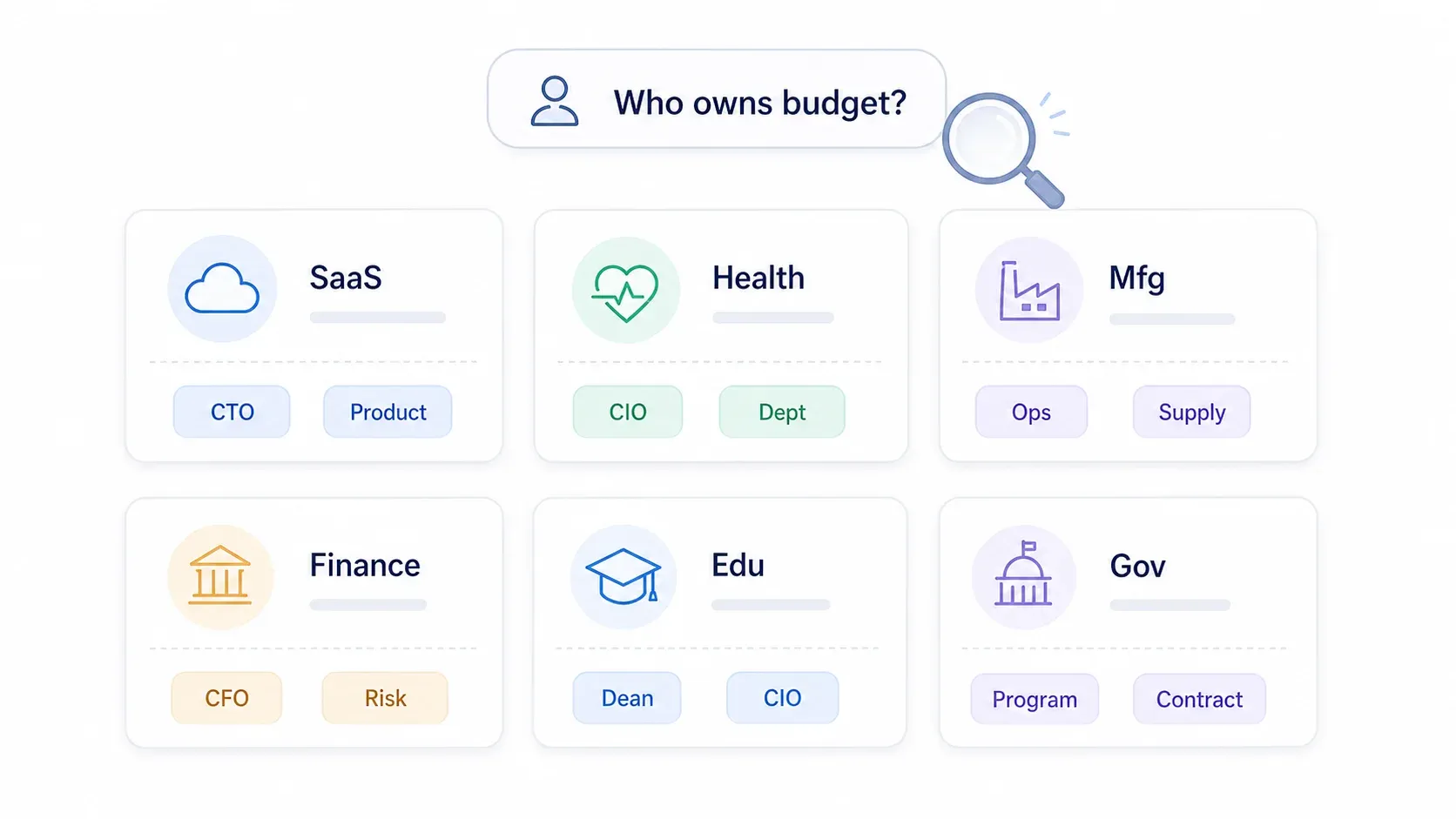
Generic "target the C-suite" advice falls short because who holds purchasing authority varies enormously by industry, company size, and the type of solution being purchased. I've put together a reference matrix based on research and real-world patterns. Use this to form your first search hypothesis—not to stop searching.
| Industry | Typical Decision Maker(s) | Who They Report To | Where to Find Them |
|---|---|---|---|
| SaaS / Tech | VP Engineering, Head of Product, CTO, CIO | CEO, COO, CPO | LinkedIn, GitHub, engineering blogs, conference talks |
| Healthcare | CIO, CMIO, CMO, Department Head, Procurement Director | Hospital CEO, COO, CFO | HIMSS, professional associations, PubMed |
| Manufacturing | Plant Manager, VP Operations, VP Supply Chain, Director of Quality | COO, CEO | Trade shows, plant leadership pages, industry directories |
| Financial Services | CFO, CIO, CISO, Head of Risk, Chief Compliance Officer | CEO, Board, Audit/Risk Committee | SEC filings, LinkedIn, risk conferences |
| Education | CIO, Dean, Department Chair, Provost, VP Administration | Provost, President, CFO | University websites, faculty pages, academic papers |
| Real Estate | Managing Broker, VP Acquisitions, Development Director, Asset Mgmt Director | CEO, Owner, Managing Principal | MLS networks, NAIOP/ULI events, brokerage leadership pages |
| Retail / Consumer Goods | Chief Merchandising Officer, VP Merchandising, VP Store Ops, CIO | CEO, COO, CMO | NRF events, retailer leadership pages, trade publications |
| Government / Public Sector | Program Manager, Contracting Officer, CIO, Technical Evaluator | Agency leadership, Procurement office | SAM.gov, agency procurement portals, budget documents |
Important caveats:
- Company size matters. At a 50-person startup, the CEO or founder often approves everything. At a 10,000-person enterprise, authority fragments across department heads, procurement, security, legal, and finance.
- Deal size matters. A $5,000 tool might be approved by a manager. A $500,000 platform deal? That's VP or C-suite territory. 6sense found that deals above $700K average 14 buying-group members, compared with 10 for smaller deals.
- Industry-specific procurement structures shift authority. In healthcare, for example, Bain reports that centralized procurement decision-making has doubled in recent years, meaning the department head who used to approve purchases may now share that authority with a procurement committee.
How to Find Decision Makers Who Aren't on LinkedIn
Most guides to finding decision makers lean heavily on LinkedIn. And LinkedIn is useful—but many real buyers haven't updated their profile in years, aren't active on the platform, or deliberately limit their visibility. If your entire prospecting strategy depends on LinkedIn, you're missing a significant chunk of the market.
Here are the alternative channels I've found most effective, with specific how-to steps for each.
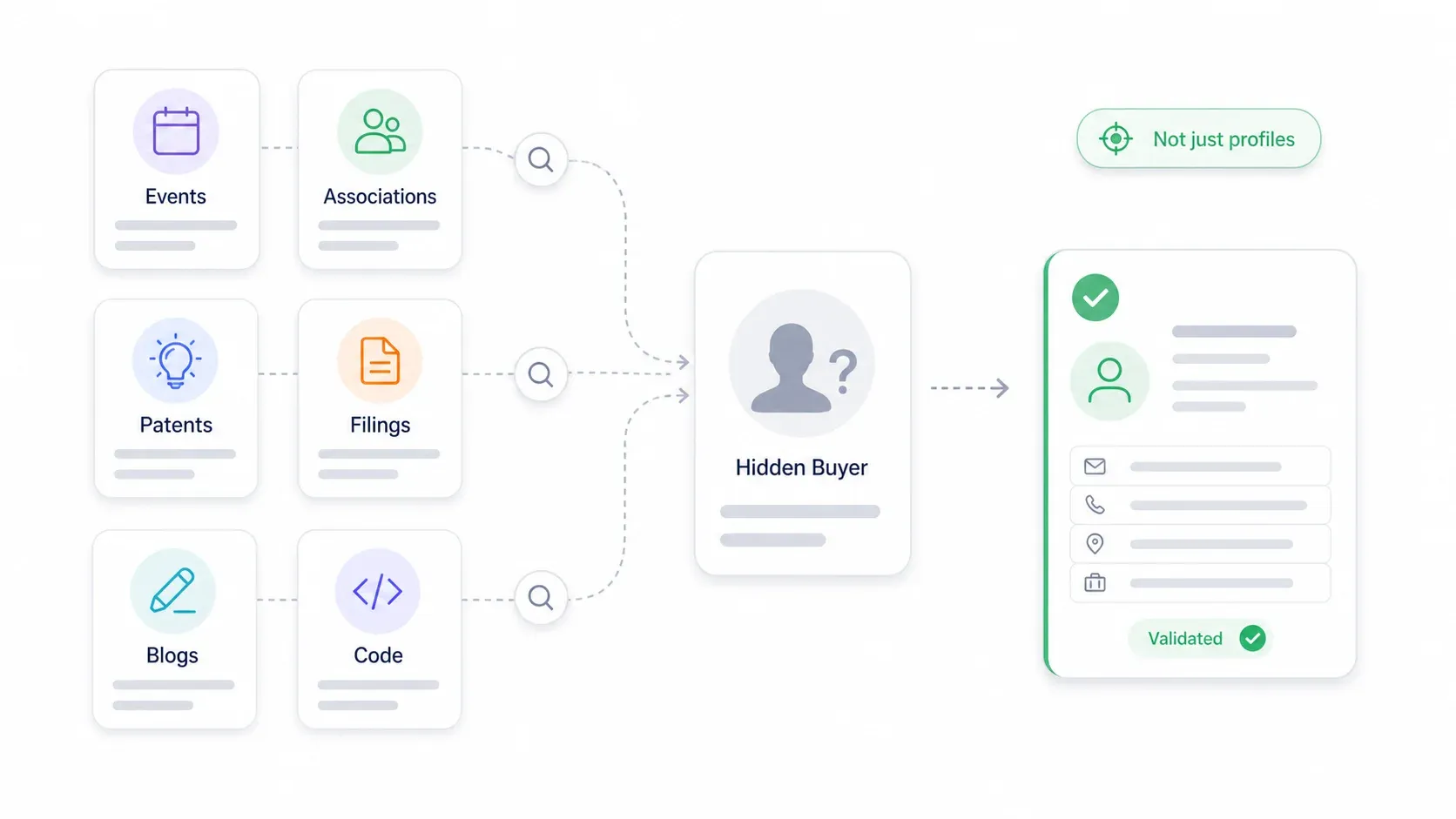
Conference Speaker Lists and Event Websites
Industry conferences publish speaker bios with names, titles, company affiliations, session topics, and sometimes contact info. These speakers are often senior leaders making strategic decisions—organizers don't invite random middle managers to keynote.
- How to use it: Search for
[industry] conference speakers [year] [buyer role]. Events like SaaStr AI Annual 2026, HIMSS, and RSAC publish detailed speaker pages. Look for session topics that align with your solution area (e.g., "procurement transformation," "cybersecurity risk," "revenue operations"). - Validation tip: If someone appears as a speaker at multiple events, they're likely a real decision-level leader, not just an attendee.
Professional Association Directories
Many industries—healthcare, legal, finance, engineering—have member directories that list professionals by role and organization. These are goldmines for titles that don't show up on LinkedIn.
- How to use it: Identify the top 2-3 associations in your target industry (e.g., HIMSS for healthcare IT, ISACA for security/compliance, CSCMP for supply chain). Check public member, speaker, and board pages.
- Validation tip: Match the association role to the purchasing problem you solve.
Patent Filings and Regulatory Documents
For R&D, innovation, engineering, pharma, and manufacturing accounts, patent databases list inventors by name and company. USPTO provides Patent Public Search, and international tools like WIPO Patentscope and EPO Espacenet cover global filings.
- How to use it: Search by company as assignee, then extract inventor names. Repeat inventors or lab heads are often key influencers or budget owners for technical purchases.
- For public companies, SEC EDGAR reveals officers, board members, CFOs, and major vendor relationships through proxy statements and 8-K filings.
Company Engineering Blogs and GitHub
Technical decision makers reveal influence through code ownership, architecture posts, and open-source contributions. GitHub's contribution graphs show the top 100 contributors to a repository.
- How to use it: Find the company's public GitHub organization, sort repos by stars or relevance, and review top contributors and maintainers. Cross-check against engineering blog bylines.
- Validation tip: Contributors are technical influencers; validate budget authority separately through the company's leadership page or discovery calls.
Industry Publications and Journal Articles
In healthcare, pharma, academia, and manufacturing, decision influence often appears in journal articles and trade publications. First authors are usually hands-on leads; last authors are often department heads or principal investigators.
Quick-reference summary:
| Alternative Channel | Best For | How to Extract Data | Validation Tip |
|---|---|---|---|
| Conference speaker lists | Technical and executive buyers | Scrape event websites for speaker bios | Check repeat appearances and session ownership |
| GitHub / open-source repos | Engineering decision makers | Review top contributors by organization | Confirm role on company site or blog |
| Patent filings (USPTO, EPO) | R&D / innovation leaders | Search by company, extract inventor names | Look for repeat inventors and leadership bios |
| Professional association directories | Healthcare, legal, finance | Search public member/speaker/board pages | Match association role to purchasing problem |
| Company engineering blogs | Technical buyers | Extract bylines, author pages, post topics | Find recurring authors on relevant systems |
| Regulatory filings (SEC, etc.) | C-suite, board, CFO, risk, legal | Search EDGAR, annual reports, proxy statements | Use filings for authority, not outreach tone |
| Government procurement portals | Public-sector buyers | Search SAM.gov, agency plans, award notices | Separate program owner from contracting signer |
How to Use Web Scraping to Find Decision Makers at Scale
Manually visiting company websites, leadership pages, and directories one by one works for five target accounts. It breaks at 50. And it's completely impractical at 500.
Web scraping turns this bottleneck into a scalable process. Instead of spending hours copying names and titles from leadership pages, you can extract structured data from publicly available sources—company "About Us" and "Team" pages, industry association directories, conference speaker pages, and business directories—in minutes.
At Thunderbit, my team built the AI Web Scraper specifically for this kind of workflow. The workflow for building a decision-maker list looks like this.
- Difficulty: Beginner
- Time Required: ~10 minutes for 20-30 accounts
- What You'll Need: Chrome browser, Thunderbit extension (free tier works), a target URL or list of URLs
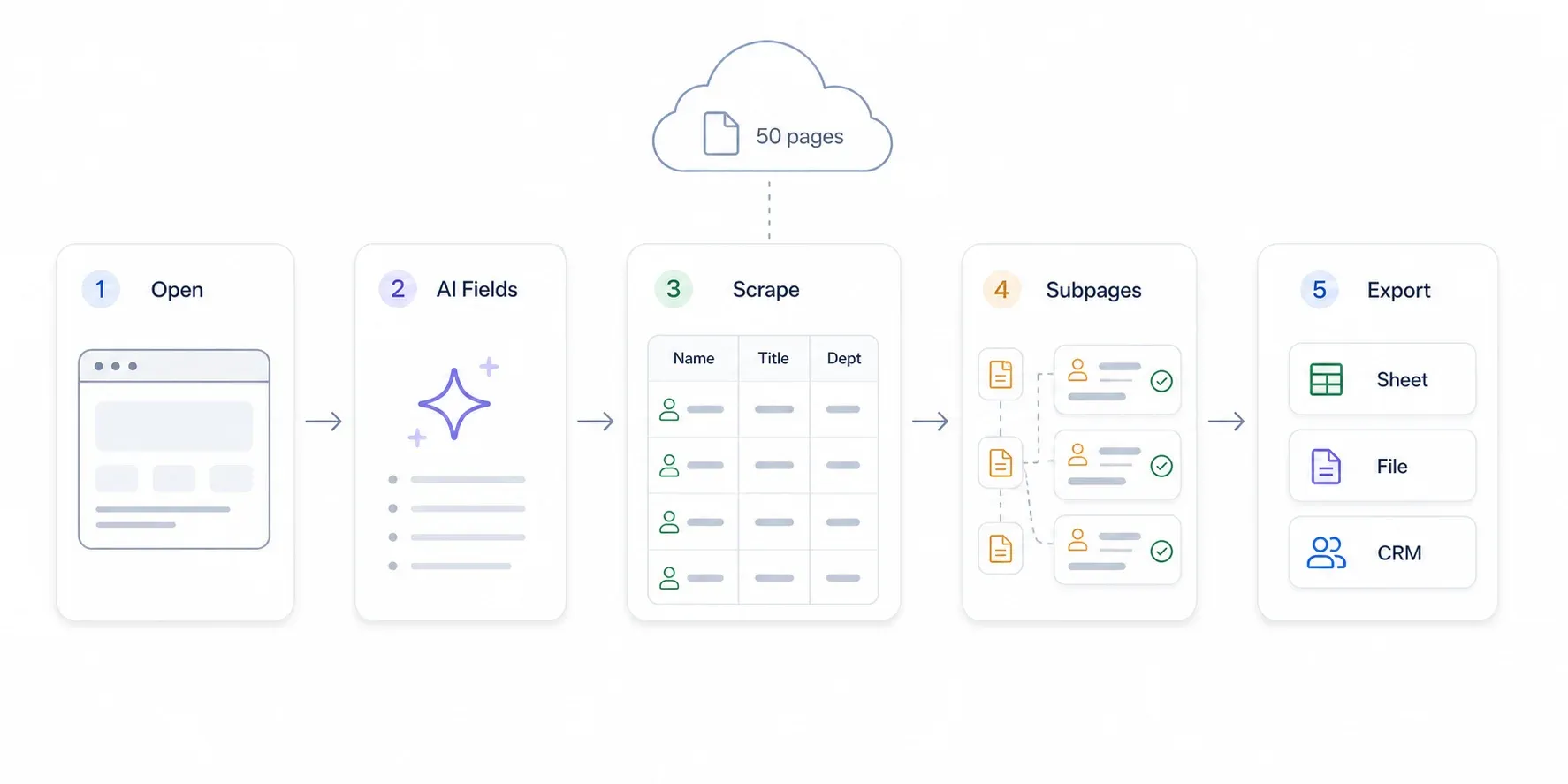
Step 1: Navigate to a Company's Leadership or Team Page
Open Chrome and go to a company's public leadership, team, or "About Us" page. For example, a SaaS company's /about or /team page, a hospital's leadership directory, or a conference's speaker page.
You should see a page listing names, titles, and sometimes bios, photos, or contact info.
Step 2: Click "AI Suggest Fields"
Open the Thunderbit sidebar and click "AI Suggest Fields." Thunderbit's AI reads the page and recommends columns—typically Name, Title, Department, Email, Phone, Bio, and LinkedIn URL.
Review the suggested fields. You can remove columns you don't need or add custom ones by clicking "+ Add Column" and describing what you want in plain English (e.g., "Department" or "Reports To").
You should see a table preview with your configured columns.
Step 3: Click "Scrape" and Review the Data
Hit the blue "Scrape" button. Thunderbit extracts the data into a structured table. For a typical leadership page with 10-20 names, this takes about 15-30 seconds.
Review the results. If the page has links to individual bio pages, you can use subpage scraping to drill into each one and enrich the table with deeper details—areas of responsibility, LinkedIn URLs, press mentions, or full bios.
Step 4: Scale Across Multiple Companies
To build a list across many accounts, start from a directory or list page (e.g., an industry association's member list, a conference's exhibitor page, or a business directory). Scrape company names and URLs, then use Thunderbit's subpage scraping to visit each company's team page and extract leadership data automatically.
This turns a process that would take days of manual research into a 10-minute workflow.
Step 5: Export to Google Sheets, Excel, Airtable, or Notion
Click "Export" and choose your destination: Google Sheets, Excel, Airtable, Notion, CSV, or JSON. Your structured decision-maker list is ready for CRM import or further enrichment.
Thunderbit also offers free email and phone extractors on public pages, which helps budget-constrained SDRs who can't justify a five-figure annual database subscription.
How Thunderbit Compares to Other Approaches
| Method | Cost | Scale | Data Freshness | Setup Effort |
|---|---|---|---|---|
| Thunderbit AI Web Scraper | Free tier available; credit-based | High (scrape dozens of sites quickly) | Real-time (reads live pages) | Very low (2 clicks) |
| Paid databases (ZoomInfo, etc.) | $5K–$64K+/year depending on tier and company size | High | Updated periodically | Low–medium |
| Apollo | Free–$119/user/month depending on tier | High | Database plus enrichment | Low |
| LinkedIn Sales Navigator | $99.99–$159.99/month per license | Medium–high | Depends on profile updates | Medium |
| Manual research | Free (time cost) | Very low | Real-time | Very high |
For more on how AI web scraping works, see our guide on AI web scraping or our roundup of the best AI web scrapers.
Mapping the Buying Committee: How to Find Every Stakeholder, Not Just "The" Decision Maker
Most sales guides skip this part entirely. Finding a single "decision maker" is not enough for enterprise deals. Gartner says six to 10; 6sense says 11 on average. If you're single-threaded into one contact, you're flying blind.
The Four Roles in Every Buying Committee
I use a four-role framework for stakeholder mapping. It draws on MEDDIC, Challenger, and years of watching deals die because someone wasn't mapped—nothing fancy, just practical.
| Role | Plain-English Definition | Common Signals | Messaging Priority |
|---|---|---|---|
| Champion | Your internal advocate who wants your solution to win | Shares context, introduces others, explains internal politics | Give them internal selling materials and proof |
| Economic Buyer | The person with budget authority who signs the contract | Budget ownership, contract sign-off, executive sponsor | ROI, risk, strategic priority, cost of inaction |
| Influencer | Shapes requirements and evaluation criteria | Writes technical requirements, attends demos, owns daily workflow | Technical fit, ease of use, integration, implementation |
| Blocker | Can slow, reject, or reshape the purchase | Security, compliance, legal, procurement, incumbent vendor owner | Risk reduction, governance, migration plan, references |
A strong Champion has influence, access to the Economic Buyer, and a personal stake in the initiative. A weak Champion is just a Talker—friendly, but unable to drive action.
How to Build a Stakeholder Map
- Start with your initial contact. Ask: "Who else would be involved in evaluating this?" and "What does the approval process look like?"
- Research the company's team page and org structure. Use Thunderbit to scrape leadership profiles and bio details.
- Assign each person to a role: Champion, Economic Buyer, Influencer, or Blocker.
- Tailor your outreach and messaging to each stakeholder's priorities. The Economic Buyer cares about ROI and risk. The Influencer cares about technical fit. The Champion needs internal ammunition. The Blocker needs risk controls and compliance answers.
- Update the map after every call. Stakeholder maps decay as people change roles or new blockers appear.
A simple template:
| Champion | Economic Buyer | Influencers | Blockers / Risk Owners |
|---|---|---|---|
| Functional manager who feels the pain | VP/C-suite/budget owner | End users, technical evaluators, department leads | Security, legal, procurement, finance, incumbent owner |
| Needs proof, deck, ROI story | Needs business case and timing | Need fit, workflow, integration clarity | Need risk, compliance, and process answers |
This process is iterative. Your map should evolve as you learn more about the account.
Step-by-Step Guide: How to Find Decision Makers for Any Account
Everything above comes together in a unified workflow. This is how I'd approach a new account from scratch.
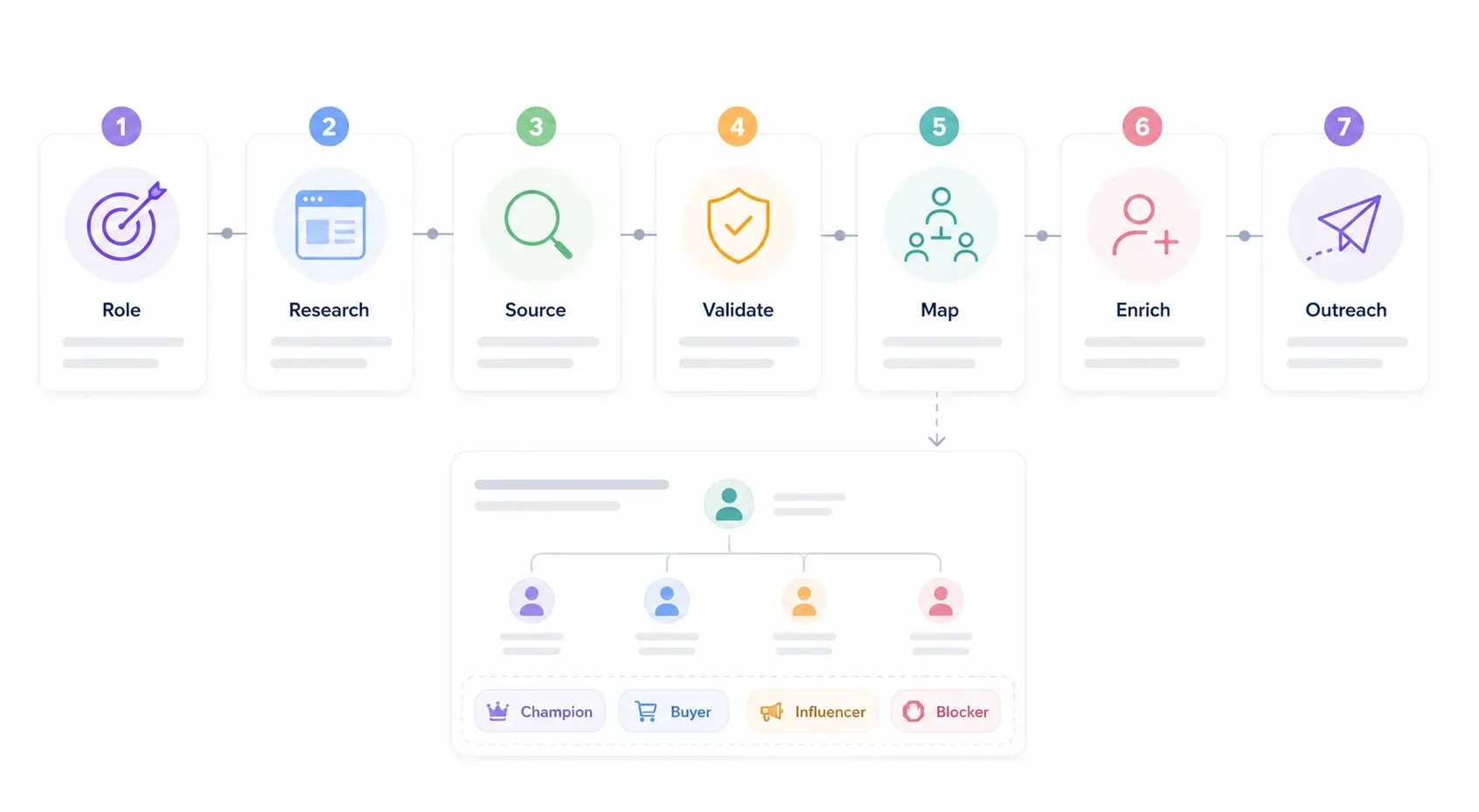
Step 1: Define Your Target Role (Not Just a Title)
Before you search, describe the function you need: "The person responsible for selecting and approving [your product category]." List 3-5 possible title variations using the industry matrix above. For example, if you're selling a security tool to a financial services firm, your list might include CISO, Head of Risk, VP Information Security, Chief Compliance Officer, and CIO.
Step 2: Research the Company Online
Check the company website (About Us, Leadership, Team pages), LinkedIn company page, and any publicly available org charts. If you're doing this across many accounts, use Thunderbit to scrape team pages in bulk.
Step 3: Source Names from Alternative Channels
If your target isn't on LinkedIn or the company website, try conference speaker lists, professional directories, patent filings, regulatory documents, or industry publications (see the alternative channels section above).
Step 4: Validate Authority with the Checklist
Apply the signal framework: check for contract-signing signals, press release mentions, LinkedIn activity around procurement, and past vendor decision involvement. No single signal is proof—look for a pattern of three or more.
Step 5: Map the Buying Committee
Use qualification questions and additional research to identify the Champion, Economic Buyer, Influencer(s), and potential Blockers. Build your stakeholder map.
Step 6: Enrich and Organize Your Data
Export your validated decision-maker list to Google Sheets, your CRM, or Airtable. Use Thunderbit's free email and phone extractors to fill in missing contact details. Keep the list updated as you learn more.
CRM hygiene tip: Store "role in buying committee" as a separate field from "job title." Add fields for Economic Buyer Confirmed, Champion Confirmed, Procurement Involved, Source URL, and Last Verified Date. Record exact discovery answers about the approval path. Refresh contacts after funding rounds, reorgs, or executive changes.
Step 7: Tailor Outreach by Stakeholder Role
Customize your message for each role:
- Economic Buyer: Business case, financial upside, risk reduction, strategic timing, cost of inaction.
- Influencer: Workflow pain, technical proof, integration details, implementation plan, peer examples.
- Champion: Internal ammunition—short business case, ROI calculator, security FAQ, one-page comparison, email language they can forward.
- Blocker: Risk controls, compliance, procurement path, migration plan, references.
Tips for Getting Past Gatekeepers to Reach Decision Makers
Once you've identified the right people, you still have to reach them. Tactics that actually work:
Ask for help, not access. "I'm trying to understand who owns decisions around [specific problem]. Would you be the right person, or is there someone better to speak with?" This respects the gatekeeper's knowledge and often gets you routed faster than a hard pitch.
Leverage referrals. Norwest's 2025 B2B benchmark report found that 65% of respondents rated warm referrals from customers or network as a top tactic—far ahead of personalized emails (28%), phone/voicemail (26%), or LinkedIn messaging (23%). If you know anyone at the company, even a junior contact, ask for an introduction.
Use multiple channels. Don't rely on email alone. Combine LinkedIn messages, phone calls, and even direct mail for high-value targets. RAIN Group's research shows that 82% of buyers accept meetings with sellers who proactively reach out—but multichannel prospecting consistently outperforms single-channel efforts.
Time your outreach. Gong's analysis of 100,000+ connected B2B sales calls found strong connection rates at 10-11 AM and 4-5 PM in the prospect's time zone, with Wednesday and Thursday often cited as the best days.
Watch for timing triggers. Decision makers are most accessible during certain windows: shortly after a funding round, during budget planning season, when they've just started a new role, or after a public expansion or regulatory change.
Build rapport with the gatekeeper. Administrative assistants and operations managers often know more about the buying process than anyone. Be honest and respectful—they can be your biggest ally or your biggest obstacle.
Conclusion and Key Takeaways
Finding decision makers in 2026 is an authority-validation and committee-mapping problem—not a title-search problem. The teams that close deals go beyond LinkedIn, validate real budget power with specific signals, map the full buying committee, and use tools like web scraping to do all of this at scale.
Key takeaways:
- Titles are starting points, not proof. Always validate authority with the signal checklist.
- Most B2B deals involve 6-11+ stakeholders. Map the Champion, Economic Buyer, Influencers, and Blockers for every account.
- LinkedIn is not enough. Use conference speaker lists, association directories, patent filings, regulatory documents, GitHub, and engineering blogs to find hidden buyers.
- Web scraping turns days of manual research into minutes. Thunderbit's AI Web Scraper lets you extract structured decision-maker data from public pages in two clicks—no code, no templates, no five-figure database subscription.
- Tailor outreach by role. The Economic Buyer, the Influencer, the Champion, and the Blocker all need different messages.
Try AI Web Scraper for Decision-Maker Research Get Started Free
Ready to build your next decision-maker list from live public sources instead of stale databases? Try Thunderbit's free tier and see how fast you can go from "I have a list of target accounts" to "Here's my stakeholder map, ready for outreach." You can also check out our YouTube channel for walkthrough videos, or explore Thunderbit pricing if you need more credits.
FAQs
1. How do I find decision makers in a company I've never contacted before?
Start with the company website—check Leadership, Team, and About Us pages. Then search LinkedIn for functional roles (not just titles). If those channels come up short, expand to conference speaker lists, professional association directories, patent filings, SEC/regulatory filings, and industry publications. Validate authority using the signal checklist (contract-signing history, budget ownership, press release mentions) before investing outreach effort.
2. What if the company has multiple decision makers?
Assume it does. Gartner says complex B2B purchases involve 6-10 decision makers; 6sense puts the average at 11. Map all stakeholders using the four-role framework: Champion (internal advocate), Economic Buyer (budget authority), Influencer (shapes requirements), and Blocker (potential objection-raiser). Tailor your messaging to each role.
3. What tools can I use to find decision makers without a big budget?
You can get surprisingly far with free resources: company websites, Google, LinkedIn (free version), conference speaker pages, professional association directories, USPTO patent search, SEC EDGAR, and GitHub. Thunderbit's free tier and free email/phone extractors let you scrape and structure public data without a paid database subscription. Paid tools like Apollo, Sales Navigator, and ZoomInfo add scale but aren't required to start.
4. How do I know if someone is a real decision maker or just an influencer?
Look for a pattern of authority signals: Do they sign contracts or purchase orders? Are they referenced in press releases about vendor partnerships? Do they post about budgets, strategy, or procurement? Have they been involved in past vendor selections? When in doubt, ask directly during discovery: "Who owns the budget for this?" and "What does the approval process look like?"
5. How do I find decision makers who aren't active on LinkedIn?
Many real buyers have outdated or minimal LinkedIn profiles. Alternative sourcing channels include conference speaker lists (scrape event websites for bios), professional association directories, patent filings (USPTO, EPO), SEC/regulatory filings, company engineering blogs, and GitHub contribution graphs. Thunderbit can help you extract names, titles, and contact info from these public sources at scale—turning a manual research process into a two-click operation.
Learn More




