
Every "best proxy API" listicle risks making the same category error: it treats Bright Data, Thunderbit, and Apify as if they compete for exactly the same job. They do not. One product may provide routed IP connectivity, another may return structured JSON, and another may run a scheduled scraping workflow. Comparing those products on a single starting price is like cross-shopping a garden hose against a water-treatment plant.
This guide maps ten proxy, managed scraping, extraction, and platform products using official documentation retrieved on August 10, 2026. It does not declare a universal winner or repeat portable success-rate claims. Instead, it gives you a way to define a valid result, shortlist products by category, and run an authorized pilot against your own targets.
Why "Proxy API" Doesn't Mean One Thing
Here's the confusion at the root of every "which proxy API should I use" thread: the term covers at least four genuinely different products.
A raw proxy network gives you an IP and routing controls — you still write the request logic, handle retries, render JavaScript if needed, and parse whatever comes back. This is the closest thing to the textbook definition of a proxy: RFC 9110 describes it as a message-forwarding intermediary the client chooses to use, nothing more.
A managed unblocking or browser API owns more of the request lifecycle. You send a URL, it picks the IP, renders the page if it needs to, retries on failures, and hands back HTML, a screenshot, or occasionally Markdown.
An extraction API goes a layer higher still — you get structured JSON or clean text back, not raw HTML you have to parse yourself.
A scraping platform wraps all of the above plus scheduling, storage, and often a marketplace of prebuilt scrapers.
The reason this matters for a "choosing a proxy API" article is simple: price and "success rate" are not comparable across these categories. A residential network billed by traffic and a managed API billed by requests are solving different problems. Their denominators, included work, and output semantics differ, so a headline-price ranking would be misleading. Each profile below therefore starts with the product category.
One more thing worth saying up front: having proxy access doesn't grant you permission to scrape anything you want. Authorization, target ToS, and data-privacy obligations are a separate conversation from "which vendor has the biggest IP pool," and no proxy API — however good — makes that conversation go away.
How to Evaluate the Ten Options
There is no honest fixed weighting that works for every team. A raw-HTML archive, a location-sensitive price monitor, and a structured-data enrichment workflow have different requirements. Start with these criteria, assign weights that sum to 100, and score only from your own pilot evidence or a documented requirement:
| Criterion | What to measure |
|---|---|
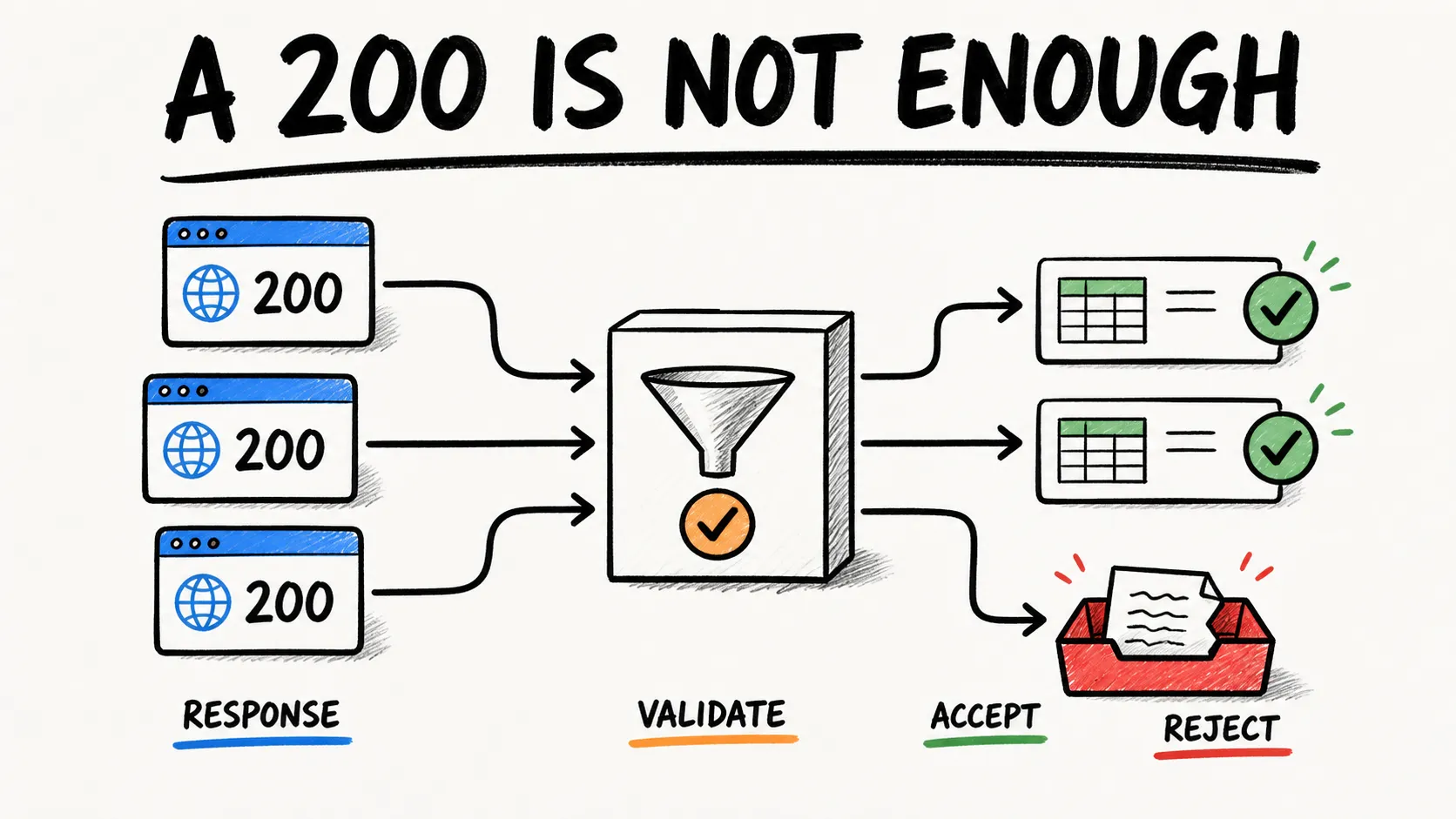
| Valid-result rate | Percentage of attempts that pass your semantic validator, not merely HTTP 200 |
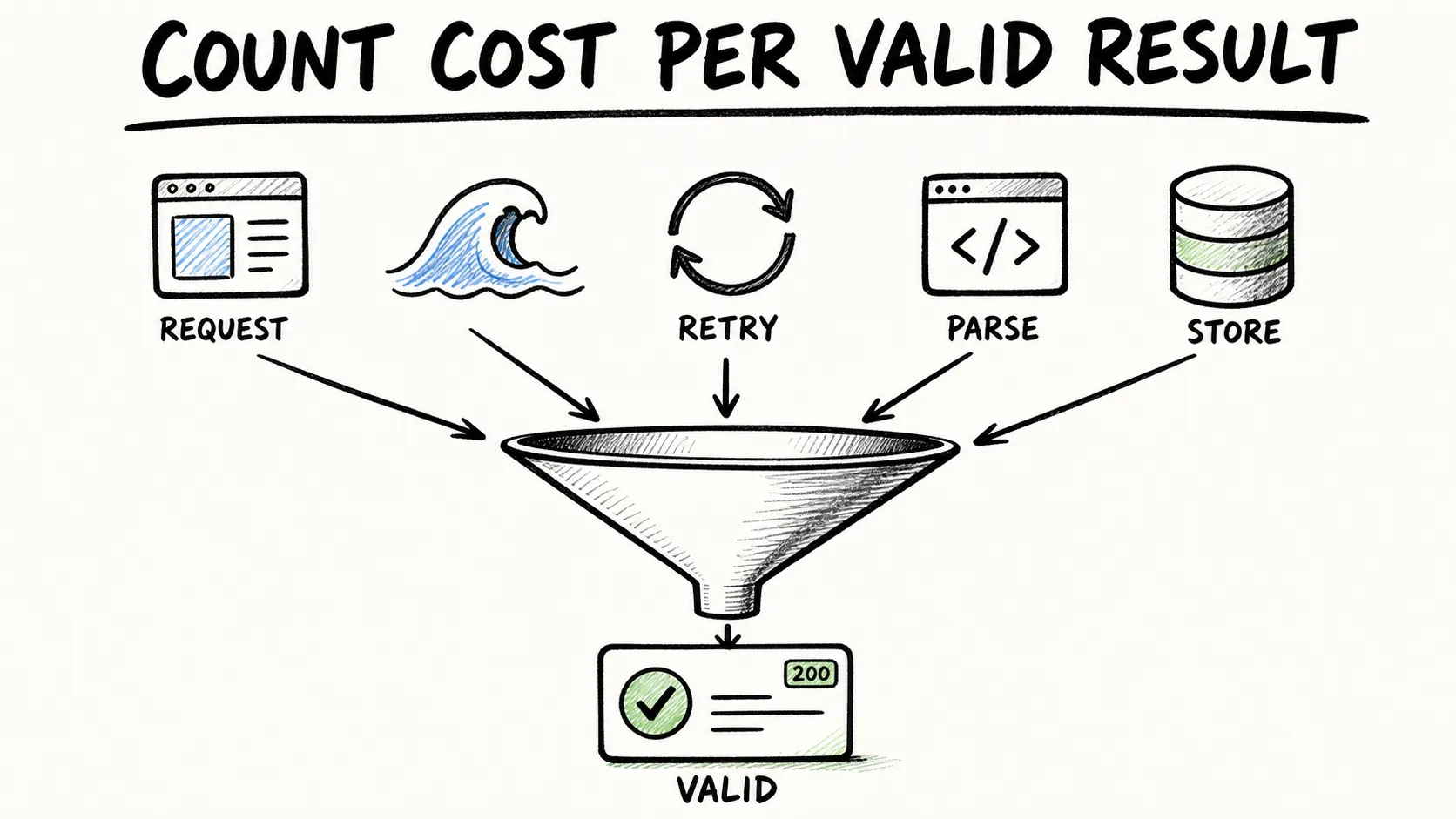
| Cost per valid result | All request, traffic, rendering, retry, parsing, storage, and operator costs divided by valid outputs |
| Output fit | Raw response, rendered HTML, screenshot, Markdown, or schema-shaped data |
| Connection and geo controls | Region, city, ASN, session, rotation, header, cookie, and protocol controls you actually need |
| Observability and limits | Request IDs, billed-unit headers, logs, replay, concurrency controls, and budget stops |
| Compliance evidence | Sourcing statements, contracts, target eligibility, auditability, and support process |
| Engineering effort | Integration, parser maintenance, monitoring, and manual repair time |
Keep unsupported cells blank or mark them “not applicable.” The goal is a workload-specific decision, not a score that creates false precision.
1. Thunderbit
Thunderbit is the outlier on this list because it is an adjacent extraction API, not a raw proxy network that you plug into an HTTP client. Its public API documentation describes Distill for Markdown, Extract for schema-shaped JSON, and Batch for asynchronous URL sets. That boundary can remove several downstream steps when the desired output is content or records rather than a proxy connection.
The practical difference shows up the moment you send a request. With a traditional proxy API, a successful call gets you raw HTML — job half done. With Thunderbit's POST /extract endpoint, you pass a target URL and a JSON Schema describing the fields you want, and what comes back is already-structured JSON matching that schema. No CSS selectors to write, no parser to maintain when the site redesigns its product page in Q3.
That product boundary is the practical selling point: the caller can describe the output schema instead of maintaining a separate proxy, renderer, and parser stack. It still needs a real pilot. Validate field completeness, target support, latency, current unit consumption, concurrency, and failure behavior against authorized URLs before adopting it.
Key features:
- Structured output by default — JSON matching a schema you define, not raw HTML
- Documented rendering and routing controls — evaluated as part of the extraction endpoint rather than as a raw proxy product
- HTTP API boundary — Distill, Extract, and Batch cover Markdown, structured JSON, and asynchronous URL sets
- Batch mode for asynchronous multi-URL jobs, useful for anything beyond a handful of pages
- Schema-shaped extraction that reduces, but does not eliminate, the need for field-level validation and maintenance
Billing unit: Distill and Extract use documented per-page units rather than proxy bandwidth. Check the current Thunderbit pricing and API documentation before budgeting because units and plans can change.
Best for: developers who want validated, structured data out of the box and would rather not build (and maintain) a proxy-rotation-plus-parser pipeline themselves.
Where a traditional proxy API still wins: if you need raw HTML for a custom pipeline, bulk archival, or a non-HTTP protocol, Thunderbit's structured-output model isn't the right tool — you actually want one of the next nine entries.
Skip Proxies for AI-Driven Extraction Thunderbit's agentic web scraper handles rendering and anti-bot walls itself, so many jobs need no separate proxy API at all. Get Started Free
2. Bright Data
Bright Data is the closest thing this industry has to an incumbent, with residential, datacenter, ISP, and mobile proxy networks alongside a separate managed product called Web Unlocker. That word "separate" matters — Bright Data isn't one product, it's a family, and pricing/behavior varies a lot depending on which piece you're buying.
The Residential network documentation lists country, region, city, ZIP, and ASN targeting. Web Unlocker is a separate managed layer with pay-per-success billing and a monthly spend cap. Those are useful controls, but their accuracy and fit still need to be verified in the buyer's pilot; this guide did not run a cross-provider geo benchmark.
Key features:
- Residential, datacenter, ISP, and mobile proxy types with granular geo-targeting
- Web Unlocker managed API with pay-per-success billing and spend limits
- Documented opt-in sourcing statement for residential IPs
- Debug fields (request ID, billed state, peer country) for troubleshooting
Billing unit: raw proxy products and Web Unlocker use different units. Confirm the exact product, commitment, target eligibility, and current rate on the official pricing pages before budgeting.
Best for: enterprise teams that need every proxy type available and are willing to manage a slightly more complex product lineup in exchange for scale.
3. Oxylabs
Oxylabs plays in the same weight class as Bright Data — residential, datacenter, ISP, and mobile proxy networks plus a separate Web Unblocker product for managed access. Its session handling uses a dedicated X-Oxylabs-Session-Id header, giving you IP continuity for a bounded window, which is genuinely handy for multi-step flows like paginated search results.
Key features:
- Multiple proxy types with vendor-documented geo controls
- Web Unblocker for JS rendering and managed unblocking, billed by GB in current pricing
- Session persistence via header-based session IDs
- Job/session headers included in sample responses for debugging
Billing unit: the Web Unblocker page retrieved for this research used GB-based plans with plan-specific rate limits; other Oxylabs products use different units. Recheck the selected product's current page.
Best for: large-volume operations that need geo-diversity and don't mind managing GB-based billing across products.
4. ScrapingBee
ScrapingBee is a managed HTML API: you send a URL, it returns page content, and you generally keep responsibility for downstream validation and parsing. Its documentation exposes a feature-dependent credit system, Auto-Mode, cost headers, and a max_cost parameter that can bound an individual Auto-Mode request.
Key features:
- Auto-Mode that escalates configuration (proxy tier, rendering) automatically until it succeeds
max_costparameter to cap per-request spend- Failed Auto-Mode attempts across every configuration cost zero credits
- Usage/cost headers on every response for real-time tracking
Billing unit: credits vary with rendering, proxy tier, and other enabled features. Inspect the current credit ladder and concurrency limits instead of treating the base plan as a per-request price.
Best for: small-to-mid projects where quick setup matters more than deep customization — the credit ladder makes cost genuinely predictable once you understand it.
5. ZenRows
ZenRows bundles a Universal Scraper API, a Scraping Browser, and residential proxies under one roof, with request multipliers for JavaScript rendering and premium proxy usage. One quirk worth flagging clearly: ZenRows counts HTTP 404 and 410 responses as "successful" for billing purposes, which is a good reminder that "success" in a vendor's invoice and "success" in your validator are not the same thing.
Key features:
- Combined toolkit: scraper API, browser automation, and residential proxies
- Multiple output formats claimed (JSON, Markdown, screenshots, plaintext)
- Managed rendering and access components whose current behavior must be verified on authorized targets
- URL-based usage limits that pause requests until extra capacity is purchased
Billing unit: request credits with documented multipliers for features such as JavaScript rendering and premium proxies. Confirm the current plan and multiplier rules.
Best for: teams that want to evaluate scraper API, browser, and proxy products from one vendor, while testing each selected product on authorized targets.
What Patterns Emerge So Far
Five tools in, a pattern's already obvious: almost nobody's product boundary matches their marketing copy exactly. Bright Data and Oxylabs both split "raw proxy" from "managed unblocking" into separate products with separate pricing models, which means the vendor's own homepage doesn't answer "how much will this cost me" — you have to pick a specific product first. ScrapingBee and ZenRows both use credit-based billing with escalating multipliers, which is more transparent than GB pricing but still requires you to read the fine print on what triggers a multiplier.
The other recurring theme: "successful request" is defined by the vendor, not you. ZenRows counting 404s as billable successes isn't malicious — it's just a definition mismatch that'll bite you if you assume "billed as successful" means "the data I needed was actually there."
6. Scrape.do
Scrape.do runs a managed Web Scraping API with a "Successful API Credits" billing model — you're only charged for the current core endpoint, since the company's own pricing navigation lists standalone proxy and scraping-browser products as "coming soon" (worth checking before you assume Scrape.do sells raw proxies today). The API surface covers geo-targeting, sessions, headers, cookies, and browser/proxy mode switches.
Key features:
- Credit-based billing that stops requests once the monthly limit is hit (no surprise overage by default)
- Premium-network switch available for eligible targets
- Session and geo controls that should be tested against the exact workload
- Browser rendering mode for JS-heavy pages
Billing unit: packaged successful API credits with monthly limits; verify current plan limits, concurrency, and extra-capacity rules.
Best for: budget-conscious teams that want a managed API without committing to GB-based pricing.
7. Smartproxy / Decodo
Smartproxy rebranded to Decodo, and its current residential proxy pricing page documents per-GB and pay-as-you-go plans with ASN-level targeting and both rotating and sticky sessions over HTTP(S)/SOCKS5. The retrieved page cites Proxyway research for displayed performance claims. That provenance is useful context, but it is not evidence that the same result will transfer to another target, region, time window, or account configuration.
Key features:
- Residential, datacenter, ISP, and mobile proxy types
- ASN and location-level targeting
- Rotating and sticky session support over HTTP(S) and SOCKS5
- Performance claims sourced from third-party research rather than self-reported
Billing unit: the residential page retrieved for this research documents per-GB and pay-as-you-go options. Confirm current rates and included controls on the selected product page.
Best for: e-commerce monitoring and mid-scale operations that want proxy variety without enterprise pricing.
8. Scrapfly
Scrapfly is a managed scraping API with an optional Anti Scraping Protection (ASP) feature. Its own documentation explicitly says target defenses evolve, restoration after a block can take an uncertain amount of time, and resource-related costs can change. That caveat is important: managed access is not a guarantee of durable access.
Key features:
- ASP with dynamic cost escalation based on target difficulty
cost_budgetparameter and failed-scrape fairness protection (excluded status codes don't count against you)- Response-level cost headers and a request replay/debug dashboard
- Optional browser rendering and residential proxy pools
Billing unit: credits whose cost can change with proxy pool, rendering, and ASP configuration. Response headers, cost_budget, and project limits help measure and contain that cost.
Best for: teams that specifically prioritize anti-detection tooling and want visibility into what each request actually cost, credit-wise.
9. Zyte
Zyte (formerly Scrapinghub, for anyone who's been in this space long enough to remember) offers an API that can return raw HTTP responses, browser-rendered HTML, screenshots, or automatically extracted structured objects, depending on the request. Pricing is assigned per target/request tier rather than a flat rate, and — like a few other tools here — unsuccessful responses and rate-limited requests aren't charged.
Key features:
- Multiple output modes: HTTP, browser, screenshot, or auto-extraction
- Native Scrapy integration for Python developers already in that ecosystem
- Spending limits and blocking thresholds you can set proactively
- Target/request-tier pricing that adjusts to site difficulty
Pricing: pay-as-you-go available; exact rate depends on target tier.
Best for: teams that need a managed HTTP/browser/extraction API, especially those already using Scrapy. Target fit and tier stability must be established by a pilot.
10. Apify
Apify is less a proxy API and more a full scraping platform — compute, prebuilt "Actors" (their term for packaged scrapers), scheduling, dataset storage, and proxy services all bundled together with separate line-item billing for each. That's a feature if you want a marketplace of ready-made scrapers for common sites; it's a complication if you just wanted a proxy and got handed a platform instead.
Key features:
- Marketplace of prebuilt Actors for common scraping targets
- Residential, datacenter, and SERP proxy services available as one component
- Scheduling, dataset storage, and webhook support for workflow automation
- Detailed diagnostic proxy status codes for debugging failed requests
Billing unit: prepaid platform usage can include separate compute, Actor, proxy, dataset, and storage charges. Model the entire workload rather than quoting only the proxy line.
Best for: teams that want prebuilt scrapers and workflow automation more than they want raw proxy control.
The Hidden Cost Problem: Use Cost per Valid Result
List price is only one numerator. The useful denominator is not requests sent, bytes transferred, or HTTP 200 responses. It is the number of outputs that satisfy your own semantic validator.
Define the measurement before the pilot:
cost_per_1,000_valid = total_pilot_cost / valid_results * 1,000
total_pilot_cost should include the costs that actually differ across candidates: request or network units, rendering and premium-routing multipliers, retries, parsing, compute, storage, monitoring, and operator time. valid_results should count only responses with the required fields, correct locale, acceptable freshness, and no challenge or consent page masquerading as content.
Consider a deliberately hypothetical example. Provider A costs $3.00 for a test batch and produces 600 valid records; Provider B costs $3.50 and produces 950. Their normalized costs are $5.00 and about $3.68 per 1,000 valid records. Those numbers illustrate the arithmetic only. They are not claims about any provider, target class, or protection system.
For an extraction API such as Thunderbit, include the value and cost of receiving schema-shaped data instead of raw HTML. For a raw proxy, include downstream parser and maintenance work. Neither boundary is universally cheaper; the answer depends on the output the workload actually needs.
If you want the deeper mechanics of how AI-based extraction handles this differently from selector-based scraping, our AI web scraping breakdown covers the underlying approach.
Proxy API vs. AI Scraping API: Do You Even Need Proxies?
Every top-ranking article on this topic assumes the reader needs a proxy. None of them question that premise — which is strange, given how many people online are now asking a more basic question: do I need raw HTML at all, or do I just need the data?
| Dimension | Traditional Proxy API | AI Scraping API (e.g., Thunderbit) |
|---|---|---|
| What you get back | Raw HTML you parse yourself | Structured JSON matching your schema |
| Managed access behavior | Controlled by your proxy/client stack or a separate managed product | Part of the extraction service and subject to its documented limits |
| Parsing/extraction | You build and maintain parsers | AI extracts fields per schema |
| Maintenance on layout change | Your team owns selector and parser changes | The service owns more extraction logic, but your team still validates output |
| Best for | Bulk HTML archival, custom pipelines, niche protocols | Structured data, RAG ingestion, lead lists |
| Integration boundary | Proxy endpoint or provider API | HTTP extraction endpoints such as Distill, Extract, and Batch |
The honest takeaway: if your pipeline genuinely needs raw HTML, proxy-level session control, or a custom request stack, a traditional proxy API may be the right boundary. If the required output is structured product data, lead records, or search results ready for a spreadsheet or retrieval pipeline, an extraction API can move routing, rendering, and extraction behind one service boundary. That reframes the decision without proving that either model is universally better.
For teams specifically hunting leads or structured records rather than raw pages, the AI lead generation and AI for sales guides show the kinds of workflows where structured rows are the natural output.
See If You Even Need a Proxy Free plan covers 6 pages a month — test whether Thunderbit's built-in rendering handles your target site before buying proxy capacity. Get Started Free
Compliance and Sourcing Questions Belong in the Evaluation
Technical access and authorization are separate. Before a pilot, document which URLs the organization is allowed to collect, the data fields required, retention rules, privacy obligations, applicable target terms, and an escalation owner. A proxy subscription does not expand those permissions.
For residential networks, ask the provider for its current sourcing and consent documentation, target-eligibility rules, identity or KYC requirements, audit evidence, and response process when an IP range or target becomes unavailable. Official vendor statements are useful evidence, but they are not an independent supply-chain audit.
During the pilot, record region and ASN observations where relevant, but do not infer that a single lookup proves the sourcing of an entire network. Treat discrepancies as questions for the provider and procurement team. If authorization changes, a policy check fails, the retry ceiling is reached, or the budget cap triggers, stop the run.
For extraction and platform services, sourcing and access responsibilities do not disappear; they move behind a different service boundary. The buyer should still review contracts, supported-use policies, failure behavior, and data handling. This guide is technical evaluation guidance, not legal advice.
At-a-Glance Comparison
| Tool | Product boundary | Typical output | Billing unit to verify | Useful pilot question |
|---|---|---|---|---|
| Thunderbit | Extraction API | Markdown or schema-shaped JSON | Per-page units | Do the required fields remain valid across target templates? |
| Bright Data | Raw proxy families plus managed Unlocker | Connection, raw content, or managed output | Traffic or successful requests, depending on product | Which exact product and geo controls does the workload require? |
| Oxylabs | Proxy families plus Web Unblocker and scraper APIs | Connection or managed content | Product-specific; retrieved Unlocker page was GB-based | How do response size and session continuity affect cost? |
| ScrapingBee | Managed HTML API | HTML | Feature-dependent credits | Which configuration succeeds, and what does it cost per valid page? |
| ZenRows | Scraper API, browser, and residential proxies | Multiple vendor-documented formats | Requests with feature multipliers | How do 404/410 billing semantics interact with your validator? |
| Scrape.do | Managed Web Scraping API | Page content | Successful API credits | Do premium, geo, session, and browser controls fit the workload? |
| Decodo | Proxy and scraping product family | Connection or product-specific output | GB or PAYG on the retrieved residential page | Are location, ASN, protocol, and sticky-session controls accurate enough? |
| Scrapfly | Managed scraping API | Page content, browser output, optional extraction | Feature-dependent credits | Do cost budgets, logs, and failure protection behave as expected? |
| Zyte | Managed HTTP, browser, extraction, and Scrapy interfaces | HTTP, rendered HTML, screenshots, or objects | Target/request tier plus options | Is the tier stable, and do request-mode limits fit the implementation? |
| Apify | Scraping platform and marketplace plus proxies | Actor or crawler datasets | Compute, Actor, proxy, storage, and dataset charges | Does the workflow benefit justify the full platform cost? |
The categories and billing units above reflect official pages retrieved on August 10, 2026. Plans, limits, names, and feature multipliers can change, so recheck the exact product before budgeting.
A Decision Flowchart: What Are You Actually Scraping?
The single most common question in proxy-related forum threads is some version of "I don't know which one is best, does anyone have a recommendation?" — followed by a generic list that doesn't actually answer it. Here's an attempt at something closer to an actual decision path.
What output do you need?
- Need proxy-protocol control, raw responses, custom headers, or your own parser? Shortlist raw proxy products.
- Need rendered HTML without operating the browser and retry layer? Shortlist managed scraping or browser APIs.
- Need validated fields, records, or Markdown? Shortlist extraction APIs, including Thunderbit's documented Distill and Extract endpoints.
- Need scheduling, storage, marketplace jobs, and team operations? Shortlist scraping platforms.
What controls are non-negotiable? Write down required regions, session duration, rotation behavior, request methods, cookies, headers, rendering, screenshots, data shape, concurrency, logs, and spending stops. Remove candidates that cannot meet a hard requirement before testing soft preferences.
What volume are we talking about? Do not use a generic page-count threshold to pick a provider. Volume interacts with response size, concurrency, feature multipliers, valid-result rate, negotiated commitments, and engineering effort. Model the expected mix of target templates and run a pilot at representative concurrency.
Raw HTML or structured data? This remains the main fork. If you need raw HTML for a custom pipeline, test proxy or managed-HTML products. If the deliverable is validated rows, JSON, or Markdown, test an extraction boundary as a separate category instead of forcing a like-for-like proxy comparison.
Build Your Own Weighted Scorecard
Feature lists do not make the decision because performance and cost depend on the target set and configuration. Build the scorecard from your own requirements and pilot results. The weights below are intentionally blank.
| Criterion | Your weight | Provider A score (1–5) | Evidence | Provider B score (1–5) | Evidence |
|---|---|---|---|---|---|
| Valid-result rate | |||||
| Cost per valid result | |||||
| Output fit | |||||
| Geo/session/request controls | |||||
| Observability and budget controls | |||||
| Compliance and sourcing evidence | |||||
| Support and operational fit | |||||
| Engineering and maintenance effort | |||||
| Total | 100 |
Use a 1–5 score only when the evidence exists. Keep “not applicable” distinct from zero. Publish the weights beside the result so colleagues can see which assumptions drove the outcome.
The following compact Python example fails closed on missing or invalid inputs. The 30-attempt minimum is a tutorial guardrail, not a universal statistical sample-size claim:
from dataclasses import dataclass

@dataclass(frozen=True)
class PilotResult:
    attempts: int
    valid_results: int
    request_cost: float
    engineering_cost: float = 0.0

    def cost_per_1000_valid(self) -> float:
        if self.attempts < 30:
            raise ValueError("pilot needs at least 30 attempts for this tutorial")
        if not 0 < self.valid_results <= self.attempts:
            raise ValueError("valid_results must be between 1 and attempts")
        if self.request_cost < 0 or self.engineering_cost < 0:
            raise ValueError("costs cannot be negative")
        total = self.request_cost + self.engineering_cost
        return total / self.valid_results * 1000

def weighted_score(weights: dict[str, float], scores: dict[str, float]) -> float:
    if set(weights) != set(scores):
        raise ValueError("every weighted criterion needs a score")
    if abs(sum(weights.values()) - 100.0) > 1e-9:
        raise ValueError("weights must sum to 100")
    if any(not 1 <= score <= 5 for score in scores.values()):
        raise ValueError("scores must be in the 1–5 range")
    return sum(weights[name] * scores[name] for name in weights) / 100
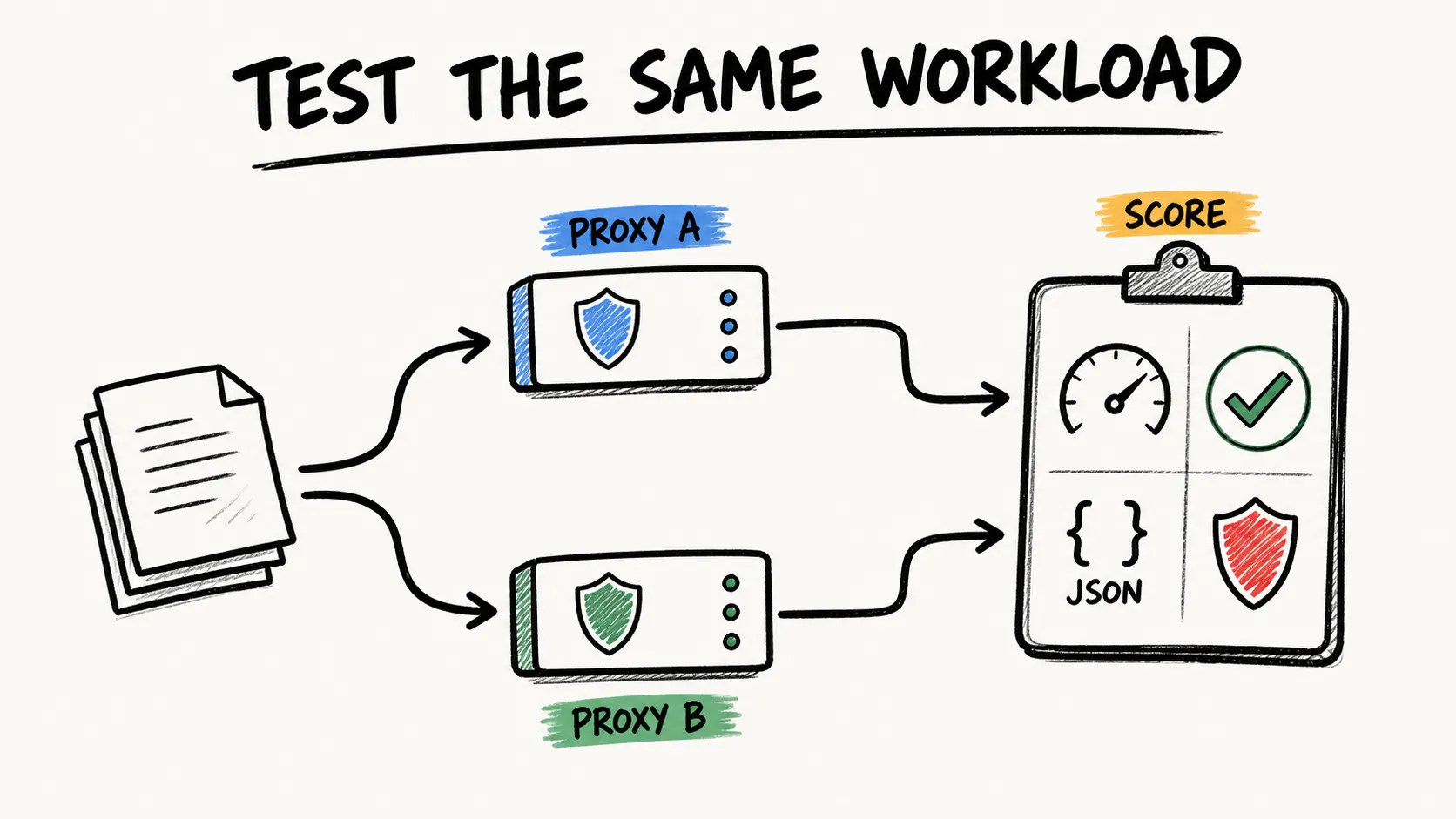
Run at least two rounds at different times under fixed conditions. For each attempt, capture target group, region, configuration, status, semantic-validator result, latency, retries, billed units, bytes, request or job ID, and reason for invalidity. Larger purchases need a sample sized to the team's risk and target diversity; a tutorial floor cannot replace that design.
If you're new to scraping generally and want the fundamentals before diving into vendor comparisons, our primer on what web scraping actually is and our guide to web scraping without coding are decent starting points.
Choosing a proxy API isn't really a "which vendor is best" question — it's a "which product boundary matches my output requirement" question, followed by a pilot to confirm the vendor's marketing claims hold up against your actual targets. Ten providers, four product categories, and one formula (cost per valid result) get you most of the way there. The last mile is just running the test yourself instead of trusting someone else's benchmark.
If your actual goal is structured data rather than a pile of HTML to parse, you can include Thunderbit's Chrome extension or API in the shortlist and check the current trial or plan limits before running a pilot. The Thunderbit YouTube channel also provides product walkthroughs; treat them as demonstrations, not independent benchmark evidence.
Try Thunderbit's Agentic Web Scraper Get Started Free
Learn More
- What Is Web Scraping
- AI Web Scraping
- Web Scraping Without Coding
- Instant Data Scraper Alternatives
- Scraping LinkedIn
FAQs
1. What's the real difference between a proxy network and a scraping API?
A raw proxy network gives you an IP and routing controls — you still handle rendering, retries, and parsing yourself. A scraping API (managed or AI-based) owns more of that lifecycle and hands back HTML, JSON, or Markdown depending on the product. They're not interchangeable, and comparing their prices directly usually produces a misleading conclusion.
2. How do I measure "success rate" in a way that actually matters?
Don't count HTTP 200 as success. Define success as "the content or fields I actually needed were present and correct," then test against a representative sample of your real targets — not the vendor's demo site.
3. How do I calculate cost per successful request?
Divide the listed price (per request or per GB) by your measured success rate on your specific targets. A cheaper provider with a lower success rate can easily end up costing more once retries are factored in — run the math before you commit to a plan.
4. Do I need a proxy API if I just want structured data, not raw HTML?
Not necessarily. Extraction APIs such as Thunderbit can return structured JSON and place rendering and routing behind the service boundary, which may remove the need to buy a separate raw proxy for that workflow. Test target support and field validity. A traditional proxy product remains the relevant category when you need raw responses or proxy-level control.
5. What should I ask a provider about IP sourcing before signing up?
Ask for current residential-IP consent and sourcing documentation, supported-use policies, compliance evidence, auditability, and the response process when a subnet or target becomes unavailable. First-party statements should be reviewed by procurement or counsel when the risk warrants it; they are not an independent supply-chain audit.




