
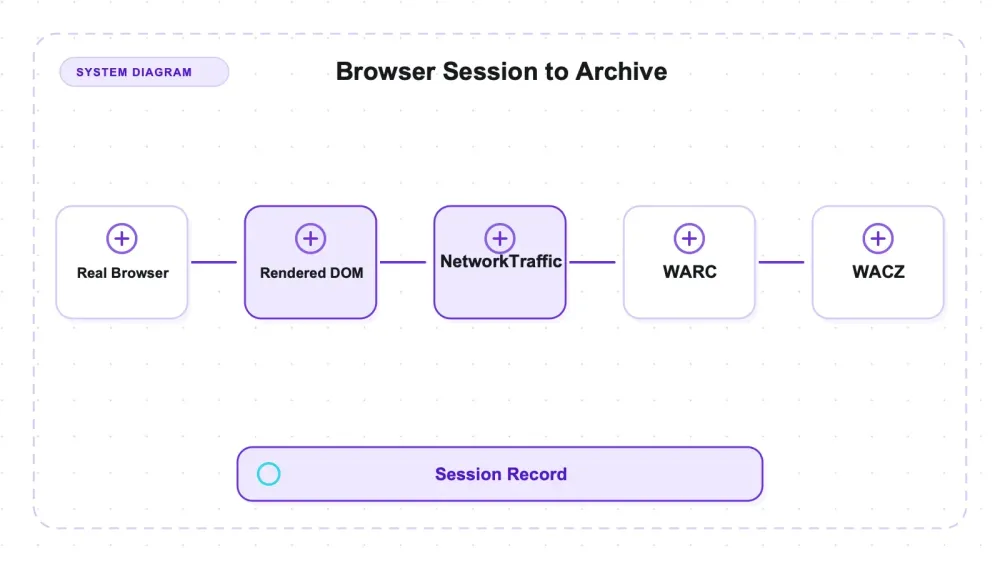
Browsertrix Crawler is Webrecorder's archiving crawler: one Docker image that drives a real Chromium through Puppeteer, records everything that browser fetched, and writes it into WARC — the standard web archive format — optionally bundled into a WACZ package with an index, page list and logs. Its purpose is what separates it from the scraping tools it superficially resembles. A scraper goes out for data and discards the page once it has the fields; an archiver keeps the visit itself — the bytes, the headers, the order they arrived in — so the page can be opened again long after the site has changed or vanished. Webrecorder has maintained that layer of the web's infrastructure, formats and replay stack included, since well before archiving resembled a product category, and libraries, newsrooms and researchers run on it.
I ran v1.14.0 in Docker against a local fixture holding four deliberately different endpoint classes, and instrumented both sides of the crawl: WARC records for the archive contents and a server-side hit counter for actual requests. The useful distinction was not simply static versus dynamic. Browsertrix captured a runtime-created link and a page-issued fetch(), but it did not request two URL literals inside an uncalled JavaScript function.
The linked app.js was archived in full, including both literal paths, yet neither endpoint produced a response record, request record, or server hit. The function holding them never ran. This article therefore evaluates Browsertrix as an archiver of a browser session, not as an inventory of every URL mentioned in source code.
What Browsertrix Crawler actually is
Plenty of people arrive expecting a scraper and leave disappointed. Nothing in the default pipeline hands you a CSV of product prices, and expecting one is like expecting a dashcam to write you a traffic report. The output is a replayable record of a browsing session, and every design decision downstream follows from that.
I tested v1.14.0 on July 27, 2026: webrecorder/browsertrix-crawler:latest at digest sha256:9d6800a8…, with crawl --version confirming the build. The project is AGPL-3.0. Every measurement ran under Docker via Colima on macOS arm64 against the controlled local fixture; the server-side counter supplied evidence independent of Browsertrix logs and archive parsing.
AGPL-3.0 deserves a beat of its own. Strong copyleft with network-use terms. If Browsertrix Crawler is going to sit inside a commercial product rather than be run as a standalone tool, have someone read the license properly before you ship. That is a flag, not legal advice.
The archive records the session, not the source code
My fixture served four kinds of endpoint, deliberately separated because an archiver treats them completely differently:
- Class A — plain
<a href>in the HTML. Four pages plus a three-level depth chain. Any crawler on earth finds these. - Class B — URL literals inside a function that never runs. Two paths,
/api/js-endpoint-7and/api/js-endpoint-8, sitting as strings inside an uncalledloadData()in a linkedapp.js. - Class C — a link built at runtime. An
<a href>assembled from fragments in JavaScript ('endpoint' + (6 * 7)) and appended to the DOM. The contiguous path/runtime-only/endpoint42exists in no served byte. - Class D — a
fetch()the page actually issues. Path assembled the same way ('runtime-xhr-' + (33 * 3)), then genuinely requested on load.
For classes C and D, the complete paths were absent as contiguous strings from the served files. Their server-side hits and response records are therefore evidence that the runtime construction and request paths were exercised in this fixture.
What got captured, and what didn't
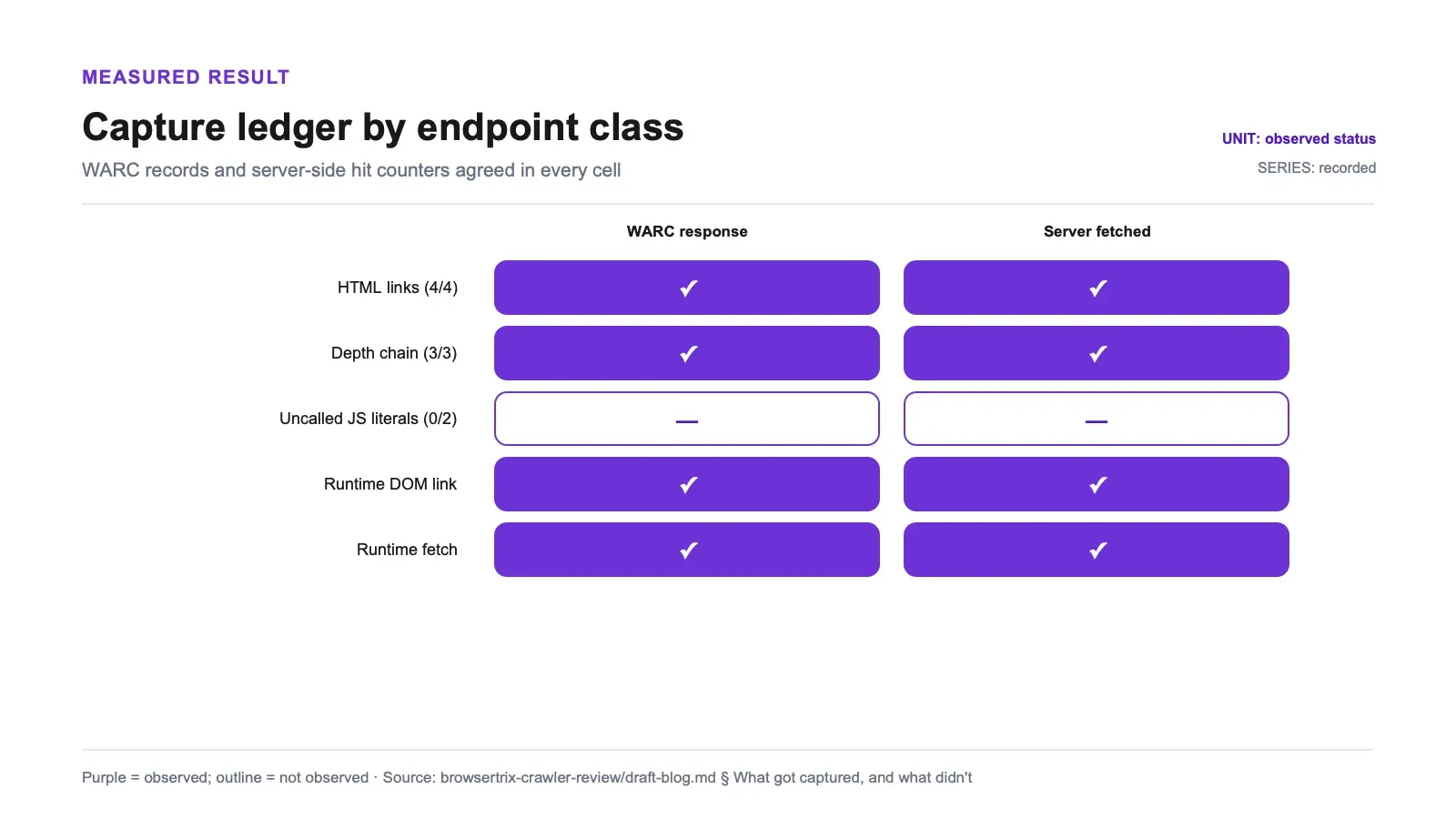
Two instruments, checked against each other in every cell: WARC response records (what's in the archive) and the fixture's server-side hit counter keyed on (Host header, path) (what actually got requested). They agreed everywhere.
| Endpoint class | Response record in WARC | Actually fetched (server-side) | Verdict |
|---|---|---|---|
A — HTML <a href> | 4/4 | 4/4 | captured |
| A — depth chain (3 levels) | 3/3 | 3/3 | captured |
| B — URL literal in uncalled JS | 0/2 | 0/2 | not captured |
| C — link injected at runtime | yes | yes | captured |
D — runtime fetch() | yes | yes | captured |
Class C is the one that separates a real browser from a static crawl. The default link extraction reads the rendered DOM (a[href]->href, per the common options docs), so a link that only exists after JavaScript runs still gets queued, fetched, and archived. Class D lands for a different reason — the page issued the request itself, and the archiver is sitting on the network path recording whatever goes by.
One honest boundary on class C: my link was injected synchronously at page load. Links that appear later, during Browsertrix's behaviors, are a separate case, and there's an open issue for exactly that — #723, "Links on pages that are discovered during behaviors are not extracted". I did not test that scenario, so I'm not claiming anything about it either way.
The file was archived. The endpoints were not.
Confirming the class-B miss took a record-by-record pass through the WARC rather than a summary count.
app.js is in the archive — one response record, a 222-byte JavaScript body — and both class-B literals appear verbatim inside it. Meanwhile, neither /api/js-endpoint-7 nor /api/js-endpoint-8 is the target URI of a single record in the whole file: zero response records, zero request records. Each literal string occurs exactly once across the entire archive, and both occurrences are inside app.js's stored body.
That rules out the boring explanation ("app.js never got fetched"). The archiver stored the file that references those endpoints and never issued a request for them, because loadData() was never called. Browsertrix's default behaviors were active — autoplay, autofetch, autoscroll, siteSpecific — and autofetch didn't rescue them either, which makes sense once you read what autofetch does: it goes after img srcset entries, stylesheets, and data-* URLs, not string literals buried in function bodies.
For an illustrative same-fixture contrast, I also ran Katana v1.6.1 as katana -u <seed> -jc -silent -nc -d 4. Its raw discovery summary records the opposite result on the two deliberately constructed JavaScript classes:
| What you want to find | Browsertrix v1.14.0 | Katana v1.6.1, standard -jc |
|---|---|---|
| Links in served HTML | found | found |
| Link injected into DOM at runtime | found (rendered-DOM extraction) | missed without a headless mode |
fetch() the page actually issues | found (recorded as traffic) | missed — nothing executes |
| URL literal in JS that never executes | missed (0/2) | found (2/2 on this same fixture) |
| The JS file containing that literal | archived in full | parsed, not preserved |
Both commands used the same fixture and endpoint names. The table is not a general ranking of browser and static crawlers; it shows why endpoint inventory and session preservation require different coverage tests.
"Real browser, so it captures everything JavaScript does" is the line you'll see repeated in write-ups. It's over-stated. It captures executed traffic. Code that references a URL without ever calling it produces no traffic, and no traffic means no record.
Replay bodies are there, with one thing I didn't check
For the two runtime-produced endpoints, I pulled the archived HTTP response bodies out of the WARC and confirmed they hold the served JSON: 206 bytes for the runtime-injected link's target, 201 bytes for the runtime fetch() target. So those aren't index stubs pointing at nothing — the content itself is in the archive, which is the precondition for a replay serving them.
What I did not do was stand up pywb or replayweb.page and render the archive. Body-in-archive and correct rendered replay are different claims, and this test covers only the first. Replay behavior, authenticity controls, chain of custody, and evidentiary admissibility all require separate validation.
A production capture needs a wider acceptance test
The fixture answers a narrow question cleanly: did a synchronous runtime link and a page-issued request become network traffic and archive records? A production preservation job usually has several more ways to fail while still producing a valid WACZ.
Start with replay. Open the package in the replay system the collection will actually use and compare a fixed set of pages with the capture-time reference. Check rendered text, images, styles, navigation, and any interactions that matter to the record. Then inspect the replay browser's network panel for missing subresources. A response body can exist in WARC while the replay still fails because rewriting, indexes, timing, origins, or dependencies do not line up. This review did not cross that boundary.
Dynamic behavior deserves its own fixture set. The class-C link here appeared synchronously during page load. Real applications may reveal content after timers, scrolling, consent dismissal, route changes, custom elements, or long API chains. Plant one known target behind each behavior you depend on and verify both the server hit and archived body. Browsertrix's default behaviors are useful inputs to that test, not proof that every delayed state was reached. Issue #723 is especially relevant if links appear during behaviors rather than during the initial page execution.
Authenticated captures add session questions. Confirm that login state enters the browser profile, survives the required navigations, and does not leak into collections that should be isolated. Exercise token refresh and logout paths. If the archive contains private or personal material, test access controls and retention on the resulting files as part of the same acceptance plan. A technically complete capture can still be mishandled after collection.
Service workers, streaming media, WebSockets, downloads, cross-origin frames, and signed URLs each deserve a representative page if they matter to the target. The eleven-page fixture says nothing about them. It also does not establish how the crawler behaves when a page remains active for minutes, emits requests after the usual settle window, or requires user gestures. Avoid turning “real Chromium” into a blanket coverage claim; define the browser behaviors the collection must preserve and make each one observable.
Finally, retain the evidence needed to diagnose misses. Save the exact image digest and command, Browsertrix logs, page lists, indexes, WARC/WACZ checksums, server-side request evidence where available, and a small ground-truth manifest. For repeat captures, record time, configuration, and environment alongside the artifact. Those records do not create legal admissibility, but they make a technical claim reproducible and expose whether a later difference came from the target, the crawler, or the replay stack.
What this tiny-body fixture cost in bytes
This fixture serves only a few hundred bytes per page, so its overhead ratios should not be projected onto asset-heavy sites. Within that narrow regime, I measured the archive's composition rather than only its final size:
| WARC record type | Count | Content bytes | Share |
|---|---|---|---|
request | 14 | 6,912 | 40.6% |
response (the actual page payload) | 13 | 5,339 | 31.4% |
resource (urn:pageinfo: JSON, one per page) | 11 | 4,527 | 26.6% |
revisit (deduplicated dead link) | 1 | 154 | 0.9% |
warcinfo | 1 | 92 | 0.5% |
| Total record content | 40 | 17,024 | 100% |
Per-type counts and byte totals are in the public
capture-summary.json; shares use the 17,024-byte total record content as the denominator.
In this tiny-body run, request records outweighed response content, and the request plus urn:pageinfo: bytes were about 2.1× the response payload. That describes this fixture's record mix, not a general WARC ratio.
On disk, across three isolated runs:
| Metric | min | median | max |
|---|---|---|---|
| Crawl wall time (s) | 28.22 | 29.75 | 30.27 |
| WARC.gz bytes | 24,174 | 24,250 | 24,262 |
| WACZ bytes | 53,446 | 53,523 | 53,533 |
| Captured response payload (bytes) | 5,339 | 5,339 | 5,339 |
Taking medians, four ratios fall out of that:
| Derived measure (medians) | Value |
|---|---|
| Compressed WARC vs. captured response payload | 4.5× |
| WACZ vs. captured response payload | 10× |
| WARC per page | ~2.2 KB |
| WACZ per page | ~4.9 KB |
And inside the WACZ itself:
| WACZ component | Share of the bundle |
|---|---|
| WARC | 45% |
| CDX index | 16% |
| Crawl log | 30% |
That last row is the one that surprised me. Nearly a third of the archive package, on a small crawl, is the record of the crawl rather than the web.
The measurement was stable: the response payload came back byte-identical all three runs (5,339 B every time), with WARC.gz and WACZ varying under 0.4%.
The ratios do not carry over to real pages with images, fonts, and large script bundles. The structural point does: request and page-info records create overhead independent of payload size. Measure a representative sample before planning production storage; do not multiply the 10× fixture ratio by a corpus estimate.
Setup, and the disk you should plan for
Once Docker or Colima is installed and running, the Browsertrix-specific setup is docker pull webrecorder/browsertrix-crawler:latest, then docker run … crawl --url … --generateWACZ. The image carries Chromium, so no separate browser or Python environment was needed.
What that convenience costs, on the runs measured here:
| What you're budgeting for | Measured |
|---|---|
| Image download | ~1 GB |
| Image unpacked on disk | 3.51 GB |
crawls/ tree (WARCs, WACZs, browser profile data) after a handful of 11-page runs on a fixture serving a few kilobytes of content | ~116 MB |
| Wall clock, 11-page fixture crawl | 28–30 s |
The container is where the friction lives, and that download-and-unpack line is what bundling a browser costs. I ran it with --shm-size 1g, and because my fixture lived on the host while the crawl ran in the container, I needed --add-host=host.docker.internal:host-gateway and a fixture bound to 0.0.0.0 rather than loopback. If you're crawling the public internet you'll skip that networking step entirely, but if you're archiving something on your own machine or an internal staging host, budget an afternoon for it.
The output directory is the row that's easiest to underestimate. Extrapolate that growth to a real crawl and plan storage before you start, not after your disk fills at 3 a.m.
Browser startup likely contributes materially to a 28–30 second crawl of only eleven pages, but I did not isolate startup from navigation or packaging time. No per-page throughput conclusion follows from this run.
Planning storage without abusing the fixture ratios
The useful way to size a collection is empirical. Select pages that represent the target's actual distribution: thin application shells, image-heavy landing pages, document downloads, long articles, and authenticated views if those are in scope. Capture each class with the intended behaviors and packaging settings. Measure response payload, WARC, WACZ, indexes, logs, browser-profile residue, and any temporary workspace that remains during a run. Peak disk use matters as much as the final bundle if packaging briefly keeps multiple copies.
Separate fixed and variable components. The 3.51 GB container image is deployment overhead that can be shared by many captures on one worker. Request records, page-info records, indexes, and page lists grow with crawl activity. Response bodies depend heavily on the target, while logs depend on run length and verbosity. Retention and replication then multiply the final collection independently of crawl behavior. A capacity model that combines all of those into “bytes per page” will be brittle.
Compression and deduplication also need representative content. This fixture's response payload was byte-identical across three runs, but that does not describe pages with changing ads, timestamps, personalized responses, or cache-busting asset URLs. If repeated captures are part of the program, measure successive captures of the same pages and inspect revisit records rather than assuming that unchanged-looking pages deduplicate well. Likewise, test whether logs and indexes are retained at the same replication level as the preservation payload.
Operationally, set warning thresholds before the collection starts. Monitor free space, per-collection growth, failed packaging, and the size of browser profiles or temporary directories. Run a restore exercise from the stored WACZ, not only a checksum pass. The ratios above are useful because they reveal which components exist; the representative sample is what tells you how large they will be for your site.
Document those assumptions beside the capacity estimate and revisit them after the pilot crawl.
Scope discipline, tested with two controls
Archiving crawlers that wander are a real operational hazard — you can end up with a legal problem and a storage bill at the same time. My home page linked to http://outofscope.test:<port>/page/out, a different hostname pointing at the same fixture, so a hit carrying that Host header would prove an out-of-scope fetch with no real-internet traffic involved.
| Configuration | Out-of-scope host fetched? | Server-side hits |
|---|---|---|
--scopeType prefix (default) | no | 0 |
--scopeType any | yes | 2 |
The second row is what makes the first row meaningful. Under any the link was reached twice, so it was reachable — the zero under the default prefix scope is real discipline, not a link the crawler failed to notice. There is an open report of out-of-scope visits in other configurations, #788, which I did not reproduce under default prefix scope on this fixture. Worth knowing it exists; not worth me claiming I saw it.
Robustness was unremarkable in the good way. A route returning HTTP 500 and a dead link were both requested, the crawl exited cleanly with a valid WARC and WACZ, and the dead link was stored as a deduplicated revisit record rather than blowing anything up.
Pros and cons
Pros
- Captures runtime-injected DOM links and page-issued
fetch()calls — both confirmed in the archive and on the server side, on paths that exist nowhere as literals. - Static HTML and depth traversal are complete: 4/4 links, 3/3 depth chain, no misses.
- Once Docker/Colima was running, one
docker runproduced a WARC and WACZ; Chromium came inside the image. - Default
prefixscope held with zero out-of-scope fetches;anywidened as documented, so the knob does what it says. - Output is a standards-based archive (WARC, bundled as WACZ with a CDX index and page list) rather than a proprietary blob.
- Near-deterministic archives: payload byte-identical across three runs, on-disk size varying under 0.4%.
- Clean failure behavior: a 500 route and a broken link didn't abort the crawl.
Cons
- URL literals in unexecuted JavaScript are simply not discovered (0/2), even when the file containing them is archived. Correct by design, still a real coverage gap if endpoint discovery is your goal.
- Heavy footprint: ~1 GB pull, 3.51 GB on disk, and output directories that grow fast.
- Byte overhead is substantial on small pages — request plus pageinfo records exceeded the actual payload, and ~30% of the WACZ was the crawl log.
- AGPL-3.0 means real compliance homework for commercial embedding.
- Not a structured-data tool. There's no schema, no field mapping, no clean rows at the end.
- Per-page throughput is modest by design, since every page goes through a real browser.
Who should run it, and who should not
Browsertrix is aimed at teams whose required artifact is an archive of browser-fetched resources rather than extracted rows. In this fixture, runtime-fetched response bodies were present in WARC and packaged into WACZ. Libraries, newsrooms, and researchers are plausible users, but production adoption should separately test rendered replay, authentication, service workers, consent flows, delayed behaviors, streaming assets, retention controls, and any evidence-handling requirements.
Skip it if what you actually need is data. If the goal is "get me every product and price from these 400 pages as a spreadsheet," an archiver is a strange path to that outcome — you'd archive gigabytes and then still have to write extraction code against WARC files. Skip it too if you're mapping an application's API surface, because the class-B result says plainly that a static JavaScript parser will find endpoints Browsertrix never touches. And if you're allergic to Docker or working somewhere a 3.5 GB image is a problem, this isn't the tool that will bend for you.
Authorization and retention
Scope controls do not supply authorization. Define permitted hosts, retention, and archive access before crawling, especially when durable captures may include personal data. The prefix/any test shows that configuration changes network reach; it does not establish which reach is lawful for a particular collection.
Related review: legal side of web scraping and archiving.
Alternatives by required output
Choose by artifact. Browsertrix targets preservation in WARC/WACZ. A browser automation library such as Playwright exposes a programmable page but leaves capture packaging to you. Endpoint-discovery crawlers enumerate URLs, while extraction tools return text or structured records. These categories can share a browser and still solve different jobs.
Related review: Heritrix review.
Disclosure: Thunderbit is the publisher's product and was not tested in this Browsertrix fixture. It belongs to the managed extraction category, producing page text or structured data rather than a standards-based archive. This review supports only the output boundary, not a comparative performance or capability claim.
Try Thunderbit for Web Data Extraction
Verdict
Use Browsertrix Crawler when the required output is a WARC/WACZ capture and a containerized Chromium fits the deployment. On this fixture, archive records and server hits agreed for synchronous runtime-DOM and page-issued fetches, default prefix scope excluded the second host, and failure routes did not prevent a valid archive.
Before production use, validate replay, delayed behavior, authenticated sessions, service workers, storage composition on representative pages, and license obligations. The tested boundary is narrower: code references that never execute produced no request and no archive record for their targets, even though the containing script was preserved.
Try Thunderbit for Web Data Extraction Get Started Free
FAQs
What's the difference between WARC and WACZ here? WARC contains the captured request, response, and related records. WACZ packages WARC with indexes, page lists, metadata, and logs for distribution and replay tooling. This review inspected both packages but did not render a replay.
How should I estimate storage? Measure representative pages and retain the full WACZ composition, including logs and indexes, in the sample. The ratios in this article come from unusually small response bodies and are unsuitable for multiplying by a production URL count.
Will it wander off the site I pointed it at?
Not on the default setting, in my testing. With --scopeType prefix, a link to a different hostname was fetched zero times; switching to --scopeType any fetched it twice, which proves the link was reachable and the default's zero was real scope discipline. There is an open upstream report of out-of-scope visits in other configurations that I did not reproduce under the default, so check your own scope settings rather than assuming.
What must I test before claiming replay fidelity? Load the WACZ in the intended replay system and compare rendered pages, interactions, and required subresources against the live or reference capture. Body presence in WARC is necessary but does not verify the rendered replay by itself.
Does Browsertrix turn an archived page into structured rows? No. Its output is an archive package, not a table of selected fields. If the deliverable is products, prices, contacts, or another schema, you still need an extraction stage after capture—or a different tool whose primary output is structured data.




