

The internet is a wild place these days—between privacy concerns, geo-blocks, and the sheer volume of bots crawling the web, it sometimes feels like you need a secret agent just to check your email. As someone who’s spent years in SaaS and automation, I’ve seen firsthand how critical proxies—especially SOCKS5 proxies like 911 Socks 5—have become for business users, researchers, and anyone who values privacy or needs reliable access to global data. But with the original 911 Socks 5 out of commission and the proxy landscape shifting fast, finding the right SOCKS5 alternatives (and optimizing them for your workflow) is more important than ever.
Let’s dive into the nuts and bolts of how proxy SOCKS5 works, why 911 Socks 5 alternatives matter, and how you can use tools like Thunderbit to extract, analyze, and deploy the best proxy solutions for your needs. Whether you’re a business user, an IT pro, or just someone who wants to keep their browsing private, this guide will walk you through every step—no technical jargon required.
What is 911 Socks 5 and How Does Proxy Socks5 Work?
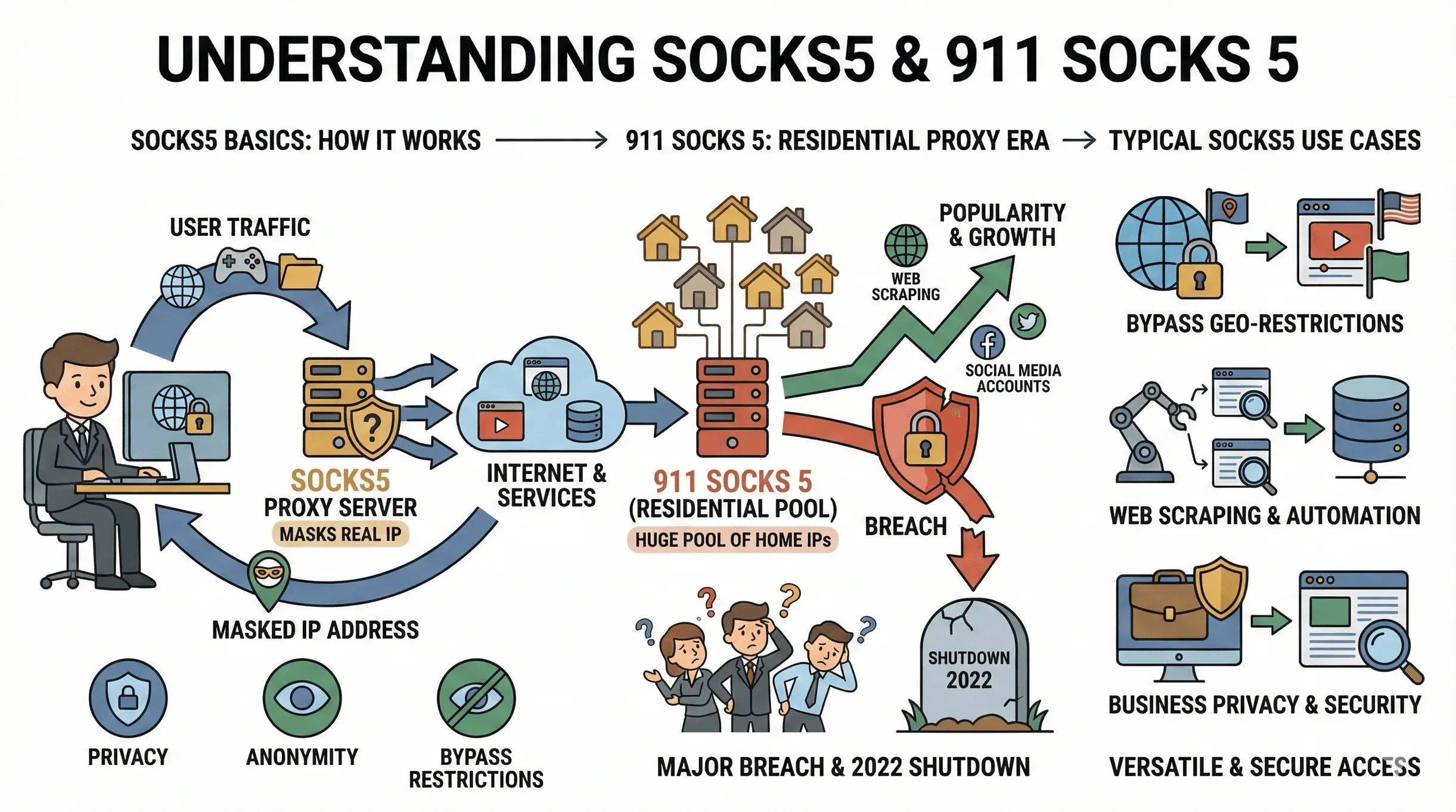 If you’ve ever wondered how some folks seem to magically appear online from another country (or keep their web activity under wraps), there’s a good chance they’re using a SOCKS5 proxy. Let’s break down what that means—and why 911 Socks 5 became such a big deal.
SOCKS5 Proxies: The Basics
A SOCKS5 proxy is a type of internet relay that routes your traffic through a third-party server, masking your real IP address and making it look like you’re browsing from somewhere else. Unlike HTTP proxies (which only handle web traffic), SOCKS5 operates at a lower level and supports all kinds of network traffic—think web browsing, file transfers, streaming, gaming, and, yes, large-scale web scraping (ExpressVPN).
The main perks? Privacy (your real IP stays hidden), anonymity (websites see the proxy’s IP, not yours), and the ability to bypass geo-restrictions or network blocks. For businesses, this means you can do things like monitor global prices, access region-locked content, or automate data collection without tipping your hand (Bright Data).
911 Socks 5: What Made It Special?
For years, 911 Socks 5 was the go-to provider for residential SOCKS5 proxies. Unlike datacenter proxies (which are easier to detect and block), residential proxies use real home IPs, making them look like genuine users to most websites. 911 Socks 5 offered a huge pool of these IPs, making it popular for everything from web scraping to managing multiple social media accounts (PrivateProxy.me).
But here’s the catch: 911 Socks 5 was shut down in 2022 after a major security breach (Proxyway). That left a lot of users scrambling for alternatives—and highlighted just how risky it can be to rely on a single proxy provider.
Typical Use Cases for Proxy Socks5
- Bypassing geo-restrictions: Access content or services only available in certain countries.
- Web scraping and automation: Gather data at scale for price monitoring, SEO, or research—without getting blocked.
- Protecting sensitive business activities: Mask your company’s real IP when conducting competitive research or managing multiple accounts.
Configuring Proxy Socks5 in Your Browser
Setting up a SOCKS5 proxy in your browser isn’t rocket science, but the steps do vary depending on what you use. Here’s a quick guide:
Firefox
- Go to Options/Preferences > General > Network Settings > Settings.
- Select Manual proxy configuration.
- Enter the SOCKS5 server’s IP address and port under SOCKS Host.
- (Optional) Add domains to “No proxy for” if you want to bypass the proxy for certain sites.
- Save and restart your browser.
Chrome & Edge
Both use your system’s proxy settings:
- On Windows, open Settings > Network & Internet > Proxy (or Control Panel > Internet Options > Connections > LAN settings).
- Enable “Use a proxy server” and enter your SOCKS5 proxy’s address and port.
- Save and restart your browser.
Alternatively, you can use browser extensions like SwitchyOmega for more granular control.
Verifying Your Proxy
After setup, visit a site like whatismyip.com to check your IP. If the proxy is working, you’ll see the proxy’s IP and location—not your own.
Troubleshooting Tips
- Double-check the IP and port.
- Make sure you’ve entered any required credentials.
- Temporarily disable firewalls or antivirus if you suspect they’re blocking the connection (PYPROXY).
- Try a different network or proxy server if you’re still having issues.
Why Consider Socks5 Alternatives to 911 Socks 5?
The proxy world moves fast, and the 911 Socks 5 shutdown is a perfect example of why you shouldn’t put all your eggs in one basket. Here’s why exploring SOCKS5 alternatives is a must:
Instability and Shutdowns
911 Socks 5’s abrupt closure left users stranded overnight (Proxyway). New providers have popped up (like PIA S5), but many lack transparency or simply resell other networks’ IPs (Proxyway). Relying on a single, unvetted provider is risky for business continuity.
Regional and Technical Limitations
Some SOCKS5 providers only offer IPs in certain regions or require special software (911 Socks 5 was Windows-only and China-centric). If you need global coverage or integration with various tools, you’ll want a provider with broader infrastructure and better support (PrivateProxy.me).
Use-Case Mismatch
Not all proxies are created equal. Some are optimized for speed, others for anonymity or specific protocols. If your business needs change, your proxy should be able to keep up.
Common Challenges with Proxy Socks5 Services
- Speed drops: Residential proxies often trade speed for stealth. If your downloads crawl, try a different provider or switch to datacenter proxies for faster throughput (Proxyway).
- IP bans: Websites may block proxy IPs if they detect suspicious activity. Rotating proxies and a large IP pool help reduce this risk (OKKProxy).
- Authentication headaches: Some proxies use IP-whitelisting, others require usernames/passwords. Double-check your setup if things aren’t working (PYPROXY).
- Stability issues: Cheap or free proxies can drop connections or go offline without warning. If uptime is critical, invest in a reputable provider (Proxyway).
How to Choose the Right Socks5 Alternatives
With so many SOCKS5 alternatives out there, how do you pick the right one? Here’s my go-to checklist:
Key Criteria for Evaluating Socks5 Alternatives
- IP Pool Size & Diversity: Bigger, globally distributed pools mean less chance of IP reuse and bans. Top providers like Bright Data and Oxylabs offer 150–177 million IPs across 180+ countries (Bright Data).
- Location Coverage: Need to appear in a specific city or country? Make sure your provider offers granular targeting.
- Speed and Bandwidth: Datacenter proxies are faster, but easier to detect. Residential proxies are stealthier but slower. Test before you commit.
- Session Persistence: Some proxies let you keep the same IP for a set time (“sticky sessions”), others rotate per request. Match this to your workflow.
- Security Features: SOCKS5 doesn’t encrypt traffic by default. If you need encryption, consider a VPN or an encrypted proxy option.
- Uptime and Reliability: Look for providers with 99.9% uptime and positive user reviews.
- Customer Support: 24/7 support and transparent ownership are a must for business users.
- Pricing: Compare pay-as-you-go vs. subscription models. Cheap isn’t always better—balance cost with reliability and support.
Sample Comparison Table of Popular Socks5 Alternatives
| Provider | IP Pool Size | Coverage | Example Pricing (Residential) |
|---|---|---|---|
| Bright Data | ~150 million | 195+ countries | ≈$2.94/GB |
| Oxylabs | ~177 million | 188 countries | ≈$8/GB |
| Decodo (Smartproxy) | ~125 million | 195+ countries | $6 for 2GB (= $3/GB) |
| IPRoyal | ~32 million | 195+ countries | ≈$3.68/GB |
| Webshare | Undisclosed | 150+ countries | $2.99/mo (100 static DC) |
Using Thunderbit to Extract and Analyze Proxy Socks5 Performance Data
Scrape Proxy Reviews and Specs with AI Get Started Free
Here’s where things get interesting. With so many providers and so much marketing fluff, how do you actually compare SOCKS5 alternatives based on real-world performance and user feedback? Enter Thunderbit.
Thunderbit is an AI-powered web scraper that lets you extract structured data from any website in just a couple of clicks. For proxy research, that means you can:
- Aggregate user reviews from sites like Trustpilot, G2, or specialized proxy forums.
- Scrape provider specs (IP pool size, coverage, pricing, features) directly from vendor websites.
- Collect performance benchmarks (download speeds, uptime, success rates) from review blogs or comparison charts.
Step-by-Step: Scraping Proxy Socks5 Reviews with Thunderbit
- Install the Thunderbit Chrome Extension.
- Navigate to a review site or provider comparison page.
- Click “AI Suggest Fields”—Thunderbit’s AI will scan the page and propose columns like reviewer name, rating, and comment.
- Click “Scrape” to extract all the reviews into a neat table.
- Use “Scrape Subpages” if you want to gather more details from linked pages (like full review text or performance charts).
- Export your data to Google Sheets, Airtable, Notion, or Excel for easy analysis.
Now you can filter, chart, and compare providers based on real user experiences—not just marketing claims. This is a game-changer for anyone who needs to make data-driven decisions about which proxy socks5 to trust (Thunderbit Blog).
Try Thunderbit to Scrape Proxy Reviews
Integrating and Deploying Socks5 Alternatives with Thunderbit
Automate Proxy List Management with Thunderbit Get Started Free
Thunderbit isn’t just for research—it’s also a powerful tool for IT teams or business users who need to manage and deploy proxy socks5 solutions at scale.
Bulk Gathering and Integration Workflow
- Scrape provider dashboards or documentation to compile a master list of available proxies, credentials, and features.
- Export structured data directly into your business systems (Google Sheets, Airtable, Notion).
- Schedule regular scrapes to keep your proxy lists up to date—Thunderbit’s cloud scraping can handle dozens of pages at once (Thunderbit Blog).
- Set up alerts or automations (using Airtable or Notion) to notify your team when proxies go offline or new options become available.
This approach means your IT or operations team always has the freshest, most reliable proxy socks5 data at their fingertips—no more scrambling when a provider goes down.
Automating Proxy Socks5 Selection and Updates
- Use Thunderbit’s Scheduled Scraper to auto-refresh provider data weekly or even daily.
- Monitor performance metrics (like speed, uptime, and IP bans) by scraping benchmark sites or your own logs.
- Rotate proxies aggressively to avoid bans and keep your operations running smoothly (OKKProxy).
- Maintain fallback options by tracking multiple providers—if one fails, you can switch instantly.
Step-by-Step Guide: Using and Optimizing Proxy Socks5 and Socks5 Alternatives
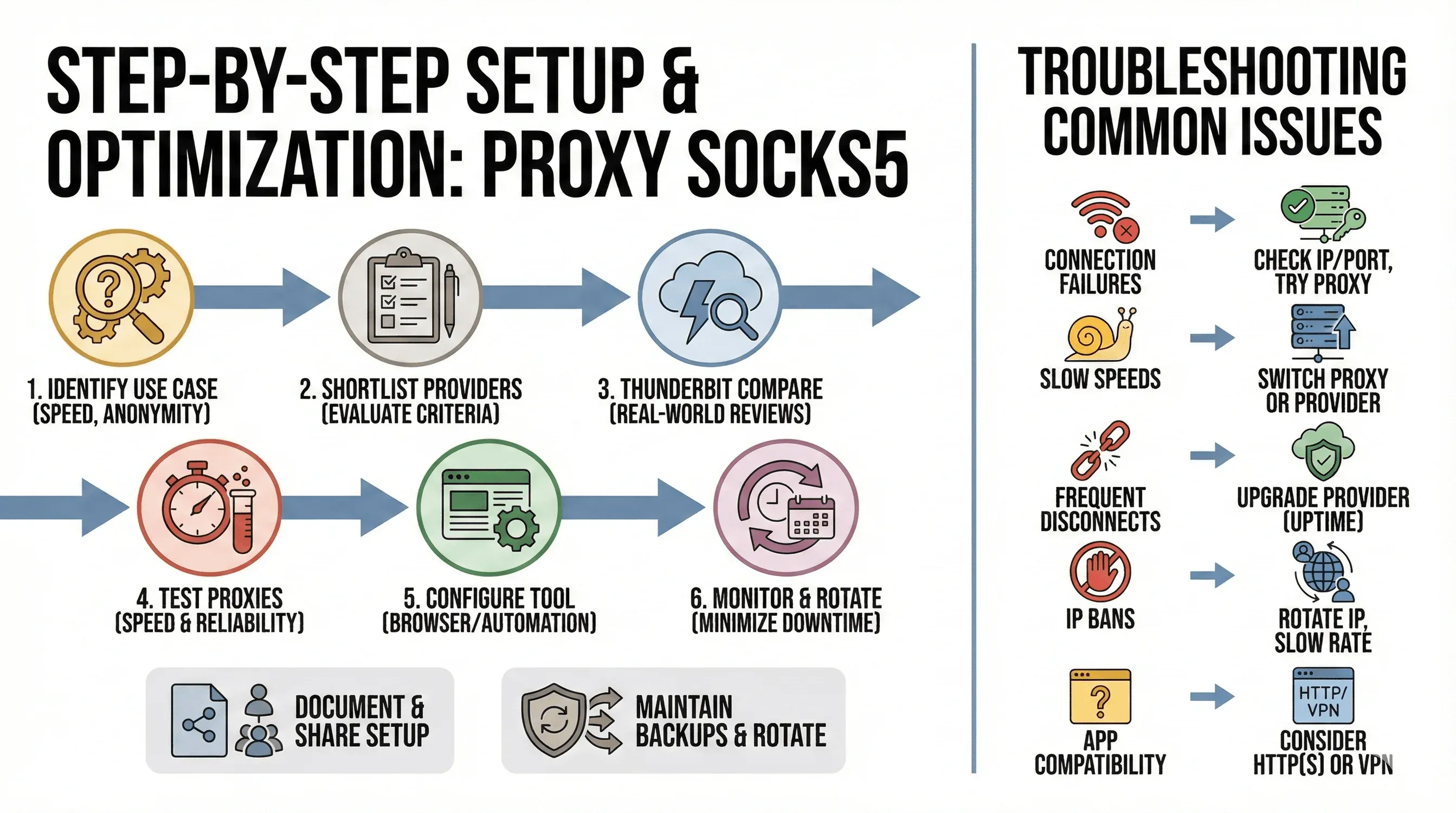 Let’s pull it all together. Here’s how I recommend approaching proxy socks5 setup and optimization:
- Identify your use case: Do you need speed, anonymity, global coverage, or all of the above?
- Shortlist providers using the evaluation criteria above.
- Use Thunderbit to scrape and compare real-world reviews, specs, and performance data.
- Test a few proxies before committing—look for speed, reliability, and compatibility with your tools.
- Configure your browser or automation tool (see setup guide above).
- Monitor performance regularly—use Thunderbit to schedule scrapes and keep your proxy list current.
- Rotate proxies and maintain backups to minimize downtime.
- Document your setup and share with your team for easy troubleshooting.
Troubleshooting Common Proxy Socks5 Issues
- Connection failures: Double-check your IP, port, and credentials. Try a different network or proxy server.
- Slow speeds: Switch to a different proxy or provider. Datacenter proxies are faster, but less stealthy.
- Frequent disconnects: Upgrade to a more reliable provider with better uptime guarantees.
- IP bans: Use rotating proxies and a larger IP pool. Slow down your request rate to mimic human behavior.
- App compatibility: Not all software supports SOCKS5. If yours doesn’t, consider an HTTP(S) proxy or VPN.
Conclusion & Key Takeaways
Choosing and optimizing the right proxy socks5 solution is crucial for privacy, security, and business efficiency in today’s web landscape. With the original 911 Socks 5 gone, it’s more important than ever to evaluate SOCKS5 alternatives based on real-world performance, coverage, and reliability—not just marketing hype.
By leveraging Thunderbit, you can automate the entire process: from scraping and comparing providers, to maintaining up-to-date proxy lists, to deploying and monitoring proxies at scale. This means less downtime, better privacy, and more robust business operations—whether you’re scraping data, managing accounts, or just trying to keep your browsing private.
Stay proactive: Rotate your proxies, monitor performance, and always have a backup plan. And if you want to make your proxy management as easy as possible, give Thunderbit a try—it’s the AI-powered assistant your web privacy strategy has been waiting for.
For more tips on web scraping, proxy management, and automation, check out the Thunderbit Blog.
Try Thunderbit for Proxy Management
FAQs
1. What is a SOCKS5 proxy and how does it differ from other proxies?
A SOCKS5 proxy routes all types of internet traffic (not just web) through a third-party server, masking your real IP and providing greater flexibility than HTTP proxies. It’s ideal for privacy, bypassing geo-blocks, and supporting a wide range of applications (ExpressVPN).
2. Why did 911 Socks 5 shut down, and what does it mean for users?
911 Socks 5 was shut down in 2022 after a security breach, leaving users without access and highlighting the risks of relying on a single proxy provider (Proxyway). Users now need to explore reliable SOCKS5 alternatives.
3. What should I look for in a SOCKS5 alternative?
Key factors include IP pool size, location coverage, speed, session persistence, security features, uptime, customer support, and pricing. Match these to your specific use case for best results (Bright Data).
4. How can Thunderbit help with proxy socks5 research and deployment?
Thunderbit’s AI web scraper can extract and organize reviews, specs, and performance data from across the web, helping you compare providers and maintain up-to-date proxy lists. It also supports bulk data export and scheduled scraping for ongoing monitoring (Thunderbit Blog).
5. What are best practices for optimizing proxy socks5 usage?
Rotate proxies frequently, monitor performance, maintain backup providers, and use tools like Thunderbit to automate research and list management. Always test proxies before deploying them in critical workflows, and stay compliant with relevant laws and site terms.
Ready to take your proxy socks5 workflow to the next level? Download Thunderbit and start optimizing your privacy, security, and business automation today.
Try AI Web Scraper for Proxy Management Get Started Free
Learn More




