
The pace of digital news today is nothing short of dizzying. Every minute, thousands of headlines are published, updated, or quietly edited—across mainstream outlets, niche blogs, and social feeds.
To put it in perspective, LexisNexis Newsdesk ingests over 4 million news articles every single day, while the GDELT Project tracks news in 100+ languages and updates its global feed every 15 minutes.
For anyone in media, research, or business intelligence, trying to keep up with this torrent manually is like bailing out a sinking ship with a coffee mug.
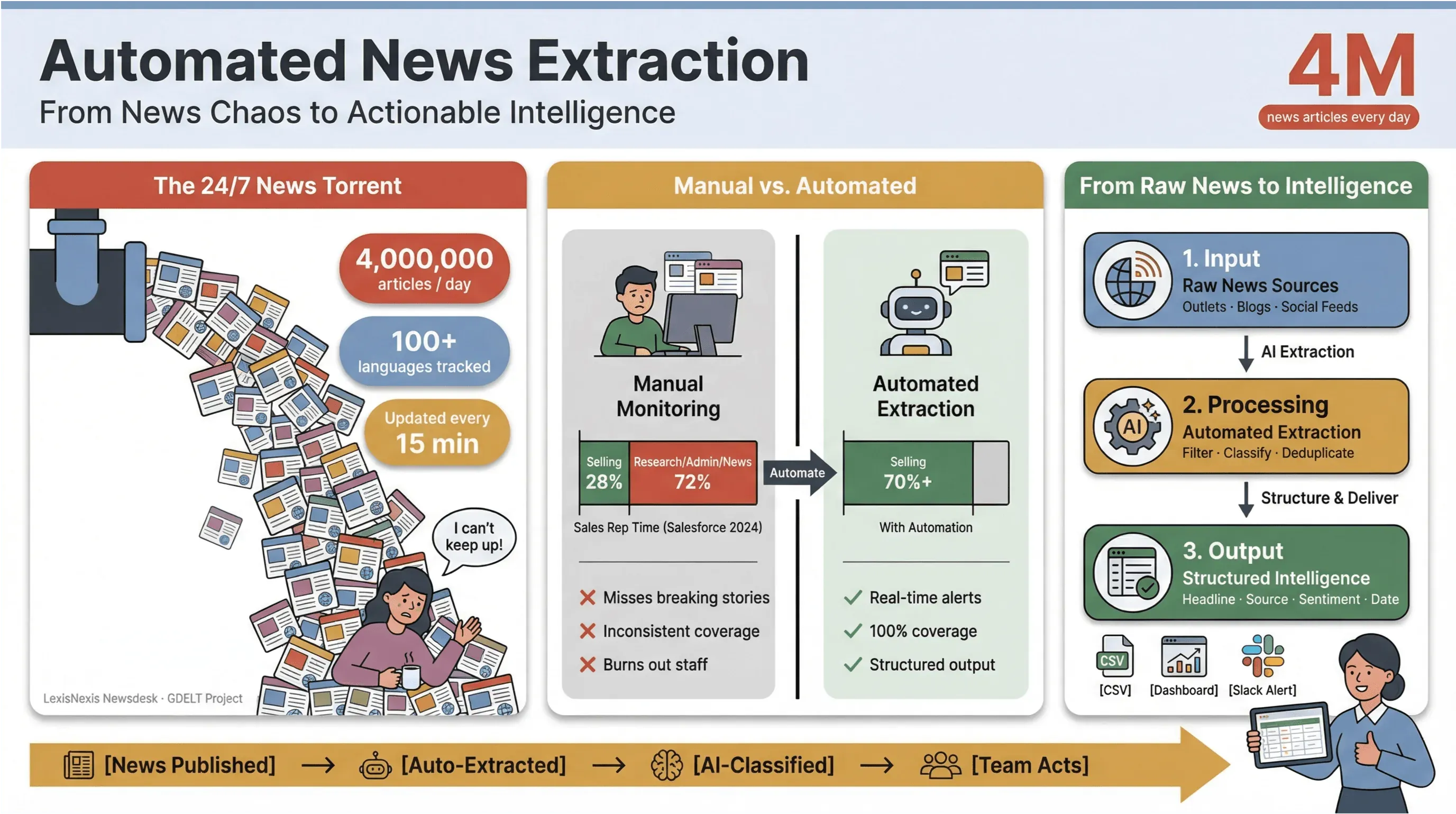
I’ve seen firsthand how manual news monitoring eats up time and drains resources. Sales teams spend less than a third of their week actually selling—just 28% according to Salesforce—with the rest lost to research, admin, and, yes, endless news tab juggling.
That’s why automated news extraction has become the secret weapon for modern teams: it’s the only way to turn the chaos of the 24/7 news cycle into structured, actionable intelligence—without burning out your staff or missing the stories that matter most.
Let’s dive into what automated news extraction really means, why it’s essential for anyone who cares about real-time news data, and how to build a robust, compliant workflow using the best tools (including how Thunderbit makes the whole process shockingly simple—even for non-techies like my mom).
Try Thunderbit for Automated News Extraction Headline, timestamp, author, and summary from any news page — click once and schedule it to repeat. Get Started Free
Automated News Extraction: Why It’s Essential for Modern Newsrooms
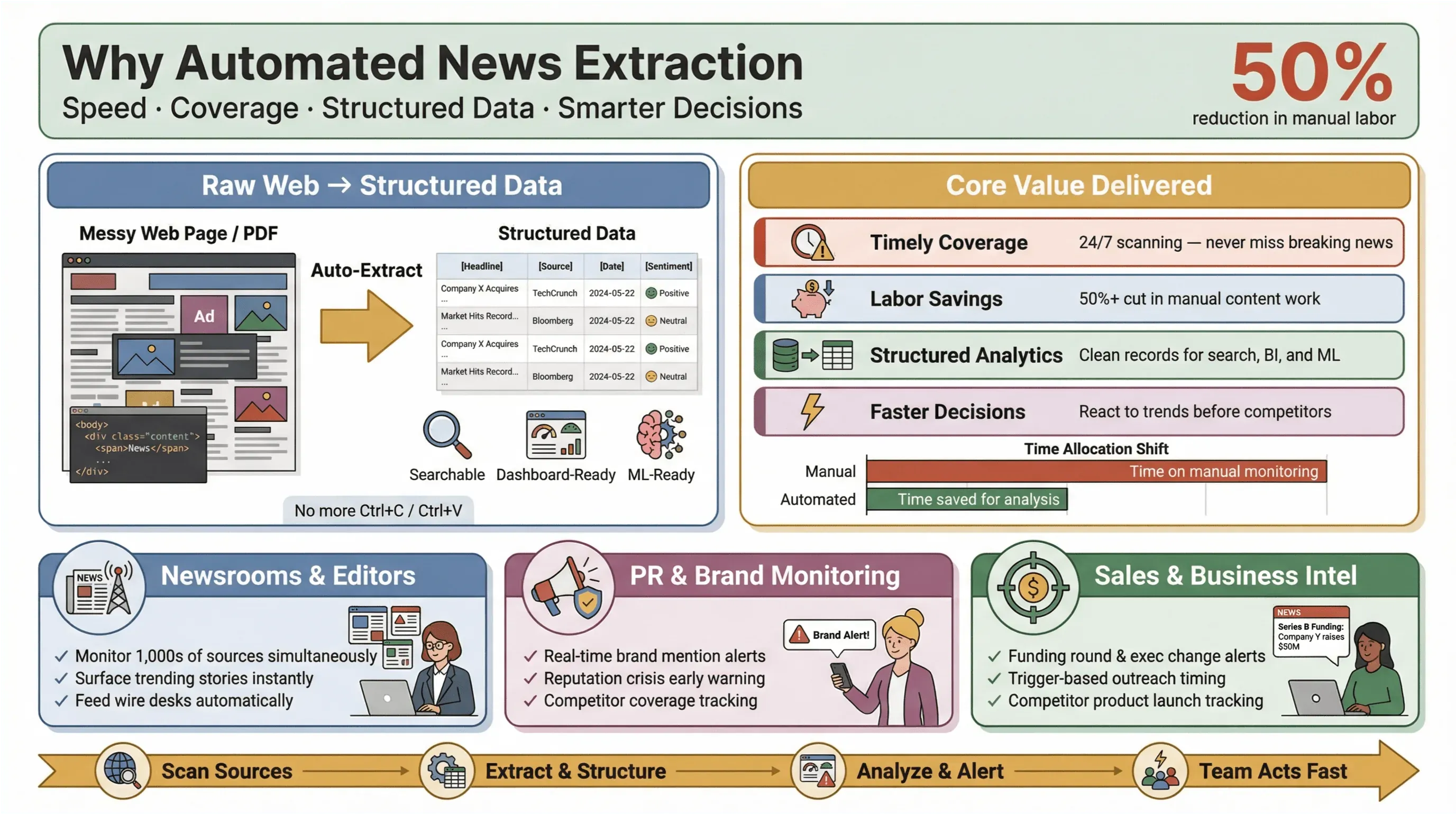
Automated news extraction is exactly what it sounds like: using software to collect news content automatically and transform it into structured, searchable data—think rows and columns instead of messy web pages or PDFs. In practice, this means you can monitor hundreds (or thousands) of sources, extract key fields like headline, timestamp, author, and body text, and feed that data into dashboards, alerts, or downstream analytics—without ever touching Ctrl+C/Ctrl+V.
 Why does this matter? Because in today’s news landscape, speed is everything. Whether you’re a newsroom editor, a PR manager watching for brand mentions, or a business analyst tracking competitor moves, being first to know can mean the difference between seizing an opportunity and playing catch-up. Automated extraction tools let even small teams punch above their weight—gathering real-time news data from across the web, reducing manual workload, and surfacing the stories that matter most.
And the impact is real: studies show that automation can cut manual labor for content updates by at least 50%, freeing up time for actual analysis and decision-making.
Core Value of Automated News Extraction in the News Industry
Let’s get practical. What does automated news extraction actually deliver for newsrooms and business teams?
- Timely, comprehensive coverage: No more missing breaking stories because someone forgot to check a feed. Automated tools scan sources 24/7, ensuring you never miss a beat.
- Labor and cost savings: Small and mid-sized teams can monitor as many sources as the big guys—without hiring an army of interns.
- Structured data for analytics: Instead of sifting through unstructured articles, you get clean, structured records ready for search, dashboards, and machine learning.
- Faster, smarter decisions: Real-time news data means you can react to market shifts, PR crises, or emerging trends before your competitors.
Take PR and communications: platforms like Cision and Meltwater position real-time media monitoring as essential for protecting reputation and acting quickly on harmful coverage. In sales, real-time news alerts become “context cards” for prospecting—think funding rounds, exec changes, or product launches that trigger outreach at just the right moment.
Choosing the Right News Scraping Tools for Different Scenarios
Not all news scraping tools are created equal. The right choice depends on your goals, technical comfort, and the types of news you care about. Here’s a framework to help you pick the best fit:
- Evaluating Ease of Use and Accessibility
- Security and Data Privacy Considerations
- Matching Tools to News Types and Industry Needs
Evaluating Ease of Use and Accessibility
For most business users and journalists, ease of use is non-negotiable. You want a tool that works out of the box, with no coding or complicated setup. No-code and low-code platforms like Thunderbit, Octoparse, and ParseHub let you build scrapers visually—just point, click, and extract.
Thunderbit, in particular, stands out for its one-click flow: click One Click Extract and the AI reads the page, works out the fields, and pulls them. Even non-technical users can set up a news data pipeline in minutes, not hours.
Security and Data Privacy Considerations
With great data comes great responsibility. News scraping tools often access sensitive content, so security and compliance should be top of mind. Look for:
- Data encryption (in transit and at rest)
- Clear privacy policies (Thunderbit, for example, declares it does not sell user data and only accesses content you choose to scrape)
- Granular permissions (especially for browser extensions—always check what data the tool can access)
- Compliance with local laws (GDPR, CCPA, and, for EU users, the DSM Copyright Directive)
For extra peace of mind, choose reputable vendors, verify extension permissions, and minimize access to only what’s necessary.
Matching Tools to News Types and Industry Needs
Some tools excel at specific news domains:
- Finance: APIs like News API and AYLIEN offer clustering, sentiment, and event detection for financial news.
- Tech & Startups: Custom scraping with Thunderbit or Octoparse lets you target niche blogs, press releases, or event listings.
- Politics & Policy: Licensed databases like Factiva and LexisNexis provide access to premium sources and archives.
If you need to monitor a mix of mainstream, niche, and international sources—including those without APIs—flexible AI-driven scrapers like Thunderbit are your best bet.
Thunderbit’s Unique Advantages for Real-Time News Data Extraction
Scrape real-time news data with Thunderbit The AI reads the page and works out the fields — no selector maintenance when a publisher redesigns. Get Started Free
Now, let’s talk about what makes Thunderbit a standout choice for automated news extraction—especially if you want real-time news data without the technical headaches.
Thunderbit is an AI-powered web scraper Chrome Extension designed for business users, journalists, and analysts who need up-to-date, structured news content from any website. Here’s why it’s become my go-to:
- One Click Extract: Thunderbit reads the news page and works out the best columns to extract—headline, timestamp, author, summary, and more. No need to fiddle with selectors or templates.
- Subpage Scraping: Need the full article, not just the headline? Thunderbit can visit each news link, extract the body text, entities, and tags, and merge everything into a single, structured table.
- Bulk Export & Instant Updates: Export your news data directly to Excel, Google Sheets, Airtable, or Notion with one click. No more copy-paste marathons or CSV wrangling.
- Scheduled Scraping: Set up recurring jobs (hourly, daily, or custom intervals) to keep your news pipeline fresh—ideal for breaking news, market monitoring, or ongoing research.
- Adaptability: Thunderbit’s AI adapts to layout changes and long-tail news sites, so you spend less time fixing broken scrapers and more time analyzing data.
With 100,000+ users on the Chrome Web Store, it's used by PR teams, sales researchers, and analysts who need news data without babysitting a scraper.
AI-Driven Field Detection and Subpage Scraping
One of Thunderbit’s killer features is its AI-driven field detection. Just click “One Click Extract,” and the tool scans the news page—identifying key fields like title, date, author, and summary. You can tweak or add custom fields (for example, “tag this article as ‘earnings’ if it mentions quarterly results”), and Thunderbit’s AI will handle the rest.
Subpage scraping is a game-changer for news: scrape a homepage or section listing for headlines, then let Thunderbit visit each article URL to extract the full story, entities, and even images. This means you get complete, enriched news records—ready for search, dashboards, or downstream AI analysis.
Bulk Export and Instant Updates
Thunderbit makes exporting news data painless. With one click, you can send your structured news feed to Google Sheets, Airtable, Notion, or download as CSV/Excel. For teams that live in spreadsheets or BI tools, this is a massive time saver.
And because Thunderbit supports scheduled scraping, you can set it to run every hour, every day, or on your own custom schedule—ensuring your news data is always up to date. No more waiting for Google Alerts to index stories days late.
Overcoming Operational Challenges in Real-Time News Data Solutions
Even with the best tools, real-time news extraction comes with its own set of challenges. Here’s how to tackle the most common ones:
Managing Latency and Data Freshness
- Schedule scrapes based on news velocity: For breaking news, set scrapers to run every 15–30 minutes (matching the GDELT Project’s update cycle). For slower beats, daily or hourly may suffice.
- Monitor lag between published and fetched times: Track the difference between when an article is published and when your system grabs it. If the lag grows, check for blocks or slowdowns.
- Re-scrape for “quiet edits”: News articles are often updated after publication. Schedule a second scrape 24 hours later to catch corrections or stealth edits (GDELT does this by design).
Handling API Limits and Source Variability
- Respect API quotas: If you use news APIs, watch for rate limits—spread requests over time, and cache results when possible (News API docs).
- Deduplicate and canonicalize: News stories often appear on multiple URLs or get updated. Capture canonical URLs and use hashes (e.g., title + date) to avoid duplicates (Google’s canonicalization guide).
- Handle dynamic content: For sites with infinite scroll or lazy loading, use tools that support dynamic rendering and monitor for layout changes (Octoparse’s guide).
Smart News Data Analysis: The Role of AI and Machine Learning
Extracting news is just the first step. The real value comes from analyzing and acting on that data—and that’s where AI and machine learning shine.
- Entity extraction: Use NLP to pull out people, organizations, and places mentioned in each article (Google Cloud’s guide).
- Topic classification: Automatically tag articles by topic, sentiment, or urgency—enabling smarter dashboards and alerts (AYLIEN’s taxonomy docs).
- Event clustering: Group duplicate or related stories across outlets, so you see the big picture (not just a flood of near-identical headlines).
- Personalization and targeting: Use real-time news data to segment audiences, improve ad targeting, or recommend content—boosting engagement and ROI.
For example, PR teams use real-time news analytics to spot emerging crises before they go viral, while sales teams enrich prospect lists with “trigger events” like funding rounds or executive hires.
Best Practices Checklist for Automated News Extraction
Here’s a quick-reference checklist to keep your news extraction pipeline running smoothly:
| Best Practice | Why It Matters | How to Implement |
|---|---|---|
| Schedule frequent scrapes | Minimize data lag, catch breaking news | Match update frequency to news velocity (e.g., every 15 min for fast beats) |
| Use AI-driven extraction | Adapt to layout changes, reduce setup time | Tools like Thunderbit, Diffbot, Zyte API |
| Deduplicate and canonicalize | Avoid duplicate alerts, ensure clean data | Capture canonical URLs, use hashes for deduplication |
| Monitor extraction quality | Catch missing fields, drift, or failures | Track % complete records, lag, and error rates |
| Respect legal/compliance boundaries | Avoid legal risk, maintain trust | Prefer official APIs/feeds, review terms, minimize personal data |
| Export to structured formats | Enable downstream analytics | CSV, Excel, Sheets, Notion, Airtable |
| Schedule re-scrapes for edits | Catch post-publication changes | Revisit articles after 24h/1w (GDELT model) |
| Secure your pipeline | Protect sensitive data | Encryption, access controls, reputable tools |
Building a Robust Automated News Extraction Workflow
Ready to build your own “black box” for news data? Here’s a step-by-step workflow:
- Identify your sources: List the news sites, blogs, or APIs you want to monitor.
- Set up extraction: Use Thunderbit or your tool of choice to define fields (One Click Extract makes this a breeze).
- Schedule scrapes: Set frequency based on news velocity—hourly for breaking news, daily for slower beats.
- Subpage enrichment: For each headline, scrape the full article for body text, entities, and tags.
- Deduplicate and normalize: Capture canonical URLs, hash records, and standardize fields.
- Export and integrate: Send structured data to Excel, Google Sheets, Airtable, or Notion for analysis.
- Monitor and adapt: Track extraction quality, watch for layout changes, and adjust as needed.
- Stay compliant: Review terms, respect robots.txt, and minimize personal data.
For a visual workflow, think:
Sources → Extraction (AI fields) → Subpage enrichment → Deduplication → Export → Analysis/Alerts → Monitoring
Conclusion & Key Takeaways
Turn Any News Page Into a Table Free to start, no card required. The Email, Phone Number, and Image Extractors are included on every plan. Get Started Free
Automated news extraction isn’t just a “nice-to-have” anymore—it’s a must for anyone who needs to stay ahead in a world where news breaks (and changes) by the minute. By following best practices and using the right tools, you can transform the firehose of digital news into a steady stream of actionable, structured intelligence.
Key takeaways:
- The scale and speed of online news demand automation—manual monitoring just can’t keep up.
- Automated news extraction tools save time, reduce costs, and empower small teams to match the coverage of much larger organizations.
- Choosing the right tool means balancing ease of use, security, and adaptability—Thunderbit stands out for its AI-driven simplicity and real-time export options.
- Build your workflow around freshness, deduplication, compliance, and quality monitoring to ensure reliable, actionable news data.
- AI and machine learning unlock even greater value—enabling smarter targeting, personalization, and decision-making.
If you're still copy-pasting headlines or waiting for Google Alerts to surface stories a day late, it's worth piloting an automated workflow. Install the free Chrome Extension, point it at three or four sources you check every morning, and see whether the structured export saves you the time you think it will. For more tips, workflows, and deep dives, check out the Thunderbit Blog.
Scrape News Sites with Thunderbit Set it on a schedule and let it monitor the sources you care about. Exports go straight to Sheets, Excel, Airtable, or Notion. Get Started Free
FAQs
1. What is automated news extraction, and how does it work?
Automated news extraction is the process of using software to collect news articles and turn them into structured data (like tables or JSON) for analysis, search, or alerts. Tools like Thunderbit use AI to identify key fields (headline, timestamp, author, body text) and extract them from web pages or APIs automatically.
2. Why is real-time news data so important for businesses?
Real-time news data lets businesses react quickly to market events, PR crises, or competitor moves. Whether you’re in sales, PR, or research, having up-to-date news means you can make smarter, faster decisions and stay ahead of the competition.
3. How does Thunderbit make news scraping easier for non-technical users?
Thunderbit offers a simple one-click flow: click One Click Extract and the AI works out what to pull. With features like subpage scraping and instant export to Excel or Google Sheets, even non-technical users can build robust news data pipelines in minutes.
4. What are the legal and compliance considerations for news scraping?
Always review the terms of service for your target sites, prefer official APIs or feeds when available, and respect robots.txt directives. Avoid scraping login-required or paywalled content without permission, and minimize the collection of personal data to stay compliant with privacy laws.
5. How can I ensure my news extraction workflow stays reliable over time?
Schedule regular scrapes, monitor extraction quality, and use tools that adapt to layout changes (like Thunderbit’s AI-driven extraction). Deduplicate records, track lag between publication and extraction, and set up alerts for failures or missing fields to keep your pipeline healthy and up to date.
Try Thunderbit AI Web Scraper Get Started Free
Learn More




