Walmart product scraper

By
Extract product details from Walmart pages, including price, ratings, images, and availability, to speed up research and comparison.

Want to scrape data in bulk? Try Thunderbit for free.

Chrome Store Rating
PRODUCT HUNT#1 Product of the Week
Accenture logoCriteo logoGrammarly logoVerisk logoklook logoPuma logoRingCentral logoAccenture logoCriteo logoGrammarly logoVerisk logoklook logoPuma logoRingCentral logoAccenture logoCriteo logoGrammarly logoVerisk logoklook logoPuma logoRingCentral logoAccenture logoCriteo logoGrammarly logoVerisk logoklook logoPuma logoRingCentral logoAccenture logoCriteo logoGrammarly logoVerisk logoklook logoPuma logoRingCentral logoAccenture logoCriteo logoGrammarly logoVerisk logoklook logoPuma logoRingCentral logo
Scrape Walmart Products with EaseUse Thunderbit to scrape Walmart product pages and pull structured details in a few clicks. Collect prices, ratings, images, and availability without copy-paste work.
chrome-web-store
Install fromChrome Web Store

Scrape Walmart Products with Ease

Thunderbit reads Walmart product pages and turns them into structured data you can use for research or catalog building. It can also scrape subpages, PDFs, docs, and images, then format fields like product name, price, rating, and availability. Export results to Google Sheets, Airtable, or Notion in a few clicks. Thunderbit also helps summarize, categorize, and organize scraped data so your team can move from page to spreadsheet with less manual work.

How to Extract Product Data Using Thunderbit

step_01.png
STEP 1Download and InstallDownload and install the Thunderbit Chrome Extension from the Thunderbit Chrome Extension Download Page at https://chromewebstore.google.com/detail/thunderbit-ai-web-scraper/hbkblmodhbmcakopmmfbaopfckopccgp. After installation, sign in or create a free account to begin.
step_02.png
STEP 2Open ExtensionGo to the Walmart product page you want to scrape, then open the Thunderbit Chrome Extension. In the tool menu, choose the Walmart Product Scraper. Paste one valid Walmart product URL into the input field, such as https://www.walmart.com/ip/sample-product-id.
step03.png
STEP 3Click the Extract product data ButtonClick the Extract product data button. Thunderbit will read the product page and extract structured fields such as Product Name, Product URL, Brand, Current Price, Original Price, Unit Price, Rating, Reviews Count, Availability, Seller, Short Description, Description, Product Image, All Images, Model, UPC, Fulfillment Type, Product ID, and Category. When the table is ready, export it to Excel, Google Sheets, Airtable, or Notion, or download it as CSV or JSON.

Learn how to extract Walmart product data

Extract Product Details from Walmart
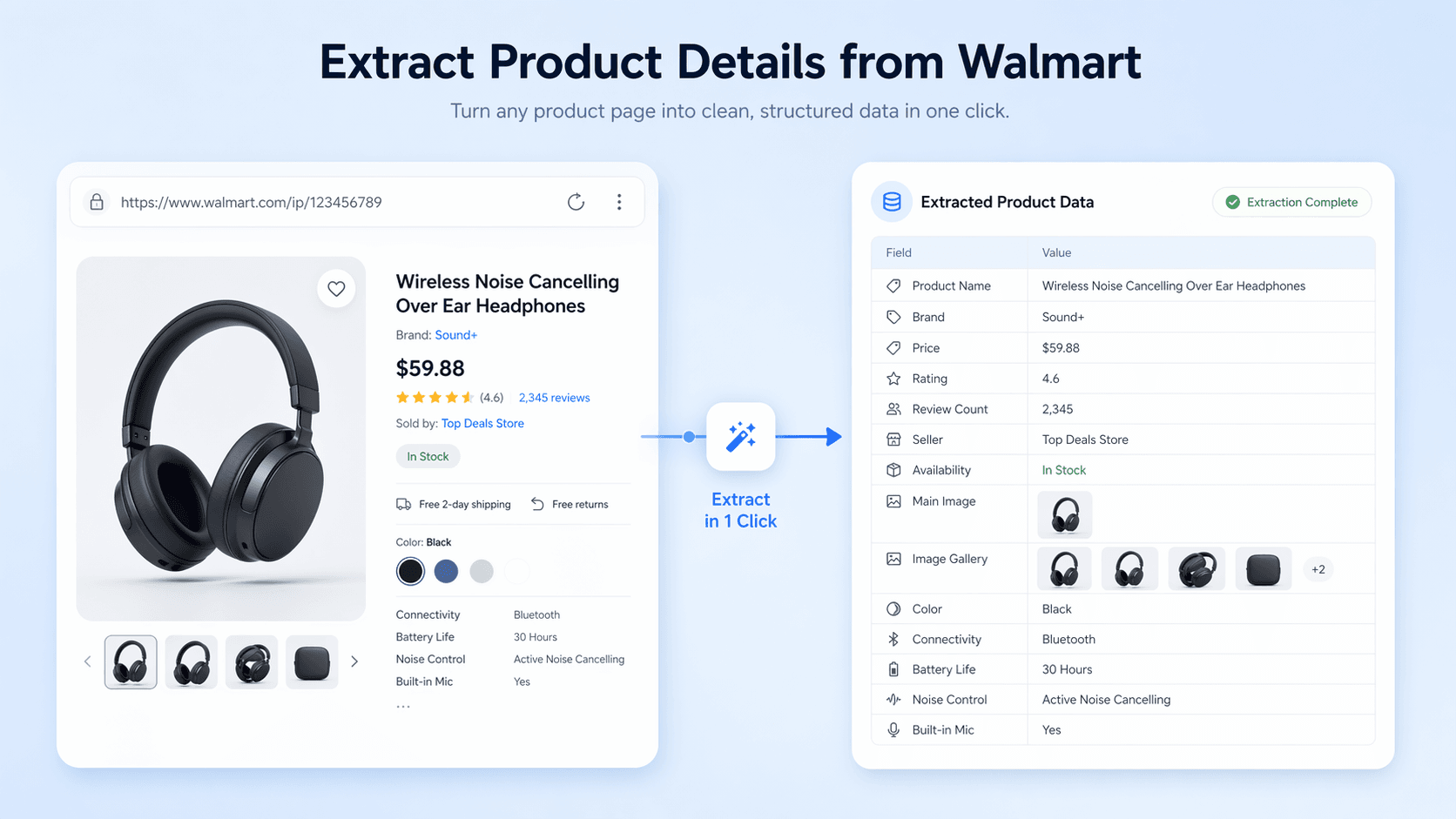
This scraper pulls key product information from a Walmart product page using just one URL. It can capture the product name, brand, price, rating, reviews, seller, availability, and description in a structured table. It is useful for ecommerce teams, analysts, and researchers who need reliable product data for comparison, catalog building, or market tracking without manual copy and paste.
Get Started Free
walmart_product_details_v1.png

Capture Images and Identifiers

Beyond basic listing data, the tool also extracts the product image, all available images, model number, UPC, fulfillment type, product ID, and category. This helps teams build richer product records and keep details organized for audits, content workflows, and product matching. It is especially helpful when you need both visual assets and standardized identifiers from the same Walmart listing.
Get Started Free
walmart_images_identifiers_v1.png

Export Data for Analysis

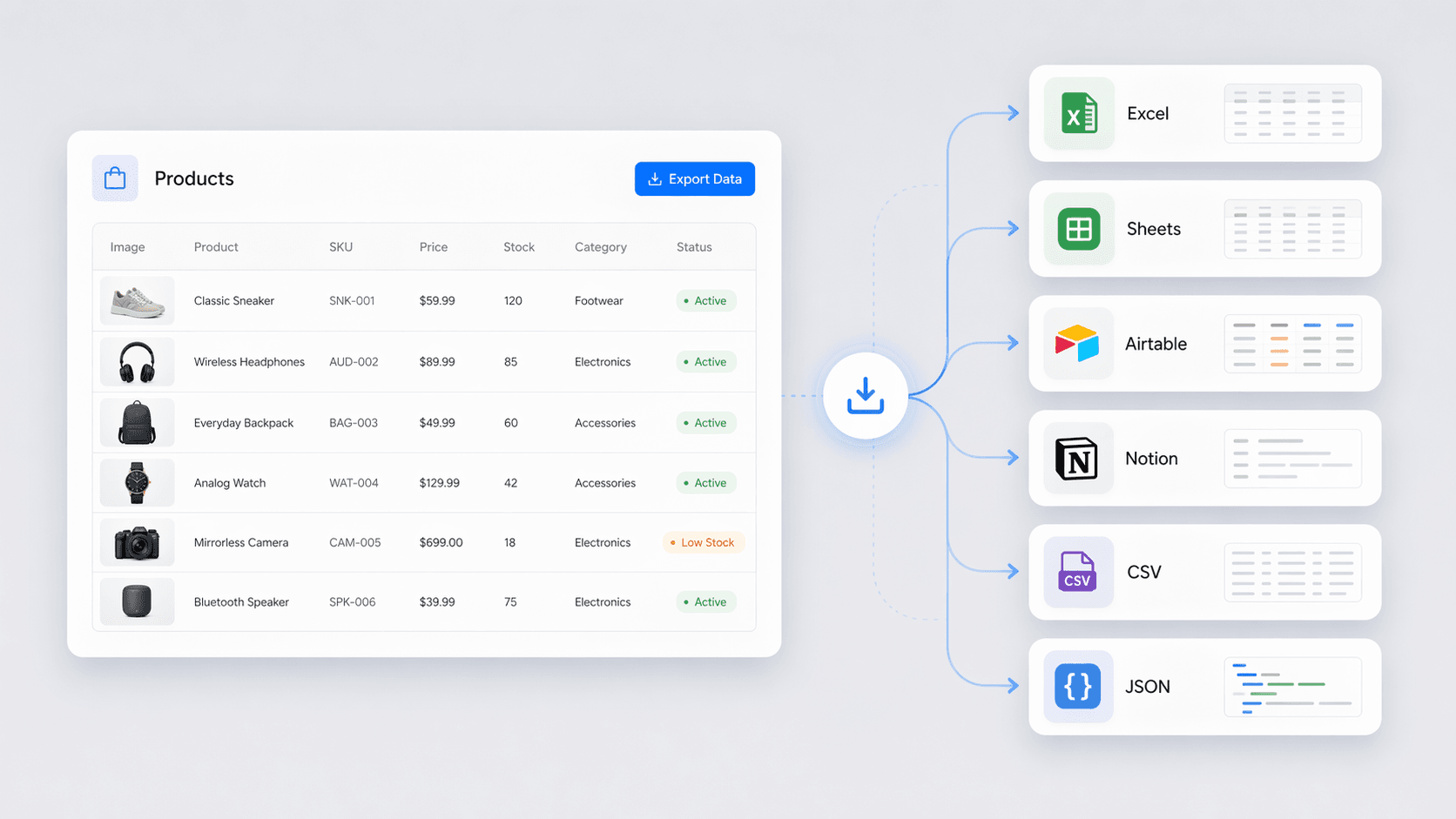
The extracted table is ready to use in your workflow and can be exported to Excel, Google Sheets, Airtable, Notion, CSV, or JSON. This makes it easy to compare Walmart products against competitors, update internal catalogs, or share clean product records with your team. Structured output reduces errors and saves time compared with collecting details by hand.
Get Started Free
walmart_export_analysis_v1.png

Support Ecommerce Research and Monitoring
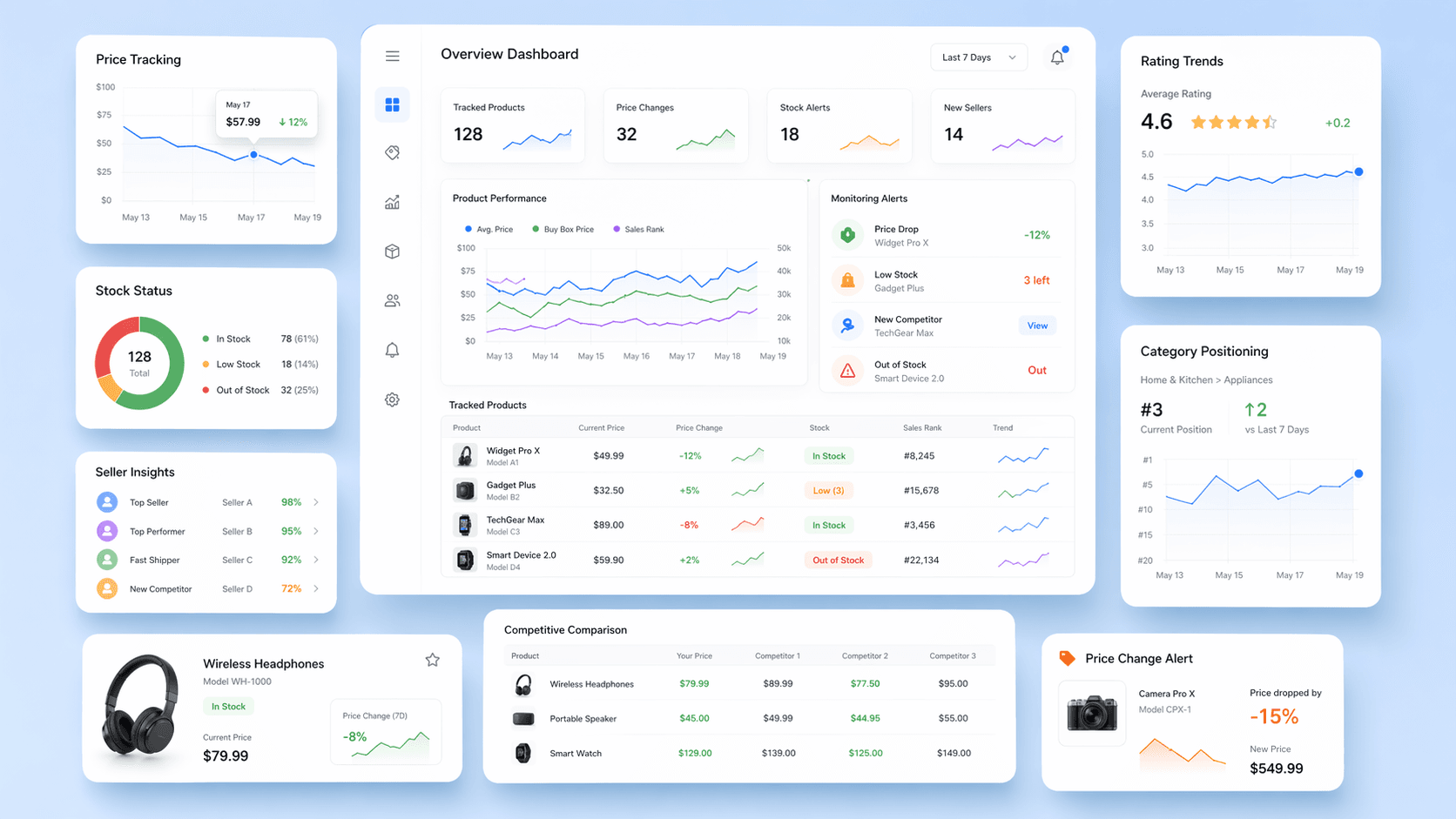
This tool is well suited for ecommerce operations, pricing research, and product intelligence. Teams can use it to review Walmart listings, monitor price changes, check stock status, and study product positioning. Sales and merchandising teams can also use the extracted data to identify trends, review seller information, and keep product databases current across many items.
Get Started Free
walmart_research_monitoring_v1.png

Discover More Free Tools

Amazon Listing Quality Checker

Evaluates Amazon product listings for completeness and SEO readiness. Flags missing or weak titles, bullets, images, and keywords. Get a clear score plus actionable fixes to improve visibility.

Disposable Email Checker

Check if an email uses a disposable domain and see the detected provider. Reduce spam signups and keep your lists cleaner. Get a clear result with a short explanation.

UPC Lookup

Look up product details by UPC to verify items and compare listings. Get names, brands, manufacturers, categories, and images in one search.

Amazon Products Scraper

Extract product info from Amazon by pasting product URLs. Get titles, prices, ratings, and more in a structured table for quick export and review.

Zoominfo scraper

Extract company and contact details from ZoomInfo pages into a structured table for faster prospecting and analysis.

Flipkart Scraper

Extract product data from Flipkart listings and SKU pages with AI-suggested fields for fast, structured analysis. Perfect for e-commerce research and price monitoring.

Email Format Finder

Find the most likely email pattern for any company domain and generate probable addresses for a person. Get ranked formats with confidence to speed up outreach and reduce bounce risk.

Name Parser

Parse full names into structured parts like prefix, first, middle, last, and suffix. Standardize user input for cleaner CRM records, forms, and databases.

Idealista Scraper

Extract Idealista property listings into a clean table for analysis. Capture address, URL, price, bedrooms, and size (m²) from search results. Export structured data for faster research and comparisons.

LinkedIn Message Generator

Create polished LinkedIn outreach messages for networking, job inquiries, or connection requests. Customize with names, purpose, and key points to save time and stay professional.

Naver Shopping Crawling Tool

Extract product data from Naver Shopping search results and compare prices, ratings, and sellers with less manual work.

Redfin Scraper

Extract Redfin property listings into a structured table for analysis. Capture address, price, beds, baths, square footage, and agent details to compare homes faster.

Timestamp Converter

Convert Unix timestamps to readable dates or turn dates into timestamps. Save time working with time data across formats.

Sur La Table Scraper

Extract Sur La Table product, class, and store data for analysis. AI suggests fields and structures results for easy export and business insights.

Free Amazon Revenue Calculator

Estimate gross monthly revenue from product price and monthly sales volume. Get a quick snapshot to validate demand and plan inventory.

Amazon Profit Calculator

Estimate net profit and margin for Amazon products by entering price, COGS, shipping, referral rate, FBA fees, and other costs. Get a clear cost breakdown to validate product viability before you list.

Find More Tools Now

What users say about Thunderbit

Taryn W.Growth Strategist@Thunderbit changed how I run competitor research. I click 'AI Suggest Fields,' and it builds a clean table across paginated results—no coding, no CSS. Huge time-saver when analyzing product data from long-tail marketplaces.
Miles T.Sales Development ConsultantI use Thunderbit to grab emails and phone numbers from directories. It extracts clean contact info in one click, and exporting to Sheets or Notion takes seconds. No extra setup, no coding—just usable data ready to work with.
Rhea C.E-commerce AnalystThunderbit helps me monitor SKU data across multiple pages. I scrape the listings, then use Subpage Scraping to pull full product specs, pricing, reviews, and stock. The AI organizes everything into columns I define.
Cassian B.Real Estate AdvisorThunderbit's Scheduled Scraper makes real estate tracking easier. I describe the interval in plain English, and it automatically pulls updated listings, prices, and links without touching the setup again. Simple and very practical.
Dorian B.Content & SEO SpecialistI use Thunderbit's Field AI Prompts to clean and tag scraped blog content. It extracts titles, authors, and even suggests categories. Works great across dynamic sites and subpages—perfect for building structured SEO datasets.
Lina K.Marketplace Operations LeadWe track SKUs from niche stores using Thunderbit. Cloud Scraping handles 50 pages at a time, and for login-required sites, we switch to browser mode. It’s fast, flexible, and doesn’t need ongoing maintenance or manual edits.
Jorge F.Inbound Sales ManagerThunderbit’s AI Autofill is a lifesaver. After scraping contact info, I use it to fill lead forms directly in my browser. I just select the tab, and it fills everything using the scraped row. No manual input needed.
Alina D.Freelance ResearcherI rely on Thunderbit for extracting data from PDFs, image-based sites, and infinite scroll pages. It handles messy formats with AI and delivers ready-to-export tables I can send to Google Sheets or Airtable in seconds.
Taryn W.Growth Strategist@Thunderbit changed how I run competitor research. I click 'AI Suggest Fields,' and it builds a clean table across paginated results—no coding, no CSS. Huge time-saver when analyzing product data from long-tail marketplaces.
Miles T.Sales Development ConsultantI use Thunderbit to grab emails and phone numbers from directories. It extracts clean contact info in one click, and exporting to Sheets or Notion takes seconds. No extra setup, no coding—just usable data ready to work with.
Rhea C.E-commerce AnalystThunderbit helps me monitor SKU data across multiple pages. I scrape the listings, then use Subpage Scraping to pull full product specs, pricing, reviews, and stock. The AI organizes everything into columns I define.
Cassian B.Real Estate AdvisorThunderbit's Scheduled Scraper makes real estate tracking easier. I describe the interval in plain English, and it automatically pulls updated listings, prices, and links without touching the setup again. Simple and very practical.
Dorian B.Content & SEO SpecialistI use Thunderbit's Field AI Prompts to clean and tag scraped blog content. It extracts titles, authors, and even suggests categories. Works great across dynamic sites and subpages—perfect for building structured SEO datasets.
Lina K.Marketplace Operations LeadWe track SKUs from niche stores using Thunderbit. Cloud Scraping handles 50 pages at a time, and for login-required sites, we switch to browser mode. It’s fast, flexible, and doesn’t need ongoing maintenance or manual edits.
Jorge F.Inbound Sales ManagerThunderbit’s AI Autofill is a lifesaver. After scraping contact info, I use it to fill lead forms directly in my browser. I just select the tab, and it fills everything using the scraped row. No manual input needed.
Alina D.Freelance ResearcherI rely on Thunderbit for extracting data from PDFs, image-based sites, and infinite scroll pages. It handles messy formats with AI and delivers ready-to-export tables I can send to Google Sheets or Airtable in seconds.

Frequently Asked Questions

Extract Data using AI
Easily transfer data to Google Sheets, Airtable, or Notion
Chrome Store Rating
PRODUCT HUNT#1 Product of the Week