Competitor Analysis Tool

By
Compare up to five competitor sites across traffic, engagement, sources, and audience. Spot strengths, gaps, and opportunities with side-by-side benchmarks.
PRODUCT HUNT#1 Product of the Week
Accenture logoCriteo logoGrammarly logoVerisk logoklook logoPuma logoRingCentral logoAccenture logoCriteo logoGrammarly logoVerisk logoklook logoPuma logoRingCentral logoAccenture logoCriteo logoGrammarly logoVerisk logoklook logoPuma logoRingCentral logoAccenture logoCriteo logoGrammarly logoVerisk logoklook logoPuma logoRingCentral logoAccenture logoCriteo logoGrammarly logoVerisk logoklook logoPuma logoRingCentral logoAccenture logoCriteo logoGrammarly logoVerisk logoklook logoPuma logoRingCentral logo
Product Listing
Extracted Data Table
Just Click to Extract
Analyze Competitors Faster with ThunderbitUse Thunderbit to scrape competitor pages, subpages, PDFs, and images into structured tables. Automate extraction and export to Sheets, Airtable, or Notion in a few clicks.
chrome-web-store
Install fromChrome Web Store

Analyze Competitors Faster with Thunderbit

Track competitors without manual copy-paste. Thunderbit scrapes websites, follows subpages, and pulls structured fields from pages, PDFs, docs, and images, then summarizes, categorizes, and formats the results into a clean dataset. Send your tables to Google Sheets, Airtable, or Notion for reporting and collaboration. Use AI Suggest Fields to set up fast, handle pagination, and keep your competitive research organized across many sources.

How to Generate Competitor Reports Using Thunderbit

step_01.png
STEP 1Download and InstallDownload and install the Thunderbit Chrome Extension from the Thunderbit Chrome Extension Download Page. Once installed, log in or create a free account to get started.
step_02.png
STEP 2Open ExtensionOpen Chrome and go to the Thunderbit Competitor Analysis Tool. In the "Enter Competitor URLs" tab, paste 1–5 competitor website URLs into the "competitor_urls" field (separated by commas or new lines). Optionally, fill in "industry" (for example, SaaS or eCommerce) and "region" (for example, US or UK) to tailor the analysis. Review your entries to confirm each domain is correct and within the 1–5 limit.
step03.png
STEP 3Click the Generate competitor report ButtonClick the "Generate competitor report" button to run the analysis. Thunderbit will produce a table with a "Competitor Report" field that contains a structured JSON array, with one object per competitor and consistent keys across all competitors (traffic, engagement, sources, referrals, demographics, strengths, weaknesses, opportunities, and notes). After the results load, export or download the output as CSV or JSON, or send it to Excel, Google Sheets, Airtable, or Notion using Thunderbit’s export options.

Learn how to generate competitor website benchmarking reports from a list of URLs

Compare competitor performance metrics
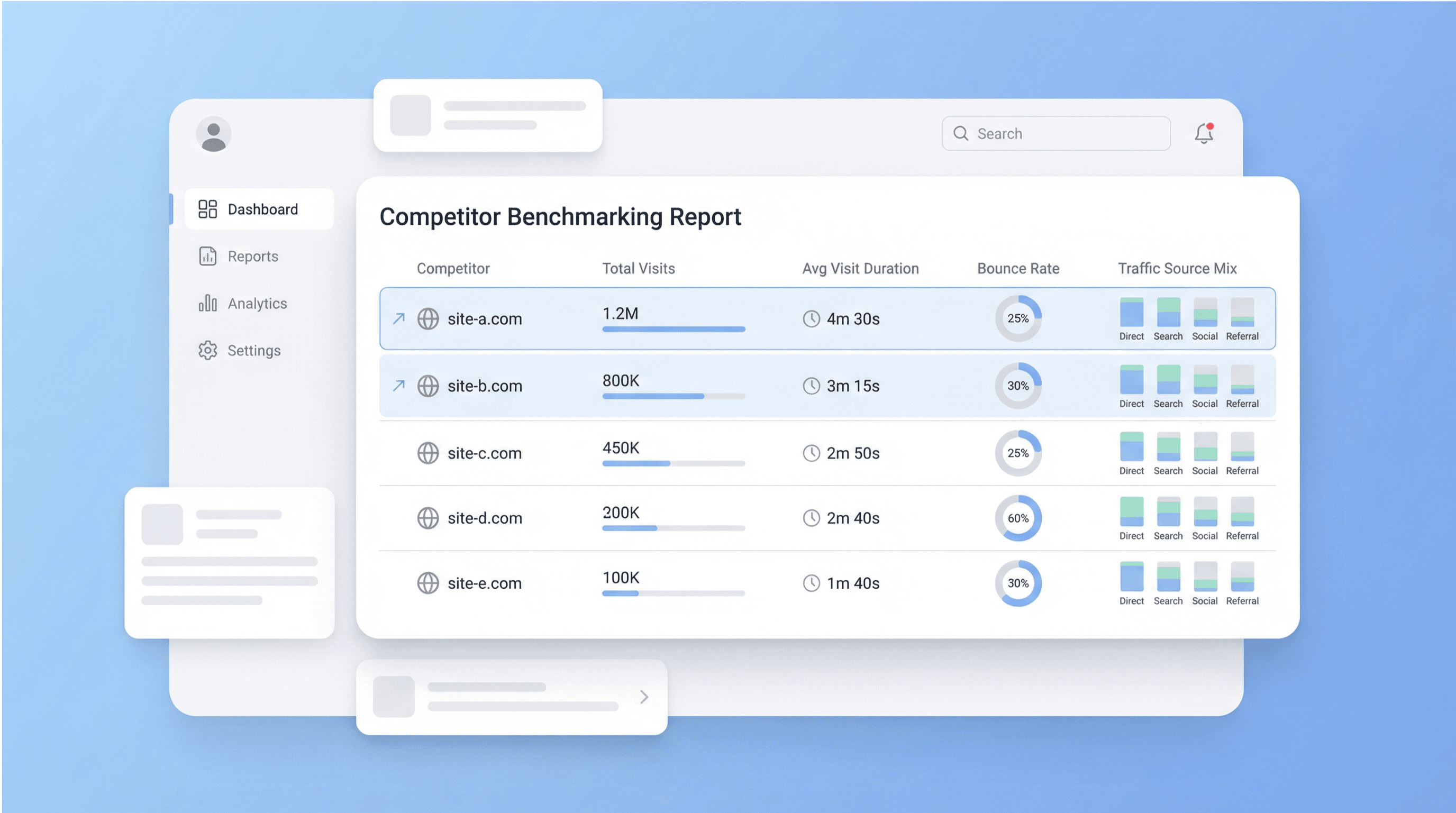
Enter 1–5 competitor URLs and Thunderbit generates a side-by-side report covering core benchmarking metrics such as total visits, average visit duration, bounce rate, traffic source mix, top referrers, and audience demographics. This helps founders, marketing teams, and product teams replace scattered research with one consistent view, so you can spot who is growing, who is retaining attention, and where your site may be underperforming.
Get Started Free
0_jXZfzctV3GEKGefQx483SJ_1773309388448_na1fn_L2hvbWUvdWJ1bnR1L2NvbXBldGl0b3JfYmVuY2htYXJraW5nX21ldHJpY3M.png

Tailor analysis by industry and region
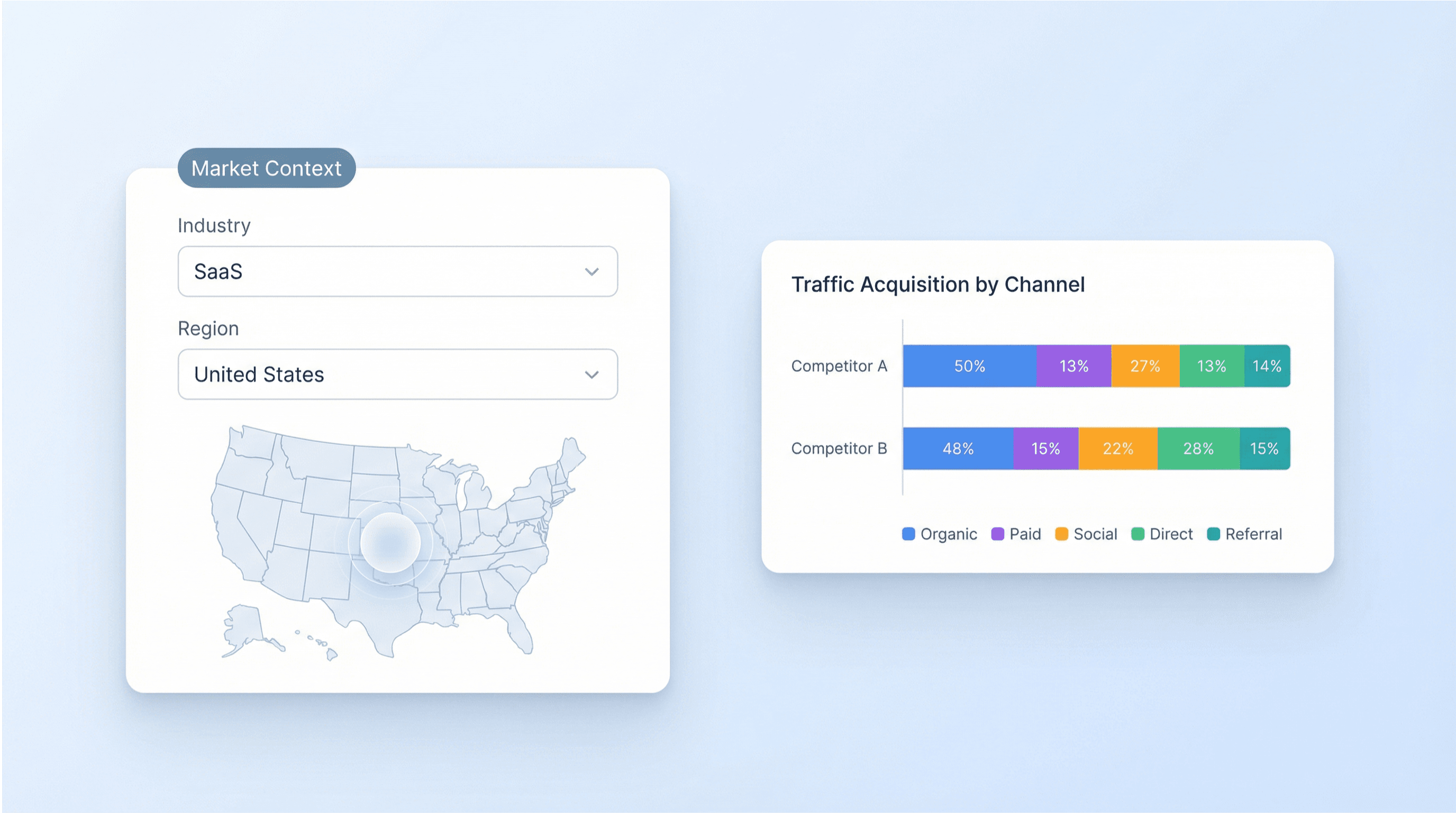
Add an optional industry and region to make the report more relevant to your market context, such as SaaS in the US or eCommerce in the UK. The tool uses these inputs to shape segmentation and assumptions, making comparisons more meaningful when competitors operate in different geographies or categories. This is useful for teams planning market entry, positioning, and channel strategy based on how audiences and acquisition sources differ.
Get Started Free
1_1xSOdfRsuJ1Ds3sx65rlp7_1773309378917_na1fn_L2hvbWUvdWJ1bnR1L3VpX3V4X2lsbHVzdHJhdGlvbl8x.png

Identify strengths, weaknesses, and market opportunities
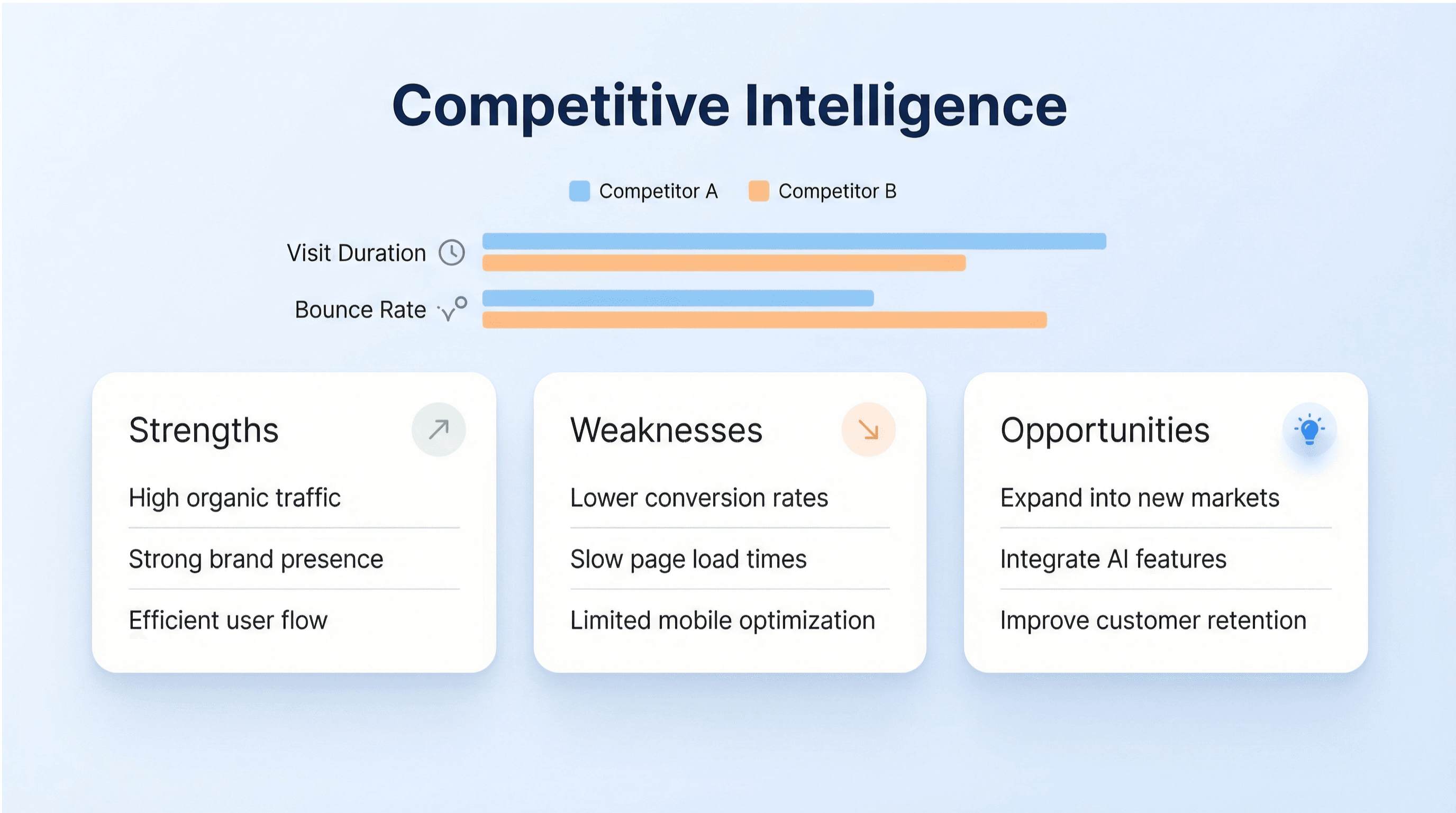
Use the generated strengths, weaknesses, and opportunities bullets to turn metrics into decisions. Marketing teams can prioritize channels by comparing traffic source breakdowns and referrers, while product and growth teams can infer engagement gaps from visit duration and bounce rate. The output is structured per competitor, making it easier to build a narrative for stakeholder updates, competitive briefs, and quarterly planning.
Get Started Free
2_strengths_weaknesses_opportunities.png

Export findings into planning and reporting workflows
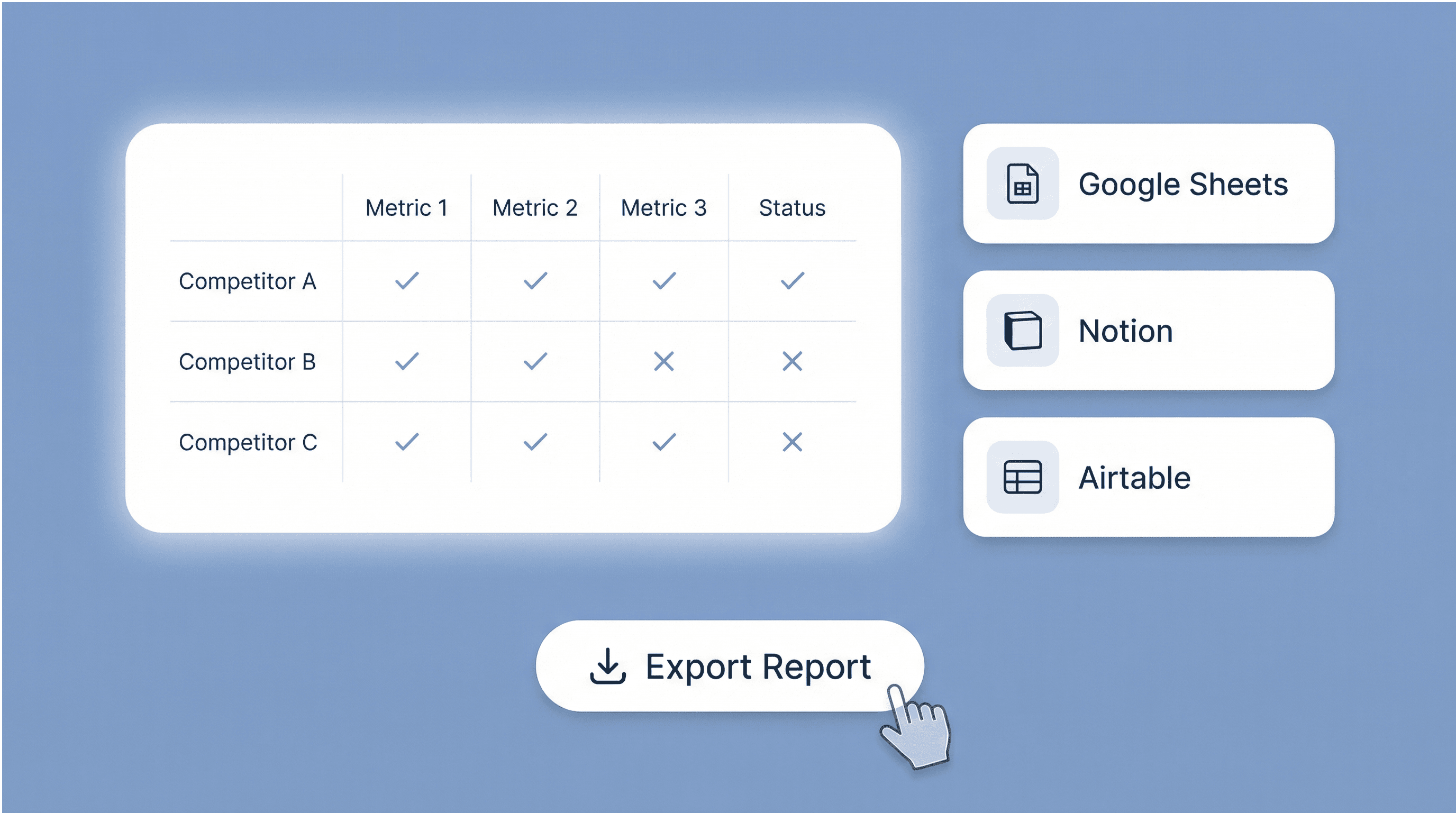
Take the comparative table output and move it into your existing workflow for tracking and collaboration. Teams commonly export results to Google Sheets or Excel for ongoing benchmarking, or to Airtable and Notion for competitive research databases. Because each competitor follows the same schema, you can standardize reporting across markets, append new competitors over time, and keep a repeatable process for reviews and strategy docs.
Get Started Free
3_A9WRlxR2mGjX4HoBM0LXjv_1773309392306_na1fn_L2hvbWUvdWJ1bnR1L2V4cG9ydF9maW5kaW5nc19pbGx1c3RyYXRpb24.png

What users say about Thunderbit

Taryn W.Growth Strategist@Thunderbit changed how I run competitor research. I click 'AI Suggest Fields,' and it builds a clean table across paginated results—no coding, no CSS. Huge time-saver when analyzing product data from long-tail marketplaces.
Miles T.Sales Development ConsultantI use Thunderbit to grab emails and phone numbers from directories. It extracts clean contact info in one click, and exporting to Sheets or Notion takes seconds. No extra setup, no coding—just usable data ready to work with.
Rhea C.E-commerce AnalystThunderbit helps me monitor SKU data across multiple pages. I scrape the listings, then use Subpage Scraping to pull full product specs, pricing, reviews, and stock. The AI organizes everything into columns I define.
Cassian B.Real Estate AdvisorThunderbit's Scheduled Scraper makes real estate tracking easier. I describe the interval in plain English, and it automatically pulls updated listings, prices, and links without touching the setup again. Simple and very practical.
Dorian B.Content & SEO SpecialistI use Thunderbit's Field AI Prompts to clean and tag scraped blog content. It extracts titles, authors, and even suggests categories. Works great across dynamic sites and subpages—perfect for building structured SEO datasets.
Lina K.Marketplace Operations LeadWe track SKUs from niche stores using Thunderbit. Cloud Scraping handles 50 pages at a time, and for login-required sites, we switch to browser mode. It’s fast, flexible, and doesn’t need ongoing maintenance or manual edits.
Jorge F.Inbound Sales ManagerThunderbit’s AI Autofill is a lifesaver. After scraping contact info, I use it to fill lead forms directly in my browser. I just select the tab, and it fills everything using the scraped row. No manual input needed.
Alina D.Freelance ResearcherI rely on Thunderbit for extracting data from PDFs, image-based sites, and infinite scroll pages. It handles messy formats with AI and delivers ready-to-export tables I can send to Google Sheets or Airtable in seconds.
Taryn W.Growth Strategist@Thunderbit changed how I run competitor research. I click 'AI Suggest Fields,' and it builds a clean table across paginated results—no coding, no CSS. Huge time-saver when analyzing product data from long-tail marketplaces.
Miles T.Sales Development ConsultantI use Thunderbit to grab emails and phone numbers from directories. It extracts clean contact info in one click, and exporting to Sheets or Notion takes seconds. No extra setup, no coding—just usable data ready to work with.
Rhea C.E-commerce AnalystThunderbit helps me monitor SKU data across multiple pages. I scrape the listings, then use Subpage Scraping to pull full product specs, pricing, reviews, and stock. The AI organizes everything into columns I define.
Cassian B.Real Estate AdvisorThunderbit's Scheduled Scraper makes real estate tracking easier. I describe the interval in plain English, and it automatically pulls updated listings, prices, and links without touching the setup again. Simple and very practical.
Dorian B.Content & SEO SpecialistI use Thunderbit's Field AI Prompts to clean and tag scraped blog content. It extracts titles, authors, and even suggests categories. Works great across dynamic sites and subpages—perfect for building structured SEO datasets.
Lina K.Marketplace Operations LeadWe track SKUs from niche stores using Thunderbit. Cloud Scraping handles 50 pages at a time, and for login-required sites, we switch to browser mode. It’s fast, flexible, and doesn’t need ongoing maintenance or manual edits.
Jorge F.Inbound Sales ManagerThunderbit’s AI Autofill is a lifesaver. After scraping contact info, I use it to fill lead forms directly in my browser. I just select the tab, and it fills everything using the scraped row. No manual input needed.
Alina D.Freelance ResearcherI rely on Thunderbit for extracting data from PDFs, image-based sites, and infinite scroll pages. It handles messy formats with AI and delivers ready-to-export tables I can send to Google Sheets or Airtable in seconds.

Frequently Asked Questions

Extract Data using AI
Easily transfer data to Google Sheets, Airtable, or Notion
PRODUCT HUNT#1 Product of the Week