wayfair-scraper

Wayfair Scraper

Thunderbit’s Wayfair Scraper lets you extract product data from category listings and daily sales pages using AI. Scrape names, prices, discounts, ratings, availability, and product URLs, then export to Excel, Google Sheets, Airtable, or Notion in just a couple of clicks.
4.7
Monthly users4.1k
AI-Powered
E-commerce
Get Started Free
Free tier available

Thunderbit’s Wayfair Scraper helps you extract product data from and turn messy listings into structured tables using AI. You can collect product names, prices, discounts, ratings, shipping info, and URLs from category pages and daily sales pages, then export to Excel, Google Sheets, Airtable, or Notion in a couple of clicks. If you need deeper details, Thunderbit can also visit product subpages to enrich your dataset.

🛋️ What is Wayfair Scraper

The AI-Powered Wayfair Scraper is an that lets you scrape Wayfair product listings and deals pages without coding. You simply open a Wayfair page (like a sofa category or daily sales), click AI Suggest Columns, then click Scrape—Thunderbit’s AI reads the page and outputs structured data you can download or send to your tools.

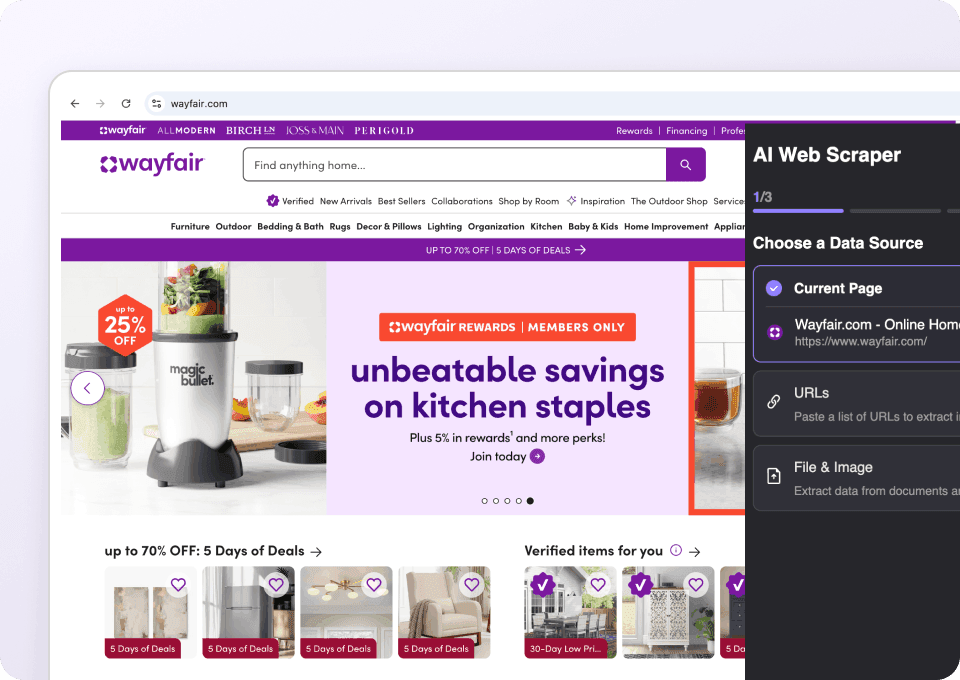
Wayfair.com Screenshot

🧾 What can you scrape with Wayfair.com

Wayfair is packed with valuable e-commerce data: pricing, promotions, ratings, availability, and product metadata across thousands of SKUs. Thunderbit is built for list pages like category results and deal hubs, and it also supports pagination and infinite scroll so you can capture more than what’s visible on screen.

🛋️ Scrape Wayfair Category Product Listing

A category listing page is ideal when you want to build a product catalog, track competitor pricing, or analyze assortment by brand, style, material, or rating. Example page: .

Wayfair Category Product Listing Screenshot

Steps:

  1. Download the and register an account.
  2. Go to the destination page, for example: .
  3. Click AI Suggest Columns to generate recommended column names and data types.
  4. Click Scrape to run the scraper, then export to Excel, Google Sheets, Airtable, or Notion.

Column names

ColumnDescription
🏷️ Product NameThe product title shown in the listing card.
🔗 Product URLThe direct link to the product detail page.
💲 Current PriceThe current listed price (including sale price when applicable).
🏷️ Original/List PriceThe crossed-out or reference price (if shown).
📉 Discount / SavingsThe discount amount or percent (if displayed).
RatingAverage star rating shown on the listing.
🧾 Review CountNumber of reviews associated with the product.
🚚 Shipping InfoShipping text such as delivery estimate, free shipping, or shipping badges.
AvailabilityStock/availability signals like “In stock” or limited availability messaging (when present).
🖼️ Image URLThe main product image URL from the listing.

🔥 Scrape Wayfair Flash Deals & Daily Sales

Wayfair’s deals hub is perfect for monitoring promotions, building a daily deals feed, or tracking price movement over time. Example page: .

Wayfair Flash Deals & Daily Sales Screenshot

Steps:

  1. Download the and register an account.
  2. Go to the destination page, for example: .
  3. Click AI Suggest Columns to generate recommended columns for deals data.
  4. Click Scrape to extract the deals list and export your file.

Column names

ColumnDescription
🏷️ Deal Product NameThe product name shown in the deals module.
🔗 Product URLLink to the product page for the deal item.
💲 Deal PriceThe discounted price currently shown.
🧾 Original PriceThe pre-discount price (if displayed).
📉 Discount % / SavingsThe percent off or savings amount shown on the deal card.
Deal Timing / BadgeDeal labels like “Flash Deal”, “Limited Time”, or other promotional badges (when present).
RatingStar rating displayed for the deal item.
🧾 Review CountNumber of reviews displayed for the deal item.
🚚 Shipping / DeliveryDelivery estimate or shipping messaging shown on the deal card.
🖼️ Image URLThe primary image URL for the deal item.

🎯 Why Use Wayfair.com Tool

Scraping Wayfair data is useful when you need repeatable, structured product intelligence for pricing, merchandising, and market research.

Common reasons teams scrape Wayfair:

  • E-commerce operators: Build a competitor price tracker for categories like sofas, beds, rugs, lighting, and patio furniture. Use Scheduled Scraper to monitor changes over time.
  • Retail & brand teams: Track how your products appear across listings—pricing, ratings, review volume, and promo badges.
  • Marketing teams: Collect product URLs and metadata for ad research, landing page audits, and promotional analysis.
  • Analysts: Create datasets for assortment analysis (price bands, rating distribution, discount depth, review velocity).
  • Dropshippers & marketplace sellers: Compare pricing and promotion patterns to inform your own catalog strategy.

Thunderbit is especially helpful when:

  • Listings change layout (AI adapts without you rebuilding selectors)
  • You need pagination + infinite scroll support
  • You want subpage scraping to enrich listing rows with deeper product details

If you’re new to scraping, these guides can help:

🧩 How to Use Wayfair.com Chrome Extension

  1. Install the Thunderbit Chrome Extension: Get it from the and create your account on .
  2. Navigate to a Wayfair page you want to scrape: For example, a category listing like or a deals hub like .
  3. Activate AI-Powered Scraper: Click AI Suggest Columns to generate fields (or edit them to match your workflow), then click Scrape.

Optional upgrades you can use on Wayfair:

  • Scrape Subpages: After scraping a listing, let AI open each product page and add fields like dimensions, materials, color options, SKU, or care instructions.
  • Pagination Scraping: Capture multiple pages of results (click pagination or infinite scroll).
  • Cloud Scraping vs. Browser Scraping: Use Cloud for speed on public pages; use Browser if you need your logged-in session.

💳 Pricing for Wayfair Scraper

Thunderbit uses a simple credit system:

  • 1 credit = 1 output row (one row in your results table)
  • AI-powered scraping is included, and exporting is free (Excel/CSV/JSON, Google Sheets, Airtable, Notion)

What you can try for free:

  • Free plan: scrape 6 pages per month
  • Free trial: scrape 10 pages for free before choosing a paid plan

If you scrape a Wayfair category page and get 120 products, that’s about 120 credits for that run. If you scrape multiple pages or use subpage enrichment, your total rows (credits) will increase based on the final output table.

Paid plans (monthly and yearly) scale with your volume. The yearly plan is typically the best value because it discounts the monthly rate while giving you a larger annual credit pool. See full details on .

TierPricing (Monthly)Pricing (Yearly)Yearly Total PriceCredits (Monthly)Credits (Yearly)
FreeFreeFreeFree6 pagesN/A
Starter$15$9$1085005,000
Pro 1$38$16.5$1993,00030,000
Pro 2$75$33.8$3986,00060,000
Pro 3$125$68.4$79610,000120,000
Pro 4$249$137.5$1,59220,000240,000

❓ FAQ

  1. What is the AI Powered Wayfair Scraper?
    The AI Powered Wayfair Scraper is a tool that uses AI to read Wayfair pages and extract product data into a structured table. You can scrape category listings and daily sales pages, then export the results to spreadsheets or databases for analysis and monitoring.

  2. What is Thunderbit?
    is an AI Web Scraper Chrome Extension that helps you extract data from websites, PDFs, and images with minimal setup. It’s designed for business workflows like lead generation, e-commerce operations, and market research, with exports to Excel, Google Sheets, Airtable, and Notion.

  3. What Wayfair pages work best for scraping?
    Category listing pages and curated deal pages work especially well because they contain repeated product cards with consistent fields like price, rating, and product URL. Thunderbit can also handle pagination and infinite scroll so you can capture more than one screen of results.

  4. Can Thunderbit scrape Wayfair product detail pages too?
    Yes. After you scrape a listing page, you can use Subpage Scraping to visit each product URL and enrich your table with additional fields like dimensions, materials, color options, or other specifications shown on the product page. This is useful when you need more than just listing-level data.

  5. How do I scrape Wayfair prices and discounts for monitoring?
    Start from a category page (like sofas) or the daily sales page, then include columns for current price, original price, and discount/savings. For ongoing monitoring, use Thunderbit’s Scheduled Scraper to run the same scrape on a schedule and track changes over time.

  6. Does Wayfair scraping support pagination and infinite scroll?
    Yes. Thunderbit supports both click-based pagination and infinite scroll patterns. This matters for Wayfair categories where products span many pages, and you want a larger dataset for pricing or assortment analysis.

  7. What export options do you get after scraping?
    You can export to Excel, Google Sheets, Airtable, or Notion, or download as CSV or JSON. Exporting is free, which makes it easy to share data with your team or plug it into your reporting workflow.

  8. What is the difference between Cloud Scraping and Browser Scraping for Wayfair?
    Cloud Scraping is faster and can scrape up to 50 pages at a time, which is great for public Wayfair pages. Browser Scraping runs inside your Chrome session and is better when a site requires login or when you want the scrape to reflect your personalized view.

  9. Is it okay to scrape Wayfair data?
    You should always follow applicable laws, respect privacy, and review Wayfair’s terms before collecting data. In general, focus on publicly available product information and use the data responsibly for internal analysis, catalog research, or competitive intelligence.

📚 Learn More

  • Get started with the extension:
  • Explore guides and tutorials:
  • Learn scraping fundamentals:
  • Build list-based crawls:
  • Export workflows:
  • Compare tools:
  • Watch product videos:
  • View plans and credits:

If you want to scrape Wayfair category listings or daily deals into a clean dataset today, install and run AI Suggest Columns → Scrape.