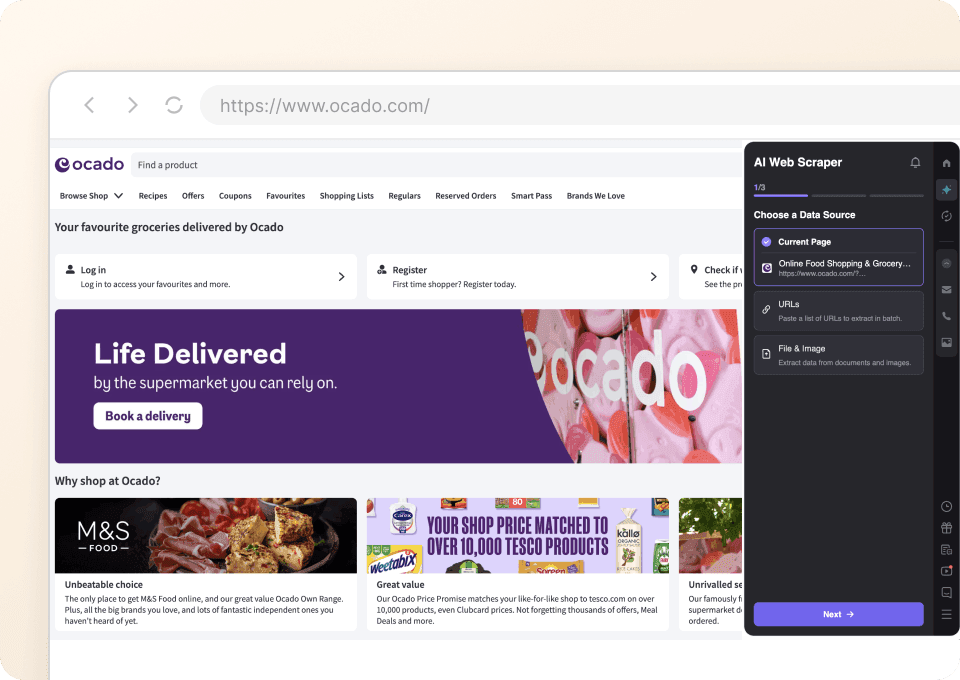
Thunderbit’s Ocado Scraper helps you turn Ocado product and promotion pages into clean, structured data using AI. You can extract listings from top offers, bundles, and curated collections, then enrich your dataset by visiting each product subpage for deeper details. With the AI web scraper, you click AI Suggest Columns and Scrape, then export to Excel, Google Sheets, Airtable, or Notion.
🛒 What is Ocado Scraper
The AI-Powered Ocado Scraper is an that lets you scrape product listings, prices, and promotions from in a couple of clicks. Just open the page you want (like top offers or an M&S Food collection), let Thunderbit’s AI suggest the best columns, and run the scrape to get a structured table you can download or export.

🎯 What can you scrape with Ocado
Ocado pages are packed with valuable e-commerce data: product names, prices, promo mechanics, pack sizes, and links to product detail pages. Thunderbit is built for business workflows, so you can scrape the listing page first, then use Subpage Scraping to visit each product URL and add richer fields (ingredients, nutrition, full description, brand, and more) to the same table.
Scrape Ocado Site-wide Top Offers & Bundles
Use this to capture promotional listings from Ocado’s top offers page, including multi-buy deals and bundles. This is useful for price monitoring, promo tracking, and building a weekly offers dataset for analysis.

Steps:
- Download the and register an account.
- Go to the destination page: .
- Click AI Suggest Columns to generate recommended column names and data types.
- Click Scrape to extract the data, then export to Excel, Google Sheets, Airtable, or Notion.
Column names
| Column | Description |
|---|---|
| 🏷️ Product Name | The product title shown in the offer listing. |
| 🌐 Product URL | The link to the product detail page (great for subpage scraping). |
| 💷 Current Price | The current listed price (including promo price when applicable). |
| 🧾 Was Price | The previous price (if shown) for discount comparison. |
| 🎁 Promotion Text | Promo label such as multi-buy, bundle, or limited-time offer messaging. |
| 📦 Pack Size | Size/weight/quantity (e.g., grams, liters, count) shown on the card. |
| 🏪 Brand | Brand name when available on the listing card. |
| ⭐ Rating | Star rating (if displayed). |
| 🗳️ Review Count | Number of reviews (if displayed). |
| 🖼️ Product Image | Main product image URL for cataloging or reporting. |
Scrape Ocado M&S Food Exclusive Collection
Use this to extract product listings from Ocado’s M&S Food collection pages. It’s ideal for assortment tracking, category research, and building a structured product catalog for analysis or internal tools.

Steps:
- Download the and register an account.
- Go to the destination page: .
- Click AI Suggest Columns to generate recommended column names and data types.
- Click Scrape to extract the data, then export your file.
Column names
| Column | Description |
|---|---|
| 🥫 Product Name | The product title in the M&S collection listing. |
| 🌐 Product URL | Direct link to the product page for enrichment via subpage scraping. |
| 💷 Price | The listed price for the item. |
| 📦 Pack Size | Size/weight/count shown in the listing. |
| 🏷️ Category / Collection | The collection context (useful when scraping multiple collection pages). |
| 🏪 Brand | Brand label (often M&S, but can vary by listing). |
| 🧠 Dietary Tags | Tags like vegetarian/vegan/gluten-free when shown. |
| ⭐ Rating | Star rating if available. |
| 🗳️ Review Count | Number of reviews if available. |
| 🖼️ Image URL | Product image URL for catalog or reporting. |
📈 Why Use Ocado Tool
Scraping Ocado helps you build a reliable dataset for pricing, promotions, and assortment intelligence without manual copy-paste.
Common reasons you might scrape Ocado:
- E-commerce operations: Track competitor pricing, promo frequency, and pack-size changes across weeks.
- Category managers: Monitor assortment shifts in curated collections (like M&S Food) and compare against your own catalog.
- Marketing teams: Analyze promotional messaging patterns (multi-buy, bundles, price cuts) and map them to product types.
- Data teams & analysts: Create a structured dataset for dashboards, time-series price monitoring, and promo effectiveness studies.
- Retail consultants: Build evidence-based reports using consistent exports to Excel/Sheets.
Thunderbit also supports Pagination Scraping (click pagination or infinite scroll) and Subpage Scraping, so you can start from a listing page and end with a richer product table.
If you want broader scraping guidance, these resources help:
🧩 How to Use Ocado Chrome Extension
- Install the Thunderbit Chrome Extension: Get it from the and create your account.
- Navigate to an Ocado page you want to scrape: For example, or the .
- Activate AI-Powered Scraper: Click AI Suggest Columns to generate column names, data types, and optional field prompts. You can edit columns to match your workflow (pricing, promo, pack size, URLs).
- Scrape and enrich: Click Scrape for the listing page, then use Scrape Subpages to visit each product URL and append details like ingredients, nutrition, or long descriptions.
💳 Pricing for Ocado
Thunderbit uses a simple credit system:
- 1 credit = 1 output row in your results table (for example, one product listing row).
- The AI-powered scraping experience (AI Suggest Columns + structured extraction) is included, and you can start without writing code.
What you can try for free:
- Free tier: scrape 6 pages per month (page-based allowance).
- Free trial: scrape 10 pages for free, which is enough to test Ocado listing pages and subpage enrichment.
Paid plans scale with your workload, and the yearly option is typically the most cost-effective:
- Starter: $15 monthly or $9 yearly (billed yearly)
- Pro tiers increase credits for larger monitoring and catalog projects
See full details on . After scraping, exporting is free: download CSV/JSON or send to Excel, Google Sheets, Airtable, or Notion.
❓ FAQ
-
What is the AI Powered Ocado Scraper?
The AI Powered Ocado Scraper is a Thunderbit workflow that extracts structured product and promotion data from Ocado pages like top offers and curated collections. It uses AI to understand the page layout and return a clean table of fields such as product name, price, pack size, promo text, and URLs. -
What is Thunderbit?
is an AI Web Scraper Chrome Extension that helps you collect data from websites, PDFs, and images and turn it into structured datasets. It’s designed for business teams who want fast setup, repeatable scraping, and easy exports to tools like Google Sheets, Airtable, and Notion. -
Do I need coding skills to scrape Ocado?
No. You can scrape Ocado by opening the page, clicking AI Suggest Columns, and clicking Scrape. If you want more control, you can rename columns, change data types (text, number, URL, image), and add field instructions without writing code. -
What Ocado data can I extract from listing pages?
You can typically extract product name, price, was price, promotion text, pack size, rating, review count, image URL, and the product URL. The exact fields available depend on what Ocado displays on that page, and Thunderbit’s AI will adapt its suggestions accordingly. -
Can Thunderbit scrape product detail pages too?
Yes. After scraping a listing page, you can use Subpage Scraping to visit each product URL and enrich your table with additional fields. This is useful when you need deeper attributes like ingredients, nutrition panels, long descriptions, or product identifiers shown on the detail page. -
How does pagination or infinite scroll work on Ocado?
Thunderbit supports Pagination Scraping for both click-to-next pagination and infinite scroll patterns. If the page loads more products as you scroll, you can configure Thunderbit to keep loading and scraping until you reach your desired coverage. -
What is the difference between Cloud Scraping and Browser Scraping for Ocado?
Browser Scraping runs inside your Chrome session, which is helpful if a site requires your login or personalized context. Cloud Scraping runs faster and can process many pages in batches (often up to 50 pages at a time), which is useful for public pages when login is not required. -
How much does it cost to scrape Ocado with Thunderbit?
Cost is based on credits, where 1 credit equals 1 output row. If you scrape 200 products into a table, that’s about 200 credits for that run (and subpage enrichment can add rows only if you create additional rows; typically it enriches existing rows). You can start with the free tier (6 pages/month) or the free trial (10 pages) before choosing a plan on the . -
What formats can I export to after scraping?
You can export to CSV or JSON, or send data directly to Excel, Google Sheets, Airtable, or Notion. Export is designed to be quick for reporting, catalog building, and ongoing price monitoring workflows.
📚 Learn More
- Get started with the extension:
- Explore guides and tutorials:
- Learn scraping fundamentals:
- Build list-based scraping workflows:
- Export to spreadsheets:
- Compare tools: