
I get asked about these two tools a lot, and honestly, it's a fun one to answer because both products now use AI in materially different parts of the workflow, and buyers are still figuring out what those differences mean in practice. So let's actually dig into it instead of just repeating marketing copy.
Here's the short version before we get into the weeds: Thunderbit is built for someone who opens a webpage and wants structured data out of it in one click, no selectors, no setup. Simplescraper is built around reusable "Recipes" — you configure an extraction once (increasingly with AI help), save it, and run it again and again through their API, schedules, or integrations. Both are legitimate tools. They just optimize for different moments in a workflow.
Quick Answer
If you're the kind of person who opens ten different websites a week and just needs the data out — sales lists, product catalogs, directory listings — Thunderbit's one-click flow is going to feel faster because there's almost nothing to configure.
If you're building a recurring data pipeline that needs to run on a schedule, hit webhooks, or feed a broader API-driven system, Simplescraper's Recipe model gives you more reusable infrastructure.
And to be fair to Simplescraper here — I've seen a lot of comparison content frame it as "manual selectors only," which isn't accurate anymore. Simplescraper now has Smart Extract, where you describe what you want in plain English and it generates the CSS selectors for you. It's AI-assisted too. The real difference isn't "AI vs no AI" — it's what happens after that first extraction and how much reusable structure you end up maintaining.
Thunderbit vs Simplescraper at a Glance
| Category | Thunderbit | Simplescraper |
|---|---|---|
| Primary model | Agentic — interprets the current page at runtime | Recipe-based — builds reusable selectors, AI-assisted or manual |
| First-run workflow | Click One Click Extract; agent detects fields and auto-runs (Run Now is optional) | Create a Recipe via point-and-click or Smart Extract (describe fields in plain English) |
| AI extraction | Yes — page-level agentic detection | Yes — Smart Extract generates selectors from a described schema |
| Reusable saved config | Not the core model (extraction is interpreted fresh each time) | Yes — Recipes are the central reusable artifact |
| Browser + cloud | Yes | Yes |
| Deep scraping / subpages | Supported on compatible pages | Supported (deep scraping, infinite scroll, login flows) |
| Dedicated API | Open API | Scrape API with Recipe management, batch runs, direct extraction |
| MCP / AI-agent integration | MCP Server + CLI | Not positioned as an MCP-native tool |
| Screenshots / Markdown output | Not a core feature | Yes — dedicated screenshot API and Markdown extraction |
| Post-extraction AI transforms | Field-level instructions during extraction | AI Enhance — separate post-scrape summarization/transformation step |
| Credit/pricing model | See Thunderbit pricing | Credit-based: 1 credit/page (no JS), 2 credits/page (JS, default-on) |
⚠️ A quick honesty note: feature tables like this go stale fast. Both vendors update docs and pricing regularly, so treat this as a snapshot from research done in mid-2026, not gospel.
What Is Thunderbit?
Thunderbit is an agentic web scraper built for business users — the people who need data out of a website but don't want to think about CSS selectors, DOM structure, or API schemas. My team built it around a pretty simple idea: most people just want to look at a page, click a button, and get a clean table.

Here's the actual current flow, not the old UI some older reviews still describe:
- You open a page you're authorized to view.
- You click One Click Extract.
- Thunderbit's agent detects the page structure, reads it, analyzes what's useful, and prepares fields — automatically.
- It auto-runs. Run Now is there if you want to kick it off immediately, but it's optional — the extraction starts on its own if you don't touch anything.
That's it. No "suggest fields, then review, then edit, then scrape" multi-step dance that older versions (and some outdated reviews) describe. It's genuinely one required click on a compatible page.
Beyond that single-page flow, Thunderbit also supports pagination and subpage enrichment on compatible pages, browser and cloud execution paths depending on the task, a Web App, the Open API for developers, an MCP Server for AI agents like Claude or Cursor, a CLI for terminal workflows, and exports to Excel, Google Sheets, Airtable, and Notion.
What Is Simplescraper?
Simplescraper is a browser extension plus a cloud/API platform, and its whole architecture revolves around something called a Recipe — a saved extraction configuration you build once and reuse.
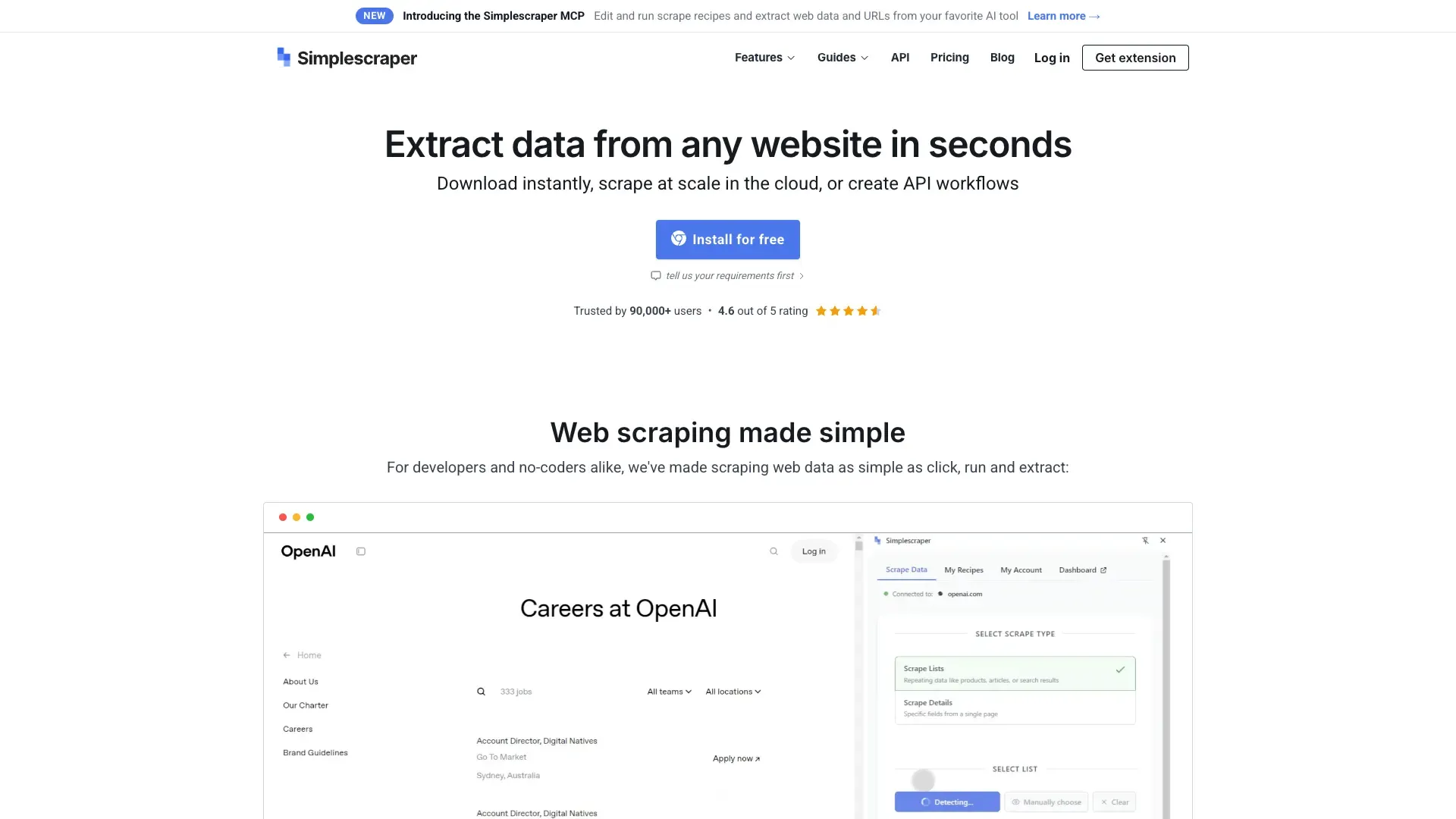
You can build a Recipe two ways now:
- Point-and-click: manually select the elements on a page you want captured, and Simplescraper generates CSS selectors behind the scenes.
- Smart Extract: describe the data you want in plain English, and the AI proposes a schema and generates the reusable selectors for you.
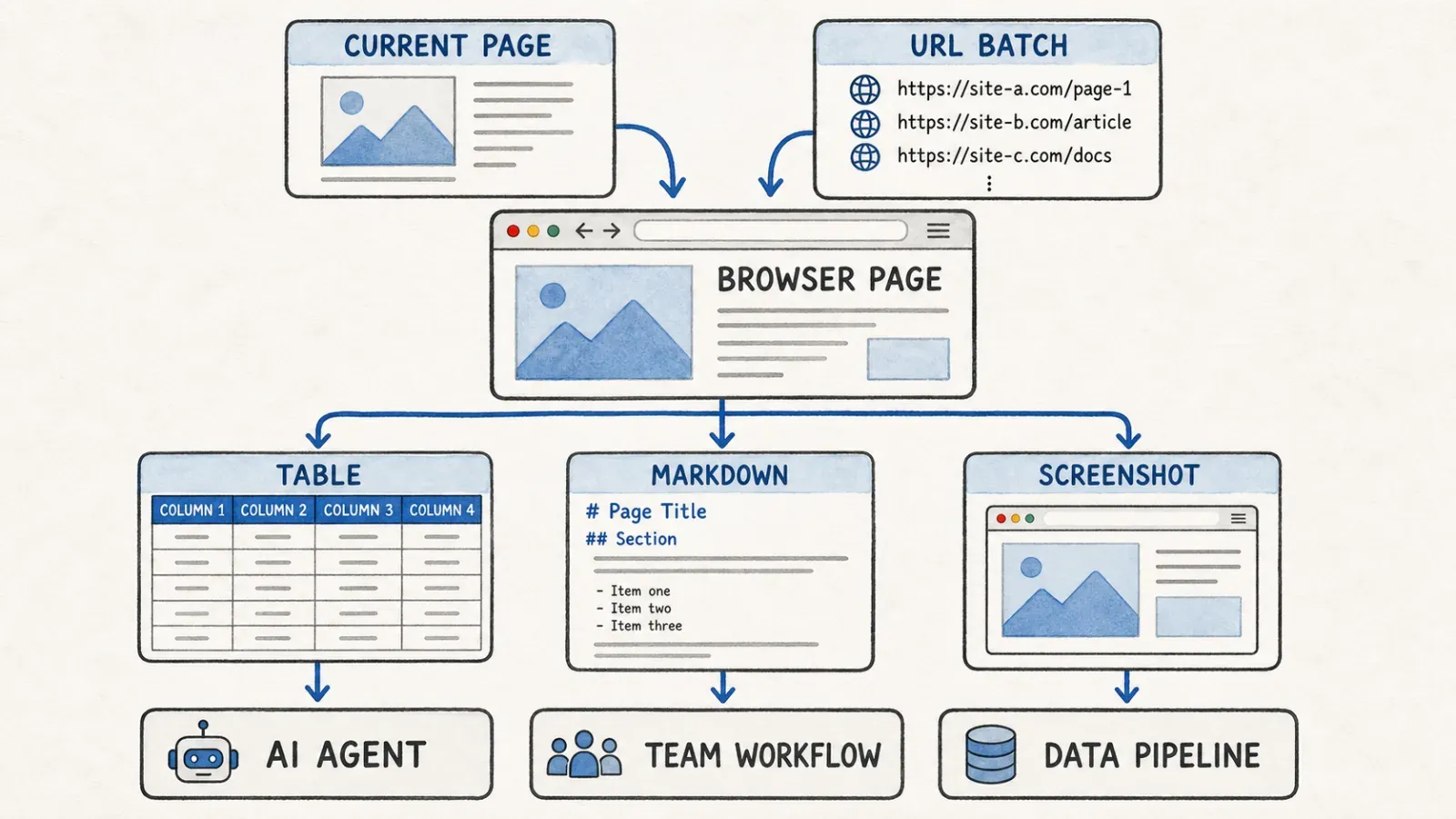
Once you have a Recipe, you can run it against bulk URL lists, schedule it to run repeatedly, trigger webhooks on completion, push results to Google Sheets or Airtable, or hit their Scrape API programmatically. There's also a Screenshot API, Markdown extraction (handy if you're feeding content into an LLM pipeline), SERP scraping, and deep-scraping features like infinite scroll handling and login-session support.
There's also AI Enhance, which is separate from Smart Extract — it's a post-extraction step that transforms, summarizes, or enriches data you've already scraped. Think of it as a cleanup/analysis layer that runs after the scrape, not during the initial field detection.
The Core Difference: Runtime Agentic Interpretation vs AI-Generated Reusable Recipes
Thunderbit's one-click current-page workflow
Thunderbit doesn't really build a persistent "recipe" in the traditional sense. Every time you click One Click Extract, the agent looks at the page fresh, figures out what's structured and useful, and extracts it. You can give it natural-language refinement instructions ("only include listings with a price," "translate the description column to English"), but there's no separate artifact you're maintaining across page-layout changes — the agent re-interprets each time.
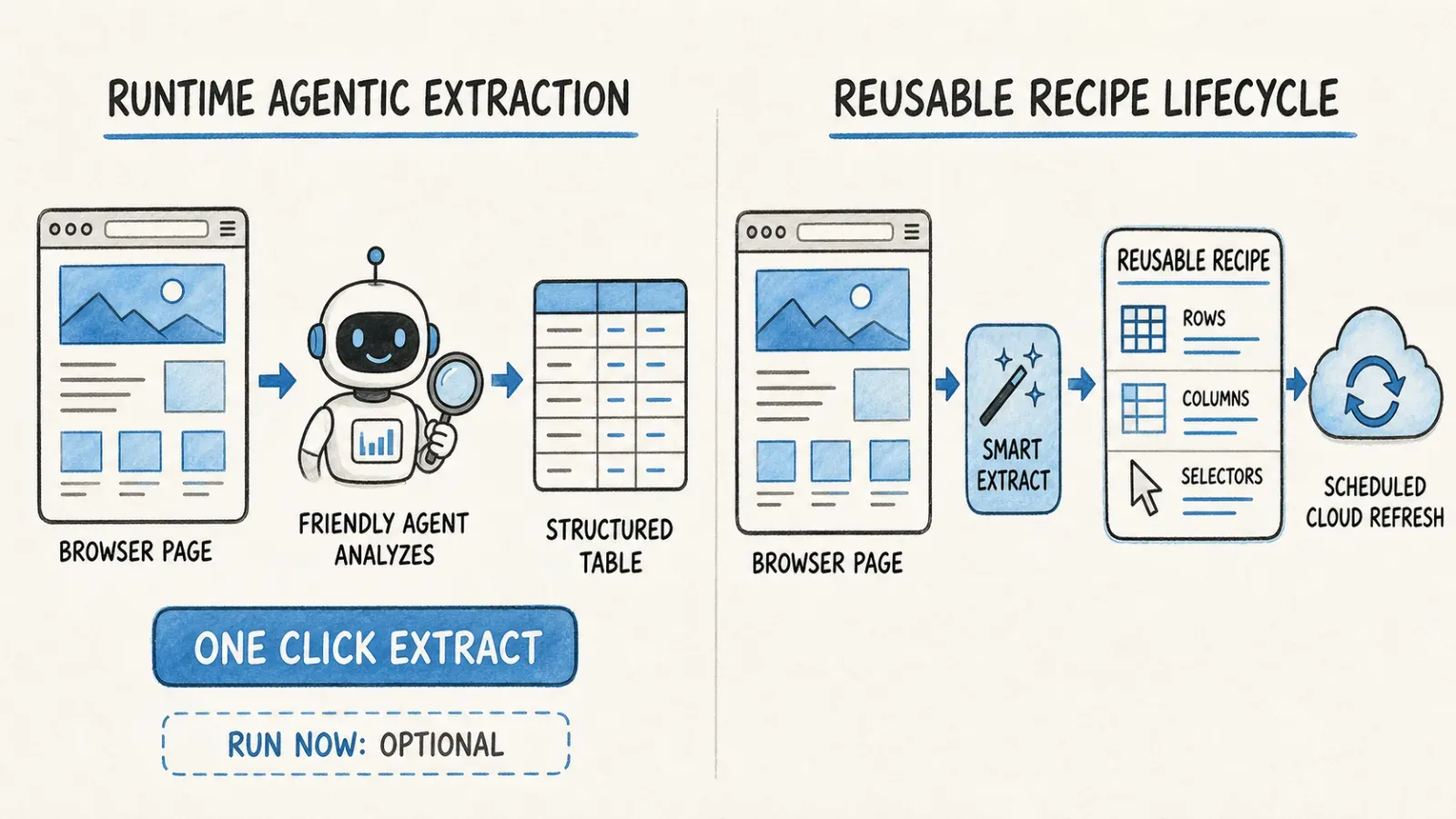
Simplescraper Smart Extract and Recipe lifecycle
Simplescraper's model is fundamentally about creating something reusable. Even with Smart Extract's AI-generated selectors, the output is still a Recipe — a saved configuration tied to specific CSS selectors that Simplescraper will re-run. That Recipe becomes an asset in your account: you can schedule it, batch it, share it, version it.
What happens when a site changes
This is where the tradeoffs get real. If a target site changes its layout, a Simplescraper Recipe's saved CSS selectors can break — even AI-generated ones, since they were locked in at creation time. You'd typically need to re-run Smart Extract or manually patch the Recipe.
Thunderbit's agentic approach means each extraction re-interprets the page, which in theory adapts better to layout drift — but it's not magic. On unusual layouts, heavily obfuscated markup, or pages behind aggressive anti-bot measures, agentic detection isn't guaranteed either. Neither approach is bulletproof; they just fail differently. Simplescraper's Recipes fail predictably (a broken selector is easy to diagnose). Thunderbit's runtime interpretation can occasionally propose a different structure than you expected, which needs a quick human check.
Hands-On Workflow Comparison
Ad hoc list/table extraction
Thunderbit: open page, click One Click Extract, done. Simplescraper: open extension, build or run a Recipe (Smart Extract if new, or pick a saved one), extract.
For a one-off job on a page you've never scraped before, Thunderbit's flow has fewer steps because there's nothing to save or configure.
Repeated scheduled scraping
This is Simplescraper's home turf. Save a Recipe, attach a schedule, let it run against the same page structure repeatedly, and route results via webhook or Sheets integration. Thunderbit supports scheduling where the plan and surface allow it, but the platform's design center of gravity is the interactive, page-by-page extraction rather than a long-running unattended Recipe.
Multiple URLs and detail-page workflows
Both support this — Simplescraper via bulk URL lists and deep scraping into detail pages from a listing page; Thunderbit via subpage enrichment on compatible pages (extract a list, then automatically visit each item's detail page for more fields).
API-based structured extraction
Simplescraper's API guide documents Recipe execution, direct Markdown/HTML/screenshot extraction, Smart Extract via API, and batch runs of up to 5,000 URLs per request (credit-dependent). Thunderbit's Open API documents structured extraction and asynchronous batch workflows for developers building extraction into their own applications.
Screenshots or Markdown for downstream AI
Simplescraper has dedicated endpoints for this — if you're feeding pages into an LLM and need clean Markdown or visual screenshots, it's a documented, first-class use case. Thunderbit's core strength is structured field extraction rather than raw page-to-Markdown conversion.
API and Agent Integration
If you're a developer, this section probably matters more than the UI comparison above.
Simplescraper's API is genuinely broad: you can create, list, read, and update Recipes; pull latest or historical results; run batch jobs against URL lists; hit direct extraction endpoints for Markdown/HTML/screenshots; call Smart Extract programmatically; and even discover URLs from a sitemap. Async runs return a result ID you can poll, and webhooks are supported for completion notifications.
Thunderbit takes a different angle on the developer/agent side. Beyond the Open API, there's a dedicated MCP Server — this matters if you're working inside Claude, Cursor, or another MCP-compatible AI host and want Thunderbit's extraction capability exposed as a native tool your agent can call directly, rather than writing custom API integration code. There's also a CLI for scripting from a terminal or coding-agent environment.
If your priority is "a mature, general-purpose scraping API with lots of surface area," Simplescraper's docs cover more ground today. If your priority is "I want my AI agent to call a scraping tool natively without me writing glue code," MCP is the more direct answer, and that's Thunderbit's lane.
Pricing and Credit Math
Let's actually do the math instead of quoting nominal numbers, because this is where marketing pages can be misleading — not maliciously, just because "up to X pages" always assumes best-case conditions.
Simplescraper's official pricing as researched:
| Plan | Price | Credits |
|---|---|---|
| Free | $0 | Browser scraping free + 100 starter cloud credits |
| Plus | $39/mo | 6,000 credits |
| Pro | $70/mo | 15,000 credits |
| Premium | $150/mo | 40,000 credits |
| Scale | $249/mo | 100,000 credits |
And here's the part that matters for real budgeting, from their credit documentation:
- 1 credit per page without JavaScript rendering
- 2 credits per page with JavaScript rendering — and JavaScript rendering is enabled by default
- AI Enhance costs 1 credit per 500 words processed (counting both input and output)
So that "6,000 pages" on the Plus plan? If your target sites need JavaScript rendering (which, let's be honest, most modern sites do), you're actually looking at roughly 3,000 pages for the same $39. Add AI Enhance on top of that and the real number drops further depending on how much text you're processing per row. This isn't a knock on Simplescraper — their docs are transparent about it — it's just something a lot of comparison articles skip because doing the math is more work than copying the pricing table.
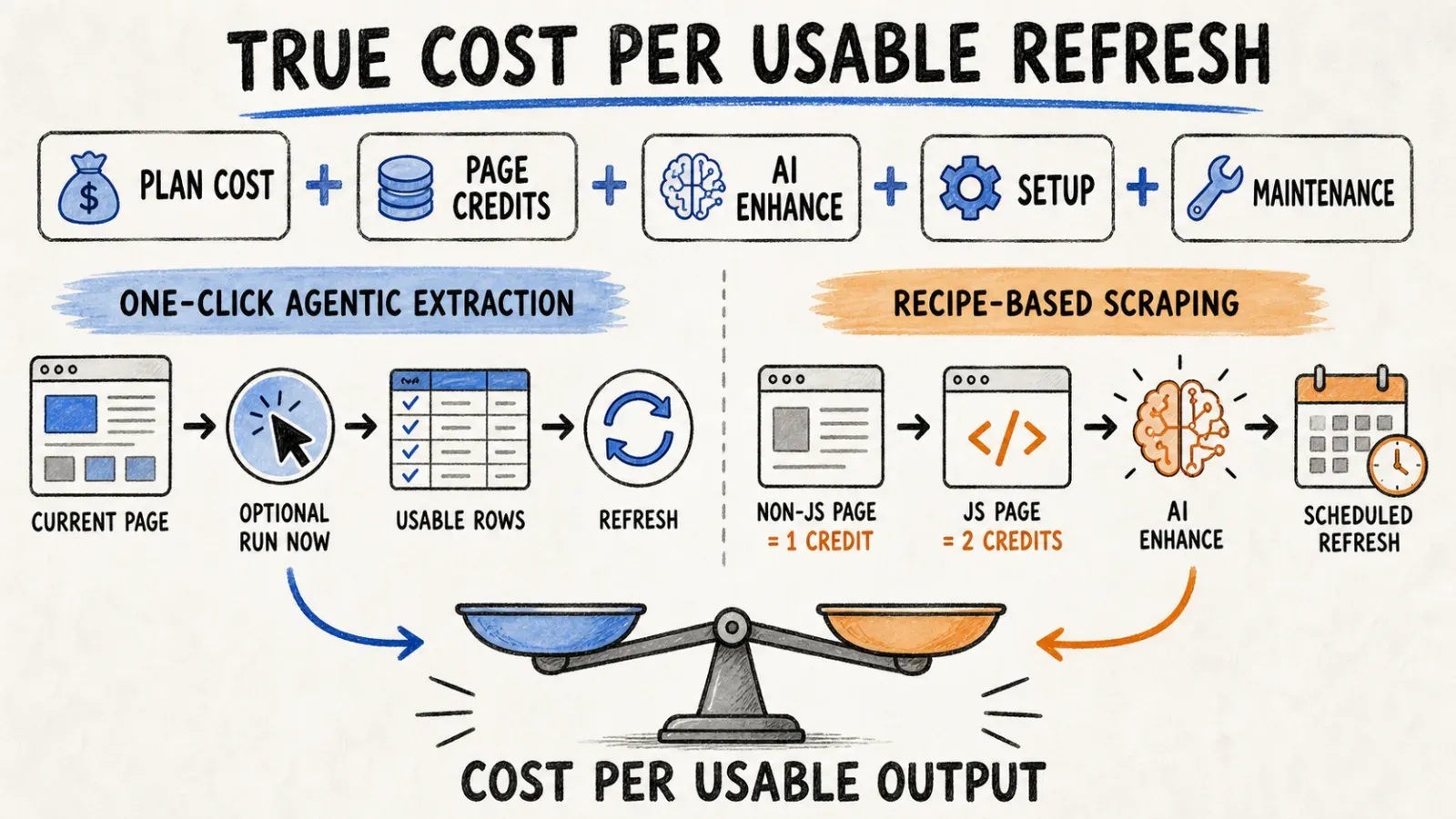
For Thunderbit's current pricing, check the live pricing page directly rather than trusting a copied number later — pricing pages change, and I'd rather send you to the source than have you working off a stale figure.
The honest advice here: whatever workload you actually run — same target site, same number of rows, same fields — test it against both tools' real credit or unit costs before committing to a plan. Nominal credit counts across different vendors aren't directly comparable because the "cost per unit of work" varies by JS-rendering rules, AI-enhancement usage, and how each platform defines a billable action.
Automation, Exports, and Team Handoff
Simplescraper leans hard into "set it up once, let it run forever" territory: schedules, webhooks, native Google Sheets/Airtable/Zapier integrations, and on the Scale plan, they'll even help you set up Recipes and Live Data Feeds for you. If your team has a recurring data need — say, monitoring competitor pricing weekly — that infrastructure is built for exactly this.
Thunderbit's automation story centers more on the extraction moment itself being fast enough that automation isn't always necessary — but where it is, scheduling is supported on applicable plans, and the browser/cloud/API/MCP combination means you can hand off the same underlying capability to a non-technical teammate (browser extension) or a developer (API/MCP) depending on who's doing the work that week.
The real question for your team: are you maintaining a Recipe as a long-term asset, or are you re-running an interpretive extraction each time you need fresh data? Both are valid team patterns — they just create different maintenance obligations down the line.
Which One Should You Choose?
Choose Thunderbit if...
You're a business user, salesperson, ecommerce operator, or researcher who needs data off a page right now, doesn't want to build or maintain selector configurations, and would rather have an agent re-interpret the page each time than manage a Recipe library. Also a strong pick if you're building an AI-agent workflow and want native MCP integration instead of custom API glue code.
Choose Simplescraper if...
You're building a production data pipeline that needs to run on a schedule, hit webhooks, integrate with Zapier/Airtable/Sheets natively, or you need screenshots and Markdown extraction as first-class outputs. Also a better fit if your team is comfortable maintaining Recipes and wants a mature, broad API surface for custom development.
Use both if...
Honestly? A lot of teams end up here. Use Thunderbit for ad hoc, one-off extraction needs across whatever page someone's looking at that day, and Simplescraper for the two or three recurring pipelines that genuinely benefit from scheduled Recipes and webhook automation. I've seen this pattern show up more than once — different tools for different moments in the same workflow, not a single winner-take-all decision.
Final Verdict
Both Thunderbit and Simplescraper are legitimate, modern, AI-assisted scraping tools — and I want to be upfront that a lot of older comparison content out there frames this as "new AI tool vs old-school manual scraper," which isn't fair to Simplescraper anymore. They've built real AI extraction capability with Smart Extract, and AI Enhance is a genuinely useful post-processing layer.
The actual decision comes down to this: do you want the shortest possible path from "I found a page with data on it" to "I have a clean table" — that's Thunderbit's whole design philosophy. Or do you want to build reusable, schedulable, API-driven extraction infrastructure that a team can maintain over time — that's Simplescraper's strength.
My honest recommendation: pick one real job you actually need done — a real target page, a real set of fields, a real refresh cadence — and run it through both tools using their free tiers. Time the setup, count the usable rows you actually get, check what happens if you re-run it a week later, and do the real math on credit cost per completed extraction rather than trusting nominal numbers. That fifteen minutes of testing will tell you more than any comparison article, including this one.
And if you land on Thunderbit, the Chrome extension is free to try — no credit card, just click One Click Extract on a page you're curious about and see what it gives you.
FAQ
Does Simplescraper use AI? Yes. Simplescraper's Smart Extract feature lets you describe a desired data schema in plain English, and the AI generates a schema plus reusable CSS selectors. There's also AI Enhance, a separate post-extraction feature for transforming, summarizing, or enriching already-scraped data.
Does Thunderbit require CSS selectors? No. Thunderbit's agentic model interprets the page at extraction time — you click One Click Extract, and the agent detects and proposes fields without you writing or configuring selectors. This works on compatible pages; unusual layouts or heavily obfuscated sites may still need manual review of the results.
What is a Simplescraper Recipe? A Recipe is Simplescraper's saved, reusable extraction configuration — built either through point-and-click element selection or via Smart Extract's AI-generated selectors. Recipes can be scheduled, batch-run against URL lists, and triggered via API or webhooks.
How do Simplescraper credits work? Per their credit documentation, pages without JavaScript rendering cost 1 credit, pages with JavaScript rendering (enabled by default) cost 2 credits, and AI Enhance costs 1 credit per 500 words processed (input plus output combined).
Which offers a better API? It depends on your priority. Simplescraper's API has broader documented surface area today — Recipe management, batch runs up to 5,000 URLs, direct Markdown/HTML/screenshot extraction, and sitemap discovery. Thunderbit's Open API plus its MCP Server is the stronger choice if you specifically want native AI-agent integration (Claude, Cursor, etc.) rather than custom API glue code.
Do both support detail-page scraping and JavaScript? Yes, both support extracting from listing pages into detail/subpages on compatible sites, and both handle JavaScript-rendered content — though Simplescraper explicitly bills JS rendering at double the credit cost by default, which is worth factoring into your usage math.
Can either scrape every website? No. Neither tool guarantees universal website compatibility. Authentication requirements, anti-bot measures, unusual page structures, and site-specific access restrictions can limit either platform. Always test against your specific target pages, and only scrape data you're authorized to access.




