

I've had this exact question land in my inbox more times than I can count: "Should we use Thunderbit or ScrapeStorm for our data pulls?" And honestly, it's a fair question — both tools promise to get you structured data from websites without hiring a developer. But they get there in completely different ways, and picking the wrong one for your workflow means either wasting hours building rules you didn't need, or hitting a wall when you actually needed granular control.
So I dug into both products, read through the official docs, and mapped out where each one genuinely shines. Here's the honest breakdown — no marketing fluff, just what each tool actually does and who should be using which.
Quick Answer
If you want the short version: Thunderbit is built for people who'd rather have an agent look at a page and just figure out the data than sit down and design extraction logic themselves. You click One Click Extract, the tool reads the page, and it starts pulling structured data — Run Now is there if you want to kick things off immediately, but it's optional since the task auto-starts anyway.
ScrapeStorm, on the other hand, gives you Smart Mode for automatic detection on typical list and content pages, plus a Flowchart Mode where you can build out explicit click-scroll-wait-loop logic when a site needs more than pattern recognition.
Neither one is "the manual one" and neither is "the fully automatic one." That's actually the biggest misconception I keep seeing in comparison articles — they paint ScrapeStorm as purely rule-based drudgery, which undersells Smart Mode, and they paint Thunderbit as magically working on every site, which isn't realistic either. Compatibility and authorization still matter for both.
Thunderbit vs ScrapeStorm at a Glance
Before we get into the weeds, here's the table I wish existed when I was first comparing these two:
| Attribute | Thunderbit | ScrapeStorm |
|---|---|---|
| Deployment | Chrome/Edge browser extension, Web App, Open API, MCP Server, CLI | Desktop app (Windows/macOS/Linux) |
| Setup workflow | Agentic — click One Click Extract, page is auto-analyzed, Run Now is optional | Smart Mode (automatic) or Flowchart Mode (visual, manual logic) |
| Best for | No-code users, ops/sales teams, quick browser-based pulls | Users comfortable building rule-based workflows for complex sites |
| Pagination handling | Compatible pagination and subpage enrichment on supported pages | Smart Mode auto-detects; Flowchart Mode offers explicit loop components |
| Interaction support (clicks, forms, scrolling) | Browser session-based, works within authorized sessions where supported | Explicit Flowchart components: click, hover, dropdown, input, wait, condition |
| Scheduling | Cloud-based, plan-dependent (check current plan) | Desktop scheduler starting at Premium tier |
| Export | Excel, Google Sheets, Airtable, Notion, other supported formats | Excel, TXT, CSV, HTML, MySQL, PostgreSQL, SQL Server, MongoDB, Google Sheets (Premium+) |
| Developer access | Open API, MCP Server, CLI | RESTful API for local task control (Business tier) |
| Pricing model | Credit/plan-based — see current pricing | Tiered subscription, see official pricing |
I'm intentionally leaving out speed and accuracy rankings here. I haven't seen an independent, controlled benchmark comparing the two head-to-head, and vendor-stated speed claims (like ScrapeStorm's "3-10x" boost) depend heavily on page load times and how the task is designed. So I'm not going to pretend I have data I don't have.
What Is Thunderbit?
Thunderbit is what we built at my company — an agentic web scraper designed for the person who has zero interest in learning XPath or CSS selectors but desperately needs a spreadsheet of data by end of day.

Here's the actual current workflow, because I've seen older reviews describe an interface that doesn't exist anymore (more on that "0 Ratings" issue later): you click One Click Extract in the browser extension, and Thunderbit's agent detects, reads, and analyzes the page you're on. It figures out what fields make sense — product names, prices, contact info, whatever the page structure suggests — and then it just runs. Run Now is there if you want to trigger it immediately, but if you don't click anything, it starts on its own anyway.
That's the part that surprises people. There's no "review your selectors" step, no schema-building phase. You can refine things afterward using plain language — tell it to reformat a date field or split a name column — and on compatible pages it handles pagination and subpage enrichment (think: scraping a list page, then automatically pulling extra details from each linked detail page).
Beyond the browser extension, Thunderbit also has a Web App, an Open API for developers who want to trigger extraction programmatically, an MCP Server so AI agents like Claude or Cursor can call Thunderbit as a tool, and a CLI for terminal-based workflows. Exports go to Excel, Google Sheets, Airtable, Notion, and other supported formats.
I'll say this plainly: this only works well on pages that are compatible and that you're authorized to access. It's not a universal key that opens every locked door on the internet.
What Is ScrapeStorm?
ScrapeStorm takes a different architectural approach entirely. It's a downloadable application — Windows, macOS, or Linux — and it's been around long enough to build out a genuinely comprehensive feature set.
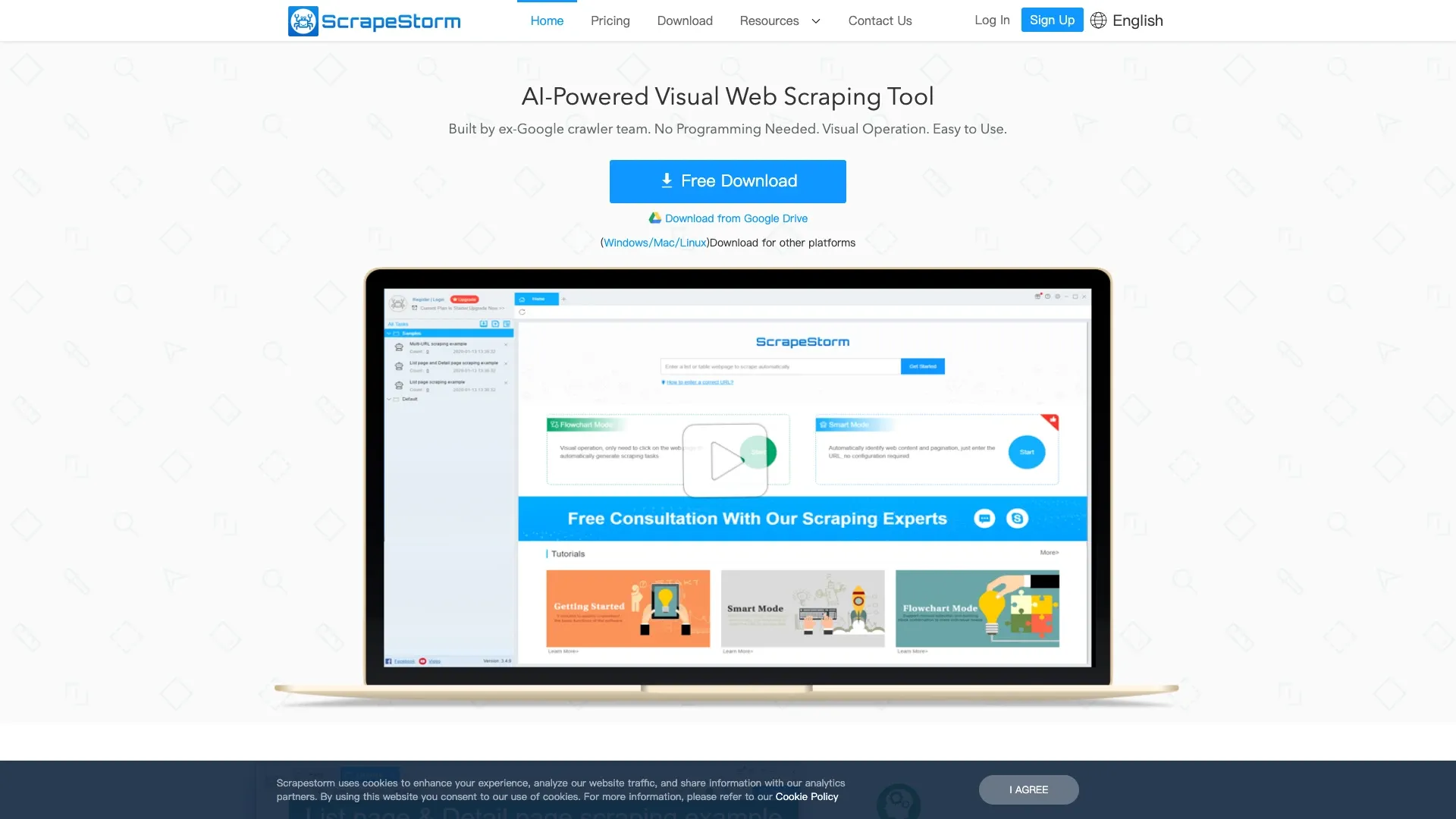
The core of ScrapeStorm is its two operating modes, and understanding the difference matters a lot for deciding if it fits your use case.
Smart Mode tries to automatically identify content and pagination structure on list and content-style pages. According to ScrapeStorm's own tutorial on choosing the right mode, this works well when the page fits recognizable patterns — think product listing grids, article feeds, that sort of thing.
Flowchart Mode is where ScrapeStorm gets genuinely powerful for complicated sites. You build out a visual flowchart using components documented in their Flowchart component reference: open a URL, click something, wait for a load, scroll down, type into a form field, hover to trigger a dropdown, set up conditional branches, loop through paginated results or SKU variations, navigate back, copy a value, even handle CAPTCHA steps.
That's a lot of granular control. If a site requires you to log in, filter by a dropdown, then click through five tabs before the data you want even appears, Flowchart Mode gives you the tools to model that exact sequence.
ScrapeStorm also supports local execution on your machine or cloud/server modes, direct exports to databases like MySQL, PostgreSQL, SQL Server, and MongoDB, and (at higher tiers) automated scheduling and Google Sheets integration.
The Core Difference: Agent Delegation vs Hybrid Visual Control
Okay, so here's where I want to get philosophical for a second, because I think this is the actual decision framework that matters more than any feature checklist.
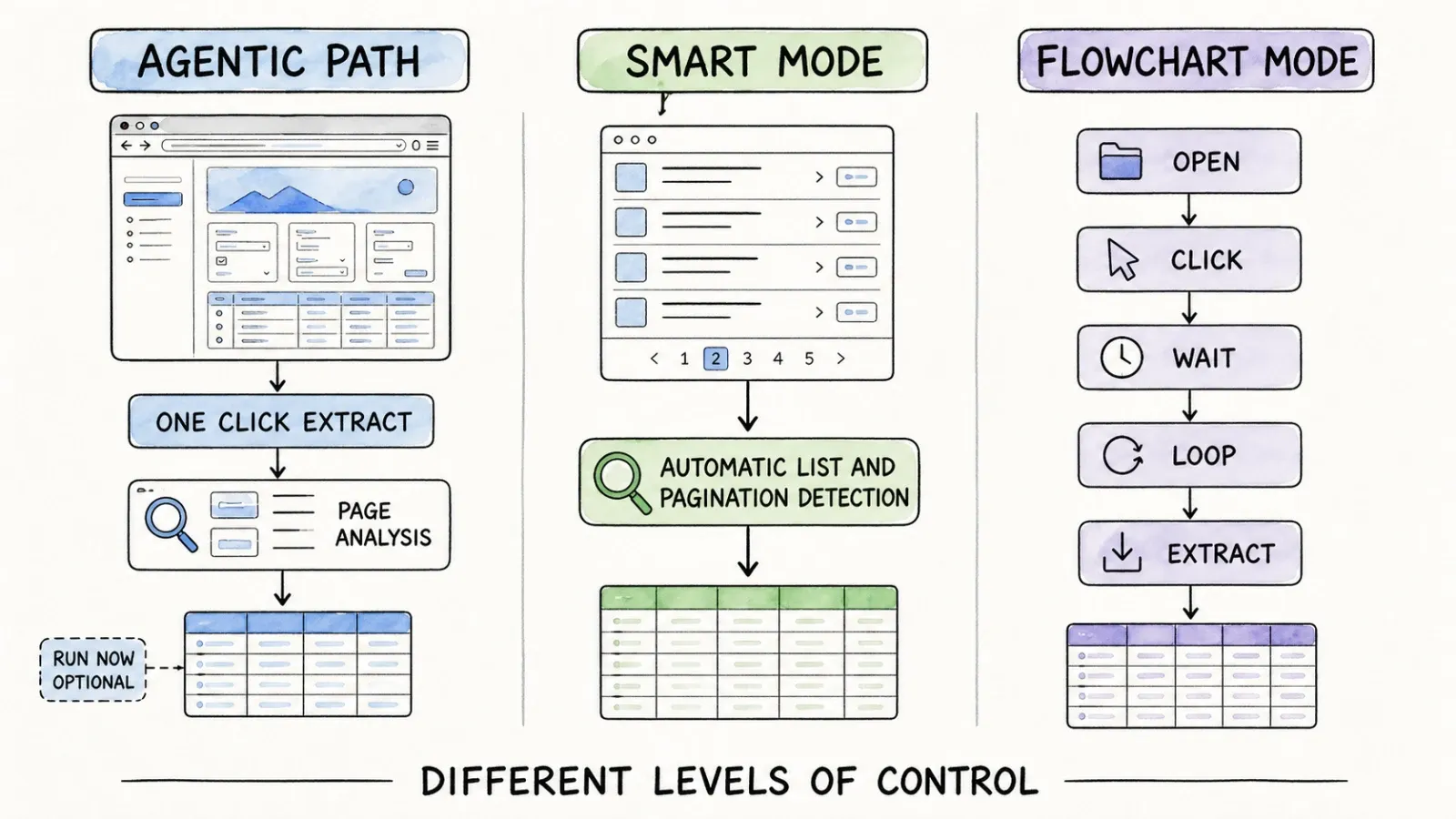
Thunderbit's one-click agentic path
The entire premise of Thunderbit is delegation. You're not telling the tool "the price is in this specific div, the title is in that specific span." You're saying, essentially, "figure it out" — and the agent does. This is genuinely faster to start because there's no configuration step between "I have a page open" and "I have structured data."
The tradeoff is that you're trusting the agent's interpretation. For most standard pages — product listings, directories, review pages — this works great. For pages with unusual structures or ambiguous data, you might need to nudge it with a natural-language instruction.
ScrapeStorm Smart Mode
Smart Mode is ScrapeStorm's answer to the same problem, and I don't think it's fair to call it "manual" — it's automated pattern detection, just built around specific page-type recognition rather than open-ended agentic reasoning. When it works, it's genuinely low-setup. When the page doesn't fit the patterns it recognizes, you're nudged toward Flowchart Mode.
ScrapeStorm Flowchart Mode
This is the mode that requires actual workflow construction. You're building a sequence of steps, testing it, debugging when a click doesn't register or a wait time is too short. It's powerful, but it's a different kind of work entirely — more like light programming with visual blocks than "point at a page and get data."
The contrast I keep coming back to: Thunderbit gives you immediate table output on compatible pages. ScrapeStorm's Flowchart Mode gives you a workflow you built, tested, and can now trust to repeat exactly — but you paid for that trust with setup time.
Hands-On Workflow Comparison
Let me walk through some realistic scenarios, because abstract feature comparisons only get you so far.
Simple list or table
If you're pulling a straightforward table — say, a directory of businesses with name, address, and phone number — Thunderbit's one-click flow is about as fast as it gets. ScrapeStorm's Smart Mode should handle this too, assuming the page fits recognized list patterns.
Pagination and infinite scroll
This is one of the top pain points I see mentioned constantly in user feedback — nobody wants to manually click "next page" fifty times. Thunderbit handles compatible pagination and subpage enrichment automatically as part of its agentic flow, provided the page structure supports it. ScrapeStorm's Smart Mode also auto-detects pagination on supported page types, and if that fails, Flowchart Mode has explicit loop components built for exactly this — looping through pages or scrolling for infinite-scroll content.
Neither tool guarantees success on every pagination pattern out there. Some sites use pagination logic that's genuinely tricky (JavaScript-rendered "load more" buttons with weird timing), and both tools depend on the target page's actual behavior.
Detail pages and multi-step navigation
Here's where things diverge more. If you need to go from a list page into individual detail pages and pull additional fields from each, Thunderbit's subpage enrichment on compatible pages does this as part of the same agentic workflow — no separate configuration needed. ScrapeStorm can absolutely do this too, but it typically requires Flowchart Mode to model the click-into-detail-page-and-extract sequence explicitly.
Login, forms, and interaction-heavy jobs
This is a legitimate concern I see raised constantly: "does it work behind a login?" Thunderbit can work within an authorized, logged-in browser session where supported — meaning if you're already logged into a site in your browser, the extension can operate within that session. This is not a guarantee across every authentication method or every anti-bot system out there.
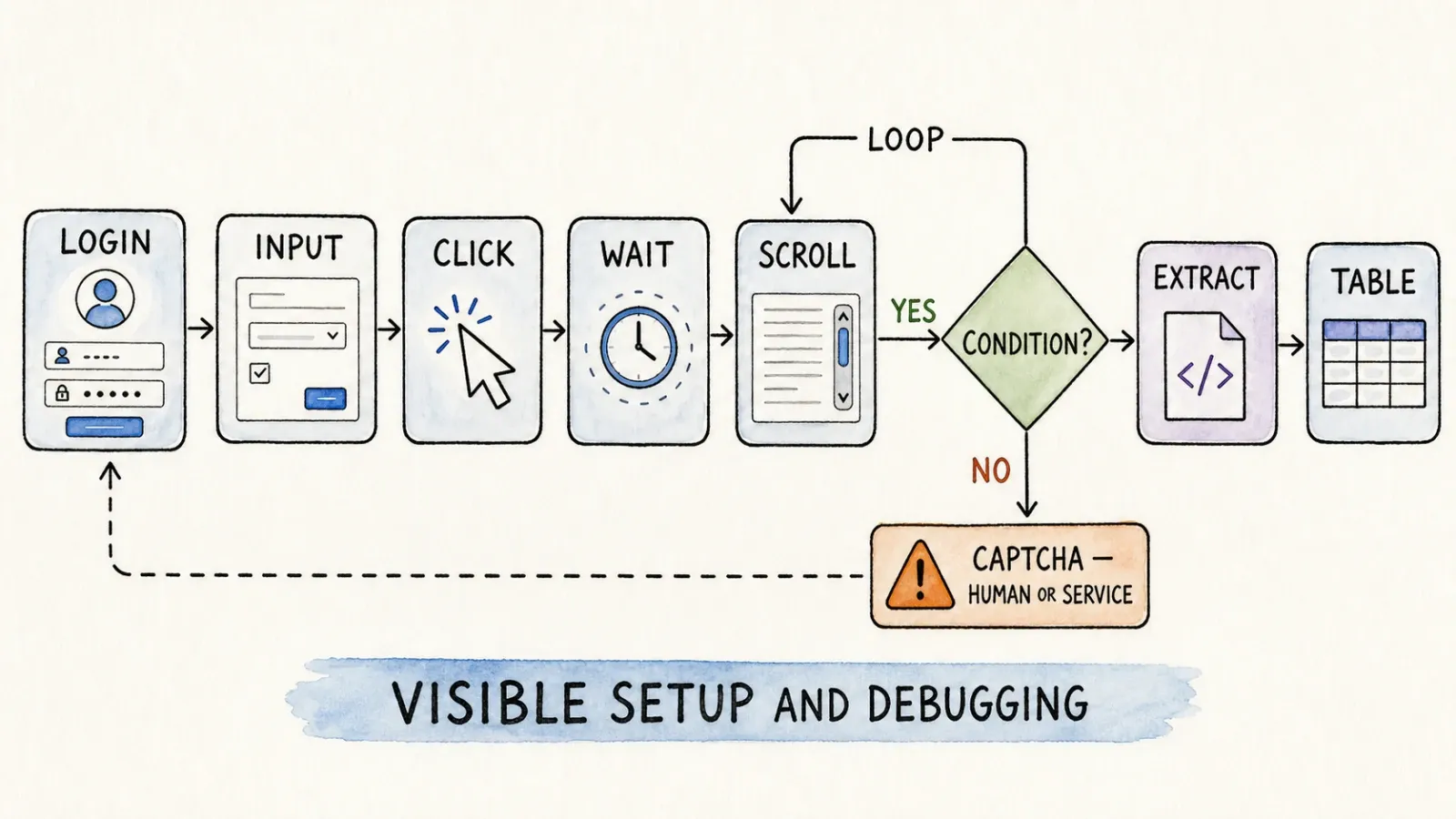
ScrapeStorm's Flowchart Mode gives you explicit input and click components, so you can model a login sequence step by step if needed — type username, type password, click submit, wait for redirect. It's more hands-on, but it's also more transparent about exactly what's happening at each step.
For CAPTCHA specifically: ScrapeStorm's Business tier includes CAPTCHA-handling features. Neither tool should be described as bypassing every anti-bot system — that's simply not a realistic claim for any scraping tool.
Recurring scheduled collection
If you need this data weekly or daily, both tools support scheduling — Thunderbit through its cloud-based plans (check your current plan for specifics), ScrapeStorm starting at its Premium tier with hourly/daily/weekly options plus automatic export.
Automation and Developer Access
For teams that want to go beyond point-and-click, both tools have developer-facing layers, but they're built differently.
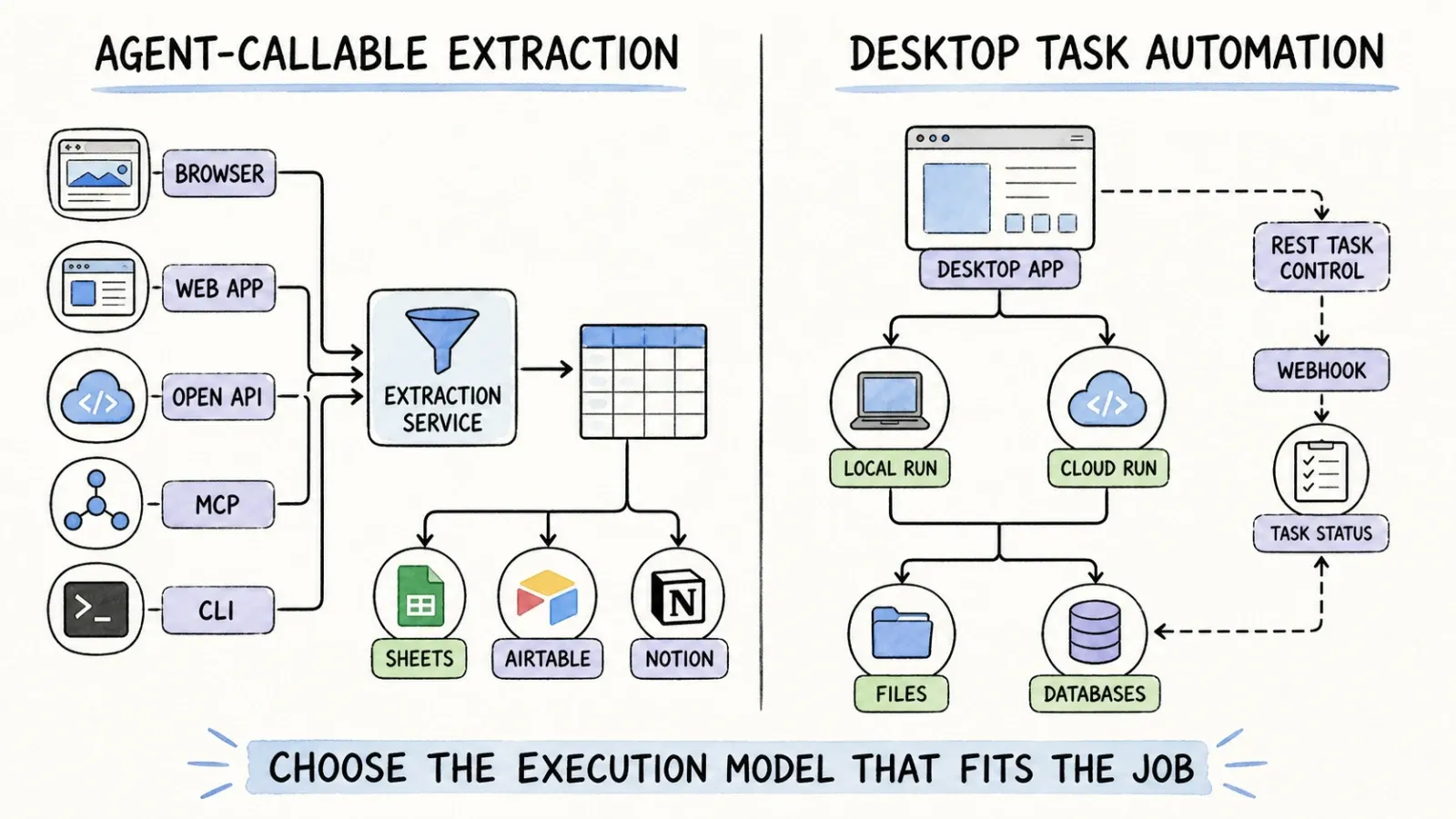
ScrapeStorm's Business tier includes a RESTful API that lets you control tasks running on your local ScrapeStorm application — load a task, check its status, start it, stop it, clear its data, that sort of thing. It also adds webhooks and task groups. I want to be precise here: this is task-control automation for your locally running desktop app, not a hosted extraction API that fetches and returns data from a server somewhere. That's a meaningful distinction if you're architecting a system around it.
Thunderbit's Open API is built as a more traditional API surface — you can trigger extraction and get structured data back programmatically without needing the desktop app running locally. The MCP Server is genuinely interesting for anyone building with AI agents right now — it exposes Thunderbit's extraction capabilities as a tool that agents in Claude, Cursor, or similar environments can call directly. And the CLI gives terminal-comfortable users a way to script extraction jobs.
If you're building agentic workflows or want extraction as one step in a larger automated pipeline, I think the API/MCP combination is where Thunderbit's architecture genuinely pulls ahead for developer use cases.
Export and Deployment
ScrapeStorm's export options lean heavily toward local file and database workflows: Excel, TXT, CSV, HTML locally, plus direct connections to MySQL, PostgreSQL, SQL Server, and MongoDB. Google Sheets integration and automatic export show up starting at the Premium tier.
Thunderbit's exports are built around the tools business teams already live in — Excel, Google Sheets, Airtable, Notion — plus whatever other formats are currently supported (check the Thunderbit site for the current list).
The deeper operational difference here: ScrapeStorm's desktop-first model means you're managing task files and running the app on a specific machine (or up to three concurrent machines on the Business plan). Thunderbit's browser and cloud execution model means less machine-management overhead but also less of the "this lives entirely on my computer" control some data-sensitive teams prefer.
Pricing
I always tell people to check live pricing pages before making a decision, because subscription pricing changes more often than any of us would like. That said, here's what ScrapeStorm's official pricing page showed as of my research date:
- Starter (Free): 10 tasks, one concurrent local run, unlimited URLs/pages per task, but capped at 100 exported rows/day
- Professional ($45/month, or $39/month billed annually): 100 tasks, two concurrent local runs, 10,000 rows/day export cap, IP rotation
- Premium ($89/month, or $79/month annually): unlimited tasks, unlimited concurrent local runs, unlimited data export, scheduling, Google Sheets integration, image download
- Business ($179/month, or $158/month annually): everything in Premium plus REST API, webhooks, task groups, file download, CAPTCHA-handling features, and up to three concurrent computers
- Customized: contact for a quote
I want to flag something important about that "unlimited URLs/pages per task" language on the free tier — unlimited page-crawling doesn't mean unlimited usable output, since you're still capped at 100 exported rows a day. Local compute power, target site behavior, concurrency limits, and proxy costs (which may be sold separately) all factor into what "unlimited" actually feels like in practice.
For Thunderbit's current pricing, check the official pricing page directly — plan structures and credit systems shift, and I'd rather point you to the source of truth than quote numbers here that might be stale by the time you read this.
Which One Should You Choose?
Choose Thunderbit if...
You're a business user — sales, ops, marketing, research — who needs data fast and doesn't want to spend an afternoon learning a new tool's workflow logic. You're working primarily in a browser, you want compatible pagination and subpage enrichment handled without extra configuration, and you'd rather refine results with plain language than debug a flowchart.
Choose ScrapeStorm if...
You're comfortable with (or actively want) granular control over browser interaction logic. You're dealing with sites that require complex multi-step navigation — login sequences, dropdown filters, conditional branches — and you want a visual way to model and debug that exact sequence. You also want local database exports and don't mind managing a desktop application across your team's machines.
Use both if...
Honestly, this happens more than people admit. I've talked to teams who use Thunderbit for quick, one-off browser pulls and ad hoc research, while keeping ScrapeStorm running scheduled Flowchart-Mode jobs against a handful of complex, login-gated sites that need that explicit step-by-step control. There's no rule that says you have to pick exactly one tool for every scraping job in your org.
Final Verdict
If I had to boil this down to one sentence: Thunderbit gives you the shortest path from "open page" to "structured data" through agent delegation, while ScrapeStorm gives you a hybrid of automatic detection and hands-on visual control for when a site genuinely needs step-by-step logic.
Neither one is objectively "better" in a vacuum — that framing is honestly a bit lazy. What I'd actually recommend: pick one real target site you're authorized to scrape, one that matters to your actual workflow, and test both tools against it. Time how long setup takes. Look at whether the output is immediately usable or needs cleanup. Think about who on your team will maintain this six months from now.
That's the real comparison — not a features table (even a good one, like the one above), but your actual data and your actual team's patience for configuration. If you want to see how the agentic approach handles your specific page, the Thunderbit Chrome extension is free to try — click One Click Extract on a page you care about and see what comes back before you commit to anything more elaborate.
FAQ
Is ScrapeStorm really AI-powered?
ScrapeStorm's Smart Mode uses automatic pattern recognition to identify list and content structures plus pagination on many page types, which the vendor markets under an AI/smart-detection label. It's a real capability, but it's scoped to recognizable page patterns rather than the more open-ended agentic reasoning Thunderbit uses to interpret arbitrary page structures.
What is the difference between Smart Mode and Flowchart Mode?
Smart Mode automatically attempts to detect data and pagination on list/content-style pages with minimal setup. Flowchart Mode requires you to build an explicit visual workflow using components like click, wait, scroll, input, condition, and loop — giving you more control for pages Smart Mode can't handle cleanly, at the cost of more setup time.
Does Thunderbit require selectors or coding?
No. The default browser workflow is agentic — click One Click Extract and the tool detects, reads, and analyzes the page to propose fields, then auto-runs (Run Now just lets you start immediately instead of waiting). No XPath, CSS selectors, or manual schema design is required for the standard flow.
Can both handle pagination and login pages?
Both offer relevant capabilities, but neither guarantees universal success. Thunderbit supports compatible pagination and subpage enrichment on supported pages, and can work within an authorized logged-in browser session where supported. ScrapeStorm's Smart Mode auto-detects pagination on many page types, and Flowchart Mode has explicit components for modeling logins and complex navigation. Results always depend on the specific site's structure, authentication method, and any anti-bot protections in place.
Does ScrapeStorm offer an API?
Yes, at the Business tier. It's a RESTful API for controlling tasks running in the locally installed ScrapeStorm application — starting, stopping, checking status, and clearing tasks, plus webhook support. It's task-control automation rather than a hosted extraction API that runs independently of a local desktop install.
Which tool is better for scheduled extraction?
Both support scheduling. ScrapeStorm offers desktop-based scheduling starting at its Premium tier, with hourly/daily/weekly options and automatic export. Thunderbit offers cloud-based scheduling depending on your current plan — check the Thunderbit pricing page for exact current details.
Can either scrape every website?
No, and any tool claiming that should raise your skepticism. Both Thunderbit and ScrapeStorm depend on the target page being accessible, structurally compatible, and something you're authorized to access. Heavy anti-bot systems, unusual JavaScript rendering, and strict authentication can limit either tool. Always test against your actual target before committing to a workflow.




