
Every few weeks, someone on our support team forwards me the same question from a prospect: "How is Thunderbit different from ScraperAPI?" I get why people ask — both show up on the same Google search for "web scraping tool," both have "scrape" or "scraper" plastered across their homepage, and both promise to hand you data from the internet. But after spending years building automation and AI products (and a fair amount of time before that untangling messy data pipelines at Automation Anywhere), I can tell you these two tools are answering completely different questions.
This isn't really a "which one is better" comparison — it's closer to comparing a moving company to a personal assistant. Both help you get things done, but you'd never hire one to do the other's job. So let me walk through what ScraperAPI actually is, what Thunderbit actually is, what each one costs for real-world scenarios (something I noticed nobody has actually laid out side by side), and who should pick which. No hedging, no "it depends" cop-outs where I can avoid them.
Thunderbit vs ScraperAPI: Quick Answer at a Glance
Here's the one-sentence version, since I know some of you are skimming on your lunch break: ScraperAPI is developer infrastructure for scraping at scale — proxies, CAPTCHA handling, and rendering, delivered through an API. Thunderbit is an agentic, no-code extraction layer that turns pages you're already looking at into structured data, with a browser extension, Web App, Open API, and MCP Server behind it.
Here's the quick-reference table I wish existed when I first started fielding questions like this:
| ScraperAPI | Thunderbit | |
|---|---|---|
| Best for | Engineering teams building scraping pipelines | Business users, marketers, ops, and developers who want structured data fast |
| Setup required | API key + request parameters + your own parsing logic | Click One Click Extract on the page (browser extension), or use Open API/MCP for automation |
| Output format | Raw HTML/JSON, structured parsers for supported sites | Structured, exportable tables |
| Coding needed | Yes, for most real workflows | No, for the browser flow; yes, if you're using the API/CLI/MCP |
| Ideal user | Developer or technical ops team | Non-technical operator, plus developers who want a faster structured layer |
If you already know which camp you're in, jump to the sections below that match — one covers ScraperAPI in more depth, one covers Thunderbit, and further down there's a real pricing breakdown and a decision framework that should settle the "which one for me" question in under two minutes.
What Is ScraperAPI? Built for Developers and Scraping Infrastructure
ScraperAPI, in plain terms, is a service you send a URL to, and it hands back page content while quietly handling the ugly parts of scraping — rotating proxies, retrying failed requests, dodging CAPTCHA and bot-detection systems, and optionally rendering JavaScript-heavy pages like a real browser would. You're still the one writing the code that calls the API and parses whatever comes back.
That's an important distinction I don't think gets made enough. ScraperAPI isn't "raw HTML only" anymore — its current feature set includes JSON auto-parsing and structured-data endpoints for supported targets, plus a DataPipeline product and full crawler access for bigger jobs. So it's not stuck in 2018. But the core assumption baked into the product is that you have (or are building) an engineering workflow around it: something that sends requests, checks responses, handles retries at the application level, and stores the results somewhere useful.
Where ScraperAPI genuinely shines is infrastructure-scale work: hundreds of thousands or millions of requests a month, hitting sites that actively fight back with bot detection. That's a hard problem, and outsourcing proxy management to a company whose entire job is proxy management is a smart move for a lot of engineering teams. I'll say this clearly since some comparison articles love to overstate things in both directions: ScraperAPI doesn't guarantee it'll get through every anti-bot system on earth, and its marketing claims like uptime percentages are vendor-reported, not third-party benchmarked. Treat them as a starting point, not gospel.
Who Should Even Consider ScraperAPI?
You're probably a good fit if:
- You're comfortable writing code that sends API requests and parses responses
- You need to scrape at real scale — think tens of thousands to millions of pages a month
- You need proxy rotation, geotargeting, and anti-bot handling built directly into your request pipeline
- You already have (or want to build) a data pipeline that ScraperAPI slots into as the "access" layer
If any of that made you nod along, keep ScraperAPI on your shortlist. If it made your eyes glaze over, stick around — the next section is probably more your speed.
What Is Thunderbit? An Agentic, No-Code Extraction Layer
Thunderbit takes a different starting point entirely: instead of assuming you'll write the extraction logic, it figures out the extraction logic for you. Click One Click Extract, and Thunderbit's AI recommends the right fields and extraction strategy, then turns the page into structured data for you — product names, prices, contact info, job listings, or whatever the page is actually about.
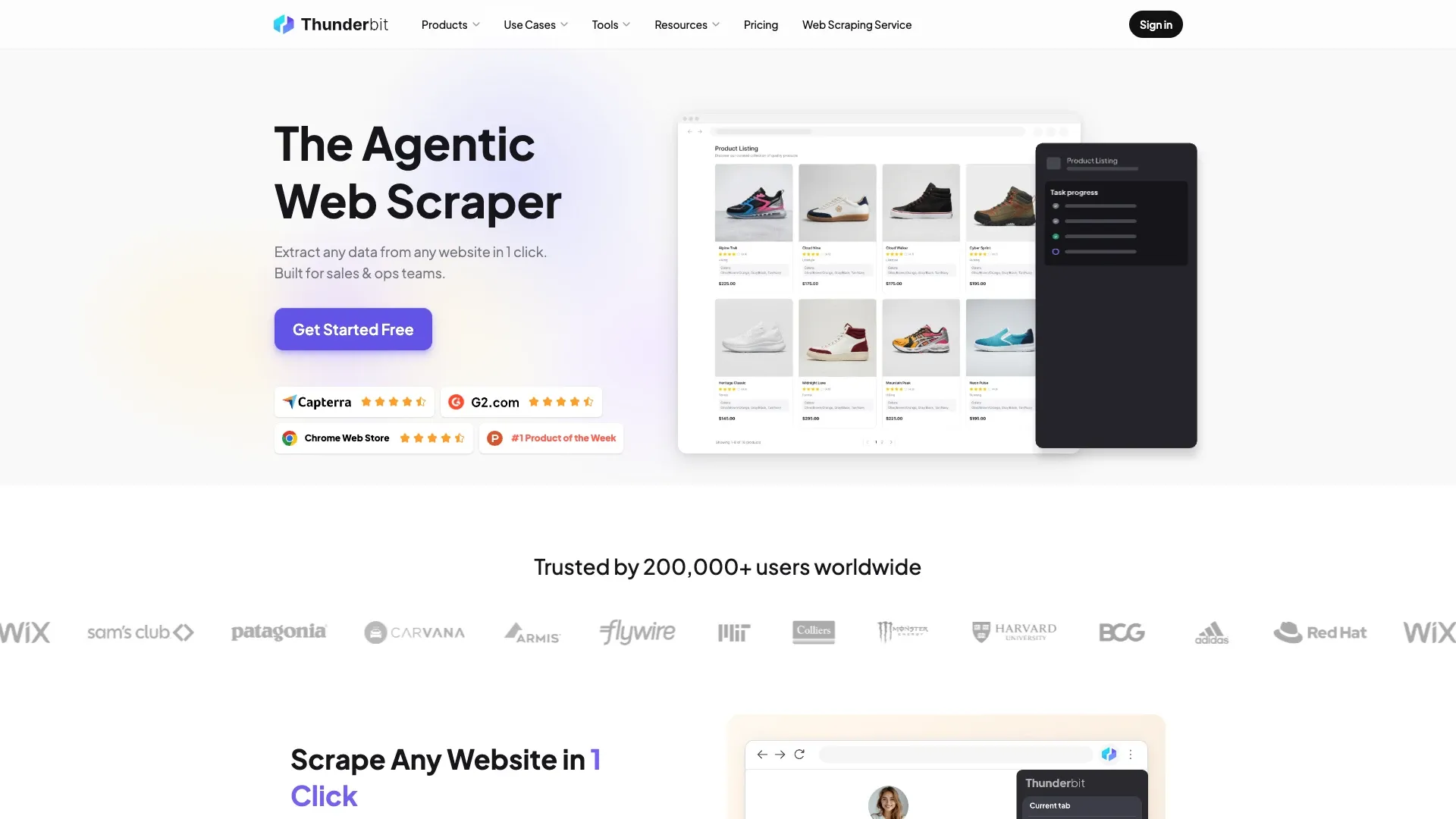
That simplicity matters for the non-technical crowd Thunderbit is built for: getting from a webpage to a usable spreadsheet takes one click, with no selectors, schema design, or scraping code. Nobody wants homework before they get their spreadsheet.
Thunderbit isn't limited to the browser, either. There's a Web App for cloud-based runs, an Open API for developers who want to call extraction programmatically, an MCP Server for plugging Thunderbit into AI agents like Claude or Cursor, and a CLI for terminal-based workflows. So while the flagship experience is no-code, it's not exclusively a no-code tool — it's more accurate to call it a structured-extraction layer with multiple doors into the same underlying capability.
And to set up something I'll come back to later: Thunderbit is not a proxy-rotation or anti-bot-bypass product. It's built to extract structured data from pages you can already access, not to fight through CAPTCHA walls at scale. Different job entirely.
Who Should Even Consider Thunderbit?
You're probably a good fit if:
- You're a sales, marketing, ops, or research person who needs data out of a webpage today, not after a two-week engineering sprint
- You want the data to land somewhere useful — Excel, Google Sheets, Airtable, Notion — without writing a parser
- You'd rather click a button than write a scraper, and that's not a character flaw, that's just being efficient
- You're a developer who wants a faster structured-output layer for internal tools, even if you're comfortable coding
How They Work: Architecture and Workflow Side by Side
The cleanest way I can explain the difference is this: ScraperAPI hands you the raw material and trusts you to build the furniture. Thunderbit tries to hand you the furniture already assembled.
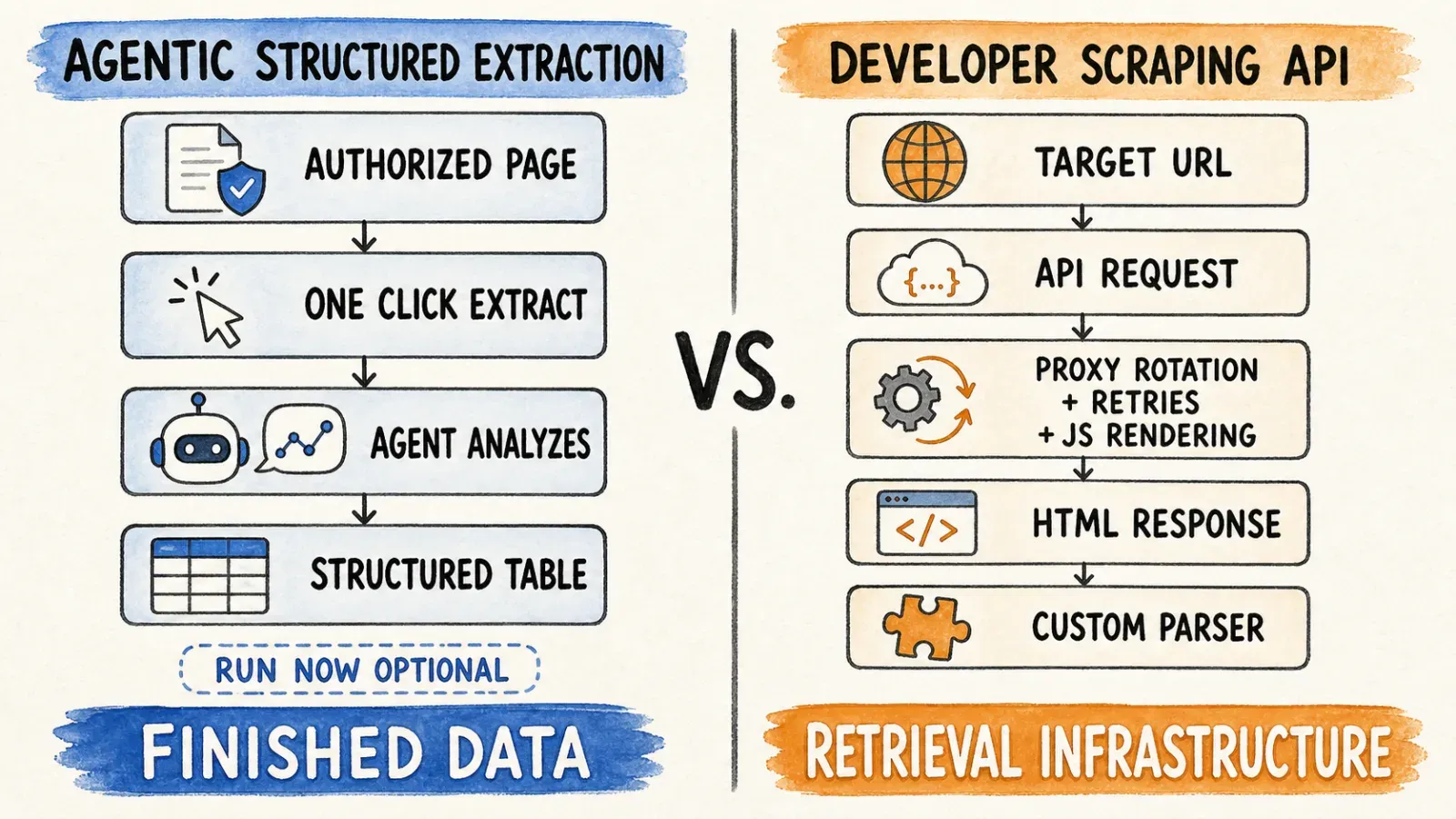
Under the hood, ScraperAPI's architecture is proxy-and-rendering-first. Your request goes through its network, gets routed through residential or mobile IPs as needed, potentially gets rendered through a headless browser if JavaScript execution is required, and comes back to you as HTML, JSON, or a parsed structure for supported domains. Everything downstream — schema design, storage, deduplication, scheduling — is on you, unless you're using its DataPipeline or crawler products specifically built for that.
Thunderbit's architecture is analysis-first. The agent reads the page's structure and content before deciding what to extract, which means the "schema" step that a developer would normally hand-code gets handled automatically. The output isn't raw material — it's a table you could hand to your sales manager without apologizing for the formatting.
Comparison Table: Core Mechanics
| ScraperAPI | Thunderbit | |
|---|---|---|
| Core model | Proxy rotation + raw HTML/JS rendering via API | Agentic page analysis → structured extraction via extension, Web App, API, MCP Server |
| Setup | Send request to endpoint with parameters | Click One Click Extract; AI recommends the fields and extraction strategy, then runs the extraction |
| Output | Raw HTML/JSON, structured parsers for supported sites | Structured, exportable data |
| Best for | Infra-scale scraping pipelines | Quick, structured, no-code extraction from an accessible page |
Neither model is "better" in a vacuum — they're built to solve different bottlenecks. ScraperAPI's bottleneck is access (getting past blockers). Thunderbit's bottleneck is comprehension (turning a messy page into usable rows).
Thunderbit vs ScraperAPI Pricing: Real Cost Per 1,000 Pages
This is the part that made me want to write this whole article, honestly. Every deep-dive on ScraperAPI's pricing explains its credit-multiplier system in exhausting detail, and every Thunderbit pricing page explains Thunderbit's own plans — but nobody puts them next to each other and says "okay, but what does this actually cost for the thing I'm trying to do?"
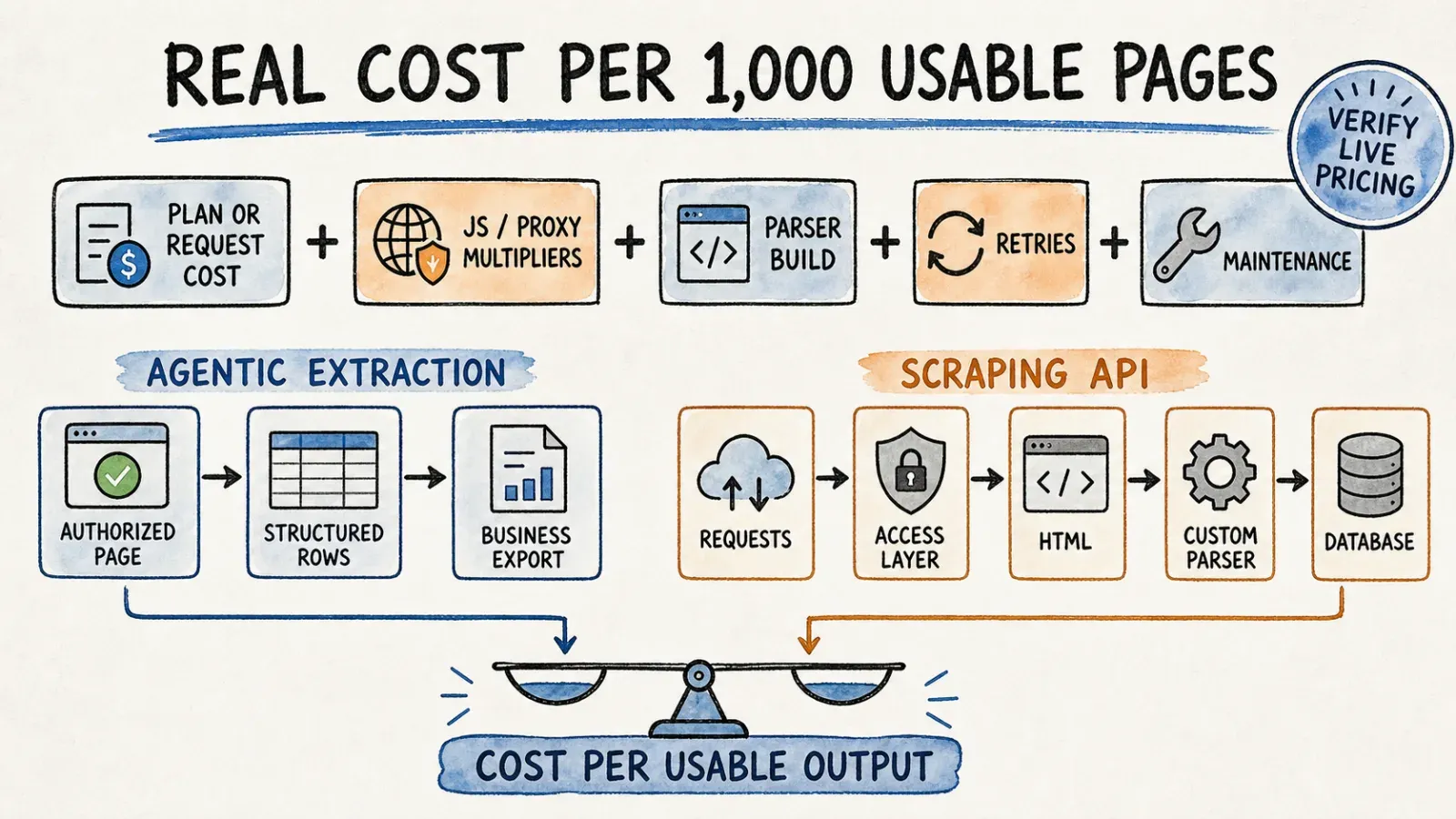
So let's do the math ScraperAPI's own documentation makes possible. Its credit system charges different base rates depending on the target: a normal page costs 1 credit, Amazon costs 5 credits, Google or Bing search results cost 25 credits, and LinkedIn costs 30 credits. On top of that, bypassing bot protection systems like Cloudflare or DataDome can tack on another 10 credits, and JavaScript rendering or premium proxy features can add even more — the exact amount depends on the target, so ScraperAPI's own cost estimator in the dashboard is the only reliable source before you commit to a plan.
Using the Hobby plan ($49 for 100,000 credits, which works out to roughly $0.00049 per credit) as a baseline for 1,000 pages:
| Scenario | ScraperAPI cost per 1,000 pages (Hobby plan rate) | ScraperAPI cost per 1,000 pages (Business plan rate) |
|---|---|---|
| Simple static pages (1 credit/page) | ~$0.49 | ~$0.10 |
| Amazon-style e-commerce pages (5 credits/page) | ~$2.45 | ~$0.50 |
| Google/Bing SERP scraping (25 credits/page) | ~$12.25 | ~$2.49 |
| LinkedIn pages (30 credits/page) | ~$14.70 | ~$2.99 |
That range widens fast once you factor in JS rendering or bot-bypass surcharges, and it narrows considerably on higher-volume plans since the per-credit rate drops as you move from Hobby up to Business, Scaling, or Professional tiers. This is the part most comparison articles skip — the effective per-page cost on ScraperAPI depends heavily on both the target site and which plan tier you're on.
Thunderbit's pricing model works differently at a structural level: instead of domain-specific multipliers where scraping LinkedIn costs 30 times more than scraping a static blog, Thunderbit's plans are built around monthly credit allotments tied to the volume of rows or pages you extract, scaling with plan tier. I'm not going to hand you a fabricated per-credit number here, because pricing pages change and I'd rather send you to the live Thunderbit pricing page than have you quote me on a number that's stale in three months. What I can tell you directionally is that for a one-off job — say, pulling 500 leads off a directory site or scraping a few hundred product listings for a client audit — you're not going to sit there calculating credit multipliers before you hit run. You just extract, and the pricing tier you're on determines how many of those runs you get per month.
Takeaway: if you're running infrastructure-scale scraping across many different domain types and can predict your credit multipliers in advance, ScraperAPI's cost model rewards planning and volume. If you're doing structured, ad hoc, or business-facing extraction where the value is in the finished table rather than the raw request count, Thunderbit's model is built for exactly that use case.
Which One Should You Choose? A Persona-Based Decision Framework
I've noticed the top-ranking articles on this exact comparison never actually answer the question people are searching for, which is some version of "am I a developer who needs infrastructure, or am I a business person who just needs data." So let me answer it directly.
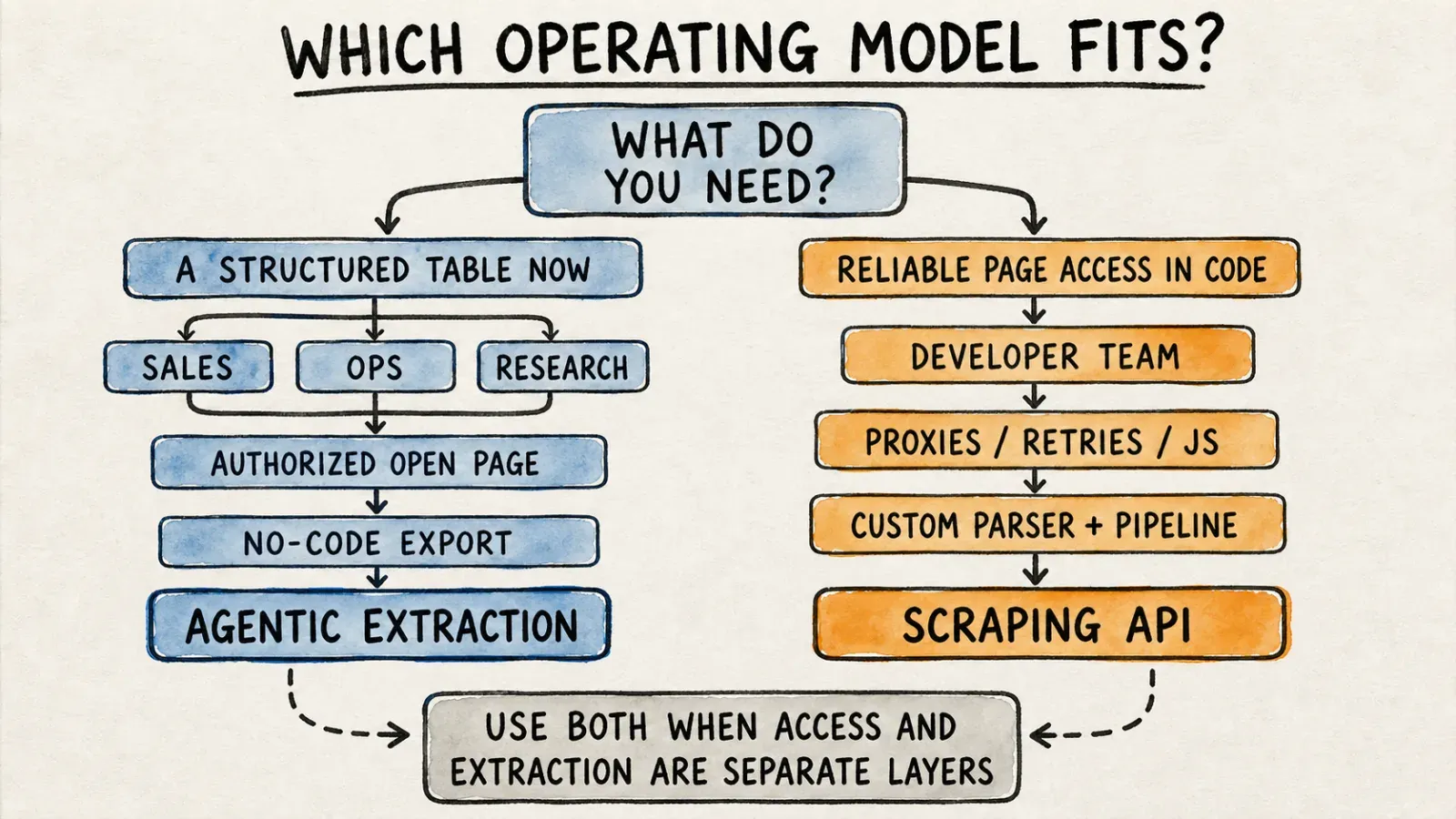
Choose ScraperAPI If...
- You're a developer or engineering team building scraping infrastructure at scale
- You need proxy rotation and CAPTCHA handling baked directly into your API calls
- You're comfortable writing request logic and parsing raw HTML or JSON responses
- Your use case involves millions of requests a month across many different domains
Choose Thunderbit If...
- You're a business user, marketer, or operator who needs structured data from a page you're already looking at
- You'd rather click One Click Extract and let the agent figure out the fields than write a single line of scraping code
- You need the output to land directly in Excel, Google Sheets, Airtable, or Notion
- You're a developer who wants a faster structured layer for internal tools without building extraction logic from scratch
I'll be the first to admit this isn't a binary choice for everyone. I've talked to teams that use both — engineering owns the ScraperAPI pipeline for high-volume infrastructure, while sales and marketing use Thunderbit for the "I need this list of leads by Thursday" requests that would otherwise sit in an engineering backlog for two weeks. That combination actually makes a lot of sense once you stop trying to force one tool to do the other's job.
Does Thunderbit Replace ScraperAPI? Clearing Up the Confusion
This is where I see the most confusion, and I want to be direct about it instead of dancing around it for SEO purposes. People search "AI scraper tool" and lump every result — Thunderbit included — into the same mental bucket as "scraping infrastructure." They're not the same bucket.
Thunderbit is a structured-extraction layer. It's built to turn a page you can already access into usable, exportable data, using AI to figure out the fields instead of requiring you to define a schema by hand. It is not a proxy-rotation or anti-bot-bypass infrastructure product the way ScraperAPI is. If you need to hammer through Cloudflare challenges across ten thousand different domains a day, that's ScraperAPI's home turf, not Thunderbit's.
Flip it around, though: ScraperAPI doesn't offer no-code AI field detection. It'll happily hand you the HTML of a page protected by heavy bot detection, but you're still the one deciding what "price" or "job title" means in that HTML and writing the code to extract it. Neither tool is trying to be the other, and I'd rather tell you that plainly than let you find out the hard way three weeks into a project.
For large-scale, high-blocking-risk crawling, ScraperAPI's proxy pool and anti-bot handling remain the more direct fit. For fast, structured extraction from pages you or your team can already access, Thunderbit's agentic approach is built for exactly that. And to be fair to both products, neither claim should get overstated — Thunderbit doesn't promise to bypass every anti-bot system out there, and ScraperAPI's own uptime and success claims are self-reported rather than independently verified.
Feature Comparison Table: Thunderbit vs ScraperAPI
Beyond the architecture and pricing differences, here's how the two stack up on the practical stuff a team actually cares about day to day.
| Feature | ScraperAPI | Thunderbit |
|---|---|---|
| Coding required | Yes, for most real-world use | No, for the browser extension flow |
| Output format | Raw HTML/JSON, structured parsers for supported sites | Structured tables, ready to export |
| Export options | Developer-managed (build your own storage/delivery) | Export to Excel, Google Sheets, Airtable, Notion |
| Scheduling | Available via DataPipeline for supported workflows | Available on supported plans and product surfaces |
| Proxy/anti-bot handling | Built into every request, core product feature | Not the core function; extraction targets accessible/authorized pages |
| Automation surfaces | REST API, DataPipeline, crawler access | Browser extension, Web App, Open API, MCP Server, CLI |
| Best team fit | Engineering/technical ops | Sales, marketing, ops, research, plus developer workflows |
The last row is really the whole story in one line. If your team's Slack channel is full of engineers, ScraperAPI probably already makes sense to you. If your team's Slack channel is full of "can someone pull this list into a spreadsheet" requests, that's Thunderbit's exact reason for existing.
Data Access, Compliance, and Responsible Use
I'll keep this section short because I don't think either company or I should be handing out legal advice. Both tools require you to work with public or otherwise authorized data, respect the access controls on the sites you're pulling from, follow applicable privacy law, and honor the target site's terms of service. Neither ScraperAPI's proxy network nor Thunderbit's AI extraction automatically makes any given scraping job legal or compliant — that responsibility sits with whoever's running the extraction, not the tool doing the extracting. If you're scraping anything involving personal data, logged-in sessions, or a site with an explicit "no scraping" clause in its terms, that's a conversation for your legal team, not a feature checkbox.
FAQs: Thunderbit vs ScraperAPI
Does Thunderbit have an API like ScraperAPI? Yes. Thunderbit's Open API supports Distill and structured Extract for programmatic, developer-facing workflows. It's a different experience than the no-code browser extension, built for teams that want to call extraction from their own applications or backend pipelines.
Can Thunderbit handle CAPTCHA/IP blocking like ScraperAPI? No. Thunderbit doesn't offer the proxy-rotation and CAPTCHA-bypass infrastructure that ScraperAPI is built around. It's designed for structured extraction from accessible, authorized pages — not for evading anti-bot systems at scale.
Which is cheaper for 10,000 or 100,000 pages? It genuinely depends on your scenario. A simple static-page job at high volume tends to favor ScraperAPI's infrastructure pricing once you're on a higher-tier plan. A structured, ad hoc extraction job — where the value is the finished table, not raw request count — tends to favor Thunderbit. Check the scenario-based breakdown above before assuming either tool is automatically cheaper.
Is Thunderbit a good ScraperAPI alternative? Only for structured, no-code extraction needs. It's not a drop-in replacement for proxy-rotation or anti-bot infrastructure at scale, and I'd rather tell you that upfront than have you find out mid-project.
Can I use Thunderbit and ScraperAPI together? Plenty of teams do exactly this — engineering uses ScraperAPI for high-volume infrastructure-level access, while business teams use Thunderbit for structured, one-off, or recurring extraction jobs that don't need a full engineering sprint. There's no rule that says you have to pick just one.
Deciding between these two really comes down to one honest question: are you building infrastructure, or do you just need a table of data by end of day? ScraperAPI is developer-grade scraping infrastructure — proxies, CAPTCHA handling, and rendering, built for teams comfortable writing request logic at scale. Thunderbit is an agentic, no-code extraction layer built for business users, marketers, and researchers who need structured data out of a page fast, plus an API and MCP layer for developers who want that same speed programmatically. Pick the tool that matches the actual job in front of you, not the one with the flashier landing page — and if you're the type who'd rather click a button than write a scraper today, you can try the Thunderbit Chrome extension and see how far one click actually gets you.




