
A few weeks back, someone on our team Slack dropped a link asking "wait, is this the same Ferret thing?" It wasn't. Turns out there's an Apple vision model called Ferret, a NOAA data tool called Ferret, and then there's MontFerret — an open-source browser automation framework that developers use to write scraping scripts in something called FQL. None of them are related, and if you're researching "Thunderbit vs MontFerret" right now, you've probably already hit that same confusion wall.
So let's clear it up first: I run Thunderbit, and I'm talking about our product versus MontFerret specifically — the declarative web-scraping project at montferret.dev. Not Apple's thing. Not NOAA's thing. And honestly, once you get past the naming mess, the matchup gets pretty interesting, because Thunderbit and MontFerret aren't really fighting for the same customer. They're solving different problems for different people, and I think that's the actual story here.
Quick Answer
If you want the short version before we get into the weeds: Thunderbit is a managed, agentic web scraper built to turn any page into structured data fast — across a browser extension, a Web App, an Open API, an MCP Server, and a CLI. MontFerret is an open-source browser automation framework where you write queries in FQL (Ferret Query Language) to scrape and interact with pages.
One more disambiguation note before we move on, because I've seen people burn 20 minutes on this: the focus is strictly on the MontFerret project. Not the Apple Ferret vision model, not NOAA's Ferret data visualization tool, not any other "Ferret" you might stumble into on a Google search. Just montferret.dev.
At a Glance
| Thunderbit | MontFerret | |
|---|---|---|
| Primary user | Non-technical business users (sales, ops, GTM), plus developers | Developers/engineers |
| Setup | Install extension or open Web App | Install Go/Ferret runtime, configure Chrome debugging port |
| Interface | Click One Click Extract, agent does the rest | Write FQL queries against DOM/CDP |
| Query language | None — natural language field refinement | FQL (inspired by ArangoDB AQL) |
| Browser automation | Managed on compatible, authorized pages | Self-managed via Chrome DevTools Protocol |
| Extraction logic | Agentic page analysis | Explicit selectors, loops, filters you write |
| Deployment | Browser extension / Web App / cloud | Self-hosted, you own the infrastructure |
| Scheduling | Supported on qualifying plans | You build and manage it yourself |
| Maintenance | Handled by the product | Owned by your team |
| License | Paid SaaS (credits/plan-based) | Open-source, free to run |
| Total cost | Subscription cost | "Free" software, but infrastructure + engineering time |
What Is Thunderbit?
I've explained Thunderbit to a lot of people who've never scraped a website in their life, and the way I usually frame it is this: you open a page you're allowed to access, click one button, and Thunderbit figures out what data matters on that page.
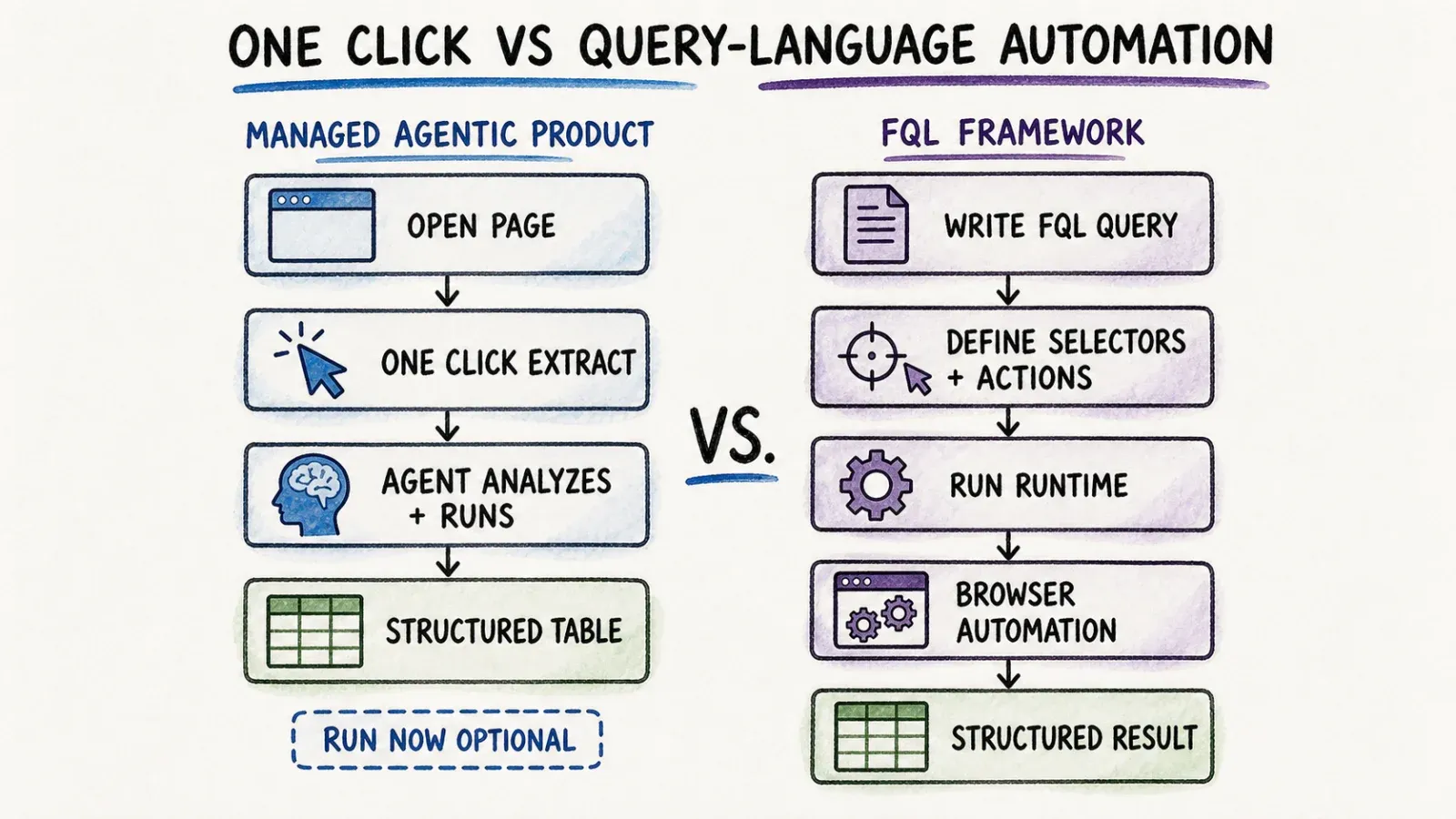
Here's the actual flow. You click One Click Extract. Our agent detects the page, reads it, analyzes the structure, and prepares fields it thinks are useful — think product names, prices, contact info, whatever the page is actually offering. Then it shows you Run Now. You can click that to kick things off immediately, or if you just... don't do anything, it auto-starts on its own. That's it. One intentional click, no schema-building, no selector-writing, no code.
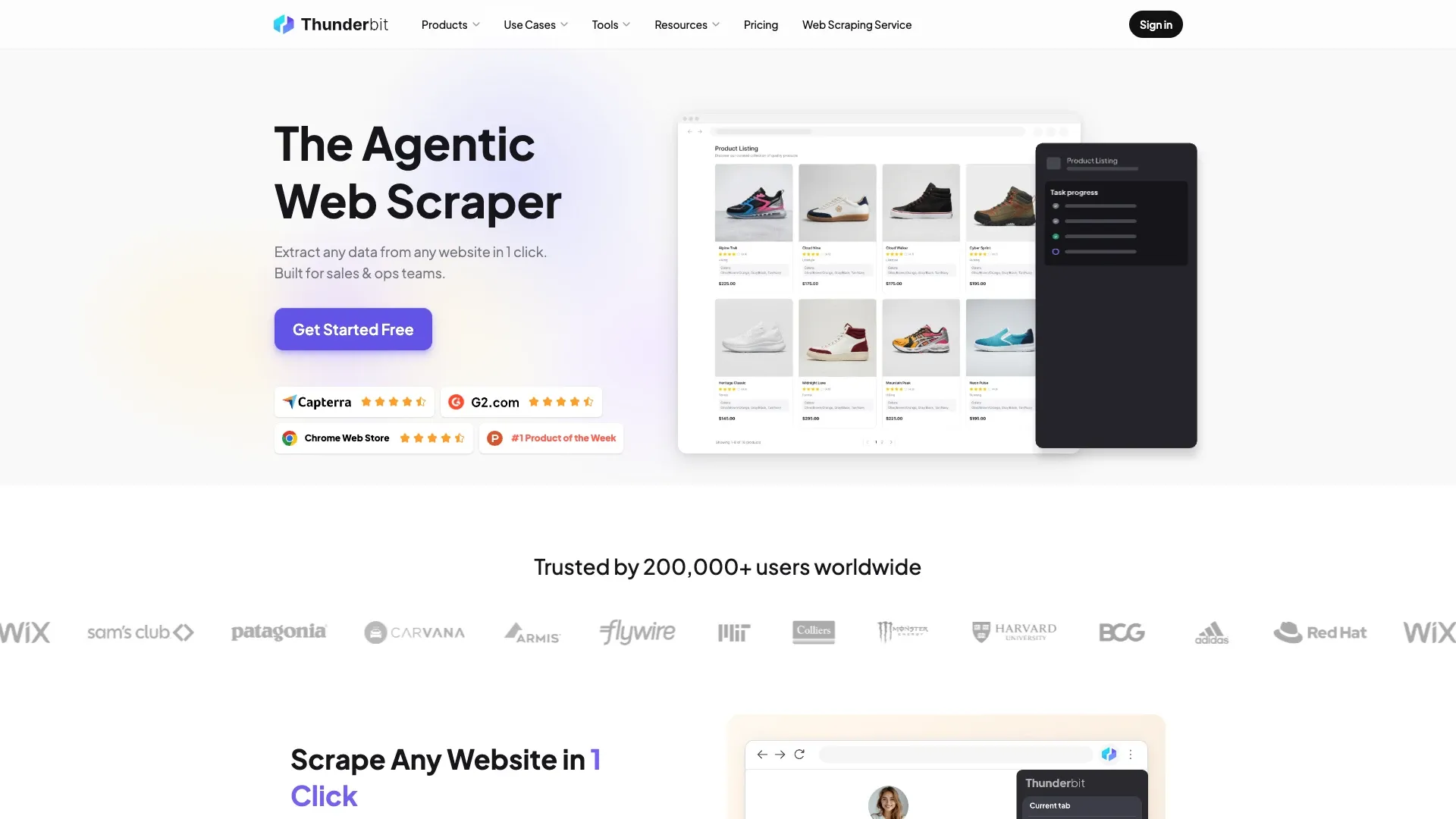
That's the Thunderbit Chrome Extension workflow, and it's the one most people encounter first. But it's not the only surface. If you want to refine the extraction — say, tell it to also grab a specific field it missed, or reformat something — you can do that with plain instructions. Thunderbit also handles compatible pagination and subpage enrichment automatically on supported pages, and lets you export to places like Excel, Google Sheets, Airtable, or Notion.
For developers, there's more under the hood: the Thunderbit Web App for cloud-based extraction, an Open API for programmatic access, an MCP Server for plugging into AI agents like Claude or Cursor, and a CLI for terminal-based or coding-agent workflows. So while the extension is the no-code entry point, Thunderbit isn't just a browser toy — it's a full extraction platform with multiple ways in.
One honest caveat here, because I don't want to oversell this: "one click" applies to compatible pages you're authorized to access. It's not a guarantee against every anti-bot system, every login wall, or every weird edge case a website throws at you.
What Is MontFerret?
MontFerret is a different animal entirely, and I actually respect what they built. It's an open-source declarative web scraping system where instead of clicking buttons, you write queries in FQL — Ferret Query Language — which the project describes as inspired by ArangoDB's AQL.
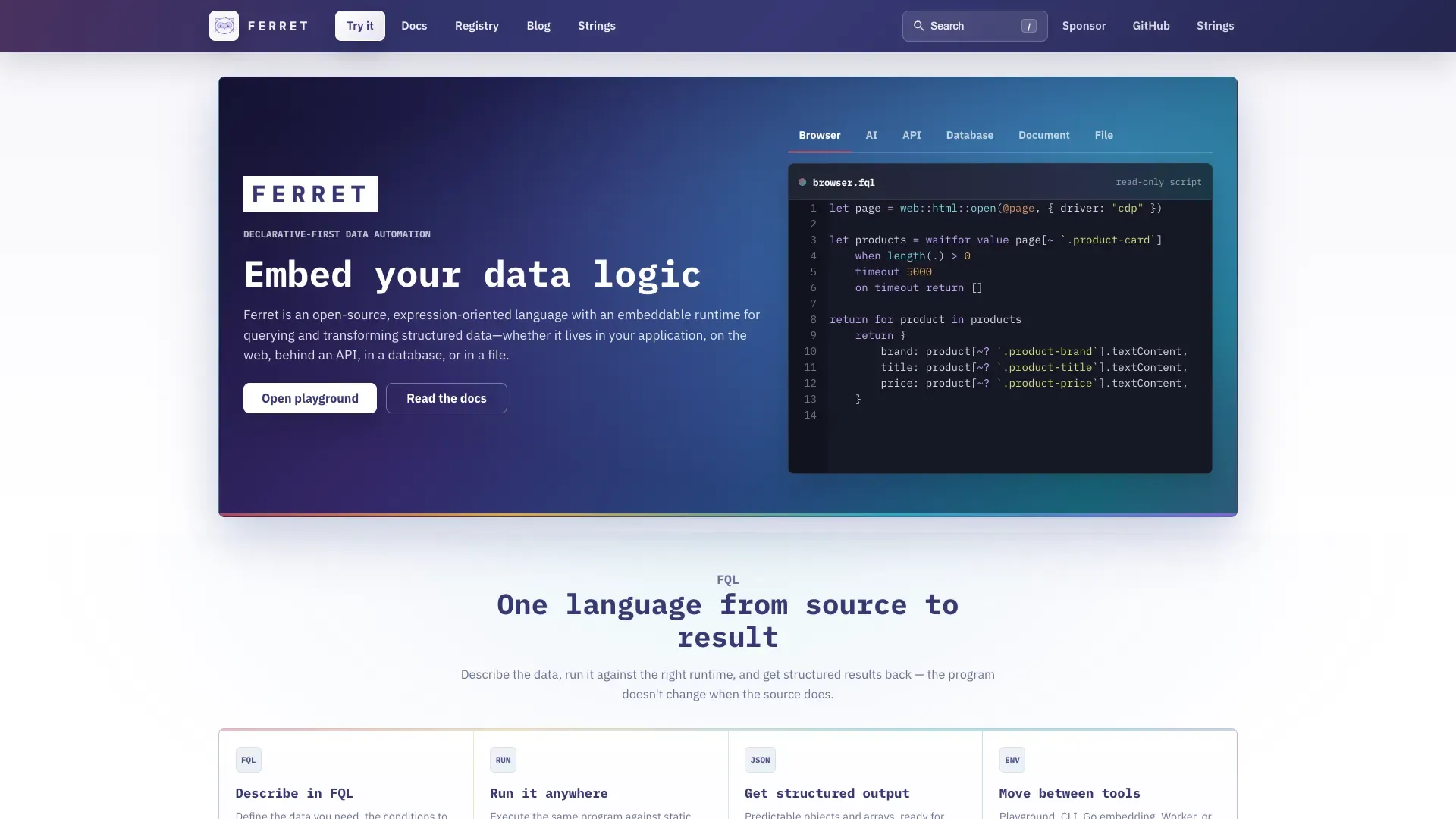
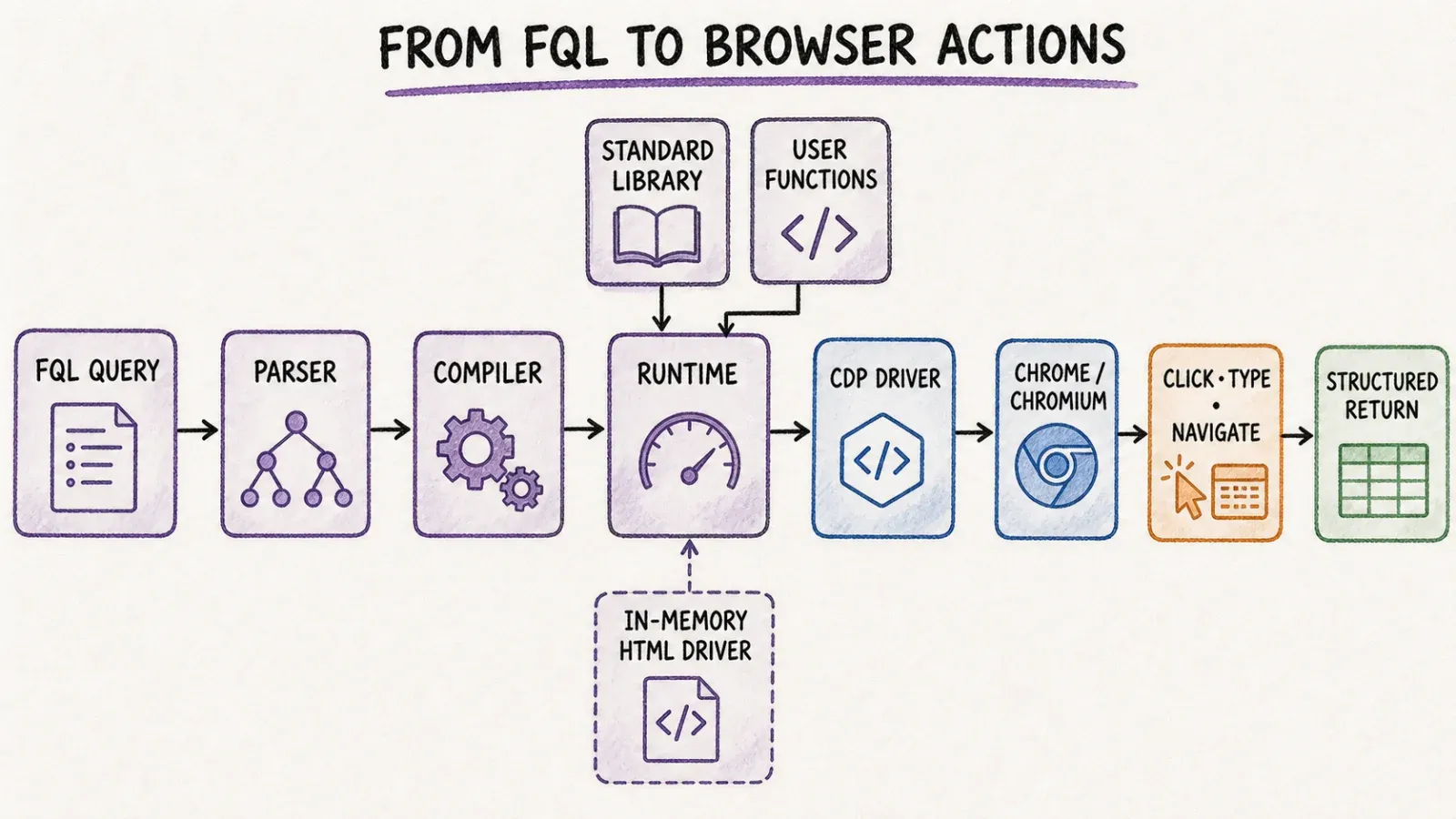
According to their official docs, the system is made up of a few core pieces: an FQL parser, a compiler, a runtime, a standard library, a user-function registry, in-memory HTML drivers, a Chrome DevTools Protocol (CDP) driver, and a command-line interface. If that sounds like a lot of moving parts, it is — but that's kind of the point. MontFerret is built for developers who want granular, code-level control over how a page gets scraped.
For anything involving JavaScript-rendered content or actual browser interaction, you need Chrome or Chromium running with a debugging port open so MontFerret can talk to it through CDP. Once that's set up, your FQL query can express loops, filters, CSS-style selectors, page navigation, click/type interactions, and structured return values — basically a query language wrapping browser automation logic.
The tradeoff is real: MontFerret abstracts away a lot of the low-level browser/network plumbing, but you still have to learn FQL, write and test your queries, and operate your own runtime. There's no "click and it figures out the fields" moment here. You tell it exactly what to do, every time.
Core Difference: Managed Agentic Product vs Query-Language Framework
Time to first structured result
This is where the gap is most obvious. With Thunderbit, time-to-first-result is measured in seconds: click One Click Extract, let the agent analyze the page, and the job auto-runs; Run Now is optional. With MontFerret, you're writing a query first. Even a simple FQL script requires understanding selectors, the query syntax, and how the CDP driver behaves on your target page. That's not a knock on MontFerret — it's just a fundamentally different starting point. One is "let the agent figure it out," the other is "you tell it exactly what to do."
Custom browser automation and control
Flip the lens, though, and MontFerret wins on precision. If you need a scraper that does something very specific — multi-step form fills, conditional logic based on page state, custom retry behavior — FQL gives you that level of control because you're writing the logic yourself. Thunderbit's agentic approach is fantastic for "extract what's useful on this page," but it's not designed to be a general-purpose browser scripting language. If your use case needs bespoke branching logic across a multi-page workflow, that's squarely MontFerret territory.
Deployment and maintenance ownership
Here's the part people underestimate. With Thunderbit, when a site changes its layout, the agentic extraction adapts because it's re-analyzing the page each time rather than relying on hardcoded selectors — though again, this isn't a promise it'll work on every single redesign. With MontFerret, if a site's DOM structure changes, your FQL query's selectors can break, and someone on your team needs to notice, debug, and fix it. That's ongoing engineering ownership that never fully goes away with a hand-written scraper, open-source or not.
Hands-On Scenarios
One-off business-user extraction
Say a sales ops person needs a list of companies from a directory site by end of day, and there's no engineer available. Thunderbit is built for exactly this: open the page, click One Click Extract, export to Google Sheets, move on with your day. Nobody's writing FQL for a one-time task.
Developer-authored repeatable browser automation
Now say an engineering team is building a monitoring pipeline that needs to check a competitor's pricing page every night, parse specific nested data, and push it into an internal system with custom transformation logic. This is where MontFerret's declarative query approach can shine — you write the FQL once, understand exactly what it does, and own the whole pipeline.
Dynamic multi-step site workflow
For sites requiring login flows, multi-page navigation, and conditional actions based on what's on screen, MontFerret's CDP driver and explicit query logic give you the control to script that precisely. Thunderbit can handle compatible pagination and subpage enrichment on supported, authorized pages, but it's not designed as a general scripting tool for arbitrary multi-step browser workflows.
API or AI-agent integration
If you're building an AI agent that needs to pull structured web data as part of a larger workflow, Thunderbit's MCP Server plugs directly into tools like Claude Code or Cursor. MontFerret can be scripted into a custom stack too, but you're building that integration layer yourself rather than using a pre-built connector.
Reliability, Flexibility, and Maintenance
I'll be straight with you here because this is the section where a lot of comparison articles get lazy. Thunderbit's agentic page understanding is genuinely useful because it reduces the maintenance burden of hardcoded selectors — the agent re-reads the page structure rather than relying on a brittle CSS path that breaks the moment a site redesigns its markup. But "agentic" doesn't mean "magic." It works on compatible, authorized pages, and there are absolutely sites and situations where it might not extract exactly what you expect.
MontFerret's explicit query/automation logic is more predictable in one sense — you know exactly what the query does because you wrote it — but that predictability comes at the cost of fragility when the underlying page changes. If a site swaps a div for a section, your selector might quietly break, and you won't know until your data comes back empty or wrong.
Neither tool makes universal claims about beating anti-bot protections, and I'd be skeptical of any tool that does. Both require operating within the bounds of what you're authorized to access.
Pricing, License, and Total Cost
This is where the "free" label on open-source software gets misleading, and I think it's worth being direct about it.
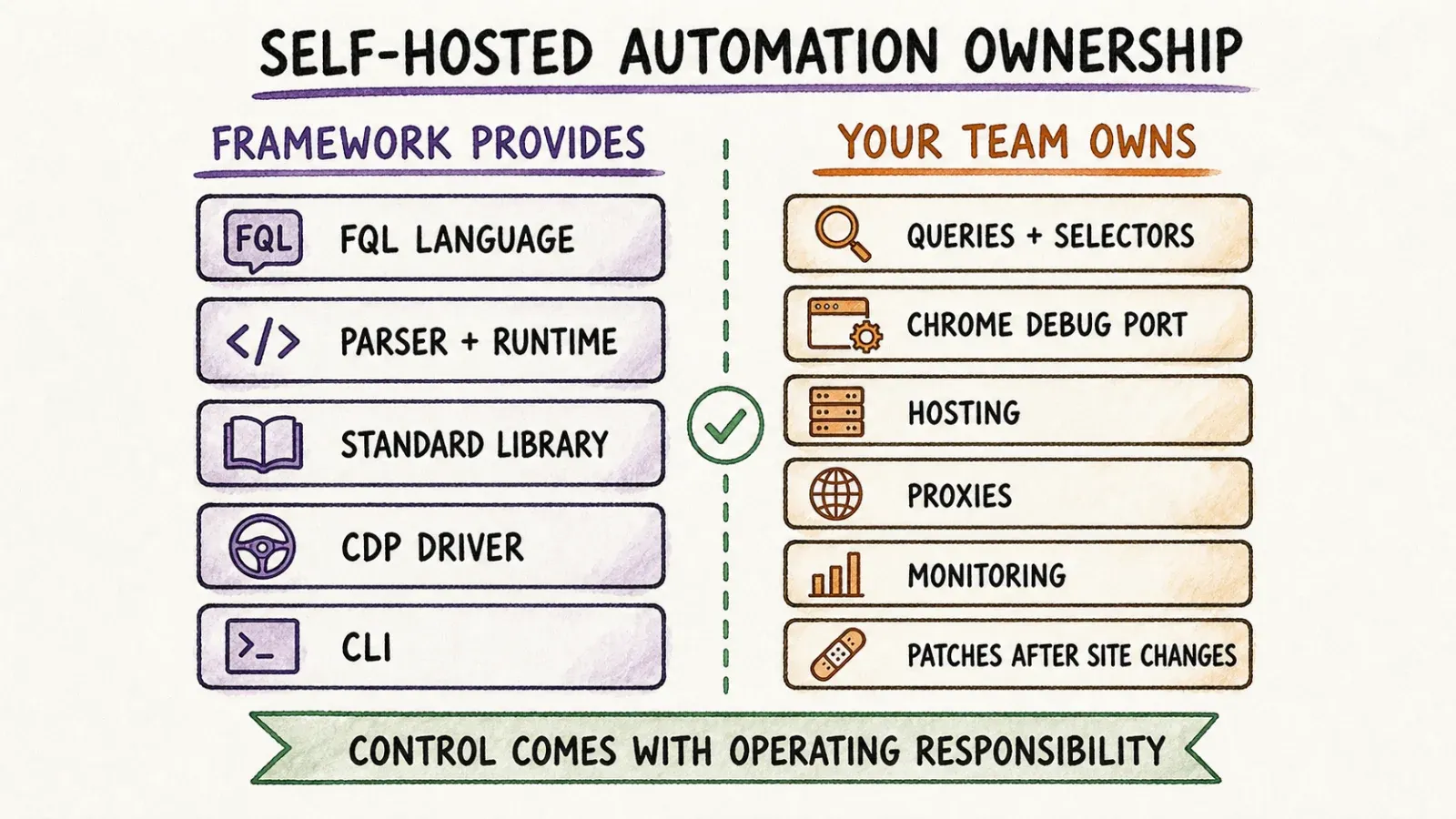
MontFerret is open-source — verify the exact current license on their repository before you commit, since these things can technically shift, but broadly speaking there's no subscription fee to use the core framework. That said, "free" only covers the software license. You still need to provision and host your own compute, run and maintain Chrome/Chromium instances, manage proxies if you're scraping at any real volume, set up monitoring for when things break, and pay engineers to write and maintain the FQL scripts.
Thunderbit runs on a paid plan structure — check the current Thunderbit Pricing page for exact numbers since these details shift over time — but that cost bundles in the managed browser/cloud execution, the agentic extraction logic, exports, and API/MCP/CLI access. There's no separate infrastructure bill to worry about.
| Cost Factor | Thunderbit | MontFerret |
|---|---|---|
| License cost | Paid SaaS (credits/plan-based) | Free, open-source |
| Infrastructure cost | Included in plan | You provision/host servers, Chrome, proxies |
| Engineering time | Minimal — no code required | Ongoing — writing, testing, debugging FQL |
| Maintenance burden | Handled by product | Owned by your team |
The real question isn't "which is cheaper" — it's "where do you want the cost to show up." Thunderbit shows it on a monthly invoice. MontFerret shows it on your engineering team's calendar.
Who Should Choose Thunderbit?
If you're a non-technical team member who needs data now and doesn't have engineering resources on standby, Thunderbit is the obvious pick. Same goes for anyone doing one-off or recurring business data pulls where "zero setup" matters more than granular control. And if you're already building AI-agent workflows and want scraping to plug in via MCP or CLI without writing a custom integration layer, that's squarely in Thunderbit's lane.
Who Should Choose MontFerret?
If you're a developer building a repeatable scraping pipeline that needs to run in CI/CD, or you need self-hosted infrastructure for data residency or compliance reasons, MontFerret's declarative approach and full infrastructure control make sense. It's also the better fit if your team has the engineering bandwidth to maintain FQL scripts long-term and actually wants that level of control over browser automation logic.
Can Teams Use Both?
Honestly, yes, and I don't think that's a cop-out answer. I've seen setups where a technical team runs specialized, repeatable FQL jobs for core data pipelines that need exact, version-controlled logic, while business users on the same team use Thunderbit for ad hoc research, quick exports, or exploratory data pulls that don't justify writing a custom script. They're not really competing tools — they sit at different layers of the same broader data operation. I won't pretend there's some official integration between the two, because there isn't, but architecturally it's a perfectly sane split.
Verdict
If I had to boil this down to one sentence: choose based on who's doing the work and how much time they have. If you've got a non-technical person who needs a table of data in the next ten minutes, Thunderbit wins every time — there's no contest. If you've got an engineer who wants a declarative, self-hosted, version-controllable scraping pipeline and doesn't mind owning the maintenance long-term, MontFerret is a legitimately good open-source option.
This isn't a "one tool beats the other" situation, and I'd be doing you a disservice if I pretended otherwise. It's a "which problem are you actually solving" situation.
FAQ
Which Ferret project is being discussed? The relevant project is MontFerret, the open-source declarative web scraping framework at montferret.dev. It is not related to Apple's Ferret vision model, NOAA's Ferret data visualization tool, or any other project sharing the "Ferret" name.
Is MontFerret open source? Yes, MontFerret is an open-source project. There's no licensing fee for the core framework, though you should check the current repository for exact license terms before using it in a commercial context, since infrastructure and engineering costs still apply even though the software itself is free.
Does Thunderbit support API and MCP integrations? Yes. Thunderbit offers an Open API for programmatic access and an MCP Server that connects Thunderbit's extraction tools to AI agent hosts like Claude Code and Cursor, alongside a CLI for terminal-based workflows.
Which is easier for non-developers? Thunderbit, without question. Its browser extension is built specifically so non-technical users can extract structured data by clicking One Click Extract — no query language, no selectors, no code. MontFerret requires learning FQL and setting up a runtime, which assumes at least basic development skills.
Which gives more explicit browser automation control? MontFerret. Because you write FQL queries directly against the DOM via the Chrome DevTools Protocol, you get precise, code-level control over navigation, interactions, and conditional logic. Thunderbit's agentic approach optimizes for fast structured extraction on compatible pages rather than granular scripted automation.




