
I've been staring at Kadoa's site on and off for the past few weeks, mostly because their June 2026 rebrand caught me off guard. One day they were "an AI web scraper" and the next they were calling themselves a "Web Scraping OS." That's a big jump — and it tells you something about where this whole category is headed.
So here's the question I kept getting from readers and from my own team: is Kadoa still comparable to Thunderbit, or did they just leave the "quick scraping tool" lane entirely? Short answer: a little of both. Long answer is everything below.
Quick Answer
If you want the tl;dr before I get into the weeds:
- Thunderbit is built for the moment you're staring at a webpage and thinking "I just need this data, now, in a spreadsheet." One click, no schema, no waiting on a data team.
- Kadoa is built for organizations that need governed, monitored, continuously maintained datasets running in production — think finance teams pulling alternative data from dozens of sources every day, with audit trails attached.
- Neither one is "the AI scraper" versus "the manual scraper." Both are genuinely agentic — the difference is what they're optimizing the agent for.
That last point matters more than people give it credit for. I see a lot of comparison articles treat this as a feature checklist battle, when really it's two products that have drifted into different buyer categories.
At a Glance
| Dimension | Thunderbit | Kadoa |
|---|---|---|
| Primary user | Business users, marketers, solo operators, developers | Enterprise/finance data teams, central data orgs |
| Time horizon | Immediate — extract the page in front of you | Production lifecycle — build, approve, maintain a pipeline |
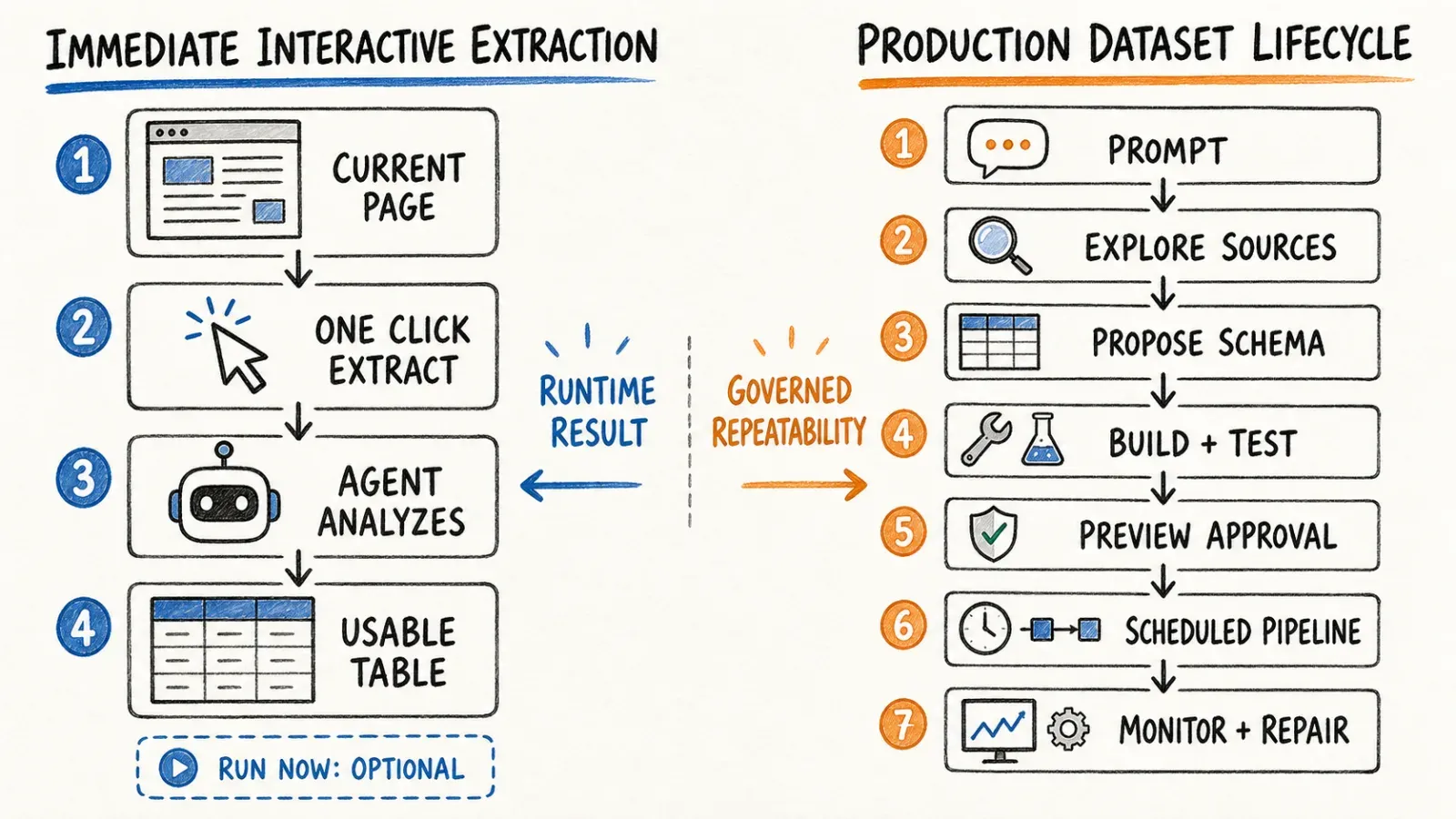
| Setup flow | Click One Click Extract → auto-runs | Prompt → schema proposal → pipeline build/test → approval → scheduled live workflow |
| Execution model | Agentic page analysis per session | Deterministic pipeline generation with agent-assisted maintenance |
| Maintenance | User re-runs on compatible pages | Automated pipeline monitoring and self-healing (vendor-described) |
| Observability | Table preview, refinement | Success rate, MTTR, provenance, SLA dashboards (vendor-described) |
| Access surfaces | Browser extension, Web App, Open API, MCP Server, CLI | Web Scraping OS platform, enterprise deployment |
| Pricing | Public self-serve tiers, see pricing page | Contact sales; no public self-serve price table as of this writing |
| Best fit | Ad hoc, departmental, or moderately recurring jobs | Governed, multi-source, continuously refreshed enterprise datasets |
I'll be honest — building this table took longer than I expected, because most of the existing "Thunderbit vs Kadoa" content out there just slaps a checkmark next to "AI-powered" for both and calls it a day. That tells you nothing.
What Is Thunderbit?
Here's the actual flow, exactly as it works today (not the older UI some reviews still describe):
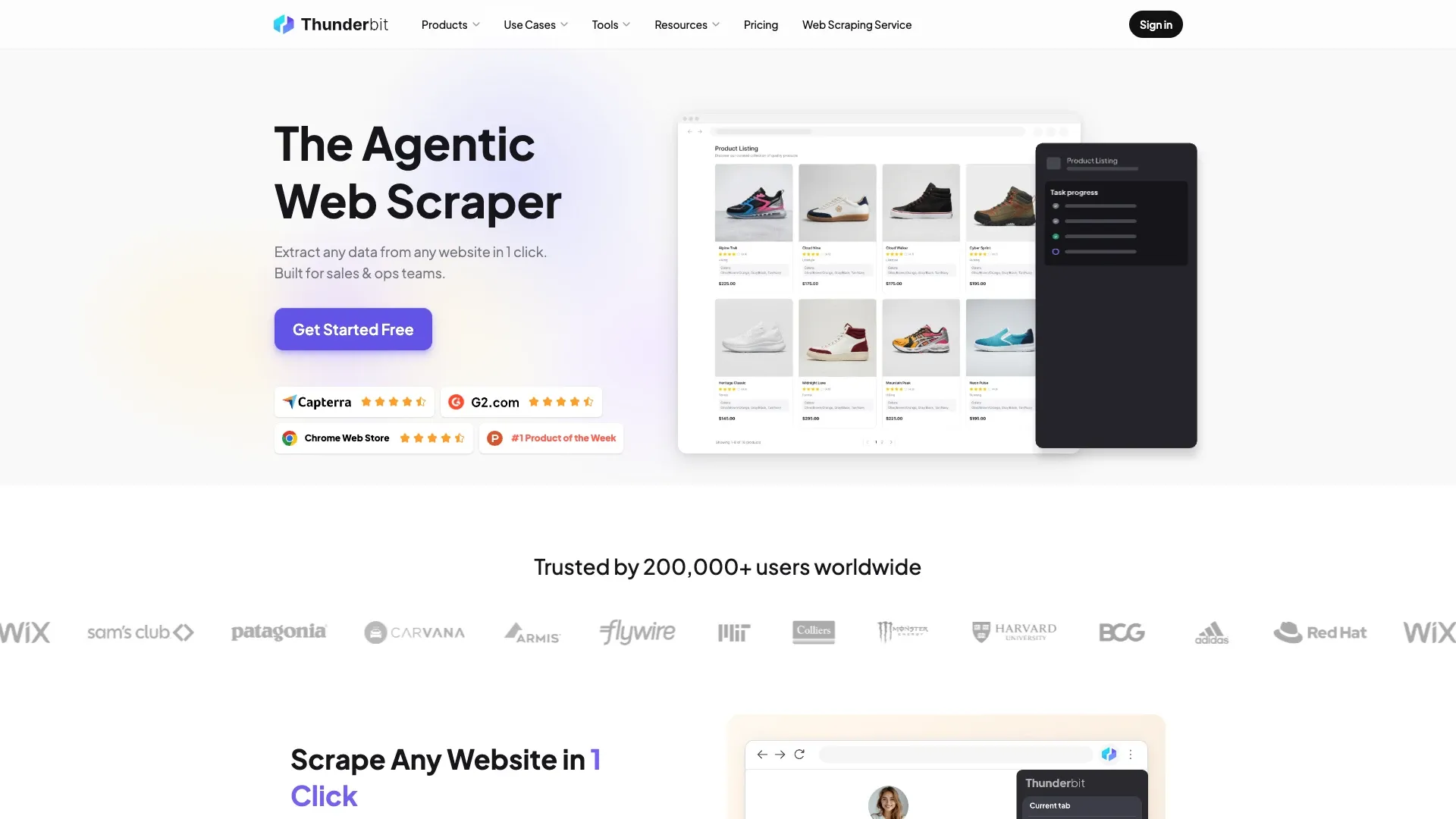
You open a webpage you're authorized to view. You click One Click Extract. That's it — Thunderbit's agent detects the page structure, reads the content, figures out what fields matter, and starts preparing the extraction. You'll see a Run Now button, but honestly you don't even need to click it — if you do nothing, it starts automatically. One intentional click, zero schema setup, zero selectors.
I like to describe it as "the tool gets out of your way." You can still refine things with natural language if the auto-detected fields aren't quite right, and on compatible pages it'll paginate or enrich subpages for you. Beyond the browser extension, there's a Web App, an Open API for developers, an MCP Server for AI agents like Claude or Cursor, and a CLI for terminal workflows. Export goes to Excel, Google Sheets, Airtable, or Notion.
This is not a tool designed to sit inside a data engineering stack. It's designed for the person who needs data right now and doesn't want to file a ticket to get it.
What Is Kadoa in 2026?
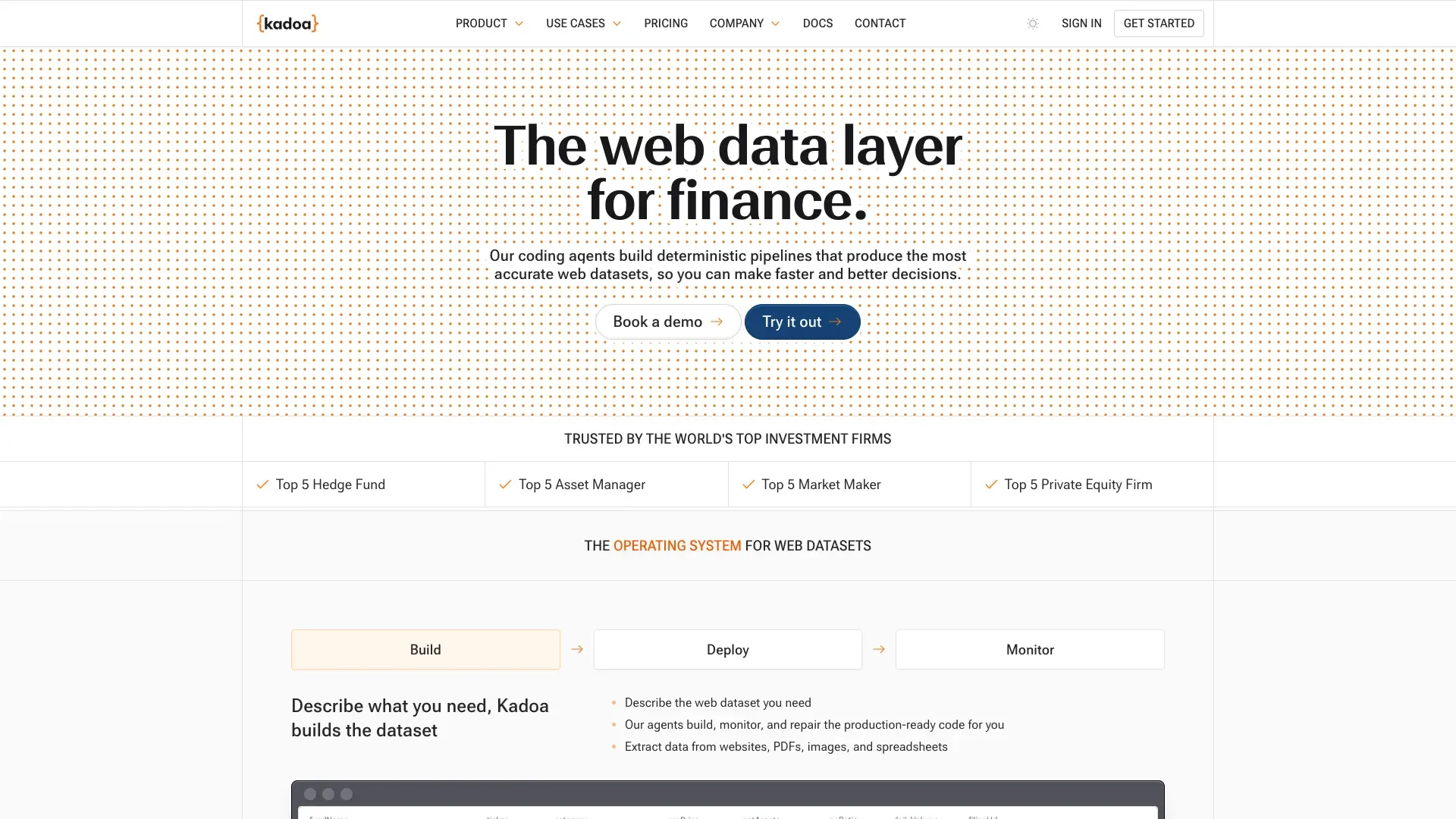
This is where things get interesting. Kadoa's June 2026 announcement introduced what they call the Web Scraping OS, powered by something they're calling "Kadoa Assistant." The workflow they describe:
- You type a request in natural language — "I need pricing data from these 12 competitor sites, refreshed daily"
- Kadoa explores the target sources and picks the most reliable extraction method (an API endpoint, embedded JSON, a downloadable file, whatever's most stable)
- It proposes a data schema
- It builds a deterministic pipeline — meaning actual generated extraction code, not an LLM guessing at every single run — and tests it
- You review a preview and approve it
- It goes live with scheduling, validation, and notifications baked in
The "Web Scraping OS" framing adds automatic pipeline maintenance, unblocking infrastructure, observability dashboards (success rate, mean time to repair, SLA tracking), data provenance, and governance/compliance workflows. This is squarely enterprise infrastructure language, and their current positioning leans hard into finance and alternative-data use cases — think hedge funds and asset managers who need auditable, continuously refreshed datasets from dozens of sources.
That's a genuinely different product ambition than "help me scrape a page." I want to give Kadoa credit here — pivoting from a scraping tool to a data infrastructure platform is a real strategic move, not just a rebrand for marketing's sake.
The Core Difference: Immediate Extraction vs Production Dataset Lifecycle
Thunderbit's one-click interactive job
Thunderbit optimizes for the shortest possible distance between "I see data on a page" and "I have that data in a spreadsheet." There's no schema review step because the agent handles field detection in real time, on the page you're already looking at. If you're a solo founder or a sales rep, this is exactly what you want — you don't have "approve a pipeline preview" energy at 4pm on a Tuesday when you just need 200 leads.
Kadoa's approved deterministic pipeline
Kadoa's workflow deliberately inserts a review-and-approval gate before anything goes into production. That's not a bug, it's the point — if you're building a dataset that feeds into a trading model or a compliance report, you want a human to sign off on the schema before it runs unattended for the next six months.
Runtime interpretation versus agent-generated maintained code
Here's the architectural nuance worth understanding: Kadoa explicitly distinguishes between an agent generating deterministic extraction code (which then runs without needing an LLM call every time) versus direct LLM extraction on every page load. Their official explainer on AI in web scraping covers this in more depth. I won't speculate beyond what they've published, but the takeaway is: Kadoa is trying to get the reliability of deterministic code with the setup speed of AI-assisted pipeline generation. Thunderbit, by contrast, keeps the agentic analysis in the loop for each interactive session rather than compiling a long-lived pipeline artifact upfront.
Hands-On Scenarios
Let me walk through how I'd actually use each tool, because abstract feature comparisons never tell the whole story.
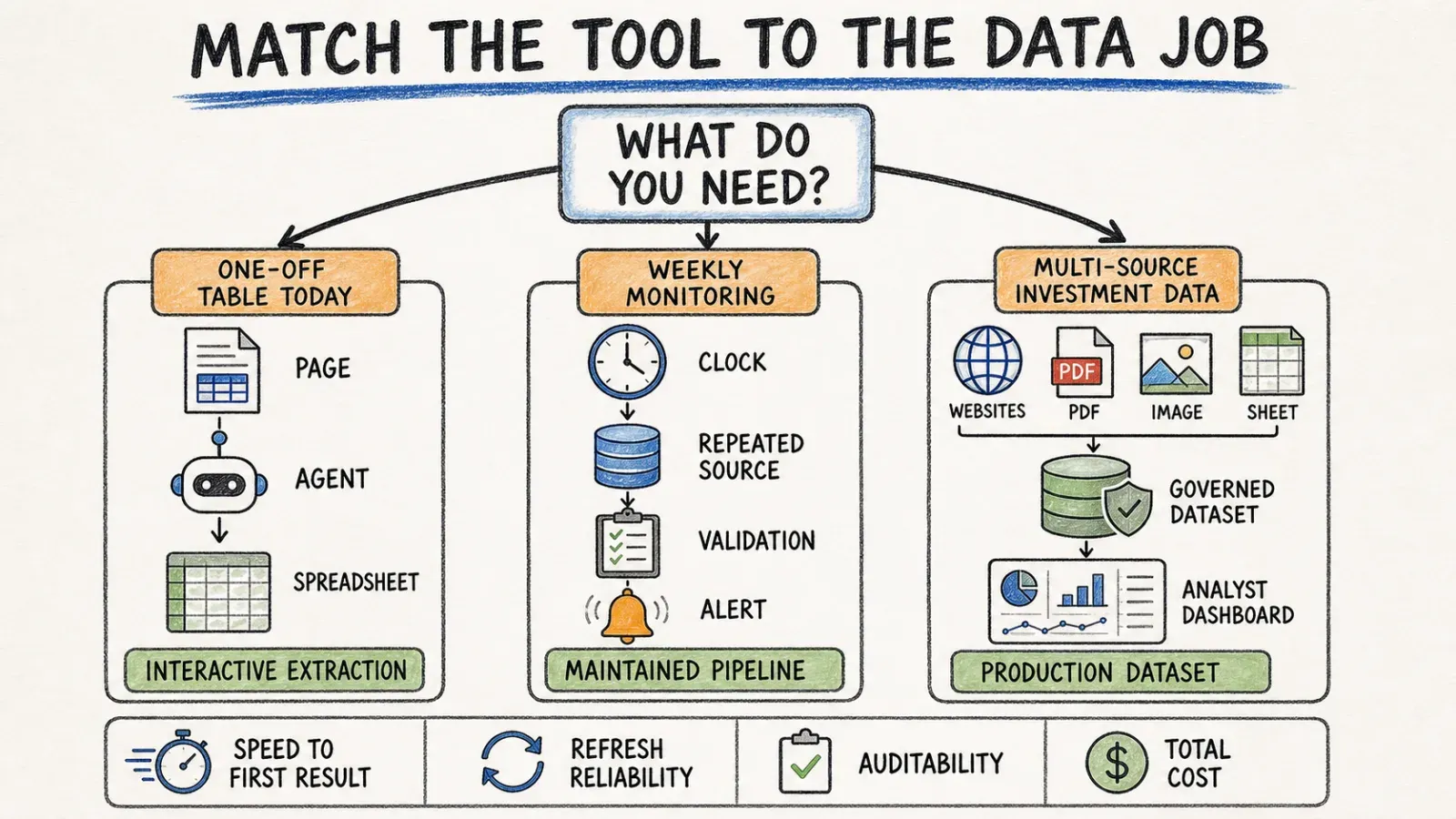
One-off lead/product/research table
Say I need a list of 150 companies from a directory site, with names, websites, and contact emails. I'd open the page, hit One Click Extract in Thunderbit, and have a spreadsheet in under a minute. There's no world where I'd spin up a Kadoa pipeline, get schema approval, and wait for a scheduled run for a one-time list like this. Total overkill.
Weekly competitor-monitoring dataset
Now say I want pricing data from 15 competitor sites, refreshed every Monday morning, landing in a dashboard my whole team trusts. This is closer to Kadoa's sweet spot — the approval step, the monitoring, the "what happens when a competitor redesigns their site" self-healing story all start to matter. Thunderbit can technically do scheduled extraction too on supported plans and surfaces, but Kadoa's whole pitch is built around exactly this recurring, multi-source use case.
Multi-source investment/alternative-data workflow
This is Kadoa's home turf based on their current positioning — pulling from dozens of financial or alternative data sources with provenance tracking and audit trails. I wouldn't reach for Thunderbit here; it's simply not the product's design center.
AI-agent integration and data delivery
If I'm building a RAG pipeline or a monitoring agent that needs to call an extraction tool programmatically, that's where Thunderbit's MCP Server and Open API come in — Claude, Cursor, or any compatible AI host can invoke Thunderbit directly. I don't have visibility into a public self-serve API or MCP offering from Kadoa as of this writing, so if that's a hard requirement for your stack, verify directly with Kadoa before assuming parity.
Accuracy, Maintenance, and Observability
Kadoa describes source grounding, confidence scoring, and plausibility/completeness checks as part of their pipeline validation. They've also published early-results numbers — claims like faster setup and reduced maintenance overhead — from early-access customers. I want to be direct about this: those are Kadoa's own vendor-reported numbers, not independent benchmarks, and I haven't seen a controlled head-to-head test between Thunderbit and Kadoa on accuracy or maintenance burden. Treat any specific percentage you see in their marketing as a claim to verify, not a settled fact.
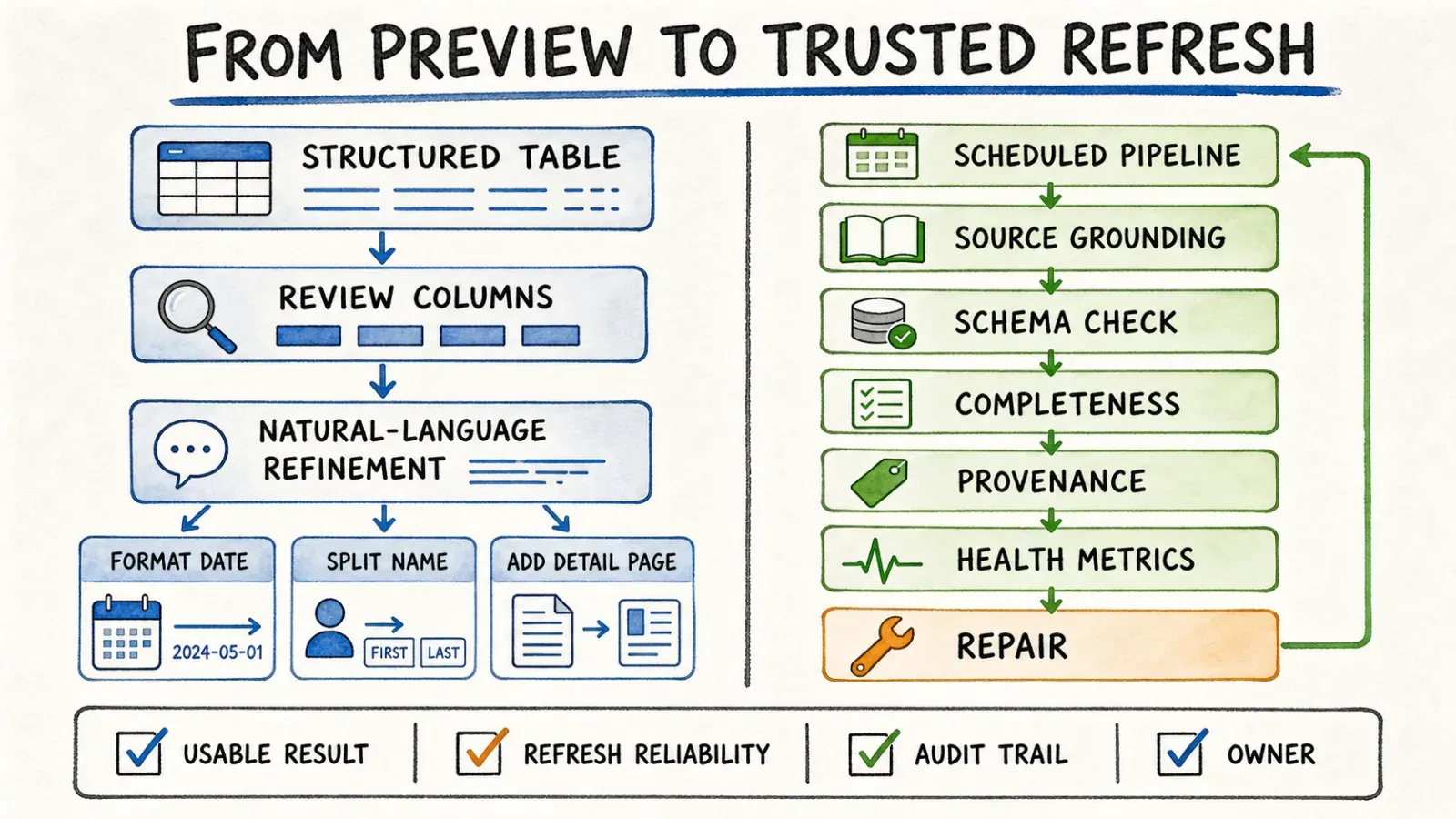
On the Thunderbit side, the accuracy story is simpler because the workflow is simpler: you get an immediate table preview, you can eyeball it and refine field instructions on the spot, and there's no six-month-old pipeline quietly drifting out of sync with a site redesign because there's no six-month-old pipeline in the first place — you're always extracting fresh.
One honest caveat that applies to both tools: neither one guarantees success on every website. Login walls, aggressive anti-bot measures, and drastic layout redesigns are real failure modes. Thunderbit's agentic re-analysis approach helps on compatible, authorized pages, but "agentic" isn't a magic word that makes CAPTCHAs disappear.
API, MCP, and Deployment
Thunderbit's developer-facing surfaces are well documented: the Open API for programmatic access, the MCP Server for AI agent integrations, and the CLI for terminal and coding-agent workflows — plus browser and cloud execution for interactive use.
Kadoa's current deployment story centers on their enterprise Web Scraping OS platform, with managed pipeline infrastructure and governance/security features aimed at larger organizations. I did not find documentation of a public self-serve API or MCP integration for Kadoa at the time of this writing — if that's critical to your evaluation, confirm directly with their team rather than assuming feature parity with Thunderbit's dev-facing tools.
Pricing and Buying Motion
Here's where I have to be upfront about a limitation: Kadoa's current public pages, as of their June 2026 launch, don't expose a self-serve pricing table. Their positioning asks prospects to contact sales or request a test. So if you're comparing "$X/month" line items between the two products, you're going to hit a wall on Kadoa's side — that's not me being lazy with research, it's genuinely not published.
Thunderbit does have a live, public pricing page with self-serve tiers you can check right now.
What actually matters when comparing buying motion isn't the sticker price anyway — it's procurement friction. Thunderbit lets you sign up and start extracting in minutes. Kadoa's enterprise motion implies a sales conversation, onboarding, and likely a proof-of-concept period before you're in production. If your organization already has a procurement process built for enterprise SaaS, that's not a dealbreaker. If you're a two-person team, it's a real friction cost worth weighing.
Which One Should You Choose?
Choose Thunderbit if...
- You're a solo marketer, founder, or sales rep who needs data from a handful of pages, today, without waiting on anyone
- Your team needs recurring exports into Sheets or Airtable but doesn't have (or want to hire) a data engineering function
- You're a developer building an AI agent, RAG pipeline, or monitoring script and want programmatic access via API, MCP, or CLI
- You value getting a usable table in one click over a formal pipeline-approval workflow
Choose Kadoa if...
- You're an enterprise or finance data team that needs governed, multi-source, continuously refreshed datasets with audit trails
- Compliance, provenance, and observability dashboards are non-negotiable buying criteria
- You have (or are building) a procurement process that can accommodate a contact-sales, custom-pricing enterprise product
- Pipeline maintenance and self-healing infrastructure matter more to you than one-click speed
Use both if...
- Your analysts want to explore and validate a data idea quickly with Thunderbit before a central data team decides it's worth operationalizing into a maintained enterprise pipeline with Kadoa. I've actually seen this pattern in smaller companies that are scaling up — start scrappy, formalize later.
Final Verdict
I keep coming back to the same framing: Thunderbit is an interactive agentic scraper built for speed and accessibility. Kadoa, especially post-rebrand, is an enterprise Web Scraping OS built for governance and scale. Comparing them on a feature checklist misses the point — they're solving for different variables entirely.
If you're genuinely torn between the two, my honest advice is to run a small proof of concept rather than trust any comparison article (including this one). Measure: how long until you get a usable first result, how reliably the extraction survives a site change, how auditable the output is for your use case, and what the real total cost of ownership looks like once you factor in setup time and maintenance.
For most people landing on this page — someone staring at a webpage wondering how to get that data out without writing code or waiting on IT — Thunderbit's browser extension is probably the faster path to an answer. It's free to start, and you'll know within five minutes whether it solves your problem.
FAQ
Are Thunderbit and Kadoa both agentic? Yes. Both use AI agents to understand page structure and extract data without manual selector-writing. Thunderbit applies agentic analysis per interactive session on the page you're viewing; Kadoa uses agents to generate and maintain deterministic extraction pipelines for production datasets.
How does Kadoa Assistant work? Per Kadoa's official announcement, you describe the data you need in natural language, Kadoa explores sources and proposes a schema, builds and tests a deterministic pipeline, and after your approval, deploys it as a scheduled, monitored workflow.
Does Thunderbit require selectors or schema setup? No. You click One Click Extract on a page and the agent detects fields automatically; Run Now is optional since extraction starts on its own if you don't click anything.
Does Kadoa run LLM extraction on every page? Not necessarily. Kadoa distinguishes between agent-generated deterministic code (which runs without an LLM call each time) and direct LLM extraction. Their architecture explainer covers this distinction in more detail.
Which is better for recurring datasets? It depends on scale and governance needs. Thunderbit supports scheduled extraction on supported plans for moderately recurring jobs. Kadoa is purpose-built for large-scale, multi-source, continuously maintained datasets with observability and compliance controls — its current positioning leans toward finance and enterprise data teams.
Is Kadoa pricing public? As of this writing, no — Kadoa's current launch pages direct prospects to contact sales or request a test rather than listing self-serve pricing tiers. Thunderbit has a public pricing page you can check directly.
Can either tool handle every website? No. Both tools work best on compatible, authorized pages. Login walls, aggressive anti-bot systems, and major site redesigns remain real failure modes for any scraping tool, agentic or not — treat "handles everything" claims from any vendor with skepticism.




