
Data Miner has been sitting in a lot of Chrome extension folders for over a decade now, quietly powering a small army of people who've built their own personal library of scraping "recipes." I've watched it come up again and again in forums whenever someone asks how to pull a table off a website without writing code. It's a legit tool. But it's also a good example of how "no-code" can still mean "no-code, but you're the one building the logic."
That's the real question people are asking when they type "Thunderbit vs Data Miner" into Google: do I want to build reusable rules myself, or do I want an agent that figures out the page for me? Let's actually answer that, side by side, instead of doing the thing every other article does — reviewing Data Miner, then pivoting into a Thunderbit pitch without ever putting them in the same table.
Thunderbit vs Data Miner at a Glance
I'll be upfront: I run Thunderbit, so take the framing with the appropriate grain of salt. But I've tried to keep this table honest about what each tool actually does, not what either marketing page wants you to believe.
| Category | Data Miner | Thunderbit |
|---|---|---|
| Extraction method | Manual "recipes" built from CSS/HTML selectors | Agentic AI — click One Click Extract, it detects and reads the page, then auto-runs |
| First-run setup | Build a private recipe, or find/preview a public one | No selectors or schema — one intentional click on supported pages |
| Pagination | Add a "Next" selector to a List Recipe | Compatible pagination handled on supported pages |
| Detail-page enrichment | Two-recipe workflow: List Recipe → save URLs → Detail Recipe → Crawl | Compatible subpage enrichment, merged into the same table |
| Logged-in pages | Works on visible content in an authorized browser session | Works on visible content in an authorized browser session |
| Exports | CSV, Excel, clipboard, Google Sheets (paid plans) | Export to supported destinations (Sheets, Airtable, Notion) plus downloads |
| Automation surface | Browser automation, next-page automation, custom JS, automated crawls | Browser/cloud runs, schedules where supported, Open API, MCP Server, CLI |
| Reusability | Recipes are shareable and reusable — huge community library | AI re-interprets each page; no recipe library to maintain |
| Pricing model | Monthly page credits, tiered by volume | Plan-based, see current pricing |
| Best fit | Stable, recurring targets with a working recipe already available | New or varied pages, nontechnical users, fast one-off jobs |
Nobody else has put these two side by side like this. I looked. It's a strange gap given how often the keyword gets searched.
What Is Thunderbit?
Thunderbit is what I'd call an agentic web scraper — the "agentic" part matters because it's not just automating clicks, it's interpreting the page the way a person would, then deciding what data probably matters. You install the Chrome extension, open a page you're authorized to view, and click One Click Extract. That's genuinely the entire required action. The agent reads the page, figures out useful fields, and starts running — you can hit Run Now if you want it to start immediately, but it'll auto-start on its own if you just sit there.

I built this specifically because I got tired of watching non-technical teammates at previous jobs get stuck the moment a scraping tool asked them to define a "selector." Most people don't know what a CSS selector is, and honestly, they shouldn't have to.
Beyond the extension, there's a Web App, an Open API for developers who want programmatic access, an MCP Server for AI-agent workflows (think Claude, Cursor, that whole ecosystem), and a CLI for terminal-based automation. On compatible pages, it handles pagination and can enrich list rows with data pulled from detail pages, then merge everything into one table.
What Is Data Miner?
Data Miner is older, more established, and built around a completely different philosophy: recipes. A recipe is a saved set of instructions — essentially selectors mapped to rows and columns — tied to a specific website's HTML structure. Data Miner's own help documentation explains that recipes come in three flavors: public (shared by other users), generic (built to work broadly across many sites), and private (ones you build yourself).
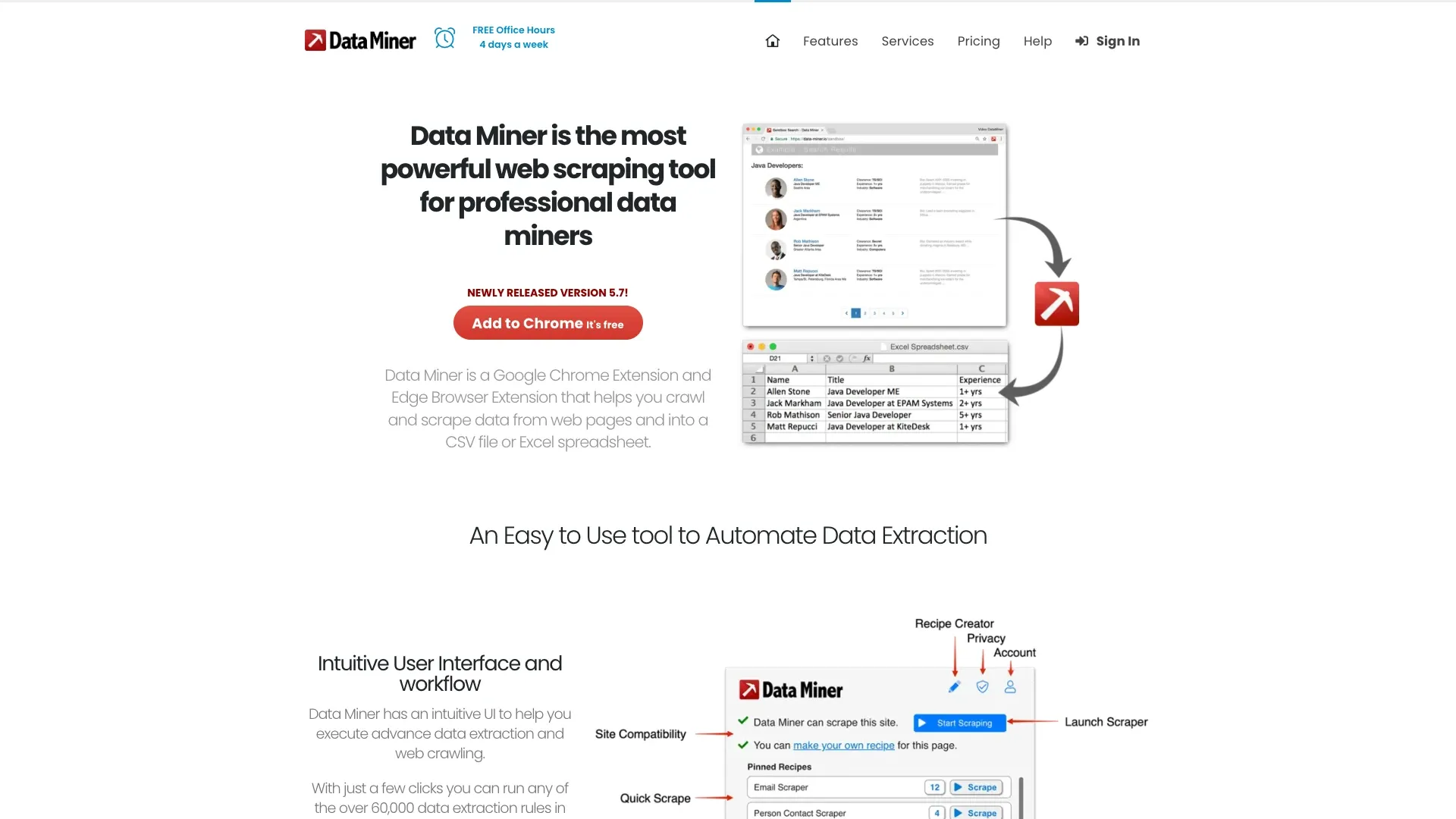
The site claims more than 50,000 public recipes covering over 15,000 popular websites — though interestingly, another part of their own site says "60,000." I'll just call it "tens of thousands" and let you draw your own conclusions about how precisely anyone's counting.
Data Miner supports Page Scrape, Next Page Automation, URL Crawl (for scraping lists of URLs), automatic form filling, and custom JavaScript for power users. It runs in your browser, meaning it can access content in a logged-in session just like you'd see it manually, and Enterprise customers get server-side execution options.
The Real Difference: Runtime Page Understanding vs Stored Recipes
Here's where I think most comparison articles get lazy. They'll say "Data Miner is recipe-driven, Thunderbit is AI-driven" and just leave it there — no example, no walkthrough, nothing you can actually picture.
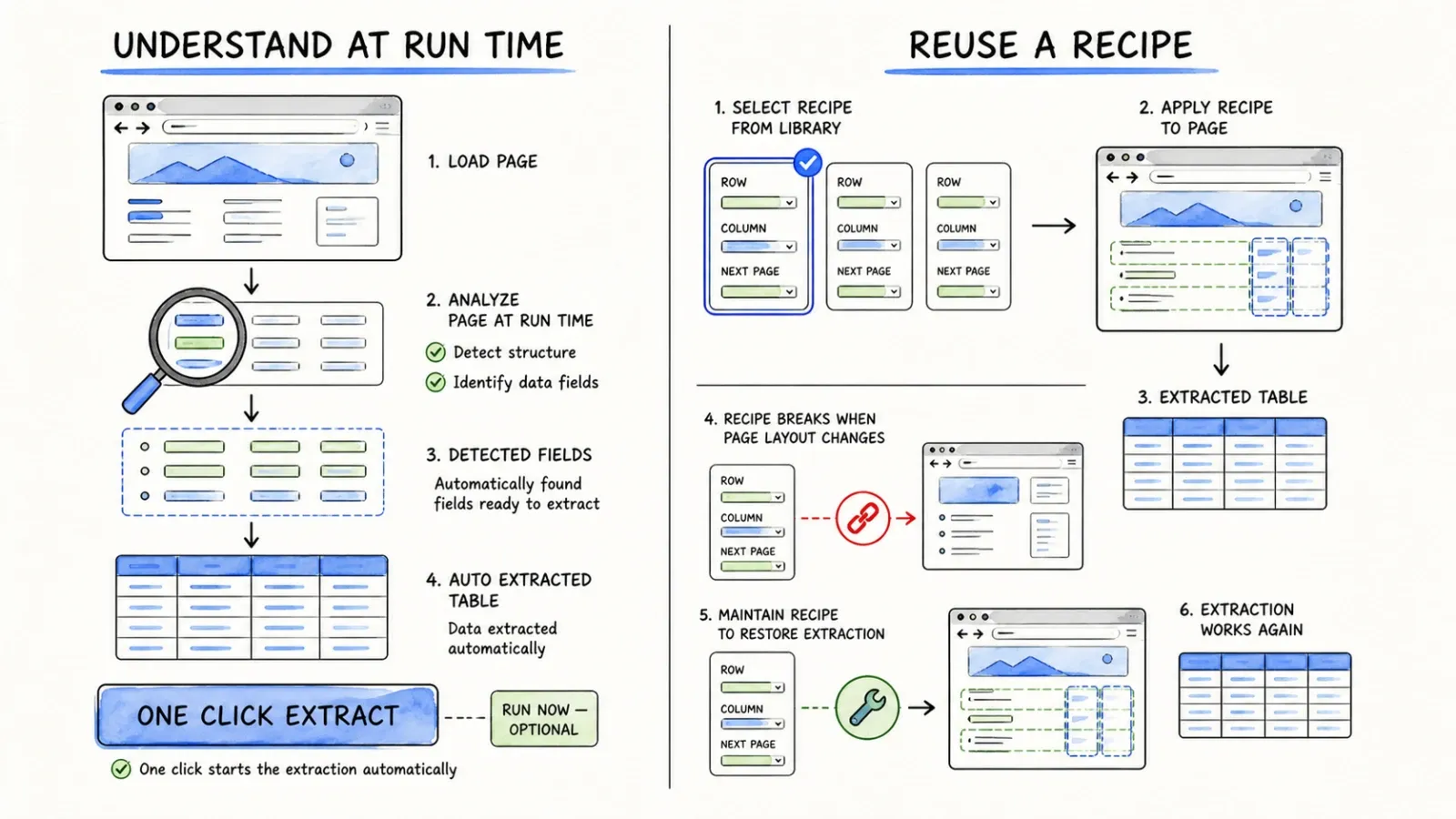
Thunderbit delegates interpretation to an agent. Every time you land on a new page, the AI looks at it fresh. It's not consulting a stored rulebook for that specific site — it's reading the DOM, understanding structure, and making a judgment call about what data matters. This means zero setup time on a page you've never seen before, but it also means the AI is doing real-time work every single run rather than replaying a memorized script.
Data Miner reuses selector instructions. Once a recipe exists — whether you built it or someone else did — running it again is fast because the logic is already locked in. The tradeoff, which Data Miner's own docs admit, is that if the site's HTML changes, the recipe can break. You're now debugging selectors instead of scraping.
When either approach becomes "one click": Data Miner can absolutely be one-click — if a public recipe for your exact target already exists and still works. That's a real "if," though. Thunderbit's one-click claim applies to pages the agent can successfully interpret; it's not a guarantee for every site on the internet either, especially ones with heavy anti-bot measures or unusual layouts.
Neither tool has a monopoly on "easy." They just define easy differently — one through community-built shortcuts, one through runtime interpretation.
Hands-On Workflow Comparison
Scraping a simple table: With Data Miner, you'd check if a public recipe exists for the site, preview it, and scrape if it matches. If not, you build rows and columns manually using the Easy Finder. With Thunderbit, you click One Click Extract and let it detect the table structure itself.
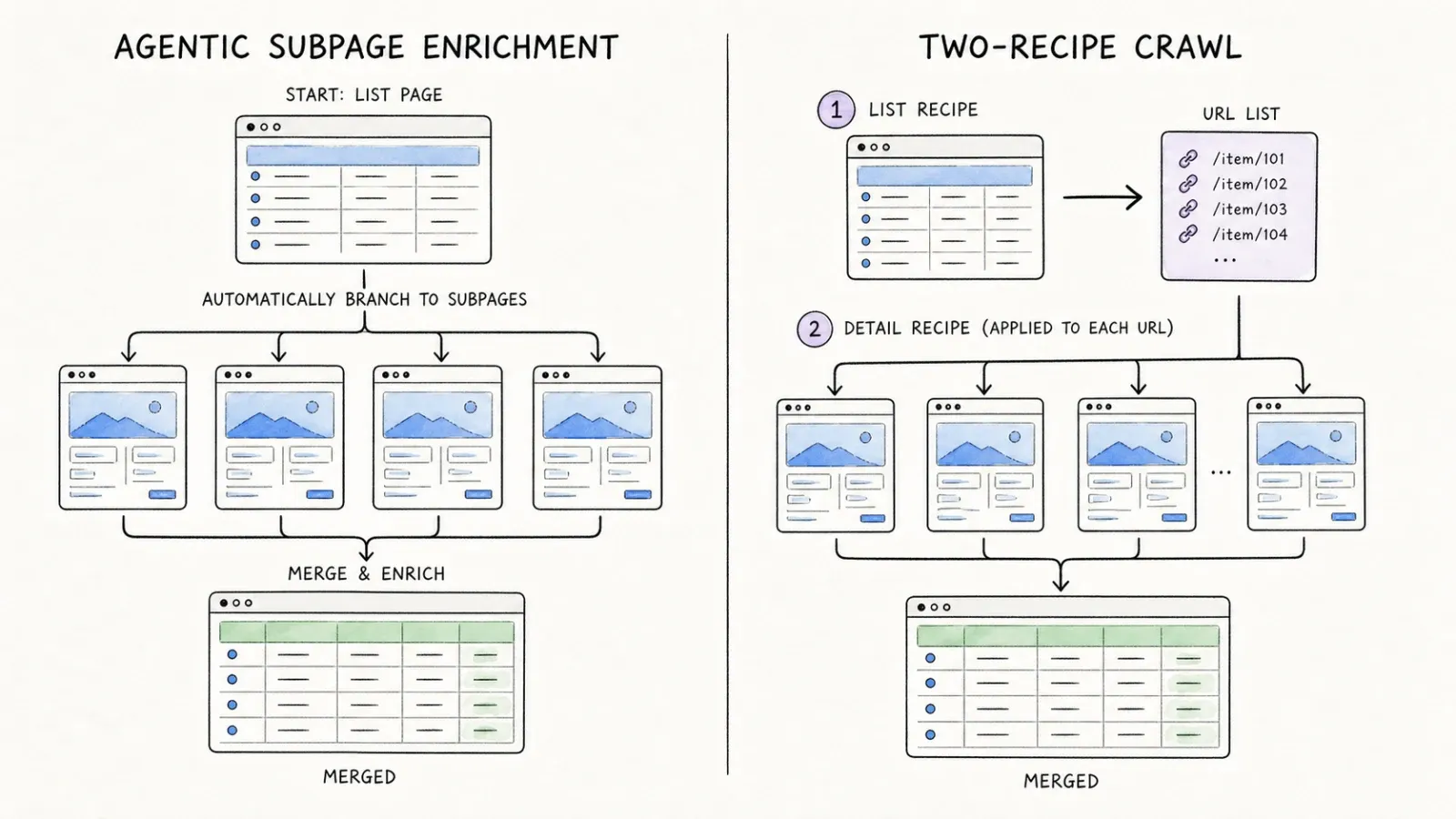
Paginating a product or directory list: Data Miner requires you to add a navigation selector to your List Recipe so it knows what "Next" looks like. Thunderbit handles compatible pagination on supported pages without that manual step.
Enriching list rows from detail pages: This is where the workflows diverge most visibly. Data Miner's Crawl documentation lays out a genuinely multi-step process: build a List Recipe to collect detail-page URLs, save that URL list, build a separate Detail Recipe, create a Crawl job connecting the two, validate the URLs, run it, then export. It works, but it's several distinct steps involving two separate recipes. Thunderbit's compatible subpage enrichment folds detail-page data into the same table without that recipe-pairing dance — though I'll be honest, this only works reliably on pages the agent can parse well.
Working behind an authorized login: Both tools operate on content visible in your browser session, so if you're logged into an authorized account, both can see what you see. Neither one is magically bypassing authentication — they're both just working with what's rendered on screen.
Automation, Extensions, and Developer Access
Data Miner's automation lives in the browser: next-page automation, automated URL crawls, and custom JavaScript for people comfortable writing their own scripts. Google Sheets integration comes on paid plans. Enterprise customers can move execution to Data Miner's servers instead of running everything client-side.
Thunderbit's surface is broader in a different direction. Beyond browser and cloud execution with schedules where supported, there's the Open API for backend integrations, and the MCP Server — which matters more than it sounds like it should. MCP lets AI agents (Claude Code, Cursor, and similar tools) call Thunderbit directly as part of their own workflows. If you're building something where an AI agent needs to fetch structured web data as one step in a larger pipeline, that's a meaningfully different capability than "I wrote some custom JavaScript in my browser extension."
To be clear, Data Miner's custom JS is genuinely useful for power users who want fine control. It's just not the same category of tool as a public API or an agent-callable MCP server.
Export, Privacy, and Data Handling
Data Miner exports to CSV, Excel, clipboard, or Google Sheets on paid plans. Its pricing FAQ states scraped data isn't sold or shared, and its browser-run crawl documentation notes that data isn't stored on Data Miner's servers during standard automated crawls — you're expected to save it yourself once a job finishes. Enterprise server-side jobs are a different execution model entirely.
Thunderbit exports to supported destinations like Google Sheets, Airtable, and Notion, plus standard downloads, and offers both browser and cloud execution modes depending on your workflow.
I won't pretend one architecture is universally "more private" than the other — it really depends on what you're scraping, how sensitive it is, and which execution mode you pick. If data sensitivity matters to your use case, that's a conversation worth having with whichever vendor before you commit, not something to assume from a comparison article.
Pricing: Page Limits and Recipe Costs
Here's Data Miner's current pricing as of this writing:
| Plan | Price | Pages/month |
|---|---|---|
| Free | $0 | 500 (some domains restricted) |
| Solo | $19.99/mo | 500 |
| Small Business | $49/mo | 1,000 |
| Business | $99/mo | 4,000 |
| Business Plus | $200/mo | 9,000 |
| Enterprise | Custom | Custom |
Credits reset monthly and don't roll over — and their own FAQ notes that exceeding the 500-page free limit can lock your free account until you upgrade. That's worth knowing before you get halfway through a project.
What almost nobody mentions when reviewing Data Miner: they also sell custom recipe development as a paid service. A single custom recipe runs $150 one-time; a multi-level recipe (the kind you'd need for list-to-detail crawling) is $300 one-time; anything more advanced is quote-based. If your target site doesn't have a working public recipe and you don't want to build one yourself, that's real money on top of your subscription.
For Thunderbit's current pricing, check the live pricing page rather than trusting any numbers I could quote here — plans change, and I'd rather send you to the source than let the numbers become outdated.
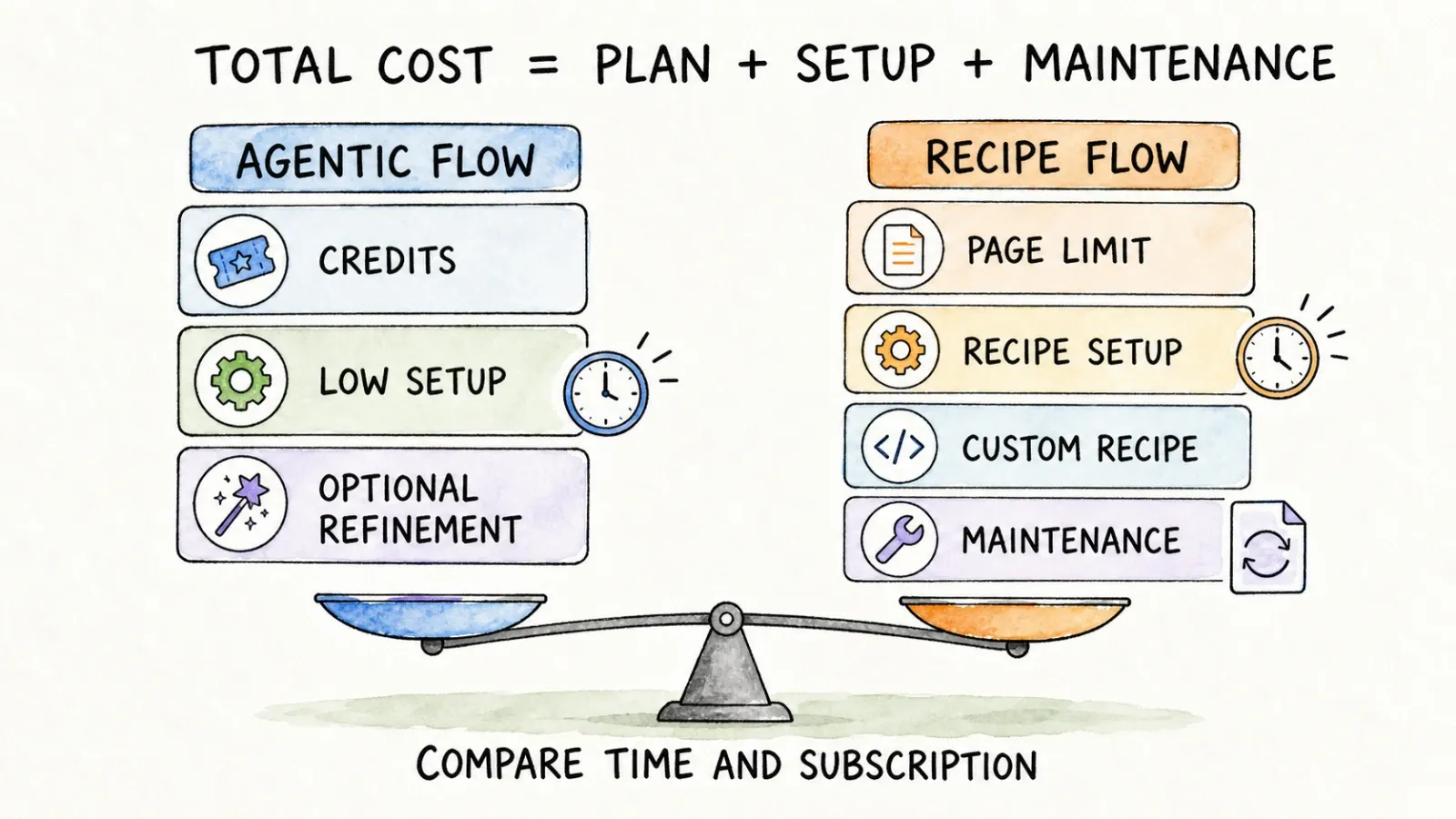
The bigger cost consideration honestly isn't the sticker price on either plan — it's total time spent. Building and maintaining recipes takes hours you're not getting paid for unless you count your own salary. Agentic re-interpretation avoids that maintenance burden but means the AI is doing fresh work every run, which is a different kind of cost (compute, not your afternoon).
Which One Should You Choose?
Choose Thunderbit if... you're not technical, you're hitting a page you've never scraped before, or you want to skip building/finding a recipe entirely. Sales ops folks pulling lead lists from directories, market researchers checking competitor pricing pages weekly, anyone who just wants data now without a setup phase.
Choose Data Miner if... you've got a recurring, stable target where a public recipe already exists and works, or you're the kind of person who genuinely enjoys having granular selector control and doesn't mind rebuilding a recipe when a site redesigns. Power users comfortable with custom JavaScript will feel at home here too.
Use both if... you've got a mix — some legacy jobs on sites where you already have working Data Miner recipes (no reason to rebuild those), and new, varied targets where you'd rather not spend an afternoon defining selectors. I've talked to teams who do exactly this: keep the old recipes running, trial Thunderbit for anything new. It's not an all-or-nothing decision, despite what a lot of "vs" articles imply.
Final Verdict
This really does come down to agentic interpretation versus reusable recipes — and neither approach is objectively superior in every scenario. Data Miner rewards patience and site-specific investment with genuinely fast repeat runs. Thunderbit rewards speed-to-first-result at the cost of never quite "memorizing" a site the way a recipe does.
My honest suggestion: pick one authorized target you actually need data from, and test both. Time how long setup takes, count how many usable rows come out clean, see what happens after the site changes something (recipes break, agents adapt — usually), and add up the real cost including any custom recipe fees you might need.
If you want to see the one-click version in action, the Thunderbit Chrome extension is free to try — no recipe-building required.
FAQ
Is Data Miner really one-click? It can be, if a working public recipe already exists for your target site. If not, you're building one from scratch using their Recipe Creator, which takes real setup time.
Does Data Miner require coding? Not for basic recipes — the Easy Finder lets you click to select rows and columns. Custom JavaScript and advanced selector work are optional for power users who want more control.
Can Data Miner scrape multiple pages and detail pages? Yes, through Next Page Automation for pagination and a two-recipe Crawl workflow (List Recipe + Detail Recipe) for pulling data from linked detail pages.
Does Thunderbit use CSS selectors? No. The agent interprets page structure at run time, so there's no manual selector definition required on supported pages.
Which works better behind a login? Both operate on content visible in your authorized browser session, so results depend more on what's rendered on screen than on which tool you're using.
How does Data Miner count pages? Each plan allocates a monthly page credit limit — 500 on Free and Solo, scaling up to 9,000 on Business Plus. Credits reset monthly and don't roll over.
Does either product offer an API? Thunderbit has an Open API, MCP Server, and CLI for developer and agent workflows. Data Miner's automation is primarily browser-based, with server-side options available for Enterprise customers.
Can either scraper work on every website? No. Both tools depend on page compatibility, authorization, and how a site is structured — anti-bot measures, unusual layouts, or heavy JavaScript rendering can limit either one.




