
A few weeks back, someone on our team pinged me a GitHub issue thread where a developer was debugging their third PlaywrightCrawler retry logic at 11pm on a Friday. Right below it, someone else replied with "just use Thunderbit for this," and the original poster shot back "that's not the point, I need this in my pipeline." Both of them were right. That's basically the entire Thunderbit vs Crawlee debate in one GitHub thread.
I've spent enough years bouncing between SaaS and automation tooling (shoutout to my Automation Anywhere days) to know that "which scraper is better" is almost always the wrong question. The right question is: who's actually doing the scraping, and what do they need next? Let's get into it.
The Real Question Isn't "Which Tool Is Better" — It's "Who's Doing the Scraping?"
Here's something that trips people up every time they Google "Crawlee vs [anything]": they expect a feature-for-feature shootout, like comparing two coffee makers. But Crawlee and Thunderbit aren't competing for the same job. They're built for two completely different people standing in front of two completely different problems.
Crawlee is an open-source crawling library built by the Apify team, and it assumes you're a developer who's comfortable writing JavaScript, TypeScript, or Python. You're going to install it, write request handlers, define selectors, and ship code. Thunderbit assumes something very different: that you're a person on a sales, marketing, or ops team who needs structured data from a webpage right now, and you have zero interest in touching a terminal.
| Factor | Crawlee | Thunderbit |
|---|---|---|
| Who it's for | Developers building custom crawlers | Non-technical users, ops/sales/marketing teams |
| Setup requirement | Install Node.js or Python, write scraper code | Install browser extension, click One Click Extract |
| Coding required | Yes (JS/TS or Python) | No |
| Best fit | Production pipelines, custom logic | Ad-hoc or recurring structured extraction from a page |
I bring this up first because I think most comparison articles skip this fork in the road entirely, and it's the thing that actually determines which tool you should even be evaluating. If you're a developer who needs granular control over retries, proxies, and browser pools, no amount of one-click convenience is going to satisfy you. And if you're not a developer, no amount of Crawlee's flexibility matters — you just won't use it.
What Is Thunderbit?
Thunderbit is what I'd call an agentic web scraper — meaning the AI layer does the interpretive work of figuring out what's on a page and what should be extracted, rather than you writing selectors by hand. The core workflow, on the Thunderbit Chrome Extension, goes like this: open the page you want data from, click One Click Extract, and the agent reads and analyzes the page, figures out useful fields, and prepares to run. Run Now shows up so you can kick it off immediately, but it's optional — if you do nothing, extraction starts automatically.

That's genuinely the whole setup. No schema-building or field-mapping session: the agent analyzes the page and the extraction auto-runs.
Beyond the browser extension, Thunderbit also has a Web App, an Open API for programmatic access, an MCP Server for AI-agent tool use, and a CLI for terminal-based workflows. That last part matters more than people realize — I'll come back to it later, because it's the piece that keeps this from being a purely "no-code wins" article.
On compatible pages, Thunderbit can also handle pagination and enrich subpages, and once you've got your data, you can export it to spreadsheets or other supported destinations. I'd caveat this the way I caveat everything about "AI reads the page": it works well on compatible, authorized pages, and it's not a promise that every JavaScript framework or anti-bot wall on the internet will bend to your will.
What Is Crawlee?
Crawlee is an open-source library — not a hosted product — for building web crawlers and scrapers in JavaScript/TypeScript or Python. It's maintained by Apify, and I want to be precise here because a lot of people conflate the two: Crawlee is the library, Apify is the (separate, though related) cloud platform that can host and run Crawlee-based projects. They're cousins, not the same thing.
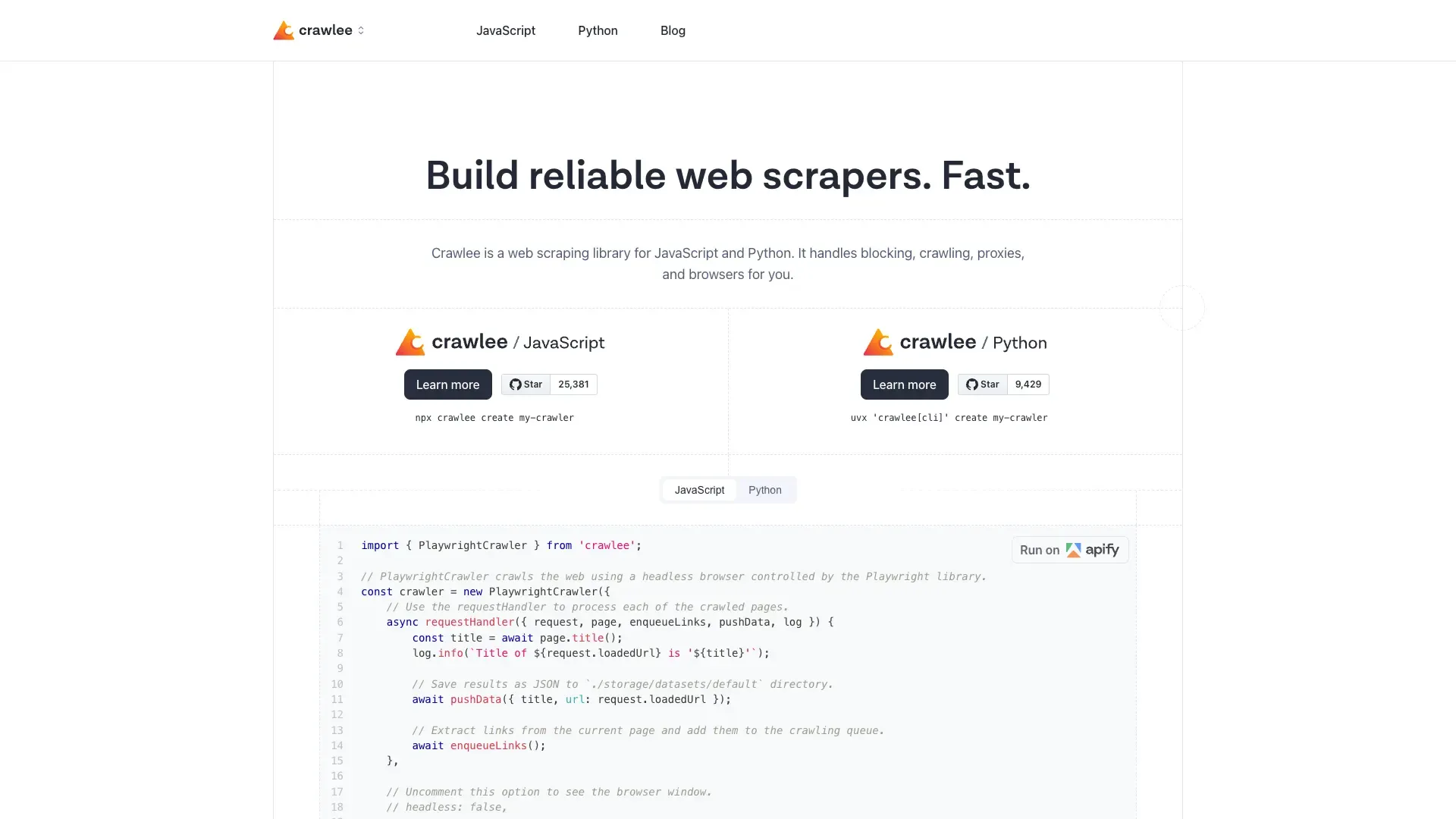
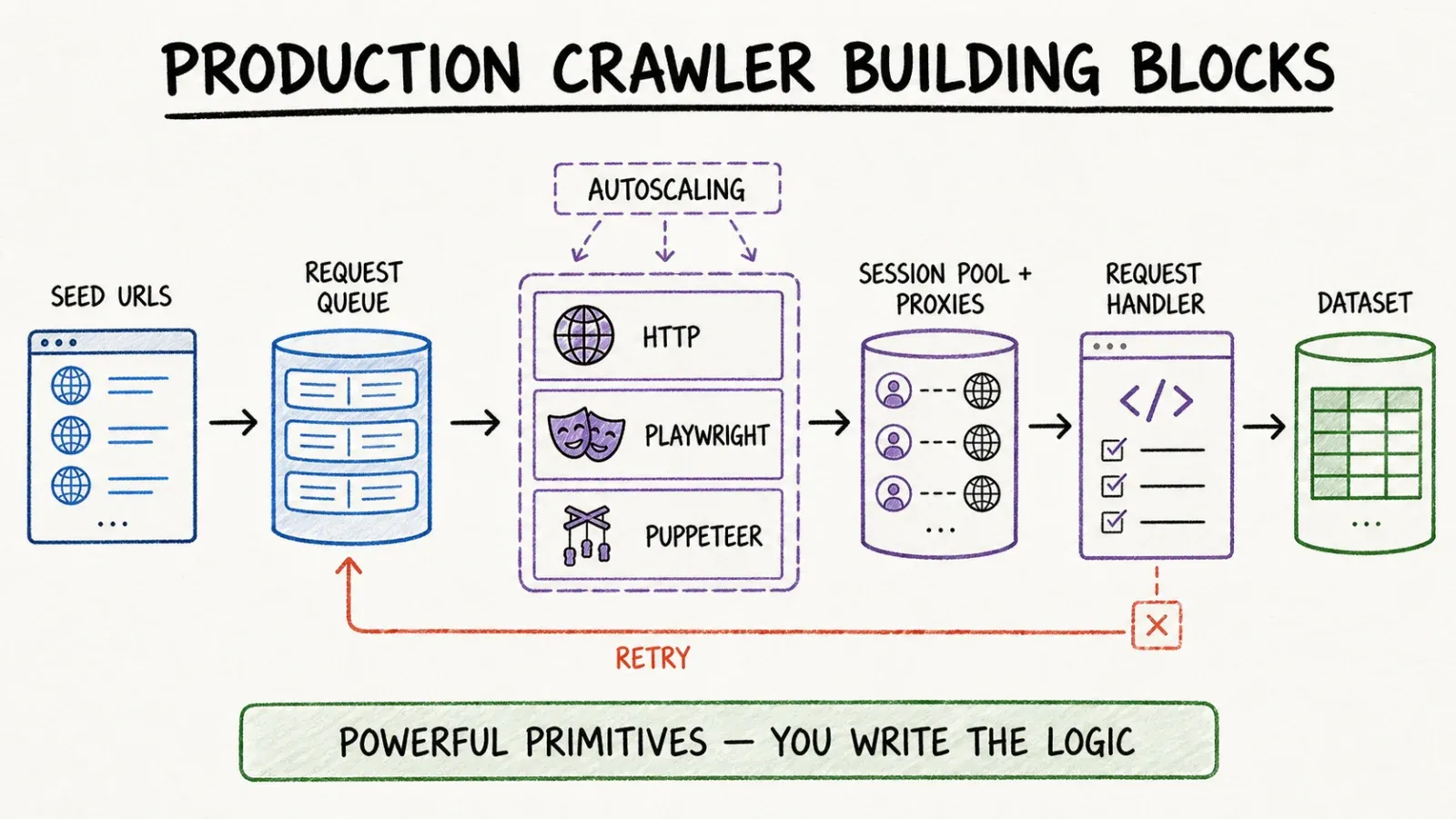
What you actually get with Crawlee is a toolbox. It gives you HTTP-based crawlers for lightweight, non-JS-heavy scraping, plus browser crawlers built on Playwright and Puppeteer for sites that need real rendering. It handles request queues so you're not manually tracking which URLs you've hit. It manages storage for the data you extract. It has autoscaling and session pools built in, so if you're running a crawl across thousands of pages, you're not reinventing concurrency logic from scratch.
None of this happens by clicking a button, though. You're writing code — defining request handlers, setting up your crawler instance, telling it what to do when it hits a page. Crawlee gives you the scaffolding; you still build the house.
Core Difference: Managed Extraction Product vs Code Library
Time to first structured table
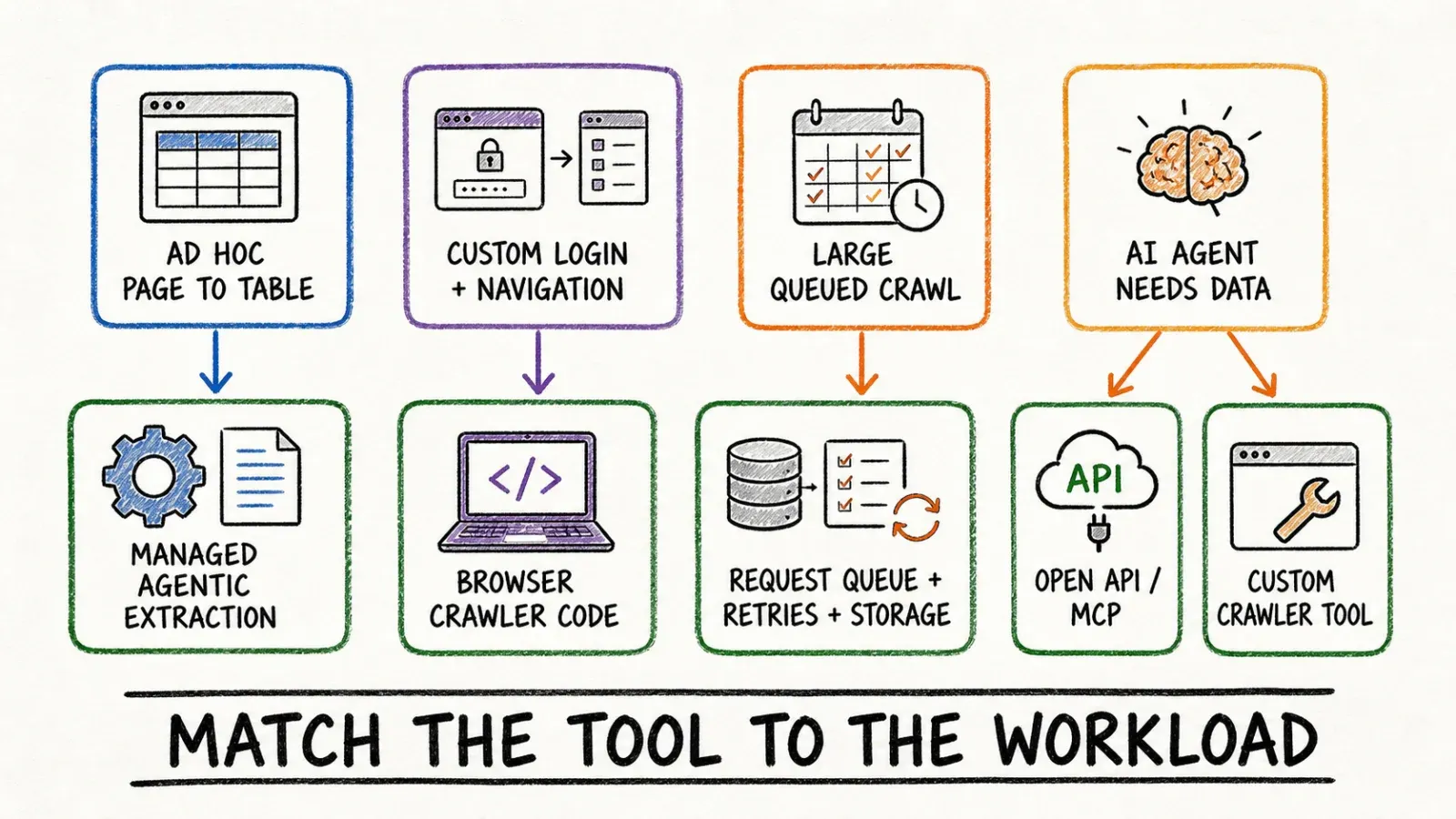
This is where the gap is starkest. With Thunderbit, from opening the page to having a usable table of data, you're looking at seconds to a couple of minutes on a compatible page — click, let the agent detect and run, done.
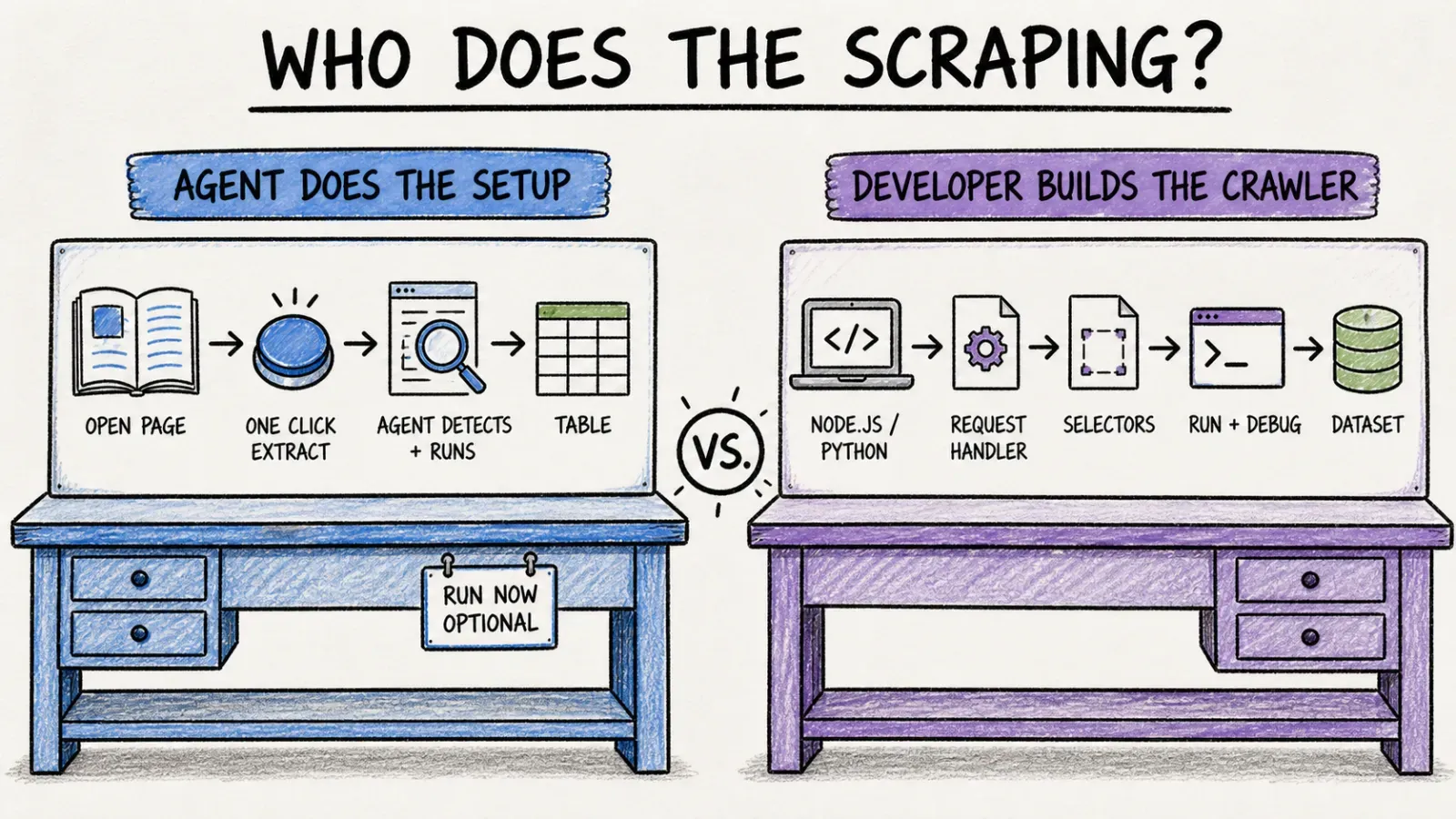
With Crawlee, even a simple first crawler is going to eat up real setup time. You need Node.js or Python installed, the Crawlee package added, a request handler written, selectors identified (manually, by inspecting the page), and then you run it and debug whatever broke. For a first-timer, I'd estimate somewhere in the 30–60 minute range just to get one working extraction — and that's assuming you already know some JavaScript or Python.
Control over browser/crawler logic
Here's where Crawlee wins outright, no argument. You control everything: which browser engine, how sessions are managed, how proxies rotate, what happens on a failed request, how deep your link discovery goes, how you throttle concurrency. If your crawl needs custom logic — say, handling a multi-step login flow, or crawling a site with weird pagination that breaks standard patterns — Crawlee gives you the primitives to build exactly that.
Thunderbit's agentic approach trades that granularity for speed and accessibility. You're not writing the logic; the AI is inferring it based on what it sees on the page. That's great when it works, and less useful when you need to force a very specific, non-obvious extraction pattern.
Deployment and maintenance ownership
With Crawlee, you own the deployment. That means you're responsible for hosting (your own servers, or Apify's platform, or wherever else you choose), for handling site markup changes that break your selectors, and for keeping dependencies updated. It's real ongoing work, but it's also real ongoing control.
Thunderbit runs on managed infrastructure — the browser extension executes locally in your session or in the cloud for scheduled jobs, and updates to the extraction logic happen on Thunderbit's side, not yours.
Hands-On Scenarios
One-off page extraction
Say you need to pull a competitor's product listing page into a spreadsheet before a 2pm meeting. Thunderbit is built exactly for this — open the page, click One Click Extract, export. Crawlee, for a genuinely one-off task, is overkill; you'd spend more time writing a script than you'd save.
Custom Playwright/Puppeteer crawl
Now say you're building a monitoring pipeline that needs to log into an authenticated dashboard, navigate three levels deep, and extract data from a site that renders everything via a JS framework with unusual DOM timing. This is Crawlee's home turf. PlaywrightCrawler gives you the browser automation primitives to handle exactly this kind of custom navigation logic.
Large queued crawl with retries and storage
If you're crawling tens of thousands of URLs and need automatic retry logic, request queue persistence, and structured storage output, Crawlee's built-in request queue and dataset abstractions are designed precisely for this scale. This isn't really Thunderbit's browser-extension use case — that's a one-page-at-a-time (or compatible-subpage) tool, not a queue-management system.
Calling extraction from an AI agent
This is the scenario people usually get wrong in these comparisons. Developers building AI-agent workflows sometimes assume "AI agent needs data" automatically means "write custom Crawlee code and wrap it as a tool." That's one valid path. But Thunderbit's MCP Server exists specifically so an AI host — Claude, Cursor, and similar compatible clients — can call Thunderbit's extraction capability as a tool without anyone writing a custom crawler. It's a genuinely different surface than the one-click browser workflow, and it's configuration-required, not "click and done." But it's also not the same effort as building a Crawlee-based tool from scratch.
Dynamic Sites, Scale, and Reliability
I want to be careful here because this is where marketing copy (mine included, historically) tends to overpromise. Crawlee's browser crawlers can execute JavaScript, wait for dynamic content, and interact with pages the way a real user would — that's genuinely useful for rendering-heavy sites. Thunderbit's browser extension similarly runs in a real browser context and can work with JS-rendered pages you have open.
But neither tool guarantees success everywhere. Crawlee gives developers the tools to configure proxy rotation and session pools themselves — it's manual, tunable control, not an automatic bypass. Thunderbit applies managed rendering and anti-bot handling on supported, authorized pages, which again is not a universal "works on everything" claim. If you're reading a comparison anywhere that promises 100% success against every anti-bot system on the internet, that comparison is lying to you, full stop.
Pricing, License, and Total Cost
Crawlee itself is free and open-source — the Python version, for instance, ships under Apache License 2.0. But "free" doesn't mean "no cost." You're paying in developer time to write and maintain crawlers, in hosting costs (your own servers or Apify's platform, which is a separate paid product from the library itself), and in proxy service fees if your target sites need IP rotation to avoid blocks.
Thunderbit runs on a subscription/plan model with credit-based usage — I'd point you to the Thunderbit Pricing page directly since these numbers shift, and I'm not going to quote a figure here that might be stale by the time you read this.
The honest maintenance comparison: Crawlee crawlers break when a target site changes its markup, because your selectors were written against a specific DOM structure. Someone has to notice the failure and fix the code. Thunderbit's agentic extraction re-analyzes the page each run, which reduces (not eliminates) this class of breakage — a major layout overhaul on the target site can still throw things off, but you're not maintaining hardcoded selectors the same way.
Who Should Choose Thunderbit?
If you're not a developer and you need structured data out of webpages — for lead lists, competitor pricing, market research, whatever — Thunderbit is built for exactly your situation. Same goes if you're a developer who wants to hand a self-serve extraction tool to a non-technical team, or if you want programmatic access via the Open API without writing a full crawler from scratch.
Who Should Choose Crawlee?
If you're building a production data pipeline that needs custom navigation logic, fine-grained control over retries and proxy behavior, and you want to own the source code end to end, Crawlee is the right foundation. It's also the better call if your crawl needs to run at genuine scale — tens of thousands of pages with request queue management — which isn't the shape of problem a browser-extension workflow is built to solve.
Can Teams Use Both?
Realistically, yes, and I don't think that's a cop-out answer. I've seen this pattern play out in plenty of companies I've worked with: engineering owns a Crawlee-based pipeline for the recurring, large-scale, structured crawl jobs that feed a data warehouse, while sales, marketing, or ops teams use Thunderbit's browser extension or Web App for the ad-hoc "I need this one page's data right now" tasks that would otherwise land as a ticket in the engineering backlog. No official integration ties these two together — I'm not going to invent one — but architecturally, they solve adjacent problems well enough that plenty of teams end up running both.
Verdict
If you're a developer building something that needs to live in a codebase, scale to thousands of pages, or handle genuinely custom navigation logic, Crawlee gives you the control to do that — at the cost of your time and ongoing maintenance. If you're anyone else who needs data off a webpage without writing code, or a developer who wants to expose extraction as a tool to an AI agent without building a crawler from scratch, Thunderbit is the faster path. Neither tool is "better" in the abstract. They're solving different problems for different people, and picking the wrong one for your situation is really the only mistake to avoid here.
FAQ
Is Crawlee the same as Apify? No. Crawlee is the open-source crawling library, maintained by the Apify team. Apify is a separate cloud platform that can host and run Crawlee-based projects, along with other services like proxies and scheduling. They're related but distinct products with different pricing models.
Is Crawlee free? The library itself is free and open-source (the Python version uses Apache License 2.0). Your real costs come from developer time, hosting infrastructure, and any proxy services you need — not from a license fee.
Does Thunderbit support API and MCP access for developers? Yes. Beyond the browser extension, Thunderbit offers an Open API for programmatic access and an MCP Server that lets compatible AI hosts call Thunderbit's extraction tools directly.
Which is easier for someone with no coding background? Thunderbit, without question. The browser extension's One Click Extract flow requires no code, no selector writing, and no schema setup. Crawlee assumes JavaScript/TypeScript or Python fluency from the start.
Which tool gives more control over crawler behavior like retries and proxies? Crawlee, by a wide margin. It exposes session pools, proxy rotation, request queue management, and retry logic as configurable primitives for developers. Thunderbit manages this on its end, trading that manual control for simplicity and speed.




