

I get this question at least once a week now: "Which one should I use, Thunderbit or Bardeen?" And every time, my honest answer is the same — it depends on what you're actually trying to build. These two tools get lumped together in "best web scraper" roundups constantly, but after spending real time in both, I don't think that's the right frame at all.
Here's the short version. Thunderbit is a dedicated agentic web scraper — you click one button, it figures out the page, and you get structured data. Bardeen is a browser automation platform where scraping is one ingredient in a much bigger recipe involving CRM updates, lead enrichment, and triggered workflows. They overlap, but they're not solving the same problem, and picking based on a generic "top 10 scrapers" list will probably leave you frustrated either way.
Quick Answer
If you just need to turn a page into a spreadsheet, fast, Thunderbit is built for exactly that job — one required click, and the extraction runs itself. If scraping is only step one of a longer process — enrich these leads, qualify them, push the good ones into your CRM, repeat every Monday — Bardeen's Playbook system is designed to carry that whole chain.
The two tools aren't category-identical. One is a scraper with an agent brain. The other is an automation platform with scraping baked in. I'll walk through where they genuinely overlap and where they diverge, so you can pick based on your actual workflow instead of a marketing tagline.
Thunderbit vs Bardeen at a Glance
| Attribute | Thunderbit | Bardeen |
|---|---|---|
| Core job | Turn a page into structured data | Automate multi-step browser + GTM workflows |
| First-run setup | Click One Click Extract — the agent detects fields automatically | Build or select a Playbook/scraper, define fields, test in Builder Mode |
| Scraping model | Agentic — page detection, no selectors required | Web scrapers + premium scrapers, configured per workflow |
| Detail/subpage handling | Supported on compatible pages, merges into list rows | Supported via deep scraping actions inside a Playbook |
| Workflow automation | Not the core focus — extraction-centered | Core strength — Playbooks (manual) and Autobooks (triggered) |
| App integrations | Export to Excel, Google Sheets, Airtable, Notion | Broad GTM integrations — CRMs, Slack, email, spreadsheets, and more |
| Triggers/scheduling | Scheduling supported per plan/surface | Autobooks provide event-based triggers |
| API/MCP/CLI access | Open API, MCP Server, CLI available (docs) | Primarily browser-based; verify current developer access on official docs |
| Credit/pricing basis | See Thunderbit Pricing | Row/action-based credits — verified as of 2026-08-14 on Bardeen pricing |
| Free-tier caveat | Check current plan limits | Free plan intended for non-commercial use per Bardeen terms |
| Best fit | One-off or recurring structured extraction with minimal setup | Multi-step GTM automation spanning several apps |
I'm marking pricing and credit details as "verified as of 2026-08-14" because both companies change their tiers often enough that I don't trust any number I read in an article from six months ago — including my own. Check the live pages before you commit.
What Is Thunderbit?
Thunderbit is an agentic web scraper built for people who don't want to think about selectors, schemas, or CSS. My team built it around a simple idea: if you can see the data on a page, you shouldn't need to know how to code to get it into a spreadsheet.
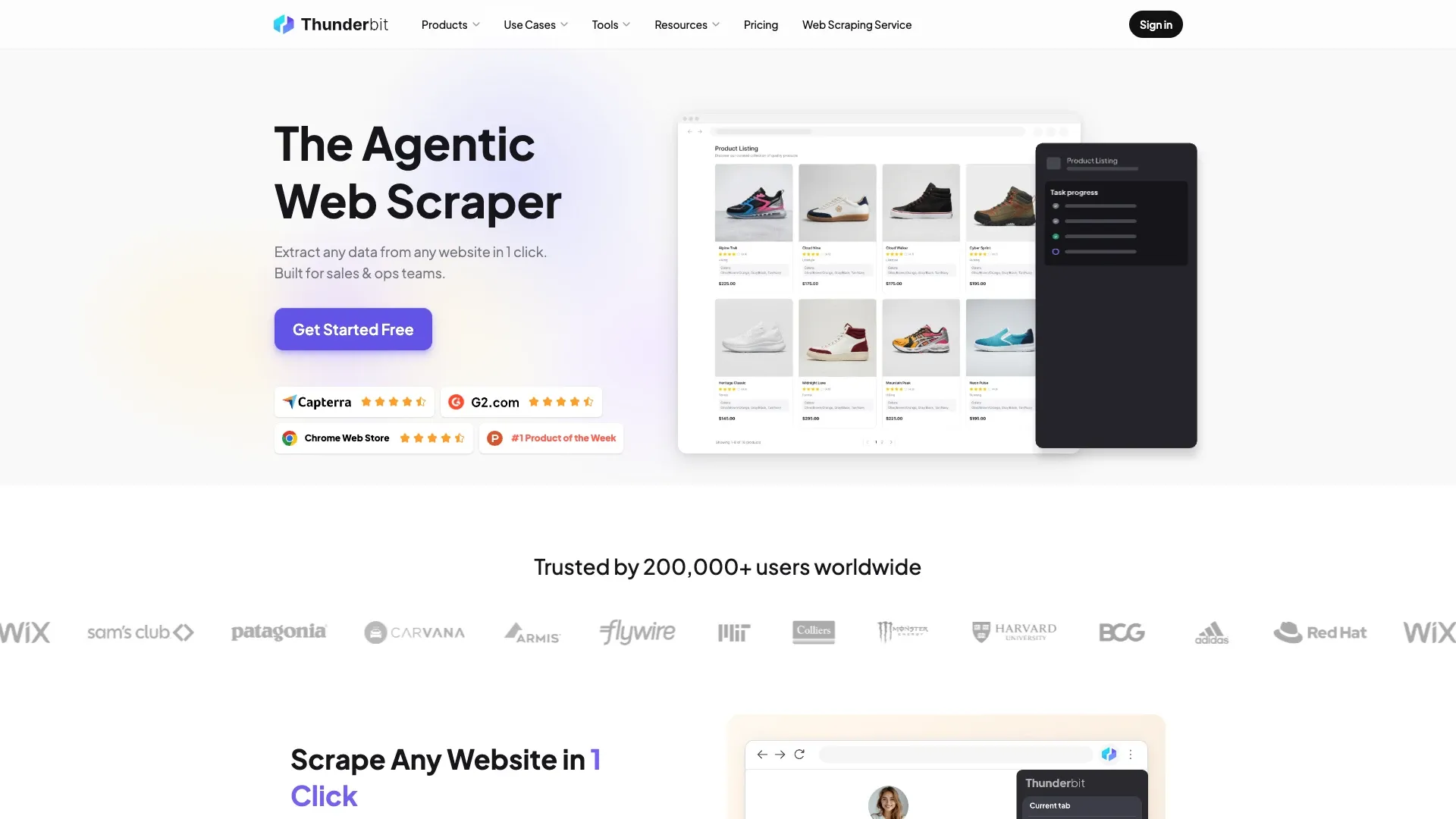
The current workflow is refreshingly boring in the best way. You open a page — say, a directory listing, a marketplace, a list of job postings — click One Click Extract, and the agent takes over. It reads the page, figures out what's probably useful (names, prices, links, whatever structure is there), and prepares the fields for you. Then it shows you Run Now, which you can click to start immediately. If you do nothing, it auto-starts anyway. One intentional click, no schema-building ritual required.
From there, you can refine what it pulled using plain language — "also grab the phone number" or "format the date as MM/DD/YYYY" — and it adjusts. On compatible pages, it'll follow pagination and pull in subpage details, merging everything into one clean table. You can run it in the browser extension for quick one-off jobs, or use the Web App, Open API, MCP Server, or CLI if you're building something more programmatic. Export goes to Excel, Google Sheets, Airtable, or Notion.
That's it. That's the whole pitch. It's not trying to be your CRM or your outreach tool — it's trying to be the fastest, least annoying way to get structured data out of a webpage.
What Is Bardeen?
Bardeen is a different animal entirely. It's a browser-based AI automation platform, and lately it's leaned hard into go-to-market use cases — think sales research, lead enrichment, and pipeline hygiene. Scraping is definitely part of what it does, but it's one action type among many inside something much bigger called a Playbook.
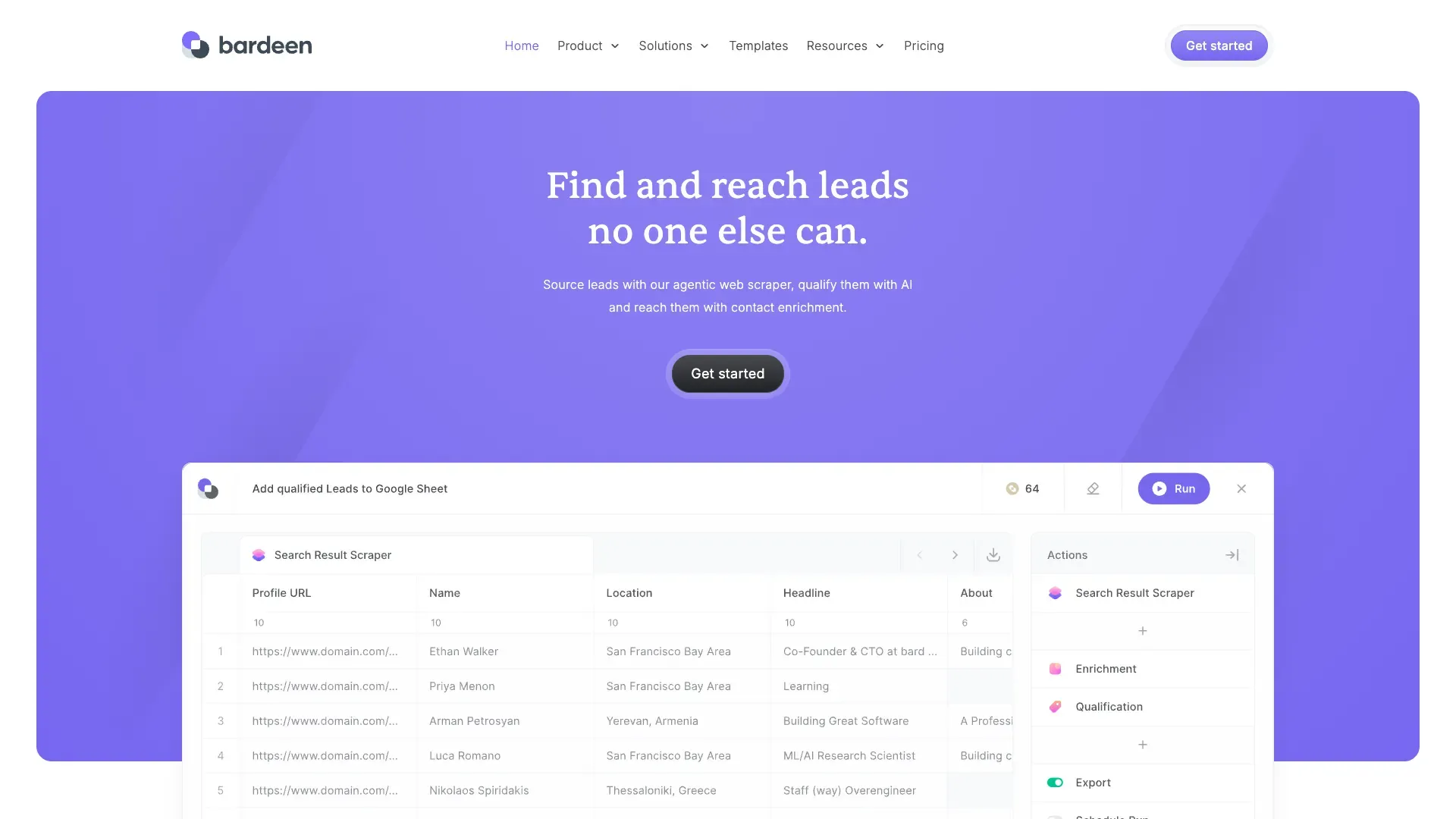
Here's how I'd describe it to someone who's never used it: imagine Zapier had a baby with a browser extension, and that baby grew up obsessed with sales workflows. Bardeen lets you chain together actions — scrape a list, visit each profile, enrich the contact info, run it through an AI qualification step, then push the results into your CRM or spreadsheet. You build this chain once as a Playbook, test it for free in Builder Mode, and then either run it manually whenever you need it or turn it into an Autobook that fires automatically on a trigger (new row added, scheduled time, etc.).
The scraping piece specifically comes in a few flavors — standard web scrapers and "premium scrapers" for trickier pages — but it's always sitting alongside web search, enrichment, and AI tools in the same canvas. Bardeen also does something Thunderbit doesn't: it integrates broadly across the GTM stack, so the data you scrape can flow directly into Salesforce-style tools, Slack notifications, or email sequences without you manually exporting anything.
For teams, Bardeen also offers Enterprise support where their team will build and maintain custom scrapers for you, which tells you a lot about who they're building for — revenue teams that need this stuff running reliably in the background, not necessarily people who want to poke at a page once and grab a table.
The Core Difference: Dedicated Extraction vs End-to-End Workflow Orchestration
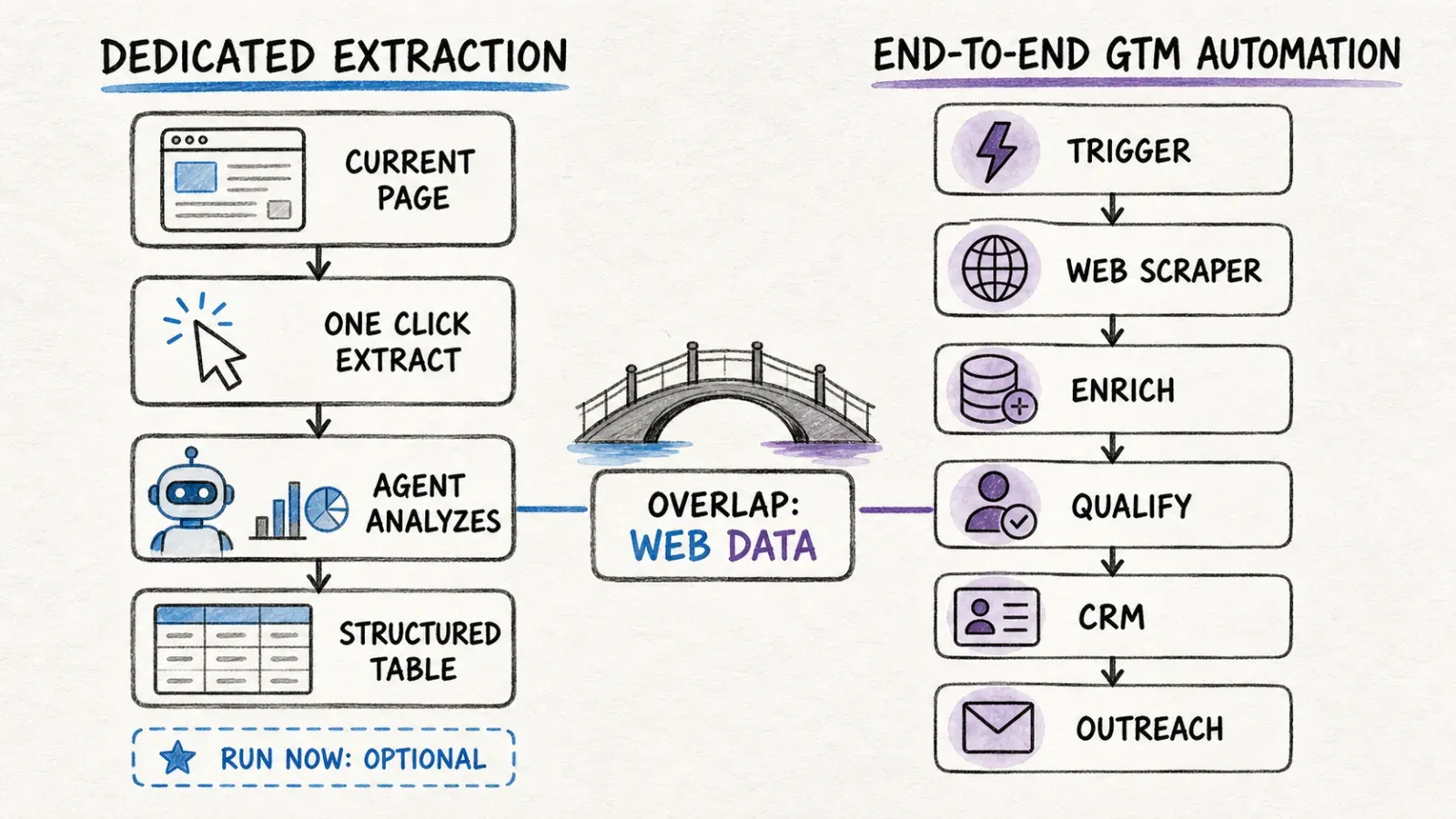
Thunderbit starts from the page
Every Thunderbit session begins the same way: you're looking at a webpage, and you want it turned into data. The tool's whole design philosophy orbits around minimizing the distance between "I see this page" and "I have this data." That's it. That's the job.
Bardeen starts from a multi-app business process
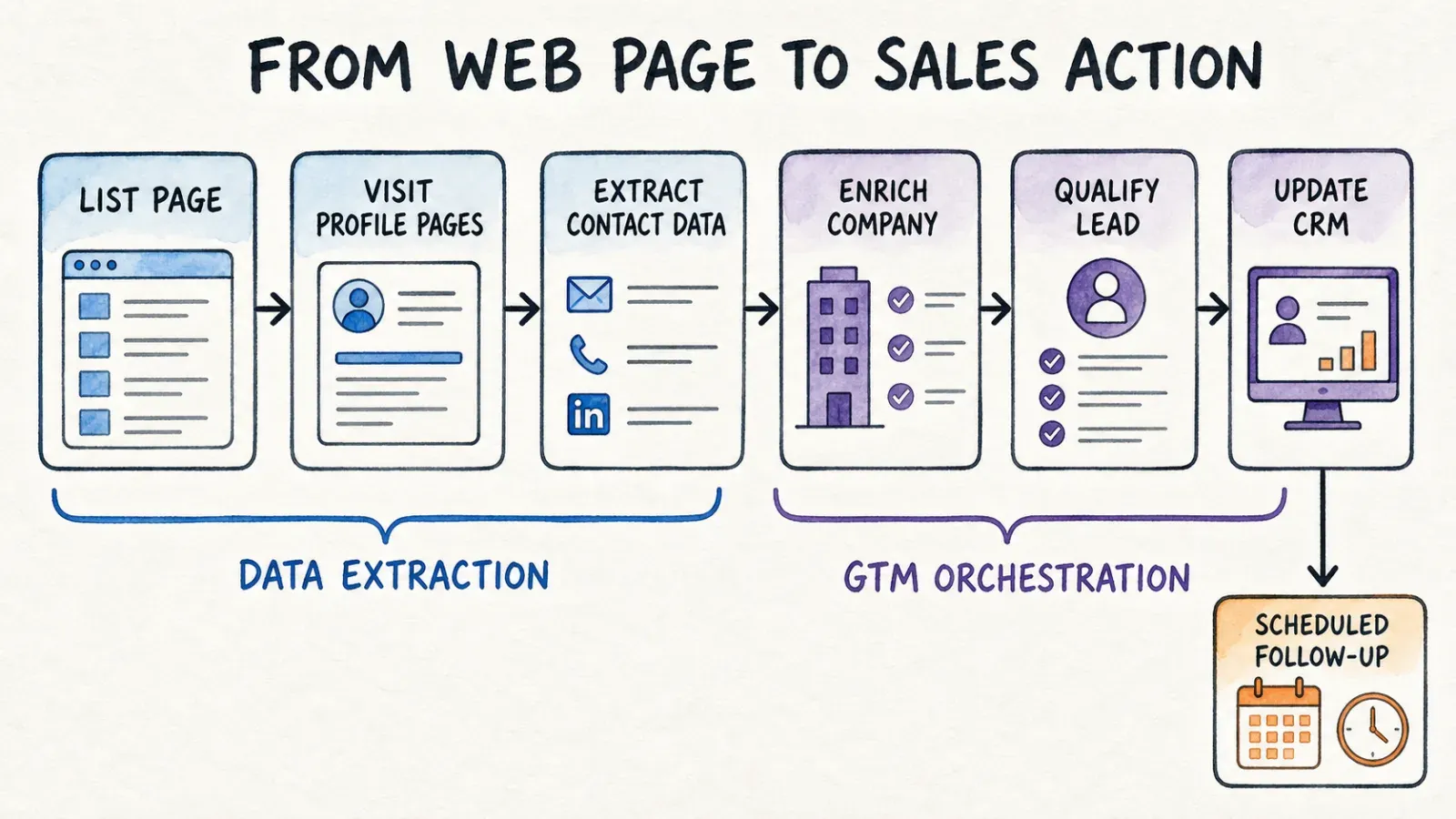
Bardeen's mental model is different. You're not just thinking about one page — you're thinking about a process that spans several tools. Scrape leads, enrich them, qualify the good ones, notify your team, log it in the CRM. The scraping step is real, but it's embedded in a chain that touches four or five other systems before it's "done."
Where their capabilities overlap
Both tools can visit a list, follow links to detail pages, and pull structured fields — and this overlap is exactly why so many comparison articles lump them together as "web scrapers." But judging either tool purely on scraping mechanics misses the point. If your actual need is "get this table into a spreadsheet once," Bardeen's enrichment and CRM-integration muscle is overkill you're paying for and not using. If your need is "run this 8-step GTM workflow every morning," Thunderbit's one-click simplicity won't chain your downstream actions for you — because that's not what it's built to do.
I've seen people pick a tool off a "top scrapers" listicle without asking which category they actually needed, and it's a bit like buying a food processor when what you wanted was a knife. Both cut vegetables. Only one fits in your pocket.
Hands-On Workflow Comparison
Let me walk through four common jobs and how each tool actually handles them, based on how the products currently work.
Scrape a list into a spreadsheet
With Thunderbit: open the page, click One Click Extract, let it auto-run, export to Google Sheets. Realistically one or two minutes if the page is straightforward.
With Bardeen: you'd select or build a web scraper for the list, define or confirm the fields, test it in Builder Mode (free), then run it and export. More steps, but if you're already living in Bardeen for other workflows, it's not a big lift.
Visit profile/detail pages
Thunderbit: on compatible pages, subpage enrichment is part of the same flow — it follows links and merges detail data into your rows automatically.
Bardeen: this is "deep scraping," a premium action that support documentation notes typically costs one credit per scraped record. It works well, but it's a metered action inside your workflow, not a free automatic step.
Enrich and qualify leads
This is where Bardeen pulls ahead clearly. Enrichment and AI qualification are native action types you can drop into a Playbook — three credits per row for enrichment, per Bardeen's current documentation. Thunderbit doesn't compete here; it's not designed to run contact enrichment or AI scoring as a chained step.
Update a CRM or trigger recurring work
Bardeen's Autobooks exist specifically for this — trigger a workflow on a schedule or an event, and have it push results into a connected app automatically. Thunderbit supports scheduling on supported plans/surfaces for recurring extraction, but it's not orchestrating a CRM update as part of that schedule — you'd export and handle the CRM sync yourself, or build that connection through the Open API.
Counting it up: a "scrape → enrich → qualify → CRM" job might involve one click in Thunderbit's world (for the extraction piece alone) plus manual work for everything downstream, versus one built Playbook in Bardeen that handles the whole chain but requires more upfront configuration and ongoing credit spend.
Credit Math and Pricing
Let's talk numbers, because this is where I see the most confusion — and honestly, where older articles comparing these two tools get things wrong by quoting stale tiers.
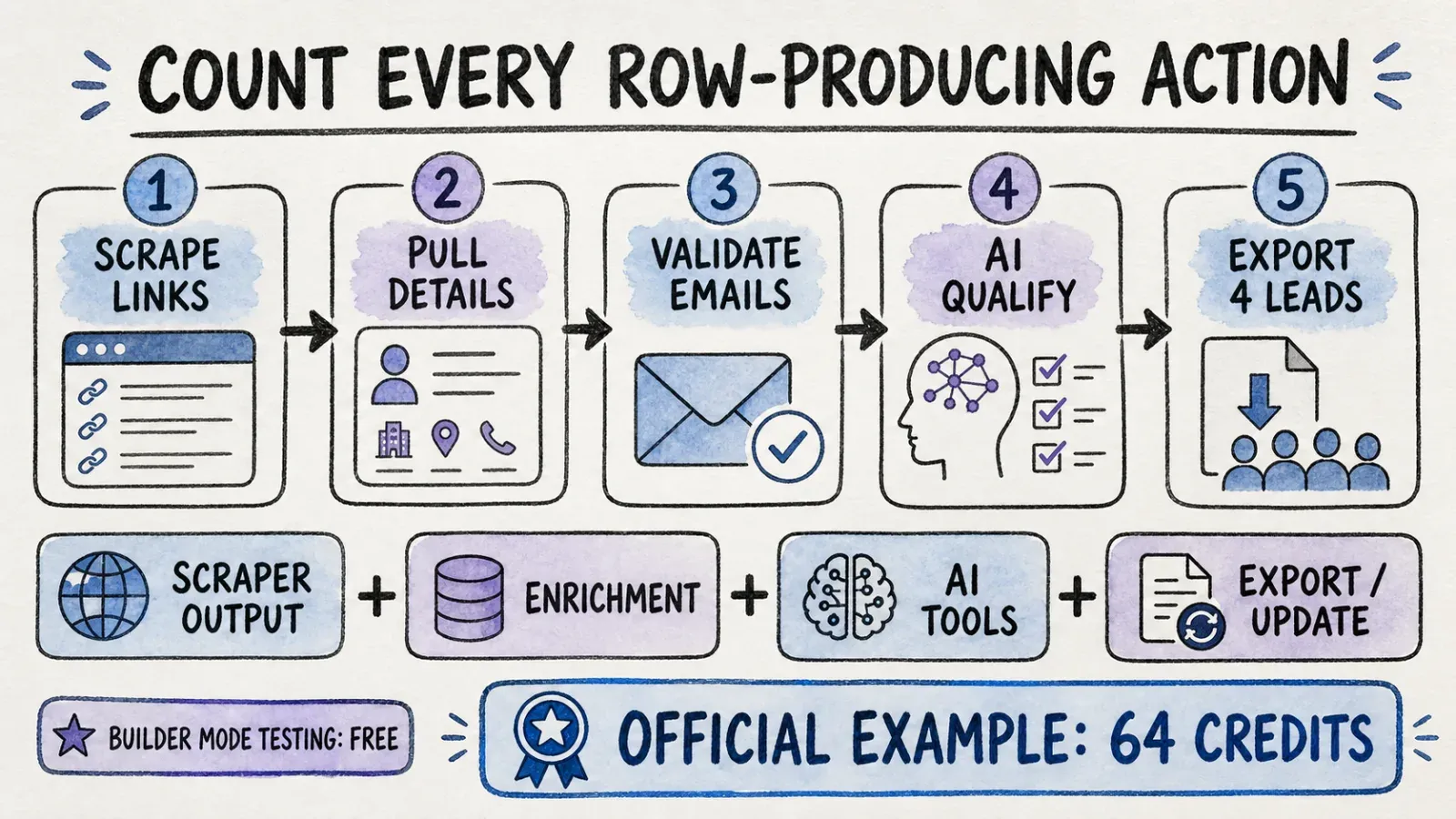
As of 2026-08-14, Bardeen's official pricing page shows:
- Free: 100 credits, unlimited Builder Mode testing
- Basic: $10/month, 100 credits/month
- Premium: $50/month for 1,000 credits/month, or $480/year for 12,000 annual credits
- Enterprise: custom bulk credits with dedicated support, including Bardeen's team building and maintaining scrapers for you
What actually consumes a credit matters more than the headline number. Per Bardeen's support documentation:
- Scraper output: 1 credit per row
- Web search: 1 credit per row
- AI tools: 1 credit per row
- Enrichment: 3 credits per row
- Utilities: free
- Spreadsheet/Airtable/Notion import: free
- Export/update actions: potentially 1 credit per row
Bardeen's own documented example makes this concrete: scraping ten profile links, pulling their details, validating emails, running AI qualification, and exporting four qualified leads adds up to 64 credits for that single workflow. That's not ten credits for ten profiles — it's the sum of every row-producing action across the whole chain.
A separate support article on credit mechanics confirms Builder Mode testing is free (so you can prototype without burning credits), monthly credits reset each billing cycle, and annual plans front-load the full year's credits at once. A simple example there — a ten-row deep scrape plus a ten-row export — runs about 30 credits when three row-producing actions are stacked.
One more thing worth flagging clearly: Bardeen's terms describe the Free Plan as intended for non-commercial or non-business use. If you're planning to run business lead generation on the free tier, that's worth double-checking against current terms before you build a whole workflow around it.
For Thunderbit's current pricing, check the live pricing page directly — I'm not going to quote numbers here that might be stale by the time you read this. The more useful comparison isn't "credits per plan" anyway, it's "cost of the completed workflow." Map out your actual job — the real number of rows, the real number of enrichment steps — before comparing sticker prices.
Automation, Integrations, and Developer Access
Bardeen's real strength is orchestration. Playbooks and Autobooks let you connect scraping to a genuinely wide net of GTM tools — CRMs, communication apps, spreadsheets — and trigger the whole chain automatically. If your team's workflow depends on "when X happens, do Y, Z, and notify the channel," Bardeen's canvas is built for exactly that.
Thunderbit's developer surface goes a different direction. Beyond the browser extension and Web App, there's an Open API for backend integration, an MCP Server for connecting to AI hosts like Claude or Cursor, and a CLI for terminal and coding-agent workflows. This matters more than it sounds — MCP specifically gives AI agents a standardized way to call Thunderbit's scraping directly, which is useful if you're building an agent that needs to fetch structured data as one step in its own reasoning loop.
I want to be careful here: this isn't "Thunderbit's API replaces Bardeen's orchestration." They're solving different problems. Bardeen's strength is the human-designed, multi-app business process. Thunderbit's strength is being a callable, dependable extraction layer — whether that call comes from a person clicking a button or an AI agent invoking it through MCP.
Which One Should You Choose?
Choose Thunderbit if...
You're a sales researcher who needs a list of companies off a directory site before your call this afternoon. You're a recruiter pulling candidate details from a job board. You're an analyst who needs pricing data from a competitor's site, once or on a recurring schedule, without building an automation first. You just want the data, fast, without designing a workflow around it.
Choose Bardeen if...
You're running revenue operations and scraping is the first domino in a chain that includes enrichment, lead scoring, and CRM hygiene. You need triggers — new lead added, form submitted, schedule hit — to kick off multi-step processes automatically. You're managing a team where consistency across dozens of recurring workflows matters more than the speed of any single extraction.
Use both if...
Honestly? A lot of teams end up here. Use Thunderbit for the quick, ad-hoc extraction jobs that pop up constantly — the "can you grab me this list real quick" requests — and let Bardeen own the scheduled, multi-app GTM machinery that runs in the background. Thunderbit's exports to Google Sheets or Airtable can feed right into whatever downstream system you're already running.
Final Verdict
The honest framing here is dedicated agentic extraction versus horizontal workflow automation. Thunderbit wants to be the fastest path from "I'm looking at a page" to "I have structured data." Bardeen wants to be the canvas where scraping, enrichment, qualification, and app updates all live together as one repeatable business process.
My actual advice, and this is the same thing I tell people who ask me this in person: don't pick based on a listicle ranking. Model one real workflow you actually need — start from the first page you'd open, walk through every step to the final destination (a spreadsheet, a CRM, wherever), and count every action and every row along the way. That exercise will tell you which tool fits faster than any comparison table, mine included.
If what you land on is "I just need this page turned into data, repeatedly, without building an automation," give Thunderbit's Chrome extension a try — it's genuinely just one click.
FAQ
Is Bardeen a web scraper? Partially. Bardeen includes web scraping and premium scraping as action types, but its core identity is a broader browser automation platform for GTM workflows — scraping is one ingredient, not the whole product.
Is Thunderbit easier for one-off scraping? Yes, for most cases. Thunderbit's workflow requires one click — One Click Extract — and the agent handles field detection automatically, with Run Now as an optional immediate-start button. There's no Playbook or scraper configuration step beforehand.
How do Bardeen credits work? Different action types consume different credit amounts per row: scraper output, web search, and AI tools each cost 1 credit/row; enrichment costs 3 credits/row; utilities and imports are free. Export/update actions can also cost 1 credit/row. Check the live pricing page for current plan allowances.
Can both scrape detail pages? Yes. Thunderbit supports subpage enrichment on compatible pages, merging detail data into list rows automatically. Bardeen offers this as a premium "deep scraping" action within a Playbook, typically consuming credits per scraped record.
Does Thunderbit integrate with AI agents? Yes, through its MCP Server, which lets compatible AI hosts like Claude or Cursor call Thunderbit's extraction capabilities directly as a tool within their own workflows.
Is Bardeen's free plan for commercial use? Per Bardeen's current terms, the Free Plan is intended for non-commercial or non-business use. If you're planning business lead generation, verify current eligibility on their official terms before relying on the free tier.
Can either scrape every website? No. Neither tool guarantees compatibility with every anti-bot system, login-gated page, or heavily dynamic site. Both work best on pages that are publicly accessible or where you have authorized access through your own browser session.




