
Adaptive selectors get credited to the wrong tools all the time. Half the scraper comparisons I read pin "survives a website redesign" on some big AI crawler that doesn't actually do it. The Python library that puts the feature front and center is Scrapling, a fast-rising project sitting at roughly 68.7k GitHub stars as of 2026-07-09.
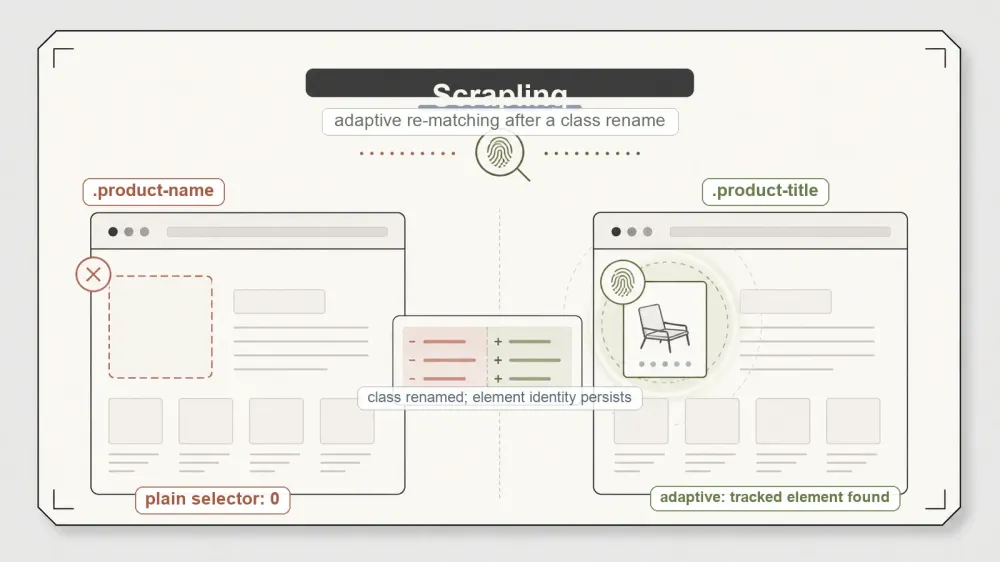
So I ran the one test that matters for a claim like that. I built a fixture page, saved a selector, then renamed the target element's class out from under it — the precise thing that silently zeroes out a scraper the morning after a site ships a redesign. A plain selector came back empty. Scrapling's adaptive match found the element anyway. That part is real, and I'll show the numbers. The part almost nobody quantifies is where the recovery stops, and that boundary turns out to be the whole review.
What Scrapling actually is
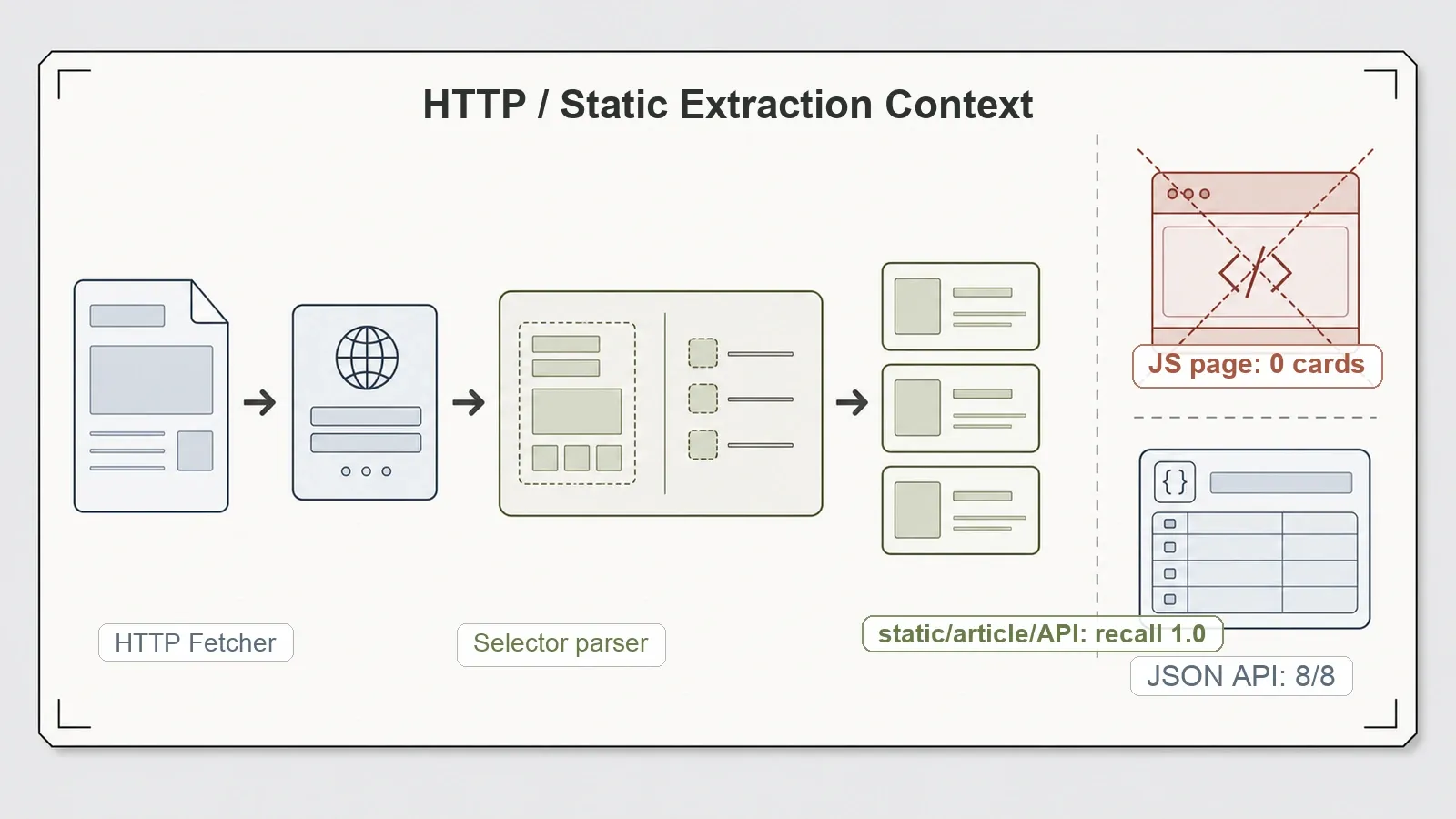
Scrapling describes itself as an adaptive web scraping framework that handles "everything from a single request to a full-scale crawl." Strip the tagline and it's two components stacked: an HTTP Fetcher that pulls pages, and an lxml-backed Selector that parses them, with proper CSS/XPath and handy ::text / ::attr() pseudo-selectors. It's BSD-3-Clause licensed, which is about as permissive as open-source licenses get. I tested version 0.4.10, which was the current release at the time — no "you benchmarked something stale" asterisk to worry about.
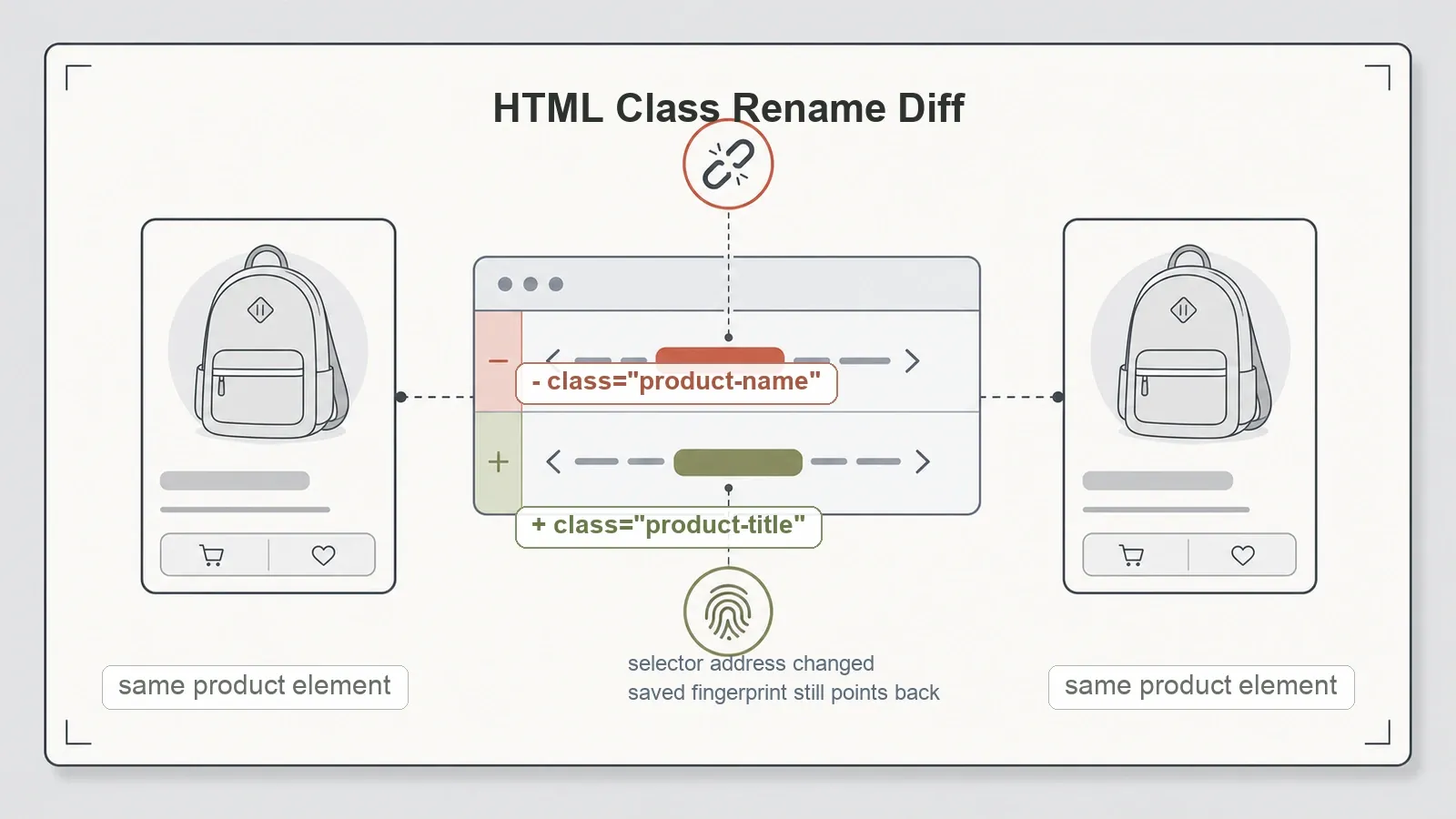
The interesting layer is the adaptive one on top of that parser. Picture how a normal selector works: it's a hardcoded street address. "Grab the element with class product-name." Renumber the building — rename the class — and the address points at an empty lot. Scrapling can instead save a fingerprint of an element on one run, and on a later run, after the markup has shifted, relocate that element by its fingerprint rather than its now-dead address. Per the Scrapling adaptive scraping docs, the match phase scores similarity across an element's tag, text, attributes, siblings, and position — no model in the loop, just structural comparison against what it saved.
Worth being straight about the pedigree here, because it changes how you should read the feature. Adaptive relocation is a real, documented capability, not something I discovered — the vendor docs spell out the whole save-to-SQLite, match-by-similarity mechanism, and independent third-party writeups walk through it too. The concept of self-healing selectors also predates Scrapling in the test-automation world. What's distinctive is that Scrapling ships it as a native library feature: plain parsers like lxml, parsel, and BeautifulSoup give you static selectors and nothing that relocates on its own. So this is a distinctive-but-documented feature I reproduced and stress-tested — not a capability nobody else has.
The adaptive test, in detail
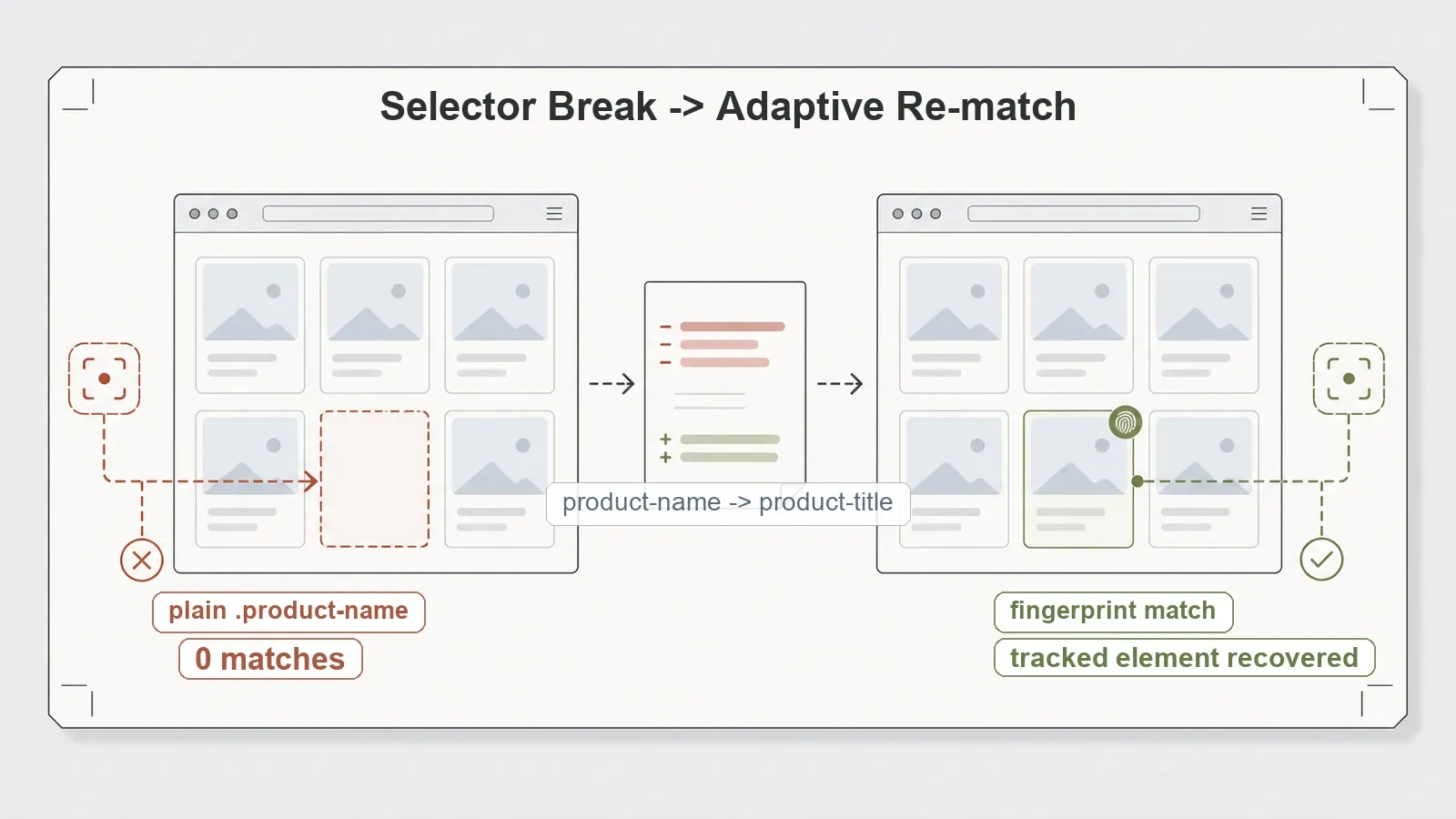
Here's the setup. I stood up a fixture catalog and tracked a product element while its class was product-name. Then I renamed that class to product-title and re-ran the same code. A plain .product-name selector matched 0 elements — exactly the empty result you'd expect from a selector pointed at a class that no longer exists. Scrapling's adaptive re-matching recovered the tracked element using the fingerprint it had saved on the previous version. The raw result is in the benchmark repo at local_adaptive_selector.json.
Try Thunderbit for Web Data Extraction
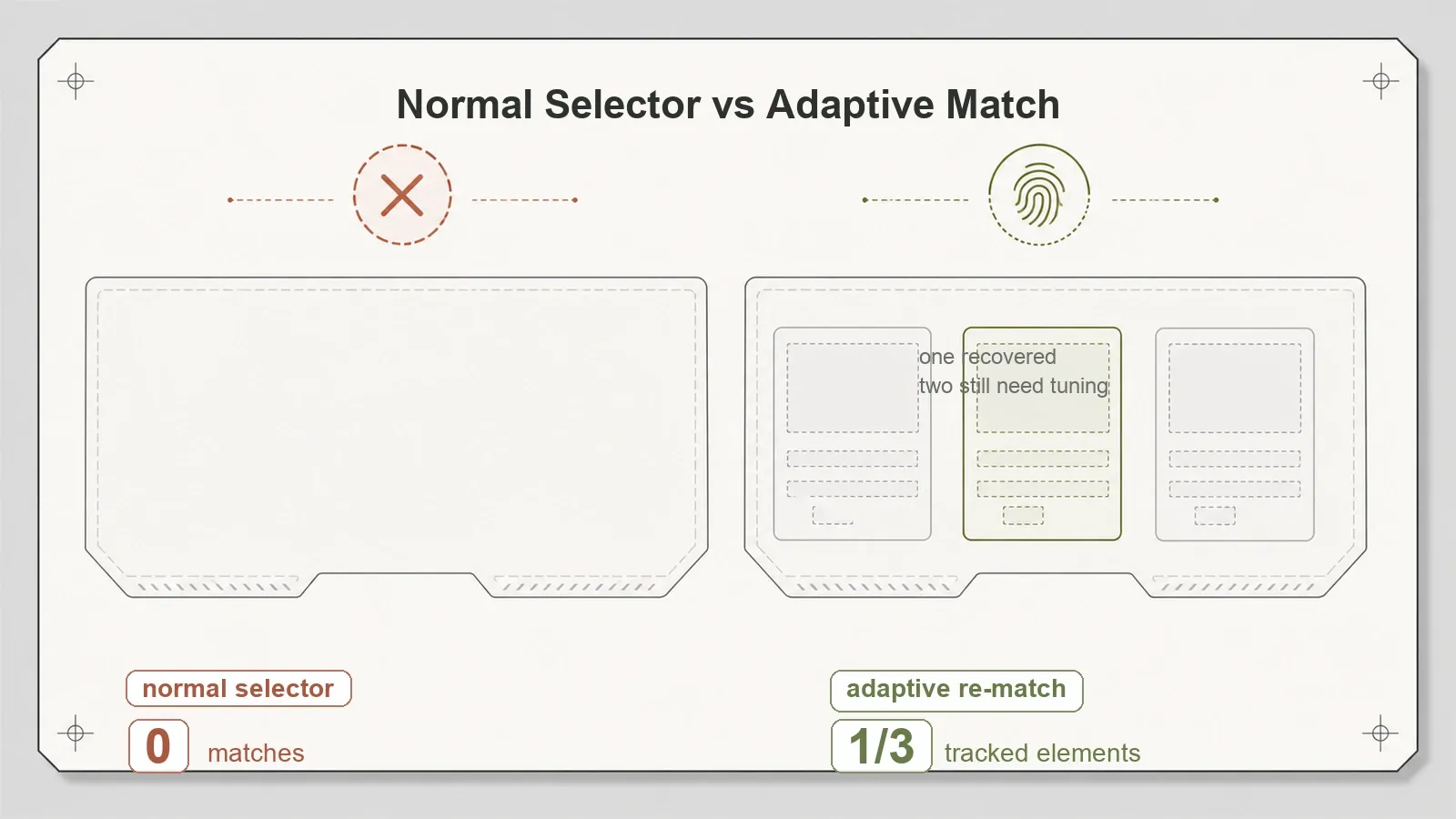
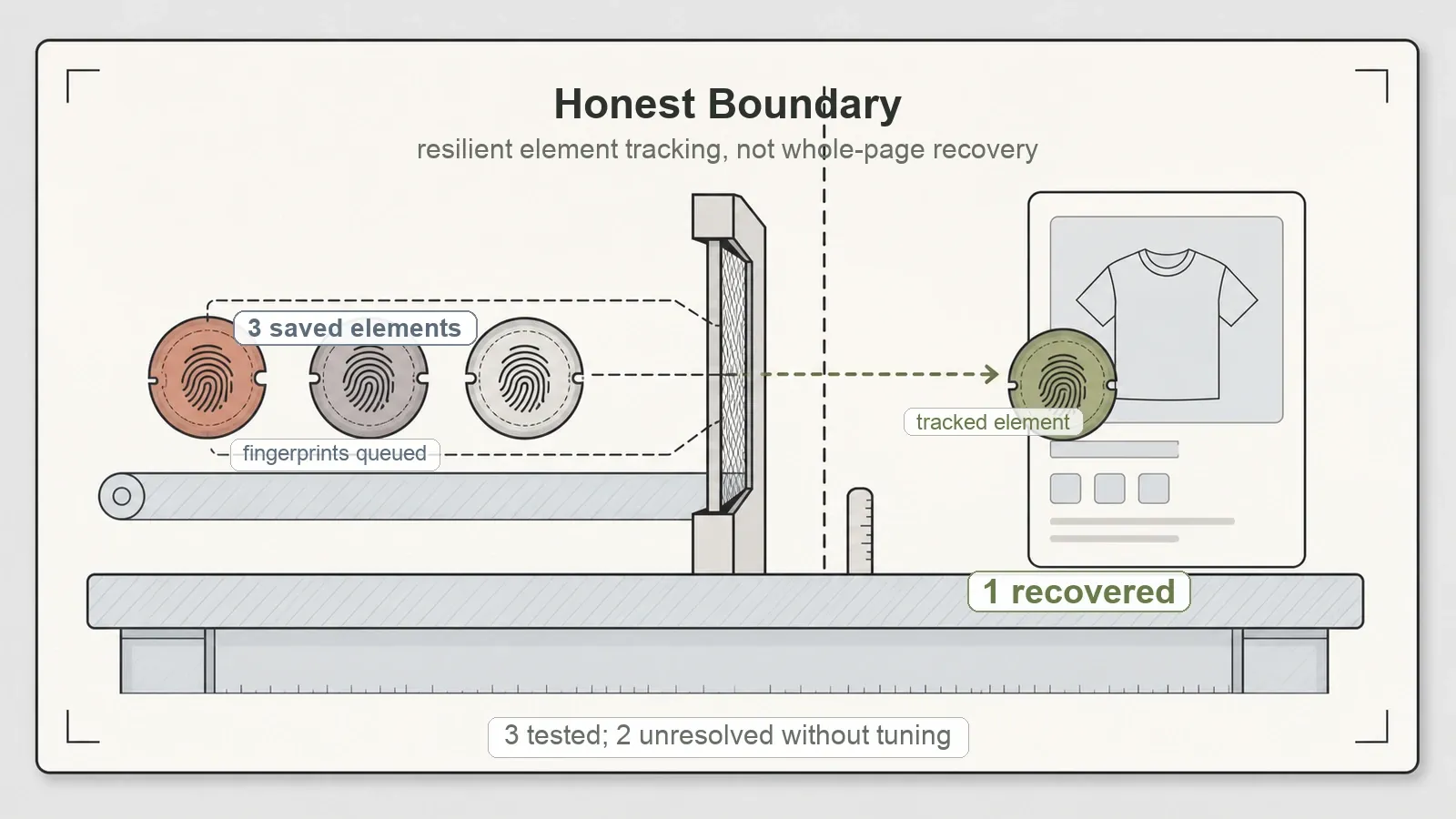
Now the part that most reviews skip. I pushed it further with a synthetic multi-element test — three tracked elements instead of one. Scrapling relocated the first saved element, not all three. That's not a failure and it's not a bug; the docs frame auto-match as element tracking, one fingerprint per saved element, so a 1-of-3 result under default settings is the feature behaving exactly as designed. But it does mean the accurate description is "resilient element tracking," not "automatic recovery of a whole redesigned page." Auto-match follows the element you told it to follow. Multi-element resilience is tuning you do yourself.
That distinction carries more weight than it first appears. "Survives markup changes" is a headline. "Keeps following the one fingerprinted element across markup changes, and you handle the rest" is the actual capability you're buying. Go in expecting the first and you'll feel let down. Go in expecting the second and it does the job cleanly.
Setup: the friction nobody warns you about
This one cost me real time, so you get it before you hit it yourself. pip install scrapling installs the parser — and only the parser. The instant I wrote from scrapling.fetchers import Fetcher, it broke on a chain of missing dependencies: first curl_cffi, then playwright, then browserforge, each one surfacing only after I'd resolved the one before it.
The fix is to install the extra: pip install "scrapling[fetchers]", or run the scrapling install CLI step, which pulls the full HTTP-plus-browser fetcher stack. After that, everything worked. But the base-install-looks-fine-then-explodes-on-first-fetch sequence is real, and nothing shoves it in your face up front. Budget for the [fetchers] extra and its heavy transitive dependencies from the very first command, and you'll skip the whole detour.
What held up in plain HTTP extraction
Once the fetchers were in place, the ordinary extraction path was solid — recall 1.0 straight across:
| Test | Result |
|---|---|
| Static catalog + pagination | 12/12 products |
| Article extraction | title + 3/3 paragraphs |
| Dynamic JSON API | 8/8 items |
| Books to Scrape (public) | 20 products |
| HTTP 500 handling | status exposed cleanly, no crash |
The lxml backing shows its hand here. CSS and XPath both behave the way you'd want, and the ::text / ::attr() pseudo-selectors keep the extraction code short and legible instead of turning it into a pile of nested calls. The 500 case is a small but telling one — the Fetcher surfaced the status code instead of throwing a stack trace at me, which is the difference between a scraper you can put on a schedule and one you have to babysit. Full numbers live in scrapling-test-summary.json.
None of that is flashy. It's just correct, and correct is underrated.
What it doesn't do (by design)
The HTTP Fetcher does not render JavaScript. I aimed it at a JS-rendered fixture and got 0 cards back; same 0 on the public Quotes to Scrape JS page. That isn't a defect — the HTTP Fetcher downloads HTML, it doesn't drive a browser, so client-rendered content simply isn't there when it looks. Scrapling ships a separate DynamicFetcher (browser-backed) for JS pages. I didn't exercise it in this pass, so I won't tell you how it performs. Just don't point the HTTP path at a client-rendered app and expect to see the content.
There's also a StealthyFetcher aimed at anti-detection. I'm treating that as a compliance consideration, full stop — not a feature to wave around. Where and how you're permitted to scrape is on you and your legal footing, and this review tested extraction capability, not evasion. I didn't run it, and I'm not scoring it.
Pros and cons
Pros:
- Adaptive selectors genuinely recovered a tracked element after a class rename that returned 0 for a plain selector — the distinctive reason to reach for Scrapling.
- Recall-1.0 HTTP extraction on static pages, articles, and JSON APIs.
- Clean lxml-backed CSS/XPath with readable
::text/::attr()pseudo-selectors. - Graceful HTTP 500 handling — status surfaced, no crash.
- Tested version equals the latest release, so no version drift.
- Permissive BSD-3-Clause license, friendly to commercial use.
Cons:
- Auto-match tracks one saved element, not a whole page — the three-element test recovered one. Size the claim accordingly.
pip install scraplingis parser-only; fetchers need the[fetchers]extra and its heavy dependency chain, which I found out the hard way.- The HTTP Fetcher renders no JavaScript; client-side content needs the browser-backed
DynamicFetcher, untested here. - The headline resilience feature needs manual tuning for multi-element cases.
Who it's for — and who should skip it
Scrapling earns its place if you maintain scrapers against sites that redesign often and you're tired of one class rename quietly nuking your extraction overnight. If your recurring pain is "my selectors break every few weeks and I just want the one element I care about to keep getting found," this is aimed squarely at you. It doubles as a clean, lightweight lxml extractor for static pages and JSON APIs even if you never switch on the adaptive layer.
Reset expectations, or look elsewhere, in two cases. If you were hoping adaptive selectors would auto-heal an entire redesigned page — they track elements, they don't rebuild layouts — you'll want a different mental model. And if your targets are JavaScript-heavy and you don't want to stand up the browser-backed DynamicFetcher, the HTTP path alone won't get you there. Either way, when you do install it, add the [fetchers] extra from the first command.
Where a managed AI scraping API fits
Scrapling is a free, open-source library you run and maintain yourself. You own the code, the dependency chain, and the tuning — and in exchange you pay nothing per request and keep everything in-house. That's a real, defensible choice, and for a lot of teams it's the right one.
The question worth asking is who owns the resilience problem. Scrapling's answer is that you own it: you fingerprint elements and tune the tracking. A managed AI scraping API answers it differently — the drift-handling moves to the server. That's the slot Thunderbit's developer stack fills for technical teams. POST /extract returns structured JSON against a JSON Schema you define, with rendering, anti-bot, and markup drift absorbed server-side; a renderMode flag controls how much of the page gets executed before extraction. There's a Thunderbit MCP server for AI agents and coding assistants — thunderbit_suggest_fields is free and runs first to plan an extraction — and a CLI via npx @thunderbit/thunderbit-cli for terminal, scripts, and CI. Same AI engine behind all three surfaces.
The real trade-off isn't better versus worse — it's where you want the resilience logic to live. With Scrapling you keep it in your own code, fingerprinted and tuned by you, at zero per-call cost, and you accept the maintenance that comes with that. With a managed API you hand off drift-handling and pay per request. Small, self-hosted, and you like owning the tuning? Scrapling's control is the right answer. Scaling across a hundred sites and you'd rather not babysit selector fingerprints on every one? The managed route deletes that maintenance category.
If you're comparing the field, the full open-source scraper benchmark puts Scrapling next to the others on the same fixtures, and the Scrapy review and Colly review cover two more HTTP-first frameworks worth a look.
Verdict
Should you use Scrapling? Yes — if you want an open-source Python extractor whose standout trick is keeping a tracked element found after the markup underneath it moves, and you're clear-eyed about the shape of that trick. It recovered an element a broken selector couldn't, on a rename that would have silently cost a normal scraper its data. The plain HTTP extraction is clean and hit full recall across every fixture. The license is permissive and the version I tested was current.
Just size the claim correctly and you'll be happy with it. It tracks elements, it doesn't auto-rebuild pages — the three-element test recovered one. Install the [fetchers] extra from the start or you'll walk into the dependency wall I did. And if your pages need JavaScript, that's the browser-backed fetcher's job, not the HTTP one's. Inside those lines, Scrapling does the specific thing it's known for, and among Python scraping libraries it's the one that actually ships the feature everyone keeps misattributing.
Try Thunderbit for Web Data Extraction Get Started Free
FAQs
Do Scrapling's adaptive selectors really survive a website redesign?
They survive a class rename for a tracked element — verified in testing. After I renamed product-name to product-title, a plain selector matched 0 while adaptive re-matching recovered the tracked element. But it tracks saved elements rather than rebuilding a whole page: a three-element synthetic test recovered one. Treat it as resilient element tracking, not automatic full-page recovery.
Why does pip install scrapling fail when I import a fetcher?
Because the base install is the parser only. Importing scrapling.fetchers triggers a cascade of missing dependencies — curl_cffi, then playwright, then browserforge. Run pip install "scrapling[fetchers]" (or the scrapling install CLI) to pull the full fetcher stack, and the import works.
Can Scrapling scrape JavaScript-rendered pages?
Not with the HTTP Fetcher — it returned 0 on both a JS fixture and the public Quotes JS page, because it downloads HTML without running a browser. Scrapling ships a separate browser-backed DynamicFetcher for JS pages, which this test didn't cover, so I can't speak to its performance yet.
Is Scrapling fast and accurate for normal extraction? In testing, it was accurate — recall 1.0 on static catalogs, article pages, and JSON APIs, with clean lxml-backed CSS/XPath. It also handled an HTTP 500 by surfacing the status instead of crashing. If you never touch the adaptive layer, it's still a solid, lightweight extractor for static content.
Is Scrapling free for commercial use? It's BSD-3-Clause, which is permissive and commercially friendly. As always, confirm the current license on the repo before you build on it.




