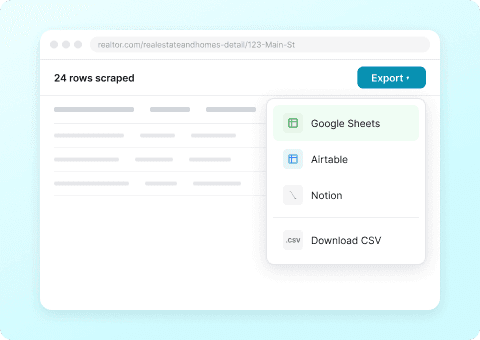
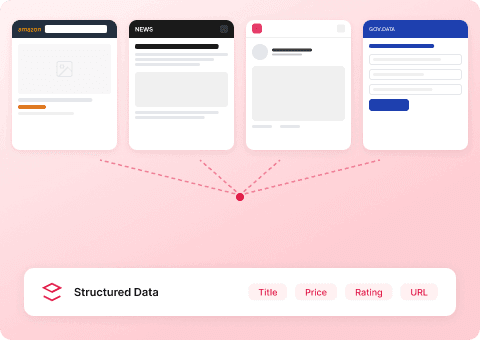
Thunderbit’s Realtor.com Scraper helps you turn real estate listings into clean, structured data using AI. You can scrape listing results (including pagination), then use subpage scraping to open each property detail page and enrich your dataset with deeper fields like HOA, year built, price history, and agent info. Export your results to Excel, Google Sheets, Airtable, or Notion in minutes with the AI Web Scraper.
🏠 What is Realtor.com Scraper
The AI-Powered Realtor.com Scraper is an that extracts data from listing pages and property detail pages. You simply open a Realtor.com search results page, click AI Suggest Columns, then click Scrape—Thunderbit’s AI reads the page, structures the data into a table, and keeps working across pagination and subpages when you need more details.

🧾 What can you scrape with Realtor.com
Realtor.com is packed with valuable market signals—prices, days on market, property types, new construction inventory, and neighborhood-level trends. With Thunderbit, you can collect that data for analysis, reporting, lead lists, and monitoring.
Below are two common workflows you can run right away.
📍 Scrape Realtor.com Regional Market Price Analysis
This use case focuses on extracting listing-level data from a regional search page (city/ZIP/area) so you can analyze pricing, inventory, and property mix over time. Example page: .

Steps:
- Download the and register an account.
- Go to the destination page, for example: .
- Click AI Suggest Columns to generate recommended column names and data types.
- Click Scrape to extract the data, then export to Excel, Google Sheets, Airtable, or Notion.
Column names
| Column | Description |
|---|---|
| 🏷️ Listing Title | The headline shown on the card (often includes key selling points). |
| 📍 Address | Street address (or partial address if limited). |
| 🏙️ City | City name for grouping and filtering. |
| 🗺️ State | State abbreviation (useful for multi-market datasets). |
| 🔢 ZIP Code | ZIP/postal code when available. |
| 💲 List Price | Current asking price displayed on the results page. |
| 🛏️ Beds | Number of bedrooms. |
| 🛁 Baths | Number of bathrooms (may include partial baths). |
| 📐 Square Footage | Interior living area (sq ft) when shown. |
| 🌳 Lot Size | Lot size if available on the card. |
| 🏠 Property Type | House, condo, townhouse, multi-family, etc. |
| 🏗️ Year Built | Year built when available on the listing card. |
| 🕒 Days on Market | DOM indicator if shown (great for market velocity). |
| 🖼️ Primary Image URL | Main photo URL for the listing card. |
| 🔗 Listing URL | Direct link to the property detail page (used for subpage scraping). |
🏗️ Scrape Realtor.com New Construction Growth Tracking
This use case is designed for tracking new construction inventory and growth signals—new builds, communities, and builder listings—across a market. Example page: .

Steps:
- Download the and register an account.
- Go to the destination page, for example: .
- Click AI Suggest Columns to generate recommended column names and data types.
- Click Scrape to extract the data, then export to your preferred tool.
Column names
| Column | Description |
|---|---|
| 🏘️ Community / Development Name | Name of the new construction community (if shown). |
| 🏗️ New Construction Tag | Indicator that the listing is new construction. |
| 📍 Address / Area | Address or general location shown on the card. |
| 💲 Starting Price / Price | Starting price (common for communities) or list price. |
| 🛏️ Beds Range | Beds or beds range (e.g., 3–5) when displayed. |
| 🛁 Baths Range | Baths or baths range when displayed. |
| 📐 Square Footage Range | Sq ft range for new builds when available. |
| 🏢 Builder / Brand | Builder name if present on the results page. |
| 🖼️ Image URL | Primary image for the community or listing. |
| 🔗 Detail Page URL | Link to the community or property detail page for enrichment. |
| 📌 Status | If shown: move-in ready, to-be-built, under construction, etc. |
🎯 Why Use Realtor.com Tool
Scraping Realtor.com data is useful when you need repeatable, structured market intelligence without manual copy/paste.
Common reasons you might scrape Realtor.com:
- Real estate agents & teams: Build comps datasets, track price changes, and monitor inventory in your farm area.
- Investors: Compare neighborhoods by price per square foot, DOM, and property type mix to spot opportunities.
- Brokerage ops & analysts: Create weekly market reports, pipeline dashboards, and internal pricing trackers.
- Builders & contractors: Track new construction supply, community launches, and competitive positioning.
- Marketing teams: Build geo-targeted content plans using real listing data and trends.
Thunderbit is especially helpful when you want to go beyond the results page:
- Use pagination scraping to capture more than the first page of listings
- Use subpage scraping to open each listing and extract deeper fields (agent, HOA, taxes, price history, school info, and more depending on what’s visible)
If you’re new to scraping, these guides can help:
🧩 How to Use Thunderbit Chrome Extension
- Install the Thunderbit Chrome Extension: Get it from the and create your account on .
- Navigate to a Realtor.com page: Open a listing results page like or a filtered view like .
- Activate AI-Powered Scraper: Click AI Suggest Columns to generate a ready-to-scrape table. You can rename columns, change data types (Text/Number/Date/URL), and add Field AI Prompts for formatting.
- Scrape, then enrich with subpages: Click Scrape for the results page. If you want deeper property details, click Scrape Subpages so Thunderbit visits each listing URL and appends extra columns automatically.
- Export for free: Download CSV/JSON or export to Excel, Google Sheets, Airtable, or Notion (export is free).
Tip: If you’re scraping public pages at scale, Cloud Scraping is usually faster. If you need to stay in your logged-in session or handle dynamic content, use Browser Scraping.
💳 Pricing for Thunderbit
Thunderbit uses a simple credit system:
- 1 credit = 1 output row (one row in your results table)
- The AI-powered scraping workflow (AI Suggest Columns + Scrape) is included, and you can start without coding.
What you can try for free:
- Free tier: scrape 6 pages per month (page-based allowance)
- Free trial: scrape 10 pages for free to test your full workflow before upgrading
Typical cost per run:
- If you scrape 5 pages of results and each page yields ~40 listings, you’ll produce about 200 rows, which uses ~200 credits.
- If you then use subpage scraping to enrich those 200 listings, you’ll still generally keep the same row count (you’re adding columns), so the credit usage is primarily tied to the number of rows you output.
Paid plans (monthly and yearly) scale with your volume. The yearly plan is usually the most cost-effective because it includes a discount compared to paying month-to-month.
You can review current options on the page.
| Tier | Pricing (Monthly) | Pricing (Yearly) | Yearly Total Price | Credits (Monthly) | Credits (Yearly) |
|---|---|---|---|---|---|
| Free | Free | Free | Free | 6 pages | N/A |
| Starter | $15 | $9 | $108 | 500 | 5,000 |
| Pro 1 | $38 | $16.5 | $199 | 3,000 | 30,000 |
| Pro 2 | $75 | $33.8 | $398 | 6,000 | 60,000 |
| Pro 3 | $125 | $68.4 | $796 | 10,000 | 120,000 |
| Pro 4 | $249 | $137.5 | $1,592 | 20,000 | 240,000 |
❓ FAQ
-
What is the AI Powered Realtor.com Scraper?
The AI Powered Realtor.com Scraper is a workflow in Thunderbit that reads Realtor.com pages and converts listings into structured rows and columns. You click AI Suggest Columns to generate a table schema, then click Scrape to extract the data and export it. -
What is Thunderbit?
is an AI Web Scraper Chrome Extension that helps you extract data from websites, PDFs, and images into structured datasets. It’s built for business workflows like lead generation, market research, ecommerce monitoring, and real estate analysis—without needing code. -
What Realtor.com pages can I scrape with Thunderbit?
You can scrape search results pages (city, ZIP, neighborhood, filters like new construction) and also scrape individual property detail pages. Thunderbit supports pagination and can visit each listing URL via subpage scraping to collect deeper fields. -
Can Thunderbit handle pagination on Realtor.com search results?
Yes. Thunderbit can scrape multi-page results, including click-based pagination and infinite scroll patterns depending on how the page is built. This is useful when you need a complete dataset for a market rather than only the first page. -
What is subpage scraping and why does it matter for property data?
Subpage scraping means Thunderbit can open each listing’s detail page and extract additional information not shown on the results grid. For real estate workflows, this is often where the most valuable fields live, such as detailed features, agent/broker info, HOA details, taxes, and price history (when available). -
Can I export Realtor.com data to Google Sheets or Airtable?
Yes. Thunderbit supports free export to Excel, Google Sheets, Airtable, and Notion, plus CSV and JSON downloads. This makes it easy to build dashboards, share reports, or connect your dataset to downstream workflows. -
How do credits work for Realtor.com scraping?
Thunderbit charges by output rows: 1 credit equals 1 row in your results table. If you scrape 300 listings, you’ll typically use about 300 credits, regardless of how many columns you include. -
Should I use Cloud Scraping or Browser Scraping for Realtor.com?
If you’re scraping public listing pages and want speed, Cloud Scraping is often a good choice because it can process batches quickly. If you need to scrape while logged in, or the site behavior depends on your browser session, Browser Scraping is the better option. -
Is it okay to scrape Realtor.com data for market research?
Scraping can be allowed or restricted depending on the website’s terms and applicable laws, and requirements can vary by location and use case. You should only scrape data you have the right to access and use, and you should review Realtor.com’s terms and any relevant regulations before running large-scale collection.
📚 Learn More
- Get started with the extension:
- Explore product details and use cases:
- Read more tutorials and playbooks:
- Learn scraping fundamentals:
- Build better list scrapes:
- Export workflows:
- Scrape documents too:
- Compare tools:
If you want to start now, open a Realtor.com results page like , click AI Suggest Columns, then click Scrape in Thunderbit.