
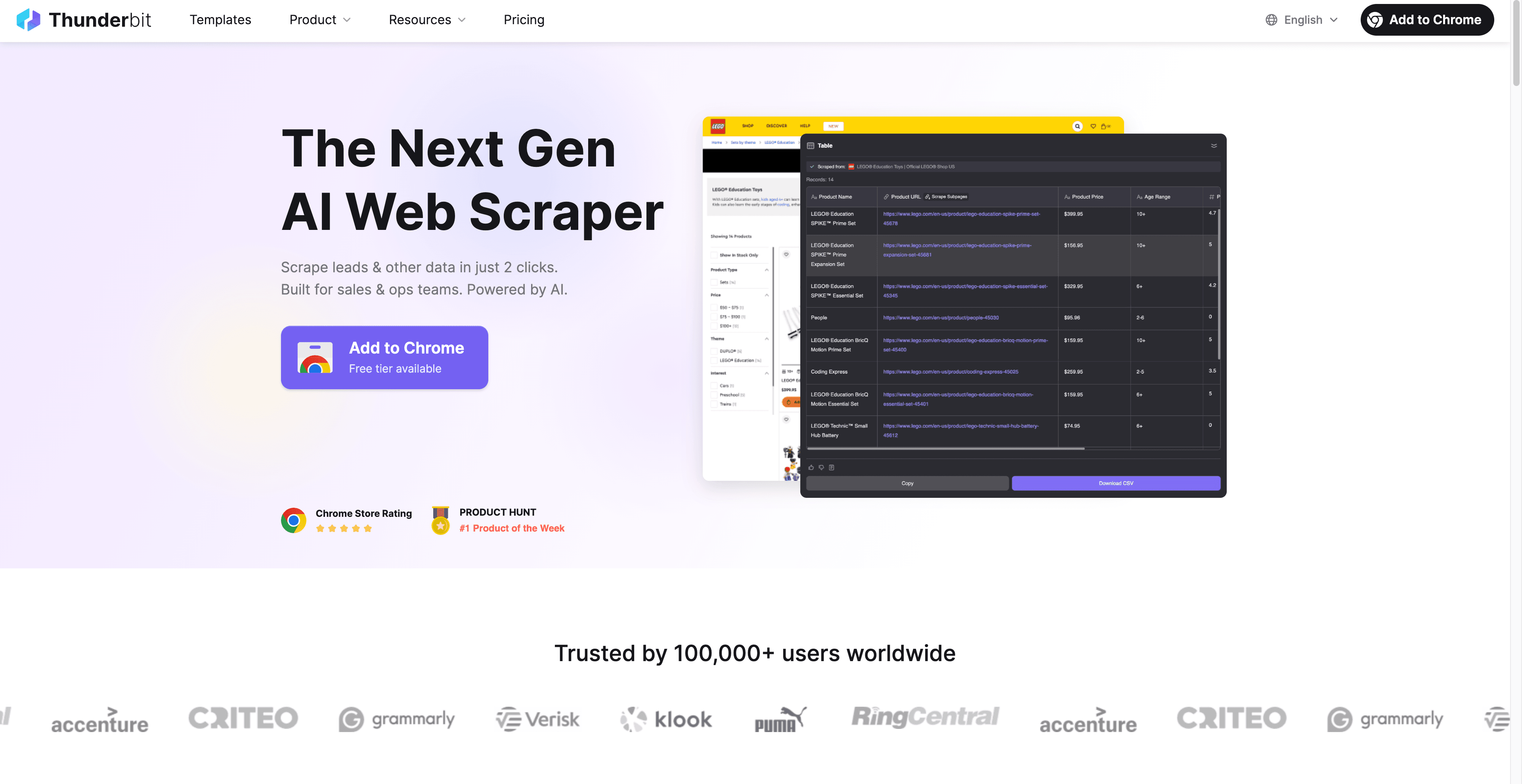
Thunderbit’s E-commerce Product Scraper helps you turn marketplace listings into clean, structured data using AI. You can extract product titles, prices, ratings, seller details, and more, then enrich each row by visiting product subpages automatically. In a couple of clicks, you can export to Excel, Google Sheets, Airtable, or Notion for price monitoring and C2C arbitrage workflows.
🛍️ What is E-commerce Product Scraper
The E-commerce Product Scraper is an AI Web Scraper built with Thunderbit that helps you scrape product listing pages and detailed SKU pages from major marketplaces. You simply open a target page (like an Amazon Best Sellers category or an eBay category), click AI Suggest Fields, then click Scrape to get structured data.
Because Thunderbit uses AI to read the page layout, it can adapt to different marketplace designs, handle pagination, and even enrich your dataset with Subpage Scraping (visiting each product page to pull extra details).
🧾 What can you scrape with E-commerce Product Scraper
E-commerce marketplaces are full of valuable signals: pricing, availability, seller identity, shipping speed, ratings, and product attributes. With Thunderbit’s AI Web Scraper (https://thunderbit.com/), you can collect those signals into a table you can filter, compare, and schedule.
🌍 Scrape Global Marketplace Price Monitoring
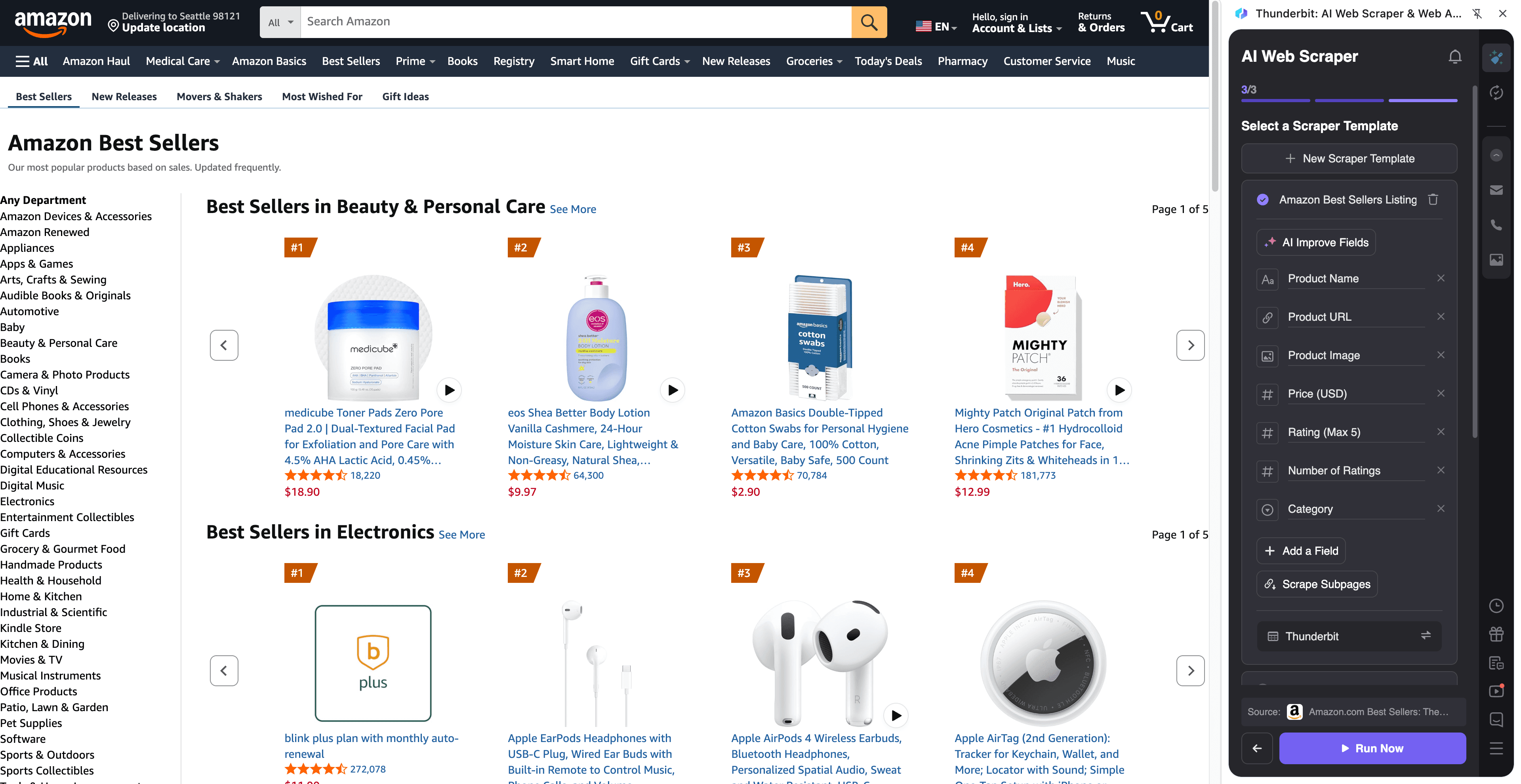
Use this workflow to monitor pricing and product performance from a marketplace category page like Amazon Best Sellers. This is useful when you want to track category leaders, spot price changes, and build a recurring competitive pricing dataset.
Steps:
- Install the Thunderbit Chrome Extension and create your account.
- Go to the page you want to scrape, for example: Amazon Best Sellers.
- Click AI Suggest Fields to generate recommended columns for this page.
- Click Scrape to extract the data, then export to Excel, Google Sheets, Airtable, or Notion.
Column names
| Column | Description |
|---|---|
| 🏷️ Product Title | The product name as shown in the listing. |
| 🔗 Product URL | The direct link to the product detail page (useful for subpage scraping). |
| 💲 Current Price | The listed price at the time of scraping (including sale price when shown). |
| 🧾 List Price | The original price (MSRP) when the marketplace shows a discount. |
| 📉 Discount % | The discount percentage calculated from list price vs current price (when available). |
| ⭐ Rating | Average star rating displayed on the listing. |
| 🧮 Review Count | Total number of reviews shown for the product. |
| 🏆 Best Seller Rank | The rank position in the category (great for trend tracking). |
| 🚚 Shipping / Delivery | Delivery estimate, shipping speed, or shipping label shown on the listing. |
| 🖼️ Image URL | The main product image URL (exports well to Airtable/Notion). |
🔁 Scrape C2C Market Arbitrage
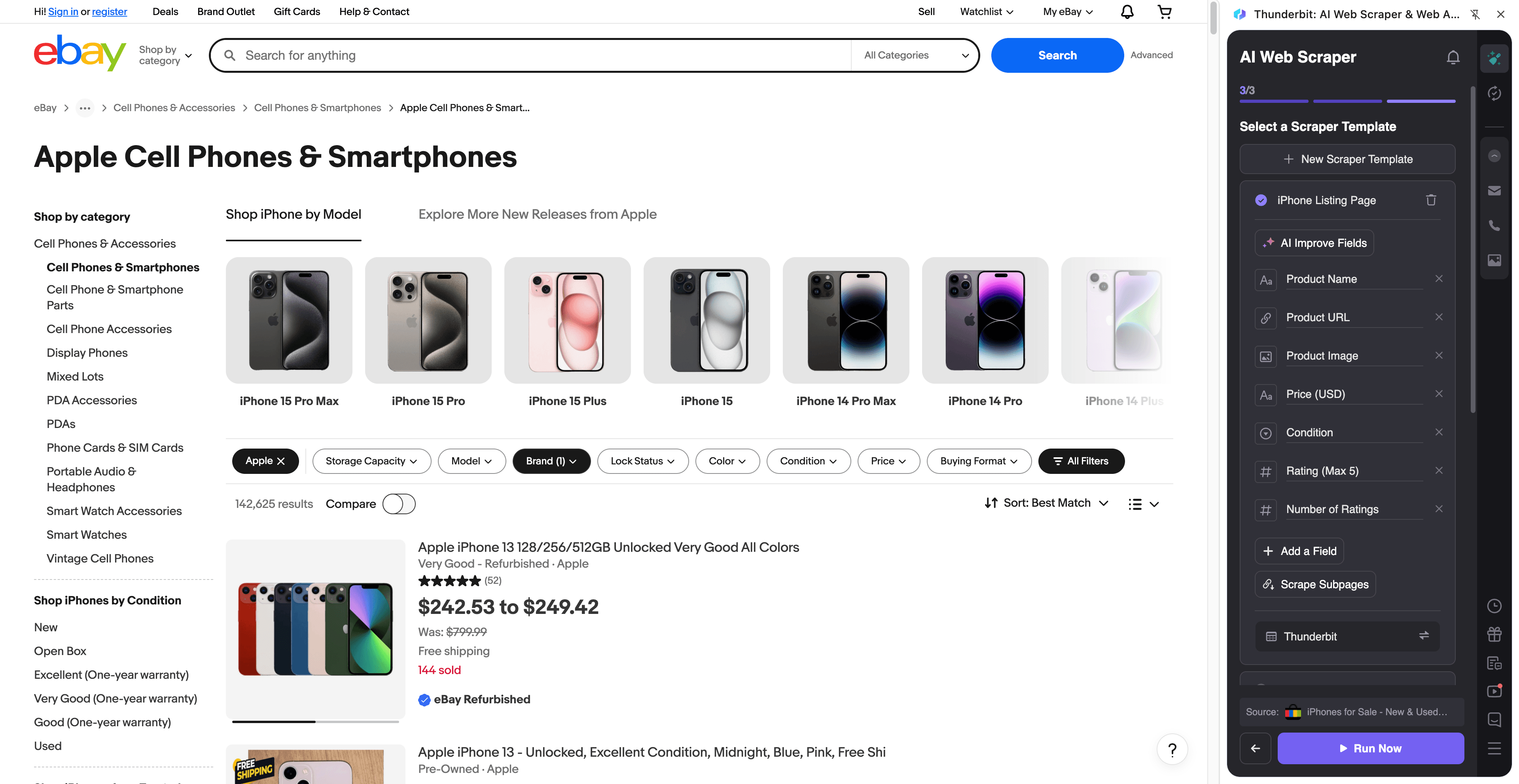
Use this workflow to collect listings from C2C and resale marketplaces like eBay Apple Cell Phones & Smartphones. This is useful for identifying underpriced items, comparing conditions, and building a sourcing list for resale.
Steps:
- Install the Thunderbit Chrome Extension and register your Thunderbit account.
- Open the target page, for example: eBay Apple Cell Phones & Smartphones.
- Click AI Suggest Fields to let AI propose the best columns for this category layout.
- Click Scrape to extract listings, then download as CSV/JSON or export to Sheets/Airtable/Notion.
Column names
| Column | Description |
|---|---|
| 📌 Listing Title | The item title as shown in the search/category results. |
| 🔗 Listing URL | The link to the listing page (ideal for subpage enrichment). |
| 💵 Price | The current listing price shown (buy-it-now or current bid). |
| 🧾 Price + Shipping | Combined cost when shipping is shown separately (useful for true arbitrage math). |
| 🏷️ Condition | Condition label such as New, Used, Refurbished, or Open Box. |
| 🧑💼 Seller Name | Seller/store name when displayed on the listing card or subpage. |
| 📍 Item Location | Location text shown (city/state/country depending on listing). |
| ⏳ Time Left | Remaining time for auction-style listings (when available). |
| 🧮 Watchers / Bids | Engagement signals like watchers or bid count (when available). |
| 🖼️ Image URL | Primary image URL for the listing. |
🎯 Why Use E-commerce Product Scraper Tool
Scraping marketplace data is how you move from “checking prices” to running a repeatable, measurable operation.
- E-commerce operators: Build competitor price trackers, monitor category movement, and compare shipping promises across sellers.
- Retail and sourcing teams: Identify new SKUs, map variants, and create a structured catalog from messy listings.
- Arbitrage sellers: Compare C2C pricing vs retail pricing, filter by condition, and prioritize listings with the best margin potential.
- Marketing teams: Track review counts, ratings, and positioning to understand what’s winning in a category.
- Sales and partnerships: Collect seller/store data and enrich it with subpage details for outreach lists.
Thunderbit’s AI Web Scraper (https://thunderbit.com/) is especially useful when:
- The site layout changes often and traditional scrapers break
- You need pagination scraping (click pagination or infinite scroll)
- You want Subpage Scraping to enrich each row with deeper SKU attributes
🧩 How to Use E-commerce Product Scraper Chrome Extension
- Install the Thunderbit Chrome Extension: Get it from the Chrome Web Store and sign up.
- Navigate to a marketplace listing page: Open a page like Amazon Best Sellers or an eBay category such as Apple Cell Phones & Smartphones.
- Activate AI-Powered Scraper: Click AI Suggest Fields to generate columns, adjust if needed, then click Scrape.
Optional but recommended: run Scrape Subpages to pull details like seller info, specs, model numbers, or variant attributes.
💳 Pricing for E-commerce Product Scraper
Thunderbit uses a credit system:
- 1 credit = 1 output row in your results table
- Exporting data (CSV/JSON, Excel, Google Sheets, Airtable, Notion) is free
You can start with the Free tier and scrape 6 pages per month. If you start a free trial, you can scrape 10 pages for free, which is a good way to test pagination and subpage enrichment on real marketplace workflows.
Paid plans are designed for ongoing monitoring and higher-volume scraping. If you scrape regularly (price monitoring, daily checks, multi-category tracking), the yearly plan is typically more cost effective because it includes a discount compared to monthly.
You can review the latest options on Thunderbit Pricing.
❓ FAQ
-
What is the AI Powered E-commerce Product Scraper?
The AI Powered E-commerce Product Scraper is a Thunderbit workflow that extracts product listing data and SKU details from online marketplaces into a structured table. It uses AI to identify fields on the page, so you can scrape without writing code or maintaining brittle selectors. -
What is Thunderbit?
Thunderbit is an AI productivity tool and Chrome extension that helps you scrape data from websites, PDFs, and images, then export it to the tools you already use. It’s built for business workflows like lead generation, e-commerce operations, marketing research, and real estate data collection. -
Can you scrape both listing pages and product detail pages?
Yes. You can scrape a listing page first, then use Subpage Scraping to visit each product/listing URL and enrich your table with additional fields. This is useful when key attributes (seller, model, storage size, shipping policy) only appear on the detail page. -
How does pagination scraping work for marketplaces?
Thunderbit can scrape paginated results whether the site uses “Next page” buttons or infinite scroll. You can keep collecting rows across multiple pages, which is essential for category-level monitoring and large sourcing lists. -
What data can you export, and where can you send it?
You can export to Excel, Google Sheets, Airtable, or Notion, or download as CSV/JSON. Exports are free, so you can run a scrape and immediately share the dataset with your team or plug it into your pricing model. -
What’s the difference between Cloud Scraping and Browser Scraping?
Cloud Scraping runs on Thunderbit’s cloud infrastructure and is usually faster for public pages, often processing up to 50 pages in a batch. Browser Scraping runs in your Chrome session, which is helpful when a site requires login, region settings, or other session-based access. -
Will the scraper still work if the marketplace layout changes?
In many cases, yes. Traditional scrapers often break when CSS selectors or page structure changes, but Thunderbit’s AI reads the page and re-infers fields each run. You can also use AI Improve Fields to refine columns if you want more consistent outputs. -
Is it possible to schedule price monitoring automatically?
Yes. With Scheduled Scraper, you can describe the interval you want (for example, daily or weekly), add the URLs, and Thunderbit will run the scrape on schedule. This is useful for tracking price changes, stock signals, and category movement over time. -
How do credits work for large marketplace scrapes?
Credits are based on output rows, not pages. If you scrape 200 products from a category, that’s 200 credits, and if you enrich those rows with subpage scraping, the output is still measured by rows in your final table. If you’re planning ongoing monitoring, choosing a higher tier (especially yearly) can reduce your cost per row.
📚 Learn More
- Get started with the Thunderbit Chrome Extension
- Read: How to Scrape Any Website Using AI
- Read: How to Scrape Website Data into Excel using AI
- Read: What Is Data Scraping and How to Do It in 2025
- Read: What Is List Crawling and How to Do It Using AI
- For more guides and templates: Thunderbit Blog
- Watch tutorials on Thunderbit YouTube Channel
Ready to build a repeatable price monitoring or arbitrage workflow with an AI Web Scraper (https://thunderbit.com/). Install Thunderbit, click AI Suggest Fields, then click Scrape and export your dataset where your team already works.










