
Kalau Anda seperti saya, Anda pasti tahu bahwa data web adalah urat nadi bisnis modern. Entah Anda bergerak di bidang sales, marketing, properti, atau e-commerce, punya informasi yang tepat di ujung jari bisa menentukan berhasil tidaknya langkah besar Anda berikutnya. Tapi jujur saja: dulu mengambil data dari website itu menyiksa—entah Anda harus belajar coding, atau menghabiskan berjam-jam copy-paste. Itulah sebabnya web scraper no-code bertenaga AI seperti Browse AI meledak popularitasnya.
Tapi apakah Browse AI benar-benar tools terbaik untuk pekerjaan ini? Atau ada alternatif lain yang lebih baik, lebih mudah, dan lebih hemat biaya—terutama bagi pengguna non-teknis yang hanya ingin pekerjaannya selesai tanpa kurva belajar yang curam?
Kalau Anda sedang mempertimbangkan Browse AI, atau Anda frustrasi dengan keterbatasannya dan mencari sesuatu yang lebih ramah pemula, ulasan mendalam ini untuk Anda. Saya akan menguraikan apa yang dilakukan Browse AI dengan baik, di mana ia kurang, dan mengapa Thunderbit dengan cepat menjadi rekomendasi andalan saya untuk siapa pun yang ingin scraping data web tanpa ribet.
Mari kita mulai.
Apa Itu Browse AI?
Browse AI adalah salah satu tools web scraping no-code yang paling banyak dibicarakan di pasaran. Diluncurkan pada 2021 oleh sebuah tim di Vancouver, Kanada, Browse AI bertujuan “mendemokratisasi akses ke data web” untuk semua orang—dari pengusaha solo sampai perusahaan besar. Misi mereka sederhana: memungkinkan siapa pun mengubah website apa pun menjadi sumber data langsung, tanpa menulis satu baris kode pun.
Pertumbuhan perusahaan ini cukup mengesankan. Setelah peluncuran yang sukses di Product Hunt, Browse AI membangun basis pengguna yang besar dan menarik perhatian investor. Kini mereka menjadi salah satu pemain tetap di ranah ekstraksi data no-code — halaman utamanya menyebut dukungan untuk pelanggan yang “scraping jutaan baris data setiap hari” — dan produknya masih aktif dikembangkan pada 2026.
Produk dan Fitur Utama
Produk utama Browse AI adalah aplikasi berbasis web bernama Robot Studio yang memungkinkan Anda “melatih” robot scraping khusus. (Ekstensi Chrome Browse AI yang disebut dalam ulasan-ulasan lama sudah resmi dihentikan — help center kini mengarahkan pengguna ke Robot Studio.) Berikut cara kerjanya secara singkat:
- Ekstraksi No-Code, Point-and-Click: Anda membuka sebuah website, mengklik data yang Anda inginkan, dan robot Browse AI belajar apa yang harus diambil. Tanpa coding, tanpa setup rumit.
- Pemantauan Otomatis: Atur robot Anda untuk memantau perubahan—seperti penurunan harga, listing baru, atau ulasan yang diperbarui—dan terima notifikasi saat ada yang berubah.
- Ubah Website Jadi API atau Spreadsheet: Browse AI bisa mengalirkan data hasil scraping langsung ke Google Sheets, Airtable, atau bahkan menyediakannya sebagai endpoint API untuk aplikasi Anda.
- Integrasi dengan 7.000+ Aplikasi: Berkat integrasi dengan tools seperti Zapier dan Make, Anda bisa mengirim data ke mana saja—CRM, database, Slack, sebut saja.
- Infrastruktur Web Scraping Bawaan: Platform ini menangani proxy, percobaan ulang, dan penjelajahan yang menyerupai manusia untuk mengakali deteksi bot. Ia bahkan bisa login ke situs dan menangani infinite scroll atau pagination.
- Skalabilitas dan Managed Service: Untuk proyek besar, Browse AI menawarkan managed service di mana tim mereka yang membangun dan merawat scraper Anda.
Singkatnya, Browse AI berfokus membuat ekstraksi data web jadi mudah, andal, dan bisa diskalakan—setidaknya, itulah janjinya.
Browse AI Cocok untuk Siapa?
Browse AI dirancang untuk pengguna bisnis yang butuh data web tapi tidak mau berurusan dengan kode. Kalau Anda seorang marketer, sales analyst, product manager, pengusaha, atau peneliti, Browse AI memang ditujukan untuk Anda. Berikut yang paling diuntungkan:
- Profesional non-teknis: Kalau skrip Python terasa menakutkan bagi Anda, antarmuka point-and-click Browse AI terasa seperti angin segar.
- Bisnis kecil dan startup: Perlu memantau harga kompetitor, mengawasi ulasan, atau mencari leads? Browse AI dibuat untuk Anda.
- Analis dan peneliti: Kalau Anda lelah copy-paste data untuk laporan atau studi, Browse AI bisa mengotomatiskan pekerjaan kasarnya.
- Bahkan pengguna teknis: Developer dan data scientist yang ingin menghemat waktu bisa memakai API dan webhook Browse AI untuk mengintegrasikan scraping ke dalam alur kerja yang lebih besar.
Intinya: kalau Anda butuh data web dan tidak mau membangun scraper sendiri dari nol, Browse AI layak dilirik. Tapi seperti yang akan saya jelaskan, ia tidak selalu seramah pemula sebagaimana yang diklaim.
Harga Browse AI: Berapa Biaya Sebenarnya?
Browse AI memakai model freemium dengan beberapa tingkatan langganan. Berikut rincian apa yang Anda dapatkan di tiap level (browse.ai/pricing, per Mei 2026):
- Paket Free: $0/bulan. 50 kredit per bulan, 2 website, hingga 3 kursi pengguna, robot tanpa batas, retensi data 90 hari, pemantauan minimal per jam, dan dukungan email dasar. Cocok untuk mencoba satu atau dua scraping sederhana.
- Paket Personal: $48/bulan, atau $19/bulan jika membayar tahunan. 2.000 kredit per bulan (12.000–24.000/tahun tergantung skema penagihan), 5 website, 3 pengguna, robot tanpa batas, retensi 90 hari, pemantauan 5 menit, dan dukungan email dasar. Website tambahan $5/bulan (bulanan) atau $4/bulan (tahunan).
- Paket Professional: $87/bulan, atau $69/bulan tahunan. 5.000–30.000 kredit per bulan tergantung sub-tier yang Anda pilih, 10 website, 10 pengguna, retensi 90 hari, pemantauan 5 menit, dukungan email prioritas. Website tambahan $3/bulan (bulanan) atau $2,40/bulan (tahunan). Ini paket “paling populer” Browse AI menurut tampilan di UI mereka.
- Paket Premium: Mulai dari $500/bulan, ditagih tahunan. 600.000+ kredit per tahun, batas website / pengguna / retensi / pemantauan yang bisa disesuaikan, account manager khusus, onboarding yang dikelola penuh, transformasi data, dan pengelolaan berkelanjutan. Ini tingkatan untuk tim yang ingin tim Browse AI benar-benar menjalankan scraper untuk mereka.
Cara kerja kredit: Setiap tugas scraping menghabiskan kredit berdasarkan jumlah data dan kompleksitas situsnya. Tidak ada opsi pay-as-you-go — kalau kredit habis sebelum bulan berakhir, Anda harus upgrade atau menunggu.
Satu hal yang perlu dicatat: Browse AI dulu punya paket “Team” terpisah seharga $249/bulan. Per Mei 2026 paket itu tidak lagi ada di halaman harga — Personal dan Professional kini sama-sama menyertakan akses multi-kursi, dan apa pun di atas itu masuk ke Premium.
Masukan Pengguna untuk Browse AI: Apa Kata Pengguna Sesungguhnya?
Saya selalu memeriksa ulasan pengguna sebelum merekomendasikan tools apa pun. Berikut yang saya temukan setelah menyisir G2, Capterra, Trustpilot, dan situs ulasan lainnya.
Rating Sekilas
- G2: 4,7/5 bintang (sentimen sangat positif pada ulasan-ulasan terbaru)
- Capterra: 4,5/5 bintang dari 59 ulasan
- Trustpilot: 2,7/5 bintang dari 14 ulasan — sangat terpolarisasi, dengan sebagian besar ulasan negatif menyoroti keluhan soal penagihan atau keandalan
Skor tinggi di G2 dan Capterra menunjukkan banyak pengguna yang puas, tapi gambaran di Trustpilot makin terpolarisasi selama setahun terakhir — dan keluhan publiknya cenderung berkumpul di soal penagihan, waktu respons dukungan, dan keandalan, bukan soal kemudahan penggunaan. Ini layak ditanggapi serius kalau Anda berencana memasang tagihan berulang di kartu Anda.
URL anchor yang ditulis ulang bersumber dari: listing Browse AI yang sebenarnya di masing-masing platform (G2 dan Capterra dikonfirmasi lewat pencarian pada sesi ini; URL Trustpilot adalah slug kanonis /review/browse.ai). Jumlah ulasan Capterra (59) terlihat pada metadata cuplikan pencarian untuk capterra.com/p/246180/Browse-AI/reviews/. Angka 2,7/5 dan 14 ulasan di Trustpilot terlihat pada metadata listing Trustpilot sendiri lewat pencarian pada sesi ini. Catatan untuk ops: tautan anchor platform pada artikel asli semuanya mengarah ke halaman utama, bukan ke listing Browse AI — penulisan ulang ini memperbaikinya.
Yang Disukai Pengguna dari Browse AI
- Kemudahan Penggunaan & Hemat Waktu: Sebagian besar pengguna sepakat bahwa Browse AI jauh lebih mudah daripada membuat scraper sendiri dengan coding. Antarmuka point-and-click-nya intuitif, dan Anda bisa melatih sebuah robot dalam hitungan menit. Seorang pengulas berkata, “Browse AI adalah tools ekstraksi data yang hebat, sederhana dan intuitif, tapi sangat fungsional... ia melakukannya dengan mulus.”
- Fitur yang Kuat: Pengguna terkesan dengan cara Browse AI menangani pagination, infinite scroll, dan konten dinamis. Menjadwalkan scraping dan mendapat notifikasi saat ada perubahan adalah nilai plus yang besar. Integrasi dengan Google Sheets dan Zapier juga sering dipuji.
- Dukungan Pelanggan: Banyak pengguna melaporkan respons yang cepat dan membantu dari tim dukungan, terutama saat mereka baru memulai.
Singkatnya, Browse AI menepati janjinya membuat web scraping jadi mudah diakses dan efisien bagi sebagian besar pengguna bisnis.
Di Mana Browse AI Kurang
Tapi tidak ada tools yang sempurna. Berikut poin-poin di mana Browse AI mendapat nilai minus dalam ulasan pengguna—dan di mana saya sendiri menemui kendala saat mengujinya.
1. Kurva Belajar untuk Pemula
Meski dipasarkan sebagai no-code, beberapa pengguna menyebut Browse AI tidak se-plug-and-play yang mereka harapkan. Ada “kurva belajar awal” untuk memahami cara menyiapkan robot, menangani pagination, dan menjadwalkan tugas. Seorang pengulas G2 mengatakannya terus terang: “Mencoba memahami beberapa langkah penting sebagai pengguna baru cukup menantang.”
Kalau Anda tidak paham bagaimana struktur sebuah website, Anda mungkin kesulitan mengenali elemen mana yang harus di-scraping. Tugas seperti login ke situs atau mengambil konten yang butuh klik bisa membingungkan. Help center dan tutorialnya lumayan, tapi jangan berharap pengalaman yang benar-benar mulus—apalagi kalau Anda benar-benar pemula.
2. Tidak Selalu Ramah bagi Pendatang Baru
Sebagian pengguna berharap pengalaman yang lebih terpandu dan antigagal. Yang mereka dapat justru harus bereksperimen dan mengutak-atik robot lewat coba-coba. Di forum komunitas, saya melihat banyak pemula meminta bantuan untuk tugas-tugas dasar. Tidak setiap skenario cukup dengan “satu klik dan selesai”.
3. Keandalan pada Tugas Kompleks
Browse AI menangani sebagian besar situs standar dengan baik, tapi bisa kewalahan pada website yang kompleks atau berproteksi ketat. Kalau situs target Anda memakai langkah anti-bot canggih, Anda mungkin harus terus mengawasi robot Anda atau menerima bahwa sebagian data memang tidak akan berhasil diambil.
Kesimpulan Saya tentang Ulasan Browse AI
Setelah berminggu-minggu riset dan pengujian langsung, ini pendapat jujur saya: Browse AI adalah tools web scraping no-code yang tangguh dan menepati banyak janjinya. Ia mudah dipakai (setelah Anda terbiasa), kaya fitur, dan terintegrasi baik dengan tools bisnis lain. Bagi banyak pengguna bisnis, ini pengubah permainan—menghemat berjam-jam kerja manual dan membuat data web bisa diakses tanpa kode.
Tapi ia tidak sempurna. Kurva belajarnya nyata, terutama bagi pemula total. Keandalannya bisa menurun di situs yang kompleks, dan model harganya mungkin tidak cocok untuk semua orang—apalagi kalau Anda berada di posisi canggung antara “cuma beberapa halaman” dan “skala enterprise”. Dukungannya umumnya baik, tapi tidak selalu seresponsif yang Anda harapkan saat ada masalah.
Jadi, apakah Browse AI tepat untuk Anda? Kalau Anda bersedia meluangkan sedikit waktu untuk mempelajarinya, dan kebutuhan scraping Anda muat dalam sistem kredit mereka, ini pilihan yang solid. Tapi kalau Anda mencari sesuatu yang lebih mudah lagi, lebih ramah pemula, dan dengan model harga yang lebih fleksibel, alternatifnya layak dijajaki.
Di situlah Thunderbit masuk.
Thunderbit: AI Web Scraper Termudah untuk Semua Orang
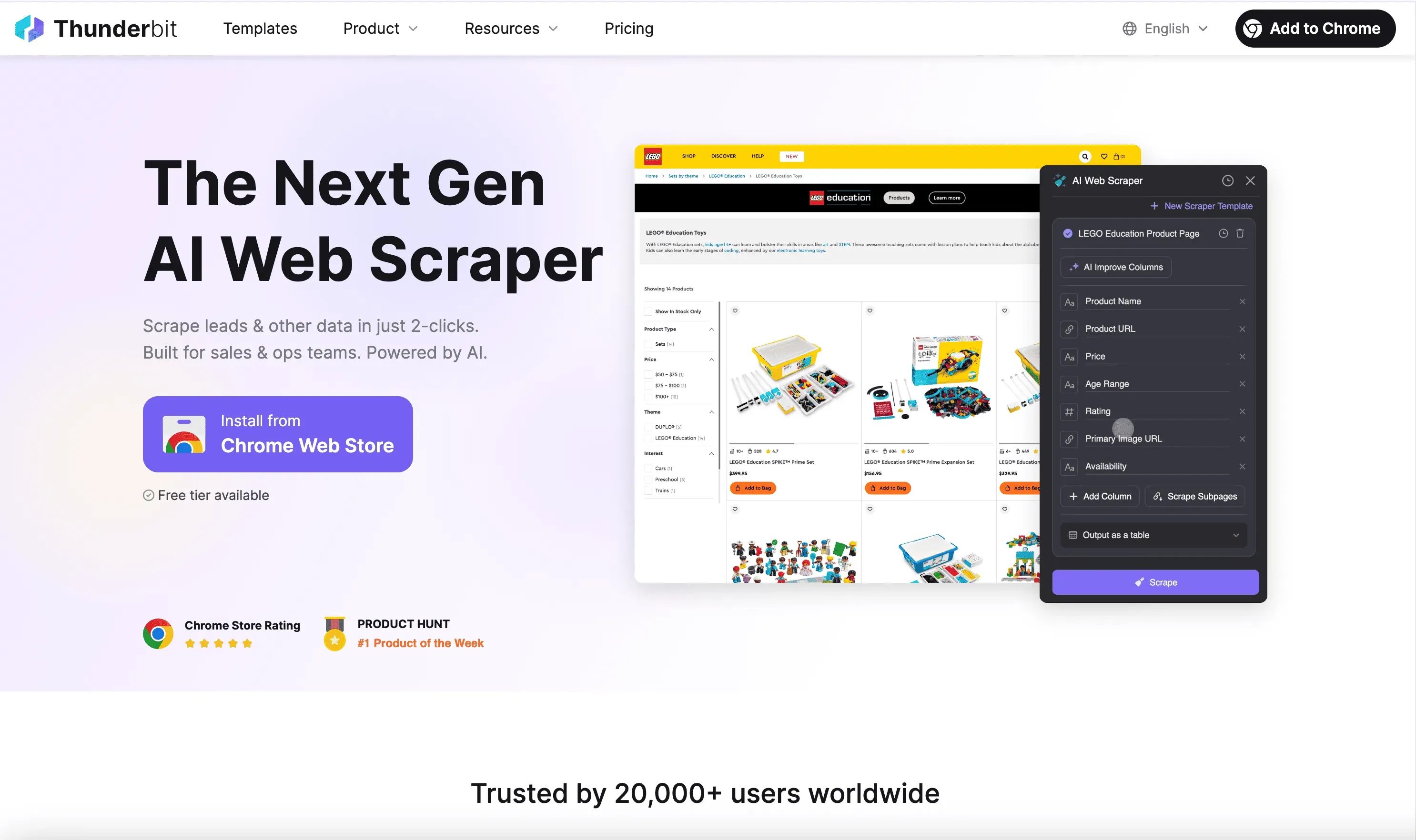
Ambil data dari website mana pun dengan AI Get Started Free
Thunderbit adalah ekstensi Chrome web scraper bertenaga AI yang dirancang untuk pengguna bisnis yang ingin menghemat waktu dan mengotomatiskan tugas web yang berulang—tanpa coding, tanpa pusing setup, tanpa kurva belajar yang curam. Ia dibuat untuk sales, marketing, properti, e-commerce, dan siapa pun yang butuh data dengan cepat.
Fitur Utama Thunderbit (dan Kenapa Itu Penting)
- AI Web Scraper: Thunderbit memakai AI canggih untuk menganalisis konten website dan otomatis menghasilkan data terstruktur. Cukup klik “AI Suggest Columns”, biarkan AI menentukan apa yang perlu diambil, lalu tekan “Scrape”. Sesederhana itu.
- Scraping 2 Klik: Tak perlu lagi mengutak-atik selector atau alur kerja rumit. Thunderbit bisa mengambil data dari website, PDF, atau gambar mana pun hanya dalam dua klik.
- Scraping Subhalaman: Butuh lebih dari sekadar data di halaman saat ini? AI Thunderbit bisa mengunjungi setiap subhalaman dan memperkaya tabel Anda secara otomatis.
- Template Instant Data Scraper: Untuk situs populer seperti Amazon, Zillow, Instagram, dan Shopify, Anda bisa mengekspor data dengan satu klik memakai template siap pakai.
- Ekspor Data Gratis: Ekspor data hasil scraping Anda ke Excel, Google Sheets, Airtable, atau Notion—tanpa biaya tambahan untuk ekspor data.
- AI Autofill: Pakai AI untuk mengisi formulir online dan menuntaskan alur kerja. Cukup pilih konteksnya lalu tekan enter—AI yang mengerjakan sisanya.
- Scheduled Scraper: Atur scraping otomatis pada interval terjadwal. Cukup jelaskan waktunya, masukkan URL-nya, lalu klik “Schedule”.
- Ekstraktor Email, Nomor Telepon, dan Gambar: Ambil email, nomor telepon, atau gambar dari website mana pun dengan satu klik—sepenuhnya gratis.
- Parser Gambar/Dokumen: Ekstrak tabel dari dokumen tak terstruktur seperti PDF, Word, Excel, atau gambar. Unggah dokumennya, biarkan AI menyusun datanya, lalu klik “Scrape”.
- AI Suggest Columns: AI Thunderbit merekomendasikan nama dan tipe kolom terbaik untuk website mana pun, jadi Anda tak perlu menebak-nebak.
Thunderbit dibangun dari nol untuk menjadi web scraper termudah bagi semua orang—bahkan kalau Anda belum pernah scraping data sama sekali. Dengan Thunderbit, Anda tak perlu paham bagaimana struktur sebuah website atau berkutat dengan selector. AI-nya yang melakukan semua kerja berat. Cukup klik “AI Suggest Columns” lalu “Scrape”. Selesai. Tanpa coba-coba, tanpa setup rumit.
Kalau Anda ingin melihat Thunderbit beraksi, kunjungi Kanal YouTube Thunderbit atau telusuri blog mereka untuk panduan langkah demi langkah seperti Cara Scraping Produk dan Ulasan Amazon dengan AI dan Cara Scraping Data Website ke Excel dengan AI.
Coba Thunderbit AI Web Scraper Gratis
Harga Thunderbit: Sederhana, Transparan, dan Terjangkau
| Tingkatan | Harga Bulanan | Harga Tahunan (per bulan) | Total Tahunan | Kredit (Bulanan) | Kredit (Tahunan) |
|---|---|---|---|---|---|
| Free | Gratis | Gratis | Gratis | 6 halaman | Tidak tersedia |
| Starter | $15 | $9 | $108 | 500 | 5.000 |
| Pro 1 | $38 | $16,5 | $199 | 3.000 | 30.000 |
| Pro 2 | $75 | $33,8 | $406 | 6.000 | 60.000 |
| Pro 3 | $125 | $68,4 | $821 | 10.000 | 120.000 |
| Pro 4 | $249 | $137,5 | $1.650 | 20.000 | 240.000 |
- Tingkat Gratis: Scraping hingga 6 halaman per bulan, tanpa syarat apa pun.
- Paket Starter: $15/bulan (atau $9/bulan jika dibayar tahunan) untuk 500 kredit—pas untuk proyek kecil.
- Paket Pro: Naikkan skala sesuai kebutuhan, hingga 240.000 kredit per tahun untuk pengguna berat.
Tanpa biaya tersembunyi, tanpa pungutan tambahan untuk mengekspor data, dan Anda selalu bisa mulai gratis. Kunjungi halaman Harga Thunderbit untuk detail terbaru.
Thunderbit vs. Browse AI: Tabel Perbandingan Berdampingan
Mari kita adu Thunderbit dan Browse AI secara langsung supaya Anda bisa melihat persis di mana masing-masing unggul—dan di mana Thunderbit melesat lebih jauh.
| Fitur / Paket | Thunderbit 🟨 | Browse AI 🔵 |
|---|---|---|
| Kemudahan Penggunaan 🖱️ | ⚡️ Scraping AI 2 klik, tanpa setup | 👆 Point-and-click, tapi ada kurva belajar untuk pemula |
| Scraping Subhalaman 🧭 | ✅ Ya – AI bisa mengunjungi dan mengambil dari subhalaman secara otomatis | ⚠️ Ya, tapi butuh setup manual |
| Scraping PDF/Gambar 🖼️ | 📄 Ya – ekstrak tabel dari PDF, gambar, Word, Excel | 🚫 Terbatas – sebagian besar hanya halaman web |
| Template Instan 🧩 | 🟢 Ya – template 1 klik untuk Amazon, Zillow, Instagram, Shopify, dll. | 🟡 Ya – robot siap pakai untuk situs umum |
| Ekspor Data 📤 | 🆓 Gratis ke Excel, Google Sheets, Airtable, Notion | 🆓 Gratis ke Google Sheets/Airtable (ada batasan di paket gratis) |
| Ekstraktor Email/Telepon/Gambar 📬 | ✅ Ya – 1 klik, sepenuhnya gratis | ❌ Tidak |
| AI Autofill ✍️ | ✅ Ya – isi formulir dan alur kerja dengan AI, gratis | ❌ Tidak |
| Scraping Terjadwal ⏰ | 📅 Ya – penjadwalan sederhana dengan bahasa sehari-hari | ⏱️ Ya – dengan batasan sesuai paket |
| Integrasi 🔌 | 🔄 Google Sheets, Airtable, Notion, Excel, dan lainnya | 🌐 7.000+ aplikasi via Zapier, Make, dll. |
| Harga 💰 | 🎁 Tingkat gratis, lalu $15/bln untuk 500 kredit, penskalaan fleksibel | 💵 Tingkat gratis, lalu $19/bln (tahunan) untuk 2.000 kredit, tingkatan lebih tinggi jadi mahal |
| Sistem Kredit 🧮 | 🔍 1 kredit = 1 baris output, sederhana dan transparan | 📊 Kredit terpakai per tugas, berdasarkan data dan kompleksitas situs |
| Ramah Pemula 👶 | 🌟 Sangat – tanpa kurva belajar, AI yang bekerja | 📘 Ada kurva belajar, terutama bagi pengguna non-teknis |
Kenapa Saya Merekomendasikan Thunderbit (Terutama untuk Pengguna Non-Teknis)
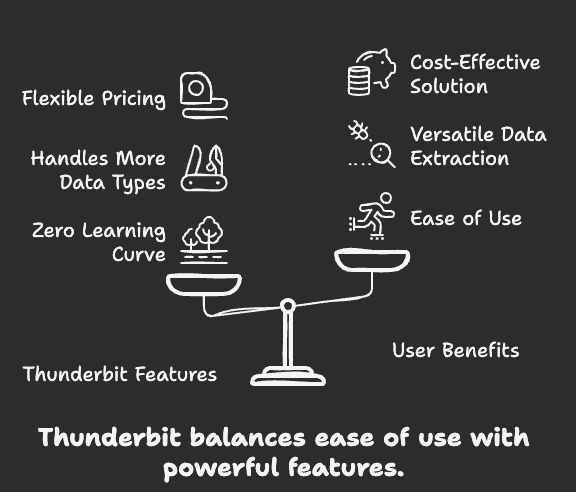 Setelah menguji kedua tools berdampingan, inilah alasan saya merekomendasikan Thunderbit kepada siapa pun yang ingin scraping data web tanpa pusing:
- Tanpa Kurva Belajar: AI Thunderbit mengerjakan semua bagian yang sulit. Anda tak perlu tahu apa pun tentang web scraping, selector, atau struktur data. Tinggal klik dan jalan.
- Menangani Lebih Banyak Jenis Data: Perlu mengambil tabel dari PDF, gambar, atau dokumen Word? Thunderbit siap membantu.
- Fitur Esensial Gratis: Ekstraksi email, nomor telepon, dan gambar sepenuhnya gratis.
- Harga Fleksibel dan Terjangkau: Bayar hanya untuk yang Anda pakai. Tingkat gratisnya murah hati, dan Anda bisa naik skala sesuai kebutuhan tanpa menguras kantong.
- Tanpa Biaya Tersembunyi: Ekspor ke Excel, Google Sheets, Airtable, atau Notion secara gratis—tanpa pungutan tambahan.
- Sempurna untuk Pengguna Bisnis: Entah Anda di bidang sales, marketing, properti, atau e-commerce, Thunderbit dibuat untuk Anda. Ini tools produktivitas yang saya harap sudah saya punya bertahun-tahun lalu.
Kalau Anda ingin melihat bagaimana Thunderbit dibandingkan dengan tools lain, baca Tools & Software Web Scraping Terbaik dan Cara Scraping Website Mana Pun dengan AI di blog Thunderbit.
Masa Depan Web Scraping Sudah Tiba—Dan Namanya Thunderbit
Web scraping tak harus sulit. Dengan tools yang tepat, Anda bisa mengubah website, PDF, atau gambar apa pun menjadi data terstruktur dalam hitungan detik—tanpa coding, tanpa pusing, tanpa buang waktu.
Browse AI adalah pilihan solid bagi banyak pengguna bisnis, tapi ia belum seramah pemula dan sefleksibel yang seharusnya. Kalau Anda lelah dengan kurva belajar, batasan kredit, dan biaya tersembunyi, saatnya mencoba sesuatu yang lebih baik.
Thunderbit adalah AI web scraper termudah, tercepat, dan paling terjangkau yang pernah saya pakai. Entah Anda pengusaha solo, bisnis kecil, atau tim yang berbasis data, Thunderbit akan membantu Anda mendapatkan data yang Anda butuhkan—tanpa ribet.
Siap membuktikannya sendiri? Unduh Ekstensi Chrome Thunderbit, daftar akun gratis, dan mulai scraping data dalam dua klik. Atau kunjungi Situs Resmi Thunderbit untuk info lebih lanjut, menjelajahi tutorial, dan melihat bagaimana Thunderbit bisa melipatgandakan produktivitas Anda.
Jangan cuma percaya kata saya—coba sendiri Thunderbit dan rasakan masa depan web scraping hari ini.
Coba AI Web Scraper Get Started Free
Bacaan Lanjutan:




