
The web is evolving at breakneck speed, and so are the challenges for anyone trying to automate it. Just a few years ago, if you wanted to automate a web task—say, checking competitor prices or testing a new feature—you’d probably reach for Selenium, the open-source workhorse of browser automation. But as websites get more dynamic and business teams demand faster, smarter results, classic Selenium starts to feel like using a flip phone in a world of smartphones. Enter Selenium AI: a new wave of automation that blends the reliability of Selenium with the adaptability and intelligence of artificial intelligence.
I’ve spent years in SaaS and automation, and I’ve seen firsthand how brittle scripts and endless maintenance can slow down even the best teams. But now, with AI in the mix, we’re seeing automation that can heal itself, adapt to changes, and even predict where things might break before they do. In this blog, I’ll break down what Selenium AI really is, why it matters, and how tools like are making these advances accessible—even for folks who don’t write a line of code.
Selenium AI: A New Era in Web Automation
Let’s start with the basics: What is Selenium AI? In simple terms, Selenium AI is the marriage of Selenium’s browser automation capabilities with artificial intelligence. It’s not a brand-new tool, but a smarter, evolved way of using Selenium—one that leverages machine learning, computer vision, and natural language processing to make web automation less brittle and more adaptive ().
Think of classic Selenium as a GPS that only knows one route: if there’s a roadblock, you’re stuck. Selenium AI, on the other hand, is like a smart GPS that reroutes in real time, recognizes new landmarks, and even learns your preferences as you drive. Instead of breaking when a button moves or a label changes, Selenium AI can recognize elements by context, visual cues, or even by “reading” the page like a human would.
Some of the key advances in Selenium AI include:
- Self-healing locators: If a button’s ID or position changes, the AI finds it anyway—no more script failures every time a developer tweaks the UI.
- AI-assisted test generation: The system can watch how users interact with a site and auto-generate test steps or automation flows.
- Predictive insights: By analyzing past runs, Selenium AI can flag which parts of a workflow are likely to fail, letting you fix issues before they become problems ().
- Visual and contextual recognition: AI can “see” the page, not just the code—finding buttons by their appearance or text, even if the HTML changes.
This shift from static, code-heavy scripts to adaptive, intelligent automation is what makes Selenium AI such a big deal for modern businesses.
Why Selenium AI Matters for Modern Businesses
So, why should you care about Selenium AI if you’re in sales, operations, or any business function that relies on web data or workflows? The answer is simple: it makes automation faster, more reliable, and dramatically less painful to maintain.
Here’s what’s driving the adoption:
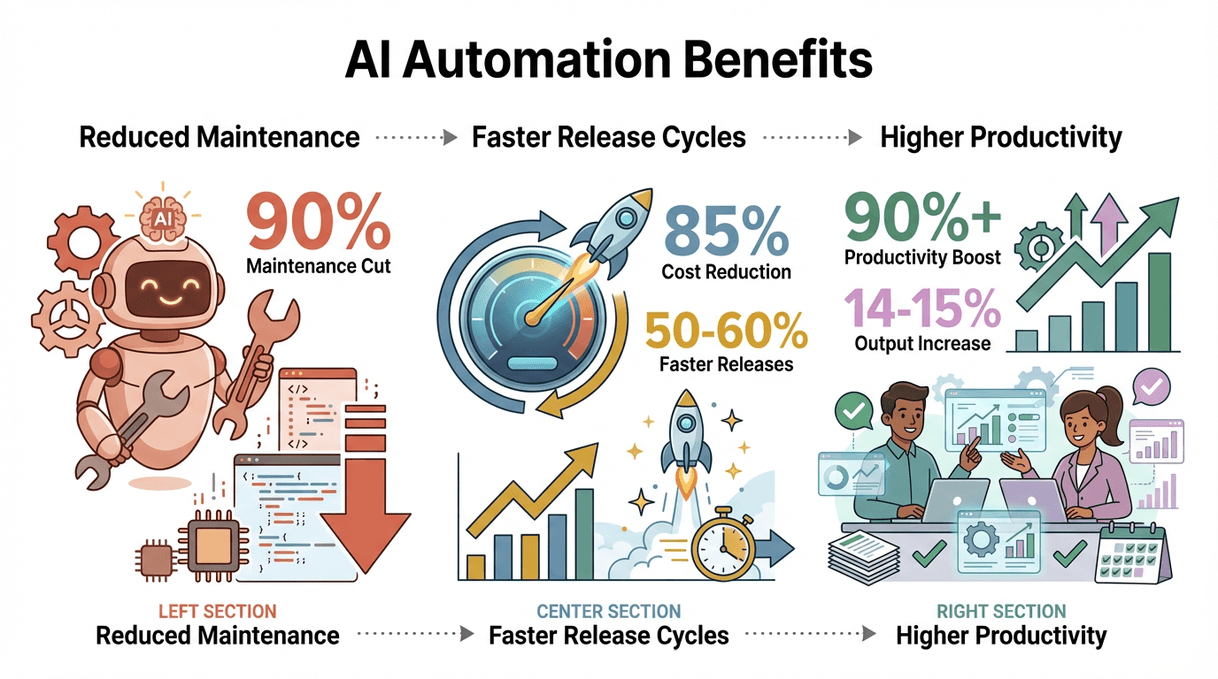
- Reduced maintenance: AI-powered self-healing can cut script maintenance by up to 90% ().
- Faster release cycles: Companies using AI-augmented automation have slashed testing costs by as much as 85% and sped up releases by 50–60% ().
- Higher productivity: Over 90% of workers say automation boosts their productivity, and businesses report a 14–15% increase in output ().
- Adaptability: When websites change, AI keeps the data flowing—no more scrambling to fix broken scripts every time a layout shifts.
 Here’s a quick look at how different teams are using Selenium AI:
| Department | Automation Use Case | Outcome / Benefit |
|---|---|---|
| Sales & Marketing | Lead generation from directories or LinkedIn | Thousands of leads/month; 10× sales growth; 8+ hours saved per rep weekly (Thunderbit). |
| Ecommerce Operations | Competitor price monitoring, product data extraction | 30% less manual work; daily pricing updates; faster pricing decisions (Thunderbit). |
| Business Operations | Data aggregation from real estate, travel, or job portals | 35% more high-quality leads; 40% team efficiency boost (Thunderbit). |
| QA / IT | Regression tests, form-filling, workflow automation | 50–60% faster releases; 80% fewer bugs; 300% more test coverage (VirtuosoQA). |
The bottom line: Selenium AI lets you automate more, with less effort, and get better results—no matter your industry.
From Classic Selenium to Selenium AI: What’s Changed?
Let’s get a bit technical for a moment. Classic Selenium is powerful, but it’s also notoriously brittle. Scripts break if a button moves, a label changes, or a page loads a little slower than expected. Maintenance becomes a full-time job, and teams spend more time fixing tests than building new ones.
Here’s how Selenium AI changes the game:
| Feature | Classic Selenium | Selenium AI |
|---|---|---|
| Locator Handling | Fixed (breaks on UI changes) | Self-healing, adapts to changes automatically |
| Test Creation | Manual coding, step-by-step | AI-assisted, can use plain English or recordings |
| Response to Changes | Scripts fail, manual fixes needed | AI adjusts in real time, rarely breaks |
| Execution Speed | Runs every test, slow feedback | Selective, runs only relevant tests, faster |
| Flaky Test Management | Hard to detect/fix | AI flags, auto-retries, or adjusts wait times |
| Maintenance Effort | High, ongoing | Up to 90% reduction in upkeep (Testsigma) |
In short, Selenium AI is like having a junior developer who never gets tired, never misses a detail, and learns from every run.
Real-World Applications: Selenium AI in Action
Let’s bring this to life with some concrete examples.
Ecommerce: Smarter Product and Price Monitoring
Ecommerce teams live and die by their ability to track competitor prices, monitor inventory, and keep product data up to date. With classic Selenium, scripts to scrape prices or SKUs would break every time a site changed its layout. With Selenium AI, those scripts adapt—finding prices by context, handling infinite scroll, and even logging in automatically when needed ().
One apparel retailer used AI-powered Selenium to track competitor prices daily, cutting analyst workload by 30% and ensuring their pricing stayed competitive. The data? It flowed straight into their analytics platform, ready for action.
Finance: Automated Data Collection and Compliance
Financial teams need accuracy, speed, and airtight compliance. Selenium AI can automate everything from scraping market data to running nightly compliance checks on internal dashboards. One bank reported a 96% reduction in transaction errors and an 89% drop in security testing overhead after adopting AI-driven automation ().
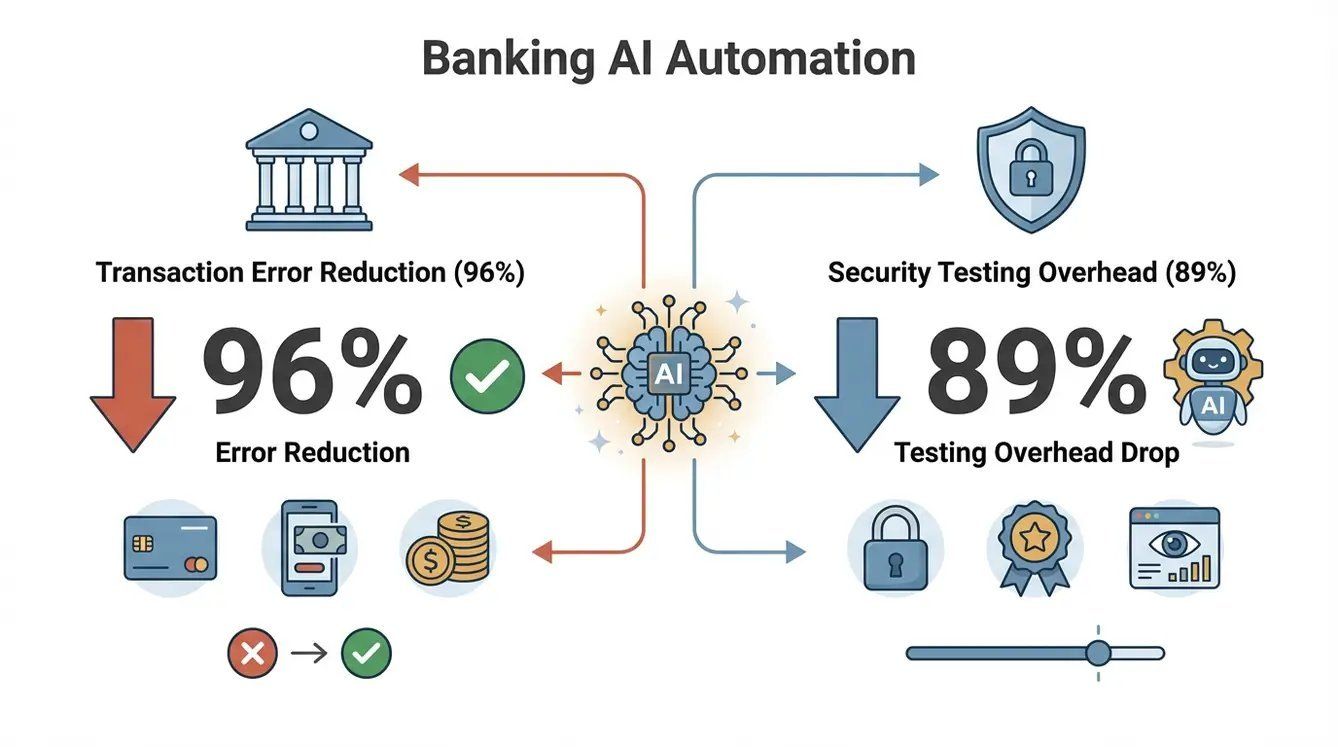 AI bots can even simulate trades, verify workflows, and generate audit-ready logs—no more manual screenshots or missed compliance gaps.
Education: Testing and User Simulation
Edtech platforms need to work flawlessly for students and teachers alike. Selenium AI can simulate a student’s journey—logging in, watching videos, taking quizzes—even as the platform evolves. When the UI changes mid-semester, AI-powered tests keep running, ensuring no student is left staring at a broken quiz.
One education company increased its release frequency from 2 to 8 times a year and saved the equivalent of four full-time testers by switching to AI-guided automation ().
Thunderbit: Supercharging Selenium AI Workflows
Here’s where things get really interesting. Data collected via Selenium AI can be imported into , where it’s instantly structured, enriched, and exported to tools like Excel, Google Sheets, Airtable, or Notion. Thunderbit’s AI field suggestion, subpage scraping, and instant templates make it the perfect companion for anyone who needs to turn raw web data into actionable insights—no code required.
How Selenium AI Shortens Development Cycles
Remember the days when a single broken test could stall a release for days? With Selenium AI, those days are numbered. Here’s how:
- Pre-trained models and AI optimizations: Instead of writing every step by hand, developers can rely on AI to generate, heal, and optimize tests.
- Fewer errors: Self-healing scripts mean fewer false failures and less time spent debugging.
- Faster feedback: AI can run only the tests that matter, cutting test execution time by 50% or more ().
- More bandwidth for innovation: With less time spent on maintenance, teams can focus on building new features and delivering value.
Here’s a typical workflow:
- Define the goal: What do you want to automate or test?
- Let AI generate or heal the script: Use a tool like Testim or Healenium to create or update your automation.
- Run and review: The AI adapts to changes, flags issues, and provides actionable feedback.
- Export and analyze: Use Thunderbit to structure, enrich, and export the data for deeper analysis or reporting.
Choosing the Right Selenium AI Tool for Your Needs
With so many options out there, how do you pick the right Selenium AI solution? Here’s what to consider:
- Ease of use: Do you need a tool for non-technical users, or do you have a strong QA/dev team?
- AI features: Look for self-healing locators, visual validation, predictive analytics, and plain-English test creation.
- Integration: Make sure the tool works with your CI/CD, browsers, and business platforms.
- Support and scalability: Open-source tools offer flexibility; commercial platforms provide support and advanced features.
- Cost: Balance upfront investment with long-term productivity gains.
Here’s a quick comparison:
| Tool | Type | Key Features | Best For | Weaknesses |
|---|---|---|---|---|
| Healenium | Open-source | Self-healing locators | QA teams with coding skills | Requires setup, Java/Selenium knowledge |
| AI4Selenium | Open-source | Dynamic element discovery | Power users, custom frameworks | Technical expertise needed |
| Testim | Commercial | Smart locators, AI suggestions | Dev/test teams, low-code | Paid, ecosystem lock-in |
| Functionize | Commercial | ML engine, plain-English tests | Enterprise QA, business users | Higher cost, ML training required |
| Thunderbit | No-code | AI field suggestion, subpage scraping | Sales, ops, marketing, analysts | Not for complex multi-step transactions |
For most business users, combining a robust Selenium AI platform with a no-code tool like gives you the best of both worlds: power and accessibility.
Thunderbit’s Role in the Selenium AI Workflow
Let’s talk about Thunderbit for a second. As a , Thunderbit is designed to make web automation and data extraction dead simple—even for non-technical users. Here’s how it fits into the Selenium AI ecosystem:
- AI field suggestion: Thunderbit reads the page and suggests what data to extract—no need to define every field manually.
- Subpage and pagination scraping: It can follow links, handle multi-page results, and even dive into detail pages to enrich your data.
- Instant templates: For popular sites (Amazon, Zillow, Shopify), Thunderbit offers one-click templates—no setup required.
- Free data export: Send your data straight to Excel, Google Sheets, Airtable, or Notion with a click.
- AI autofill: Automate form-filling and repetitive workflows, saving even more time.
Thunderbit is the perfect sidekick for Selenium AI: use Selenium AI for complex, end-to-end automation, and Thunderbit for rapid data extraction, enrichment, and analysis. In fact, many teams use Selenium AI to navigate tricky login flows or custom workflows, then hand off to Thunderbit to scrape and structure the data ().
Practical Tips for Getting Started with Selenium AI
Ready to dive in? Here’s a quick-start guide:
- Assess your needs: Are you automating tests, scraping data, or both? Do you need a code-heavy or no-code solution?
- Pick your tools: For technical teams, try Healenium or Testim. For business users, start with Thunderbit—just install the extension and go.
- Enable AI features: Make sure self-healing, smart locators, and AI suggestions are turned on.
- Start small: Pilot with a single workflow or data extraction task. Learn the ropes before scaling up.
- Iterate and expand: Add more workflows, integrate with your CI/CD or analytics tools, and keep humans in the loop for oversight.
- Combine for best results: Use Selenium AI for robust, complex automation; use Thunderbit for rapid, no-code data extraction and analysis.
For more step-by-step guides, check out the .
Conclusion: The Future of Selenium AI and Business Automation
Selenium AI isn’t just a buzzword—it’s a real, practical leap forward for anyone who needs to automate the web. By blending the power of Selenium with the intelligence of AI, businesses can automate more, adapt faster, and free up their teams for higher-value work. And with tools like , even non-technical users can get in on the action—scraping data, automating workflows, and driving insights with just a few clicks.
The future? Expect even more natural interfaces (think plain-English automation), smarter AI agents that collaborate, and a world where automation is accessible to every team—not just IT. If you haven’t tried Selenium AI or Thunderbit yet, now’s the time. Start small, experiment, and watch your productivity soar. In the race to automate, intelligence is your new superpower.
FAQs
1. What is Selenium AI, and how is it different from classic Selenium?
Selenium AI is the integration of artificial intelligence into Selenium-based automation. Unlike classic Selenium, which relies on static scripts and fixed locators, Selenium AI uses machine learning and computer vision to adapt to changes in web pages, heal broken scripts, and even generate tests automatically.
2. What are the main business benefits of using Selenium AI?
Selenium AI reduces maintenance by up to 90%, speeds up release cycles, improves data reliability, and enables non-technical teams to automate tasks that used to require coding. This leads to higher productivity, faster insights, and a stronger competitive edge.
3. Can Selenium AI be used outside of software testing?
Absolutely. While Selenium started in QA, Selenium AI is now used in sales, marketing, ecommerce, finance, and operations for everything from lead generation to price monitoring and compliance checks.
4. How does Thunderbit complement Selenium AI?
Thunderbit is a no-code AI web scraper that makes it easy to extract, structure, and export web data. It’s perfect for business users who need quick results, and it can work alongside Selenium AI for more complex workflows—handling data extraction, enrichment, and integration with business tools.
5. What’s the best way for a non-technical team to get started with Selenium AI?
Start with a user-friendly tool like Thunderbit: install the Chrome extension, use AI field suggestions, and try scraping data from a site you care about. For more complex automation, consider pairing with a commercial Selenium AI platform or open-source library that fits your team’s skills and needs.
Ready to see Selenium AI and Thunderbit in action? and start automating smarter today. And for more deep dives, don’t miss the .
Learn More