Tripadvisor Hotel Scraper

โดย
Extract hotel names, ratings, images, and reviews from Tripadvisor pages into a structured, downloadable table. Save time collecting hotel data for research or analysis.

Scrape hundreds of webpages in one click with the Thunderbit Chrome Extension. Prefer to hand this job to AI? Use the Thunderbit API or Thunderbit MCP. Want us to run it for you? Use our Web Scraping Service.

Extract Tripadvisor Hotel Data Fast

Thunderbit lets you pull structured hotel data from Tripadvisor listings or detail pages with minimal setup. Just provide a URL, and the tool extracts hotel names, ratings, prices, and review counts into a clean table—no manual copy-paste required. You can further enrich your dataset by scraping subpages, summarizing or categorizing hotel information, and exporting results to Google Sheets, Airtable, or Notion. Thunderbit supports scraping from PDFs, images, and paginated lists, making it ideal for travel research, competitor analysis, or market monitoring.

How to Extract Hotel Data Using Thunderbit

step_01.png
STEP 1Download and InstallDownload and install the Thunderbit Chrome Extension from the Thunderbit Chrome Extension Download Page. Once installed, log in or create a free account to get started.
step_02.png
STEP 2Open ExtensionNavigate to the Tripadvisor hotel listing or hotel detail page you want to scrape. Open the Thunderbit Chrome Extension and select the "Tripadvisor Hotel Scraper" tool from the menu. Enter the Tripadvisor URL in the provided field.
step03.png
STEP 3Click the Extract Hotel Data ButtonClick the "Extract Hotel Data" button. Thunderbit will process the page and extract hotel names, URLs, prices, ratings, and number of reviews into a structured table. You can export the results to Excel, Google Sheets, Airtable, Notion, or download them as CSV or JSON.

Learn how to extract hotel data from Tripadvisor listings

Extract Structured Hotel Information
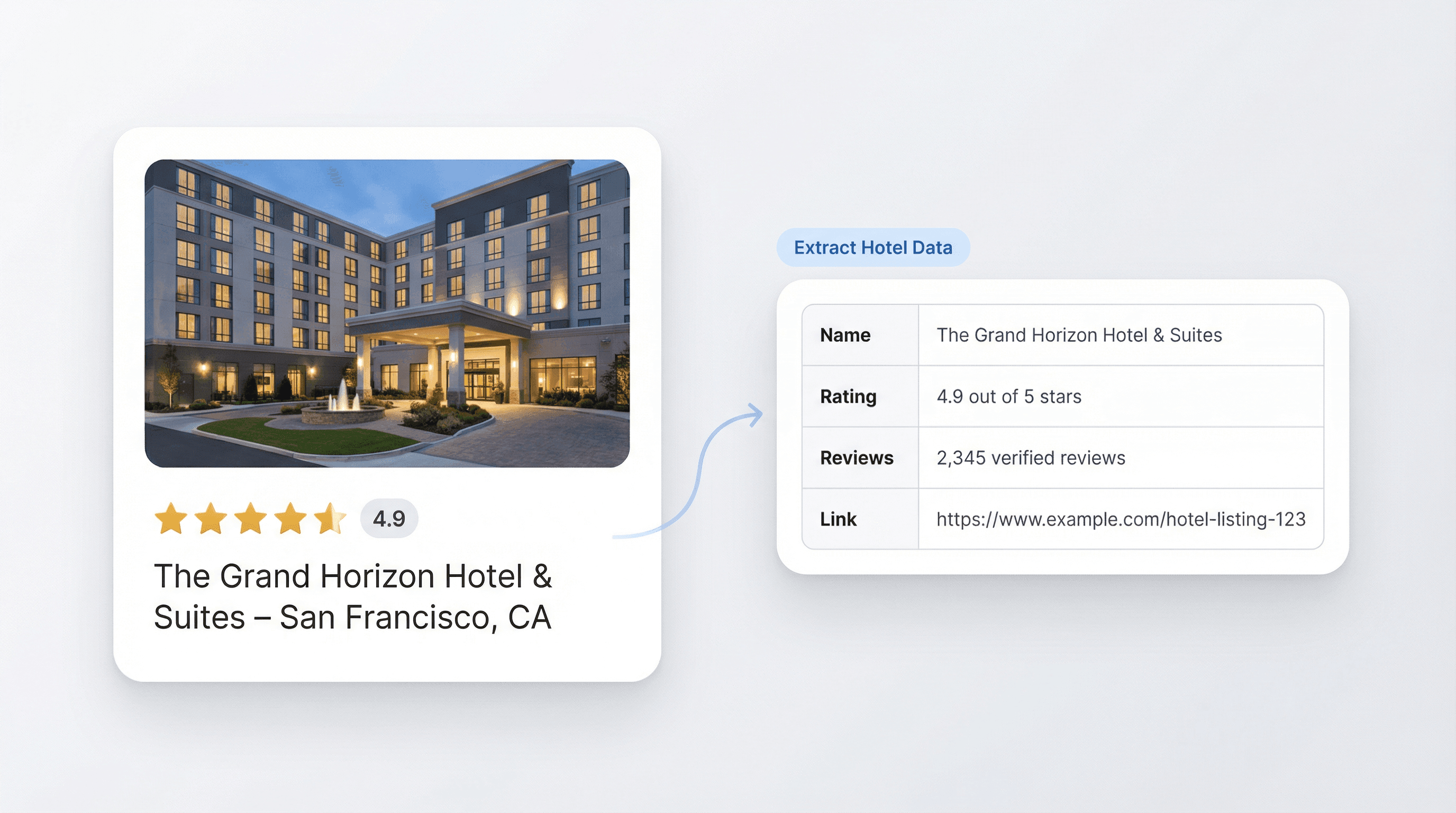
The Tripadvisor Hotel Scraper allows you to pull key details from any Tripadvisor hotel listing or detail page. By entering a URL, you can quickly gather hotel names, ratings, review counts, images, and direct links. This tool is ideal for travel agents, market researchers, and hospitality professionals who need organized data for analysis or comparison, eliminating the need for manual data collection from multiple pages.
เริ่มใช้ฟรี
hotel_scraper_feature.png

Convert Unstructured Content into Downloadable Tables
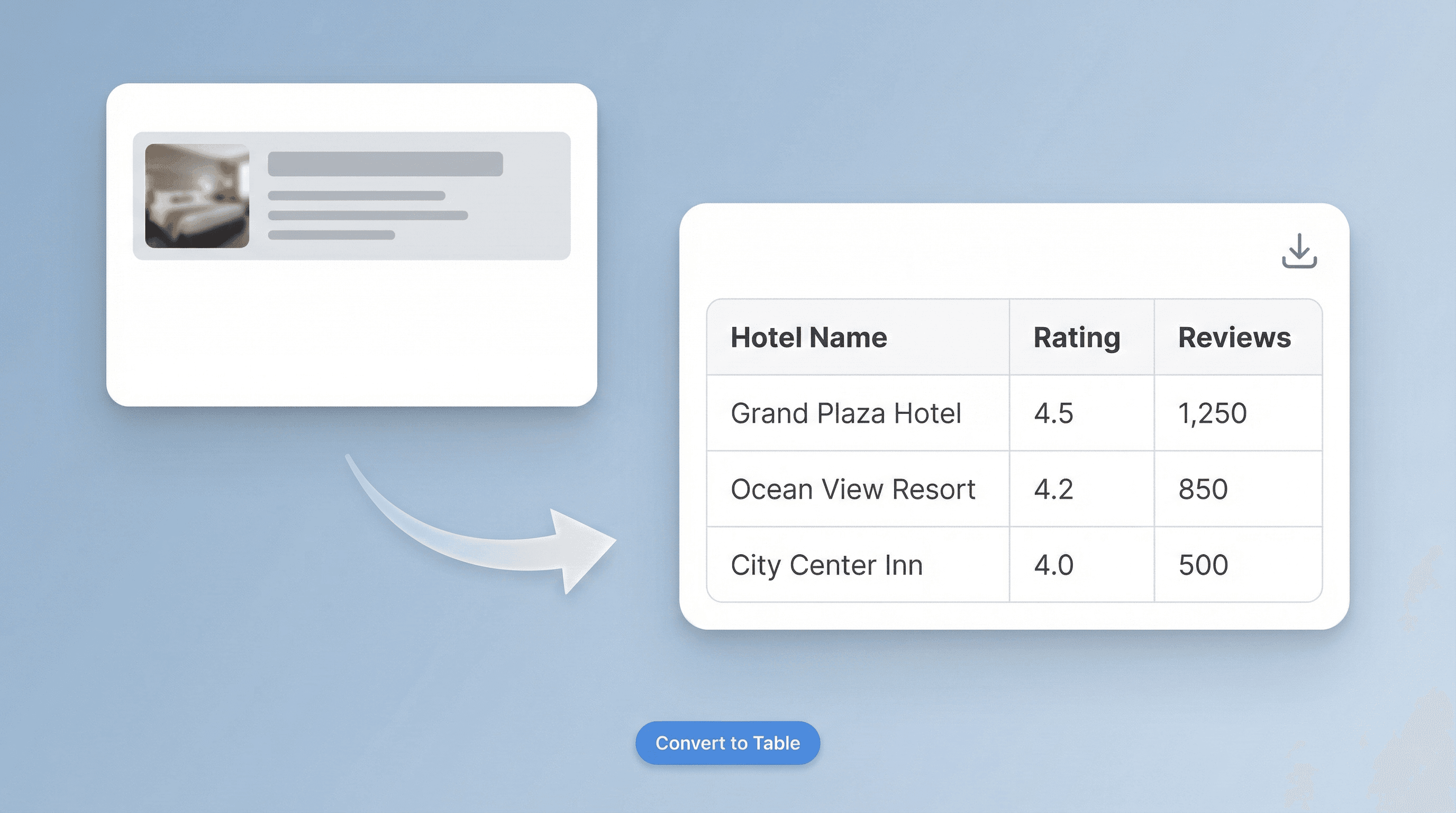
Transform messy web content into a clean, structured table with just a few clicks. The scraper automatically organizes extracted data into columns such as hotel name, rating, and number of reviews. This streamlines your workflow, reduces errors, and ensures you have reliable information ready for reporting or further processing. It’s especially useful for anyone compiling hotel lists for business intelligence or travel planning.
เริ่มใช้ฟรี
convert_to_table_feature_v2.png

Export Data to Your Preferred Platforms
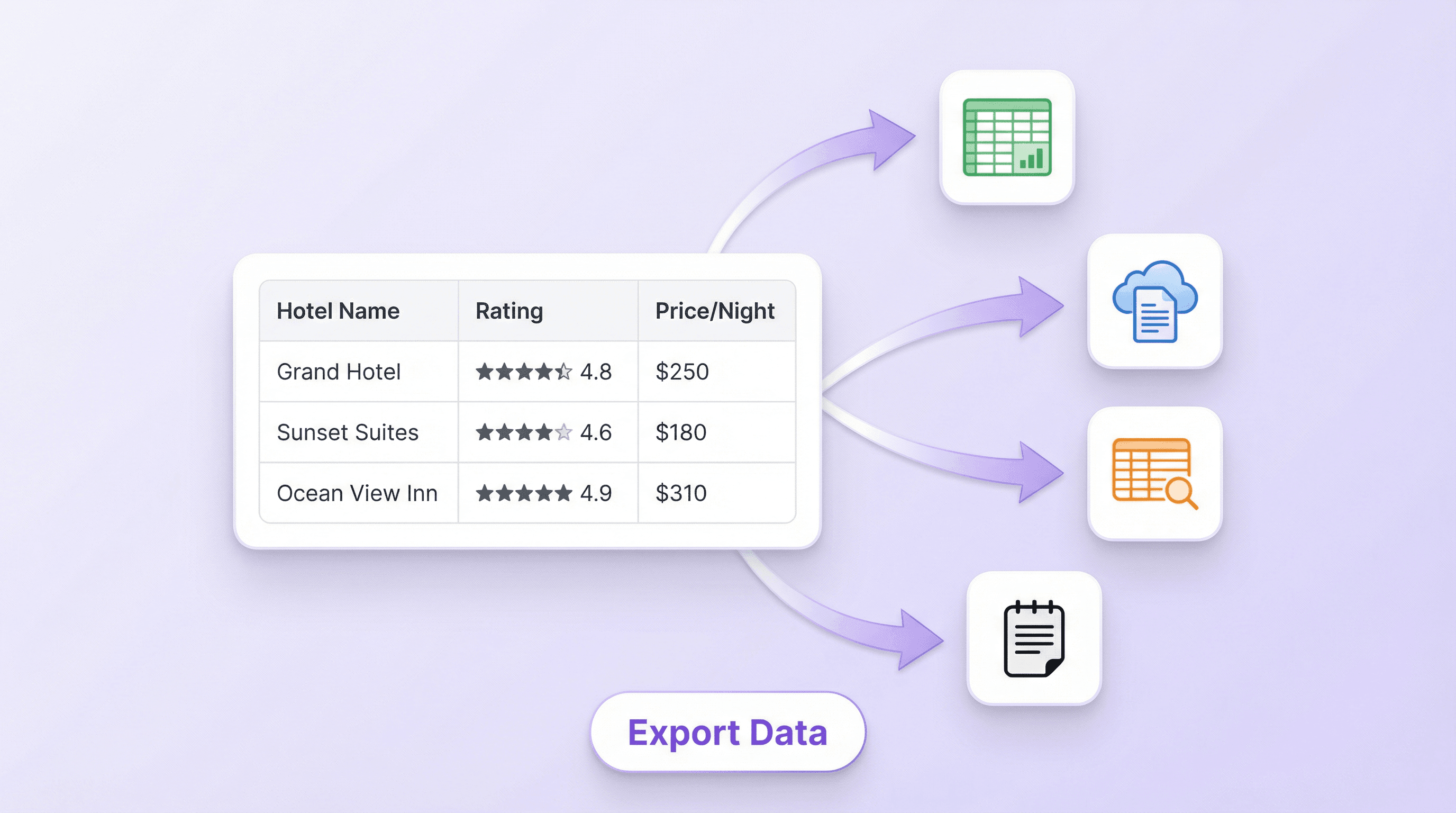
Once the hotel data is extracted, you can export it directly to Excel, Google Sheets, Airtable, or Notion. The output is formatted for easy integration, so you can immediately use the data for presentations, client reports, or database updates. This feature is valuable for teams that need to share or analyze hotel information across different tools without extra formatting steps.
เริ่มใช้ฟรี
export_data_feature.png

Support Travel Research and Competitive Analysis
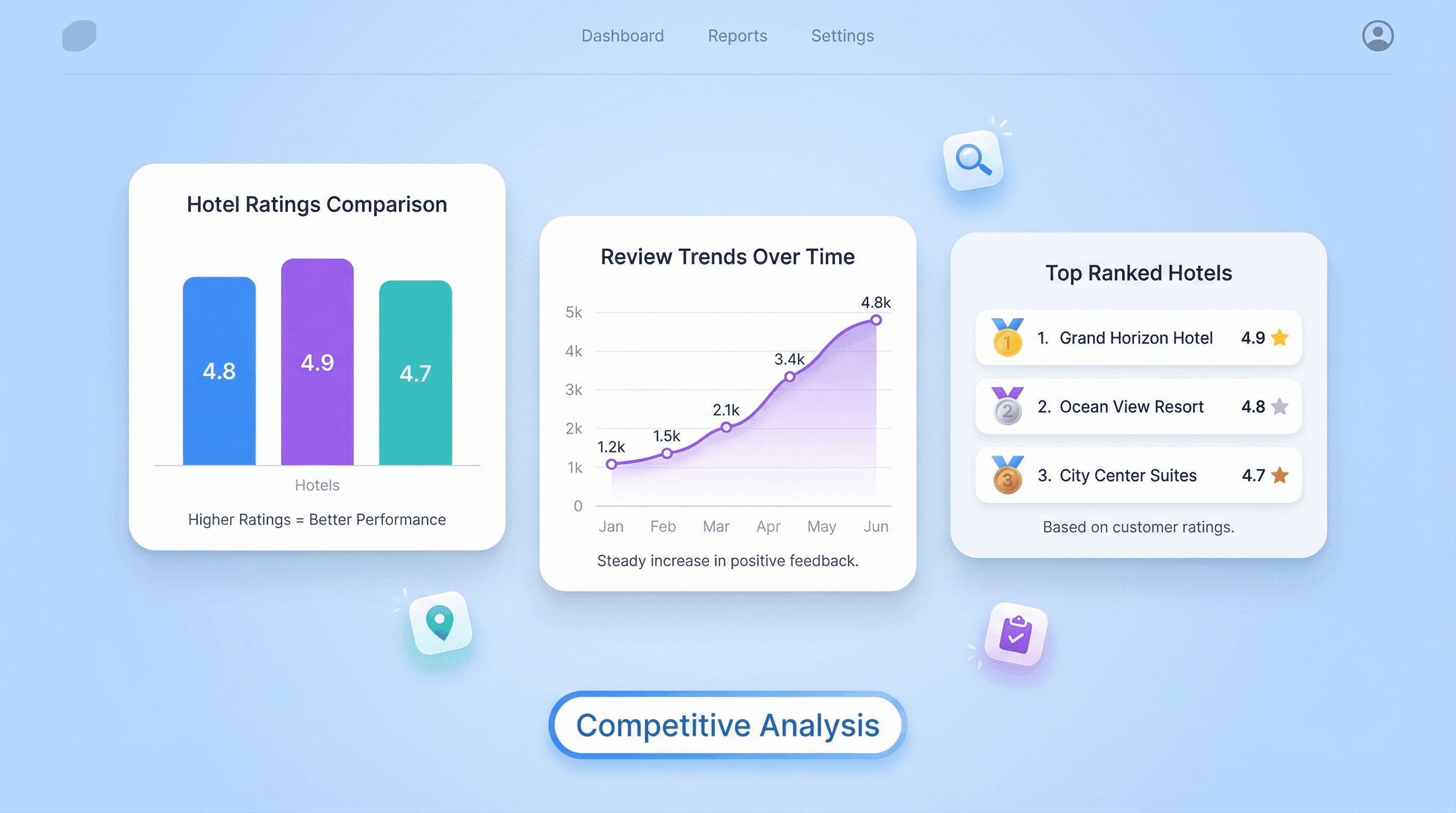
Use the extracted hotel data to compare ratings, track review trends, or build comprehensive lists for destination research. Travel agencies, bloggers, and analysts can leverage this tool to monitor market changes, identify top-performing hotels, or create content based on up-to-date Tripadvisor information. The ability to gather and organize data efficiently supports better decision-making and content creation.
เริ่มใช้ฟรี
competitive_analysis_feature.png

ค้นหาเครื่องมือฟรีเพิ่มเติม

Amazon Products Scraper

Amazon สินค้า Scraper

เพียงวาง URL สินค้าจาก Amazon ก็สามารถดึงข้อมูลสินค้าออกมาได้ทันที ไม่ว่าจะเป็นชื่อสินค้า ราคา คะแนนรีวิว และรายละเอียดอื่น ๆ จัดเป็นตารางที่เป็นระเบียบ พร้อมสำหรับส่งออกและตรวจสอบได้อย่างรวดเร็ว

เครื่องมือดึงราคา Amazon

ดึงราคาสินค้า Amazon ชื่อผู้ขาย คะแนนรีวิว ASIN สถานะสินค้า และ URL ของสินค้าได้ใน 2 คลิก จากนั้นส่งออกไปยัง Excel, Google Sheets, Airtable หรือ Notion ได้ทันที ไม่ต้องเขียนโค้ด

Amazon Review Exporter

Amazon Review Exporter

Extract detailed Amazon product reviews by pasting a product URL. Instantly collect reviewer info, ratings, and more in a structured table for easy analysis.

เครื่องมือวิจัยสินค้า Amazon

ค้นหาสินค้า Amazon ที่มีศักยภาพสูงด้วยการวิจัยจากคีย์เวิร์ด หมวดหมู่ หรือ ASIN เปรียบเทียบความต้องการ การแข่งขัน ราคา และยอดขายโดยประมาณเพื่อยืนยันไอเดีย ตัดสินใจจัดหาสินค้าได้เร็วขึ้นด้วยข้อมูลจริง

เครื่องมือประมาณยอดขาย Amazon ฟรี

ประเมินยอดขายรายเดือนและรายวันของสินค้า Amazon จากหมวดหมู่และ Best Seller Rank เพื่อดูภาพรวมความต้องการได้รวดเร็ว ใช้ประกอบการวิเคราะห์ดีมานด์และตัดสินใจเรื่องลิสต์สินค้าได้อย่างมั่นใจขึ้น

เครื่องคำนวณค่าธรรมเนียม FBA ออนไลน์ฟรี

ประเมินต้นทุน Amazon FBA ได้ง่ายๆ เพียงกรอกราคา ต้นทุน ขนาด น้ำหนัก และหมวดหมู่สินค้า จากนั้นดูค่าคอมมิชชัน ค่าจัดการ ค่าจัดเก็บ พร้อมกำไรและมาร์จิ้น เพื่อกำหนดราคาขายได้อย่างมั่นใจ

เครื่องมือตรวจคุณภาพหน้า Listing บน Amazon

ประเมินหน้า Listing สินค้า Amazon ว่าข้อมูลครบถ้วนและพร้อมสำหรับ SEO แค่ไหน พร้อมชี้จุดที่ขาดหรืออ่อน เช่น ชื่อสินค้า บูลเล็ต รูปภาพ และคีย์เวิร์ด สรุปเป็นคะแนนชัดเจนและแนวทางแก้ไขที่ทำตามได้จริงเพื่อเพิ่มการมองเห็น

เครื่องมือดึงข้อมูลสินค้า Etsy

ดึงรายละเอียดสินค้า เช่น ราคาและคำอธิบาย จากหน้า Etsy ใดก็ได้ แล้วรับข้อมูลแบบมีโครงสร้างเป็นตารางเพื่อวิเคราะห์ได้ง่าย ประหยัดเวลาการรวบรวมข้อมูลสินค้าเพื่อ research หรือจัดการ listing

ค้นหาเครื่องมือเพิ่มเติมตอนนี้

ผู้ใช้พูดถึง Thunderbit ว่าอย่างไร

Taryn W.Growth Strategist@Thunderbit เปลี่ยนวิธีที่ฉันทำรีเสิร์ชคู่แข่งไปเลย ฉันกด 'AI Suggest Fields' แล้วมันสร้างตารางที่เรียบร้อยจากผลลัพธ์หลายหน้าได้ทันที—ไม่ต้องเขียนโค้ด ไม่ต้องแตะ CSS ประหยัดเวลามากตอนวิเคราะห์ข้อมูลสินค้าจากมาร์เก็ตเพลสเฉพาะกลุ่ม
Miles T.Sales Development Consultantฉันใช้ Thunderbit ดึงอีเมลและเบอร์โทรจากไดเรกทอรี มันแยกข้อมูลติดต่อที่สะอาดได้ในคลิกเดียว และส่งออกไป Sheets หรือ Notion ก็ใช้เวลาไม่กี่วินาที ไม่ต้องตั้งค่าเพิ่ม ไม่ต้องเขียนโค้ด ได้ข้อมูลพร้อมใช้งานทันที
Rhea C.E-commerce AnalystThunderbit ช่วยฉันมอนิเตอร์ข้อมูล SKU ข้ามหลายหน้า ฉันดึงรายการสินค้า แล้วใช้ Subpage Scraping เพื่อเก็บสเปกสินค้า ราคา รีวิว และสต็อกครบ AI จัดทุกอย่างลงคอลัมน์ที่ฉันกำหนดไว้
Cassian B.Real Estate AdvisorScheduled Scraper ของ Thunderbit ทำให้การติดตามอสังหาง่ายขึ้น ฉันระบุช่วงเวลาเป็นภาษาธรรมดา แล้วระบบจะดึงรายการ ราคา และลิงก์ที่อัปเดตให้อัตโนมัติ โดยไม่ต้องกลับไปแตะการตั้งค่าอีกเลย ใช้ง่ายและใช้งานได้จริงมาก
Dorian B.Content & SEO Specialistฉันใช้ Field AI Prompts ของ Thunderbit เพื่อทำความสะอาดและติดแท็กคอนเทนต์บล็อกที่ดึงมา มันดึงชื่อเรื่อง ผู้เขียน และยังช่วยแนะนำหมวดหมู่ด้วย ใช้งานได้ดีทั้งกับเว็บแบบไดนามิกและซับเพจ เหมาะมากสำหรับสร้างชุดข้อมูล SEO ที่เป็นระบบ
Lina K.Marketplace Operations Leadเราใช้ Thunderbit ติดตาม SKU จากร้านค้าเฉพาะกลุ่ม Cloud Scraping จัดการได้ครั้งละ 50 หน้า และถ้าเป็นเว็บที่ต้องล็อกอิน เราก็สลับไปใช้โหมดเบราว์เซอร์ มันเร็ว ยืดหยุ่น และไม่ต้องคอยดูแลหรือแก้ไขเองบ่อยๆ
Jorge F.Inbound Sales ManagerAI Autofill ของ Thunderbit ช่วยชีวิตมาก หลังดึงข้อมูลติดต่อมาแล้ว ฉันใช้มันกรอกฟอร์มลีดโดยตรงในเบราว์เซอร์ แค่เลือกแท็บ มันก็กรอกทุกอย่างจากแถวข้อมูลที่ดึงมา ไม่ต้องพิมพ์เองเลย
Alina D.Freelance Researcherฉันพึ่ง Thunderbit สำหรับการดึงข้อมูลจาก PDF เว็บที่เป็นรูปภาพ และหน้าแบบ infinite scroll มันจัดการฟอร์แมตที่ยุ่งยากด้วย AI และส่งออกเป็นตารางพร้อมใช้ที่ฉันส่งเข้า Google Sheets หรือ Airtable ได้ในไม่กี่วินาที
Taryn W.Growth Strategist@Thunderbit เปลี่ยนวิธีที่ฉันทำรีเสิร์ชคู่แข่งไปเลย ฉันกด 'AI Suggest Fields' แล้วมันสร้างตารางที่เรียบร้อยจากผลลัพธ์หลายหน้าได้ทันที—ไม่ต้องเขียนโค้ด ไม่ต้องแตะ CSS ประหยัดเวลามากตอนวิเคราะห์ข้อมูลสินค้าจากมาร์เก็ตเพลสเฉพาะกลุ่ม
Miles T.Sales Development Consultantฉันใช้ Thunderbit ดึงอีเมลและเบอร์โทรจากไดเรกทอรี มันแยกข้อมูลติดต่อที่สะอาดได้ในคลิกเดียว และส่งออกไป Sheets หรือ Notion ก็ใช้เวลาไม่กี่วินาที ไม่ต้องตั้งค่าเพิ่ม ไม่ต้องเขียนโค้ด ได้ข้อมูลพร้อมใช้งานทันที
Rhea C.E-commerce AnalystThunderbit ช่วยฉันมอนิเตอร์ข้อมูล SKU ข้ามหลายหน้า ฉันดึงรายการสินค้า แล้วใช้ Subpage Scraping เพื่อเก็บสเปกสินค้า ราคา รีวิว และสต็อกครบ AI จัดทุกอย่างลงคอลัมน์ที่ฉันกำหนดไว้
Cassian B.Real Estate AdvisorScheduled Scraper ของ Thunderbit ทำให้การติดตามอสังหาง่ายขึ้น ฉันระบุช่วงเวลาเป็นภาษาธรรมดา แล้วระบบจะดึงรายการ ราคา และลิงก์ที่อัปเดตให้อัตโนมัติ โดยไม่ต้องกลับไปแตะการตั้งค่าอีกเลย ใช้ง่ายและใช้งานได้จริงมาก
Dorian B.Content & SEO Specialistฉันใช้ Field AI Prompts ของ Thunderbit เพื่อทำความสะอาดและติดแท็กคอนเทนต์บล็อกที่ดึงมา มันดึงชื่อเรื่อง ผู้เขียน และยังช่วยแนะนำหมวดหมู่ด้วย ใช้งานได้ดีทั้งกับเว็บแบบไดนามิกและซับเพจ เหมาะมากสำหรับสร้างชุดข้อมูล SEO ที่เป็นระบบ
Lina K.Marketplace Operations Leadเราใช้ Thunderbit ติดตาม SKU จากร้านค้าเฉพาะกลุ่ม Cloud Scraping จัดการได้ครั้งละ 50 หน้า และถ้าเป็นเว็บที่ต้องล็อกอิน เราก็สลับไปใช้โหมดเบราว์เซอร์ มันเร็ว ยืดหยุ่น และไม่ต้องคอยดูแลหรือแก้ไขเองบ่อยๆ
Jorge F.Inbound Sales ManagerAI Autofill ของ Thunderbit ช่วยชีวิตมาก หลังดึงข้อมูลติดต่อมาแล้ว ฉันใช้มันกรอกฟอร์มลีดโดยตรงในเบราว์เซอร์ แค่เลือกแท็บ มันก็กรอกทุกอย่างจากแถวข้อมูลที่ดึงมา ไม่ต้องพิมพ์เองเลย
Alina D.Freelance Researcherฉันพึ่ง Thunderbit สำหรับการดึงข้อมูลจาก PDF เว็บที่เป็นรูปภาพ และหน้าแบบ infinite scroll มันจัดการฟอร์แมตที่ยุ่งยากด้วย AI และส่งออกเป็นตารางพร้อมใช้ที่ฉันส่งเข้า Google Sheets หรือ Airtable ได้ในไม่กี่วินาที

Frequently Asked Questions

ดึงข้อมูลด้วย AI
โอนข้อมูลไปยัง Google Sheets, Airtable หรือ Notion ได้อย่างง่ายดาย
Chrome Store Rating
PRODUCT HUNT#1 Product of the Week