Idealo Scraper

โดย
Extract product prices, ratings, and details from Idealo for fast market research and deal comparison. Save time and get structured data in one click.

อยากดึงข้อมูลแบบจำนวนมากใช่ไหม? ลองใช้ Thunderbit ฟรี

Chrome Store Rating
PRODUCT HUNT#1 Product of the Week
Accenture logoCriteo logoGrammarly logoVerisk logoklook logoPuma logoRingCentral logoAccenture logoCriteo logoGrammarly logoVerisk logoklook logoPuma logoRingCentral logoAccenture logoCriteo logoGrammarly logoVerisk logoklook logoPuma logoRingCentral logoAccenture logoCriteo logoGrammarly logoVerisk logoklook logoPuma logoRingCentral logoAccenture logoCriteo logoGrammarly logoVerisk logoklook logoPuma logoRingCentral logoAccenture logoCriteo logoGrammarly logoVerisk logoklook logoPuma logoRingCentral logo
Collect Idealo Product Data InstantlyScrape product prices, ratings, and details from Idealo with Thunderbit’s Chrome extension—no manual copying required.
chrome-web-store
ติดตั้งจากChrome Web Store

Collect Idealo Product Data Instantly

Thunderbit’s Idealo Scraper lets you gather product names, prices, ratings, and more from Idealo listings with just a few clicks. The AI-powered tool structures your data for easy analysis, making it simple to compare deals and monitor market trends. Export your results directly to Google Sheets, Airtable, or Notion for further review. Thunderbit also supports scraping subpages, images, and reviews, so you get a complete dataset for your research.

How to Extract Product Data Using Thunderbit

step_01.png
STEP 1Download and InstallDownload and install the Thunderbit Chrome Extension from the Thunderbit Chrome Extension Download Page. Once installed, log in or create a free account to get started.
step_02.png
STEP 2Open ExtensionNavigate to the Idealo product listing page you want to extract data from. Open the Thunderbit Chrome Extension and select the 'Idealo Scraper' tool from the menu. Enter the URL of the Idealo product listing page in the provided field.
step03.png
STEP 3Click the Extract Product Data ButtonClick the 'Extract Product Data' button. Thunderbit will process the Idealo page and extract product name, product URL, product image, price, product description, and quotes(Angebote) into a structured table. You can then export the results to Excel, Google Sheets, Airtable, Notion, or download them as a CSV or JSON file.

Learn how to extract product data from Idealo listings

Collect Comprehensive Product Information

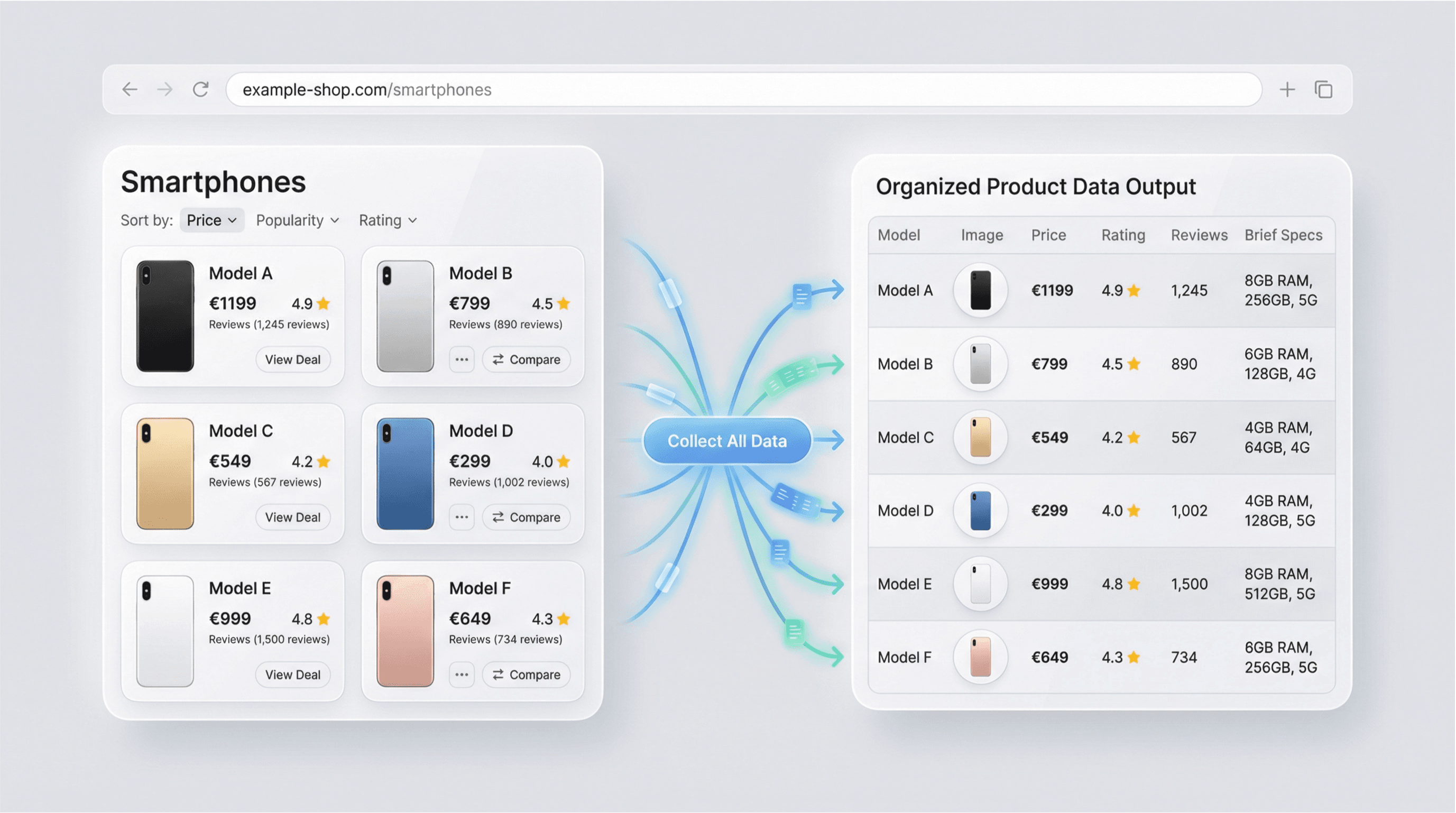
The Idealo Scraper enables users to gather detailed product data from Idealo, Europe’s leading price comparison site. By simply entering a product listing URL, you can extract essential details such as product names, images, prices, ratings, descriptions, and review counts. This tool is ideal for ecommerce professionals, market researchers, and price analysts who need accurate and up-to-date product information for competitive analysis or catalog management.
เริ่มต้นฟรี
idealo_scraper_listing_v3.png

Automate Market Research and Price Monitoring

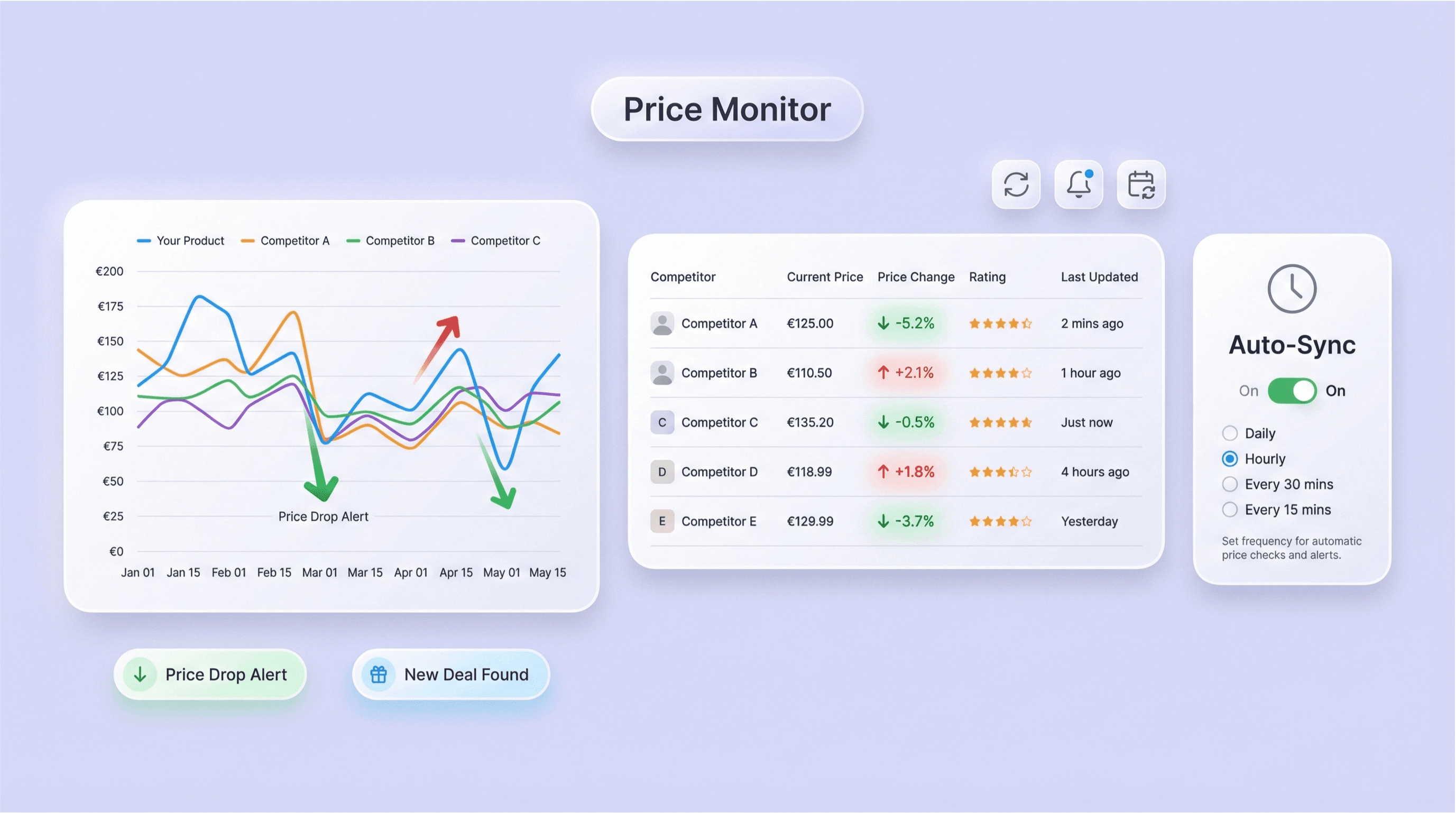
With the Idealo Scraper, you can automate the process of tracking prices, ratings, and product specifications across multiple listings. This feature is especially useful for businesses aiming to monitor competitors, identify pricing trends, or discover the best deals. By reducing manual data collection, the tool helps users save time and ensures that their market research is always based on the latest available data.
เริ่มต้นฟรี
idealo_price_monitoring.png

Export Structured Data for Analysis

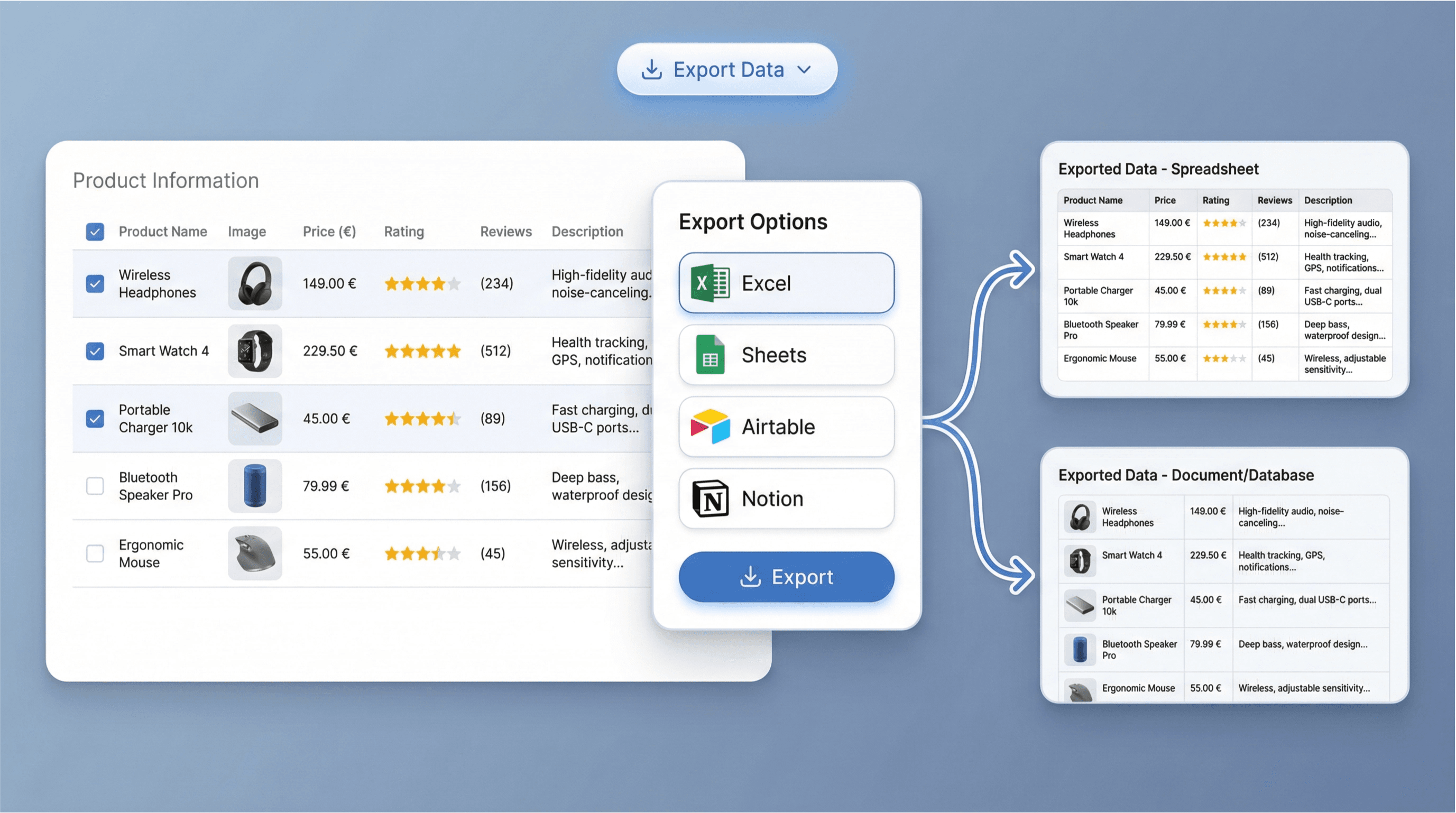
After extracting product data, the Idealo Scraper presents the results in a structured table format. You can easily export this data to Excel, Google Sheets, Airtable, or Notion for further analysis or reporting. This streamlined export process allows you to quickly integrate the information into your existing workflows, making it simple to compare products, track changes, or share insights with your team.
เริ่มต้นฟรี
idealo_data_export.png

Support Ecommerce Operations and Catalog Updates

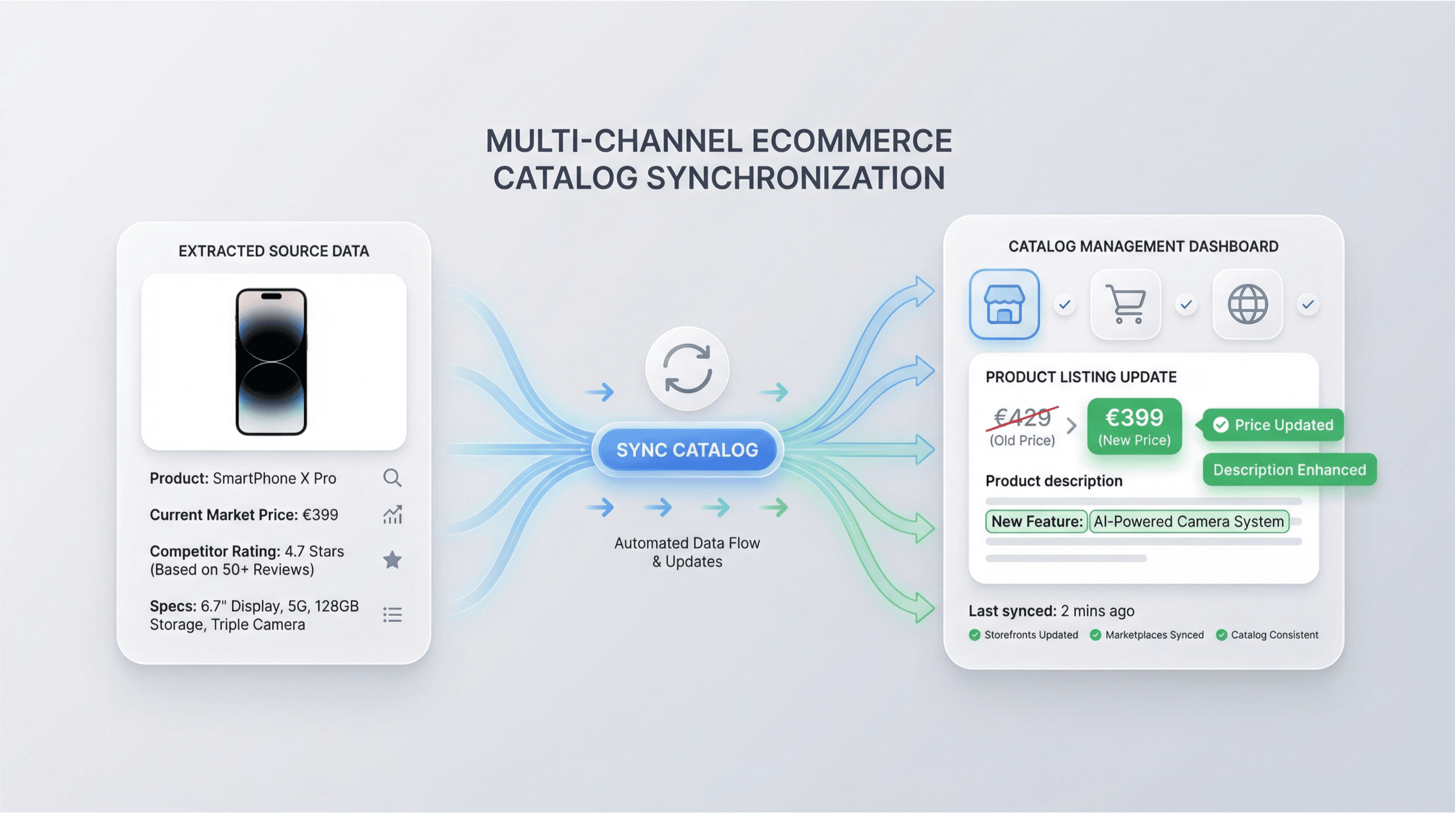
Use the Idealo Scraper to keep your product catalogs current and competitive. By regularly extracting and reviewing product details from Idealo, ecommerce teams can update listings, adjust pricing strategies, and enhance product descriptions. This capability is valuable for online retailers, distributors, and digital marketers who need to maintain accurate and appealing product information across multiple sales channels.
เริ่มต้นฟรี
idealo_catalog_updates.png

ค้นพบเครื่องมือฟรีเพิ่มเติม

ค้นหาบาร์โค้ด / UPC

ค้นหารายละเอียดสินค้าได้โดยป้อนบาร์โค้ดหรือรหัส UPC เพื่อดึงชื่อสินค้า แบรนด์ ผู้ผลิต และหมวดหมู่ สำหรับตรวจสอบสินค้าและเร่งการค้นคว้าข้อมูลผลิตภัณฑ์

เครื่องคำนวณค่าธรรมเนียม FBA ออนไลน์ฟรี

ประเมินต้นทุน Amazon FBA ได้ง่ายๆ เพียงกรอกราคา ต้นทุน ขนาด น้ำหนัก และหมวดหมู่ ระบบจะแสดงค่าธรรมเนียม Referral, Fulfillment และ Storage พร้อมคำนวณกำไรและมาร์จิ้น เพื่อช่วยตั้งราคาสินค้าได้อย่างมั่นใจ

The Good Guys Scraper

Extract detailed product data from The Good Guys listings, including pricing, images, and reviews. Ideal for price monitoring and market research.

เครื่องมือคีย์เวิร์ด Amazon

สร้างคีย์เวิร์ดค้นหา Amazon ที่มีแนวโน้มซื้อสูงจากคำตั้งต้น เพื่อปรับแต่งรายการสินค้าและเพิ่มการมองเห็นสินค้า รับไอเดียคีย์เวิร์ดพร้อมสัญญาณปริมาณค้นหา การแข่งขัน และความเกี่ยวข้อง เพื่อช่วยตัดสินใจด้าน SEO ได้เร็วขึ้น

เครื่องมือวิเคราะห์คู่แข่ง

เปรียบเทียบเว็บไซต์คู่แข่งได้สูงสุด 5 ราย ครอบคลุมทราฟฟิก การมีส่วนร่วม แหล่งที่มา และกลุ่มผู้ชม พร้อมมองเห็นจุดแข็ง ช่องว่าง และโอกาสได้แบบเทียบกันชัด ๆ

เครื่องคำนวณอัตรากำไร (Profit Margin) ออนไลน์ฟรี

คำนวณกำไรและอัตรากำไรจากราคาขาย ต้นทุน และค่าใช้จ่ายเพิ่มเติม (ถ้ามี) ได้ทั้งเปอร์เซ็นต์ที่ชัดเจนและกำไรเป็นตัวเงิน เพื่อช่วยตัดสินใจเรื่องการตั้งราคาและความคุ้มค่าในการขาย

Google Shopping Scraper

ดึงข้อมูลรายการสินค้าแบบมีโครงสร้างจากผลการค้นหา Google Shopping เพื่อใช้วิเคราะห์ราคาและคู่แข่ง เก็บชื่อสินค้า ราคา ร้านค้า คะแนน รีวิว ค่าจัดส่ง และลิงก์ลงในตารางที่อ่านง่าย

เครื่องคำนวณรายได้ Amazon ฟรี

ประเมินรายได้รวมต่อเดือนจากราคาสินค้าและยอดขายต่อเดือนแบบคร่าว ๆ เพื่อเช็กดีมานด์และวางแผนสต็อกได้อย่างรวดเร็ว

เครื่องคำนวณมาร์กอัปสำหรับธุรกิจ

คำนวณราคาขายจากต้นทุนต่อหน่วยและเปอร์เซ็นต์มาร์กอัป ดูราคาขายและกำไรขั้นต้นต่อหน่วยเพื่อกำหนดราคาสินค้าได้อย่างมั่นใจ

Tripadvisor Hotel Scraper

Extract hotel names, ratings, images, and reviews from Tripadvisor pages into a structured, downloadable table. Save time collecting hotel data for research or analysis.

Leboncoin Scraper

ดึงข้อมูลประกาศจาก leboncoin ให้อยู่ในตารางที่เป็นระเบียบเพื่อใช้วิเคราะห์ได้ทันที เก็บชื่อสินค้า ราคา ทำเล วันที่ลงประกาศ และรายละเอียดสำคัญจากลิงก์ค้นหาหรือหน้าประกาศ

เครื่องมือดึงข้อมูล Booking.com

ดึงข้อมูลที่พักจาก Booking.com เพื่อเปรียบเทียบโรงแรมและทำรีเสิร์ชได้เร็วขึ้น

เครื่องมือวิเคราะห์คะแนนรีวิว Amazon

วิเคราะห์รีวิว Amazon เพื่อดูการกระจายคะแนน ข้อดี-ข้อเสียหลัก และประเด็นที่ถูกพูดถึงซ้ำๆ ประหยัดเวลาด้วยการสรุปหน้าริวิวยาวๆ ให้เป็นข้อมูลแบบมีโครงสร้าง ช่วยตัดสินใจได้เร็วขึ้น

เครื่องมือวิเคราะห์รีวิว Amazon

วิเคราะห์รีวิว Amazon เพื่อดูอารมณ์ความรู้สึก (sentiment) ประเด็นที่ถูกพูดซ้ำ และข้อดี/ข้อเสียที่พบบ่อย เปลี่ยนฟีดแบ็กจำนวนมากให้เป็นอินไซต์ที่ชัดเจน เพื่อปรับปรุงสินค้าและหน้ารายการขายได้ตรงจุด

ค้นหา UPC (UPC Lookup)

ค้นหารายละเอียดสินค้าโดยใช้รหัส UPC เพื่อยืนยันตัวตนสินค้าและเปรียบเทียบรายการขายได้อย่างรวดเร็ว ดูชื่อสินค้า แบรนด์ ผู้ผลิต หมวดหมู่ และรูปภาพได้ในครั้งเดียว

เครื่องคำนวณกำไร Dropshipping

คำนวณกำไรสุทธิและอัตรากำไรต่อการขายแบบดรอปชิปจากต้นทุนสินค้า ราคาขาย ค่าขนส่ง ภาษี และค่าธรรมเนียมต่างๆ ช่วยตั้งราคาได้แม่นขึ้นและรักษามาร์จิ้นด้วยยอดรวมที่ชัดเจน

หาเครื่องมือเพิ่มเติมตอนนี้

ผู้ใช้พูดถึง Thunderbit ว่าอย่างไร

Taryn W.Growth Strategist@Thunderbit เปลี่ยนวิธีที่ฉันทำรีเสิร์ชคู่แข่งไปเลย ฉันกด 'AI Suggest Fields' แล้วมันก็สร้างตารางที่สะอาดจากผลลัพธ์หลายหน้าให้ทันที—ไม่ต้องเขียนโค้ด ไม่ต้องแตะ CSS ช่วยประหยัดเวลาได้มากตอนวิเคราะห์ข้อมูลสินค้าจากมาร์เก็ตเพลสเฉพาะกลุ่ม
Miles T.Sales Development Consultantฉันใช้ Thunderbit ดึงอีเมลและเบอร์โทรจากไดเรกทอรี มันดึงข้อมูลติดต่อได้สะอาดในคลิกเดียว และส่งออกไป Sheets หรือ Notion ก็ใช้เวลาแค่ไม่กี่วินาที ไม่ต้องตั้งค่าเพิ่ม ไม่ต้องเขียนโค้ด—ได้ข้อมูลพร้อมใช้งานทันที
Rhea C.E-commerce AnalystThunderbit ช่วยให้ฉันติดตามข้อมูล SKU ข้ามหลายหน้าได้ ฉันดึงรายการสินค้า แล้วใช้ Subpage Scraping เพื่อเก็บสเปกสินค้า ราคา รีวิว และสต็อกแบบครบ ๆ AI จัดทุกอย่างลงคอลัมน์ตามที่ฉันกำหนด
Cassian B.Real Estate AdvisorScheduled Scraper ของ Thunderbit ทำให้การติดตามอสังหาฯ ง่ายขึ้นมาก ฉันแค่บอกช่วงเวลาที่ต้องการเป็นภาษาธรรมดา แล้วมันก็ไปดึงรายการ ราคา และลิงก์ที่อัปเดตให้เอง โดยไม่ต้องกลับมาแตะการตั้งค่าอีก เรียบง่ายและใช้งานได้จริงมาก
Dorian B.Content & SEO Specialistฉันใช้ Field AI Prompts ของ Thunderbit เพื่อทำความสะอาดและติดแท็กคอนเทนต์บล็อกที่ดึงมา มันดึงหัวข้อ ผู้เขียน และยังช่วยแนะนำหมวดหมู่ได้ด้วย ใช้ได้ดีทั้งกับเว็บไดนามิกและ subpage—เหมาะมากสำหรับสร้างชุดข้อมูล SEO แบบมีโครงสร้าง
Lina K.Marketplace Operations Leadเราติดตาม SKU จากร้านเฉพาะกลุ่มด้วย Thunderbit Cloud Scraping จัดการได้ครั้งละ 50 หน้า และถ้าเป็นเว็บที่ต้องล็อกอิน เราก็สลับไปใช้โหมดเบราว์เซอร์ได้ มันเร็ว ยืดหยุ่น และไม่ต้องดูแลหรือแก้ไขเองต่อเนื่อง
Jorge F.Inbound Sales ManagerAI Autofill ของ Thunderbit ช่วยชีวิตมาก หลังดึงข้อมูลติดต่อแล้ว ฉันใช้มันเติมฟอร์มลีดตรงในเบราว์เซอร์ แค่เลือกแท็บ มันก็กรอกทุกอย่างจากแถวข้อมูลที่ดึงมา ไม่ต้องพิมพ์เองเลย
Alina D.Freelance Researcherฉันพึ่ง Thunderbit ในการดึงข้อมูลจาก PDF เว็บที่เป็นรูปภาพ และหน้าที่เลื่อนแบบไม่สิ้นสุด มันจัดการฟอร์แมตที่ยุ่งยากด้วย AI และส่งออกเป็นตารางที่พร้อมใช้งาน ส่งต่อไป Google Sheets หรือ Airtable ได้ในไม่กี่วินาที
Taryn W.Growth Strategist@Thunderbit เปลี่ยนวิธีที่ฉันทำรีเสิร์ชคู่แข่งไปเลย ฉันกด 'AI Suggest Fields' แล้วมันก็สร้างตารางที่สะอาดจากผลลัพธ์หลายหน้าให้ทันที—ไม่ต้องเขียนโค้ด ไม่ต้องแตะ CSS ช่วยประหยัดเวลาได้มากตอนวิเคราะห์ข้อมูลสินค้าจากมาร์เก็ตเพลสเฉพาะกลุ่ม
Miles T.Sales Development Consultantฉันใช้ Thunderbit ดึงอีเมลและเบอร์โทรจากไดเรกทอรี มันดึงข้อมูลติดต่อได้สะอาดในคลิกเดียว และส่งออกไป Sheets หรือ Notion ก็ใช้เวลาแค่ไม่กี่วินาที ไม่ต้องตั้งค่าเพิ่ม ไม่ต้องเขียนโค้ด—ได้ข้อมูลพร้อมใช้งานทันที
Rhea C.E-commerce AnalystThunderbit ช่วยให้ฉันติดตามข้อมูล SKU ข้ามหลายหน้าได้ ฉันดึงรายการสินค้า แล้วใช้ Subpage Scraping เพื่อเก็บสเปกสินค้า ราคา รีวิว และสต็อกแบบครบ ๆ AI จัดทุกอย่างลงคอลัมน์ตามที่ฉันกำหนด
Cassian B.Real Estate AdvisorScheduled Scraper ของ Thunderbit ทำให้การติดตามอสังหาฯ ง่ายขึ้นมาก ฉันแค่บอกช่วงเวลาที่ต้องการเป็นภาษาธรรมดา แล้วมันก็ไปดึงรายการ ราคา และลิงก์ที่อัปเดตให้เอง โดยไม่ต้องกลับมาแตะการตั้งค่าอีก เรียบง่ายและใช้งานได้จริงมาก
Dorian B.Content & SEO Specialistฉันใช้ Field AI Prompts ของ Thunderbit เพื่อทำความสะอาดและติดแท็กคอนเทนต์บล็อกที่ดึงมา มันดึงหัวข้อ ผู้เขียน และยังช่วยแนะนำหมวดหมู่ได้ด้วย ใช้ได้ดีทั้งกับเว็บไดนามิกและ subpage—เหมาะมากสำหรับสร้างชุดข้อมูล SEO แบบมีโครงสร้าง
Lina K.Marketplace Operations Leadเราติดตาม SKU จากร้านเฉพาะกลุ่มด้วย Thunderbit Cloud Scraping จัดการได้ครั้งละ 50 หน้า และถ้าเป็นเว็บที่ต้องล็อกอิน เราก็สลับไปใช้โหมดเบราว์เซอร์ได้ มันเร็ว ยืดหยุ่น และไม่ต้องดูแลหรือแก้ไขเองต่อเนื่อง
Jorge F.Inbound Sales ManagerAI Autofill ของ Thunderbit ช่วยชีวิตมาก หลังดึงข้อมูลติดต่อแล้ว ฉันใช้มันเติมฟอร์มลีดตรงในเบราว์เซอร์ แค่เลือกแท็บ มันก็กรอกทุกอย่างจากแถวข้อมูลที่ดึงมา ไม่ต้องพิมพ์เองเลย
Alina D.Freelance Researcherฉันพึ่ง Thunderbit ในการดึงข้อมูลจาก PDF เว็บที่เป็นรูปภาพ และหน้าที่เลื่อนแบบไม่สิ้นสุด มันจัดการฟอร์แมตที่ยุ่งยากด้วย AI และส่งออกเป็นตารางที่พร้อมใช้งาน ส่งต่อไป Google Sheets หรือ Airtable ได้ในไม่กี่วินาที

Frequently Asked Questions

ดึงข้อมูลด้วย AI
ส่งข้อมูลไปยัง Google Sheets, Airtable หรือ Notion ได้อย่างง่ายดาย
Chrome Store Rating
PRODUCT HUNT#1 Product of the Week