
The real estate industry is in the midst of a data gold rush. With property markets moving faster than ever and competition heating up, having timely, accurate data isn’t just a nice-to-have—it’s the difference between closing deals and missing out. Yet, despite the explosion of online listings and digital platforms, most real estate teams are still stuck in the slow lane, wrestling with manual research and copy-paste marathons. I’ve seen firsthand how this bottleneck can cost mid-sized firms up to . That’s not just a rounding error—it’s lost opportunity.
But here’s the good news: automated property data extraction is rewriting the rules. With the right tools, even non-technical users can gather, analyze, and act on market data in minutes instead of days. In this guide, I’ll walk you through how real estate web scraping works, why it matters, and how you can use —our AI-powered Chrome extension—to turn housing market chaos into your competitive advantage. Whether you’re a sales agent, investor, or operations pro, let’s unlock the full power of property data together.
Real Estate Web Scraping: What Is It and Why Does It Matter?
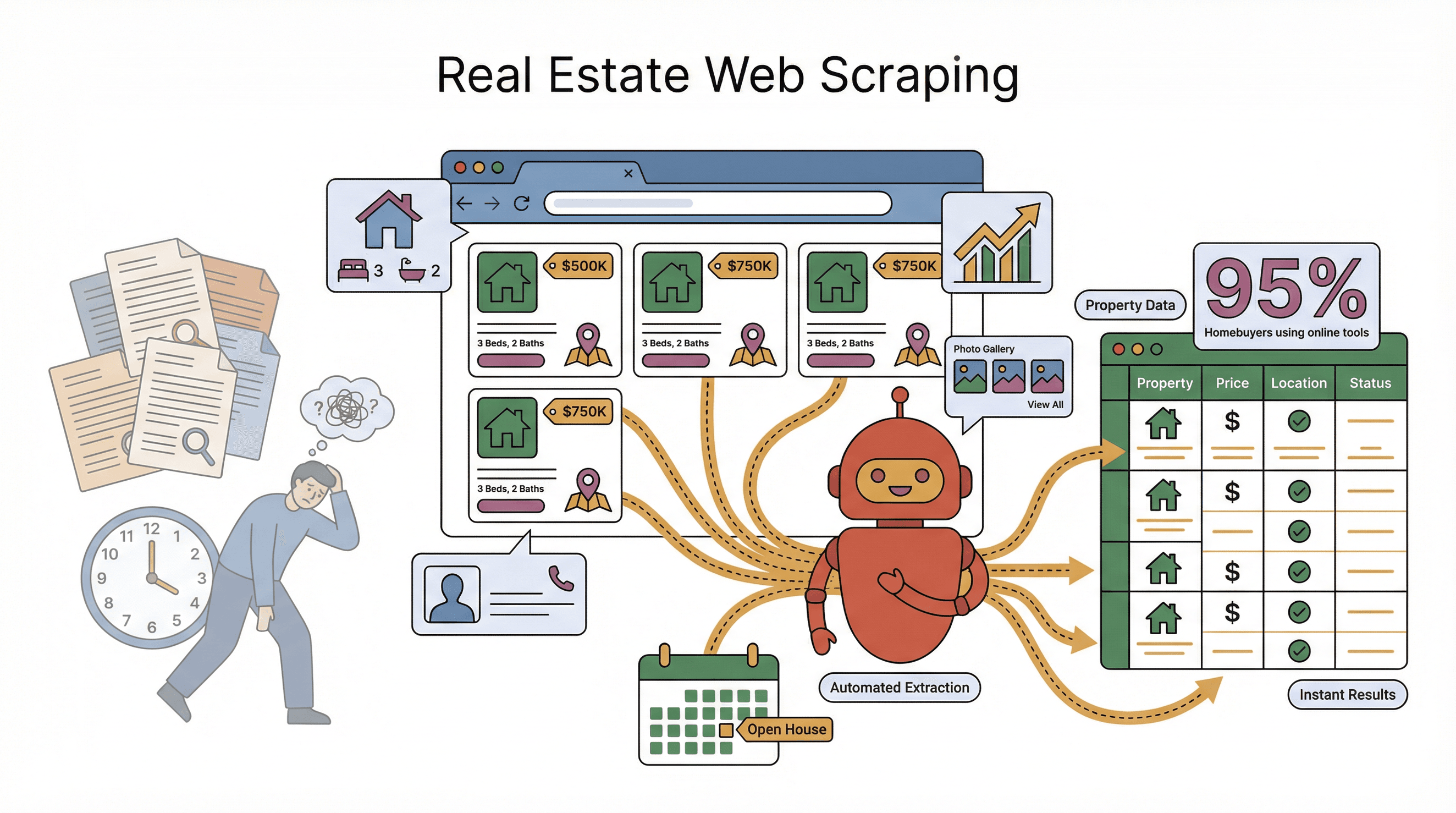
Let’s cut through the jargon. Real estate web scraping is just a fancy way of saying: “Let a digital assistant gather property info from websites for you.” Instead of spending hours copying details from Zillow, Realtor.com, or your favorite MLS, a web scraper can pull thousands of listings, prices, and agent contacts in minutes (). Think of it as having a superhuman intern who never gets tired, never makes a typo, and doesn’t ask for coffee breaks.
A housing market web crawler is the engine behind this magic. It systematically navigates listing platforms, grabs the data you care about, and organizes it into a neat spreadsheet. No more clicking through endless pages or squinting at tiny print. The difference in efficiency is massive—what used to be impossible for a person is now trivial for a scraper.
What kind of property data can you extract? Pretty much anything you see on a listing site:
- Listing details: Address, neighborhood, bedrooms, bathrooms, square footage, descriptions
- Pricing info: List price, rental rates, price history, recent changes
- Agent/seller info: Names, phone numbers, emails, agency details
- Images and media: Property photos, virtual tour links
- Meta-data: Listing date, status (for sale, sold, pending), open house times
- Public records: School ratings, census data, nearby amenities
With over in their search, this data is a goldmine—if you can actually collect it. Web scraping makes sure you’re not left behind, waiting for the next quarterly report while your competitors are already closing deals.
The Business Value of Property Data Extraction
Why bother with property data extraction? Because better data means better decisions—and in real estate, timing is everything. Here’s how web scraping is transforming the industry:
| Use Case | Data Extracted | Business Benefit |
|---|---|---|
| Market Analysis | Listings, prices, inventory, trends | Spot market shifts early, adjust pricing, invest ahead of competitors |
| Lead Generation | Owner/agent contacts, listing details | Build targeted lead lists in minutes, reach buyers/sellers before others |
| Competitor Benchmarking | Competitor listings, price changes, days on market | Optimize your pricing, react to competitor moves, win more listings |
| Investment Research | Price history, rental rates, neighborhood data | Accurate valuations, identify undervalued properties, improve ROI |
Let’s get specific. One PropTech firm combined scraped listings and social media signals to , giving investors a 47-day head start on “hot” areas. Another agency used automated competitor tracking to . The message is clear: automated data extraction isn’t just a tech upgrade—it’s a business accelerator.
Real Estate Web Scraping in Action: From Listing Platforms to Competitive Analysis
Let’s see how this plays out in the real world. Imagine you’re analyzing downtown condos. With a web scraper, you can pull all current listings from Zillow, Redfin, and your local MLS—addresses, prices, square footage, agent info, and even the main photo—into a single table. Instantly, you have a 360° view of the market that no single site can provide ().
Sales teams use this data to impress clients with up-to-date, filtered lists that match their criteria—no more manual searching or stale info. Operations and research teams track supply and demand by scraping new listings and sales weekly, enabling smarter project planning. Competitive intelligence? Scrape your rival’s listings, monitor their pricing, and spot gaps in their coverage—then swoop in with a better offer.
One agency noticed, through scraping, that high-end 1-bedroom rentals were sitting longer and getting price cuts, while 2-bedrooms moved fast. They shifted their investment focus and adjusted pricing on slow-moving units—decisions that would’ve been impossible with old-school, manual research.
And don’t forget subpages. Many sites hide juicy details—like agent bios or renovation notes—on individual property pages. A good web scraper can follow those links, grab the extra info, and enrich your dataset automatically. It’s like having X-ray vision for the housing market.
Why the Real Estate Industry Needs Smarter Web Scraping Tools
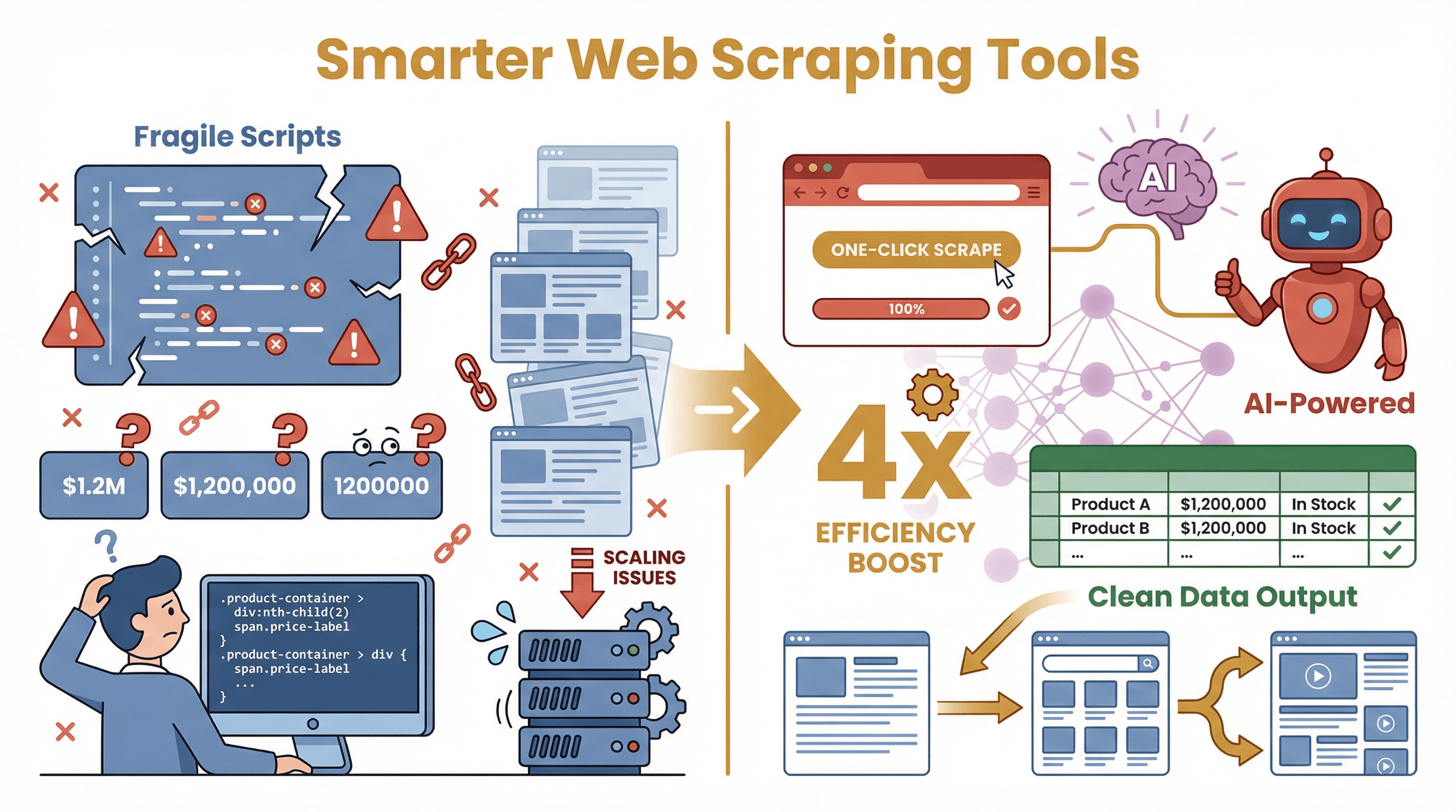 Here’s the catch: real estate web scraping isn’t always easy. Websites change layouts, data formats are all over the map, and anti-scraping measures can trip up old-school tools. Traditional methods—hiring a developer to write scripts or using basic point-and-click tools—often break when a site updates, leaving you with broken data pipelines and a lot of headaches ().
Common challenges include:
- Fragile scripts: One small website change and your scraper stops working.
- Inconsistent formats: Price as “$1.2M” here, “$1,200,000” there—good luck analyzing that.
- Technical complexity: Many tools require coding or fiddling with selectors—tough for non-tech teams.
- Scaling issues: Need to scrape hundreds of pages or handle multi-language listings? Traditional tools struggle.
That’s why the industry is moving toward AI-powered, user-friendly solutions. Modern tools like use machine learning to adapt to website changes, output clean, structured data, and make scraping accessible to anyone who can use a browser. No more wrestling with code or praying your script survives the next site update.
Thunderbit: Your All-in-One Solution for Real Estate Web Scraping
I’m genuinely proud of what we’ve built at Thunderbit, because we designed it to solve these exact pain points for real estate professionals. Here’s what sets apart:
- 2-Click AI-Powered Scraping: Click “AI Suggest Fields,” let the AI read the page and suggest columns (like Address, Price, Beds, Agent Name), then click “Scrape.” That’s it—no coding, no setup headaches ().
- AI Field Detection: Thunderbit intelligently picks out relevant fields, recognizes data types, and structures your table for you. You can tweak or rename columns, but the AI usually nails it on the first try.
- Handles Pagination and Subpages: Thunderbit auto-detects “Next” buttons, infinite scroll, and can follow links to detail pages for deeper data extraction ().
- Pre-Built Templates: For popular sites like Zillow and Redfin, just select a template and hit “Scrape”—no configuration needed. We keep these templates up-to-date so you don’t have to worry about website changes.
- Natural Language and Multi-Language Support: Describe your scraping schedule in plain English (“every Monday at 9am”), and Thunderbit handles it. Plus, it works across 34 languages—perfect for international listings.
- Free, Flexible Export: Export your data to Excel, Google Sheets, Airtable, or Notion with one click—no paywalls, no extra fees ().
- Cloud & Browser Hybrid: Scrape in the cloud for speed (up to 50 pages at once) or in your browser for login-required sites.
Thunderbit is designed so that if you can browse a website, you can scrape it—no technical background needed. And yes, my mom has actually used it (she still calls me for Wi-Fi help, but she can scrape listings like a pro).
Step-by-Step Guide: Extracting Property Data with Thunderbit
Let’s roll up our sleeves and walk through a real-world property data extraction project using .
Step 1: Setting Up Thunderbit for Real Estate Web Scraping
First, . Just search for “Thunderbit AI Web Scraper” in the Chrome Web Store, click “Add to Chrome,” and pin the icon for easy access. Sign up with your email or Google account—the free tier lets you scrape up to 6 pages (or 10 with a trial boost), which is plenty for a test run.
Step 2: Selecting and Preparing Your Target Website
Navigate to your target site—say, —and search for properties in your area of interest. Make sure you’re on the page showing the listings you want. If the site requires login for full details, log in first. Apply any filters (price range, property type) so you’re looking at exactly the data you need.
Step 3: Customizing Data Fields with AI Suggestions
Open the Thunderbit panel and click “AI Suggest Fields.” The AI scans the page and suggests columns—think Address, Price, Bedrooms, Bathrooms, Square Footage, Agent Name, Image URL, and more. Review the suggestions, tweak or rename columns if needed, or add custom fields for your specific needs. For most real estate projects, the AI’s picks will cover everything important.
Step 4: Scraping and Exporting Property Data
Click “Scrape” and watch Thunderbit fill your table in real time. If your search spans multiple pages, Thunderbit can auto-detect pagination and scrape all results—just enable the “Pagination” option if needed. For deeper data, use “Scrape Subpages” to visit each property’s detail page and enrich your dataset with extra fields like full descriptions, amenities, or agent bios.
When you’re done, hit “Export” and choose your format: Excel, CSV, Google Sheets, Airtable, or Notion. Your data is ready for analysis—no cleanup required.
Pro tip: Save your scraper setup for recurring projects, or schedule it to run automatically (more on that next).
Automating Real-Time Market Tracking and Price Updates with Thunderbit
Here’s where things get really powerful. With Thunderbit’s Scheduled Scraper feature, you can automate data collection and keep your market intelligence up to date—no manual effort required.
- Why schedule scraping? Because the market changes daily. With scheduled scrapes, you can track price changes, new listings, and inventory trends over time, building your own real-time analytics dashboard ().
- How to set it up: After configuring your scraper, set the schedule in plain English (“every day at 8am”). Thunderbit will run the job automatically, export the results to your chosen platform, and keep your data fresh.
- Sample workflow: Track rental prices in a target neighborhood by scraping listings weekly. Over a few months, you’ll see trends—rising rents, shrinking inventory—that can inform investment or pricing decisions.
Thunderbit scrapes at human-like speeds to avoid getting blocked, and the AI adapts to minor site changes, so your automated jobs keep running smoothly.
Ensuring Data Transparency for Smarter Real Estate Decisions
Transparent, structured data is the foundation of smart real estate decisions. Thunderbit outputs clean tables—each column clearly labeled, each row a specific property—so you can analyze, filter, and visualize with confidence. Want to compare average prices by neighborhood? Create a pivot table in Excel. Need to spot overpriced listings? Use conditional formatting in Google Sheets.
Thunderbit also lets you add Field AI Prompts to transform data on the fly—convert “$1.2 million” to 1200000, split “Open House: Nov 5, 2-4pm” into separate date and time fields, or translate listings from other languages. The result: uniform, analysis-ready data that everyone on your team can trust.
And because you’re scraping directly from public sources, you know exactly where your data comes from—no more black-box reports or stale info.
Comparing Real Estate Web Scraping Solutions: Thunderbit vs. Traditional Tools
| Capability | Thunderbit (AI-Powered) | Traditional Scraper |
|---|---|---|
| Ease of Use | 2-click, AI finds data for you—no code, intuitive | Manual setup, coding/selectors required |
| Setup Time | Seconds—AI auto-detects fields | Hours—manual mapping or scripting |
| Adaptability to Changes | AI adapts to site updates automatically | Breaks easily, needs constant fixes |
| Pagination & Subpages | Built-in, AI-driven handling | Manual configuration, complex for users |
| Data Export & Integration | Free, flexible—export to Sheets/Excel/Airtable/Notion | Often limited or paywalled |
| Learning Curve | Very low—designed for non-tech users | High—requires HTML/DOM or scripting |
| Scalability | High—cloud scraping for large jobs | Mixed—scripts can scale, but need expertise |
| Maintenance | Minimal—AI and templates handle changes | High—frequent fixes needed |
For most real estate teams, Thunderbit’s AI-first approach means less time fighting with tech, more time acting on insights.
Conclusion & Key Takeaways
The real estate world is moving at warp speed, and those who harness data are the ones closing deals, winning clients, and spotting trends before the competition. Web scraping unlocks this data advantage, letting you build targeted lead lists, analyze market shifts, and optimize pricing with confidence.
makes advanced property data extraction accessible to everyone—not just the techies. With its AI-powered, no-code workflow, you can go from “I wish I had that data” to “Here’s my spreadsheet, ready to go” in minutes. Whether you’re tracking listings, benchmarking competitors, or automating weekly market reports, Thunderbit is your all-in-one solution.
Ready to see it in action? and try scraping your favorite real estate site today. And if you want more tips, check out the for deep dives and tutorials.
Happy data hunting—and may your next real estate move be your smartest one yet.
FAQs
1. Is real estate web scraping legal and safe to use?
Web scraping is legal when you extract publicly available data and respect a website’s terms of service. Thunderbit encourages ethical use—avoid scraping personal info without consent, and always check local regulations.
2. What types of real estate data can Thunderbit extract?
Thunderbit can pull listing details (address, price, beds/baths), agent contacts, images, price history, and more from most real estate platforms. It also supports multi-language sites and can extract data from subpages for deeper insights.
3. How does Thunderbit handle websites with changing layouts or anti-scraping measures?
Thunderbit uses AI to adapt to layout changes automatically, reducing maintenance headaches. For sites with anti-scraping measures, Thunderbit’s cloud scraping and human-like browsing patterns help minimize blocks.
4. Can I automate recurring property data extraction with Thunderbit?
Absolutely. Thunderbit’s Scheduled Scraper lets you set up daily, weekly, or custom scraping jobs. Your data stays fresh, and you can export results directly to Google Sheets, Excel, Airtable, or Notion.
5. How does Thunderbit compare to other real estate scraping tools?
Thunderbit stands out for its ease of use, AI-powered field detection, built-in pagination and subpage support, and free, flexible export options. Unlike traditional tools, it’s designed for non-technical users and requires minimal setup or maintenance.
Want to dive deeper? Explore more guides on the or subscribe to our for step-by-step tutorials.
Learn More