

Three weeks ago, I sat down to research "personalized pet portrait" sellers on Etsy. Forty-seven browser tabs, two hours of copy-pasting, and one very messy spreadsheet later, I still didn't have a clean picture of pricing, reviews, or who was running ads versus ranking organically. That experience is what kicked off this whole project.
Etsy now has more than 100 million items for sale, 5.6 million active sellers, and 86.5 million active buyers. It's a massive, noisy marketplace — and if you're a seller, marketer, or ecommerce researcher trying to understand what's working in your niche, you need structured data, not a wall of open tabs. The problem? Etsy's anti-bot defenses have gotten seriously sophisticated in 2026. Between dynamic page structures, TLS fingerprinting, CAPTCHAs, and behavioral analysis, the days of writing a quick Python script and calling it a day are pretty much over.
I spent the last few weeks testing six Etsy scrapers head-to-head — from no-code AI tools to developer APIs — and I'm going to walk you through exactly what worked, what didn't, and which tool fits which kind of user. I'll also cover what data you can actually extract (and what you can't), the Etsy API vs. scraping debate, real use cases, and how to verify your results so you don't end up making decisions on bad data.
Why Scraping Etsy Is Harder Than You Think
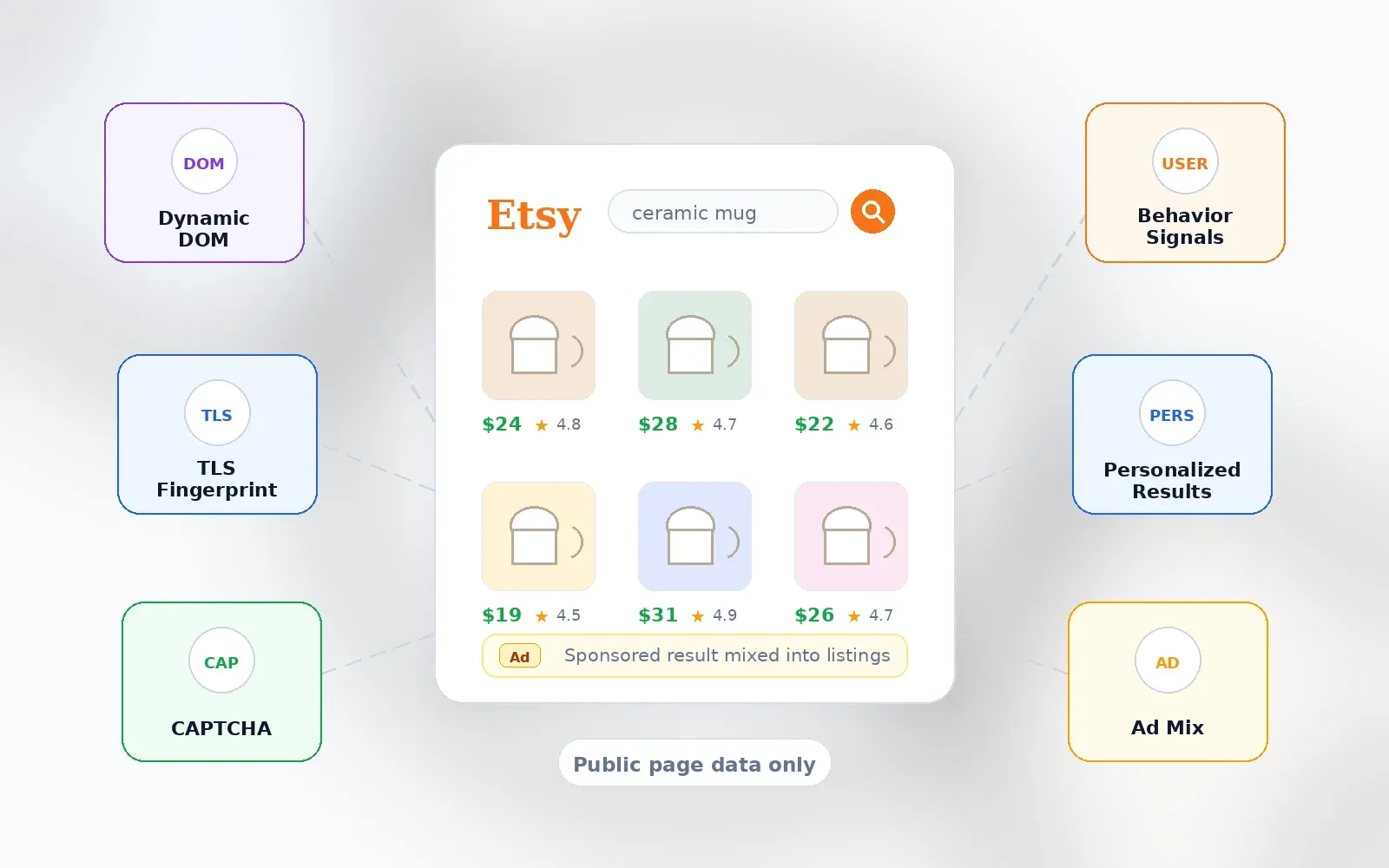
If you've ever tried to scrape Etsy and hit a wall, you're not alone. Etsy is not a static catalog — it's a dynamic, personalized marketplace. Search results, ads, badges, shipping info, and even the CSS class names on the page can shift between sessions, devices, and countries.
Here's the short version of what makes Etsy tricky:
- Dynamic page structure: Etsy's front end changes frequently. Selectors that worked yesterday might return blanks today. It's like Etsy changes the locks on its doors every few hours — the page still looks familiar to a shopper, but the data hooks a scraper depends on can shift without warning.
- Bot-management systems: Scraper vendors like Apify publicly note that Etsy uses "aggressive anti-bot protection" and that sessions may be blocked. Some Actor pages reference DataDome-avoidant URL patterns and Chrome TLS fingerprint impersonation. More broadly, Imperva's 2026 Bad Bot Report found automated traffic was 53% of all web traffic in 2025, and Akamai reported bots composed 42.1% of overall web traffic — ecommerce sites are a prime target.
- CAPTCHAs and rate limiting: High-volume scraping can trigger CAPTCHAs or outright blocks. Octoparse's Etsy template even notes that if a CAPTCHA appears, users can pause the task and solve it manually.
- Sponsored results and personalization: Etsy's search results mix organic and paid listings, and Etsy says ads appear in designated search-result ad spaces. If you're not tracking which results are ads, your competitive analysis could be way off.
None of this means scraping Etsy is impossible. It means the tool you pick matters a lot more than it used to.
What Data Can You Actually Scrape from Etsy?
This is the section I wish every competitor article included — and none of them do. Before you pick a tool, you need to know what's actually possible.
Data You Can Get from Etsy Search Results
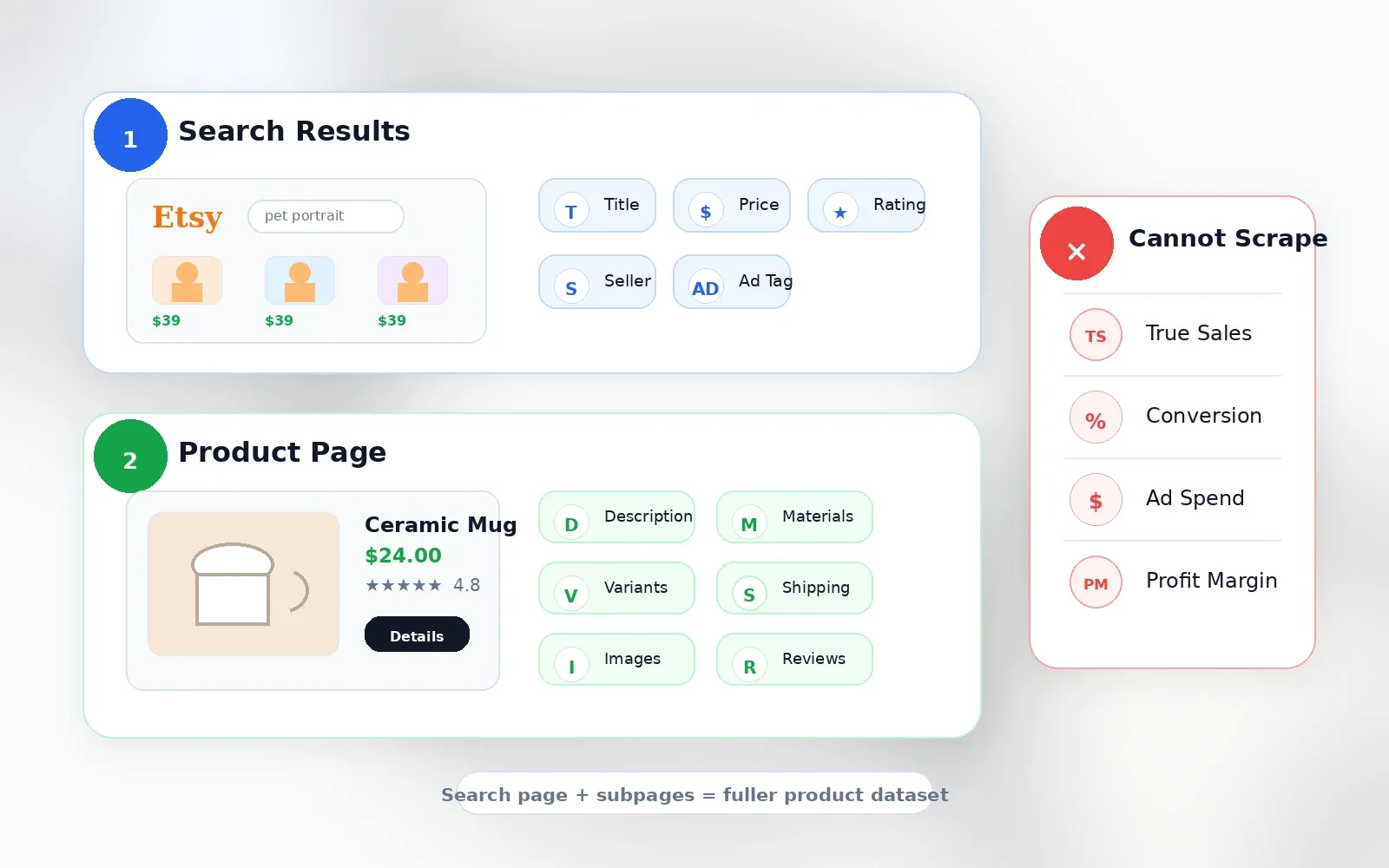
Search result pages give you breadth. Here's what you can typically extract from the grid:
- Product title
- Price (current, sale, original when visible)
- Currency
- Primary image URL
- Listing URL / listing ID
- Shop name (when visible — ads sometimes show "Ad by Etsy Seller")
- Rating
- Review count
- Free shipping badge
- Bestseller / Etsy's Pick / Star Seller badges
- Sponsored/ad label
- Page number and position
- Query, filter, sort, and country/session metadata
Apify's Automation Lab Etsy actor, for example, exposes fields like listingId, name, url, imageUrl, shop, shopId, price, originalPrice, currency, onSale, freeShipping, rating, availability, position, query, page, and scrapedAt — a useful validation of what's reliably extractable.
Data That Requires Visiting Each Product Page (Subpage Scraping)
Search cards are intentionally compact. If you're doing real product research, you need the fields hidden one click deeper:
- Full description
- Full image gallery and video URLs
- Variations and personalization options
- Item details (materials, attributes, dimensions)
- Processing time
- Shipping details and delivery estimates
- Seller/shop profile details and policies
- Review snippets or full reviews
- Related items
Etsy's own listing creation docs confirm sellers enter title, category, attributes, price, variations, personalization, description, shipping profile, processing/shipping details, and item dimensions/weight — so these fields exist, but you have to visit the page to get them.
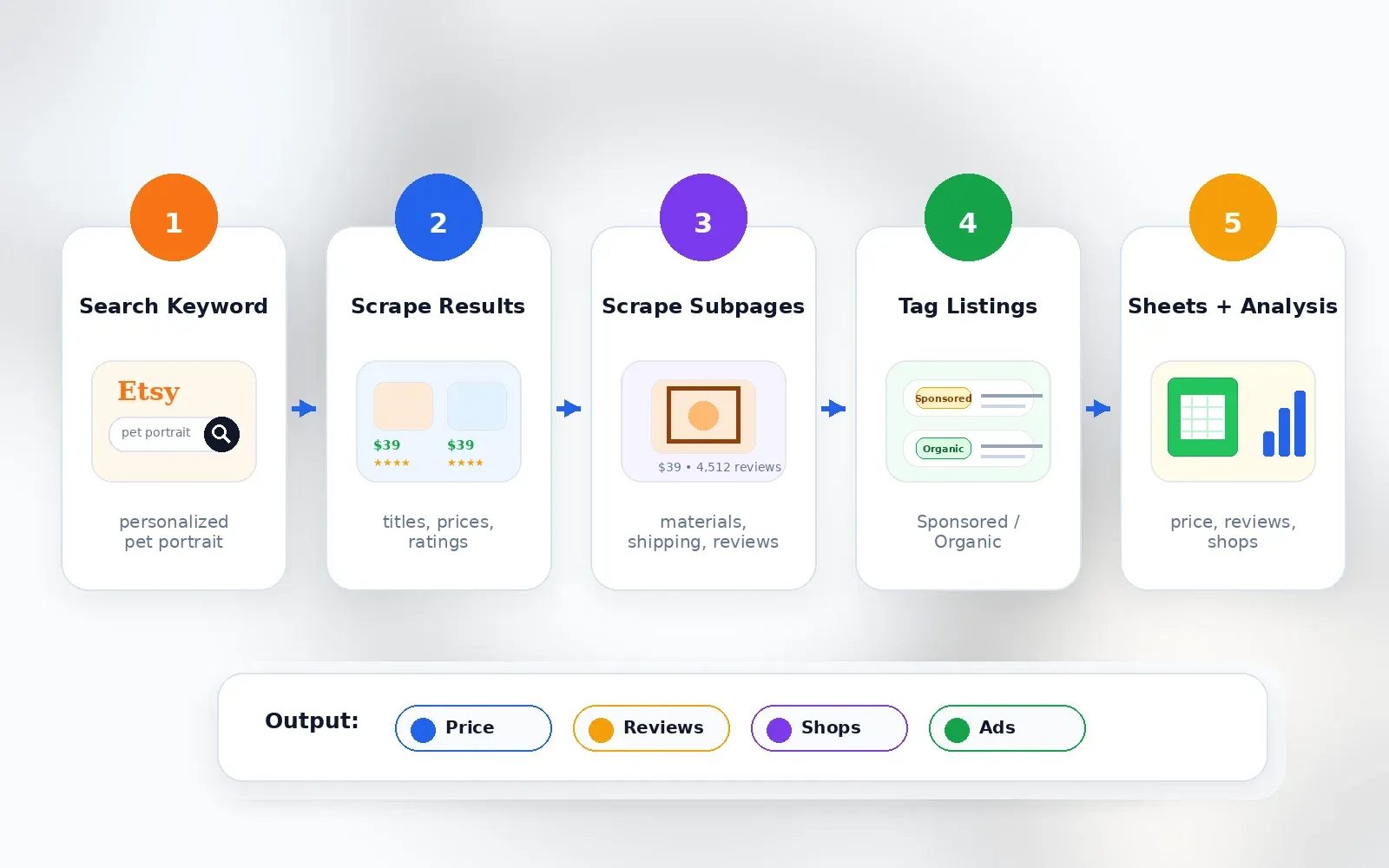
This is where subpage scraping becomes genuinely useful. With Thunderbit, for instance, you can scrape an Etsy search results page for titles, prices, and ratings, then click "Scrape Subpages" to have AI visit each individual listing and enrich the table with tags, materials, shipping details, and seller info — without any additional configuration. Thunderbit's Field AI Prompt also lets you add custom instructions per column (e.g., "categorize this product into Jewelry / Home Decor / Clothing").
Try Thunderbit for Etsy Subpage Scraping
What Scraping Cannot Tell You
I want to be upfront about this, because it's where a lot of tools lose credibility:
| Data Point | Available via Scraping? | Notes |
|---|---|---|
| Actual per-listing sales | No | Etsy does not publicly display exact sales for each listing. Shop-level sales may be visible, but listing-level sales are not. |
| Conversion rates | No | Seller analytics only, not public. |
| True keyword search volume | No | Etsy Marketplace Insights shows 30-day data inside seller tools, but this is not a public scrape field. |
| Ad spend / bid data | No | Not exposed as public listing data. |
| Profit margin | No | Price and shipping are visible; production cost, fees, and returns are not. |
Any tool claiming exact Etsy sales for competitor listings is estimating, not scraping a public fact. Tools like EverBee, eRank, and Alura openly describe using estimation algorithms, not direct data access.
Etsy API vs. Scraping: Which One Do You Actually Need?
This is a question I see all the time in forums: "Since the Etsy API does not provide keyword data, I guess they are scraping." The confusion is real, so here's a clear breakdown.
| Dimension | Etsy Official API | Web Scraping |
|---|---|---|
| Best use case | Managing your own shop, listings, inventory, orders, payments | Competitive research, search monitoring, price intelligence, subpage enrichment |
| Listings | Active listing search and detail endpoints | Any public search/listing/shop/review page |
| Own-shop sales/orders | Yes, with authorization/scopes | Not needed; use API/Shop Manager |
| Competitor exact sales | No | No (only estimates) |
| Keyword search volume | Not exposed as public Open API endpoint | Not directly; Marketplace Insights is seller UI |
| Rate limits | App-specific QPS/QPD; 429 handling | Tool/platform dependent |
| TOS posture | Official path when used within terms | Etsy terms restrict scraping without authorization |
| Output | JSON API responses | CSV/Sheets/JSON/HTML depending on tool |
The bottom line: if you need to manage your own shop, use the API. If you need to understand your competition, monitor pricing, or research a niche, scraping is the practical path. Tools like eRank and Alura likely combine API access with scraping and estimation — now you know why.
No-Code vs. Code: How to Pick the Best Etsy Scraper
Most people searching for "best Etsy scrapers" are not developers building infrastructure. They're sellers, marketers, VAs, or ecommerce researchers who want a usable table. Yet most competing articles focus on API tools or Python libraries. That's a mismatch.
Here's my decision framework:
| If you are... | Pick... | Why |
|---|---|---|
| Non-technical seller or marketer | Thunderbit | AI field suggestions, Chrome extension, subpage scraping, direct exports, scheduled scraping |
| Non-technical but likes visual workflows | Octoparse | Desktop visual workflow builder, templates, auto-detect, cloud mode |
| Freelancer or small agency building recurring Etsy jobs | Apify | Cloud Actors, scheduler, API, pay-per-result options |
| Developer building an internal pipeline | ScrapingBee or ZenRows | API transport, JS rendering, proxy/CAPTCHA handling; you control parser and storage |
| Enterprise data team | Bright Data | Managed scraper API/dataset, delivery options, uptime/compliance posture |
"No-code" for this audience means: no proxy setup, no CSS selectors, no terminal commands, no headless browser management, no custom retry logic, no database setup. You export directly to a spreadsheet or work app, and subpage enrichment doesn't require building click loops.
How I Evaluated These 6 Etsy Scrapers
I ran each tool against the same set of tasks: one Etsy search query ("personalized pet portrait"), one crowded product query ("gold huggie earrings"), one shop URL with many listings, ten listing detail pages for subpage enrichment, one scheduled weekly price-monitoring task, and one export to Google Sheets or CSV.
Here's what I scored on:
| Criterion | Why It Matters |
|---|---|
| Ease of use (no-code vs. code) | Etsy sellers should not need to become scraping engineers |
| Anti-bot/CAPTCHA handling | A tool that works for 10 rows but fails on page 2 is not useful |
| Data fields extractable | Search result fields are not enough for serious product research |
| Export options (CSV, JSON, Sheets, Airtable) | The real workflow usually ends in Sheets, Airtable, Notion, CSV, JSON, or BI tools |
| Pricing transparency (free tier + cost per 1K records) | Cost per usable row matters more than headline monthly price |
| Subpage enrichment | Tags, descriptions, shipping, materials, variations, and reviews live one click deeper |
1. Thunderbit
Thunderbit is the tool we built at Thunderbit specifically for non-technical users who need structured web data fast. It's a Chrome extension powered by AI — you open an Etsy page, click "AI Suggest Fields," and the AI reads the page structure and suggests columns like title, price, reviews, seller, URL, image, badge, and shipping. Then you click "Scrape" and get a table. That's it.
What makes Thunderbit especially useful for Etsy research is the subpage scraping feature. After scraping a search results page, you can click "Scrape Subpages" and Thunderbit's AI visits each individual listing to enrich your table with full descriptions, shipping details, materials, tags, and seller info — no additional configuration needed. I've used this flow to go from a search query to a complete competitive analysis spreadsheet in under ten minutes.
Key Features
- AI Suggest Fields: AI reads the Etsy page and recommends columns. No selectors, no guessing.
- 2-click scraping: Great for ad hoc product research.
- Subpage scraping: Enrich search results with full listing details in one click.
- Scheduled scraping: Set up weekly competitor price monitoring by describing the interval in plain language.
- Field AI Prompt: Add custom instructions per column (e.g., "categorize into Jewelry / Home Decor / Clothing" or "mark whether this listing appears personalized").
- Exports: Excel, Google Sheets, Airtable, Notion, CSV, JSON — all free to export.
- Cloud and browser mode: Cloud mode for faster public jobs; browser mode for pages where your current session/rendering matters (more accurate for dynamic fields like favorites).
- Open API: Extract endpoint accepts URL + JSON Schema and supports batch up to 100 URLs per request.
How Thunderbit Scrapes Etsy in 2 Clicks
- Navigate to an Etsy search results page (e.g., search for "personalized pet portrait").
- Click AI Suggest Fields — the AI suggests columns like title, price, reviews, seller, URL, image, badges.
- Click Scrape — data populates into a table.
- Optionally click Scrape Subpages on the listing URL column to enrich rows with full description, shipping details, materials, or reviews.
- Export to Google Sheets, Airtable, Notion, Excel, CSV, or JSON.
You can also check out our Thunderbit YouTube Channel for video walkthroughs.
Pricing
Thunderbit uses a credit-based model. There's a free tier/trial, and the Starter plan is about $15/month for 500 credits (or $108/year for 5,000 annual credits). Subpage scraping can consume more credits since each enriched row/page counts separately. See Thunderbit Pricing for the latest.
Pros and Cons
| Pros | Cons |
|---|---|
| No code, no selector setup | Credit-based; very large jobs require paid plan |
| AI field detection reduces page-change maintenance | Chrome extension requires browser installation |
| Subpage enrichment is built in | Not positioned as enterprise-scale dataset provider |
| Scheduled scraping and auto-export support monitoring workflows | Accuracy still needs spot-checking (true for all tools) |
| Works beyond Etsy — useful for general ecommerce research | Some fields remain unavailable because Etsy does not expose them |
Best for: Etsy sellers doing product research, marketers building competitor reports, ops teams monitoring pricing.
2. Apify Etsy Scraper
Apify is a cloud automation platform with a marketplace of "Actors" — pre-built scrapers you can run without managing your own infrastructure. For Etsy, there are multiple Actors available, including the Automation Lab Etsy Scraper and the CrawlerBros Etsy Scraper.
The Automation Lab Actor supports keyword search, category filtering, pagination (up to 5,000 products per run), and structured output with fields like listing ID, title, URL, image URL, shop, price, original price, currency, sale status, free shipping, rating, availability, position, query, page, and scrape timestamp. That's a solid set for search-result-level data.
Key Features
- Cloud-hosted (no local resources needed)
- Keyword search, category, and shop URL scraping
- Pagination handling
- JSON, CSV, Excel export
- Proxy integration (residential proxies available at extra cost)
- Scheduler for recurring jobs
- API access for pipeline integration
Pricing
The Apify Automation Lab Etsy Scraper charges per run plus per-product pricing: roughly $0.80–$3.45 per 1K products depending on your Apify plan. Platform plans start at ~$9/month (Starter) plus actor usage. Free plan includes $5/month platform usage.
Pros and Cons
| Pros | Cons |
|---|---|
| Ready-to-use Etsy Actors | Actor quality varies by maintainer |
| Cloud execution, scheduler, API, webhooks | Community Actors may lag when Etsy changes layout |
| Transparent per-result pricing on some Actors | Proxy costs add up at scale |
| JSON/CSV/Excel exports via Apify dataset | Custom subpage enrichment may require configuration |
| Good for recurring data pipelines | Low-code, not as simple as a browser extension for sellers |
Best for: Freelancers, small agencies, and semi-technical users who want a plug-and-play Etsy-specific data pipeline.
3. Bright Data
Bright Data is the enterprise option. If you're a large ecommerce company or data team scraping thousands of Etsy listings daily, this is built for you. Bright Data offers a dedicated Etsy Scraper API and a ready-made Etsy dataset with 18M+ records and 59 fields.
Their infrastructure is massive — 100M+ residential IPs, full-stack anti-bot handling (residential proxies, CAPTCHA solving, browser fingerprinting), structured JSON output, and compliance-first approach. They also have a no-code Data Collector option for users who don't want to touch code.
Key Features
- Pre-built Etsy data collector (no-code dashboard option)
- Full-stack anti-bot handling
- Structured JSON output with 59+ fields
- Managed delivery, webhook, and cloud storage integrations
- Enterprise SLAs, compliance tools, uptime guarantees
- Ready-made Etsy dataset for bulk analysis
Pricing
Bright Data's Etsy Scraper API starts at about $2.50/1K records on pay-as-you-go. The Etsy dataset has a $50 minimum. No free tier, but the Scraper API page advertises 1K trial requests. Scale plan is $499/month. This is premium pricing — it's not for someone scraping 50 listings on a Saturday afternoon.
Pros and Cons
| Pros | Cons |
|---|---|
| Most reliable and stable platform | Overkill for one-off seller research |
| Industry-leading anti-bot bypass | Premium pricing (barrier for small businesses) |
| No-code Data Collector option | Overwhelming number of features for simple tasks |
| Strict compliance tools | No free tier |
| Massive scale | Subpage customization may require API/configuration work |
Best for: Large ecommerce companies, data teams, and enterprises needing guaranteed uptime, legal compliance, and scale.
4. Octoparse
Octoparse is a desktop application with a visual point-and-click interface for building scraping workflows. If you like seeing exactly what your scraper is doing — clicking, scrolling, paginating — this is your tool.
Octoparse has an Etsy Product Scraper template that can extract product name, seller, rating, number of reviews, price, URL, and image URL by keyword. Their help center tutorial walks through scraping Etsy product information, including auto-detecting webpage data and creating workflows with pagination and page scroll.
Key Features
- Visual workflow builder (drag-and-drop)
- Built-in IP rotation
- CAPTCHA handling via third-party integrations (manual solve option noted on Etsy template)
- Infinite scroll and pagination support
- Cloud execution option
- Exports: CSV, Excel, JSON, database connections, Google Sheets (on paid plans)
Pricing
Free plan with local extraction and row limits. Standard plan is around $69/month annually. Paid tiers add cloud features, more export options, and higher row limits.
Pros and Cons
| Pros | Cons |
|---|---|
| Truly no-code visual interface | Desktop app is resource-heavy |
| Etsy template and tutorial exist | Complex subpage scraping requires manual workflow configuration |
| Handles pagination/infinite scroll | CAPTCHA may require manual solve in some cases |
| Exports CSV, Excel, JSON, databases | Slower than API-based solutions at large scale |
| Good learning path for no-code scraping | More setup friction than AI field suggestion tools |
Best for: Non-technical market researchers and business analysts who prefer a visual interface and want to customize extraction workflows without code.
5. ScrapingBee
ScrapingBee is a developer-focused API. You send it a URL, it returns rendered HTML (or extracted JSON if you set up extraction rules). There's no pre-built Etsy parser that hands you a spreadsheet — you write your own extraction logic in Python, JavaScript, or whatever language you prefer.
ScrapingBee's Etsy page says extractable fields can include product name, categories, price, stock status, shipping info, and size using JSON-formatted extraction rules. It also notes that Etsy scraping should consider premium proxies, request-rate handling, and terms risks.
Key Features
- JavaScript rendering
- Automatic proxy rotation
- CAPTCHA handling
- Simple REST API
- Supports Python/Node.js/any language
- Returns raw HTML or JSON; user parses and exports
Pricing
1,000 free API credits to start. Freelance plan $49/month for 250K credits and 10 concurrent requests. Startup $99/month for 1M credits. Business $249/month for 3M credits.
Pros and Cons
| Pros | Cons |
|---|---|
| Simple API integration | Code required (Python/JS) |
| JavaScript rendering and proxy options | Returns raw HTML (no automatic parsing for all fields) |
| Works with any language | No visual interface |
| Good for custom data pipelines | Subpage enrichment requires custom scripting |
| More flexible than visual tools | Export/storage/scheduling are your responsibility |
Best for: Python/JS developers building proprietary internal tools who need a reliable "transport layer" for getting Etsy HTML without blocks.
6. ZenRows
ZenRows is another developer API, similar to ScrapingBee but with a stronger emphasis on anti-bot bypass at scale. It handles CAPTCHAs, fingerprinting, and residential proxies automatically.
ZenRows' Etsy scraper page lists fields such as discount, URL, seller name, description, rating, product name, price, availability, category, image, reviews, and currency. It claims a 99.93% success rate and features like anti-CAPTCHA, premium proxies, stealth mode, smart extraction, and JavaScript rendering.
Key Features
- Anti-bot bypass (premium proxies, headless browsers)
- Auto-rotating headers
- JavaScript rendering
- Simple API calls
- High concurrency support
Pricing
14-day free trial with 1,000 basic results and 40 protected results. Developer plan $69.99/month for 250K basic / 10K protected results. Protected requests (for sites with anti-bot) cost more per request.
Pros and Cons
| Pros | Cons |
|---|---|
| Strong anti-bot bypass at scale | Code required |
| High success-rate claim for ecommerce | No parsing — only returns HTML/JSON |
| JS rendering, premium proxies, CAPTCHA handling | No visual interface |
| Good docs and API-first model | Subpage enrichment is entirely manual |
| Scales better than desktop tools | Not ideal for one-off seller research |
Best for: Development teams building large-scale Etsy data pipelines who need robust anti-detection at high concurrency.
Best Etsy Scrapers Compared: Side-by-Side Table
| Tool | No-Code? | Anti-Bot Handling | Free Tier/Trial | Export Formats | Subpage Scraping | Approx Cost per 1K | Best For |
|---|---|---|---|---|---|---|---|
| Thunderbit | ✅ Yes (Chrome ext.) | Cloud + browser modes; AI adapts fields | ✅ Free tier/trial | Excel, Sheets, Airtable, Notion, CSV, JSON | ✅ Built-in | ~$9.60–$30/1K rows (plan dependent) | Non-technical sellers & marketers |
| Apify Etsy Scraper | ⚠️ Low-code | Actor-dependent; proxy/session retries | ✅ Free $5/mo platform | JSON, CSV, Excel, API/webhooks | ⚠️ Requires config | ~$0.80–$3.45/1K products | Dedicated Etsy data pipelines |
| Bright Data | ⚠️ Dashboard + API | ✅ Full stack (residential proxies, CAPTCHA) | ❌ No (1K trial requests) | JSON, NDJSON, CSV, cloud delivery | ⚠️ Requires setup | ~$2.50/1K records PAYG | Enterprise-scale extraction |
| Octoparse | ✅ Yes (desktop app) | Built-in rotation; manual CAPTCHA option | ✅ Free plan (limited) | CSV, Excel, JSON, DB, Sheets (paid) | ⚠️ Workflow-based | Flat SaaS (from ~$69/mo) | Visual workflow builders |
| ScrapingBee | ❌ Code (API) | ✅ Proxy + JS rendering | ✅ 1K credits | JSON, raw HTML | ❌ Manual | ~$4.90/1K (Freelance est.) | Developers with Python/JS |
| ZenRows | ❌ Code (API) | ✅ Anti-bot bypass, premium proxies | ✅ 14-day trial | JSON, HTML | ❌ Manual | ~$7/1K protected | Dev teams needing scale |
No single tool wins everywhere. The best Etsy scraper depends on your technical skill level, budget, and scale needs. For sellers, 500 accurate rows in Google Sheets with title, price, reviews, seller, ad flag, and shipping are more valuable than 5,000 cheap raw HTML pages.
How to Verify Your Etsy Scraper's Accuracy (Don't Skip This)
I want to address something that comes up constantly in Etsy seller forums: data accuracy skepticism. One Reddit user reported that EverBee showed 0 sales for a sticker that had actually sold around 40 units over two months. Another said EverBee, Alura, and eRank numbers were "wildly incorrect" for their own connected shop. This isn't unique to those tools — any scraper can return stale or inaccurate data if you don't verify.
Here's the spot-check method I use:
- Scrape a small sample first — 20 to 50 rows.
- Manually open 3–5 listings from the sample.
- Check title, price, currency, review count, rating, free shipping, seller name, and listing URL against the live Etsy page.
- Check whether sponsored/ad rows are correctly labeled or separated.
- Re-run the same scrape after 24 hours and compare price/review changes.
- Add metadata columns to your export: scraped_at, source_url, query, page, position, country, tool, run_id.
Freshness matters. Tools that scrape in real time (like Thunderbit's browser scraping mode, which accesses the page in your own logged-in browser) tend to return more current results than batch jobs with unknown cache ages. Etsy's own API terms require API users not to display listing content more than 6 hours older than the corresponding Etsy site information — a useful benchmark for how quickly Etsy data can go stale.
And one more time for the people in the back: any tool claiming exact per-listing sales figures is estimating, not scraping a public fact. Be skeptical of precision claims.
Real Use Cases: Picking the Best Etsy Scraper for Your Job
"What's Selling in My Niche?" — Competitive Product Research
A seller wants to see top listings for "personalized pet portrait" — price range, review counts, bestseller tags, free shipping, shop names, and listing URLs.
Best fit: Thunderbit (2-click scrape of search results, AI suggests all relevant columns, export to Google Sheets for analysis) or Apify (set up a recurring Actor for the same query weekly).
Tip: Include the ad/sponsored flag and position. Etsy ads occupy designated search-result spaces, so page-one data is not purely organic.
"Monitor Competitor Pricing Weekly" — Price Tracking
A shop owner tracks 50 competitor listings for price changes over time.
Best fit: Thunderbit's Scheduled Scraper (describe the interval in plain language, input URLs, done) or Bright Data (for enterprise-scale monitoring across thousands of SKUs). Apify also works well for lower-cost recurring cloud jobs.
Tip: Always track scraped_at, currency, country, and whether the listing was on sale. A price without timestamp and location is weak evidence.
"Build a Product Catalog for My Store" — Bulk Data Extraction
Extract 500+ listings with images, titles, prices, descriptions, and materials.
Best fit: Thunderbit (subpage scraping enriches each listing, image extraction exports to Airtable/Notion) or Octoparse (visual workflow for bulk extraction). Apify works if JSON output and cloud execution matter more than visual workflow.
Tip: Don't reuse copyrighted descriptions or images without permission. Use scraped creative content for analysis, not copying.
"I'm Building an Etsy Data Pipeline" — Developer Use Case
A developer needs raw structured JSON at scale with anti-bot handling, custom schema, retry logs, and a warehouse pipeline.
Best fit: ScrapingBee or ZenRows as API access/rendering layers. Apify if the Actor ecosystem and managed datasets are preferred. Thunderbit's Open API if JSON Schema extraction and batch up to 100 URLs fit the pipeline.
Tip: Separate crawling, parsing, validation, storage, and reporting. The tool that gets the HTML is only one part of the pipeline.
A Note on Sponsored Listings
Forum users regularly complain that a massive chunk of top Etsy results are just sponsored ads. One Reddit user discussing uBlock filters described seeing "Ad by Etsy Seller" results repeatedly. Another seller described seeing the same item as both an ad and an organic result.
Practical scraping advice:
- Capture is_sponsored where visible
- Separate paid from organic positions
- Scrape beyond page 1
- Deduplicate by listing ID/canonical URL, not title (ads and organic rows can overlap)
- Run a clean logged-out search and a logged-in/browser-session search if your research question depends on personalization
Legal and Ethical Considerations for Scraping Etsy
I'll keep this brief. Etsy's Terms of Use say users may not crawl, scrape, or spider pages without express permission. Etsy's API Terms also prohibit using automated systems to access, analyze, or scrape Etsy site/API/data unless expressly authorized.
U.S. legal precedent is nuanced. Cases like hiQ v. LinkedIn are favorable to some public-data scraping theories, but they don't erase contract, copyright, privacy, or platform-enforcement risk. Bright Data has been involved in relevant litigation around these issues.
My advice: use Etsy's official API where it covers your use case, collect only public and necessary data, avoid personal/private data, respect rate limits and access controls, and do not republish copyrighted photos or descriptions without permission. This is not legal advice — consult a professional for specific situations.
Conclusion: Which Etsy Scraper Is Best for You?
After testing all six, my honest take is that the "best" Etsy scraper depends entirely on who you are and what you need:
- Non-technical sellers and marketers: Thunderbit. Two clicks, AI-powered, subpage enrichment, direct exports to Sheets/Airtable/Notion. Start with the free tier and see how far it gets you.
- Dedicated Etsy data pipelines: Apify. Cloud Actors, scheduler, API, transparent per-result pricing.
- Enterprise scale: Bright Data. Managed infrastructure, compliance, SLAs, massive proxy pool.
- Visual workflow preference: Octoparse. Point-and-click desktop builder with templates.
- Developers: ScrapingBee or ZenRows. API transport, JS rendering, anti-bot — you build the rest.
My final tip: start with a free tier or trial, run a spot-check for accuracy, and scale up only after you've validated the data quality. Don't commit to a paid plan until you've confirmed the tool actually returns the fields you need, in the format you need, with the freshness you need.
And may your Etsy data always be clean, structured, and free of surprise sponsored listings.
FAQs
What is the best Etsy scraper for non-technical users?
Thunderbit is the strongest pick for non-technical sellers and marketers. It's a Chrome extension where you click "AI Suggest Fields" on any Etsy page, review the suggested columns, click "Scrape," and export to Google Sheets, Airtable, Notion, or Excel. Subpage scraping and scheduled scraping are built in. Octoparse is also a solid option if you prefer a visual desktop workflow builder.
Is it legal to scrape Etsy product data?
Scraping publicly available web data has favorable U.S. legal precedent in some contexts (e.g., hiQ v. LinkedIn), but Etsy's Terms of Use and API Terms restrict crawling, scraping, and automated access without authorization. For commercial use, it's wise to consult a legal professional, use the official API where possible, and avoid copying copyrighted content like product photos or descriptions.
What data can you extract from Etsy with a scraper?
From search results: titles, prices, images, listing URLs, seller/shop names, ratings, review counts, badges (bestseller, free shipping, Star Seller), and sponsored/ad labels. From individual listing pages (via subpage scraping): full descriptions, materials, attributes, shipping details, variations, seller policies, and reviews. Actual per-listing sales numbers, conversion rates, and true keyword search volume are not directly available via scraping — any tool showing those is estimating.
Can I scrape Etsy without getting blocked?
Yes, with the right tool. Etsy uses anti-bot controls including dynamic page structures, TLS fingerprinting, CAPTCHAs, and rate limiting. Tools like Thunderbit (cloud and browser scraping modes), Bright Data (enterprise proxy infrastructure), ScrapingBee (JS rendering and premium proxies), and ZenRows (anti-bot API) handle these measures automatically. For small-scale research, Thunderbit's browser mode — which uses your own logged-in session — tends to be reliable and returns current data.
How much does an Etsy scraper cost?
Free tiers or trials are available from Thunderbit, Apify, Octoparse, ScrapingBee, and ZenRows. Bright Data offers trial requests but no ongoing free tier. Paid plans typically start at $49–$69/month for developer/no-code tools. Per-result Etsy-specific APIs range from about $0.80–$3.45 per 1K records (Apify) to $2.50/1K (Bright Data PAYG). Thunderbit's credit-based model starts at about $15/month. The real cost depends on how many rows you need, whether you use subpage enrichment, and how often you scrape.
Try Thunderbit for Etsy Scraping Get Started Free
Learn More




