

There’s something oddly timeless about the Yellow Pages. Decades after the last phone book landed on my parents’ doorstep, the digital version is still a goldmine for sales and marketing teams. But here’s the twist: while the data is richer than ever, the process of actually collecting and using it has gotten a lot more complex. I’ve seen too many teams waste hours copying and pasting business info, only to end up with messy spreadsheets and missed opportunities. That’s why I’m a big believer in using smart tools—like Thunderbit—to turn Yellow Pages data into a real competitive edge.
Try Thunderbit Yellow Pages Scraper
In this guide, I’ll break down why Yellow Pages scraping is still a must-have for modern lead generation, how to clarify your data goals, and the best practices (plus a few hard-won tricks) for getting the cleanest, most actionable data possible. Whether you’re a seasoned sales pro or just tired of manual data entry, let’s dive into how you can maximize your efficiency—and your results—with a Yellow Pages Scraper.
What is Yellow Pages? Unlocking Its Data Value for Sales & Marketing
The Yellow Pages isn’t just a relic of the analog age—it’s one of the world’s largest, most comprehensive business directories, now fully digital and more relevant than ever. Digital Yellow Pages platforms, including the classic YP.com, Yell, and PagesJaunes, collectively list millions of businesses worldwide, spanning every industry you can imagine.
What makes Yellow Pages so valuable? It’s the depth and breadth of information: business names, phone numbers, email addresses, physical locations, websites, business categories, hours of operation, and even customer reviews. For sales and marketing teams, this is a treasure trove for:
- Lead generation: Find verified, active businesses in your target market.
- Market research: Analyze competitors, spot market saturation, or discover underserved niches.
- Local targeting: Zero in on businesses by city, state, or zip code for hyper-local campaigns.
- B2B outreach: Build tailored lists for cold calling, email marketing, or direct mail.
And unlike random scraped lists, Yellow Pages data is typically more up-to-date and focused on businesses that are actually operating and responsive to inquiries (BrowserAct). That means less wasted effort and better response rates.
Clarifying Your Data Needs Before Using a Yellow Pages Scraper
Before you even open your favorite Yellow Pages Scraper, take a minute to get crystal clear on what you actually need. Trust me, this step will save you from drowning in irrelevant data later.
Define Your Target Criteria
Ask yourself:
- Which industries or business categories are you targeting? (e.g., restaurants, dentists, auto repair)
- What geographic areas matter? (city, state, zip code, or even country)
- What company sizes are relevant? (some directories include employee count or years in business)
- Are there specific keywords or specialties you care about? (e.g., “vegan bakery,” “solar installer”)
By narrowing your focus, you’ll avoid the classic pitfall of collecting thousands of contacts you’ll never use. It’s all about quality over quantity.
Common Data Fields to Extract
Most sales and marketing teams are after:
- Business name
- Phone number
- Email address (if available)
- Physical address (street, city, state, zip)
- Website URL
- Business category/type
- Description or specialties
- Hours of operation
- Ratings or reviews
Setting clear goals for which fields you need will help you configure your scraper for maximum precision (Octoparse).
Choosing the Right Filters for Your Yellow Pages Scraper
Yellow Pages sites usually offer robust search and filtering options. Use them! For example:
- Industry + Location: “Plumbers” in “San Diego, CA”
- Keyword + Category: “Vegan” in “Restaurants”
- Business Size: Filter by “small business” or “enterprise” (if available)
The more specific your filters, the more relevant your results—and the less cleanup you’ll need later (Apify).
Scrape Yellow Pages Data with AI Extract business leads from Yellow Pages in just a few clicks using Thunderbit's AI-powered web scraper. Get Started Free
By leveraging these filters, you ensure your data is both relevant and manageable, setting the stage for efficient scraping and actionable insights.
Navigating Complex Yellow Pages Pages: How to Scrape Efficiently
Here’s where things get tricky. Yellow Pages sites are designed for human browsing, not bulk data extraction. You’ll run into:
- Multi-page listings: Hundreds of results spread across dozens of pages.
- Dynamic content: Listings that load as you scroll or click “next.”
- Nested details: Key info (like emails or descriptions) hidden on business detail subpages.
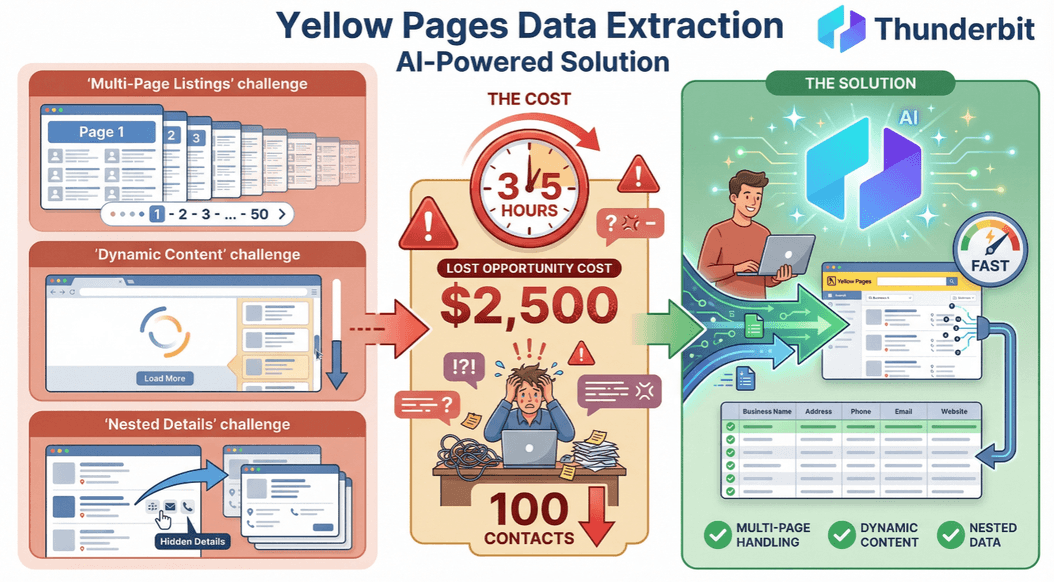 Manual extraction? Forget it. It can take 3–5 hours to collect just 100 contacts by hand—and every hour spent is $2,500 in lost opportunity cost for a typical sales team.
That’s why I’m a fan of modern, AI-powered tools like Thunderbit, which are built to handle these challenges head-on.
Leveraging “AI Suggest Fields” for Smarter Data Extraction
With Thunderbit, you don’t need to be a data scientist to get great results. Just open the Chrome extension, navigate to your Yellow Pages search results, and click “AI Suggest Fields.” Thunderbit’s AI scans the page and automatically identifies the most relevant columns—think “Business Name,” “Phone,” “Address,” “Website,” and more (Thunderbit Yellow Pages Scraper).
Benefits:
- No coding or manual setup required
- AI adapts to layout changes (no more broken templates when the site updates)
- Non-technical users can get started in minutes
You can tweak the suggested fields, add custom columns, or even use AI prompts to extract and label data exactly how you want it.
Using “Subpage Scraping” to Capture Deep Business Details
Many Yellow Pages listings only show the basics upfront. The real gold—emails, detailed bios, specialties—often lives on each business’s detail page. Thunderbit’s “Subpage Scraping” feature lets you automatically visit every subpage and enrich your main table with extra info (Thunderbit Yellow Pages Scraper).
For example, after scraping a list of restaurants, you can use subpage scraping to pull in:
- Owner or manager names
- Direct email addresses
- Social media links
- Menu highlights or specialties
This is a game-changer for building richer, more actionable lead lists—without hours of manual clicking.
Key Steps in Data Processing: Cleaning, Formatting, and Integration
Scraping is just the first step. To actually use your data (and avoid embarrassing mistakes), you need to clean, format, and organize it before importing into your CRM or outreach tools.
Cleaning and Deduplication
- Remove duplicates: Even the best scrapers can pull the same business twice if it appears in multiple categories.
- Filter out incomplete entries: Drop rows missing critical info (like phone or email) unless you plan to enrich later.
- Validate emails and phone numbers: Use built-in tools or external validators to catch typos and formatting errors (Perfect Data Entry).
Automating Data Formatting and Tagging with Thunderbit
Thunderbit’s AI can automatically:
- Standardize phone numbers (e.g., E.164 format for CRM compatibility)
- Format addresses into separate fields (street, city, state, zip)
- Tag and categorize leads based on keywords, location, or business type
- Translate or summarize descriptions for easier segmentation
This makes it much easier to segment your list, assign leads to the right reps, or trigger automated workflows.
Preparing Data for CRM Import
- Map fields: Make sure your scraped columns match your CRM’s required fields (e.g., “Business Name” → “Account Name”).
- Export in the right format: Thunderbit lets you export directly to Google Sheets, Airtable, Notion, CSV, or Excel.
- Test with a small batch: Import a sample to catch any mapping or formatting issues before uploading your whole list.
Five Proven Tips to Boost Your Yellow Pages Scraping Efficiency
Want to scrape smarter, not harder? Here are my top five tips:
| Tip | Description |
|---|---|
| 1. Schedule scraping during off-peak hours | Many sites throttle or block scrapers during business hours. Thunderbit lets you schedule jobs to run overnight or on weekends for smoother, faster results. |
| 2. Use IP rotation or incognito mode | Avoid getting blocked by switching IPs or running your browser in private mode. For high-volume jobs, consider a VPN or proxy service (ScrapingBee). |
| 3. Limit request rates | Set your scraper to mimic human browsing speeds—too many rapid requests can trigger anti-bot defenses. |
| 4. Regularly update scraping templates | Even with AI, it’s smart to review your setup after major site updates. Thunderbit’s AI adapts automatically, but a quick check never hurts. |
| 5. Monitor and validate scraped data | Spot-check your results for accuracy, especially after long runs or big jobs. Use Thunderbit’s preview and validation features to catch issues early (Perfect Data Entry). |
Scheduling and Automating Your Yellow Pages Scraper Tasks
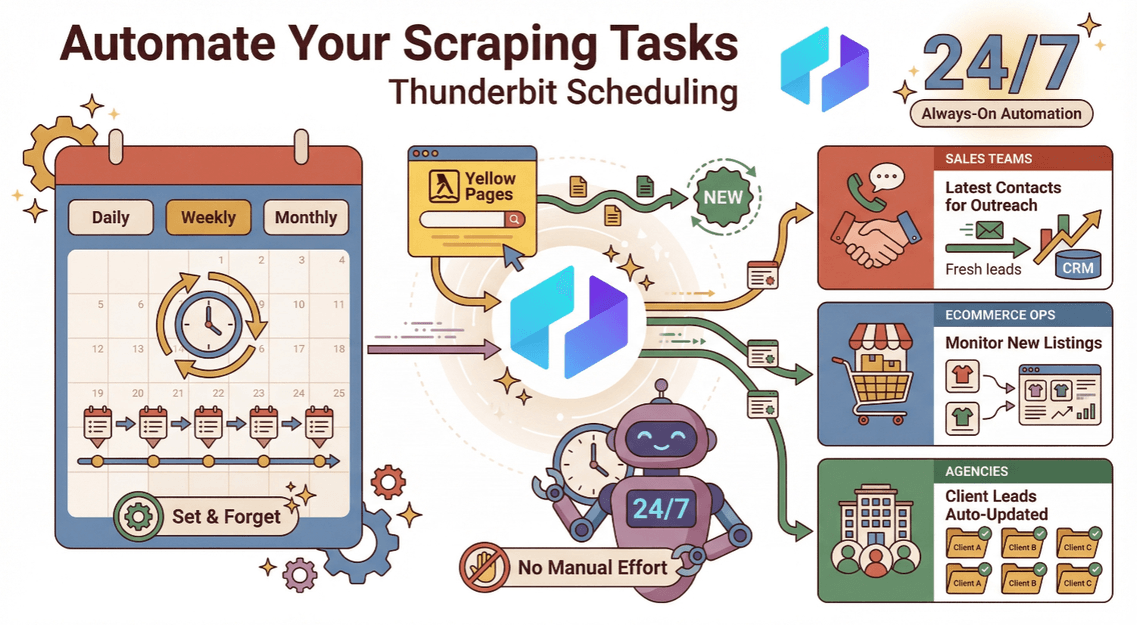 Thunderbit’s scheduling feature is a lifesaver for teams that need fresh leads on a regular basis. Just set your desired interval (daily, weekly, monthly), and Thunderbit will automatically scrape and update your data—no manual effort required. This is perfect for:
- Sales teams: Always have the latest contacts for outreach.
- Ecommerce ops: Monitor new store openings or competitor listings.
- Agencies: Keep client lead lists up to date without lifting a finger.
Integrating Yellow Pages Scraper Results into Your Sales Workflow
Once your data is clean and formatted, it’s time to put it to work. Thunderbit supports direct export to all the major tools sales and marketing teams use:
- Google Sheets: For quick collaboration and analysis.
- Airtable: For more advanced database-style workflows.
- Notion: For integrated project management and CRM.
- CSV/Excel: For bulk import into Salesforce, HubSpot, Zoho, or your CRM of choice.
Pro tip: Always double-check your field mappings and run a test import to avoid overwriting or mislabeling data.
What Is Data Scraping and How to Do It in 2025 Learn more about data scraping best practices and strategies in our comprehensive guide. Get Started Free
By integrating your Yellow Pages data directly into your workflow, you can accelerate outreach, improve targeting, and drive better results for your team.
Common Pitfalls to Avoid When Using a Yellow Pages Scraper
Even the best tools can’t save you from a few classic mistakes. Here’s what to watch out for:
- Scraping irrelevant data: Failing to set clear filters leads to bloated, unfocused lists.
- Not cleaning duplicates: Duplicate contacts waste time and annoy prospects.
- Ignoring legal considerations: Always check Yellow Pages’ terms of service and local data privacy laws before scraping (Apify).
- Overloading the site: Too many requests too quickly can get you blocked—pace yourself.
- Skipping data validation: Don’t assume scraped data is perfect. Always review and clean before importing.
Thunderbit’s built-in features—like AI field suggestions, deduplication, and export validation—help you avoid most of these headaches right out of the box.
Conclusion: Key Takeaways for Maximizing Yellow Pages Scraper Efficiency
Yellow Pages scraping is still one of the most effective ways to build targeted, high-quality lead lists for sales and marketing. But to really maximize your efficiency (and avoid the classic pitfalls), you need to:
- Clarify your data goals and filters before you start
- Leverage advanced features like AI field suggestion and subpage scraping
- Clean, format, and tag your data for easy CRM integration
- Automate and schedule your scraping to keep data fresh
- Monitor, validate, and stay compliant at every step
With Thunderbit’s Yellow Pages Scraper, you can go from hours of manual data entry to a clean, actionable lead list in just a few clicks. It’s the tool I wish I’d had years ago—and it’s helping thousands of teams worldwide work smarter, not harder.
Download Thunderbit Chrome Extension
Ready to see for yourself? Download Thunderbit’s Chrome Extension and start building your next high-converting lead list today. And if you want to dig deeper into web scraping best practices, check out the Thunderbit Blog for more guides and tips.
Start Scraping Yellow Pages with AI Get Started Free
FAQs
1. Is it legal to scrape data from Yellow Pages?
Scraping public business directories is generally legal for business use, but always check the specific site’s terms of service and comply with local data privacy laws. Avoid scraping personal data or using scraped info for spamming.
2. What’s the best way to avoid getting blocked while scraping Yellow Pages?
Schedule your scraping during off-peak hours, use incognito mode or IP rotation, and limit your request rate to mimic human browsing. Thunderbit’s scheduling and browser scraping options help minimize the risk of blocks.
3. Which fields should I extract from Yellow Pages for sales leads?
Focus on business name, phone number, email, address, website, business category, and any specialty info relevant to your campaign. Use Thunderbit’s “AI Suggest Fields” to automatically detect the most useful columns.
4. How do I import scraped Yellow Pages data into my CRM?
Export your data from Thunderbit as CSV, Excel, Google Sheets, Airtable, or Notion. Map your fields to your CRM’s requirements, and always test with a small batch before importing the full list.
5. How can I keep my Yellow Pages lead lists up to date?
Use Thunderbit’s scheduling feature to automate recurring scrapes. This ensures your lists are always fresh and relevant—perfect for ongoing outreach and market monitoring.
Happy scraping—and may your lead lists always be clean, current, and full of opportunity.




