

Picture this: You’re at a bustling conference, badge on, coffee in hand, and someone walks up and says, “Hey, I’ve been reading about your product—can you tell me more?” That’s the dream, right? In sales, we call this a “warm lead”—someone who’s already interested, already halfway through the door, and just needs a nudge to become your next customer. But what if you could find these warm leads not just at events, but everywhere—hidden in reviews, forums, directories, and even the nooks and crannies of the web? That’s exactly what I’ve been obsessed with at Thunderbit, and it’s why I think every modern sales team should rethink how they find and work with warm leads.
Let’s dive into what makes a lead “warm,” why these prospects are worth their weight in gold, and how new tools (yes, including AI web scrapers like Thunderbit) can help you build a pipeline that’s not just bigger, but smarter and more likely to convert.
Warm Leads 101: What Are Warm Leads and Why Should You Care?
Not all leads are created equal. If you’ve ever spent a day cold-calling, you know the difference between reaching out to a total stranger and talking to someone who’s already heard of you. In sales, we typically bucket prospects into three categories: cold, warm, and hot leads (UserGems).
Cold leads are people or businesses with little or no prior contact with your company. They may not even know you exist. Reaching them means starting from scratch—building awareness, trust, and interest, one awkward voicemail at a time.
Warm leads have already engaged with your brand in some way, but haven’t bought yet. Maybe they signed up for your newsletter, downloaded an eBook, attended a webinar, or interacted with you on social media (Bardeen). They know who you are and have shown some interest. They’re not ready to buy this second, but they’re much closer than a cold lead.
Hot leads are the unicorns—prospects actively looking for a solution like yours, maybe even reaching out for a demo or pricing. They’re ready to buy, and you just need to not mess it up.
So, why focus on warm leads? Because they strike the perfect balance: they already trust your brand and have some intent, but there’s still room to nurture and guide them toward a sale. In fact, warm leads are statistically more likely to convert than cold prospects, and they move faster through the sales funnel (Warmly). That’s a win-win for everyone—except maybe your competitors.
The Sales Value of Warm Leads: From Interest to Conversion
Let’s get real: Sales is a numbers game, but it’s also an efficiency game. Chasing cold leads can feel like trying to sell snow cones in Antarctica—lots of effort, not much payoff. The data backs this up: around 80% of new leads never become customers.
But warm leads? That’s a different story. Warm outreach calls have been shown to achieve a 20–30% conversion rate, compared to the ~1% success rate of cold calls. That’s not just a little better—it’s a whole new ballgame.
Here’s how the numbers stack up (LeadBoxer):
| Lead Type | Approx. Conversion Rate | Effort to Nurture/Close | Typical Sales Outcome |
|---|---|---|---|
| Cold Lead | ~1–2% | High effort—build trust from scratch | Long sales cycle; few become customers |
| Warm Lead | ~10–20% | Moderate effort—already know your brand | Shorter sales cycle; many become customers with proper follow-up |
| Hot Lead | 20%+ | Low effort—ready to buy | Quick sales cycle; likely to close |
Warm leads don’t just convert better—they also convert faster. Studies show that nurturing leads can shorten the sales cycle by around 23% on average. And because these prospects already trust you, they’re more likely to become loyal, long-term customers.
Real-world scenario: Imagine two sales reps. Alex spends his week cold-calling 100 people and sets 2 meetings. Brianna follows up with 20 warm leads from a recent webinar and sets 6 meetings, closing 3 deals in a month. Alex? Maybe 1 deal, after a lot more chasing. Warm leads are simply a better use of your time and energy.
Traditional Ways to Generate Warm Leads (And Their Limitations)
So, how do most companies try to generate warm leads? There are a few tried-and-true methods:
- Website forms & gated content: Offering eBooks, whitepapers, or case studies in exchange for contact info.
- Email newsletters & social media engagement: Nurturing followers over time until they’re ready to buy.
- Events and webinars: Meeting prospects face-to-face or virtually.
- Referrals: Getting introduced by existing customers or network contacts.
- Inbound inquiries: Prospects who reach out directly via your website or phone.
Each of these channels has its strengths, but also some serious drawbacks. Forms can generate lots of leads, but the quality is all over the place (and let’s be honest, how many times have you downloaded a whitepaper just for the stats?). Social media is great for building community, but it’s hard to tell who’s actually ready to buy. Events are expensive and time-consuming, and referrals—while golden—aren’t something you can control or scale easily.
And let’s not forget the biggest pain point: manual effort. Leads come in from all directions, data is scattered, and someone has to piece it all together. If you’re slow to follow up, those warm leads can go cold in a hurry (Spotio).
Comparing Lead Generation Channels
Here’s a quick look at how these traditional channels stack up:
| Channel | Pros 🟢 | Cons 🔴 |
|---|---|---|
| Website Forms / Gated Content | Scalable; automatable; qualifies interest by topic | High volume but mixed quality; requires strong follow-up; risk of fake info |
| Social Media Engagement | Builds trust over time; low cost; potential for viral reach | Hard to quantify intent; engagement is scattered; nurturing is slow |
| Events (Trade Shows, Webinars) | High-intent audience; personal interaction; rich data | Expensive; limited attendance; lead capture can be error-prone |
| Referrals | High trust; shortest sales cycle; highest conversion rates | Unpredictable volume; hard to scale; tracking can be a challenge |
| Inbound Inquiries | Strong intent; minimal selling needed | Reactive; volume depends on brand presence; needs immediate response |
Most successful companies use a mix of these channels, but all of them can be resource-intensive and prone to gaps. It’s all too easy for a warm lead to slip through the cracks—a form fill that never gets a follow-up, a social follower you didn’t realize was interested, or a business card lost in the shuffle.
Why Web Scraping Is a Smarter Way to Find Warm Leads
Here’s where things get interesting. Traditional lead gen relies on prospects coming to you—filling out your form, attending your event, or reaching out directly. But what about all the potential warm leads out there who haven’t hit your radar yet?
Web scraping flips the script. Instead of waiting for leads to come to you, you go out and find them—by mining the vast amount of public data on the web (Scrapfly). Think of the internet as a giant database of prospects, all leaving digital clues about their needs and interests.
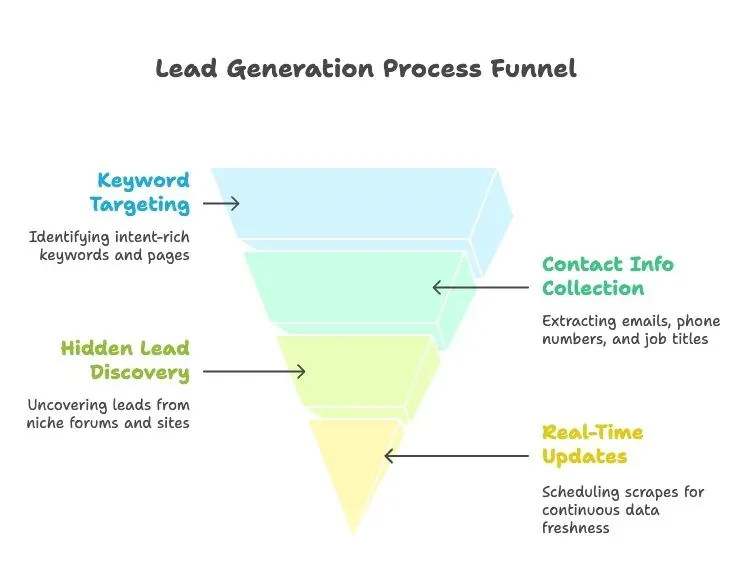
Web scraping means using software to automatically extract information from websites. For lead generation, this can mean:
- Tapping into diverse sources: Business directories, social media, forums, review sites, blogs, news, and more.
- Targeting intent-rich keywords and pages: Scraping for phrases like “looking for supplier,” “recommend a [product],” or “need a better option.”
- Gathering contact info at scale: Emails, phone numbers, company names, job titles, and more (Octoparse).
- Uncovering “hidden” leads: Monitoring niche forums, local directories, or lesser-known sites your competitors might overlook.
- Staying updated in real-time: Scheduling scrapes to continuously fetch new data, so you always have the freshest leads.
Instead of waiting for leads to come in, you can discover warm leads proactively—and often before your competitors even know they exist.
Real-World Web Scraping Use Cases for Warm Leads
Let’s make this concrete:
- B2B Software Sales: Scrape tech forums and Twitter for phrases like “data breach” or “security issue with [competitor].” When someone posts about a problem your product solves, that’s a warm lead. Scrape review sites like G2 or Capterra for low-rated competitor reviews—those reviewers are prime targets.
- E-commerce & Retail: Scrape forums for questions like “What’s the best organic dog food for allergies?” or Amazon/Yelp reviews mentioning specific pain points. These users are actively looking for solutions.
- Real Estate: Scrape FSBO (For Sale By Owner) listings or Craigslist for homeowners trying to sell without an agent. Scrape city permit filings for companies moving or expanding. Scrape forums for “Looking to relocate to [city]” posts.
- B2B Lead Lists: Scrape directories like Yellow Pages or LinkedIn for companies matching your ideal customer profile, then enrich with signals like recent news or job postings to prioritize the warmest leads.
In all these cases, web scraping acts as your always-on scouting agent, combing through digital sources to find people raising their hands—explicitly or implicitly—about a need.
Meet Thunderbit: The AI Web Scraper for Warm Lead Generation
Scrape warm leads from any website using AI Get Started Free
Okay, so web scraping sounds great—but isn’t it technical? Not anymore. Thunderbit is an AI-powered web scraper designed for business users (sales, marketing, ops) who want data from websites without coding or headaches.
Here’s how Thunderbit makes warm lead generation accessible to everyone:
- Natural language prompts: Just describe what data you want in plain English, and the AI figures out how to extract it (Thunderbit Docs).
- AI-suggested fields: Thunderbit scans the page and suggests what information can be extracted—like “Name,” “Company,” “Email,” or “Job Title.”
- 2-click scraping: Choose your data source and fields, hit Scrape, and Thunderbit does the rest. It can even handle pagination and subpages.
- Scrape from web, PDFs, images: Thunderbit can extract text from PDFs or images using OCR, making it easy to capture lead info from all kinds of sources (Futurepedia).
- Structured output and easy export: Data is presented in a neat table and can be exported directly to Google Sheets, Airtable, Notion, CSV, or Excel (Thunderbit Docs).
- Built-in data enrichment: Thunderbit can summarize, categorize, and even translate data on the fly. It can pull additional info about a person or company with a click, turning a basic lead list into a richer dataset (Thunderbit).
Thunderbit is like an AI-powered research assistant that takes a task like “find me warm leads on this site” and handles the grunt work end-to-end. It’s trusted by thousands of users and teams worldwide, from startups to large enterprises (Thunderbit).
Thunderbit in Action: Step-by-Step Warm Lead List Building
Let’s walk through a practical example. Say you want to gather a list of warm leads from a public directory of tech companies in your city.
- Navigate to the target page: Open the directory in Chrome (Thunderbit is a Chrome extension). Make sure the list is visible.
- Activate Thunderbit and set up the scraper: Click the Thunderbit extension. Use “AI Suggest Columns” and Thunderbit will scan the page, suggesting columns like “Company Name,” “Website URL,” and “Contact Email.” You can add or tweak fields as needed (Thunderbit Docs).
- Start the scrape: Hit “Scrape.” Thunderbit extracts the data, handles pagination, and pulls all results into one dataset (Thunderbit Docs).
- View and refine results: Thunderbit shows a table with all the data. You can filter, sort, or enrich the list right in the extension (Thunderbit Docs).
- Enrich or categorize (optional): Use Thunderbit’s AI to add columns like “Potential Need” or tag companies by industry, making your list even more actionable.
- Export to your CRM or sheet: Click Export and send the data directly to Google Sheets, Airtable, Notion, or download as CSV/Excel (Thunderbit Docs).
- Take action: Your sales team can now reach out with personalized emails or calls, using the context-rich data Thunderbit just delivered.
Want to get even more specific? Scrape a Google Maps search for “restaurants in [City] with ‘vegan options’ mentioned in reviews” to find leads for your vegan food supply business. Thunderbit can highlight which restaurants had multiple “vegan” mentions—warm leads for your product.
The workflow is simple, fast, and doesn’t require any technical skills. It’s like having a superpower for lead generation (minus the cape).
Try Thunderbit AI Web Scraper for Warm Leads
Beyond Static Lists: How AI Turns Warm Leads Into Dynamic Sales Assets
What Is Data Scraping and How to Do It in 2025 Get Started Free
Building a list of warm leads is great, but sales is an ongoing process. Leads that are warm today can cool off tomorrow, and new warm leads pop up all the time. That’s why treating lead generation as a dynamic, real-time process is key to staying ahead.
Thunderbit’s AI features help you not just scrape data, but also continuously enrich, update, and score your leads, so your sales team is always working with the freshest and most relevant opportunities.
Here’s how Thunderbit and AI can turn a static lead list into a living, dynamic resource:
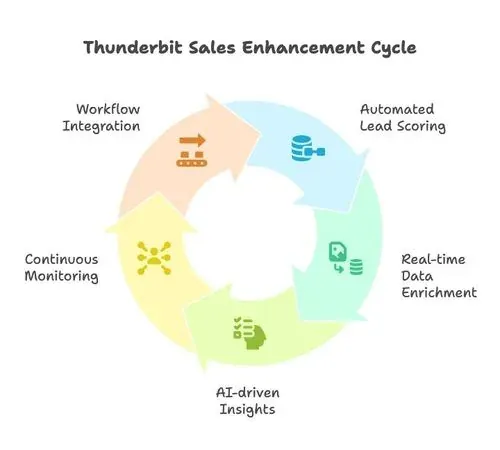
- Automated lead scoring and prioritization: AI analyzes data points (engagement level, company size, recent behavior) and assigns a lead score, so your reps focus on the hottest warm leads first. Companies that implement lead scoring see up to a 30% increase in deal conversion rates.
- Real-time data enrichment: Thunderbit can automatically append each lead’s latest company news, industry, employee count, LinkedIn bio, and more, keeping your data fresh and actionable.
- AI-driven insights and tags: Thunderbit can summarize pain points from reviews or forum posts, tag leads by interest (“interested in feature X,” “dissatisfied with competitor Y”), and make your lead list incredibly actionable (Thunderbit).
- Continuous monitoring: Set Thunderbit to scrape sources on a schedule, creating a live feed of new warm leads. Pair that with AI alerts (“alert me if a very hot keyword appears”) and your team will always be first to know.
- Integration into workflows: Export leads directly into your CRM, trigger instant notifications, or kick off automated email sequences. Thunderbit fits right into your existing sales stack.
Dynamic Lead Management: Staying Ahead of the Competition
Why go through all this effort? Because speed and timing are everything in converting warm leads. The vendor who responds first often wins, and buyers today move fast. By using web scraping and AI together, you build an early-warning radar for sales opportunities.
- Your scrapers continuously scan the web for new signals.
- Your AI qualifies and prioritizes those signals.
- Your team receives a constant, ranked feed of actionable warm leads.
Set up a dashboard that updates with new Thunderbit-sourced leads and their scores/tags. Use automation rules to trigger outreach when a lead’s score goes above a threshold. Hold weekly stand-ups to review the top new warm leads and refine your scraping criteria based on what’s working.
The end goal? A virtuous cycle where your system feeds the sales engine fresh fuel, and your sales outcomes inform the system what the best fuel is. Over time, AI can even predict which leads are likely to convert, sharpening your focus even further.
Warm Leads and Sales Success: Key Takeaways
Let’s recap:
- Warm leads matter: Only about 20% of new leads ever turn into sales, so it’s critical to focus on the subset with higher intent. Warm leads convert at significantly higher rates than cold outreaches (LeadBoxer).
- Quality over quantity: A small list of well-nurtured warm leads will beat a massive cold call list almost every time. Warm leads shorten sales cycles and lead to deeper customer relationships.
- Traditional lead generation has limits: Forms, events, and referrals are valuable but come with bottlenecks—slow processes, data silos, and missed opportunities.
- Web scraping + AI is a smarter approach: Modern sales teams can gain a competitive edge by leveraging web scraping to discover warm leads and AI to qualify and manage them (Octoparse, Scrapfly).
- Thunderbit simplifies the process: With Thunderbit’s AI-powered scraping, even non-technical team members can quickly build scrapers, automate data collection, and integrate with your workflow (Thunderbit Docs).
- Dynamic lead management is key: Don’t let your leads stagnate. Use AI to keep profiles enriched and prioritize who to talk to next. Set up ongoing web scrapes so that new warm leads keep flowing in automatically.
In short, rethinking your lead generation strategy to emphasize warm leads—and using modern tools like AI web scrapers to feed your pipeline—can dramatically boost your sales efficiency and results. Instead of sweating to get a 1% response from cold contacts, you could be closing deals with the 20–30% of prospects who actually care and are ready to buy (Sopro). It’s about turning interest into sales, with a little help from technology.
FAQs
1. What exactly is a “warm lead”?
A warm lead is a prospect who has already engaged with your brand in some way—by signing up for your newsletter, downloading content, attending a webinar, or interacting on social media. They know who you are and have shown some interest, making them much more likely to convert than a cold lead.
2. Why are warm leads more valuable than cold leads?
Warm leads convert at much higher rates (10–20% vs. 1–2% for cold leads), require less effort to close, and often lead to longer-lasting customer relationships. They’re already familiar with your brand and more receptive to your outreach.
3. How does web scraping help find warm leads?
Web scraping allows you to proactively search for intent signals across the web—like forum posts asking for recommendations, negative competitor reviews, or business directory listings. This helps you discover warm leads who may not have come through your traditional channels.
4. What makes Thunderbit different from other web scrapers?
Thunderbit is designed for business users, not just developers. It uses AI to suggest fields, handle complex websites, and even enrich and categorize data on the fly. With natural language prompts and a 2-click workflow, anyone can build and export warm lead lists—no coding required.
5. How can I keep my warm leads list up to date?
With Thunderbit, you can schedule scrapes to run automatically, ensuring your lead lists are always fresh. AI features like lead scoring, enrichment, and tagging help you prioritize and act on the most promising leads in real time, so you never miss an opportunity.
Want to see how Thunderbit can help you find and convert more warm leads? Download the Chrome extension and start building your next high-converting lead list in minutes. And if you’re hungry for more sales insights, check out the Thunderbit Blog for tips, tutorials, and the latest in AI-powered lead generation.
Try Thunderbit AI Web Scraper for Warm Leads Get Started Free




