

I’ll admit it: I’m a bit of a data nerd. There’s something deeply satisfying about seeing a well-organized spreadsheet of leads, each row a potential new customer, each column a clue to how I might win their business. But let’s be real—building those lists used to be a slog. I remember the days of flipping through industry directories, cold-calling names from yellow pages, and praying that at least one out of a hundred would pick up the phone. Fast forward to today, and the world of sales prospecting has been completely transformed by AI and automation. Suddenly, what took hours (or days) can be done in minutes, and the results are sharper, fresher, and way more actionable.
So what exactly is a sales prospecting list, and why does it matter so much for sales teams in 2025? Let’s break it down, look at how the process has evolved, and see how AI tools like Thunderbit are making it easier than ever to turn raw data into real revenue.
Sales Prospecting List: The Foundation of Modern Sales Success
Scrape sales leads with AI in 2 clicks Get Started Free
A sales prospecting list is, at its core, a curated collection of potential customers—people or companies who might be a good fit for your product or service. Think of it as your sales team’s roadmap: it tells you who to reach out to, how to prioritize your efforts, and where your best opportunities lie. Instead of shooting in the dark, you’re working from a targeted, organized list that’s built for action.
In plain English: a sales prospecting list is your “who’s who” of future customers. It’s not just a random dump of names and emails. It’s a carefully built tool that helps sales reps focus on the right people, at the right time, with the right message. Whether you’re a solo founder or part of a 100-person sales org, your prospecting list is the engine that powers your pipeline.
How Sales Teams Use Prospecting Lists
- Prioritization: Reps can sort and filter by industry, company size, or location to focus on high-potential leads first.
- Personalization: With the right data fields, outreach can be tailored to each prospect’s needs and pain points.
- Tracking Progress: Lists help teams monitor outreach, follow-ups, and conversion rates over time.
- Scaling Efforts: A well-built list makes it possible to run campaigns, delegate tasks, and measure what’s working.
As Crunchbase puts it, “Most of us associate prospecting with cold calls and emails, but the real magic happens when you start with a targeted list of the right people.”
Why a Sales Prospecting List Matters for Sales Teams
Let’s get straight to the point: sales teams with targeted prospecting lists close more deals, faster. The numbers don’t lie:
- Sales reps who use targeted prospecting lists see up to a 60% increase in lead conversion rates).
- Teams using automated or AI-driven prospecting tools report saving 30–50% of their time compared to manual research.
- Companies with well-maintained prospecting lists generate more customers and higher revenue per rep.
Why? Because a good list lets you:
- Work smarter, not harder: No more wasting time on dead-end leads or chasing the wrong accounts.
- Improve targeting: Focus your outreach on prospects who actually fit your ideal customer profile (ICP).
- Boost conversion rates: Personalized, relevant outreach gets more replies and more meetings.
- Scale your pipeline: With automation, you can build and refresh lists at a pace that manual research just can’t match.
Here’s a quick table to sum up the key benefits and use cases:
| Benefit | Use Case Example |
|---|---|
| Higher efficiency | Reps spend less time researching, more time selling |
| Better targeting | Filter by industry, location, or company size |
| Improved conversion rates | Personalized outreach based on accurate data |
| Market expansion | Identify new segments or territories |
| Account-based selling | Build lists of decision-makers at target accounts |
Traditional vs. Modern Sales Prospecting List Methods
Let’s take a walk down memory lane. Not so long ago, building a sales prospecting list meant:
- Flipping through phone books or industry directories
- Manually copying names and numbers from trade show brochures
- Buying outdated lists from third-party vendors
- Spending hours (or days) on Google, LinkedIn, or company websites, copying info into spreadsheets
The problem? Manual list-building is slow, error-prone, and nearly impossible to scale. By the time you finish, half your data is already out of date. And let’s not even talk about the morale hit—nothing drains a sales rep’s energy like hours of copy-paste.
Today, the landscape looks very different. Modern sales teams use AI-powered tools like Thunderbit, which can:
- Scrape contact info from LinkedIn, Google Maps, and industry directories in seconds
- Use AI to suggest relevant fields and structure data automatically
- Keep lists fresh with recurring, automated scrapes
- Export data directly to Google Sheets, Excel, Notion, or Airtable
As CoPilotAI notes, “AI prospecting outpaces manual methods in speed and processing capacity, making it possible to scale outreach without hiring more staff.”
Side-by-Side Comparison: Manual vs. AI-Powered Sales Prospecting Lists
| Factor | Manual List-Building | AI-Powered (Thunderbit & Similar) |
|---|---|---|
| Speed | Slow (hours/days per list) | Fast (minutes per list) |
| Accuracy | Prone to errors, outdated info | High accuracy, real-time data |
| Cost | High (labor-intensive) | Lower (automation reduces effort) |
| Scalability | Limited (hard to scale up) | High (scrape thousands of leads easily) |
| Morale | Rep burnout, tedious work | Reps focus on selling, not data entry |
Sources: CapstoneBPO, CoPilotAI
Key Elements of an Effective Sales Prospecting List
Not all lists are created equal. The best sales prospecting lists share a few key ingredients:
- Industry: What sector is the company in? (e.g., SaaS, manufacturing, healthcare)
- Location: Where are they based? (city, state, country)
- Company size: Number of employees, revenue, or other size metrics
- Decision-maker contact info: Name, title, email, phone number
- Company website and LinkedIn URL: For quick research and outreach
- Custom tags or notes: Pain points, recent news, or relevant context
Each of these fields helps sales reps personalize their outreach and prioritize the best-fit prospects. For example, a SaaS company targeting mid-sized tech firms in California can filter their list to focus only on those accounts.
How AI Tools Like Thunderbit Enhance List Quality
This is where things get really interesting. With Thunderbit, you don’t have to guess which fields to include or spend hours building templates. Just use the “AI Suggest Fields” feature, and Thunderbit will:
- Scan the target website or directory
- Recommend the most relevant columns (e.g., “Industry,” “Contact Email,” “LinkedIn URL”)
- Automatically structure the data into a clean, exportable table
Thunderbit’s AI can even handle messy, unstructured pages—turning chaos into clarity. And because it uses natural language processing, you can describe what you want (“Grab all the decision-makers in this list with their emails and company size”), and Thunderbit figures out the rest.
For more on how this works, check out Thunderbit’s guide to AI for sales prospecting.
Building a Sales Prospecting List: Step-by-Step with Thunderbit
Let’s get practical. Here’s how I (and thousands of other users) build a sales prospecting list in just a few clicks with Thunderbit:
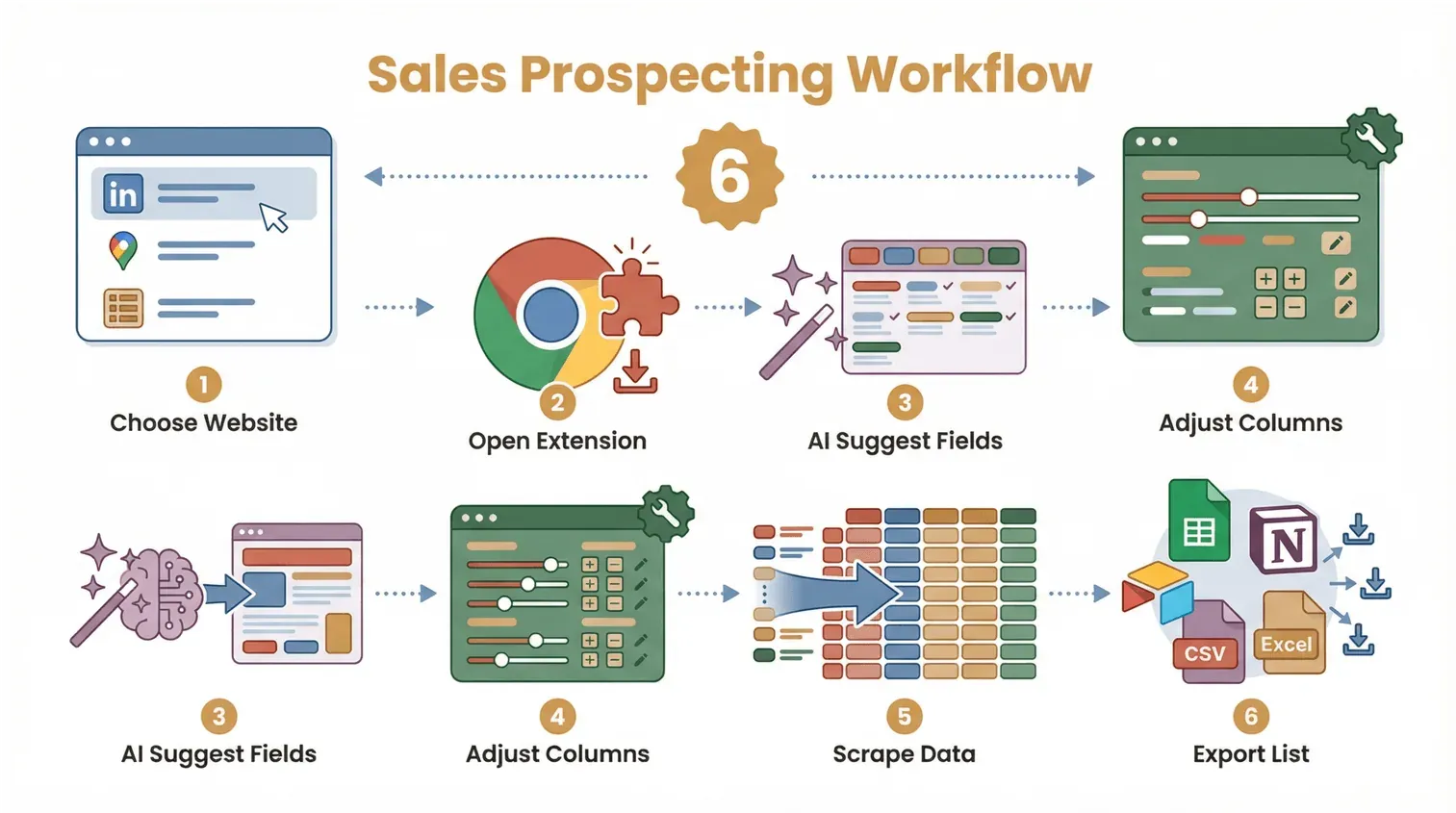
- Choose your target website: This could be LinkedIn, Google Maps, a local business directory, or even a niche industry site.
- Open the Thunderbit Chrome Extension: Download it here if you haven’t already.
- Click “AI Suggest Fields”: Thunderbit scans the page and suggests the best columns to extract.
- Adjust columns as needed: Add or remove fields, or use custom instructions for special data points.
- Click “Scrape”: Thunderbit grabs the data and structures it into a table.
- Export your list: Send it directly to Google Sheets, Notion, Airtable, or download as CSV/Excel.
That’s it. No coding, no templates, no manual copy-paste. Just actionable data, ready for outreach.
Build a sales prospecting list with Thunderbit
Automating Data Collection from Key Platforms
Thunderbit shines when it comes to scraping data from platforms like LinkedIn and Google Maps:
- LinkedIn: Extract names, titles, company info, and contact details from search results or company pages.
- Google Maps: Pull business names, addresses, phone numbers, websites, and more—perfect for local lead generation.
- Industry directories: Scrape lists of members, attendees, or certified partners from association sites.
And because Thunderbit’s AI adapts to different page layouts, you get accurate, real-time data every time. (Check out this YouTube demo of scraping 100,000 Google Maps leads in two clicks.)
From Data to Insights: Turning Your Sales Prospecting List into Strategy
AI for Sales Prospecting: The Complete Guide Get Started Free
A sales prospecting list isn’t just a pile of data—it’s a strategic asset. The real value comes from turning that data into actionable insights:
- Segmentation: Group prospects by industry, location, or company size for tailored outreach.
- Scoring: Use AI to rank leads by fit, engagement, or likelihood to convert.
- Categorization: Automatically tag prospects based on keywords, recent news, or custom criteria.
- Personalization: Add notes or pain points to each row, so reps can craft relevant messages.
Thunderbit’s AI makes all of this easy. You can use custom field instructions to label, categorize, or even translate data as you scrape. Suddenly, your list isn’t just a static file—it’s a living, breathing guide for your sales strategy.
For more on turning data into insights, see Thunderbit’s blog on AI for sales prospecting.
Maintaining and Updating Your Sales Prospecting List for Ongoing Success
Even the best list goes stale over time. People change jobs, companies move, and new prospects pop up every day. That’s why it’s crucial to keep your prospecting list accurate and up-to-date.
Best practices include:
- Regular cleaning: Remove bounced emails, duplicates, or outdated contacts.
- Validation: Use tools to verify emails and phone numbers.
- Enrichment: Add new data fields as your targeting evolves.
- Recurring scrapes: With Thunderbit, you can schedule scrapes to keep your list fresh automatically (Thunderbit Blog).
Keeping your list current isn’t just good housekeeping—it’s the key to higher response rates and better ROI.
Sales Prospecting List: Common Pitfalls and How to Avoid Them
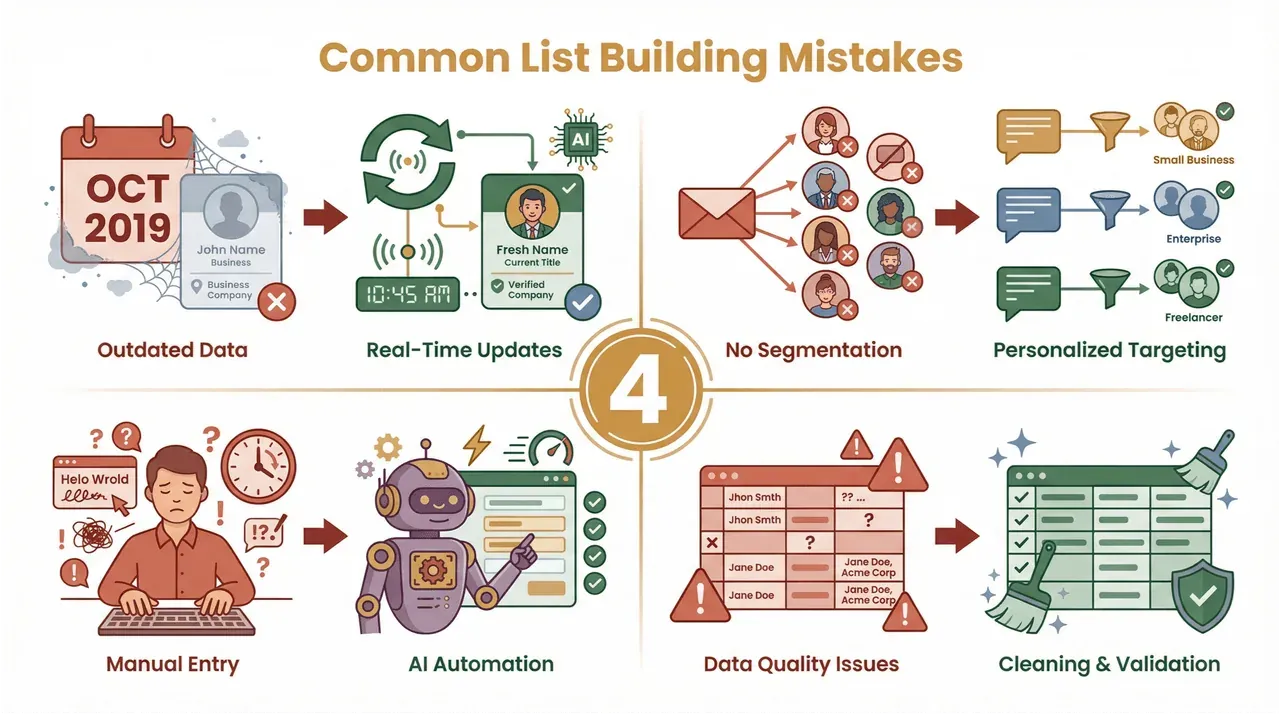
Let’s be honest—building a great list isn’t always smooth sailing. Here are some common mistakes (and how to dodge them):
- Outdated data: Leads change jobs fast; stale info kills your outreach. Solution: Use AI tools like Thunderbit for real-time scraping and regular updates.
- Lack of segmentation: Blasting the same message to everyone rarely works. Solution: Segment your list by key fields (industry, size, location) for personalized outreach.
- Over-reliance on manual entry: Human error creeps in fast. Solution: Automate data collection and structuring with AI.
- Ignoring data quality: Typos, missing fields, or duplicates can tank your campaign. Solution: Use Thunderbit’s built-in data cleaning and validation features.
 For more tips, check out Thunderbit’s guide to AI-powered sales prospecting.
Conclusion: The Strategic Value of a Sales Prospecting List in the AI Era
Here’s my take: a well-built sales prospecting list is the single most important asset for any sales team. It’s your compass, your playbook, and your secret weapon—all rolled into one. And thanks to AI-powered tools like Thunderbit, building, managing, and leveraging that list has never been easier (or more effective).
Learn more about AI for sales prospecting
If you’re still relying on manual research or outdated spreadsheets, it’s time to rethink your approach. Modern sales teams are using automation to work smarter, target better, and close more deals. The future of sales prospecting is here—and it’s powered by AI.
Ready to see what Thunderbit can do for your pipeline? Download the Chrome extension and start building your next high-converting prospect list in minutes. And for more tips, strategies, and deep dives, check out the Thunderbit Blog.
Try AI Sales Prospecting List Builder Get Started Free
FAQs
1. What is a sales prospecting list, and why is it important?
A sales prospecting list is a curated set of potential customers that sales teams use to organize, prioritize, and personalize their outreach. It’s essential because it helps reps focus on high-potential leads, improve conversion rates, and scale their pipeline efficiently.
2. What are the key elements of an effective sales prospecting list?
The most important fields include industry, location, company size, decision-maker contact info, company website, LinkedIn URL, and custom tags or notes. These fields enable targeted, personalized outreach.
3. How does Thunderbit help build better prospecting lists?
Thunderbit uses AI to suggest relevant fields, structure data automatically, and scrape contact info from platforms like LinkedIn and Google Maps. It also supports recurring scrapes and data enrichment, ensuring your list is always fresh and actionable.
4. What are the main differences between manual and AI-powered list building?
Manual list-building is slow, error-prone, and hard to scale. AI-powered tools like Thunderbit are fast, accurate, and can handle thousands of leads in minutes—freeing up reps to focus on selling, not data entry.
5. How can I keep my sales prospecting list up to date?
Use recurring scrapes, regular data cleaning, and validation tools to remove outdated contacts and enrich your list with new information. Thunderbit makes it easy to automate these processes, so your list stays accurate and effective over time.
Learn More




