
The sales world in 2026 is a whirlwind—targets are higher, buyers are savvier, and the competition is relentless. If you’re still relying on spreadsheets and manual follow-ups, you’re not just behind—you’re practically sending smoke signals in the age of 5G. I’ve spent years in SaaS and automation, and I’ve seen firsthand how the right outbound sales automation tool can turn a stressed-out sales team into a pipeline-building machine. But with so many platforms promising to “revolutionize” your workflow, how do you actually pick the right one?
Let’s cut through the noise. In this guide, I’ll break down the top 20 outbound sales automation tools that are making a real difference for sales teams—from scrappy startups to global enterprises. I’ll walk you through what makes each tool unique, how they stack up on the features that matter, and why Thunderbit (the tool my team and I built) is changing the game for data-driven outbound. Ready to work smarter, not harder? Let’s dive in.
Why Outbound Sales Automation Matters for Modern Teams
How to Choose the Best Sales Automation Tool Get Started Free
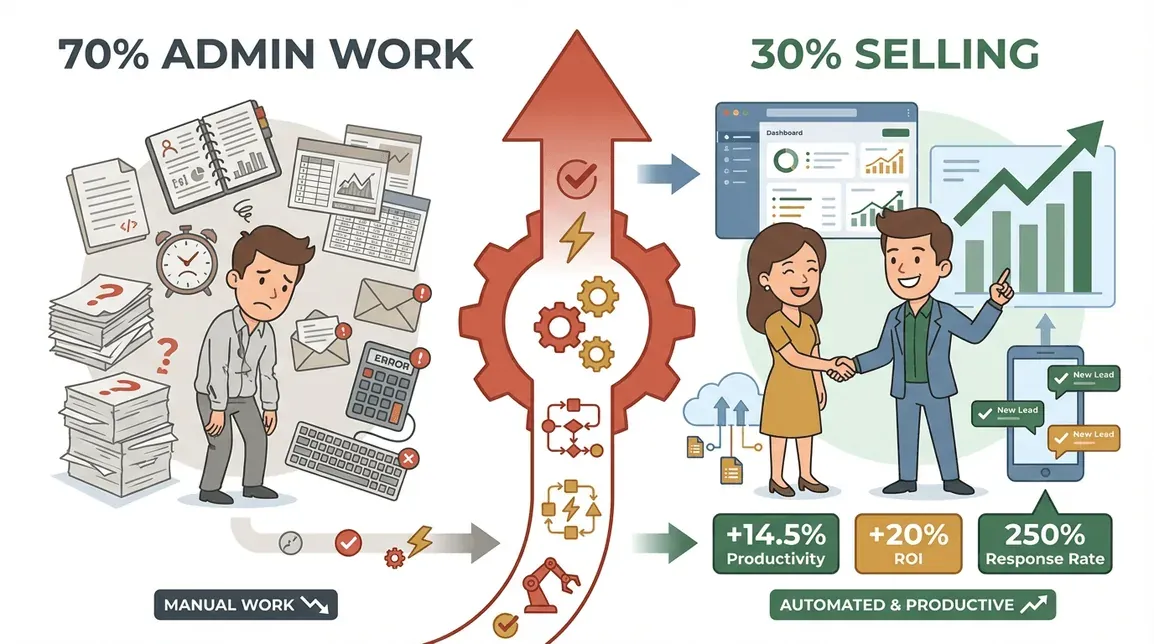
Here’s a stat that always blows my mind: sales reps spend only about 28–30% of their time actually selling, with the rest eaten up by admin, data entry, and chasing down leads. That means 70% of a rep’s day is lost to non-revenue work. No wonder so many teams feel like they’re running in place.
Outbound sales automation flips the script. By automating repetitive tasks—think follow-ups, data entry, and multi-channel outreach—teams reclaim hours every week. In fact, companies using automation report a 14.5% boost in productivity and a 10–20% increase in sales ROI. And it’s not just about working faster—it’s about working smarter. Automation ensures every lead is followed up, every touchpoint is tracked, and your team can focus on what they do best: building relationships and closing deals.
The numbers don’t lie:
- 75% of organizations globally use some form of sales automation, and B2B adoption is accelerating.
- 83% of AI-empowered sales teams saw revenue growth versus 66% of those without AI.
- Automated follow-up campaigns can yield 250% higher response rates than manual outreach.
Bottom line? Outbound sales automation isn’t a luxury anymore—it’s the backbone of any high-performing sales team.
Key Criteria for Selecting Outbound Sales Automation Tools
With so many options out there, choosing the right tool can feel like picking a Netflix show on a Friday night—overwhelming and full of FOMO. Here’s what I look for (and what you should, too):
| Criteria | Why It Matters | Example Tools That Excel |
|---|---|---|
| Integration Capabilities | Seamless sync with your CRM and tech stack saves hours and prevents data silos. | Groove (Salesforce-native), HubSpot Sales Hub |
| Supported Channels | Multichannel outreach (email, calls, SMS, LinkedIn) boosts response rates. | Outreach, SalesLoft, Reply.io |
| User Interface & Ease of Use | A clean UI means faster onboarding and higher adoption. | HubSpot Sales Hub, Pipedrive |
| Data Accuracy & Enrichment | Clean, up-to-date data = higher conversion and less wasted effort. | Apollo.io, LeadFuze, Thunderbit |
| AI-Driven Features | AI can write emails, score leads, and optimize timing for better results. | Thunderbit, Outreach, Reply.io |
| Scalability & Workflow Automation | Can the tool grow with your team and handle complex cadences? | SalesLoft, Outreach |
| Reporting & Analytics | Actionable insights help you double down on what works. | SalesLoft, Groove, Outreach |
| Customer Support & Training | Responsive support makes rollout and troubleshooting painless. | HubSpot, Groove |
For a deeper dive, check out Thunderbit’s guide to sales automation tool selection.
Top 20 Outbound Sales Automation Tools for 2026
 Here’s a quick navigation to the tools covered:
- Thunderbit
- Outreach
- SalesLoft
- HubSpot Sales Hub
- Reply.io
- Apollo.io
- Pipedrive
- Groove
- VanillaSoft
- Mixmax
- Close
- Mailshake
- LeadFuze
- Yesware
- Autoklose
- Aeroleads
- Woodpecker
- Klenty
- Sharetivity
- Snov.io
1. Thunderbit
Thunderbit is the only tool on this list that combines AI-powered web scraping with outbound automation. Why does that matter? Because most sales teams are limited by the quality (and freshness) of their lead data. Thunderbit lets you extract accurate, up-to-date contact info from any website—think industry directories, event attendee lists, or even competitor client pages—then export it directly to Excel, Google Sheets, Airtable, or Notion. No code, no templates, no headaches.
What I love about Thunderbit:
- AI Suggest Fields: Just click a button and Thunderbit’s AI recommends what data to scrape—names, emails, phone numbers, you name it.
- Subpage & Pagination Scraping: Need to dig into profile pages or multi-page lists? Thunderbit handles it automatically.
- Instant Export: One-click to push your new leads into your CRM or outreach tool.
- AI Autofill: Automate browser actions like filling out forms or updating records.
- Scheduled Scraping: Set it and forget it—Thunderbit can scrape new leads on a schedule.
Thunderbit is a game-changer for teams that want to expand their lead sources beyond the usual databases. It’s especially powerful for niche industries, local markets, or anyone who’s tired of stale, recycled lead lists. And yes, there’s a free Chrome extension so you can try it risk-free.
Try Thunderbit for AI-Powered Lead Sourcing
2. Outreach
Outreach is the gold standard for multichannel sales engagement at scale. It lets you build complex sequences across email, calls, SMS, and LinkedIn, all from one dashboard. The AI-powered sentiment analysis is a standout—it automatically tags replies as positive, negative, or neutral, so reps know who to prioritize. Outreach also offers a built-in dialer, meeting scheduler, and deep CRM integrations (especially Salesforce).
Best for: Mid-to-large outbound teams that need enterprise-grade engagement, analytics, and workflow customization.
3. SalesLoft
SalesLoft is all about streamlined cadence and pipeline management. Its drag-and-drop cadence builder is intuitive, and the integrated dialer with call recording makes it a favorite for call-heavy teams. SalesLoft’s conversation intelligence analyzes calls for coachable moments, and its analytics dashboards help managers spot what’s working (and what’s not).
Best for: Teams focused on continuous improvement, call coaching, and pipeline visibility.
4. HubSpot Sales Hub
HubSpot Sales Hub brings automation right into your CRM. Email templates, sequences, meeting scheduling, and task automation are all baked in. The real magic is the unified database—marketing and sales data live together, so reps always have the full context. HubSpot’s AI features (like predictive lead scoring and email suggestions) are getting better every year.
Best for: SMBs and mid-market teams already using HubSpot or looking for an all-in-one platform.
5. Reply.io
Reply.io shines with personalized multichannel outreach. Its AI Sales Email Assistant can draft human-like emails, and the platform supports conditional sequences across email, calls, LinkedIn, SMS, and WhatsApp. The unified inbox brings all replies into one place, and the intent detection tags responses so reps can focus on hot leads.
Best for: Startups, agencies, and SMBs needing flexible, affordable multichannel campaigns.
6. Apollo.io
Apollo.io is a powerhouse for data-driven prospecting and outreach. With a database of over 200 million contacts, advanced filters, and built-in email/call sequences, Apollo is both a lead source and an engagement tool. It’s especially strong on data enrichment and CRM sync, and its AI features help with lead scoring and prioritization.
Best for: Teams that want to combine prospecting, enrichment, and outreach in one workflow.
7. Pipedrive
Pipedrive is the visual sales automation favorite for SMBs. Its Kanban-style pipeline is intuitive, and the workflow automation engine can trigger tasks, emails, and reminders based on deal stages. While it’s not as advanced for sequencing as some tools, it’s perfect for teams that want to get organized fast without a steep learning curve.
Best for: Small to mid-sized teams looking for a simple, visual CRM with automation.
8. Groove
Groove is built for Salesforce users who want workflow automation without leaving their CRM. Everything—emails, calls, tasks—syncs directly to Salesforce in real time. Groove’s account-based workflow support and analytics dashboards make it a top pick for teams that live and breathe Salesforce.
Best for: Salesforce-centric sales teams that need seamless engagement and data accuracy.
9. VanillaSoft
VanillaSoft is a lead management and cadence automation platform with deep roots in inside sales and telemarketing. Its queue-based lead routing ensures every lead is followed up promptly, and the integrated auto-dialer is a productivity booster for call-heavy teams. VanillaSoft also supports multi-channel cadences (calls, email, SMS) and real-time reporting.
Best for: Inside sales teams, call centers, and anyone who needs high-volume, structured follow-up.
10. Mixmax
Mixmax supercharges Gmail (and Outlook) with email automation, tracking, and productivity features. You can build sequences, track opens/clicks, and insert calendar links—all from your inbox. Mixmax is perfect for reps who want to work where they already are, and its CRM integrations keep everything in sync.
Best for: Individual reps and small teams focused on email-driven outbound.
11. Close
Close is an all-in-one sales communication platform that combines calling, emailing, and SMS automation. Its pipeline management and reporting tools are robust, and the UI is designed for speed—perfect for fast-paced sales teams. Close is especially popular with startups and SMBs that want everything in one place.
Best for: Teams that want a unified platform for calls, emails, and pipeline tracking.
12. Mailshake
Mailshake is a go-to for scalable cold email and outreach. It supports multi-channel campaigns (email, phone, social), lead management, and analytics. Mailshake’s lead temperature scoring helps reps prioritize follow-ups, and its integrations make it easy to sync with your CRM.
Best for: Outbound teams focused on cold email and high-volume outreach.
13. LeadFuze
LeadFuze automates lead generation and enrichment. Its search filters are powerful, and it can build targeted lists with verified emails and phone numbers. LeadFuze integrates with outreach tools and CRMs, and its data accuracy is a big selling point.
Best for: Teams that need automated, high-quality lead lists to feed their outbound engine.
14. Yesware
Yesware is all about email tracking and sales automation. It offers templates, sequences, and reporting—plus deep Salesforce integration. Yesware is a favorite for teams looking to improve email productivity and get actionable insights on what’s working.
Best for: Sales teams focused on email outreach and analytics.
15. Autoklose
Autoklose delivers automated campaigns and lead management with a built-in lead database. Its email sequencing, lead scoring, and CRM integrations make it a solid choice for SMBs and agencies. Autoklose also offers reporting tools to track campaign performance.
Best for: SMBs and agencies that want an all-in-one outbound platform.
16. Aeroleads
Aeroleads is a web-based lead generation and outreach automation tool. Its browser extension makes quick prospecting a breeze, and it integrates with email and CRM tools for seamless workflow. Aeroleads is especially handy for teams that want to find and reach out to new contacts on the fly.
Best for: Teams that value quick, web-based prospecting and enrichment.
17. Woodpecker
Woodpecker specializes in automated email sequences for SMBs. Its personalization, deliverability optimization, and analytics features help small teams and agencies run effective cold email campaigns. Woodpecker’s UI is clean and easy to use.
Best for: Small teams and agencies focused on personalized cold email outreach.
18. Klenty
Klenty is a sales engagement and cadence automation platform that supports email, calls, and LinkedIn. Its AI-driven personalization and workflow templates make it easy to launch campaigns, and the CRM integrations keep everything connected.
Best for: Teams that want to automate multi-channel cadences with AI-powered personalization.
19. Sharetivity
Sharetivity automates social selling tasks, including content sharing and LinkedIn outreach. It integrates with sales engagement platforms and focuses on building relationships through social channels—a must for modern outbound.
Best for: Teams that prioritize social selling and relationship-building.
20. Snov.io
Snov.io offers multichannel outreach and lead management, with features like email finding, drip campaign automation, and CRM integration. Snov.io is a solid choice for both prospecting and outreach, and its analytics tools help teams track what’s working.
Best for: Teams that want an affordable, all-in-one tool for prospecting and outreach.
Quick Comparison Table: Outbound Sales Automation Tools
Here’s a snapshot to help you zero in on the right fit:
| Tool | Integrations | Channels Supported | AI Features | Data Enrichment | Pricing Range | Best For |
|---|---|---|---|---|---|---|
| Thunderbit | Sheets, Notion, Airtable, Excel | Web, Email, CRM Export | AI scraping, autofill | Yes | Free–$249/mo | Lead sourcing, enrichment |
| Outreach | Salesforce, Gmail, LinkedIn | Email, Calls, SMS, Social | Sentiment, next-best action | No | $100–$150/user/mo | Enterprise, SDR teams |
| SalesLoft | Salesforce, LinkedIn, Outlook | Email, Calls, Social | Call analysis, coaching | No | $75–$125/user/mo | Pipeline, call-heavy teams |
| HubSpot | Native, Gmail, Outlook | Email, Calls, Tasks | Lead scoring, email AI | No | Free–$150/user/mo | SMBs, all-in-one CRM |
| Reply.io | Salesforce, HubSpot, Zapier | Email, Calls, LinkedIn, SMS | Email writing, intent | Yes | $60–$90/user/mo | Startups, agencies |
| Apollo.io | Salesforce, HubSpot, Gmail | Email, Calls, LinkedIn | Lead scoring, suggestions | Yes | $49–$99/user/mo | Data-driven prospecting |
| Pipedrive | Gmail, Outlook, Zapier | Email, Calls, Tasks | AI assistant | No | $15–$59/user/mo | SMBs, visual CRM |
| Groove | Salesforce, Gmail, Outlook | Email, Calls, Tasks | Task prioritization | No | Custom pricing | Salesforce-first teams |
| VanillaSoft | CRM, VoIP, SMS | Calls, Email, SMS | Queue routing | No | $80–$130/user/mo | Inside sales, call centers |
| Mixmax | Gmail, Outlook, Salesforce | Email, Calendar | Email AI, reminders | No | $12–$65/user/mo | Email-driven teams |
| Close | Email, Calls, SMS, CRM | Email, Calls, SMS | Call AI, pipeline | No | $49–$129/user/mo | Unified comms, SMBs |
| Mailshake | Gmail, Outlook, Salesforce | Email, Calls, Social | Lead scoring | Yes | $59–$99/user/mo | Cold email, high-volume |
| LeadFuze | Zapier, CRM | Email, CRM Export | List building | Yes | $132–$447/mo | Automated lead gen |
| Yesware | Gmail, Outlook, Salesforce | Email, Calendar | Email tracking | No | $15–$85/user/mo | Email productivity |
| Autoklose | Gmail, Outlook, CRM | Email, CRM Export | Lead scoring | Yes | $59–$69/user/mo | SMBs, agencies |
| Aeroleads | Gmail, CRM, LinkedIn | Email, CRM Export | Data enrichment | Yes | $49–$499/mo | Quick web prospecting |
| Woodpecker | Gmail, Outlook, CRM | Personalization | No | $39–$59/user/mo | Small teams, agencies | |
| Klenty | Salesforce, Pipedrive, HubSpot | Email, Calls, LinkedIn | AI personalization | No | $35–$100/user/mo | Multi-channel cadences |
| Sharetivity | LinkedIn, CRM | Social, LinkedIn | Content AI | No | $20–$60/user/mo | Social selling |
| Snov.io | Gmail, CRM, Zapier | Email, Drip, CRM Export | Email finder, drip AI | Yes | $39–$738/mo | Prospecting, outreach |
*Pricing is approximate and may vary by plan or user count.
Best Practices for Maximizing Outbound Sales Automation
Sales Automation Best Practices Get Started Free
Having the right tool is only half the battle. Here’s how leading teams get the most out of their outbound stack:
- Personalize at Scale: Use templates and AI to personalize outreach, but always add a human touch—reference recent news, mutual connections, or pain points.
- Leverage AI for Timing: Let your tool suggest the best time to reach out based on engagement data. Outreach and Reply.io excel here.
- Integrate with Your CRM: Sync everything—emails, calls, notes—so your data stays clean and your team stays aligned.
- Monitor and Optimize: Track open, reply, and conversion rates. Double down on what works, and don’t be afraid to A/B test subject lines or call scripts.
- Automate, but Don’t Abdicate: Automation should free your team to focus on high-value conversations, not turn your outreach into spam. Use sequences to ensure no lead slips through, but always be ready to jump in when a prospect engages.
For more actionable tips, check out Thunderbit’s sales automation best practices.
Conclusion: Choosing the Right Outbound Sales Automation Tool for Your Team
There’s no one-size-fits-all answer—your perfect tool depends on your team size, workflow, and goals. My advice? Shortlist 2–3 platforms that fit your integration needs and budget, then run a real-world pilot. Focus on ease of use, data accuracy, and measurable ROI. And don’t underestimate the value of a tool that your team actually enjoys using—adoption is everything.
If you’re looking to expand your lead sources and automate the grunt work of data collection, give Thunderbit a try. And if you want to see these tools in action, check out the Thunderbit YouTube Channel for walkthroughs and tips.
Download Thunderbit Chrome Extension Free
Happy selling—and may your pipeline always be full (and your admin work blissfully automated).
FAQs
1. What is outbound sales automation, and why is it important?
Outbound sales automation uses software to streamline repetitive sales tasks—like sending emails, making calls, and logging activities—so reps can focus on building relationships and closing deals. It’s essential for scaling outreach, improving consistency, and boosting productivity.
2. How do I choose the right outbound sales automation tool for my team?
Start by mapping your workflow: what channels do you use, what CRM do you rely on, and how complex are your cadences? Look for tools that integrate seamlessly, offer the right level of automation, and are easy for your team to adopt. Use the comparison table above as a starting point.
3. What makes Thunderbit different from other outbound sales automation tools?
Thunderbit uniquely combines AI-powered web scraping with outbound automation, letting you extract fresh, accurate leads from anywhere on the web—not just pre-built databases. It’s ideal for teams that want to expand their lead sources and automate data enrichment.
4. Can these tools help with compliance and data accuracy?
Yes—many tools (like Apollo.io, LeadFuze, and Thunderbit) offer real-time data verification and enrichment. Always check that your chosen platform supports GDPR/CCPA compliance and keeps your CRM data clean.
5. How can I maximize ROI from my outbound sales automation investment?
Personalize your outreach, leverage AI for timing and prioritization, integrate tightly with your CRM, and continuously monitor performance. Run regular training and encourage your team to share best practices—automation is most powerful when paired with great salesmanship.
Want more sales automation insights? Explore the Thunderbit Blog for deep dives, tutorials, and the latest trends in AI-powered sales tech.
Try Thunderbit AI Web Scraper for Sales Automation Get Started Free
Learn More




