
Ever tried to keep tabs on a hundred competitor websites, only to realize you’d need a small army (or a lot of coffee) to copy-paste all that data by hand? You’re not alone. In today’s business world, web data is gold—whether you’re in sales, marketing, research, or operations. In fact, web scraping now makes up over one-third of all website traffic, and 81% of U.S. retailers use automated scrapers for price tracking (scrap.io). That’s a lot of bots doing the heavy lifting.
But how do these bots actually work? And why do so many teams turn to Node.js—the JavaScript powerhouse behind much of the modern web—to build their own web crawlers? As someone who’s spent years in SaaS and automation (and as the CEO of Thunderbit), I’ve seen firsthand how the right tools can turn a web data headache into a competitive advantage. Let’s break down what a Node web crawler really is, how it works, and how even non-coders can get in on the action.
Node Web Crawler: The Basics Explained
What Is Data Scraping and How to Do It in 2025 Get Started Free
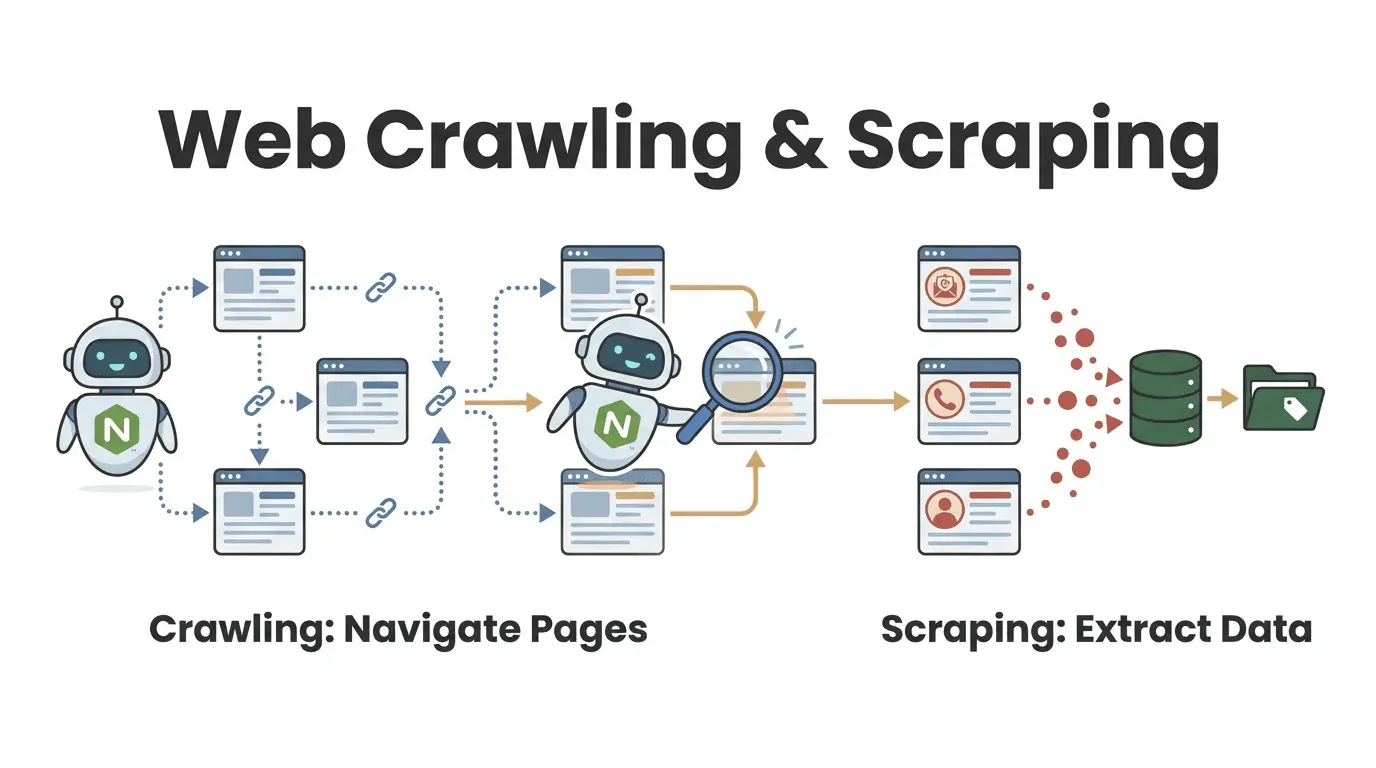
Let’s start simple. A Node web crawler is a program—built using Node.js—that automatically visits web pages, follows links, and extracts information. Think of it as a tireless digital intern: you give it a starting URL, and it clicks through pages, grabs the data you want, and keeps going until it’s covered the whole site (or the parts you care about).
But wait—what’s the difference between web crawling and web scraping? It’s a question I get a lot, especially from business users:
- Web crawling is about discovering and navigating lots of pages. Imagine flipping through every book in a library to find the ones about your topic.
- Web scraping is about extracting specific information from those pages—like copying key quotes from each book.
In practice, most Node web crawlers do both: they find the pages you need and pull out the data you care about (oxylabs.io). For example, a sales team might crawl a directory to find every company profile, then scrape each one for contact info.
How Does a Node Web Crawler Work?
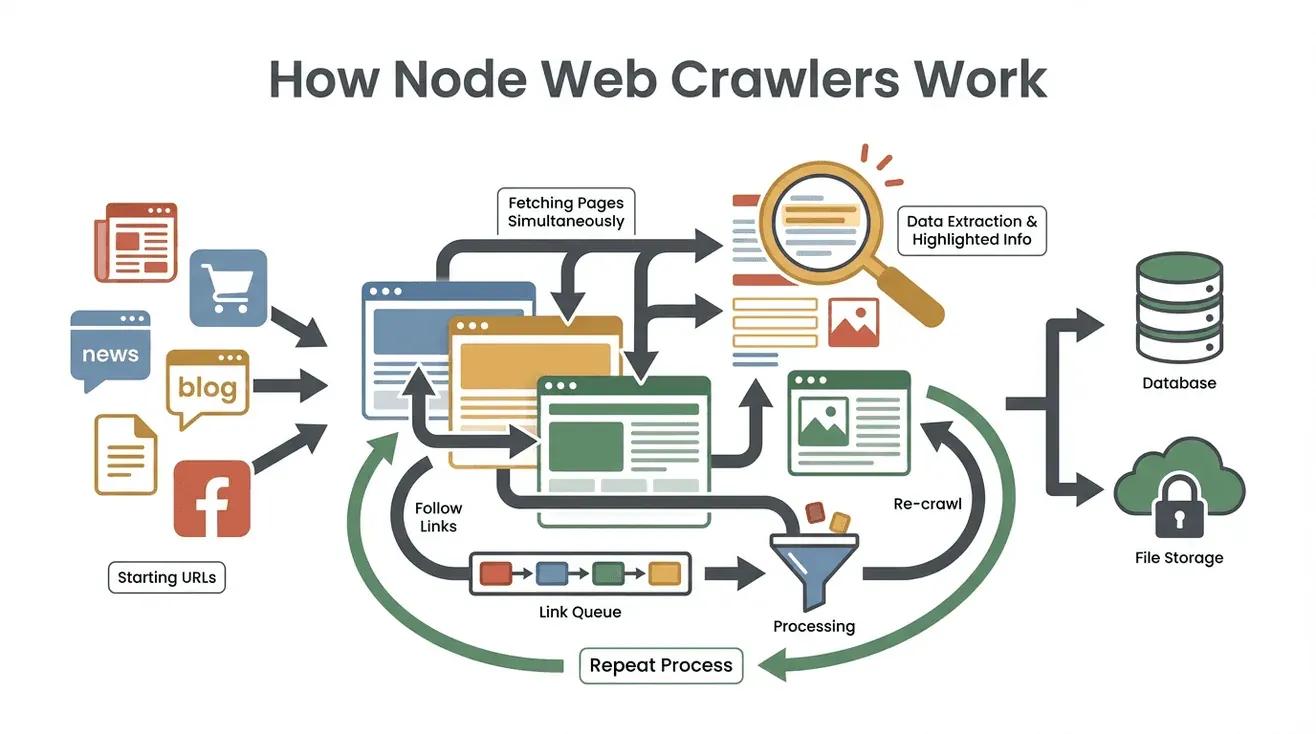 Let’s demystify the process. Here’s how a typical Node web crawler operates, step by step:
- Start with Seed URLs: You give the crawler one or more starting points (like a homepage or a product listing).
- Fetch Page Content: The crawler downloads the HTML of each page—just like your browser, but without the visuals.
- Extract Useful Data: Using tools like Cheerio (think: jQuery for Node), it pulls out the info you want—names, prices, emails, you name it.
- Find and Queue New Links: It scans each page for links (like “Next Page” or product details) and adds them to a to-do list (the “crawl frontier”).
- Repeat the Process: The crawler keeps visiting new links, extracting data, and expanding its reach until it’s covered everything you’ve told it to look for.
- Store the Results: All the scraped data gets saved—usually as a CSV, JSON, or straight into a database.
- Stop When Done: The crawler finishes when it’s out of new links or hits a limit you set.
Here’s a real-world example: imagine you want to collect all job postings from a careers site. You’d start with the main listings page, extract all job links, visit each one, grab the job details, and keep following “Next” until you’ve got the whole list.
The magic behind the scenes? Node.js’s event-driven, non-blocking architecture lets the crawler handle lots of pages at once, so it’s not waiting around for slow websites. It’s like having a team of interns working in parallel—without the pizza budget.
Why Node.js Is a Popular Choice for Web Crawlers
So, why Node.js? Why not Python, Java, or some other language? Here’s what makes Node.js a standout for web crawling:
- Event-Driven, Non-Blocking I/O: Node.js can juggle dozens (or hundreds) of page requests at once, without getting bogged down. While one page is loading, it’s already working on others (blog.apify.com).
- High Performance: Node runs on Google’s V8 engine (the same as Chrome), making it fast—especially for parsing and processing lots of web data.
- Rich Ecosystem: There’s a Node library for everything: Cheerio for HTML parsing, Got for HTTP requests, Puppeteer for headless browsing, and frameworks like Crawlee for managing big crawls (scrapingdog.com).
- JavaScript Synergy: Since most websites use JavaScript, Node.js can interact with them natively. It’s also easy to handle JSON data, which is everywhere on the web.
- Real-Time Capability: Need to monitor dozens of sites for price changes or breaking news? Node’s concurrency lets you do it in near real-time.
No wonder Node-based tools like Crawlee and Cheerio are used by over a third of web scraping developers.
Key Features and Functions of a Node Web Crawler
Node web crawlers are like Swiss Army knives for web data. Here’s what they typically offer—and how those features map to real business needs:
| Feature/Function | How It Works in Node Crawlers | Business Use Case Example |
|---|---|---|
| Automated Navigation | Follows links and paginated pages automatically | Lead generation: crawl all pages of an online directory |
| Data Extraction | Pulls specific fields (name, price, contact info) using selectors or patterns | Price monitoring: extract product prices from competitor sites |
| Concurrent Multi-Page Handling | Fetches and processes many pages in parallel (thanks to async Node.js) | Real-time updates: monitor multiple news sites at once |
| Structured Data Output | Saves results as CSV, JSON, or directly to a database | Analytics: feed scraped data into BI dashboards or CRMs |
| Customizable Logic & Filters | Add custom rules, filters, or data cleaning steps in code | Quality control: skip outdated pages, transform data formats |
For example, a marketing team might use a Node crawler to gather all blog posts from industry sites, extract titles and URLs, and export them to a Google Sheet for content planning.
Thunderbit: A No-Code Alternative to Node Web Crawlers
Try Thunderbit AI Web Scraper Extract data from any website in 2 clicks—no coding required. Get Started Free
Now, here’s where things get interesting (and, frankly, a lot more fun for non-coders). Thunderbit is an AI-powered web scraper Chrome extension that lets you extract web data—no programming required.
How does it work? You open the extension, click “AI Suggest Fields,” and Thunderbit’s AI reads the page, suggests what data you might want, and structures it into a table. Want to grab all product names and prices from a site? Just tell Thunderbit in plain English, and it figures out the rest. Need to scrape subpages or handle pagination? Thunderbit does it with a click.
Some of my favorite Thunderbit features:
- Natural Language Interface: Describe what you want; the AI handles the technical details.
- AI-Generated Field Suggestions: Thunderbit scans the page and proposes the best columns to extract.
- No-Code Subpage Crawling: Scrape detail pages (like individual product or profile pages) and merge the data automatically.
- Structured Export: Instantly send your data to Excel, Google Sheets, Airtable, or Notion.
- Free Data Export: No hidden fees for downloading your results.
- Automation & Scheduling: Set up recurring scrapes with natural language schedules (“every Monday at 9am”).
- Contact Extraction: One-click email, phone number, and image extraction—totally free.
For business users, this means you can go from “I need this data” to “Here’s my spreadsheet” in minutes, not days. And based on user reviews, even non-technical folks are building lead lists, monitoring prices, and powering research projects—without ever touching code.
Comparing Node Web Crawlers and Thunderbit for Business Users
So, which approach is right for you? Here’s a side-by-side look:
| Criteria | Node.js Web Crawler (Custom Code) | Thunderbit (No-Code AI Scraper) |
|---|---|---|
| Setup Time | Hours to days (coding, debugging, setup) | Minutes (install, click, scrape) |
| Technical Skill | Requires programming (Node.js, HTML, selectors) | No coding needed; natural language & point-and-click |
| Customization | Extremely flexible; handle any logic or workflow | Limited to built-in features and AI’s capabilities |
| Scalability | Can scale massively (with effort: servers, proxies, etc.) | Built-in cloud scraping for moderate to large jobs |
| Maintenance | Ongoing (update code as sites change, fix errors) | Minimal (Thunderbit’s AI adapts to changes) |
| Anti-Bot Handling | Must implement proxies, delays, headless browsers, etc. | Handled automatically by Thunderbit’s backend |
| Integration | Deep integration possible (APIs, databases, workflows) | Export to Sheets, Notion, Airtable, Excel, CSV |
| Cost | Free tools, but dev time and server costs | Free tier, then pay-per-use or subscription |
When to use Node.js:
- You need highly customized logic or integration.
- You have developer resources and want full control.
- You’re scraping at massive scale or building a product around web data.
When to use Thunderbit:
- You want results fast, with minimal setup.
- You’re not a programmer (or don’t want to be).
- You need to scrape a variety of sites for everyday business tasks.
- You value ease of use and AI-powered adaptability.
Many teams actually start with Thunderbit for quick wins, then invest in custom Node crawlers if their needs become more complex or large-scale.
Common Challenges When Using Node Web Crawlers
Node web crawlers are powerful, but they’re not without headaches. Here are the big ones I see (and how to tackle them):
- Anti-Scraping Defenses: Websites use CAPTCHAs, IP blocks, and bot detection. You’ll need to rotate proxies, randomize headers, and sometimes use headless browsers like Puppeteer (blog.apify.com).
- Dynamic Content: Many sites load data with JavaScript or infinite scroll. Simple HTML parsing won’t cut it—you may need to simulate real browsing or tap into APIs.
- Parsing and Data Cleaning: Not all web pages are tidy. You’ll need to handle inconsistent formats, missing data, and weird encodings.
- Maintenance: Websites change. Your code will break. Plan for regular updates and error handling.
- Legal and Ethical Issues: Always respect
robots.txt, site terms, and privacy laws. Don’t scrape sensitive or copyrighted data.
Best practices:
- Use frameworks like Crawlee that handle many of these issues out of the box.
- Build in retries, delays, and error logging.
- Regularly review and update your crawlers.
- Scrape responsibly—don’t overload sites or violate terms.
Integrating Node Web Crawlers with Cloud Services
For serious, ongoing web data projects, running your Node crawler on your laptop just won’t cut it. That’s where cloud integration comes in:
- Serverless Functions: Deploy your Node crawler as an AWS Lambda or Google Cloud Function. Schedule it to run automatically (e.g., daily or hourly), and output results to cloud storage like S3 or BigQuery (docs.aws.amazon.com).
- Containerized Crawlers: Package your crawler in Docker and run it on AWS Fargate, Google Cloud Run, or Kubernetes. This lets you scale up to crawl thousands of pages in parallel.
- Automated Workflows: Use cloud schedulers (like AWS EventBridge) to trigger crawls, store results in the cloud, and feed data into analytics dashboards or machine learning models.
The benefits? Scalability, reliability, and “set it and forget it” automation. In fact, 68% of web scraping now happens in the cloud—and that number’s only growing.
When to Choose a Node Web Crawler vs. a No-Code Solution
Still on the fence? Here’s a quick decision checklist:
-
Do you need deep customization, unique workflows, or integration with internal systems?
→ Node.js web crawler -
Are you a business user who needs data quickly, without coding?
→ Thunderbit (or another no-code tool) -
Is this a one-off or infrequent task?
→ Thunderbit -
Is this a mission-critical, ongoing, large-scale operation?
→ Node.js (with cloud integration) -
Do you have developer resources and time for maintenance?
→ Node.js -
Do you want to empower non-technical team members to self-serve data?
→ Thunderbit
My advice? Start with the no-code route for quick wins and prototyping. If your needs grow, you can always invest in a custom Node crawler later. Many teams find that Thunderbit covers 90% of their use cases—and saves a ton of time and headaches.
Get Started with Thunderbit AI Web Scraper
Conclusion: Unlocking Web Data for Business Growth
 Web data extraction isn’t just a “techie” thing anymore—it’s a mainstream business necessity. Whether you’re building your own Node web crawler or using an AI-powered tool like Thunderbit, the goal is the same: turn the chaos of the web into structured, actionable insights.
Node.js gives you ultimate flexibility and power, especially for complex or large-scale projects. But for most business users, the rise of no-code, AI-driven tools means you can get the data you need—fast, reliably, and without a single line of code.
As nearly 97% of organizations invest in Big Data and AI, the teams that master web data will be the ones leading the pack. So whether you’re a developer, a marketer, or just someone tired of copy-pasting, there’s never been a better time to unlock the power of web crawling.
Curious to try it yourself? Download Thunderbit for free and see how easy web data extraction can be. And if you want to dig deeper, check out the Thunderbit Blog for more guides, tips, and stories from the front lines of web automation.
Try AI Web Scraper for Free Get Started Free
FAQs
1. What’s the difference between a Node web crawler and a web scraper?
A Node web crawler automatically discovers and navigates web pages (like a spider moving through a web), while a web scraper extracts specific data from those pages. Most Node crawlers do both: they find pages and pull out the info you need.
2. Why is Node.js popular for building web crawlers?
Node.js is event-driven and non-blocking, meaning it can handle many page requests at once. It’s fast, has a huge ecosystem of libraries, and is especially good for real-time or high-volume data extraction.
3. What are the main challenges with Node web crawlers?
Common issues include anti-bot defenses (CAPTCHAs, IP blocks), dynamic content (JavaScript-heavy sites), data cleaning, and ongoing maintenance as websites change. Using frameworks and best practices can help, but it requires technical know-how.
4. How does Thunderbit differ from a Node web crawler?
Thunderbit is a no-code, AI-powered web scraper. Instead of coding, you use a Chrome extension and natural language to extract data. It’s ideal for business users who want results quickly, without programming.
5. When should I use a Node web crawler vs. Thunderbit?
Use Node.js for highly customized, large-scale, or deeply integrated projects—especially if you have developer resources. Use Thunderbit for rapid, everyday scraping tasks, or when you want to empower non-technical team members to get data on their own.
Ready to level up your web data game? Give Thunderbit a spin, or explore more on the Thunderbit Blog. Happy crawling!
Learn More




