

The world doesn’t wait for anyone anymore—not your competitors, not your customers, and certainly not your data. I’ve seen it firsthand: one moment, you’re ahead of the curve, and the next, you’re scrambling to catch up because you missed a critical market shift or a customer review that went viral while you were still sipping your morning coffee. That’s why I’m obsessed with the concept of “live extract”—the ability to pull in real-time data as it happens, not hours or days later. If you’ve ever wished your dashboards could update themselves the moment something changes out in the wild, you’re going to want to stick around for this deep dive.
Let’s break down what “live extract” really means, why it’s become a must-have for modern teams, and how tools like Thunderbit are making real-time data extraction as easy as ordering takeout. Whether you’re in sales, marketing, ecommerce, or just tired of making decisions based on yesterday’s news, this is your guide to unlocking the power of live, actionable insights.
Live Extract Explained: What Does It Mean?
At its core, live extract is about capturing data as it’s generated or updated—think of it as having a continuous feed of fresh information, rather than static snapshots taken at intervals. Instead of waiting for a nightly report or a weekly export, you’re tapping into a stream that delivers updates the moment they happen. It’s the difference between reading the news in tomorrow’s paper and getting breaking alerts on your phone (IBM).
Authoritative sources describe real-time data extraction as the “continuous and immediate retrieval of crucial information from various sources as it becomes available” (Inaza). In plain English: live extract keeps your data as fresh as reality itself.
Scrape data from any website using AI Get Started Free
Why does this matter? Because in today’s digital economy, acting on yesterday’s data is a recipe for missed opportunities. According to IBM, 80% of organizations still base decisions on stale data, and 85% of data leaders admit that using outdated information has directly cost their companies money. That’s not just a minor inconvenience—it’s a direct hit to your bottom line.
Common Use Cases for Live Extract: Real-World Applications
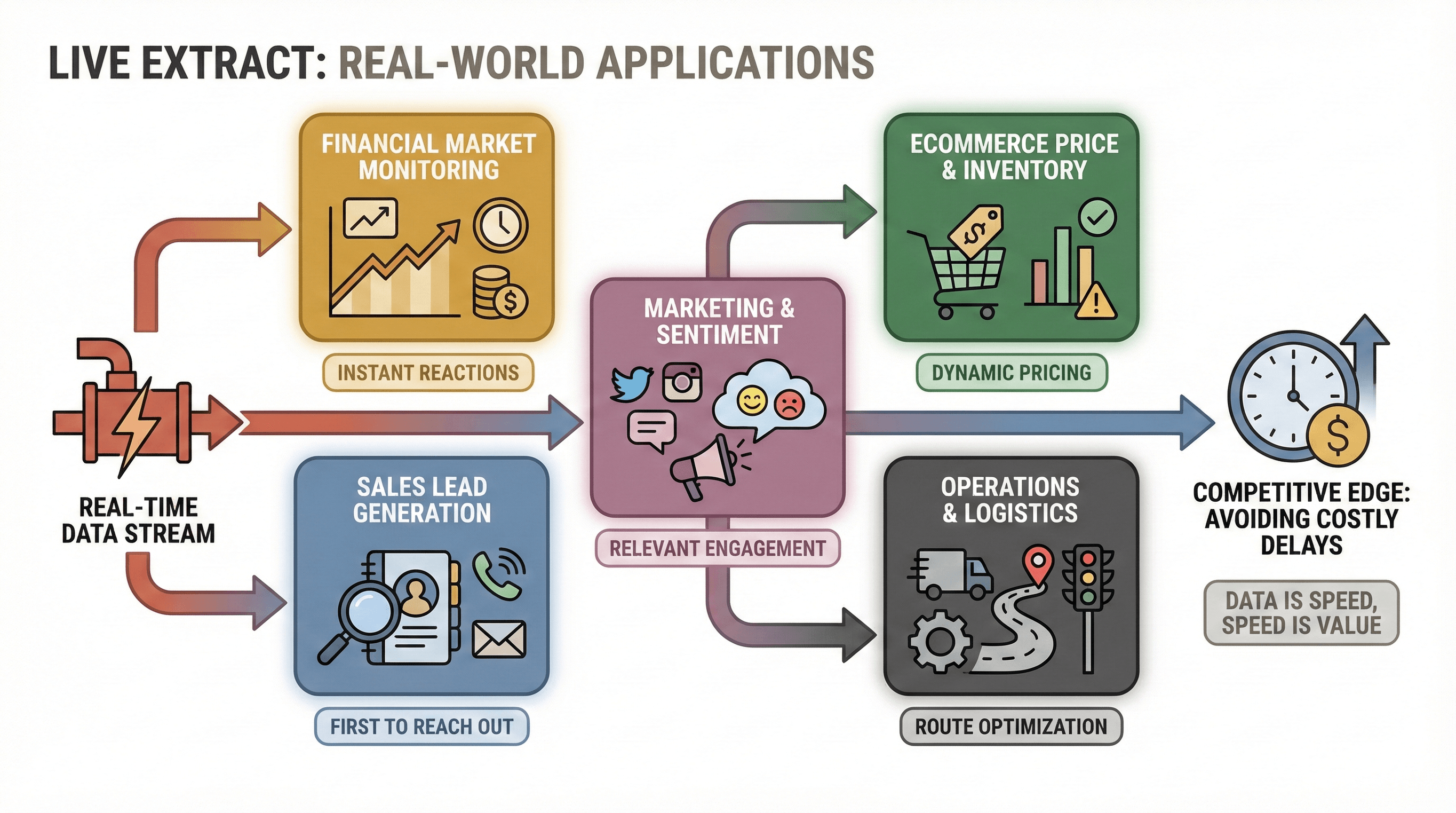 Live extract isn’t just a buzzword; it’s transforming how entire industries operate. Here are some of the most powerful ways teams are using real-time data extraction right now:
- Financial Market Monitoring: In finance, milliseconds can mean millions. Firms use live extract to monitor stock prices, forex rates, and news feeds in real time, enabling instant reactions to market shifts (IBM).
- Sales Lead Generation: Sales teams continuously pull new leads from directories or business registries, ensuring reps are the first to reach out when a new opportunity appears (Inc.).
- Marketing & Social Media Sentiment: Marketers use live extract to monitor social media, forums, and review sites in real time, adjusting campaigns or responding to feedback while it’s still relevant.
- Ecommerce Price & Inventory Monitoring: Retailers track competitor prices and stock levels as they change, enabling dynamic pricing and avoiding costly stockouts (IBM).
- Operations & Logistics: Delivery companies optimize routes using live traffic data, and manufacturers monitor equipment in real time to prevent downtime.
The unifying thread? In fast-moving environments, having the latest data is a competitive edge. Delays aren’t just inconvenient—they’re expensive.
Live Extract vs. Traditional Data Extraction: What’s the Difference?
Let’s clear up the confusion: how is live extract different from the old-school, batch-style data extraction most businesses are used to? Here’s a quick side-by-side:
| Aspect | Traditional Batch Extraction | Live (Real-Time) Extraction |
|---|---|---|
| Update Frequency | Scheduled (nightly, weekly) | Continuous or very frequent (seconds/minutes) |
| Data Freshness | Often stale (hours or days old) | Up-to-the-minute (current as of now) |
| Use Case Fit | Historical analysis, reporting, non-urgent processes | Time-sensitive monitoring, alerts, instant decisions |
| Processing Model | Batch jobs (like a laundry cycle—efficient but slow) (Statsig) | Streaming/continuous (like a running faucet—constant flow, instant output) |
| Business Impact | Reactive decisions; missed opportunities if data is late | Proactive, agile decisions; act on events as they happen |
In short: batch extraction is fine for last month’s sales report. Live extract is what you need when every minute counts—like responding to a hot lead or adjusting prices before your competitors do.
The Shift from Batch to Real-Time: Why It Matters
Why are so many businesses moving towards live extract? Because the cost of slow data is real. Retailers without live inventory updates risk $1.1 trillion in inefficiencies globally (IBM), and in finance, detecting fraud within five minutes versus five hours can be the difference between a minor incident and a major breach.
For sales teams, the speed advantage is dramatic: responding to a lead within one hour makes you seven times more likely to qualify that lead than waiting just two hours (Inc.). In other words, being faster—even by tens of minutes—can make or break your results.
No wonder over 80% of companies plan to increase investment in real-time analytics capabilities (SuperAGI).
How Thunderbit Powers Live Extract for Any Website
Here’s where I get excited. Traditionally, setting up real-time data extraction required coding, APIs, or complex pipelines. But Thunderbit flips that script. As an AI-driven, no-code Chrome extension, Thunderbit lets anyone—yes, even if you’re allergic to code—extract live data from any website with just a couple of clicks.
Here’s what makes Thunderbit uniquely suited for live extract:
- AI Suggest Fields: Thunderbit’s AI reads the page and instantly suggests which fields (columns) to extract—no more fiddling with selectors or templates (Thunderbit Blog).
- Two-Click Scraping: Confirm the fields, hit “Scrape,” and you’re done. Thunderbit structures the data for you—no messy cleanup required.
- Subpage & Pagination Automation: Need data from detail pages or across multiple pages? Thunderbit’s AI can navigate subpages and handle infinite scroll or pagination automatically (Thunderbit Blog).
- Instant Export: Send your data directly to Excel, Google Sheets, Airtable, or Notion—free and unlimited (Thunderbit Blog).
- Pre-Built Templates: For popular sites like Amazon, Zillow, or Google Maps, Thunderbit offers instant templates—one click and you’re scraping live data.
- Scheduled Scraper: Describe your schedule in plain English (“every 2 hours”), and Thunderbit will keep your data feed fresh automatically.
And yes, you can do all this without writing a single line of code. I’ve seen users go from zero to live dashboards in an afternoon.
Try Thunderbit Live Extract for Free
Thunderbit’s AI-Driven Simplicity: No Coding Required
Thunderbit’s real magic is its AI-driven simplicity. Instead of wrestling with scripts or selectors, you just tell Thunderbit what you want—or let the AI suggest fields. It even handles tricky pages with infinite scroll, pop-ups, or dynamic content, and can extract data from PDFs or images using built-in OCR (Thunderbit Blog).
For non-technical users, this is a game-changer. You don’t need to wait for IT or a developer. Just open the extension, click “AI Suggest Fields,” and watch Thunderbit do the heavy lifting.
Live Extract in Action: Sales and Market Insights with Thunderbit
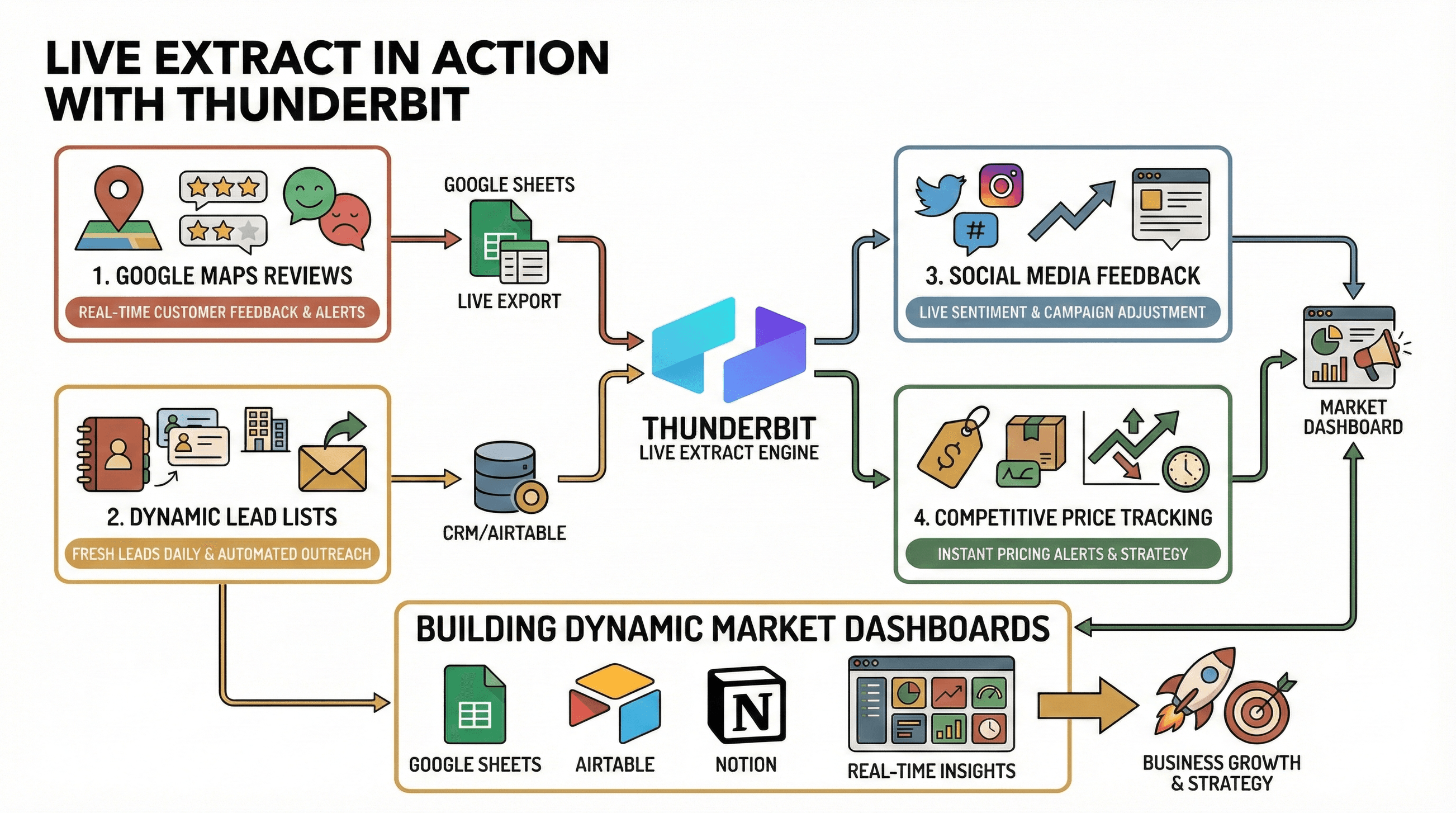 Let’s get practical. Here are a few ways I’ve seen Thunderbit’s live extract power up sales and marketing teams:
1. Extracting the Latest Google Maps Reviews
Imagine managing multiple retail locations and wanting to monitor customer feedback in real time. With Thunderbit, you can scrape new Google Maps reviews for each store, export them to a Google Sheet, and set up alerts for negative feedback. Now, you’re responding to customer issues within hours, not days—boosting your reputation and customer loyalty.
2. Building Dynamic Lead Lists from Web Directories
Sales teams can use Thunderbit to scrape new business listings or contact info from industry directories. By scheduling the scrape daily, your CRM or Google Sheet is always up to date with the freshest leads. Some teams even automate welcome emails to new prospects the moment they appear online.
3. Real-Time Social Media Feedback
Marketing teams use Thunderbit to monitor brand mentions, trending hashtags, or forum posts. By scraping these sources on a schedule, you get a live feed of public sentiment—allowing you to adjust campaigns or respond to PR issues before they spiral.
4. Competitive Price Tracking
Ecommerce teams set up Thunderbit to scrape competitor prices and stock levels multiple times a day. If a competitor drops their price, you’ll know within the hour—and can adjust your own pricing strategy instantly.
Building Dynamic Lead Lists and Market Dashboards
How to Scrape Website Data into Excel using AI Get Started Free
The best part? Thunderbit’s live extract feeds can plug directly into your analytics tools. Export to Google Sheets, Airtable, or Notion, and you’ve got a living dashboard that updates itself. Sales managers can track the pipeline in real time; marketers can monitor sentiment or campaign performance as it happens.
Overcoming Technical Challenges in Live Extract
Live extract isn’t without its hurdles—large data volumes, unstable networks, and complex web structures can trip up even seasoned pros. But Thunderbit is built to tackle these challenges head-on:
- Cloud Scraping: Thunderbit can scrape up to 50 pages in parallel using cloud servers, making it easy to handle big jobs quickly.
- Smart Extraction: The AI detects and navigates dynamic content, infinite scroll, and subpages automatically—no manual setup required.
- Error Handling: Thunderbit provides clear feedback if a scrape fails and allows for retries or manual adjustments.
- Data Validation: Fields are structured and typed (text, number, date, email, etc.), ensuring clean, consistent data every time.
And if a website changes its layout, Thunderbit’s AI adapts—no more broken scripts or hours spent debugging.
Ensuring Data Quality and Reliability
Thunderbit doesn’t just grab data—it ensures it’s accurate and reliable. You can add custom AI prompts for each field (like “extract price as a number”), and Thunderbit validates data types automatically. Exporting to cloud platforms like Google Sheets or Airtable means your data is always backed up and ready for analysis.
Scheduled scrapes use the same field definitions every time, so your data stays consistent—perfect for time-series analysis or trend tracking.
Live Extract for Sales, Marketing, and Ecommerce Teams
Let’s zoom in on how live extract supercharges different teams:
- Sales: Build and enrich lead lists in real time, monitor prospect activity, and respond to signals instantly. No more working with stale contact sheets.
- Marketing: Track campaign performance, monitor brand sentiment, and gather competitor intelligence as it happens. Adjust strategies on the fly for maximum impact.
- Ecommerce: Monitor competitor prices, inventory, and product changes in real time. Avoid stockouts, win price wars, and keep your catalog up to date without breaking a sweat.
The common thread? Live extract turns your team from reactive to proactive—making decisions based on what’s happening now, not what happened last week.
Getting Started with Live Extract Using Thunderbit
Ready to try live extract for yourself? Here’s how to get started:
- Install Thunderbit: Download the Thunderbit Chrome Extension and sign up for a free account (you get 6 pages free, or 10 with a trial boost).
- Pick Your Target: Open the website you want to extract data from—could be a directory, review site, or competitor page.
- AI Suggest Fields: Click the Thunderbit icon, then “AI Suggest Fields.” The AI will propose columns to extract—edit them if needed.
- Scrape: Hit “Scrape” and watch your data fill up in a neat table.
- Export: Send your data to Google Sheets, Airtable, Notion, or download as CSV/Excel.
- Schedule (Optional): Want live updates? Set up a schedule in plain English (“every 2 hours”), and Thunderbit will keep your feed fresh.
It’s genuinely that easy. And if you ever get stuck, Thunderbit’s documentation and support team are there to help.
Start Live Extract with Thunderbit
Conclusion: The Future of Real-Time Data with Live Extract
The era of live extract is here, and it’s changing how businesses operate—from sales and marketing to ecommerce and beyond. No more waiting for stale reports or missing out on opportunities because your data is stuck in yesterday. With tools like Thunderbit, anyone can harness the power of real-time data—no coding, no headaches, just actionable insights when you need them most.
Industry experts agree: organizations that embrace real-time data will outpace those that don’t (IBM). So, if you’re ready to move from reactive to proactive, give live extract a try. Your future self—and your bottom line—will thank you.
Want to learn more about web scraping, live extract, and automation? Check out the Thunderbit Blog for more guides and tips, or subscribe to our YouTube Channel for step-by-step tutorials.
Try AI Live Extract with Thunderbit Get Started Free
FAQs
1. What is live extract, and how is it different from traditional data extraction?
Live extract is the process of capturing data as it’s generated or updated—delivering up-to-the-minute information instead of waiting for scheduled batch updates. Unlike traditional extraction, which can leave you working with stale data, live extract keeps your insights fresh and actionable.
2. Why is real-time data so important for business teams?
Real-time data enables faster, more informed decisions. In sales, it means reaching out to leads before competitors do. In marketing, it allows you to adjust campaigns on the fly. Across industries, it reduces missed opportunities and helps teams stay agile.
3. How does Thunderbit make live extract accessible to non-technical users?
Thunderbit uses AI to suggest fields, structure data, and navigate complex web pages—no coding required. With two-click scraping, instant export, and scheduled updates, anyone can set up live data feeds in minutes.
4. Can Thunderbit handle large data volumes or complex websites?
Yes. Thunderbit’s cloud scraping can process up to 50 pages in parallel, and its AI is designed to handle dynamic content, infinite scroll, and subpages automatically. It also includes error handling and data validation to ensure reliability.
5. How do I get started with live extract using Thunderbit?
Install the Thunderbit Chrome Extension, pick your target website, use “AI Suggest Fields,” and hit “Scrape.” Export your data to your favorite platform, and set up a schedule for continuous updates if needed. Thunderbit’s free tier lets you try it risk-free.
Ready to unlock real-time data insights? Start your live extract journey with Thunderbit today—and never settle for stale data again.
Learn More




