
If you’ve ever wondered how companies turn a mountain of raw, scattered data into those slick dashboards and AI-powered insights, you’re not alone. The secret sauce? It all starts with data ingestion—the unsung hero at the very beginning of every data-driven business process. In a world where we’re generating 181 zettabytes of data in 2025 (that’s 21 zeros, in case you’re counting), getting data from point A to point B—quickly, accurately, and in a usable format—has never been more critical.
I’ve spent years in SaaS and automation, and I’ve seen firsthand how the right data ingestion strategy can make or break a business. Whether you’re wrangling sales leads, monitoring market trends, or just trying to keep your operations running smoothly, understanding how data ingestion works (and how it’s evolving) is the first step to unlocking real business value. So, let’s dig in: what is data ingestion, why does it matter, and how are modern tools—like Thunderbit—changing the game for everyone from analysts to entrepreneurs?
What Is Data Ingestion? The Foundation of Data-Driven Business
At its core, data ingestion is the process of collecting, importing, and loading data from multiple sources into a central system—think a database, data warehouse, or data lake—so it can be analyzed, visualized, or used to power business decisions. Imagine it as the “front door” to your data pipeline: it’s how you get all those raw ingredients (spreadsheets, APIs, logs, web pages, sensor feeds) into your kitchen before you start cooking up insights.
Data ingestion is the very first stage in any data pipeline (Montecarlodata), breaking down silos and making sure high-quality, timely data is available for analytics, business intelligence, and machine learning. Without it, your valuable information stays trapped in isolated systems—“invisible to the people who need it,” as one industry expert put it.
Here’s how it fits into the bigger picture:
- Data ingestion: Collects raw data from various sources and brings it into a central repository.
- Data integration: Combines and aligns data from different sources, making it work together.
- Data transformation: Cleans, formats, and enriches data so it’s ready for analysis.
Think of ingestion as trucking all your groceries home from different stores. Integration is organizing them in your pantry, and transformation is prepping and cooking the meal.
Why Data Ingestion Matters for Modern Organizations
Let’s get real: in today’s business world, timely and well-ingested data is a strategic asset. Companies that master data ingestion can break down silos, enable real-time insights, and make faster, smarter decisions. On the flip side, poor ingestion means slow reports, missed opportunities, and decisions based on stale or incomplete data.
How to Scrape Any Website Using AI Get Started Free
Here are some concrete ways efficient data ingestion delivers business value:
| Use Case | How Efficient Data Ingestion Helps |
|---|---|
| Sales Lead Generation | Consolidates leads from web forms, social media, and databases into one system in near real-time—so sales teams can respond faster and boost conversion rates. |
| Operational Dashboards | Continuously feeds data from production systems into analytics platforms, providing up-to-date KPIs for management and enabling rapid corrective action. |
| Customer 360° View | Integrates customer data across CRM, support, e-commerce, and social media to create unified profiles for personalized marketing and proactive service (Cake.ai). |
| Predictive Maintenance | Ingests high-volume sensor and IoT data, allowing analytics models to detect anomalies and predict failures before they happen—reducing downtime and saving costs. |
| Financial Risk Analytics | Streams transaction data and market feeds into risk models, giving banks and traders a real-time view of exposures and enabling instant fraud detection. |
And the numbers don’t lie: 97% of businesses have invested in big data initiatives, but those investments only pay off if the data can be ingested and trusted.
Data Ingestion vs. Data Integration and Data Transformation: Clearing Up the Confusion
It’s easy to get tangled up in the jargon—so let’s clear the air:
- Data Ingestion: The initial step of collecting and importing raw data from source systems. Think: “Get everything into the kitchen.”
- Data Integration: Combining and aligning data from different sources, ensuring consistency and a unified view. Think: “Organize the pantry.”
- Data Transformation: Converting data from raw to usable—cleaning, formatting, aggregating, and enriching it. Think: “Prep and cook the meal.”
A common misconception is that ingestion and ETL (Extract, Transform, Load) are the same. In reality, ingestion is just the “extract” part—pulling in the raw data. Integration and transformation come next, making the data ready for analysis (Astera).
Why does this matter? If you just need a quick dataset from a web page, a lightweight ingestion tool might be all you need. But if you’re combining and cleaning data from five different systems, you’ll need integration and transformation, too.
Traditional Data Ingestion Methods: ETL and Their Limitations
For decades, the go-to method for data ingestion was ETL (Extract, Transform, Load). Data engineers would write scripts or use specialized software to periodically pull data from source systems, clean and format it, and load it into a data warehouse. This usually ran on a batch schedule—think nightly updates.
But as data exploded in volume and variety, traditional ETL started to show its age:
- Complex, Time-Consuming Setup: Building and maintaining ETL pipelines required lots of coding and specialized skills. Non-technical teams had to wait for IT to set everything up (Medium).
- Batch Processing Bottlenecks: ETL jobs ran in batches, delaying data availability. In a world where instant insights matter, waiting hours or days just doesn’t cut it (SumaSoft).
- Scaling and Speed Issues: Legacy pipelines often struggled with today’s massive data volumes, requiring constant tuning and upgrades.
- Rigid and Inflexible: Adding new data sources or changing schemas was a pain, often breaking the pipeline or requiring major rework.
- High Maintenance Overhead: Pipelines could fail for all sorts of reasons, demanding ongoing attention from engineers.
- Limited to Structured Data: Classic ETL was built for neat rows and columns—not the messy, unstructured data (like web pages or images) that now makes up 90% of new data.
In short: ETL was great for a simpler time, but it’s struggling to keep up with the speed, scale, and diversity of modern data.
The Rise of Modern Data Ingestion: AI-Driven and Automated Solutions
Enter the new era: modern data ingestion tools that leverage automation, cloud scalability, and AI to make data gathering faster, easier, and more flexible.
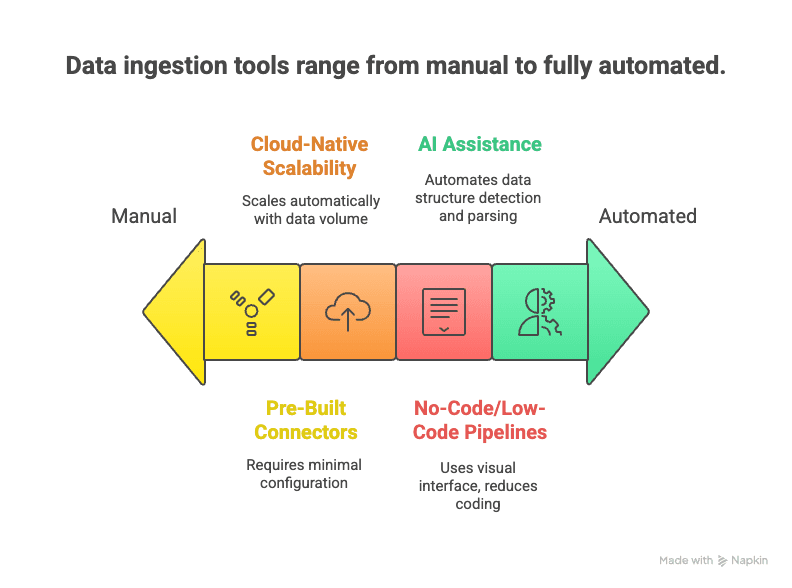
Here’s what sets them apart:
- No-Code/Low-Code Pipelines: Drag-and-drop interfaces and AI assistants let users set up data flows without writing code (Medium).
- Pre-Built Connectors: Hundreds of ready-made connectors for popular data sources—just enter your credentials and go.
- Cloud-Native Scalability: Elastic cloud services can handle massive streams of data in real time (Databricks).
- Real-Time and Streaming Support: Modern tools support both streaming and batch ingestion, letting you choose what fits your needs (Cake.ai).
- AI Assistance: AI can auto-detect data structures, recommend parsing rules, and even perform data quality checks on the fly (Cake.ai).
- Support for Unstructured Data: NLP and computer vision techniques can turn messy web pages, PDFs, or images into structured tables.
- Lower Maintenance: Managed services handle monitoring, scaling, and updates—so you can focus on using the data, not babysitting pipelines.
The result? Data ingestion that’s faster to set up, easier to change, and capable of handling today’s wild world of data.
Data Ingestion in Action: Industry Applications and Challenges
Let’s see how data ingestion plays out in the real world—and what challenges different industries face.
Retail & E-Commerce
Retailers ingest data from point-of-sale systems, online stores, loyalty apps, and even in-store sensors. By consolidating sales transactions, website clickstreams, and inventory logs, they can get a real-time view of stock levels and purchasing trends. The challenge? Handling high-volume, fast data (especially during peak shopping periods) and integrating data across online and offline channels.
Finance & Banking
Banks and trading firms ingest streams of data from transactions, market feeds, and customer interactions. Real-time ingestion is crucial for fraud detection and risk management. But with strict compliance and security requirements, any hiccup in the ingestion process can have serious consequences.
Technology & Internet Companies
Tech giants ingest massive real-time event streams (every click, like, or share) to analyze user behavior and power recommendation engines. The scale is huge, and the challenge is filtering signal from noise—ensuring data quality and consistency.
Healthcare
Hospitals ingest data from electronic health records, lab systems, and medical devices to create unified patient records and enable predictive analytics. The big hurdles? Interoperability (different systems speaking different “languages”) and patient privacy.
Real Estate
Real estate firms ingest data from listing services, property websites, and public records to build comprehensive databases. The challenge is merging data from a variety of sources—often unstructured—and keeping it fresh as listings change rapidly.
Common challenges across industries include:
- Handling data variety (structured, semi-structured, unstructured)
- Balancing real-time vs. batch needs
- Ensuring data quality and consistency
- Meeting security and compliance requirements
- Scaling to handle growing data volumes
Overcoming these challenges is key to unlocking better business outcomes—more accurate analysis, real-time decision-making, and stronger compliance.
Thunderbit: Simplifying Data Ingestion with AI Web Scraper
Now, let’s talk about where Thunderbit fits into this picture. Thunderbit is an AI-powered web scraper Chrome extension designed to make web data ingestion accessible to everyone—even if you don’t know a lick of code.
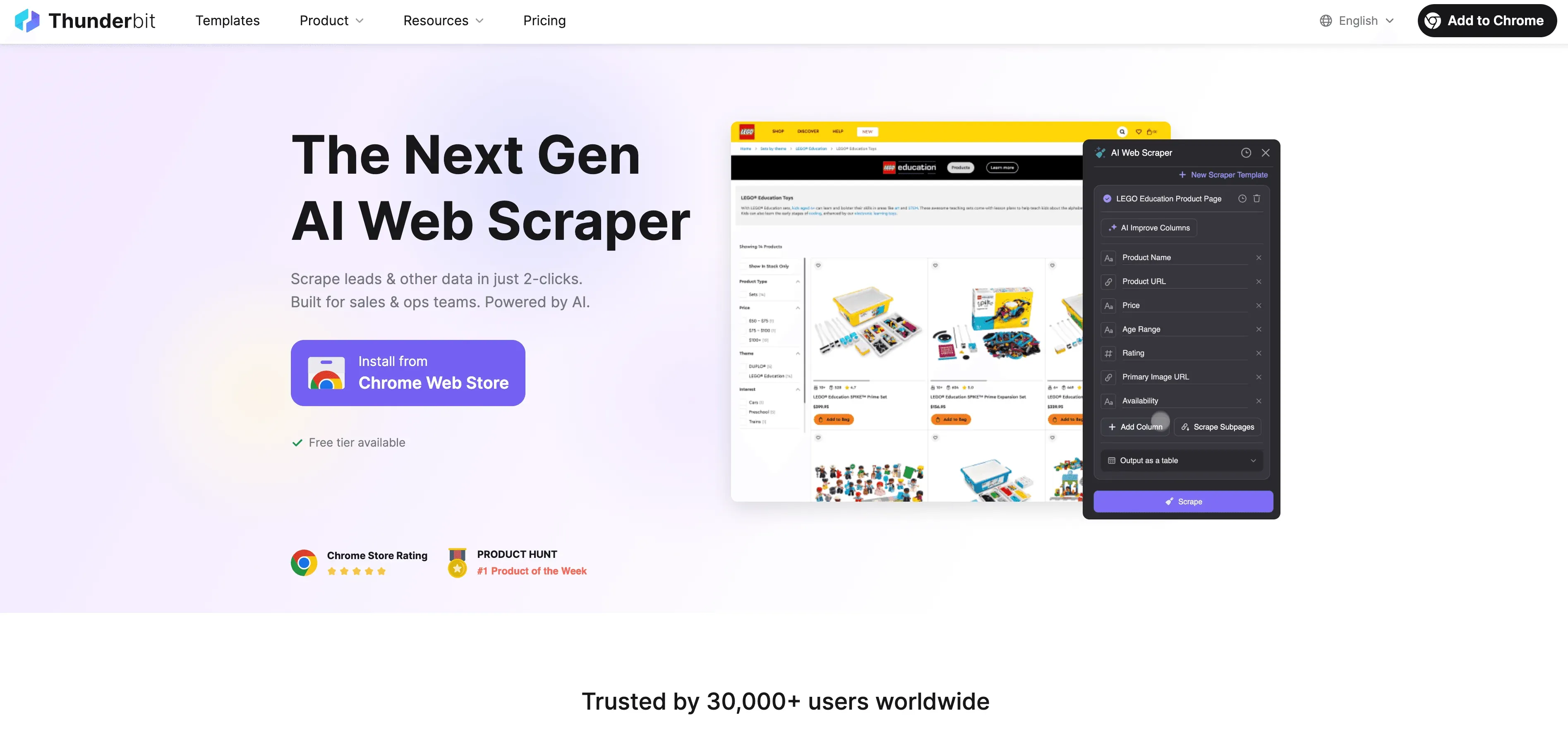
Here’s why Thunderbit is a game-changer for business users:
- 2-Click Web Scraping: Go from a messy web page to a structured dataset in two clicks. Click “AI Suggest Fields,” then “Scrape”—and you’re done.
- AI-Powered Field Suggestions: Thunderbit’s AI reads the page and recommends the best columns to extract, whether you’re on a business directory, product listing, or LinkedIn profile.
- Automatic Subpage Scraping: Need more details? Thunderbit can visit each subpage (like product details or individual profiles) and enrich your table automatically.
- Pagination Handling: It can handle paginated lists and infinite scroll pages, so you don’t miss any data.
- Pre-Built Templates: For popular sites like Amazon, Zillow, or Shopify, Thunderbit offers 1-click templates—no setup needed.
- Free Data Export: Export your data directly to Excel, Google Sheets, Airtable, or Notion—no extra charge.
- Scheduled Scraping: Set up scraping jobs to run automatically at any interval (e.g., daily competitor price checks).
- AI Autofill: Automate form-filling and repetitive web tasks, too.
Thunderbit is perfect for sales teams scraping leads, ecommerce analysts monitoring prices, or real estate agents gathering property listings. It’s all about turning unstructured web data into actionable insights—fast.
If you want to see Thunderbit in action, check out our YouTube Channel or explore our blog for more guides.
Try Thunderbit AI Web Scraper for Free
Comparing Data Ingestion Solutions: Traditional vs. Modern Approaches
Here’s a quick side-by-side comparison:
| Criteria | Traditional ETL Tools | Modern AI/Cloud Tools | Thunderbit (AI Web Scraper) |
|---|---|---|---|
| User Expertise | High (coding/IT required) | Moderate (low-code, some setup) | Low (2-click, no coding needed) |
| Data Sources | Structured (databases, CSV) | Broad (databases, SaaS, APIs) | Any website, unstructured data |
| Speed of Deployment | Slow (weeks/months) | Faster (days) | Instant (minutes) |
| Real-Time Support | Limited (batch) | Strong (streaming/batch) | On-demand & scheduled |
| Scalability | Challenging | High (cloud-native) | Moderate/High (cloud scraping) |
| Maintenance | High (fragile pipelines) | Medium (managed services) | Low (AI adapts to changes) |
| Transformation | Rigid, upfront | Flexible, post-load | Basic (AI field prompts) |
| Best Use Case | Internal batch integration | Analytics pipelines | Web data, external sources |
The takeaway? Match the tool to the job. For web data or unstructured sources, Thunderbit is often the fastest, easiest option.
The Future of Data Ingestion: Automation and Cloud-First Strategies
Looking ahead, data ingestion is only getting smarter and more automated. Here’s what’s on the horizon:
- Real-Time by Default: The old batch paradigm is fading. More pipelines are being built for real-time, event-driven data (Cake.ai).
- Cloud-First and “Zero ETL”: Cloud platforms are making it easier to connect sources and targets without manual pipelines.
- AI-Driven Automation: Machine learning will play a bigger role in configuring, monitoring, and optimizing pipelines—spotting anomalies, correcting errors, and even enriching data on the fly.
- No-Code and Self-Service: More tools will let business users set up data flows with natural language or visual interfaces.
- Edge and IoT Ingestion: As more data is generated at the edge, ingestion will happen closer to the source, with smart filtering and aggregation.
- Governance and Metadata: Automated tagging, lineage tracking, and compliance will be built into every step.
Bottom line: the future is about making data ingestion faster, more accessible, and more reliable—so you can focus on insights, not infrastructure.
Conclusion: Key Takeaways for Business Users
How to Master Automated Data Scraping Using Thunderbit Get Started Free
- Data ingestion is the critical first step in any data-driven initiative. If you want insights, you need to get the data in—quickly and reliably.
- Modern, AI-powered tools like Thunderbit make data ingestion accessible to everyone, not just IT pros. With 2-click scraping, AI field suggestions, and scheduled jobs, you can turn messy web data into business gold.
- Choosing the right tool matters: Use traditional ETL for stable, structured internal data; modern cloud tools for broad analytics; and Thunderbit for web and unstructured data.
- Stay ahead of the curve: Automation, cloud, and AI are making data ingestion smarter and easier. Don’t get stuck in the past—explore new solutions and future-proof your data strategy.
Start Ingesting Web Data with Thunderbit
FAQs
1. What is data ingestion, in plain English?
Data ingestion is the process of collecting and importing data from various sources (like websites, databases, or files) into a central system so it can be analyzed or used for business decisions. It’s the very first step in any data pipeline.
2. How is data ingestion different from data integration and transformation?
Data ingestion is about bringing raw data in. Data integration combines and aligns data from different sources, while data transformation cleans and formats it for analysis. Think: ingestion = gather, integration = organize, transformation = prep and cook.
3. What are the biggest challenges with traditional data ingestion methods?
Traditional methods like ETL are slow to set up, require lots of coding, struggle with unstructured data, and can’t keep up with today’s real-time needs. They’re also high-maintenance and inflexible when data sources change.
4. How does Thunderbit make data ingestion easier?
Thunderbit uses AI to let anyone scrape and structure web data in just two clicks—no coding required. It can handle subpages, pagination, and even schedule recurring jobs, exporting directly to Excel, Google Sheets, Airtable, or Notion.
5. What’s the future of data ingestion?
The future is all about automation, cloud-first strategies, and AI-driven pipelines. Expect more real-time data flows, smarter error handling, and tools that let business users set up data ingestion with natural language or visual interfaces.
Learn More:
- How to Scrape Any Website Using AI
- How to Master Automated Data Scraping Using Thunderbit
- What Is Data Ingestion?
- Data Ingestion: 7 Challenges and 4 Best Practices
Try AI Web Scraper Get Started Free




