
The web is growing at a pace that’s honestly hard to wrap your head around. Every day, billions of new pages, products, reviews, and datasets are published—fueling everything from market research to AI training to your next Amazon shopping spree. As someone who’s spent years in SaaS and automation, I’ve seen firsthand how the right data can make or break a business decision. But here’s the catch: collecting, updating, and making sense of all this web data is getting tougher, not easier. Traditional web scrapers are struggling to keep up, and businesses are hungry for a smarter, faster way to turn the internet into actionable insights. Enter the cloud crawler—a tool that’s quietly revolutionizing how organizations discover and leverage web data at scale.
So, what exactly is a cloud crawler? How does it differ from the web scrapers you might already know? And why are teams from sales to operations betting on this technology to stay ahead in a data-driven world? Let’s dig in, demystify the buzzwords, and see how cloud crawlers (especially Thunderbit’s solution) are changing the game for modern businesses.
What Is a Cloud Crawler? The Next Step in Data Discovery
Scrape data from any website using AI Get Started Free
Let’s break it down: a cloud crawler isn’t just a web scraper that lives in the cloud. It’s more like a data discovery engine—a smart, cloud-based system designed to automatically find, extract, and analyze massive datasets from across the internet. While a traditional web scraper grabs information from a handful of pages (often one at a time, and usually from a single device), a cloud crawler operates on a whole different level. It runs in powerful cloud data centers, crawling thousands (or even millions) of pages simultaneously, and can process everything from text to images to PDFs—no matter how complex or sprawling the target website might be.
Think of it this way: if a web scraper is like a single librarian copying passages from a book, a cloud crawler is a team of supercomputers scanning every book in the library at once, tagging, organizing, and analyzing the content as they go. The result? Businesses get richer, fresher, and more actionable data—without the bottlenecks of local hardware or manual effort (Sitebulb, Octoparse).
Cloud Crawler vs. Traditional Web Scraper: What’s the Real Difference?
If you’ve ever used a web scraper, you know the basics: point it at a page, define what you want, and let it pull the data. But as the web gets bigger and more complicated, the old approach starts to show its limits. Here’s how cloud crawlers and traditional web scrapers stack up:
| Feature/Aspect | Traditional Web Scraper | Cloud Crawler |
|---|---|---|
| Deployment | Runs on your local device or server | Runs in the cloud (remote data centers) |
| Scale | Limited by your computer’s power | Massively parallel—thousands of pages at once |
| Speed | Slower, especially for big jobs | High-speed batch processing |
| Maintenance | Needs frequent updates, breaks with site changes | Cloud-based, auto-updating, less fragile |
| Data Types | Usually text, sometimes images | Text, images, PDFs, complex layouts |
| Access | Tied to your device/network | Accessible from anywhere, any device |
| Scheduling | Manual or basic automation | Advanced scheduling, recurring jobs |
| Best For | Small projects, simple sites | Large-scale, frequent, or complex data needs |
Cloud crawlers are built for the modern web—where data is everywhere, and speed and scale are non-negotiable (GPTBots, Octoparse).
How Cloud Crawlers Supercharge Data Collection Efficiency
Here’s where things get really interesting. Cloud crawlers use the power of cloud computing to process thousands of web pages in parallel. That means you can scrape an entire ecommerce catalog, monitor competitor prices across dozens of sites, or aggregate real estate listings from every major portal—all in a fraction of the time it would take with a traditional scraper.
Why does this matter? Because in fields like ecommerce, finance, and real estate, data freshness is everything. Prices, inventory, and market trends can change by the minute. Waiting hours (or days) for a local scraper to finish just isn’t an option. Cloud crawlers aren’t limited by your laptop’s RAM or your office Wi-Fi—they scale up as needed, so you can tackle massive jobs without breaking a sweat (Zyte, Octoparse).
Industries that benefit most from this efficiency include:
- Ecommerce: Price monitoring, product catalog aggregation, review analysis
- Real Estate: Listing aggregation, market trend tracking, property comparison
- Finance: News and sentiment analysis, stock/crypto monitoring, regulatory tracking
- Sales & Marketing: Lead generation, competitor research, trend spotting
And honestly, that’s just scratching the surface. If you need web data at scale, a cloud crawler is your new best friend.
Thunderbit’s Cloud Crawler Solution: Fast, Flexible, and Powerful
Let me put on my Thunderbit hat for a second (okay, I never really take it off). Thunderbit’s cloud scraping mode is our answer to the modern data challenge—a cloud crawler built for business users who want results, not headaches.
Here’s what makes Thunderbit’s cloud crawler stand out:
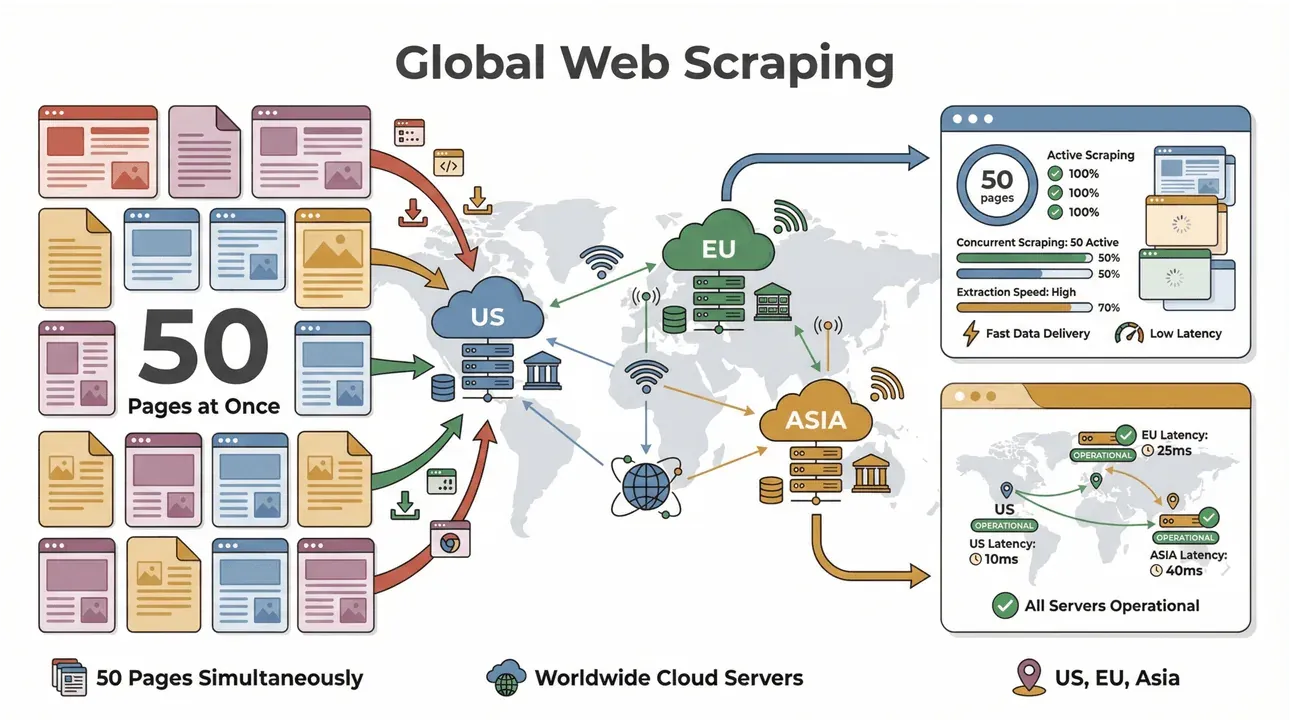
- High-Speed Batch Scraping: Scrape up to 50 pages at a time, with cloud servers in the US, EU, and Asia for global reach. No more waiting for your laptop to chug through a big list.
- Complex Page Support: Thunderbit’s AI can handle everything from dynamic ecommerce sites to tricky PDFs and even image extraction. If it’s on the web, Thunderbit can probably scrape it (Thunderbit).
- Subpage Crawling: Need to enrich your data with details from subpages (like product specs or author bios)? Thunderbit’s AI can visit each subpage and merge the results into your main dataset (Thunderbit).
- Smart Data Structuring: Use “AI Suggest Fields” to let Thunderbit read the site and recommend the best columns—no coding or template-building required.
- Export Anywhere: Send your data straight to Excel, Google Sheets, Airtable, or Notion. Or just download as CSV/JSON—whatever fits your workflow (Thunderbit).
- No Maintenance Required: Thunderbit’s AI adapts to website changes, so you’re not constantly fixing broken scrapers (Thunderbit).
And yes, you can try all this with a free tier—so you don’t have to take my word for it.
Try Thunderbit Cloud Scraper for Free
Cloud Crawler Deployment: Cloud vs. Local—Which Is Right for You?
One of the biggest advantages of cloud crawlers is deployment flexibility. With a traditional (local) crawler, you’re tied to a specific device, network, and often, a lot of setup headaches. If your computer goes to sleep or your internet drops, your scrape stops. Scaling up means buying more hardware or running multiple scripts.
Cloud crawlers flip the script:
- No Special Hardware Needed: All the heavy lifting happens in the cloud. You can launch massive scrapes from a Chromebook, a Mac, or even your phone.
- Access from Anywhere: Traveling? Working remotely? No problem—your cloud crawler is always available.
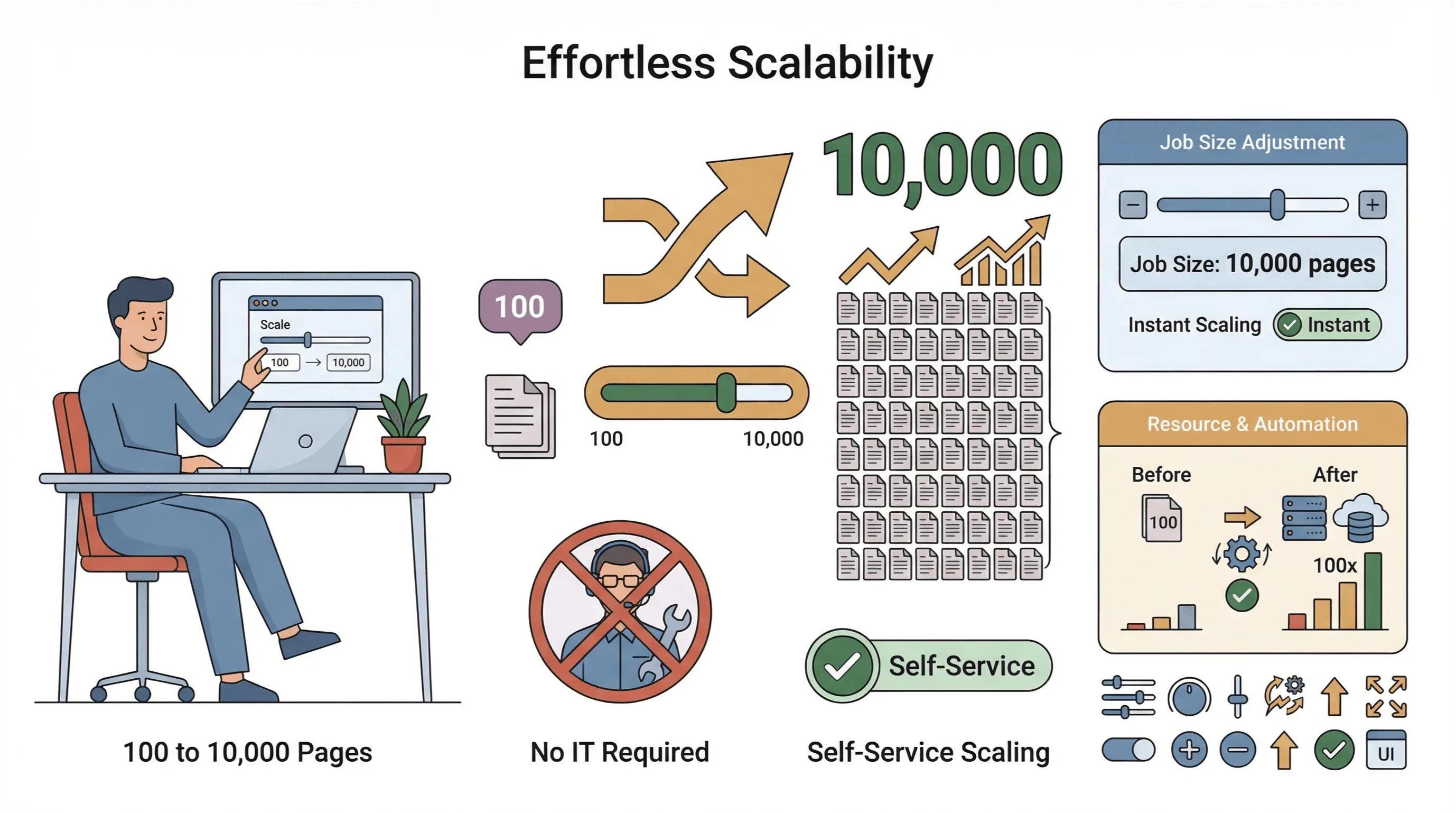
- Easy Scaling: Need to scrape 10,000 pages instead of 100? Just increase your job size—no IT intervention required.
- Global Data Collection: With cloud servers in multiple regions, you can access geo-restricted content and manage compliance more easily (PromptCloud).
Of course, security and compliance are always top concerns. The best cloud crawlers (Thunderbit included) use encrypted connections, respect website terms, and offer features to help you manage sensitive data responsibly.
Real-World Impact: How Cloud Crawlers Are Transforming Data-Driven Strategies
Let’s get practical. Why are businesses making the switch to cloud crawlers? Because they’re seeing real, measurable impact:
- Real-Time Market Analysis: Retailers use cloud crawlers to monitor competitor prices and inventory in real time, enabling dynamic pricing and faster reactions to market shifts (Zyte).
- Consumer Trend Prediction: Brands aggregate reviews, social media posts, and forum discussions to spot emerging trends and adjust campaigns on the fly.
- Sales & Lead Gen: Sales teams build up-to-date lead lists from directories, event sites, and even PDFs—feeding CRMs with fresh, qualified contacts (Thunderbit).
- Operations & Compliance: Financial firms use cloud crawlers to monitor regulatory updates, news, and filings across multiple jurisdictions—reducing risk and staying ahead of changes.
The common thread? Cloud crawlers let teams move faster, make smarter decisions, and outpace competitors who are still stuck in the slow lane.
Key Features to Look for in a Cloud Crawler
See Thunderbit Pricing & Features Get Started Free
Not all cloud crawlers are created equal. If you’re evaluating options, here are the features that matter most (and where Thunderbit shines):
- Scalability: Can it handle thousands of pages at once? Does it slow down as jobs get bigger?
- Ease of Use: Is the interface friendly for non-technical users? Can you set up a scrape in a few clicks?
- Multi-Data Support: Text, images, PDFs, subpages—can it handle them all?
- Integration: Does it export to your favorite tools (Excel, Sheets, Notion, Airtable)?
- Scheduling: Can you set up recurring jobs for always-fresh data?
- AI Assistance: Does it offer smart field suggestions, data enrichment, and auto-adapting to site changes?
- Security & Compliance: Are your data and credentials protected? Does it help you stay compliant with privacy laws?
Thunderbit checks all these boxes, making it a top pick for teams that want power without the pain.
Getting Started: How to Use a Cloud Crawler for Your Business
Ready to jump in? Here’s how a typical business user can get started with a cloud crawler like Thunderbit:
- Install the Thunderbit Chrome Extension: Quick setup, no IT required.
- Choose Your Target: Open the website, list, or document you want to scrape.
- Click “AI Suggest Fields”: Let Thunderbit’s AI scan the page and recommend the best columns to extract.
- Customize as Needed: Add, remove, or rename fields to fit your needs.
- Select Cloud Scraping Mode: For big jobs or complex sites, switch to cloud mode for maximum speed.
- Launch the Scrape: Thunderbit will process up to 50 pages at a time in the cloud.
- Review and Export: Preview your results, then export to Excel, Google Sheets, Notion, or Airtable.
- Schedule Recurring Jobs: For ongoing needs, set up scheduled scrapes—your data will update automatically (Thunderbit Docs).
Pro tip: Start with a small job to get the hang of it, then ramp up as you get comfortable. And don’t be afraid to use Thunderbit’s support or documentation—they’re there to help.
Start Cloud Crawling with Thunderbit
The Future of Data Collection: What’s Next for Cloud Crawlers?
The cloud crawler revolution is just getting started. Here’s what I’m watching for in the next few years:
- Smarter AI Extraction: Cloud crawlers are getting better at understanding context, relationships, and even sentiment—making the data they collect more valuable (GPTBots).
- Support for New Data Types: Expect better handling of video, audio, and interactive content—not just static text and images.
- Deeper Automation: From auto-scheduling to real-time alerts, cloud crawlers will become even more hands-off for business users.
- Enhanced Compliance: As privacy laws evolve, cloud crawlers will build in more tools to help teams stay on the right side of regulations.
- Integration with BI and AI Tools: Direct pipelines from cloud crawlers to analytics, dashboards, and machine learning platforms.
In short, cloud crawlers are poised to become the backbone of digital business strategy—fueling everything from product launches to AI-powered forecasting (Thunderbit Blog).
Conclusion: Why Cloud Crawlers Are Essential for Modern Businesses
To sum it up: the web is exploding with data, and the old ways of collecting it just can’t keep up. Cloud crawlers are the next evolution—offering speed, scale, and intelligence that traditional scrapers simply can’t match. Tools like Thunderbit make it possible for any team, technical or not, to tap into the full potential of web data—fueling smarter decisions, faster reactions, and a real competitive edge.
If you’re ready to leave manual scraping and slow data behind, now’s the time to explore what a cloud crawler can do for your business. Give Thunderbit’s cloud scraping mode a spin, and see how easy (and powerful) modern data discovery can be. And if you want to dive deeper, check out the Thunderbit Blog for more guides, tips, and real-world examples.
FAQs
1. What is a cloud crawler in simple terms?
A cloud crawler is a cloud-based tool that automatically discovers, extracts, and analyzes large amounts of data from the web. Unlike traditional scrapers that run on your local device, cloud crawlers operate in powerful data centers, allowing for massive scale and speed.
2. How is a cloud crawler different from a regular web scraper?
Cloud crawlers run in the cloud, handle thousands of pages at once, support complex data types (like images and PDFs), and don’t require maintenance or local hardware. Traditional scrapers are limited by your device’s power and are best for smaller, simpler jobs.
3. What are the main benefits of using a cloud crawler?
Cloud crawlers offer high-speed, large-scale data collection, support for complex websites, easy access from anywhere, and advanced features like scheduling and AI-powered extraction. They’re ideal for businesses that need fresh, actionable data fast.
4. How does Thunderbit’s cloud crawler work for business users?
Thunderbit’s cloud crawler lets you set up a scrape in just a few clicks—no coding required. You can extract data from websites, PDFs, and images, enrich it with AI, and export directly to Excel, Google Sheets, Notion, or Airtable. It’s designed for non-technical users who want results, not complexity.
5. Is cloud crawling secure and compliant with data privacy laws?
Yes, leading cloud crawlers like Thunderbit use encrypted connections and best practices for data security. Always make sure to scrape only publicly available data and respect website terms of service and privacy regulations.
Ready to see what a cloud crawler can do? Download Thunderbit and start exploring the world of large-scale, cloud-powered data collection today.
Try Thunderbit Cloud Crawler Today Get Started Free
Learn More




