

Almost every AI tool signup in 2026 drops the same three letters: API. ChatGPT, image generators, web scrapers, CRM integrations — the term is everywhere, and yet most explainers start with the same tired restaurant analogy and never actually show you what an API looks like. This article is different. By the time you scroll a few sections, you'll have seen a real API request, a real response, and you'll understand why your sales team, your ops workflow, and your ecommerce stack all depend on APIs every single day.
I've spent a lot of time at Thunderbit thinking about how to make technical concepts accessible to business teams — the kind of people who don't write code but absolutely need to understand how their tools talk to each other. So I dug into the research, tested live API calls, and put together this guide to give you the "show me, don't just tell me" experience that most API explainers skip. Sales reps, marketing managers, ecommerce operators — this one covers the ground you actually need.
What Is an API? A Plain-English Definition
An API (Application Programming Interface) is a set of rules that lets one piece of software ask another piece of software for data or an action — and get a structured answer back.
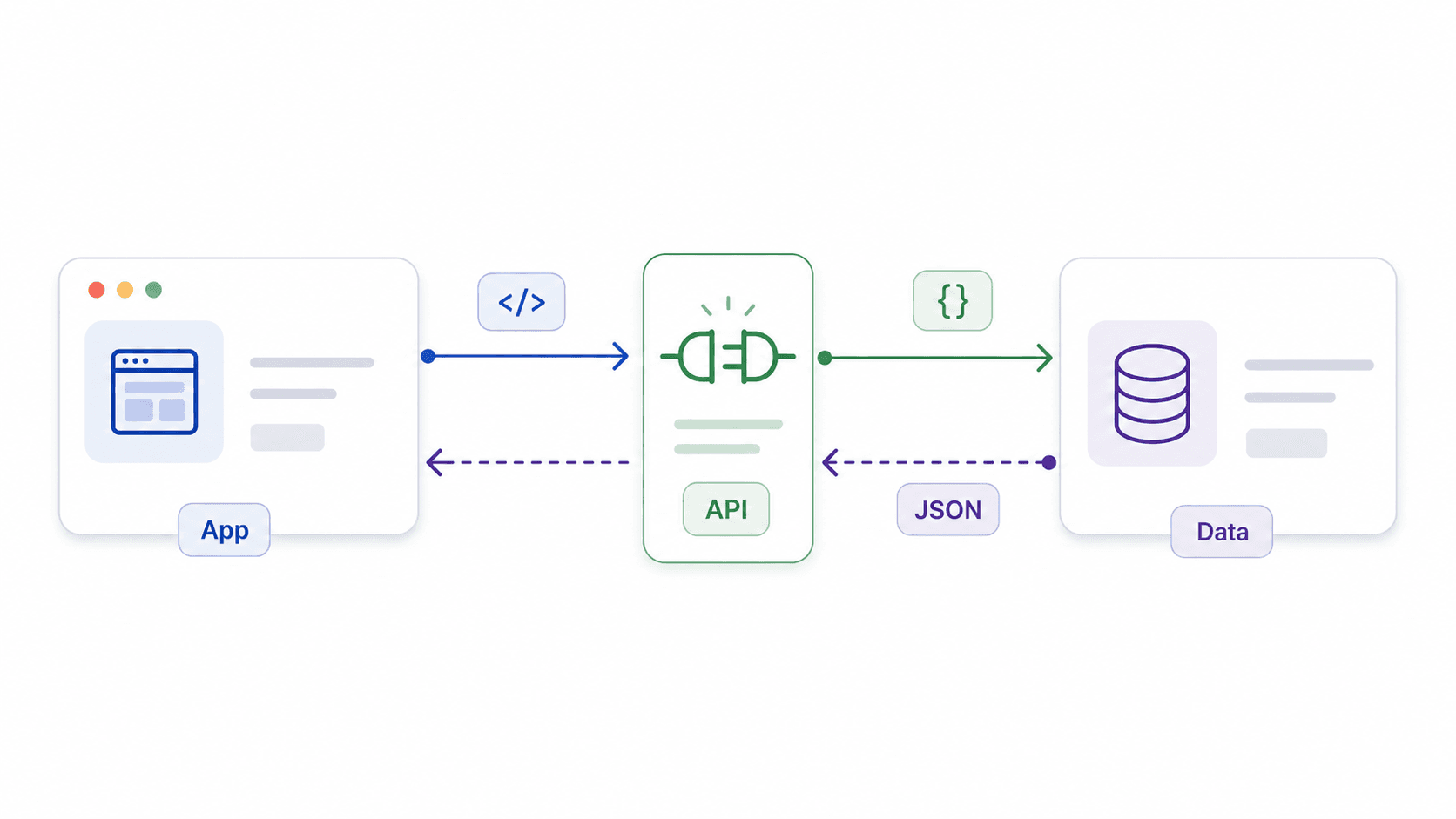
Put another way, it's the official contact point between two systems. You don't access the whole database, the whole app, or the whole company behind it. You access the parts the API exposes, in the format it expects, and you get back exactly what it promises. IBM, MuleSoft, and Postman all converge on this: an API is a mechanism or contract that enables software components to communicate using defined rules and protocols.
Think of it like a drive-through window. You place your order in a specific format (a menu item, a size, maybe a customization), and you get back exactly what you asked for — without ever stepping into the kitchen. The menu is the API documentation. The window is the endpoint. The receipt is the response.
But analogies only get you so far. Here's what an API call actually looks like.
What a Real API Request and Response Look Like
Paste this URL into your browser right now:
https://api.agify.io?name=michael
You just sent a GET request to the Agify API, asking it to predict the age associated with the name "michael." Here's what you'll get back (a JSON response):
{
  "count": 304886,
  "name": "michael",
  "age": 61
}
| Part of the Response | What It Means |
|---|---|
| "name": "michael" | The input you provided — the name you asked about |
| "age": 61 | The API's prediction based on its data |
| "count": 304886 | How many data points it used to make the prediction |
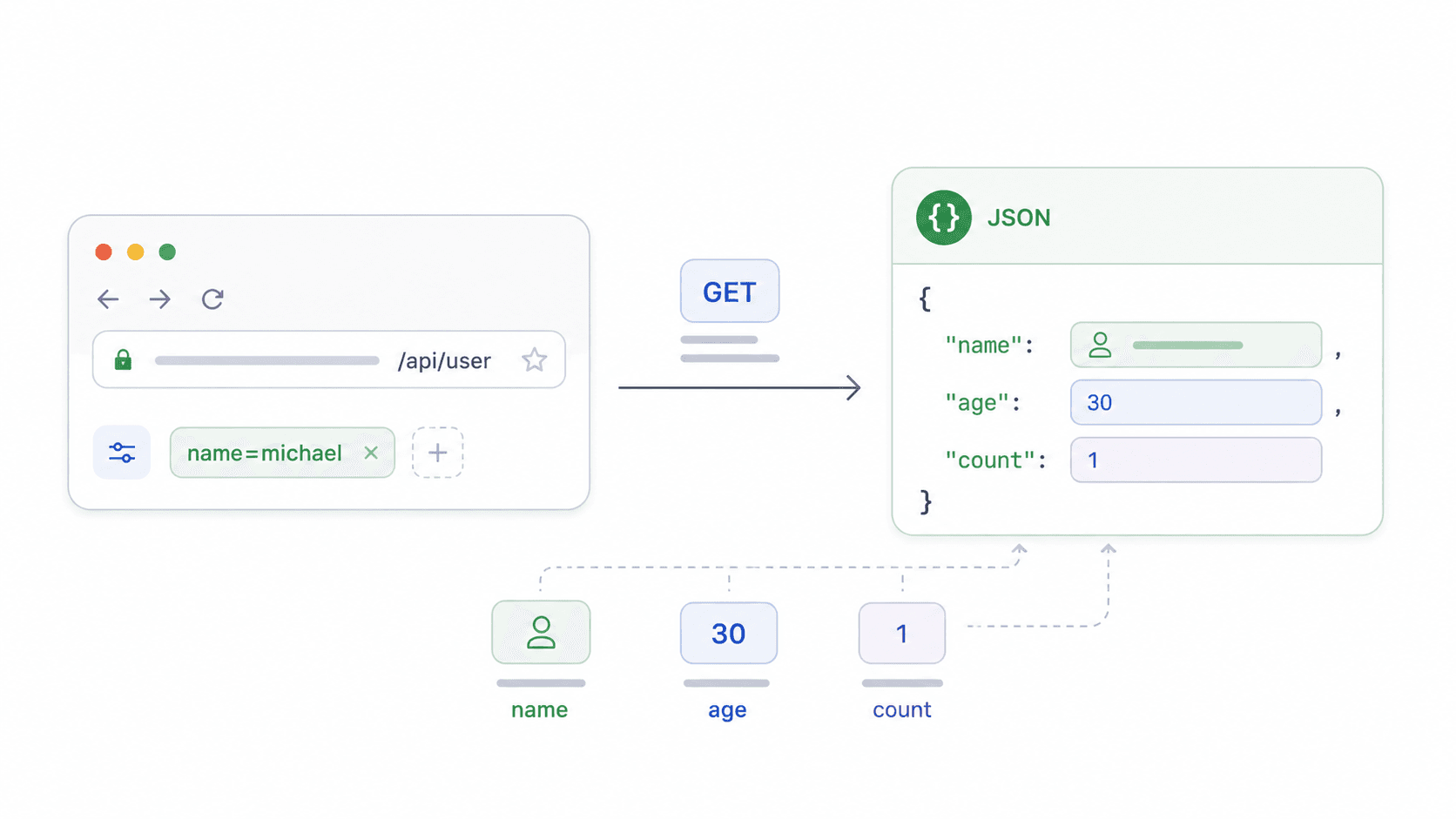
That's it. You just made an API call. No code, no terminal, no installation. The request was the URL (with a parameter), and the response was structured data your browser displayed as text. Every API works on this same basic principle: structured request in, structured response out.
What an API Is NOT
An API is not a database. It's the controlled access layer in front of a database (or a service, or a model).
An API is not a website. A website is designed for humans to read and click. An API is designed for software to read and process — it returns structured data (usually JSON), not visual pages.
An API is not hacking. It accesses only the data and actions the provider has intentionally made available.
Why Should Business Teams Care About APIs?
If you're in sales, ops, marketing, or ecommerce, you may never type an API request yourself. But you rely on API-connected software constantly — and understanding the concept gives you a real edge when evaluating tools, designing automations, and communicating with your dev team.
APIs are already woven into your daily work — here's where:
| Everyday Action | API Working Behind It |
|---|---|
| Signing in with Google on a website | OAuth 2.0 / identity API |
| Seeing live shipping rates at checkout | Carrier rate API (UPS, FedEx, etc.) |
| Pulling leads from a website into a spreadsheet | Web extraction API (e.g., Thunderbit) |
| Accepting credit card payments online | Stripe, PayPal, or another payment API |
| Embedding a map on a store locator page | Google Maps API |
| Syncing CRM with an email tool | Integration API (Zapier, Make, or native connectors) |
| Using an AI chatbot on a support page | LLM or NLP API |
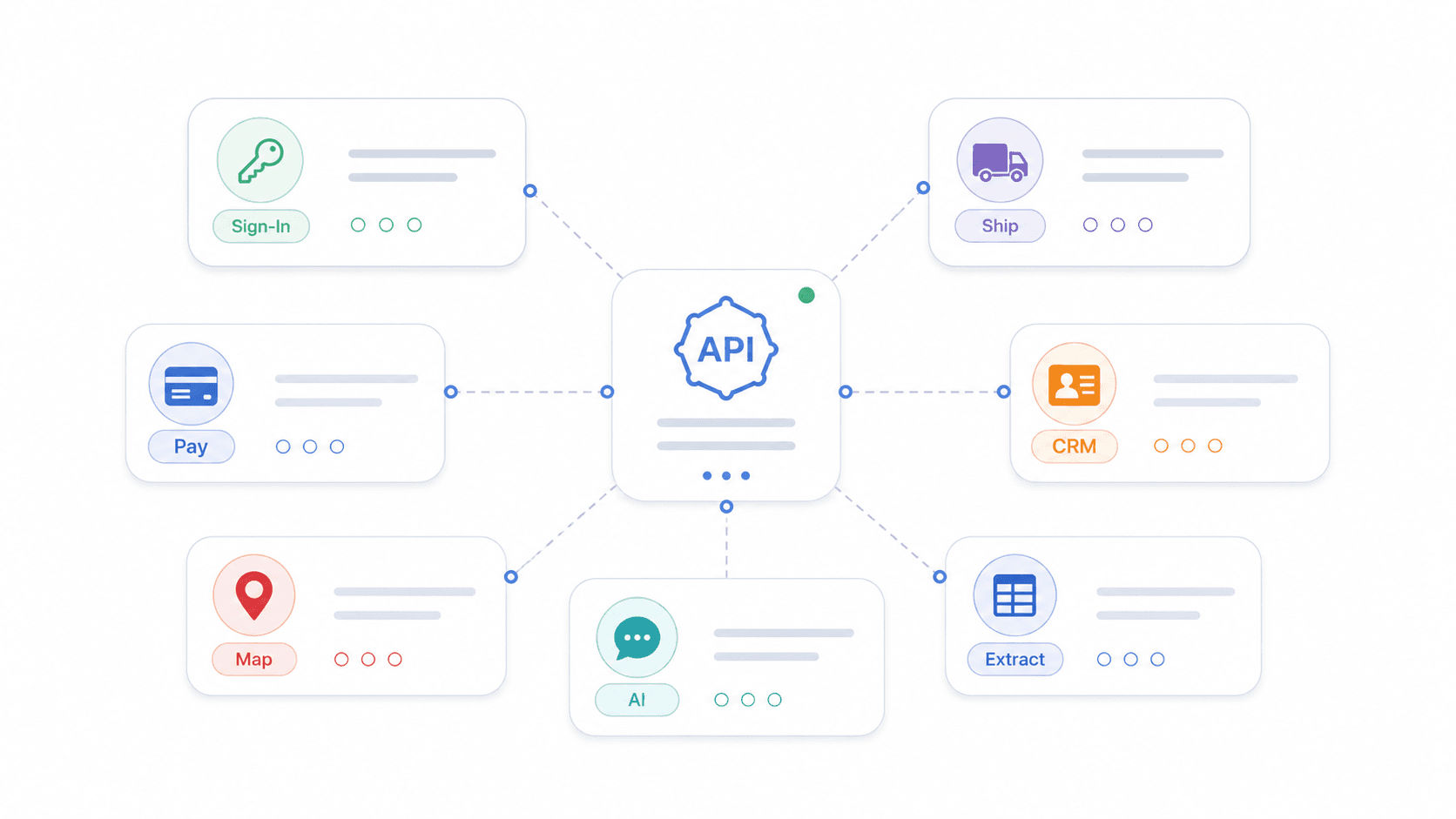
The net effect: less manual data entry, fewer errors, and processes that used to take hours finishing in seconds. Postman's 2025 State of the API report found that 37% of respondents now generate revenue directly from APIs — up from 28% the year before. And 66% say they're "API-first," meaning APIs are designed and tested before the apps that depend on them are built.
Next time you're evaluating a SaaS tool, ask one question: does it have an API, and what does it expose? That single question can save you months of integration headaches.
How Does an API Work? The Request-Response Cycle Explained
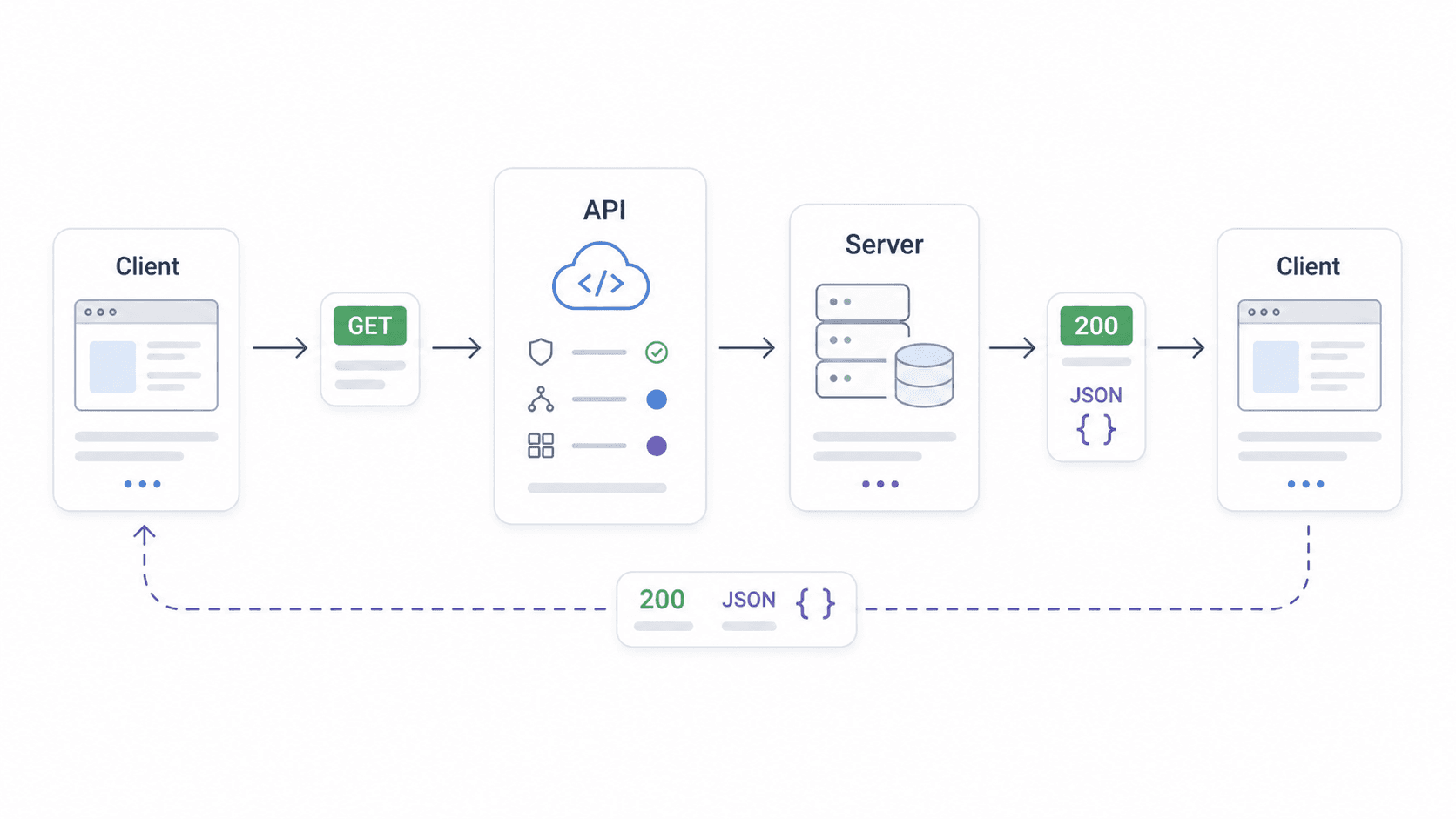
The pattern is always the same:
- You (the client) send a request — "Hey, give me the weather in New York."
- The API receives the request, checks if it's valid and authorized, and routes it to the right server.
- The server processes the request — queries a database, runs a model, or performs an action.
- The API sends a response back — structured data (usually JSON) with the answer, plus a status code telling you what happened.
A simple way to picture this:
Client → sends request (method + endpoint + headers + body) → API endpoint → Server processes → API endpoint → sends response (status code + JSON body) → Client
Key Terms You'll Actually Use
| Term | Plain-English Meaning |
|---|---|
| Endpoint | The specific URL you send your request to (like a specific window at a building) |
| HTTP Methods | GET (read data), POST (send data), PUT (update data), DELETE (remove data) |
| Request Headers | Extra info attached to your request (like your ID badge — auth tokens, content type) |
| Response Body | The actual data you get back (usually in JSON format) |
| Status Codes | The API's short answer: 200 (success), 401 (not authorized), 404 (not found), 429 (too many requests), 500 (server error) |
Source: MDN HTTP overview, MDN HTTP request methods, MDN HTTP response status codes.
A vague request gets rejected. A valid request includes the correct endpoint, method, permissions, and fields. Good API documentation is the instruction manual for what you can ask and how to ask it.
API vs. SDK vs. Webhook vs. Library: What's the Difference?
Vendor pitches love tossing around "API," "SDK," "webhook," and "library" as if they're synonyms. They're not. I've sat through enough of those calls to know the confusion is real. Here's the disambiguation table I wish someone had handed me years ago:
| Concept | What It Is | Simple Analogy | Example |
|---|---|---|---|
| API | A set of rules for two programs to talk | The drive-through window | OpenAI API, Google Maps API |
| SDK | A toolkit that bundles APIs + helpers + docs | The full cooking kit (recipe, tools, ingredients) | iOS SDK, Android SDK |
| Library | Pre-written code you call in your program | A cookbook of ready-made recipes | React, NumPy |
| Webhook | A reverse API — the server calls YOU when something happens | A doorbell that rings when a package arrives | Stripe payment alerts, GitHub push notifications |
A bit more context on each:
- SDK: If you're building a mobile app, the SDK gives you everything — APIs, sample code, documentation, utilities. You probably won't encounter SDKs unless you're working with developers.
- Library: A library is code someone else wrote that you can use inside your own program. It might use APIs under the hood, but it's a tool for developers, not a communication channel between systems.
- Webhook: Instead of you asking the API for updates ("Did the payment go through yet? How about now?"), a webhook flips the model — the server sends you a notification when the event happens. Think of it as a push notification for software.
When people say "API" in 2026, they almost always mean a web API — specifically a REST API. But knowing these related terms means you won't get lost in a vendor pitch or a Slack thread with your engineering team.
The Main Types of APIs (and When You'll Encounter Each)
By Access Level
- Public (Open) APIs: Anyone can use them. Example: a free weather API, or a public data API like Open-Meteo.
- Private (Internal) APIs: Used only within a company to connect internal systems. Example: your CRM talking to your billing system.
- Partner APIs: Shared only with specific business partners under agreements. Example: a logistics company sharing shipment tracking data with retailers.
By Architecture
| Style | Data Format | Best For | Beginner Note |
|---|---|---|---|
| REST | JSON (typically) | Web apps, SaaS integrations, public APIs | Start here — 86% of developers use REST |
| SOAP | XML | Regulated enterprise integrations (banking, healthcare) | Learn only if your stack requires it |
| GraphQL | JSON | Complex frontends that need precise fields | Useful after REST basics |
| gRPC | Protocol Buffers | Internal microservices, low-latency services | Usually developer/backend territory |
Source: Postman API protocols in 2023, GraphQL official docs, gRPC introduction.
As a business user, you'll mostly interact with REST APIs and webhooks. The rest is good to know for vendor conversations, but REST is the default starting point for SaaS docs, Zapier integrations, and tools like Thunderbit.
AI APIs in 2026: The Use Case That Changed Everything
Older "what is an API" articles act like everyone's first API encounter is Google Maps or Stripe. In 2026, that's just not true. Most beginners hit the word "API" because they signed up for ChatGPT, tried an image generator, or explored an AI scraping tool.
Mechanically, an AI API works like any other API. You send a request — a prompt, a document, a URL — and get back structured output. The difference is on the server side: instead of looking up a database row, the server runs a model.
Real examples:
- OpenAI API: Send a text prompt → get back an AI-generated response.
- Image generation APIs: Send a description → get back an AI-generated image.
- AI data extraction APIs: Send a messy web page → get back clean, structured data.
Try AI data extraction with Thunderbit Get Started Free
How Thunderbit's Open API Turns Messy Web Pages into Structured Data
Now for the part I'm biased about (for obvious reasons). Thunderbit offers an Open API that makes AI-powered data extraction available programmatically:
- Distill API: Send a web page URL → get back clean Markdown, ready for analysis or AI pipelines. Great for content analysis, knowledge base building, or feeding data into LLM workflows.
- Extract API: Define a schema (field names, types) and send a URL → AI extracts structured JSON data matching your schema.
Here's a simplified example. Imagine you send a messy Amazon product page URL to Thunderbit's Extract API:
POST https://api.thunderbit.com/v1/extract
Authorization: Bearer YOUR_API_TOKEN
Content-Type: application/json

{
  "url": "https://example-store.com/products",
  "fields": [
    { "name": "product_name", "type": "text" },
    { "name": "price", "type": "number" },
    { "name": "rating", "type": "number" }
  ]
}
And you get back:
{
  "status": "success",
  "data": [
    { "product_name": "Organic Cotton Tee", "price": 29.99, "rating": 4.7 },
    { "product_name": "Linen Button Shirt", "price": 54.00, "rating": 4.5 }
  ]
}
That response is spreadsheet-ready. One API call just replaced hours of manual copy-pasting. The Thunderbit Chrome Extension uses the same AI engine behind a no-code interface, but the API opens it up for teams that need to automate at scale.
For more on how AI-powered extraction works in practice, check out our guide on what is data extraction or how to extract data from any website.
Your First API Call: A Hands-On Mini Tutorial
Two minutes. No downloads, no installs, no coding. Ready?
Step 1: Open Your Browser
Open a new browser tab.
Step 2: Paste a Free API URL
Copy and paste this into the address bar and hit Enter:
https://api.agify.io?name=michael
You just sent a GET request to the Agify API, asking it to predict the age associated with the name "michael."
Step 3: Read the JSON Response Together
You should see something like:
{
  "count": 304886,
  "name": "michael",
  "age": 61
}
"name"— the input you provided"age"— the API's prediction"count"— how many data points it used
That's it. You just made an API call.
Step 4: Level Up — Try a Key-Authenticated API
Now try something slightly more real-world. Go to OpenWeatherMap, sign up for a free account, and get an API key. Then paste a URL like this (replacing YOUR_KEY):
https://api.openweathermap.org/data/2.5/weather?q=London&appid=YOUR_KEY&units=metric
This time, you had to prove who you are with an API key. That's authentication — and it's how most real-world APIs work.
Step 5: Understand Response Codes
When you make API calls, you'll sometimes see errors instead of data. Here's what the most common status codes mean:
| Status Code | What It Means |
|---|---|
| 200 OK | Everything worked — here's your data |
| 401 Unauthorized | Your API key is wrong or missing |
| 404 Not Found | The endpoint or resource doesn't exist |
| 429 Rate Limited | You've made too many requests too fast |
| 500 Internal Server Error | Something broke on the server side |
Source: MDN HTTP response status codes.
API Security Demystified: Keys, OAuth, and JWT in One Table
You've already used two auth levels without thinking about it: no auth (Agify) and API key (weather). The other two methods round out the picture:
| Auth Method | How It Works | When You'll See It | Complexity |
|---|---|---|---|
| No Auth | No credentials needed — anyone can call the API | Public, read-only data (name predictions, open datasets) | Very Low |
| API Key | A single secret string you include with each request | Simple data access (weather data, Thunderbit's Open API) | Low |
| OAuth 2.0 | User grants limited permission through a third-party login flow | Accessing user data (Google, Spotify, social logins) | Medium |
| JWT (JSON Web Token) | A signed token encoding user identity and permissions | Stateless authentication in modern web apps | Medium-High |
Source: OAuth 2.0 RFC 6749, JWT RFC 7519.
When you pasted that Agify URL, you used no auth. When you added your weather API key, you used API key auth. OAuth and JWT come into play when apps need to access your personal data — like when you click "Sign in with Google."
Thunderbit's Chrome extension uses the browser's own logged-in session (no separate API key needed for scraping), while Thunderbit's Open API uses standard Bearer token authentication. That's a practical example of both models in one product.
Keeping API Keys Safe
- Never share your API key publicly (no screenshots, no shared docs, no public repos).
- Don't hardcode keys into shared documents or spreadsheets.
- If you're a developer, use environment variables or a secrets manager.
- Rotate keys periodically, and immediately if you suspect exposure.
Real-World API Examples You Already Use Every Day
You probably used half a dozen APIs before lunch today and didn't notice a single one:
- Google Maps embedded on a business website: The site uses the Google Maps API to fetch and display the map. You see a map; behind the scenes, an API call fetched it. Source: Google Maps Platform docs.
- "Sign in with Google/Facebook": OAuth-based APIs that let you log in without creating a new account.
- Payment processing (Stripe, PayPal): When you check out online, an API handles the payment between the store and the payment provider. Source: Stripe API docs.
- Weather apps: Your phone's weather app calls a weather API every time you open it.
- AI chatbots and assistants: ChatGPT, Claude, and AI scraping tools all expose their capabilities through APIs.
- Spotify's recommendation engine: When Spotify suggests a playlist, APIs are serving up track data, user preferences, and model predictions behind the scenes.
- Thunderbit's AI Web Scraper: Uses AI to extract structured data from any website — and now offers an Open API so teams can automate data extraction at scale.
How to Pick the Right API for Your Business Needs
When it's time to pick an API — or help your dev team pick one — these are the criteria worth asking about:
| Criteria | What to Look For |
|---|---|
| Documentation quality | Is it clear? Can a non-developer follow the examples? |
| Pricing model | Free tier? Pay-per-call? Credit-based (like Thunderbit)? |
| Authentication method | How complex is the setup? API key vs. OAuth vs. JWT? |
| Rate limits | How many requests can you make per minute/day? |
| Data format | Does it return JSON? CSV? Markdown? |
| Support and community | Is there a help center, community forum, or customer support? |
A quick comparison:
| Type | Free Public API (e.g., Agify) | Thunderbit Open API | Google Maps API |
|---|---|---|---|
| Auth | None | API Key (Bearer token) | API Key |
| Pricing | Free | Credit-based, free tier available | Pay-per-call, free tier |
| Data format | JSON | JSON / Markdown | JSON |
| Rate limits | Generous | Per plan | Per plan |
| Documentation | Minimal | Detailed (docs) | Extensive |
The Treblle 2025 API Intelligence Report found that the average enterprise manages 613 API endpoints, with 55% managing at least 500 APIs. That's a lot of moving parts — which is why documentation, support, and clear pricing matter so much.
APIs and Automated Data Entry: Where the Concept Gets Practical
APIs get really interesting when you point them at the most tedious part of any business workflow: data entry.
Manual data entry still costs organizations billions annually, and the average data entry error rate is around 1% — which sounds small until you realize that in a dataset of 10,000 records, that's 100 mistakes. In finance, healthcare, or ecommerce, even a handful of errors can derail a deal or trigger compliance issues.
Automated data entry systems combine APIs with OCR, AI, and machine learning to capture, extract, validate, and export data — no human copying and pasting between tabs. The workflow usually looks like this:
- Data capture: The system reads data from a source (a web page, PDF, image, or form).
- Extraction: AI or OCR identifies and pulls out the relevant fields.
- Validation: Rules check for errors, duplicates, or missing values.
- Export: Clean data flows into a spreadsheet, CRM, ERP, or database — often via API.
Thunderbit fits into this workflow as an AI-powered extraction layer. Using the Chrome extension, a business user can open a web page, click "AI Suggest Fields," and let the AI figure out which columns to extract — no code, no fuss. The data exports directly to Excel, Google Sheets, Airtable, or Notion. And for teams that need to automate at scale, Thunderbit's Open API turns the same AI into a programmable endpoint.
| Approach | Setup Time | Accuracy | Scalability | Best For |
|---|---|---|---|---|
| Manual data entry | None | Low (error-prone) | Very low | One-off, small tasks |
| Legacy automation (macros, scripts) | High | Medium | Medium | IT-managed, repetitive workflows |
| AI-powered tools (Thunderbit, etc.) | Low | High | High | Business users, cross-site extraction |
For real-world examples of how automated data entry works in practice, see our post on data entry automation explained or benefits of data automation for businesses.
FAQs
1. What does API stand for?
API stands for Application Programming Interface. It's a set of rules that lets two software programs communicate — one asks for data or an action, and the other responds in a structured format.
2. Do I need to know how to code to use an API?
Not necessarily. Many APIs can be called from a browser, Postman, or no-code tools like Zapier. Tools like Thunderbit's Chrome extension use APIs behind the scenes without requiring any code at all. The Open API is programmatic, but business teams can use it through internal tools or automation platforms.
3. Is an API the same as a website?
No. A website is designed for humans to read and click. An API is designed for programs to read — it returns structured data (like JSON), not visual web pages. They often live at the same domain, but serve very different purposes.
4. Are APIs free?
Some are (like public data APIs). Others use freemium models (free tier + paid plans) or charge per request. Thunderbit's Open API, for example, uses a credit-based system with a free tier for testing. Always check pricing, rate limits, and terms of service for each provider.
5. What is the difference between an API key and OAuth?
An API key is a single secret string you include with each request — simple and good for basic access. OAuth 2.0 is a more complex flow where a user grants limited permission to an app (like "Sign in with Google"), so the app can access specific data without ever seeing the user's password. API keys identify the app; OAuth grants scoped user permissions.
Learn More




